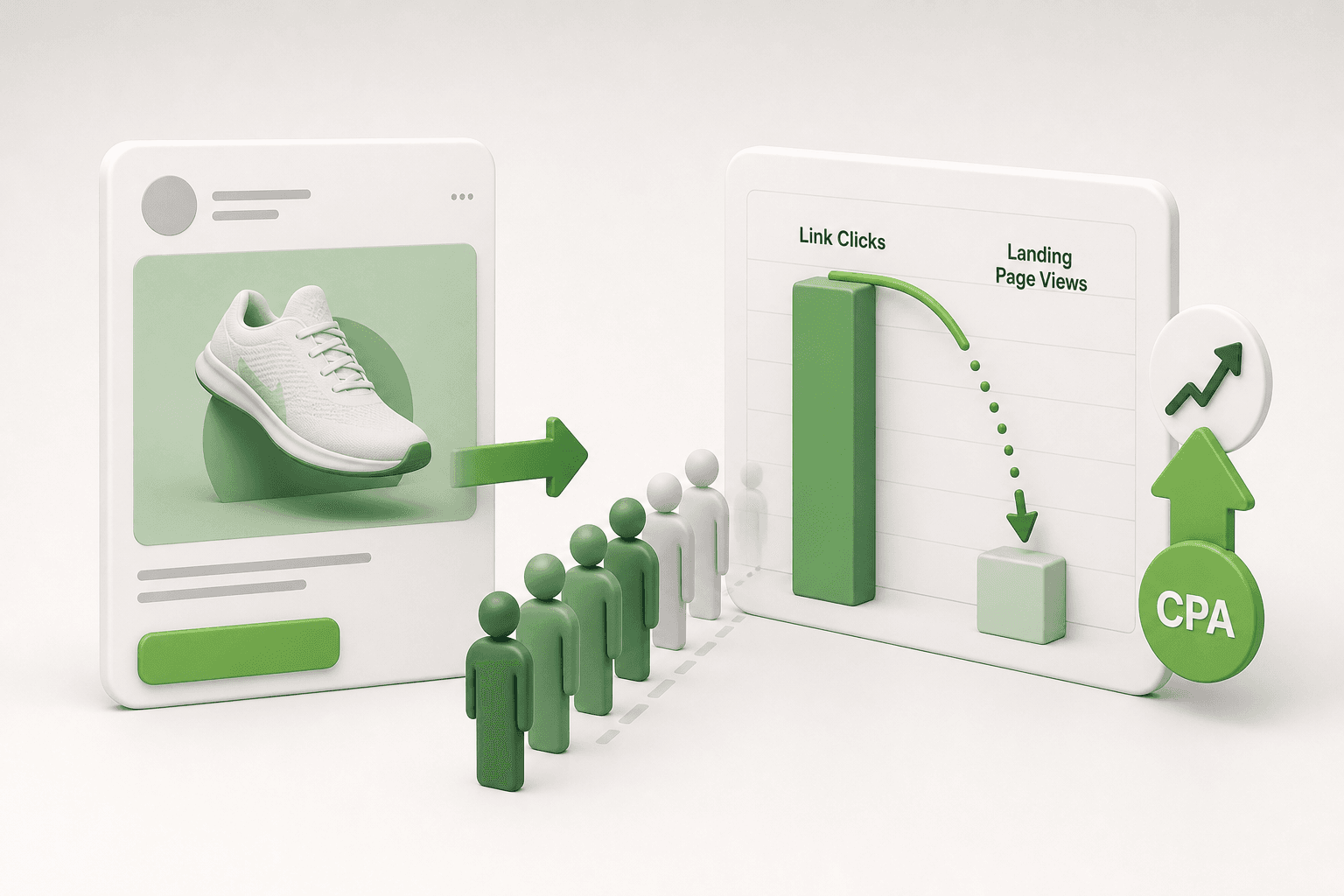

Short answer: Creative and product page message mismatch happens when ad hooks and landing pages deliver conflicting expectations, driving rapid bounces. To fix it, derive ad copy and creative assets directly from product URL specs and enforce sync checks before launching Meta campaigns.
You launch a Meta ad campaign with an engaging video hook, watch the CTR (click-through rate, which is the percentage of people who see your ad and click on it) climb above average, yet your purchases remain flat. Your analytics dashboard shows visitors arriving from Instagram or Facebook, spending fewer than five seconds on your product page, and bouncing immediately. The prospect was sold on a specific value proposition, offer, or aesthetic in the feed, but landed on a page that greeted them with different pricing, missing features, or an entirely distinct visual tone.
This disconnect typically develops when creative testing outpaces catalog updates, or when performance marketers optimize for ad-level engagement rather than post-click cohesion. Left unaddressed, message mismatch inflates CPA (cost per acquisition, the total ad spend required to generate a single sale) and drains ad spend into Meta auctions that generate vanity clicks rather than revenue. Over time, severe post-click drop-offs signal a low-quality user experience to Meta delivery algorithms, driving up CPM (cost per mille, the price of 1,000 ad impressions) and compounding ad fatigue.
This guide details how to identify, resolve, and permanently prevent narrative gaps between your ad creatives and storefront. You will learn how to audit product URLs before drafting assets, diagnose whether your leak stems from pricing, benefits, or variants, and establish a repeatable weekly synchronization routine to protect your conversion rates.
Key Takeaways
- Shoppers bounce within seconds if the ad angle does not immediately match the landing page banner.
- Deriving campaign copy directly from product URL attributes ensures message congruency across placements.
- Discrepancies between creative promises and product pages degrade Meta ad quality scores and inflate CPMs.
- Automating campaign drafting from landing page data prevents manual copy errors and offer drift.
What is creative and landing page message mismatch and how to detect it?
Creative and landing page message mismatch occurs when the visual promise, offer, or primary benefit stated in a Meta ad creative does not align directly with the copy, pricing, or imagery on the destination product URL. Marketers detect this divergence by identifying elevated click-through rates alongside depressed on-page conversion rates and instant visitor exits.
Diagnostic Signs in Meta Ads Manager and Analytics
CTR (click-through rate) is the percentage of ad impressions that generate a click, while CVR (conversion rate) is the percentage of landing page sessions that result in a completed transaction. When a Meta ad features an aggressive benefit hook or a specific price incentive that is missing on the product page, Outbound CTR in Meta Ads Manager remains high while CVR collapses. High bounce rates occur because users who expect a specific offer feel deceived or disoriented upon landing, closing the browser tab before triggering standard Meta Pixel events like AddToCart.
For example, a boutique leather goods store allocates a 1,500 TL daily budget to an Advantage+ shopping campaign in Meta Ads Manager. The ad creative features a video demonstrating an embossed travel wallet with the copy hook "Includes Free Custom Monogramming." The ad produces a strong 3.2% Outbound CTR, but zero purchases over 400 link clicks. When auditing the destination URL, the team finds that the page charges an unannounced 200 TL fee for monogramming at checkout. The team updates the product page to add a free monogram selection dropdown right above the primary Add to Cart button and aligns the product subheadline with the ad copy. Over the next five days, the marketer monitors the InitiateCheckout and Purchase event rates in Meta Ads Manager to confirm that on-page conversion volume recovers.
Campaign management platforms like Adsaify help eliminate this friction by analyzing a brand directly from its website URL, generating campaign copy, audience drafts, and creatives that directly match verified storefront content. You can explore this automated workflow by completing the free Adsaify registration process.
How do I know this is my problem if my CTR already looks average?
An average click-through rate can still mask severe message mismatch if your traffic drops off immediately after the page load. Check the drop-off rate between Link Clicks and Landing Page Views in Meta Ads Manager, alongside Google Analytics engagement time. If your Outbound CTR sits at an expected 1.2% but over 70% of visitors leave within five seconds without scrolling to your product specifications or pricing table, your creative is setting customer expectations that your landing page copy fails to confirm.
Why do ad hooks and product page content diverge over time?
Ad hooks and product page content diverge over time because creative production and e-commerce site management usually operate in isolated workflows. Creative teams test novel selling angles without editing destination product pages, while store operators update prices, discontinue variants, or modify promotional offers without notifying the media buyers managing active Meta ad campaigns.
Operational Silos and Inventory Modifications
In growing direct-to-consumer businesses, ad operations teams frequently build new ad sets detached from daily storefront maintenance. Copywriters draft imaginative hooks to lower cost per click, highlighting claims such as rapid delivery or specific product capabilities that the storefront description never mentions. Simultaneously, store managers regularly edit Shopify or WooCommerce catalog entries to adjust for wholesale cost shifts, retire older shades, or modify bundle discounts. When an ad promoting a pastel-pink variant sends prospective buyers to a parent URL where that specific shade is marked out of stock, visitors immediately abandon the session.
Comparing Common Sources of Content Divergence
| Divergence Type | Ad Creative State | Storefront State | Diagnostic Symptom |
|---|---|---|---|
| Pricing Discrepancy | Features an unapplied discount code or old seasonal rate | Displays updated baseline retail price without promo banner | Elevated Link Clicks with instant drop-off at InitiateCheckout |
| Variant Misdirection | Spotlights a specific colorway, pattern, or size option | Directs traffic to a generic collection or out-of-stock SKU | Session duration under 10 seconds and low AddToCart volume |
| Feature Inflation | Claims immediate 24-hour dispatch or unverified product traits | States a two-week pre-order delay or standard material specs | Spike in pre-sale customer service tickets and refunded orders |
| Expired Campaign Hooks | Flash sale or holiday creative remains active past deadline | Storefront reverts to non-promotional standard pricing | Sharp contraction in ROAS and rising customer acquisition cost |
ROAS (return on ad spend) is a performance metric measuring total gross revenue generated for every unit of currency spent on advertising. To prevent ROAS degradation, media buyers who manage active accounts through the Adsaify login dashboard establish cross-departmental review triggers whenever catalog pricing or creative assets are updated.
Is better team communication enough to stop product copy drift permanently?
Manual team communication reduces ad divergence temporarily, but informal communication channels consistently break down as campaign scale and catalog sizes increase. Sustainable alignment requires programmatic safeguards, including strict pre-launch URL auditing checklists, real-time inventory tracking rules, and shared changelogs between e-commerce managers and media buyers. Relying purely on verbal reminders or chat messages will eventually fail whenever flash sales end, stock sells out unexpectedly, or rapid creative refreshes enter the ad testing rotation.
What are the financial costs of running mismatched Meta ads?
Running mismatched Meta ads directly increases customer acquisition costs by triggering algorithm penalties and burning media spend on immediate bounces. When user expectations set by the ad creative conflict with landing page reality, Meta lowers the ad quality ranking, which inflates CPMs while reducing purchase conversion rates and shrinking overall net profit margins.
Algorithm penalties and wasted media spend
Meta evaluates the post-click experience through automated feedback signals and immediate user exits. When users click an ad on Facebook or Instagram and bounce back to the app within three seconds, Meta flags the ad as low quality. In Meta Ads Manager, this penalty appears under the Quality Ranking column as "Below Average (Bottom 20% of ads)". To protect user experience, Meta levies an auction penalty by inflating the CPM (cost per mille, which is the advertising cost per one thousand impressions). For example, with an ad set spending a 500 TL daily budget, an auction penalty can cause CPMs to surge from 40 TL to 100 TL, reducing the actual traffic delivered to the store by more than half without any change in competitive market bids.
Margin erosion and compromised pixel learning
Creative mismatch causes a sharp rise in CPA (cost per acquisition, the total advertising spend required to secure a single paying customer). When landing traffic encounters conflicting pricing or absent product claims, store conversion rates collapse. A drop in conversion rate from 2% to 0.4% increases CPA fivefold, wiping out product operating margins. Furthermore, the Meta Pixel (a snippet of tracking code installed on a website to record user conversion events) requires roughly 50 optimization events per week per ad set to exit the learning phase. When low-intent traffic bounces erratically, the ad set remains trapped in "Learning Limited" status, preventing Meta's delivery algorithms from identifying high-value purchasing audiences.
- Audit ad creative text against storefront promotional codes before launching campaigns.
- Inspect the Quality Ranking column inside Meta Ads Manager weekly to identify penalized assets.
- Compare Meta Ads Manager outbound link clicks against Meta Pixel landing page views to identify drop-off.
- Track average session duration inside web analytics to pinpoint landing pages with sub-five-second exits.
- Review cost per acquisition thresholds against gross margins to identify unprofitable campaigns early.
- Configure automation rules in tools like Adsaify to pause underperforming ads automatically before unaligned messaging drains ad spend.
Does a low quality score on one mismatched ad hurt my other ad sets?
A low quality score on an individual creative does not directly penalize separate ad sets within your Meta ad account. Meta calculates ad relevance diagnostics primarily at the individual ad level within specific auctions. However, persistent account-wide quality issues and elevated bounce rates can suppress overall account trust scores. Furthermore, if a mismatched creative drains shared campaign budgets inside an Advantage Campaign Budget structure, other profitable ad sets receive fewer impressions and less optimization data, dragging down total performance.
How to diagnose whether mismatch stems from pricing, benefits, or variants?
Diagnosing creative mismatch requires isolating whether traffic drops off due to price discrepancies, unfulfilled feature promises, or missing visual variants. Performance marketers pinpoint the failure point by cross-referencing on-page dwell times, add-to-cart conversion rates, and bounce metrics against specific creative hooks to determine where user expectations break down during the browsing session.
Isolating pricing, angle, and visual discrepancies
Price divergence occurs when ad copy advertises a discount, such as a 20% off promotion or a lower entry price, but the product page displays full retail or adds unexpected checkout surcharges. Shoppers who experience this discrepancy abandon sessions primarily at the cart stage. Angle divergence occurs when an ad creative highlights a specific problem-solving hook, such as back pain relief for office workers, while the destination URL contains a generic product description detailing only manufacturing materials. Visitors bounce within five seconds because the promised solution is absent from the hero section. Visual divergence occurs when an ad features a specific model, shade, or pattern that is sold out or tucked behind unlinked variant selectors.
| Mismatch Type | Primary User Behavior | Key Diagnostic Metric | Root Cause in Campaign Setup |
|---|---|---|---|
| Price Divergence | Browses product details normally but abandons cart immediately | High InitiateCheckout to Purchase drop-off rate | Ad copy features an expired promotional price or unapplied checkout discount code. |
| Angle Divergence | Exits the website within three seconds without scrolling | Sub-five-second average session engagement time | Creative hook promotes a specific benefit absent from the product page headline. |
| Visual Divergence | Toggles multiple product selectors repeatedly before exiting | High ViewContent volume with low AddToCart rates | Creative displays a color, pattern, or model that is currently out of stock. |
| Offer Divergence | Navigates through checkout but exits on final payment screen | Sharp collapse between shipping selection and order completion | Ad promises free shipping or bonus accessories omitted from final order totals. |
Performance marketers isolate these issues by pairing Meta Pixel standard events with web analytics session metrics. A landing page bounce rate above 70% alongside short session duration signals angle divergence. Conversely, an average dwell time of 45 seconds paired with frequent variant selector clicks signals visual or inventory misalignment. Leveraging campaign creation software like Adsaify helps prevent angle mismatch by drafting campaign copy directly from product page URL contents before ads enter Meta Ads Manager.
Which angle should I prioritize if the product page carries five variants?
Prioritize the single variant that generates the highest sales volume or holds the deepest inventory reserve on your storefront. Never create an ad hook centered on a secondary variant unless the destination link takes the user directly to that pre-selected option. Setting up dedicated ad sets for top-performing variants allows the creative visual, headline, and landing page hero banner to align seamlessly, which maximizes add-to-cart rates and eliminates unnecessary shopping friction for incoming traffic.
If you would rather not set up each of these steps by hand, try it in Adsaify: your first ad is free, so there is nothing to lose. Create a free account.
What product URL elements must you audit before building campaigns?
To prevent message mismatch, performance marketers must audit the product title, primary benefit claims, visible in-stock variants, pricing display, shipping commitments, and mobile page speed before building campaigns. Checking these elements ensures that every claim made in the ad copy accurately reflects what users encounter immediately upon loading the destination product page.
Verifying core copy, inventory states, and landing page pricing
Auditing begins with the product title and the core benefit proposition located in the first two paragraphs of product description copy. The marketing angle presented in Meta Ads Manager must find immediate validation in these opening sentences. If an ad hook promotes rapid muscle recovery, the first paragraph of the product description must explicitly affirm recovery rather than general athletic wellness.
Next, inspect the available variants against actual warehouse inventory. An SKU (stock keeping unit) is a unique scannable bar code or alphanumeric code assigned to a distinct product variant. If an ad creative showcases a sage green ceramic pan, that specific colorway must be pre-selected or immediately visible on the destination URL. Driving traffic to an out-of-stock colorway forces users to click alternative variants or abandon the session entirely.
Marketers must also verify that final prices, shipping thresholds, and guarantees remain visible above the fold. Above the fold refers to the upper portion of a webpage that is visible without the user scrolling down. Discrepancies between the pricing displayed on ad overlays and the final cart value destroy purchasing momentum.
Mobile page performance and interface validation
Because Meta traffic across Facebook and Instagram Feeds and Stories is overwhelmingly mobile, the product URL must be tested under real mobile network conditions. A landing page that takes more than three seconds to render causes significant drop-off before your value proposition is even read. Furthermore, confirm that the mobile view contains a persistent, sticky "Add to Cart" button that stays accessible while users evaluate product specifications.
- Scan the product title and opening description to extract the primary benefit claim.
- Verify that all featured product variants in your ad creative are currently in stock.
- Check that the base product price exactly matches the value promised in the ad.
- Confirm that shipping costs and estimated delivery windows appear above the fold.
- Test the destination URL on mobile devices to verify sub-three-second load times.
- Ensure the sticky "Add to Cart" button functions seamlessly across iOS and Android browsers.
Should technical specifications from the landing page be copied verbatim into ads?
Technical specifications from the landing page should not be copied verbatim into Meta ads. While product pages require precise technical attributes like dimensions, materials, and wattages for buyer validation, ad copy performs best when translating those technical details into distinct emotional or practical outcomes. For example, instead of pasting "304 stainless steel with double-wall vacuum insulation," the ad hook should state "Keeps water cold for 24 hours." Only preserve identical phrasing for trademarked technology, proprietary compounds, or recognized certifications.
How to set up message-congruent campaigns from a product URL step by step?
Setting up message-congruent campaigns requires extracting the core product promise from the landing page URL, synchronizing ad hooks with page headlines, generating aligned creative assets, and routing traffic through verified call-to-action buttons. This systematic workflow guarantees that the marketing angle in Meta Ads Manager matches the buyer experience without messaging friction.
Step-by-step workflow from product URL to published campaign
Begin by isolating the primary product title and dominant problem-solving claim from your destination URL. The goal is to determine the single most compelling reason a customer purchases that specific item. Next, translate that core claim into your opening ad hook. In Meta Ads Manager, the Primary Text field displays the first one to two lines before the "See More" truncation point. Ensure this opening line uses the same vocabulary and offer framing established on the product page.
To accelerate this workflow, you can input your product URL into Adsaify to automatically analyze your page structure. The tool reviews the product page content to draft corresponding audience targeting options, primary text, headlines, and creative visuals based on the actual on-page data. This automated drafting ensures that the generated campaign assets reflect the live features and angles of your product URL.
Finally, configure your campaign settings in Meta Ads Manager using the Sales campaign objective with the conversion location set to "Website." Set your CTA (call-to-action, the button prompt directing user behavior) to "Shop Now" and insert the exact product URL rather than a generic collection catalog. Verify that the URL contains the correct tracking parameters so that incoming traffic lands on the precise variant displayed in the ad visual.
- URL audit — The marketer inspects the product page for active offers and stock levels to confirm campaign feasibility.
- Hook extraction — The primary benefit headline is isolated from the page to establish the central marketing angle.
- Asset drafting — Adsaify analyzes the store URL to draft audience segments, copy variations, and initial creatives aligned with the page.
- Creative alignment — The marketer reviews drafted visuals to ensure featured colors and models match available inventory before publishing.
- Ad configuration — The campaign is published to the Meta ad account with the Sales objective and a direct "Shop Now" destination.
- Tracking verification — The Meta Pixel is tested via Events Manager to confirm page views and purchase events trigger accurately on the URL.
Which product page data points does Adsaify inspect when drafting campaigns?
When analyzing a store URL, Adsaify inspects the product title, meta descriptions, primary headline, body descriptions, listed pricing, and visible product media. By evaluating these on-page elements alongside overall business context, Adsaify identifies the core value propositions and product categories. It uses these specific inputs to draft relevant audience interest targeting, contextual primary ad copy, and suggested creatives, ensuring the resulting campaign elements mirror the live landing page rather than diverging into disconnected marketing angles.
What does a fully synchronized ad setup look like in an e-commerce store?
A fully synchronized ad setup aligns every specific promise, visual aesthetic, product variant, and pricing detail in the ad creative directly with the destination landing page. When shoppers click an ad, they immediately see the exact item, headline, and offer promoted in the ad without needing to search the store.
The Costly Mistake of Generic Routing
Consider an e-commerce store selling an RFID-blocking leather cardholder priced at 750 TL. In an unsynchronized setup, the marketing team runs broad creative hooks focusing on "Luxury Handcrafted Leather Goods" or "Elevate Your Style." When users click these ads, the destination URL routes them directly to the store homepage or a generic accessories catalog. Shoppers must manually search for the cardholder, verify whether it offers RFID protection, and hunt for the 750 TL price point. This friction causes immediate drop-offs and wasted spend.
The Fully Aligned Implementation
In a synchronized configuration, the creative and landing page act as two halves of a single conversation:
- Creative Angle: The video ad demonstrates contactless theft and displays a hook: "Protect Your Cards from Digital Theft — Slim Leather Cardholder for 750 TL."
- Destination Page: The ad routes directly to the specific cardholder product page rather than a collection page or homepage.
- Above-the-Fold Messaging: The primary headline on the product page mirrors the ad: "RFID-Blocking Slim Leather Cardholder," with the 750 TL price clearly visible above the fold.
- Visual Continuity: The leather color variant shown in the ad video matches the default selected variant on the product page.
For example, an independent leather goods brand ran a split test on a 1,000 TL daily budget inside Meta Ads Manager. The brand directed 500 TL to the generic homepage campaign and 500 TL to the synchronized cardholder URL. The synchronized setup reduced bounce rates significantly and doubled the ROAS (return on ad spend is the total revenue generated divided by the total advertising spend). To simplify this process without manual drafting, Adsaify analyzes an e-commerce website URL to extract product-specific hooks and build congruent campaign drafts automatically.
How can I apply this same congruency when advertising an entire collection?
To align a collection campaign, route traffic to a dedicated collection page whose title, promotional banner, and sorting order mirror the ad creative. If the ad highlights summer linen shirts under 600 TL, the collection page URL must display Summer Linen Shirts in the main headline tag, feature a promotional banner reiterating the discount, and immediately present those exact shirts above the fold rather than burying them beneath unrelated seasonal apparel or out-of-stock items.
Which key metrics verify that your creative and page are properly aligned?
Marketers verify creative and product page alignment by analyzing the ratio of Link Clicks to Landing Page Views, session duration, conversion velocity to cart additions, and Meta’s Quality Ranking. A healthy alignment produces minimal drop-off between ad clicks and site visits, above-average session duration, and steady progression into the checkout funnel.
Analyzing Funnel Signals in Meta Ads Manager
Evaluating message congruency requires looking past high click-through rates to see what happens once the visitor arrives on the site. Key diagnostic indicators include:
- Cost Per Click Versus Session Duration: CPC (cost per click is the average cost an advertiser pays each time a user clicks an ad link) may appear deceptively low on clickbait ads. However, if a low CPC is paired with an average session duration under 10 seconds, visitors are arriving and immediately leaving due to unmet expectations.
- Link Click to Landing Page View Ratio: In Meta Ads Manager, compare the "Link Clicks" metric against "Landing Page Views." A wide variance reveals that users click the ad but bounce before the page loads or exit instantly upon seeing an unexpected headline.
- Add to Cart Conversion Velocity: Conversion velocity measures how quickly a user transitions from viewing the landing page to triggering an Add to Cart event. Aligned messaging reduces hesitation, resulting in faster and more frequent cart additions.
- Meta Quality Ranking: Found under the "Ad Relevance Diagnostics" reporting columns, Quality Ranking measures your ad's perceived quality against ads competing for the same audience. Mismatched landing pages trigger high post-click bounce rates, causing Meta's algorithm to demote the ad to "Below Average."
Comparing Misaligned Versus Synchronized Performance Indicators
| Metric / Diagnostic Indicator | Misaligned Creative and Page | Fully Synchronized Campaign |
|---|---|---|
| Link Click to Landing Page View Ratio | Drop-off greater than 35% between clicks and views | Drop-off remains below 15% to 20% |
| Average Session Duration | Under 15 seconds with immediate tab closure | 45 seconds or higher with active scrolling |
| Landing Page View to Add to Cart Rate | Below 3% due to visual or price confusion | Between 8% and 15% for qualified traffic |
| Meta Quality Ranking | Ranked in the bottom 20% to 35% of competing ads | Rated Average or Above Average consistently |
| Post-Click Bounce Rate | Exceeds 70% as users fail to find the ad offer | Stays below 45% on dedicated product pages |
What landing page view drop-off percentage indicates a critical disconnect?
A drop-off rate exceeding 25 to 30 percent between Link Clicks and Landing Page Views indicates a critical disconnect or severe technical issue. In Meta Ads Manager, calculate this by dividing Landing Page Views by Link Clicks. If 1,000 shoppers click an ad but fewer than 700 record a landing page view, users are abandoning before the site loads, often triggered by slow rendering or an immediate realization that the storefront contradicts the ad promise.
Want to see this in your own account? Enter your website address and Adsaify drafts the campaign for you. The first ad is free. Try it now or log in.
What weekly routine prevents creative and storefront disconnects?
A structured weekly routine prevents creative and storefront disconnects by systematically cross-checking active ad claims against live product pages. Marketers review pricing, inventory levels, and Meta ad quality diagnostics on designated days, then use automation rules to pause obsolete creatives before discrepancies erode conversion rates and inflate customer acquisition costs.
Which recurring schedule keeps storefront data and ad sets aligned?
Executing an operational schedule ensures that ad copy, visual assets, and landing page details remain identical throughout the customer journey:
- Weekly (Monday morning): Check product URL inventory and pricing against active ad sets in Meta Ads Manager. If an advertised item or variant is sold out, pause the creative immediately so budget does not fund dead landing pages.
- Weekly (Monday afternoon): Cross-reference active promo codes and headline offers with your e-commerce platform checkout settings to confirm discounts apply automatically or accept promotional vouchers.
- Weekly (Wednesday morning): Inspect the "Quality Ranking" and "Conversion Rate Ranking" columns in Meta Ads Manager for your top-spending ads. An asset falling into the "Bottom 20% of ads" often signals post-click dissatisfaction caused by message disconnects.
- Weekly (Wednesday afternoon): Review landing page bounce rates and average session duration in analytics to confirm users arriving from newly launched ad variants engage with the product description.
- Weekly (Friday morning): Audit your automated rules in Adsaify to verify that underperforming ads with surging cost per acquisition (CPA) are paused according to performance thresholds.
- Weekly (Friday afternoon): Queue draft replacements for flagged or declining creatives, preparing fresh ad angles directly aligned with current inventory.
- Monthly: Review product packaging, formulation updates, and technical specifications against evergreen creative assets to ensure video hooks accurately show the current physical product.
How many hours per week does this URL-to-ad audit routine require?
This URL-to-ad audit routine requires approximately two to three hours per week for an e-commerce catalog spending moderate budgets across active campaigns. Monday stock and price checks take thirty to forty-five minutes, Wednesday diagnostic reviews take thirty minutes, and Friday automation checks take roughly thirty minutes. Stores with hundreds of active stock-keeping units (SKUs) spend slightly longer on inventory verification, while automated rules significantly reduce manual campaign supervision.
What are the most common pitfalls when syncing ads with product URLs?
The most common pitfalls when syncing ads with product URLs involve advertising unavailable variants, hiding shipping costs until checkout, routing specific promotions to generic collection archives, and using visual styles that clash with the storefront. These disconnects break buyer trust immediately after the click, causing severe conversion drop-offs and wasted ad spend.
Featuring an out-of-stock variant as the lead image
When an ad creative highlights a specific color or size that is out of stock on the destination URL, shoppers bounce instantly. Always verify variant inventory levels before selecting a visual asset, or configure the product URL to hide sold-out options automatically.
Promising free shipping in ad copy while charging delivery fees
Advertising "Free Shipping" in Meta primary text while imposing threshold requirements (such as minimum order values) at checkout creates cart abandonment. Ensure checkout settings match ad copy terms exactly, or specify terms like "Free shipping over 500 TL" directly in the ad headline.
Directing product-specific ad traffic to broad category archives
Sending users who click an ad for a specific jacket to a broad "All Outerwear" collection forces them to search for the featured item. Route product-specific ads directly to the dedicated product detail page so the advertised item is visible above the fold.
Using creative visual styles that clash jarringly with the storefront
Lo-fi user-generated content (UGC) ads that route to a minimalist, clinical luxury storefront disorient buyers. Ensure landing pages incorporate familiar visual cues, such as embedding creator video reviews or matching headline typography, to maintain seamless visual continuity.
Promoting expired promotional discounts or bundles in evergreen ads
Leaving holiday or seasonal discount codes active in evergreen ad sets frustrates shoppers when the promo code fails at checkout. Maintain a central promo calendar and configure automation rules on platforms like Adsaify to pause promotional creatives the moment sales events conclude.
Mismatching headline product names with landing page titles
Using colloquial or trendy names in ad hooks while the landing page uses technical product names creates confusion. Align the exact phrasing used in the ad headline with the H1 title on the destination product page.
Is sending paid traffic to a category page always a message mismatch?
Sending paid traffic to a category page is not a message mismatch if the ad creative explicitly promotes a curated collection, broad product line, or storewide seasonal sale. However, when an ad showcases a single product with specific pricing, technical features, or colorways, sending that traffic to a category page causes severe friction. Shoppers expect to land directly on the exact item they clicked, not on an archive requiring manual navigation.
When will message congruency alone fail to save campaign conversion rates?
Message congruency fails to save campaign conversion rates when fundamental commercial friction overrides user purchase intent. If product pricing is uncompetitive, the technical checkout flow fails, social proof is missing, or underlying market demand does not exist, aligning ad messaging with the landing page will not generate profitable e-commerce sales.
Commercial friction and technical site failures
Aligning an ad hook with a product headline sets an accurate expectation, but it cannot overcome an uncompetitive retail price. If competitors offer the same item or equivalent value at a substantially lower price point, prospective buyers will abandon the cart during the comparison shopping phase. Furthermore, technical latency destroys conversion rates regardless of messaging. When a mobile landing page takes longer than three seconds to load, or when a payment gateway produces errors during credit card processing, prospective customers exit the purchase funnel immediately.
Missing trust signals and demand limitations
Message alignment cannot substitute for customer trust or fundamental product-market fit. An e-commerce storefront that lacks verified buyer reviews, clear business contact information, or transparent return policies signals operational risk to new visitors. Additionally, automated marketing platforms cannot manufacture commercial appetite where no consumer interest exists. While an advertiser can register for Adsaify to analyze a store URL and automatically generate aligned ad copy, targeting, and creatives, software cannot force purchases for products that solve no market problem.
Before assuming that message mismatch is suppressing campaign performance, audit your store against this baseline checklist:
- Verify that product retail pricing aligns with direct market competitors.
- Audit mobile page load speed using synthetic network throttling tools.
- Complete a manual end-to-end test transaction to confirm payment gateways work without errors.
- Publish authentic customer reviews featuring photographic proof and product ratings.
- Display clear shipping timelines, customs duties, and return terms directly on the product page.
- Confirm baseline search and social interest for the product category before allocating ad spend.
Can ad copywriting compensate for a lack of customer reviews on the landing page?
No, ad copywriting cannot compensate for a complete lack of customer reviews on an e-commerce landing page. While persuasive ad copy and customer testimonials inside an Instagram ad can capture initial user interest and drive link clicks, skeptical shoppers search for on-site validation before entering payment information. If the destination page lacks third-party ratings, customer photographs, or verified purchase badges, potential buyers perceive heightened transaction risk, causing checkout abandonment regardless of ad copy quality.
What key terminology governs creative and landing page alignment?
Key terminology governing creative and landing page alignment includes technical metrics and operational concepts that measure how coherently an ad campaign transitions prospective buyers into paying customers. Understanding these definitions enables advertisers to diagnose auction penalties, track drop-off between ad clicks and page views, and optimize post-click engagement across Meta platforms.
- Message Match: The degree of visual, thematic, and textual congruency between an ad creative and its corresponding landing page destination.
- Quality Ranking: Meta's auction diagnostic metric that compares perceived creative quality and relevance against ads competing for the same audience.
- Conversion Rate (CVR): The percentage of total website sessions that successfully complete a designated action, calculated by dividing purchases by landing page sessions.
- Landing Page Experience: A qualitative assessment of post-click user satisfaction determined by website navigation, mobile layout stability, and content relevance.
- CTR (Click-Through Rate): The proportion of ad impressions that result in a click, expressed as total clicks divided by total impressions.
- Outbound CTR: The percentage of ad impressions that specifically lead users off Meta platforms to an external product URL.
- Landing Page Views: A Meta Ads Manager metric recorded only when a destination URL successfully finishes loading after an ad click.
- Drop-Off Rate: The percentage of users who click an ad link but leave before the landing page finishes loading, calculated by comparing link clicks to landing page views.
- Engagement Rate Ranking: Meta's diagnostic metric evaluating an ad's expected engagement, including clicks, likes, and comments, relative to competing commercial ads.
- Conversion Rate Ranking: Meta's diagnostic metric evaluating an ad's expected conversion outcome compared to ads targeting identical audience segments.
- ROAS (Return on Ad Spend): A performance marketing metric measuring gross revenue generated for every unit of currency spent on ad placement.
Which custom columns inside Meta Ads Manager display these diagnostics?
To display alignment diagnostics in Meta Ads Manager, click the Columns dropdown menu, select Customize Columns, and check Quality Ranking, Engagement Rate Ranking, and Conversion Rate Ranking. Additionally, select Link Clicks, Landing Page Views, Outbound CTR, Cost Per Landing Page View, and Purchases. Saving this preset as a custom view allows media buyers to immediately spot drop-offs between ad link clicks and actual page sessions alongside Meta auction quality assessments.
Make Creative Congruency Your Standard to Protect Long-Term Meta Ad Margins
Fixing creative and product page message mismatch requires aligning customer expectations before ad spend is wasted. First, audit your active Meta ad creatives against the exact product claims, pricing, and visual presentation on your landing pages. Second, revise headline copy and creative hooks so they mirror the landing page title and primary offer. Third, establish routine monitoring or automated pause rules so campaigns stop delivering whenever product URLs change or items become unavailable.
For an immediate next step, open your highest-spending Meta campaign today and compare its ad creative directly to the above-the-fold content on its destination link. If the hook, price, or core product feature does not match immediately, generate a fresh ad variation that reflects the current landing page text, ensuring shoppers experience total consistency from the first click.
Want to see this in your own account? Enter your website address and Adsaify drafts the campaign for you. The first ad is free. Try it now or log in.
Frequently Asked Questions (FAQ)
1. Why does generating ad copy directly from product pages improve campaign margins?
Generating ad copy directly from product pages ensures that customer expectations align precisely with what visitors see after clicking. When ad copy quotes accurate pricing, specs, and promotions directly from the landing page, bounce rates decline and conversion rates improve. Higher conversion efficiency lowers the effective acquisition cost per purchase, which directly preserves net profit margins on paid Meta advertising campaigns.
2. How quickly must Meta ads be updated when a product page price changes?
Meta ads must be updated immediately when a product page price changes. Showing an outdated, lower price in an ad creative while displaying a higher price on the landing page creates friction, causing shoppers to abandon their carts instantly. Inaccurate price claims also lead to wasted ad spend and can prompt user policy complaints inside Meta ad accounts.
3. How do you maintain message match when testing multiple distinct ad angles?
To maintain message match across multiple ad angles, route each distinct angle to a dedicated landing page or dynamic section that emphasizes the same benefit. For example, if one ad focuses on product durability and another on cost savings, each ad should send traffic to a tailored page variant where that specific hook dominates the above-the-fold headline and imagery.
4. Does Adsaify verify product availability before drafting campaigns from a store URL?
Adsaify analyses a business from its website URL or short description to draft campaign components, including target audience, ad copy, creatives, and budget suggestions. However, Adsaify does not monitor real-time stock levels or automatically track dynamic inventory changes. Advertisers should verify that the analysed product is fully in stock before publishing drafted campaigns to their Meta ad accounts.
5. Must the ad hook and the landing page title contain the exact same wording?
The ad hook and landing page title do not need identical wording, but they must convey the exact same core concept and promise. Using closely matched keywords, synonyms, and uniform benefit descriptions confirms to visitors that they landed in the right place. Literal word-for-word duplication is less critical than immediate conceptual continuity above the fold.
6. Does high message match help if mobile landing page loading speed is sluggish?
High message match cannot overcome sluggish mobile landing page loading speeds. Even if the ad creative aligns perfectly with page content, visitors often abandon the session before the landing page finishes rendering. Technical performance remains foundational; fast load times are required so shoppers can actually view and experience the consistent message you designed.
7. When ROAS drops, should I audit the ad creative first or the product landing page?
ROAS (return on ad spend) drops require auditing the product landing page first to confirm that the URL, pricing, checkout flow, and inventory remain fully functional. If technical elements and landing page details are intact, audit the ad creative next to check for message mismatch, rising cost per click, or creative fatigue that might depress conversion performance.
8. When should a new e-commerce store conduct its first creative alignment check?
A new e-commerce store should conduct its first creative alignment check before publishing its initial Meta ad campaign. Reviewing creative visual assets, copy hooks, and destination URLs during setup prevents launching ads with broken links, incorrect prices, or mismatched offers. Catching alignment errors prior to launch ensures your test budget is not wasted on avoidable bounces.
How can you try this with Adsaify?
The quickest way to apply the steps in this article to your own account is to try them. Adsaify analyses your business from your website address, drafts the campaign with an audience, ad copy, creative and a budget suggestion, and publishes it to your own Meta ad account once you approve.
- Your first ad is free: there is nothing to lose by trying.
- Your own ad account: the campaign runs in your Meta account and you stay in control.
- Images and video: generate ad creatives with AI or promote an existing Instagram post.
Create a free account and try your first ad · Already have an account? Log in.