
Short answer: AI ad creation for Facebook and Instagram means an AI tool reads your product page or business description, works out what to say and who to say it to, and prepares the creatives, copy, targeting and budget for a Meta campaign. With Adsaify you paste a link, review each part of the plan, publish to your own Meta ad account, and let automation rules check the results every 30 minutes.
Running ads on Facebook and Instagram looks simple from the outside: pick a picture, write a line, set a budget. In practice, one campaign is a long chain of decisions. Which objective? Which placements? Which image ratio for Feed and which for Reels? Which headline, which age range, how much per day, and when do you stop an ad that is not working?
Small teams usually hand this to an agency or learn Meta Ads Manager one setting at a time. AI ad creation is a third path. The tool does the repetitive groundwork, and you keep the decisions that matter: what you sell, what you can afford to spend and what actually goes live. It cannot guarantee results. Meta's auction, your offer and your product page decide that.
This guide covers the whole journey end to end. It starts with what you need in your Meta account, then follows each step the AI takes, from the product link and Product DNA to creatives in every format, copy angles, audiences, budget, publishing and automation rules. Then come a worked example, a weekly routine, common mistakes, limits and a glossary.
Key Takeaways
- Before you start, you need a Meta ad account with a payment method, a Facebook page and ideally a Meta pixel on your site; these are the business assets your campaign runs on.
- Adsaify starts from a link or a business description, runs an analysis (Parsing URL, Extracting Data, AI Analysis, Finalizing) and pulls out your Product DNA and Valuable Selling Points.
- From that analysis it proposes a goal and strategy, creates images and videos in Feed, Story, Reels and carousel formats, writes copy in several angles and suggests targeting and a daily budget.
- Campaigns are published to your own Meta ad account; you pay Meta directly for ad spend, and nothing goes live without your approval.
- Automation rules such as "If ROAS < 1.5, pause ad" are checked every 30 minutes, but they work best alongside a short weekly review by you.
What is AI ad creation for Facebook and Instagram?
AI ad creation for Facebook and Instagram is the use of artificial intelligence to prepare and run Meta ad campaigns, from the first idea to a live ad. Instead of opening a blank Ads Manager screen, you start with your product. The AI reads it, decides what is worth highlighting and turns that into campaign settings and finished creatives.
It helps to split the work into three layers, because tools differ in how many of them they cover:
- Creative generation: producing ad images, videos, headlines and primary text from a product page or a prompt.
- Campaign setup: choosing the objective, audience, locations, budget and placements, and building the structure of campaign, ad sets and ads.
- Ongoing management: watching results after launch and acting on them, such as pausing weak ads or giving more budget to strong ones.
Adsaify covers all three layers in one flow. You can read more about the creative side on the AI ad generator page and about management on the Meta ad automation page.
What does not change is who is in charge. The AI drafts; you approve. Every step can be edited, and the campaign only goes live when you press publish. The process looks like this:
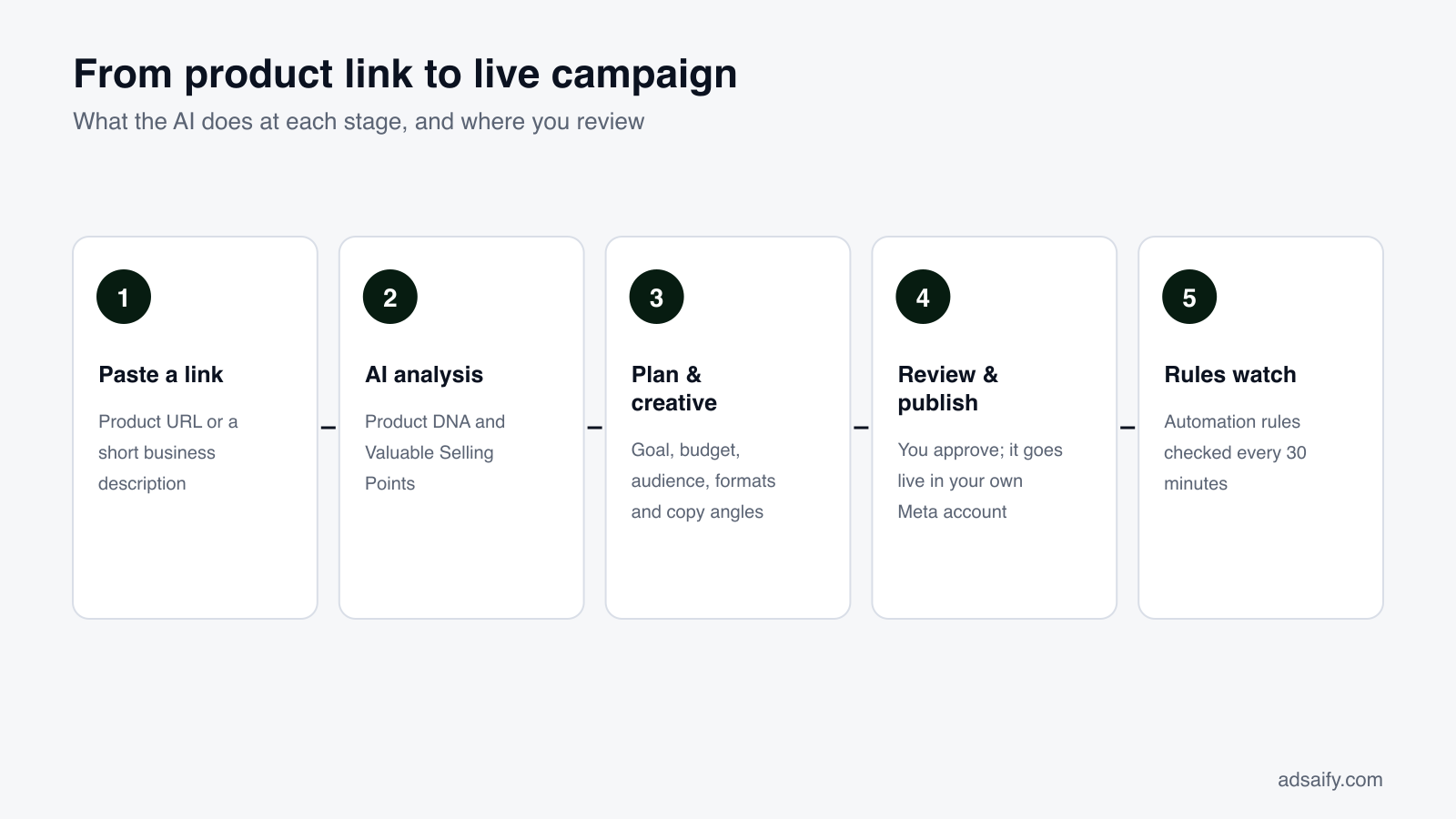
Each step feeds the next. A wrong selling point at the analysis stage will show up in every headline later, which is why the review steps matter as much as the generation steps. The sections below go through each stage in order, starting with the account setup that has to exist before any ad can run.
What do you need in your Meta account before you start?
An AI tool can prepare a campaign, but it publishes into Meta's system, so a few Meta basics must be in place first. Meta groups them as business assets: the ad account that pays for ads, the Facebook page the ad runs under and the Meta pixel that measures what happens on your site. When you publish in Adsaify, you select these assets, so it saves time to set them up before your first campaign.
The core assets
| Asset | What it does | Required? | What to check |
|---|---|---|---|
| Meta business portfolio | Holds your ad accounts, pages and pixels in one place | Strongly recommended | You are an admin and can grant access |
| Ad account | Runs campaigns and is billed for ad spend | Yes | Payment method added, correct currency and time zone |
| Facebook page | The identity your ad is shown under | Yes | Page name, logo and contact details are current |
| Instagram account | Lets ads appear under your Instagram profile | Recommended | Connected to the same page and business portfolio |
| Meta pixel | Tracks visits, add-to-carts and purchases on your site | Needed for Sales goals | Installed on your site and firing purchase events |
Why the pixel matters so much
The pixel is a small piece of code on your website that tells Meta when someone views a product, adds to cart or buys. Without it, Meta can still deliver ads, but it cannot learn who actually purchases. For a Sales goal, that learning is the whole point.
Small things that cause delays
- Currency and time zone on an ad account are hard to change later, so choose them carefully.
- A new ad account may start with a lower spending limit while Meta builds trust.
- Ads for your own domain run more smoothly when the domain is verified in your business portfolio.
Once these assets exist, the rest of the process happens inside Adsaify, and the campaign still lands in your account where you can see it in Ads Manager too.
What does the AI do with your product link?
Everything starts at a single field: Site Link or Business Description. Next to it you can switch between Description and Url, browse Similar Ads for reference, and choose the Language of your ads. The ad language does not have to match the interface language, which helps if you sell in several countries.
The four analysis stages
When you submit a link, the app shows four stages: Parsing URL → Extracting Data → AI Analysis → Finalizing. In plain terms, the tool opens the page, collects the product information, interprets it and assembles a summary you can review.
Product DNA
The first result is the Product DNA: the product name and its key attributes. For clothing, that means things like material, cut, length, print and use case. For a service, it might be what is offered, for whom and where. Product DNA is the factual base. If the page says "linen" and the DNA says "cotton", fix it here.
Valuable Selling Points
The second result is a short list of Valuable Selling Points: the reasons someone would buy, phrased so they can be used directly in ads. A feature like "100% linen" becomes a selling point like "Breathable linen". These points drive the headlines, the primary text and even what the images emphasise.
This is the most important review moment in the whole flow. Ask three questions about each selling point: Is it true? Would a customer care? Is it specific to this product, or could any competitor say it? Remove anything vague and add what the AI missed, such as a guarantee or a detail you know customers ask about.
No website? Use a description
If you sell only on Instagram, run a local service or have not built a site yet, switch to Description. Write what you sell, who it is for, where you operate and what makes you different. The analysis works from text too, and the more concrete the description, the better the selling points that come back.
How does the AI pick a campaign goal, budget and strategy?
After the analysis, Adsaify proposes an Ad Campaign Goal and Strategy together with a Recommended Scaling Strategy. The goal tells Meta what to optimise for, so it is the single setting that most shapes who sees your ad.
Choosing the right goal
| Ad Goal | What Meta optimises for | Good fit when | Needs |
|---|---|---|---|
| Sales | Purchases or other conversions | You sell online and want orders | A pixel tracking purchases |
| Traffic | Clicks to a page | You want visits to a collection or article | A fast, mobile-friendly page |
| Engagement | Likes, comments, messages | You sell through DMs or build a following | An active page or Instagram account |
| Awareness | Reach among relevant people | You launch a brand or local business | A clear, memorable creative |
| App promotion | Installs and in-app actions | You have a mobile app | App store listing and app events |
For most stores, Sales is the default because purchases are what pay for the ads. Traffic is often cheaper per click but tends to bring browsers rather than buyers.
Budget, locations and destination
The setup screen also asks for your Daily Budget, the cities or countries to target, the destination URL people land on, and whether to turn on Advantage+ Campaign Budget (CBO). With CBO on, Meta spreads the campaign budget across ad sets automatically, giving more to the ones that perform better. Choose a daily budget you can keep running for at least a week; a test that stops after two days rarely tells you much.
The scaling strategy
The Recommended Scaling Strategy covers what to do after data arrives: when to raise the budget, when to add new creatives and how to avoid resetting Meta's learning with too many changes at once.
Quick Setup for fewer decisions
If you prefer a shorter path, Quick Setup asks for three things in Quick Preferences: target location, objective and average daily budget. You then see Preparing Your Ad, followed by Your Adsaify Ad is Ready and Here is your recommended plan. You review the plan and publish.
Which formats and placements does the AI create ads for?
Meta calls the places an ad can appear placements. One campaign can run across Facebook and Instagram at the same time, and Meta sends each impression to wherever it expects the best result for your goal.
| Format | Shape | Where it appears | Best used for |
|---|---|---|---|
| Feed image or video | 4:5 vertical (1080 × 1350) | Facebook and Instagram Feed | One product with a clear message and readable copy |
| Story | 9:16 full screen (1080 × 1920) | Facebook and Instagram Stories | Quick, visual offers with a strong opening frame |
| Reels | 9:16 full-screen video | Instagram and Facebook Reels | Short videos, UGC-style demos, product in use |
| Carousel | Several cards, usually 1:1 or 4:5 | Feed and other placements | Several products, colours or angles in one ad |
| Catalog (Advantage+) | Pulled from your product feed | Across placements | Many products; the right item for each shopper |
Adsaify generates images and videos for these formats, including UGC and Reels-style video templates, carousels and story formats. The same product can appear as a 4:5 Feed image, a 9:16 Story and a short vertical video without you resizing anything by hand.
Three sources of creatives
- AI-generated creatives built from your product images and selling points.
- The AI Image Generator in the Asset Library, for new visuals from a text prompt, such as a lifestyle scene.
- An existing Instagram post, if one already does well organically and you want to put budget behind it.
Feed and full-screen placements reward different things, so it helps to know what to look for when you review each version:
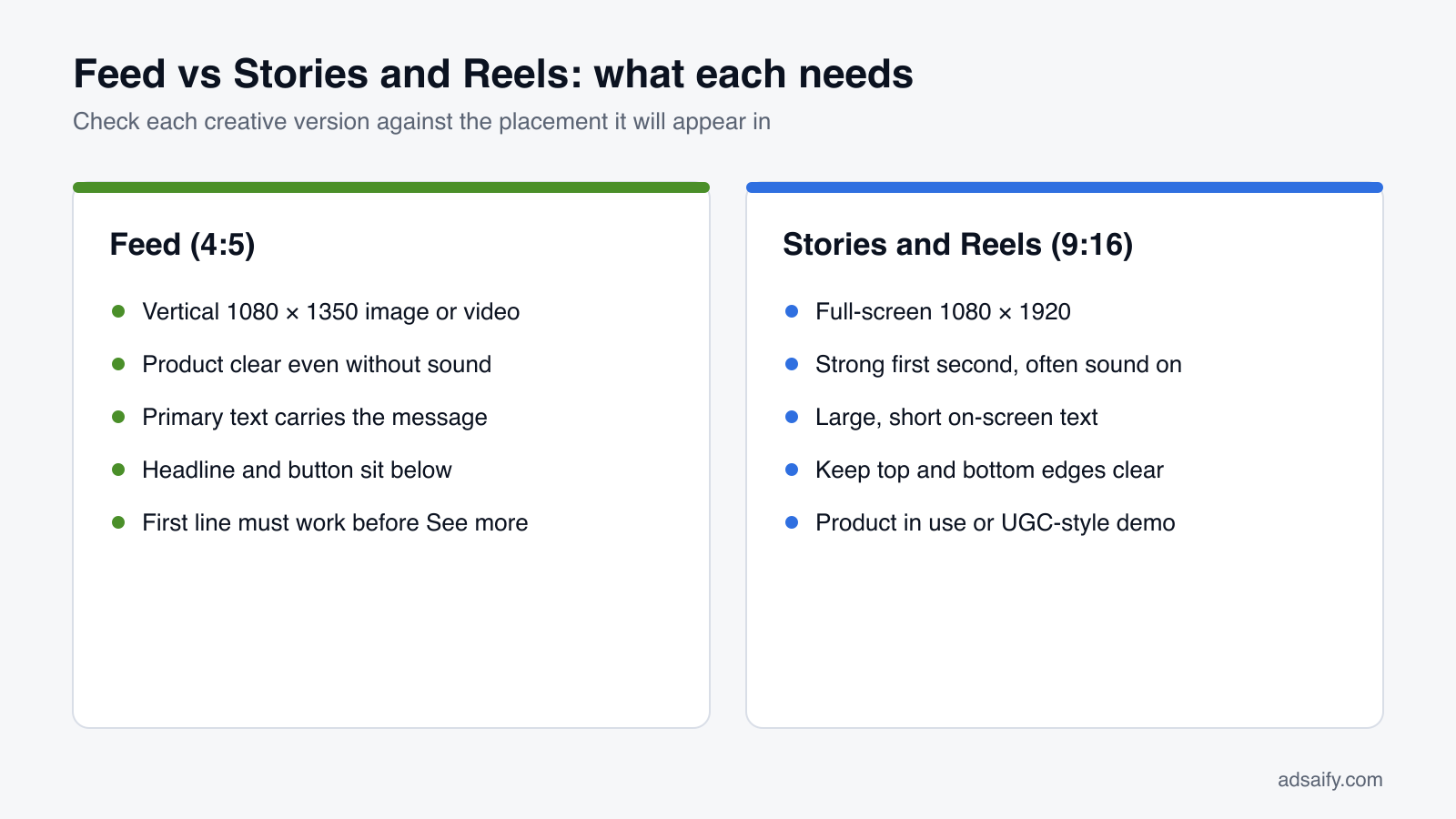
The practical rule: every product needs at least two shapes, 4:5 and 9:16. A square image gets cropped or padded in Stories and Reels.
How are copy angles written and chosen?
A Meta ad has several text fields: primary text (above the creative), a headline (below it, next to the button) and sometimes a description. Adsaify writes multiple headlines and primary texts and groups them by angle. An angle is a different reason to buy, and different people respond to different reasons.
| Angle | What it focuses on | When it fits | Watch out for |
|---|---|---|---|
| Benefit | What the customer gets | Products with a clear, practical advantage | Listing features instead of outcomes |
| Social Proof | Reviews, popularity, other buyers | You have real reviews or ratings | Claims you cannot back up |
| Urgency | Limited time or stock | Real sales, launches, seasonal moments | Fake countdowns that hurt trust |
| Pain | The problem the product solves | Products that fix a clear annoyance | Shaming or personal-attribute wording |
| Emotion | How the product makes people feel | Fashion, gifts, home and lifestyle | Vague lines with no product detail |
| Ease | How simple it is to use or buy | Products people assume are complicated | Overpromising effortless results |
How to pick angles
Do not run all six at once on a small budget. Pick two or three that match your selling points. A product with a strong physical feature suits Benefit. A gift or fashion item suits Emotion. A product that replaces something fiddly suits Ease. Running a few side by side shows which reason your audience responds to.
Editing the AI's copy
Read each line as a customer would. Keep sentences short. Make sure the first few words of the primary text make sense on their own, because Meta often cuts the rest behind "See more". And use Social Proof and Urgency only when they are true: a fake sale damages trust and can break Meta's advertising policies. Meta's policies also restrict copy that implies personal attributes, such as "Are you overweight?", so Pain lines should describe the problem, not the person.
How does targeting work, including catalog ads for stores?
Meta's delivery system is good at finding buyers on its own, especially with broad audiences and a working pixel. Targeting still matters, because it sets sensible limits: where you can deliver, who the product is clearly for and what language the ad is in. Adsaify suggests AI Recommended Targetings based on the analysis, and you can edit all of them:
- Demographics: age range and gender.
- Interests: topics and behaviours related to the product.
- Locations: countries or cities where you can actually ship or serve.
Broad or narrow?
Narrowing the audience as much as possible often backfires on Meta: a tiny audience gets expensive, and the system has less room to find the people most likely to act. A better default is to set hard limits that are true (locations you ship to, an age range that genuinely fits) and leave the rest broad, letting the creative and the pixel do the work. Interests are hints, not walls.
Catalog ads for online stores
If you sell many products, the Product Catalog option sets up Advantage+ catalog ads. Instead of you choosing one product per ad, Meta shows the best products from your catalog to the right people. Two audience choices cover most needs:
- Broad audience (recommended): finds new customers who have not visited yet.
- Viewed or added to cart, no purchase: brings back people who showed interest in the last 14 days.
You can also limit the ad to a product set, such as a summer collection, so seasonal items do not compete with everything else. Catalog ads depend on a clean feed: correct prices, working links, good images and accurate stock.
Shopify stores
If your store is on Shopify, the Adsaify Shopify app imports your products automatically and prepares a sales ad for a product in minutes. Nothing is published without your approval. More on store setups is on the Adsaify for e-commerce page.
How should you review AI output before publishing?
AI output is a strong first draft, not a finished campaign. A few minutes of review before publishing prevents most of the problems that cost money later. The review has four parts: facts, creatives, copy and settings.
Facts
Compare the Product DNA and selling points against your product page. Materials, sizes, prices, delivery promises and guarantees must match exactly. If the AI inferred something that is not on the page, remove it or confirm it.
Creatives
Look at every version at phone size, because that is how people will see it. Check that the product is recognisable, colours are true to the real item and nothing important sits at the top or bottom edges of 9:16 versions, where profile names and buttons appear. Replace any scene that misrepresents the product.
Copy
Read the primary text and headline together. Do they say the same thing twice? Does the first line work alone? Is the tone right for your brand?
Settings
Confirm the goal, daily budget, locations, destination URL and the business assets (ad account, page, pixel) before you press publish.
The diagram below sums up what to keep and what to fix:
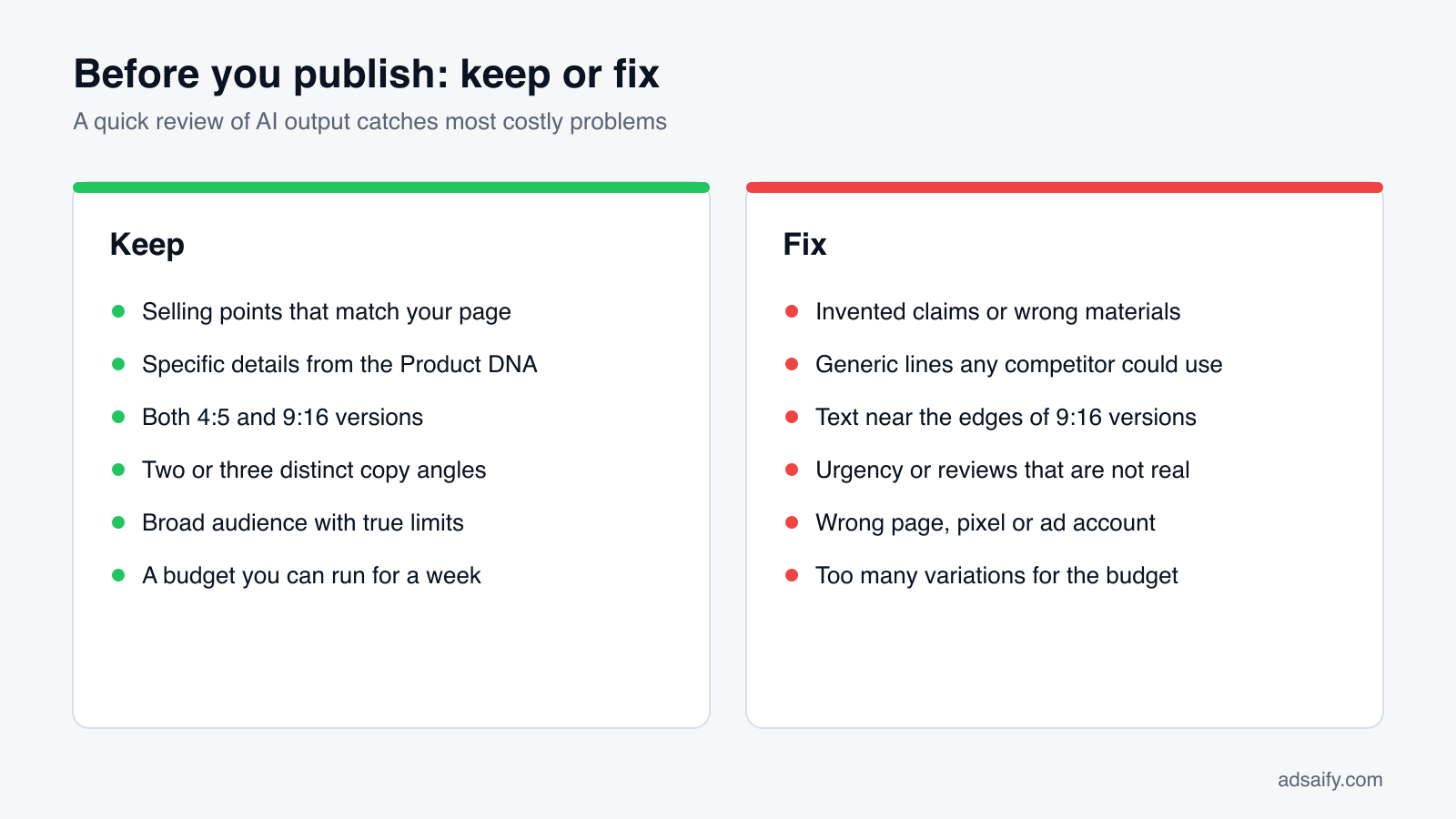
If you are unsure about one element, publish with fewer variations rather than more. Two solid creatives and two angles teach you more than eight weak ones splitting a small budget.
How is the campaign published and managed?
When everything looks right, you reach Publish Campaign: Select your Meta account and launch your ad. Here you choose your business assets: the ad account, the Facebook page the ad runs under and the Meta pixel that tracks results.
Your account, your data
The campaign runs in your own Meta ad account, and you pay ad spend directly to Meta. Adsaify does not resell ad space or sit between you and Meta's billing. Your account history, pixel data and access stay with you, and you can see and edit the same campaigns in Meta Ads Manager.
Meta's review
Every new ad goes through Meta's review before delivery. Most ads pass quickly, and your Meta ad goes live in minutes in many cases. Some take longer, and an ad may be rejected if it breaks a policy; in that case you edit the flagged part and resubmit.
Managing campaigns
Your campaigns appear in the Projects and Ads views. Each shows its objective, its status (Active, Paused, In Review or Scheduled), its budget and key metrics:
- Spend and impressions: what you paid and how often the ad was shown.
- Clicks, CTR and CPC: how many people clicked, the click rate and the cost per click.
- Results: the outcome tied to your goal, such as purchases.
Opening a campaign shows its ad sets and ads, so you can see which creative or angle is carrying the results. Keep the creatives that bring results, pause the ones that only spend, and use what you learn for the next round.
On pricing: your first ad is free, and paid plans start at $25 a month with no long-term contract. Details are on the pricing page.
How do automation rules work after launch?
The hard part of Meta ads is not the launch; it is the weeks after it. Creatives tire, costs drift, and a winning ad can sit on a small budget because nobody noticed. Automation rules handle this monitoring for you.
The shape of a rule
Every rule follows the pattern If (all conditions) … Then …. Conditions use metrics such as Spend, Purchases, CPC, CTR, ROAS and Cost per result. Actions include pausing an ad or adjusting its budget. Because the conditions are joined with "all", you can combine them: for example, act on low ROAS only once spend has passed a minimum, so a single slow morning does not trigger anything.
Adsaify checks rules every 30 minutes. A runaway cost can be caught within the hour.
Rules worth starting with
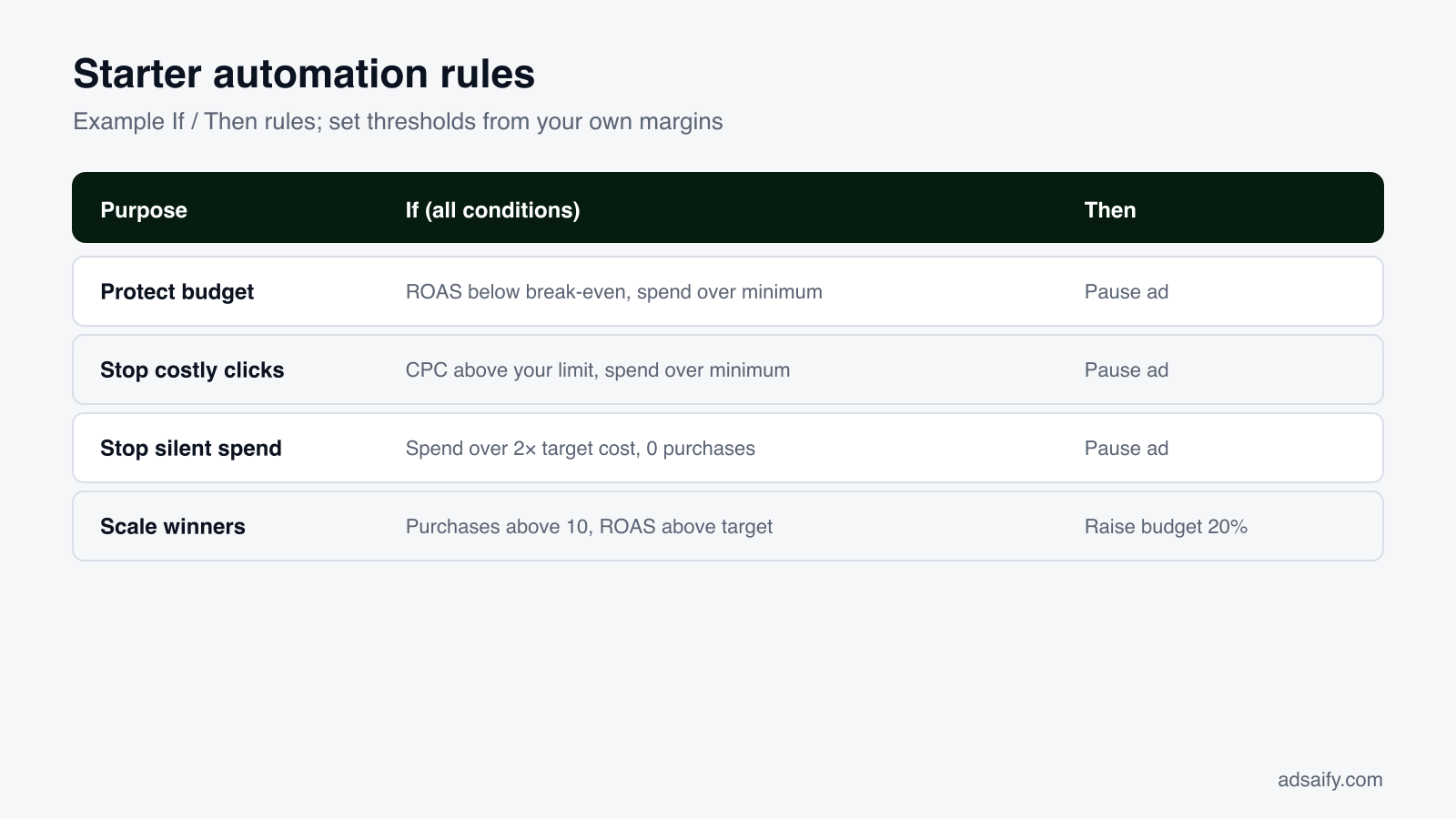
The numbers in these rules are examples, not recommendations. Your own thresholds depend on your margins. If a product earns you a 40% margin, a ROAS of 1.5 may lose money; if it earns 70%, it may be fine. Work out your break-even ROAS (1 divided by your margin) before setting a pause threshold.
Two cautions
- Give new ads time. Meta's delivery has a learning phase in which results swing. Add a minimum-spend condition so rules do not pause an ad on its first day.
- Scale in moderate steps. Raising a budget by around 20% at a time is gentler than doubling it, which can push delivery back into learning and raise costs for a while.
Rules on the Pro plan are unlimited. They do not replace your judgement, though. Decisions about new creatives, products and offers are still yours.
What does a full example look like?
Here is the whole flow with one product: a Floral linen midi dress sold on yourstore.com. The point is to show the settings and what to look at, not to predict results.
Step 1: Link and analysis
You paste the product URL from yourstore.com and set the ad language to English. The analysis runs through Parsing URL, Extracting Data, AI Analysis and Finalizing. The Product DNA lists the dress name, linen fabric, midi length and floral print. The Valuable Selling Points come back as Hand-painted print, Breathable linen and Summer-ready. You check them against the product page; they are accurate, so you keep them.
Step 2: Goal and budget
The proposed goal is Sales, because the store has a Meta pixel tracking purchases. You set a daily budget of $20, choose the countries you ship to and keep the product page as the destination URL. You leave Advantage+ Campaign Budget on.
Step 3: Creatives and copy
Adsaify prepares a 4:5 Feed image, a 9:16 Story, a short Reels-style video and a carousel showing the print up close, the fabric and the full length. For copy, you choose three angles:
- Benefit: "Breathable linen that keeps you cool all summer."
- Emotion: "A hand-painted print that feels like a holiday."
- Ease: "One dress, from morning coffee to dinner out."
Step 4: Targeting
The AI recommends women aged 25–44 interested in fashion and summer style, in your shipping countries. You keep the interests as a light hint and leave the audience broad so Meta has room to find buyers.
Step 5: Publish and automate
You select your ad account, Facebook page and pixel, then publish. Once the ad is active, you add two rules: pause any ad with ROAS below your break-even after a minimum spend, and raise the budget by 20% when purchases pass a set number.
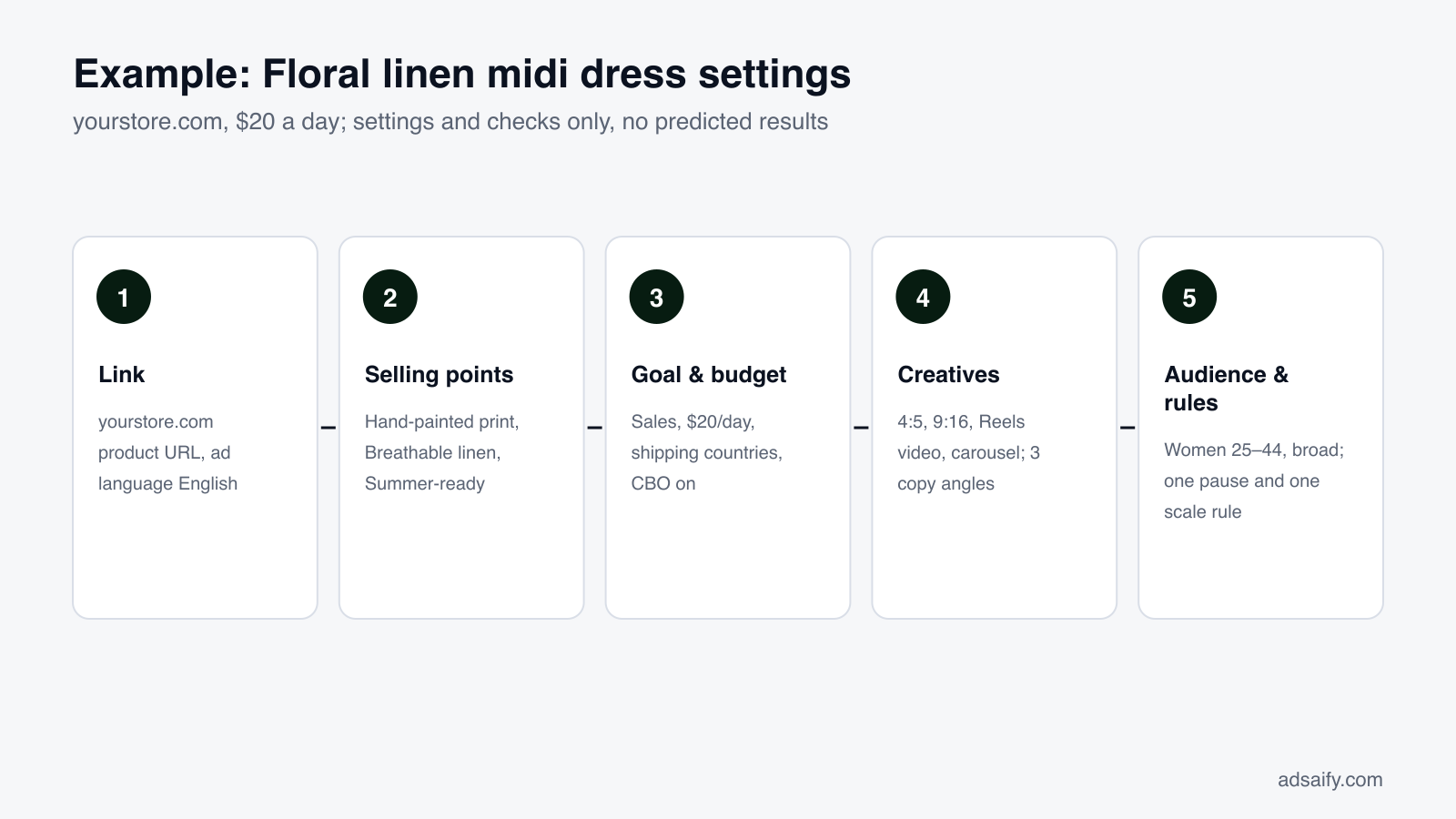
In the first week, you do not judge by single days. You look at which angle and which format bring the cheapest results over several days, and use that to brief your next creatives.
What weekly routine keeps campaigns on track?
Automation rules watch the numbers every 30 minutes, but a short human review once a week is what turns data into better ads. The metrics below are the ones to read, in roughly this order.
| Metric | What it tells you | What to do with it |
|---|---|---|
| Results and cost per result | Whether the goal is being met, and at what price | Compare with your break-even; this is the main verdict |
| ROAS | Revenue returned per unit of spend | Judge over a week, not a day; set rule thresholds from it |
| CTR | How many viewers click | Low CTR usually points to the creative or the first line |
| CPC | What each click costs | Rising CPC with falling CTR often means creative fatigue |
| Spend and impressions | Whether budget is actually delivering | Low spend can mean a narrow audience or review issues |
A useful pattern: if CTR is good but purchases are low, look at the product page, price and delivery terms rather than the ad. If CTR is low, the ad itself is the problem.
The weekly routine
- Check status: confirm every campaign is Active, nothing is stuck In Review and no ad was rejected.
- Read the week's results: cost per result and ROAS per campaign, compared with last week.
- Compare creatives and angles: open each campaign and note which format and angle carry the results.
- Review what rules did: see which ads were paused or scaled and whether you agree.
- Refresh creatives: replace the weakest ad with a new version of the winning angle, or test one new angle.
- Adjust budget calmly: move budget toward what works in moderate steps, not big jumps.
- Check the store side: stock, prices and the landing page, so ads do not send people to a dead end.
Fifteen to thirty minutes a week is usually enough for a small account. For more on Meta basics, our guides go through the fundamentals step by step.
What are the most common mistakes?
Most problems with AI-made campaigns are not caused by the AI. They come from skipped checks and impatient decisions. Here are the ones to avoid, each with its fix.
- Publishing without reading the selling points. A wrong material or an invented promise spreads into every ad. Fix: review Product DNA and selling points against your page before anything else.
- Running Sales without a working pixel. Meta cannot learn who buys. Fix: confirm the pixel fires purchase events before choosing Sales, or start with Traffic while you fix it.
- Using only one shape. A square image looks out of place in Stories and Reels. Fix: always publish 4:5 and 9:16 versions.
- Too many variations on a small budget. Eight ads on $20 a day each get too little spend to judge. Fix: start with two or three creatives and two angles.
- Narrowing the audience too far. Small audiences cost more and limit learning. Fix: set true limits (locations, fitting age) and keep the rest broad.
- Judging after one day. Early results swing during learning. Fix: wait several days and add minimum-spend conditions to rules.
- Doubling budgets on a good day. Big jumps can reset learning. Fix: scale in steps of around 20%.
- Fake urgency or social proof. It hurts trust and can break policy. Fix: use those angles only when the sale or reviews are real.
What can AI ad creation not do?
It is worth being clear about the limits, because expectations shape how you judge results.
It cannot fix the offer
If the price is out of line, delivery is slow or the product page is confusing, better ads only bring more people to a page that does not convert. The AI can highlight what is good about a product; it cannot make a weak offer strong.
It cannot guarantee results
Meta's auction decides who sees your ad and at what price, and that depends on competition, season and audience behaviour. No tool can promise a specific ROAS or cost per purchase, and you should be wary of any that does.
It only knows what you give it
The analysis reads your page or description. Your margins, stock plans, best-selling sizes and what customers say in DMs are not on the page unless you add them. Your knowledge still sharpens the output.
It does not replace policy judgement
The AI writes within normal advertising norms, but you are the advertiser. Health claims, before-and-after promises and restricted categories need your own care, and Meta's review has the final say.
It cannot shortcut learning
Meta needs time and data to learn who responds. A small daily budget simply collects data more slowly, so plan tests in weeks, not days.
Key terms
These are the terms you will meet most often while creating and running AI-made ads on Facebook and Instagram, in the order they tend to come up. Knowing them makes both the app and Meta Ads Manager easier to read.
- Business assets: the ad accounts, Facebook pages and Meta pixels your campaigns run on and are measured with.
- Meta pixel: a code snippet on your site that reports views, add-to-carts and purchases back to Meta.
- Placement: a place where an ad can appear, such as Feed, Stories or Reels on Facebook and Instagram.
- Product DNA: Adsaify's summary of a product's name and key attributes, extracted from your page or description.
- Valuable Selling Points: the reasons to buy that the AI extracts and uses in headlines, text and visuals.
- Copy angle: one specific reason to buy, such as Benefit, Emotion or Ease, used to frame the ad text.
- Advantage+ Campaign Budget (CBO): a Meta setting that spreads one campaign budget across ad sets based on performance.
- Advantage+ catalog ads: ads that show the most relevant products from your catalog to each person.
- Learning phase: the early period in which Meta's delivery explores and results are less stable.
- ROAS: return on ad spend; revenue divided by what you spent on ads.
- Automation rule: an "If … Then …" instruction that pauses ads or changes budgets when conditions are met.
Frequently Asked Questions (FAQ)
1. What is AI ad creation for Facebook and Instagram?
It is using AI to prepare and run Meta ad campaigns. The AI reads your product page or business description, extracts selling points, proposes a campaign goal, creates images, videos and copy in several formats and angles, suggests targeting and budget, and can manage the campaign with rules after launch. You review each step and decide what is published.
2. What do I need in Meta before I start?
You need a Meta ad account with a payment method and a Facebook page your ads run under. For Sales campaigns, you also need a Meta pixel installed on your site that tracks purchases. A business portfolio that holds these assets, and an Instagram account connected to your page, make setup smoother and let ads appear under your Instagram profile.
3. Can I start without a website?
Yes. Switch the input to Description and write what you sell, who it is for, where you operate and what makes you different. The analysis works from text as well as links. If you sell through Instagram, you can also promote an existing Instagram post or use the Engagement goal to get messages instead of website visits.
4. Who pays for the ads, and where do they run?
Campaigns run in your own Meta ad account, under your Facebook page and with your pixel. You pay ad spend directly to Meta; Adsaify's plan covers the tool, not the media. Your account history and data stay with you, and you can see and edit the same campaigns in Meta Ads Manager at any time.
5. How often do automation rules run?
Rules are checked every 30 minutes. Each rule follows "If (all conditions) … Then …", using metrics such as Spend, Purchases, CPC, CTR, ROAS and Cost per result, with actions like pausing an ad or adjusting its budget. Add a minimum-spend condition so new ads are not paused before Meta has had time to learn.
6. How much budget should I start with?
Choose a daily budget you can keep running for at least a week without stress, since short tests rarely show a clear picture. The example in this guide uses $20 a day to illustrate settings, not as a recommendation. With a small budget, run fewer variations so each one gets enough spend to judge.
7. Does AI-made copy break Meta's ad policies?
Not by itself, but you are the advertiser and responsible for what runs. Remove claims you cannot prove, avoid fake urgency and wording that implies personal attributes, and take extra care in restricted categories such as health. Every ad also passes Meta's own review before it is delivered.
8. Does it work for catalog and Shopify stores?
Yes. The Product Catalog option sets up Advantage+ catalog ads, with audiences such as Broad audience or people who viewed or added to cart without buying in the last 14 days, and optional product sets. The Shopify app imports products automatically and prepares a sales ad in minutes; nothing is published without your approval.
How can you try this with Adsaify?
Paste one product link and you can follow every step in this guide on your own product: the analysis, the creatives in each format, the copy angles, the audience and budget, and the automation rules.
- Your first ad is free: signup includes one ad analysis and two AI image tokens, with no credit card.
- Your own ad account: campaigns are published to your Meta ad account, and you pay ad spend directly to Meta.
- Images and video: Feed, Story, Reels and carousel creatives are prepared from a single link.
Create a free account and try your first ad · Already have an account? Log in.