Short answer: Stopping creative blindness and fatigue in AI Meta ads requires generating distinct value angles rather than superficial visual tweaks like color changes. When CTR drops and frequency climbs, automated performance rules should pause fatigued ads, while fresh multi-angle creatives generated through Adsaify are systematically introduced into the ad set to maintain healthy delivery.
You launch an AI-generated Meta campaign, watch return on ad spend climb for five days, and then witness a steep performance cliff. Click-through rates plunge, cost per acquisition doubles, and delivery frequency creeps upward. Even when you prompt an AI image generator to produce twenty fresh variations, Meta’s auction algorithm treats them as nearly identical assets, routing your budget back into a fatigued audience that has already developed subconscious banner blindness to your visual style.
This breakdown happens because standard generative workflows produce cosmetic changes—such as swapping background colors or switching fonts—rather than fundamentally distinct messaging angles. When prospective buyers repeatedly encounter identical visual cues, engagement plummets, causing Meta to penalize your declining relevance score with higher CPMs (cost per thousand impressions). Left unaddressed, unnoticed creative fatigue quietly consumes media spend on unresponsive impressions, eroding margins and making profitable customer acquisition impossible.
This guide outlines a systematic approach to breaking that cycle across your Facebook and Instagram accounts. You will learn how to pinpoint the exact metrics signaling ad exhaustion, audit foundational assets, and construct a continuous AI creative pipeline focused on novel value hooks. We will walk through real-world budget implementations, automation rules to pause decaying ads, and the weekly operational routine required to maintain stable returns.
Key Takeaways
- Use distinct creative pillars like social proof, problem-solution, and product demos instead of superficial visual iterations.
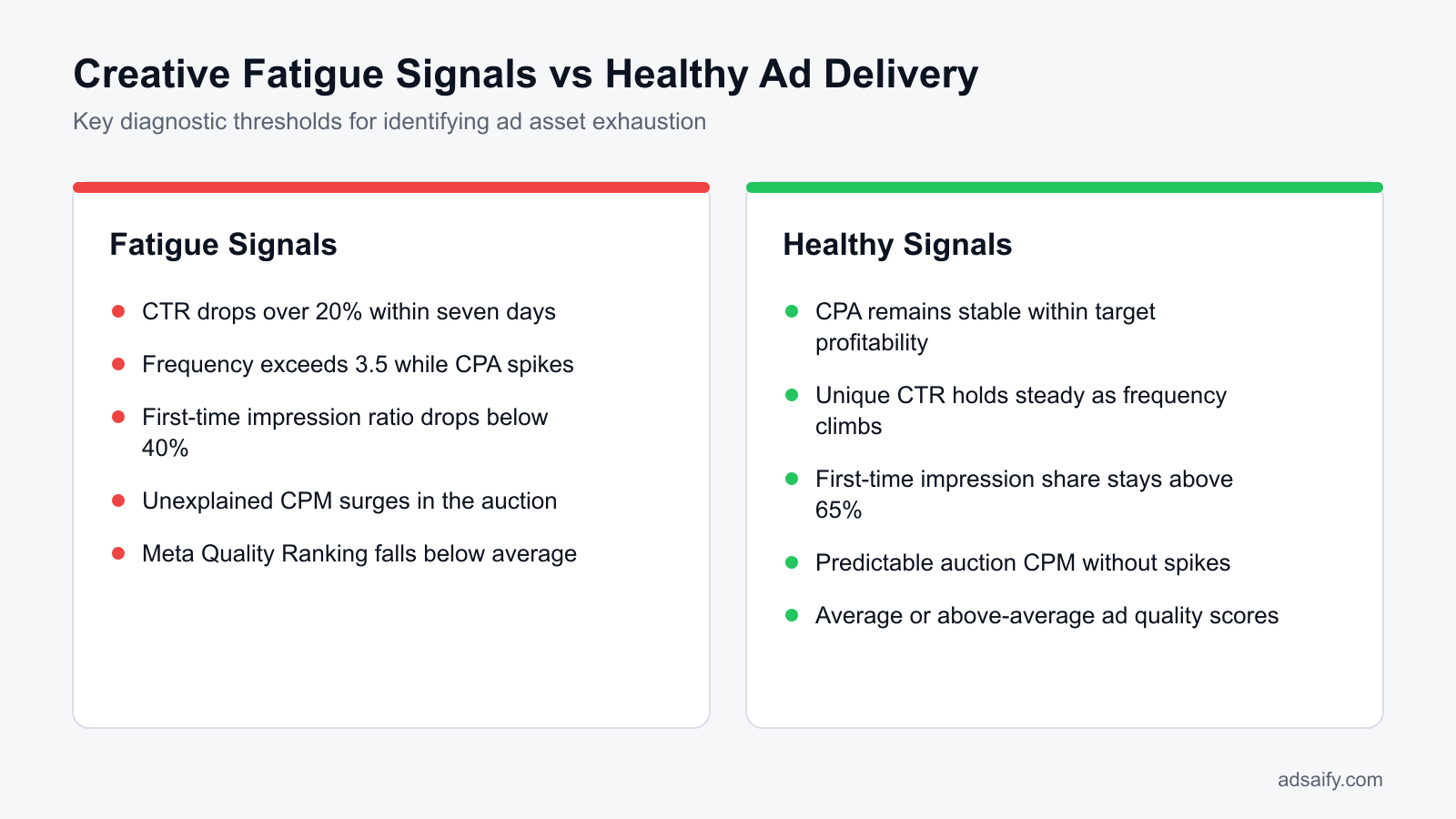
- Recognize early creative fatigue when ad frequency increases while click-through rate drops by more than twenty percent.
- Deploy automated performance rules to pause fatigued ads while manually feeding fresh AI-generated creative angles into the ad set.
- Protect your campaign learning phase by introducing new angles alongside winners rather than overwriting existing ads.
What Is Creative Blindness and Fatigue in AI Meta Ads?
Creative blindness and creative fatigue in AI Meta ads describe the drop in ad performance that occurs when an audience repeatedly sees visually similar machine-generated creatives. In the Meta auction, creative fatigue causes click-through rates to decline, estimated action rates to drop, and CPM (cost per mille, which is the cost an advertiser pays for one thousand ad impressions) to rise significantly.
How Machine-Generated Uniformity Harms the Meta Auction
Banner blindness occurs when users subconsciously ignore page elements that resemble advertising. When generative artificial intelligence creates ad sets, it often relies on uniform prompt structures, repetitive color palettes, and predictable focal points. As prospective buyers scroll past these homogeneous graphics on Instagram and Facebook, Meta’s auction system records the lack of interaction.
Meta ranks ads using a Total Value score determined by the advertiser's maximum bid, the estimated action rate, and the user value score. Two key metrics dictate this outcome: CTR (click-through rate), which is the percentage of impressions that result in a click, and eCTR (estimated click-through rate), which is Meta’s predictive calculation of how likely a user is to click on an ad before entering the auction. When visually indistinguishable AI creatives flood an ad set, users stop engaging. Meta notices this dip, decreases the ad's Quality Ranking inside the Meta Ads Manager inspect tool, penalizes the eCTR, and requires higher bids to win ad placements.
Worked Example: Tracking Creative Decay on a Real Budget
Consider an example with a direct-to-consumer apparel brand running an Advantage+ shopping campaign in Meta Ads Manager with a 600 TL daily budget. The advertiser launches four AI-generated image creatives that share identical model poses and background styling, changing only the product color.
- Day 1 to 5: Frequency is 1.2, CTR is 2.20%, and CPA (cost per acquisition, which is the total ad spend divided by purchases) sits at 110 TL.
- Day 12: Frequency reaches 2.6, CTR falls to 0.85%, and CPA increases to 240 TL.
- Audit and Correction: The marketer inspects the Ad Relevance Diagnostics column in Meta Ads Manager and sees "Below Average" for Quality Ranking. Instead of generating minor visual tweaks, the brand uses Adsaify to draft new campaign angles with completely different framing and value propositions, which restores the CTR above 2.00% on the new ad set.
Is it normal for my creative to burn out in just a couple of weeks?
Yes, creative burnout within two to three weeks is normal for Meta campaigns running moderate or high budgets against narrow audiences. When daily ad delivery repeatedly exposes the same demographic to an ad, user interaction declines quickly. In campaigns utilizing generic AI layouts, audiences recognize visual patterns sooner, accelerating fatigue. Monitoring frequency thresholds alongside CTR drops enables performance marketers to introduce fresh creative concepts before high acquisition costs erode the campaign budget.
Why Do AI-Generated Creatives Burn Out Faster on Meta?
AI-generated creatives burn out faster on Meta because automated tools frequently produce superficial variations of identical concepts rather than distinct messaging angles. When multiple ads share the same visual structure, Meta’s machine-learning delivery system groups them together, while prospective customers develop sensory habituation and scroll past the assets without engaging.
The Superficial Iteration Trap and Algorithm Deduplication
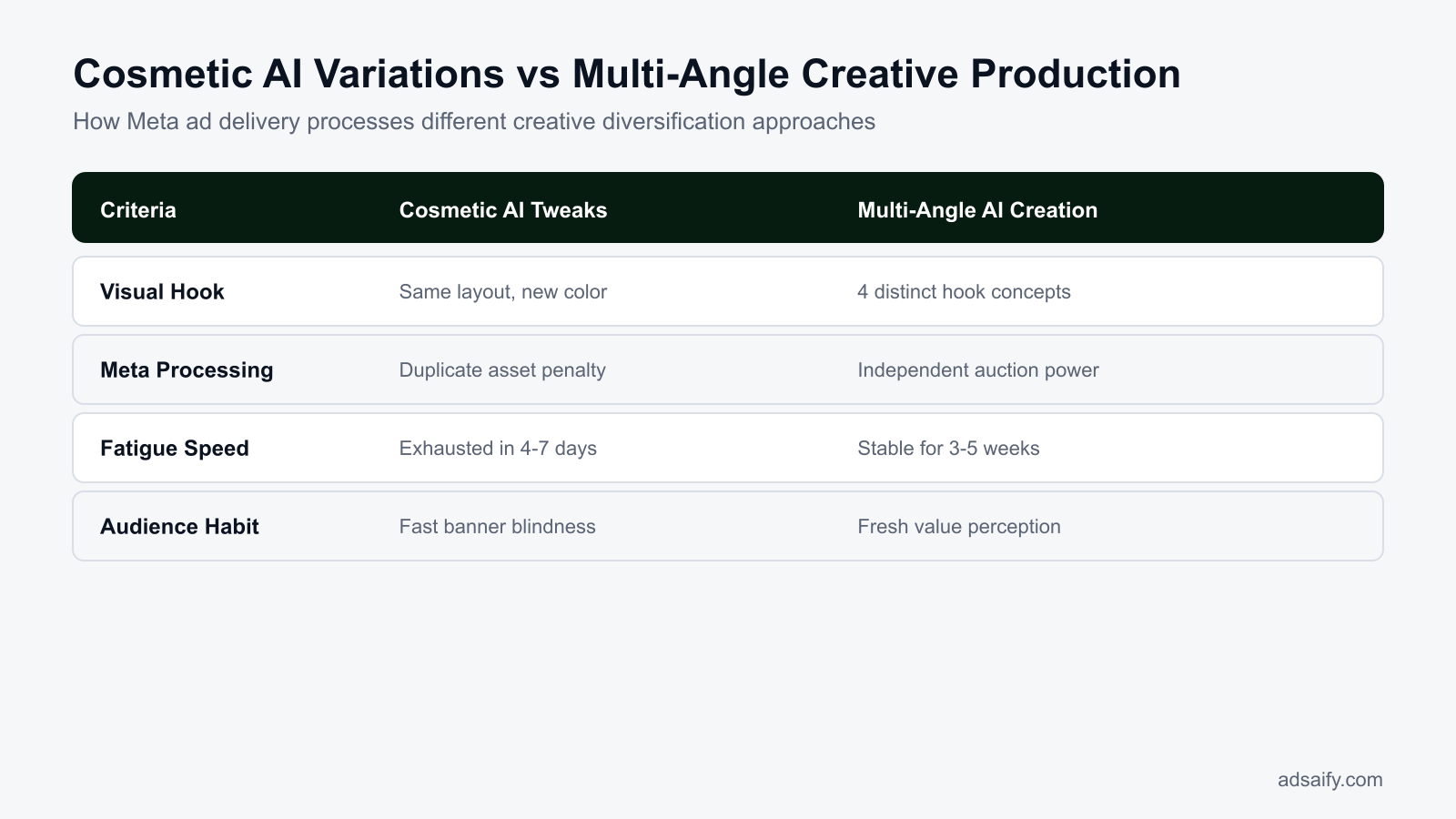
The primary reason AI ads burn out quickly is cosmetic duplication. When an advertiser asks an image generator to create ten variations, the algorithm typically adjusts minor visual tokens—such as altering the background hue, swapping typography, or shifting button placement—while preserving the same composition, subject posture, and messaging hook.
Meta’s delivery system relies on computer vision and visual embeddings to index creative assets. When an ad account uploads multiple graphics featuring identical spatial arrangements and focal points, the system clusters them as duplicate creative concepts. Rather than testing diverse psychological angles across distinct audience clusters, the delivery engine pushes all spend toward the single variation that gains initial traction, rapidly exhausting that asset. When advertisers use Adsaify to analyze a business URL, the platform drafts campaigns across varied angles such as problem-solving hooks, social proof, and direct product features, preventing cosmetic repetition.
Sensory Habituation Across Visual Iterations
Social media users scan feeds rapidly. When an audience member sees the same AI-generated lighting, synthetic skin textures, and layout structure multiple times, sensory habituation takes effect. The user's brain categorizes the pattern as generic commercial content, increasing their scrolling speed past the asset.
| Campaign Characteristic | Cosmetic AI Iterations | Strategic Angle Diversification |
|---|---|---|
| Visual Composition | Identical focal point with altered background colors | Distinct visual formats (UGC style, product-only, lifestyle) |
| Meta System Classification | Clustered as duplicate creative assets | Classified as independent creative concepts |
| Primary Message Hook | Same headline rephrased with synonyms | Different consumer motivations (cost, speed, status, safety) |
| Auction eCTR Stability | Drops rapidly within 7 to 14 days | Maintains stable delivery across distinct audience pockets |
| Ad Relevance Diagnostics | Degrades to "Below Average" on Engagement Rate | Retains "Average" or "Above Average" ratings across metrics |
If AI generates 20 visual variants, doesn't Meta treat them as distinct ads?
No, Meta does not treat visually similar variants as distinct ads. Meta’s computer vision and machine learning models analyze video frames, image compositions, and semantic text content to cluster similar creatives. When twenty AI images merely swap minor background elements or typography, the delivery algorithm recognizes them as duplicates of one core concept. Consequently, delivery concentrates on a single variation, while audience habituation quickly causes the entire batch of ads to exhaust its performance.
How Much Does Unnoticed Creative Fatigue Cost an Ad Account?
Unnoticed creative fatigue costs an ad account up to several times its baseline acquisition cost by driving up CPMs, suppressing click-through rates, and exhausting daily budgets on non-converting impressions. When Meta penalizes repetitive ads with low auction quality scores, CPA inflates until campaigns fail to break even on profit margins.
Auction Mechanics, CPM Spikes, and CPA Inflation
CPM (cost per mille) is the price an advertiser pays for one thousand impressions on Meta platforms. Meta determines ad delivery through an auction system that weighs the advertiser bid, estimated action rates, and overall ad quality. When a creative suffers from user blindness, estimated click-through rates collapse. To compensate for low engagement and maintain expected platform revenue, the Meta auction algorithm levies a delivery penalty that drives CPMs upward.
CPA (cost per acquisition) is the total ad spend divided by the number of completed conversions. ROAS (return on ad spend) is total revenue generated divided by ad spend. As ad fatigue pushes CPMs higher and drops click rates, CPA inflates simultaneously. An e-commerce campaign with a target CPA of 150 TL can quickly see acquisition costs surge to 400 TL on exhausted creatives. This inflation compresses net operating margins and turns previously profitable campaigns into loss-making initiatives.
Budget Drains and Funnel-Wide Profit Loss
In automated setups such as Meta Advantage+ campaign budget campaigns, the delivery algorithm frequently favors older ads that possess rich historical data. When creative fatigue sets in, the algorithm often continues distributing substantial spend to these exhausted assets instead of testing newer alternatives. This dynamic turns legacy ads into budget drains that consume liquidity without generating purchases. Left unaddressed, top-of-funnel ad fatigue cascades downward, starving retargeting pools of qualified prospects and reducing the blended profitability of the entire store.
- Review ad-level frequency weekly to detect audience overexposure before acquisition costs increase.
- Track 7-day rolling CPA against break-even targets inside Meta Ads Manager.
- Monitor Meta Ad Relevance Diagnostics to identify early declines in ad quality.
- Isolate top-spending creatives to ensure budget allocation matches current conversion efficiency.
- Implement automated rules through platforms like Adsaify to pause underperforming ads when CPA crosses predefined safety limits.
- Calculate net profit per order weekly to measure the true financial impact of rising ad costs.
Can I simply lower the daily budget on a fatigued ad to keep it running?
Lowering the daily budget on a fatigued ad reduces total cash burn, but it does not fix the underlying auction penalty. Meta still evaluates the ad against historical negative user interactions, depressed click-through rates, and below-average quality rankings. Running an exhausted creative on a smaller budget continues to deliver elevated CPMs and unprofitable conversions. Instead of throttling ad spend, advertisers should pause the fatigued creative and launch fresh variations to reset auction relevance.
Which Metrics Diagnose the Underlying Cause of Ad Fatigue?
Advertisers diagnose the underlying cause of ad fatigue by tracking frequency alongside unique click-through rate, first-time impression ratio, and Meta ad relevance diagnostics. A rising ad frequency coupled with declining unique CTR and below-average quality rankings confirms creative exhaustion, whereas steady ad engagement paired with drop-offs at checkout points to website conversion friction.
Cross-Examining Frequency and First-Time Impression Ratio
Frequency is the average number of times each person saw an ad within a selected timeframe. Unique CTR (click-through rate) is the percentage of distinct individuals who saw an ad and clicked on it. When frequency rises above 2.5 in a seven-day window while unique CTR drops sharply, audiences are actively ignoring the creative hook.
First-time impression ratio is the percentage of daily ad impressions served to individuals who have never seen that ad before. Inside Meta Ads Manager, advertisers can inspect this metric under the Delivery breakdown. A first-time impression ratio falling below 30% indicates that the ad is circulating among the same audience segment repeatedly, signaling that creative wear-out is imminent even if top-line CPA has not yet inflated.
Distinguishing Creative Fatigue from Landing Page Friction
Performance marketers must separate creative problems from post-click drop-offs. Meta Ad Relevance Diagnostics provide three signals: Quality Ranking, Engagement Rate Ranking, and Conversion Rate Ranking. When Quality Ranking falls into the bottom 20% while CTR plunges, the issue lies in the creative visual or copy. Conversely, if an ad maintains an above-average Engagement Rate Ranking but Conversion Rate Ranking drops, the fatigue is not creative blindness; the breakdown stems from checkout friction, stock shortages, or non-competitive shipping fees.
| Metric or Diagnostic Signal | Observed Value Trend | Root Cause Identified | Recommended Action in Ads Manager |
|---|---|---|---|
| Frequency & Unique CTR | Frequency > 2.5, Unique CTR declining | Creative visual fatigue | Pause the ad and launch a new visual hook |
| First-Time Impression Ratio | Drops below 30% in broad targeting | Audience saturation and asset wear-out | Introduce fresh creative angles or broaden audiences |
| Quality Ranking | Drops to "Below Average (Bottom 20%)" | Creative blindness and negative user feedback | Replace imagery, opening video hook, and primary text |
| Unique CTR vs. Conversion Rate | Stable Unique CTR, sharp drop in purchases | Post-click friction on the website | Audit product page speed, pricing, and checkout flow |
| Conversion Rate Ranking | Below Average, but Quality Ranking is High | Offer mismatch between ad and landing page | Align creative promise directly with landing page content |
How can I tell if a CTR drop is caused by ad fatigue rather than seasonality?
To determine whether a CTR drop stems from ad fatigue or broader seasonality, compare the affected ad against other creatives and account-wide metrics in Meta Ads Manager. If the CTR decline is isolated to a single creative while frequency increases and other ad sets remain steady, creative fatigue is the cause. If CPMs, CTRs, and conversion rates drop simultaneously across all ad sets and competitor benchmarks during known seasonal slow periods, macro market trends are driving the shift.
If you would rather not set up each of these steps by hand, try it in Adsaify: your first ad is free, so there is nothing to lose. Create a free account.
What Should You Audit Before Refreshing Fatigued Creatives?
You should audit your historical messaging angles, landing page stock availability, pricing accuracy, and ad set learning status before refreshing fatigued creatives on Meta. Checking these technical and contextual factors prevents advertisers from wasting budget on broken conversion funnels or prematurely resetting ad sets that Meta has not finished optimizing.
1. Historical Angle Breakdown and Landing Page Integrity
Before designing new assets, review your historical performance inside Meta Ads Manager by sorting ads by purchases and CPA (cost per acquisition, which is the total ad spend divided by the number of attributed purchases). Group your previous top performers into three core messaging angles: pricing incentives (such as bundle discounts), feature breakdowns (such as product material highlights), and social proof (such as customer reviews). Identify which specific angle carried performance so you do not abandon a concept that simply needs visual variation. Simultaneously, audit the destination URL. Verify that promoted SKUs are in stock, checkout flows function without technical errors, and on-page prices match the creative copy, as conversion drop-offs often stem from landing page friction rather than ad blindness.
2. Meta Learning Phase Protection and Pre-Production Workflow
Before pushing edits, inspect the Delivery column at the ad set level to confirm whether the ad set is in the learning phase (a stabilization period where Meta delivers ads to roughly 50 optimization events). Modifying an active ad set or changing ad copy can trigger an accidental learning reset, inflating costs. Keep your running ad set intact and prepare your production assets externally first. Advertisers can access the Adsaify dashboard to review AI-generated visual drafts and headline variants based on their website data prior to publishing live changes into active campaigns.
- Review past ad copy to categorize previous winning hooks across price, utility, and review angles.
- Verify product stock levels and payment gateway functionality on destination landing pages.
- Check the Delivery column in Meta Ads Manager to identify whether ad sets have exited learning.
- Confirm that on-page product pricing matches all proposed discount messaging.
- Draft visual variations in advance without editing live, stabilizing ads directly.
If I edit an existing ad to change its image, does Meta keep historical data?
No, Meta does not retain active delivery momentum when you replace the media file inside an existing ad. Overwriting the creative resets the ad's algorithmic engagement history, removes accumulated social proof like comments and likes, and sends the parent ad set back into the learning phase. Instead of editing the original ad, keep the existing ad active or paused for reporting, and create a brand-new ad asset inside the ad set to preserve data integrity.
How to Build an AI-Driven Creative Pipeline Step by Step?
You can build an AI-driven creative pipeline by generating distinct visual angles from business data, deploying assets into active campaigns, and using automated rules to pause fatigued ads. This structured cycle prevents performance drops by continuously preparing replacement creatives before rising frequency and falling click-through rates erode your return on ad spend.
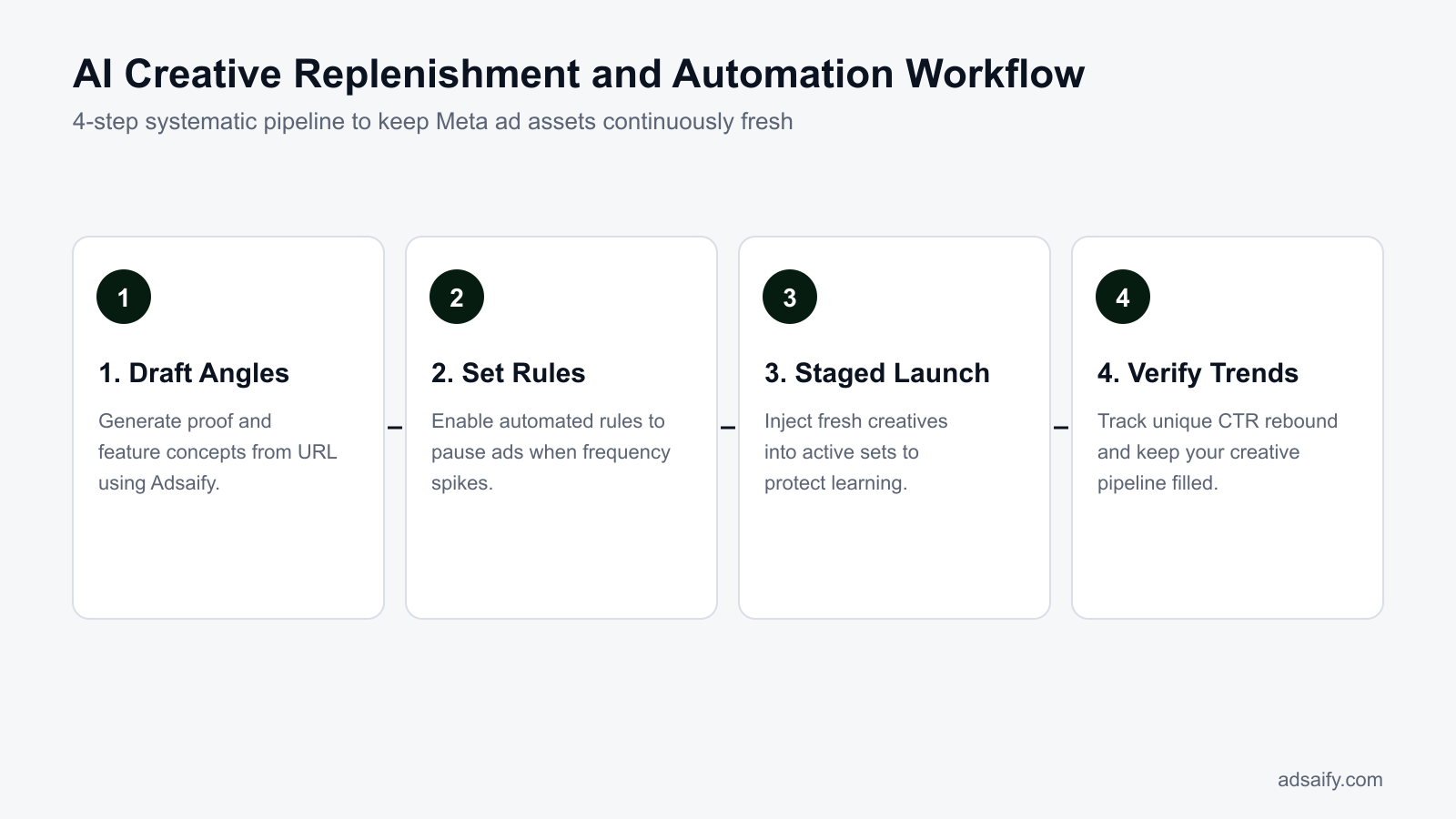
1. Creative Generation and Automated Guardrails
A resilient pipeline begins with diverse asset production rather than single-image iterations. Using Adsaify campaign creation, advertisers can input their website URL to generate four distinct visual pillars: UGC-style images (user-generated content featuring candid customer settings), technical infographics, lifestyle imagery, and offer-led promotional banners. Once these assets are queued, establish automated rules inside Meta Ads Manager to protect account efficiency. Set an automated rule to evaluate ads over the last seven days: if an ad reaches a frequency above 3.5 and CTR (click-through rate, the percentage of impressions that result in a link click) drops below 0.8%, trigger an automated pause.
2. Gradual Ingestion and Systematic Scaling
Avoid flooding an active ad set with dozens of assets simultaneously, as Meta typically allocates 80% of budget to a single creative, starving the rest. Introduce two to three fresh AI-generated assets into an active ad set alongside your current top performer. As the automated rules pause fatigued assets based on rising costs, Meta shifts daily spend toward the newly introduced assets without requiring manual budget reallocations or disruptive campaign restarts.
- Website Input — Adsaify parses the product landing page URL to extract brand color schemes, selling propositions, and audience hooks.
- Pillar Drafting — The platform drafts visual creatives across UGC-style, lifestyle, infographic, and offer-focused formats.
- Controlled Publishing — The marketer publishes two selected assets into the designated Meta ad set to initiate initial delivery testing.
- Automated Monitoring — Meta automation rules monitor link CTR and acquisition cost over a trailing seven-day evaluation window.
- Fatigue Pruning — The rule pauses any asset exceeding your frequency ceiling whose CPA surpasses target boundaries.
- Asset Replenishment — The marketer activates the next queued creative variant to absorb budget freed by pruned ads.
Should I publish fresh creatives in an isolated test campaign or the existing ad set?
You should publish fresh creatives in an isolated testing campaign if your budget permits, because this prevents untested images from consuming delivery spend before proving viability. However, smaller accounts with tight daily budgets achieve faster results by adding fresh creatives directly into their existing dynamic ad set. This consolidated structure prevents audience fragmentation, speeds up conversion data collection, and allows Meta’s auction algorithm to naturally distribute spend to whichever creative achieves the lowest acquisition cost.
How Does a 500 TL Daily Budget E-Commerce Fix Work in Practice?
A 500 TL daily budget e-commerce fix resolves creative fatigue by pausing underperforming ads through automated thresholds, introducing two fresh creative angles into the active ad set, and re-expanding audience reach. This process lowers ad frequency, reduces CPM (cost per mille, or cost per one thousand impressions), and restores ROAS (return on ad spend).
Worked Example: Turning Around a Fatigued Apparel Campaign
As a concrete example, consider an independent online apparel retailer selling winter knitwear with an ad spend of 500 TL per day in Meta Ads Manager. During the first two weeks of running a broad targeting sales campaign, the brand maintained a 3.4 ROAS. By week three, ad frequency (the average number of times each person saw an ad) climbed to 3.8, while outbound CTR (click-through rate, the percentage of impressions that led to clicks off Meta platforms) dropped from 1.6% down to 0.72%.
To remedy the drop without inflating costs, the store executed a tactical creative refresh:
- Automated rule execution: A rule configured in Meta Ads Manager paused any ad creative whose CTR dropped below 0.8% over a rolling 7-day window once it gathered at least 1,500 impressions. This immediately halted wasted budget on the saturated primary image.
- Generating contrasting concepts: Using Adsaify to draft new ad variations from the store URL, the merchant created two divergent creative styles: a short video highlighting customer reviews and a static graphic breaking down garment fabric features.
- Manual deployment: The merchant published these two new ads directly into the existing ad set, preserving ad set level machine learning history rather than launching a brand-new campaign.
Within seven days of adding the new visuals, ad set frequency stabilized down to 1.9 because Meta's auction system could match alternative creative hooks with unreached sub-segments of the broad audience. CPM dropped by 28%, and campaign ROAS rebounded from 1.6 to 3.1.
How many active creatives should a small-budget ad set run at the same time?
An ad set with a 500 TL daily budget should run between two and three active creatives simultaneously. Running more than three creatives splits daily spend too thin, preventing Meta's auction algorithm from gathering enough conversion data on any single ad. Keeping two or three contrasting formats—such as one product breakdown image and one short customer quote video—allows healthy delivery distribution without fragmenting the budget.
How Do You Measure If Ad Creative Fatigue Has Been Resolved?
Advertisers measure creative fatigue resolution by tracking a concurrent rebound in engagement, audience novelty, and purchase efficiency in Meta Ads Manager. Successful recovery is confirmed when outbound click-through rates rise, first-time impression share climbs back above sixty percent, CPM normalizes, and overall ROAS (return on ad spend) returns to profitable target levels.
Delivery Diagnostics and Performance Signals
To confirm that creative refresh efforts solved the issue rather than masking it, performance marketers check four specific indicators across Meta Ads Manager and its Inspect tool:
- Unique CTR and Outbound CTR: Unique CTR measures the percentage of unique individuals who clicked the ad. Outbound CTR measures clicks directing users to the external store. Both metrics should climb back to campaign benchmark levels once blind, repetitive exposures are replaced.
- First-Time Impression Share: Found inside the Meta Ads Manager Inspect panel, this metric indicates what percentage of daily impressions reach people who have never seen an ad from this ad set before. Sustained creative fatigue pushes this number below 35%. A resolved campaign lifts first-time impression share above 60%.
- CPM Stabilization: High creative fatigue triggers negative auction feedback and lower expected click rates, forcing CPM higher. When fatigue resolves, auction competitiveness improves, lowering CPM to standard market rates.
- CPA (cost per acquisition) and ROAS: CPA measures the total ad spend required to produce a single sale. When creative fatigue ends, customer acquisition costs contract to target boundaries, stabilizing total revenue volume.
| Diagnostic Metric | Fatigued Ad Set State | Resolved Ad Set State | Meta Ads Manager Location |
|---|---|---|---|
| Outbound CTR | Below 0.80% | Above 1.40% | Performance and Clicks column preset |
| First-Time Impression Share | Under 40% of daily reach | Above 60% of daily reach | Inspect panel (Delivery tab) |
| Weekly Frequency | Above 3.5 exposures | Between 1.5 and 2.2 exposures | Delivery column preset |
| Cost Per Acquisition (CPA) | 20% to 50% above target threshold | At or below target threshold | Account Overview or Custom Conversion columns |
How many days does it take to confirm performance recovery after adding fresh creatives?
Advertisers should monitor performance for four to seven full days before deciding whether creative fatigue has been resolved. Meta's delivery algorithm requires at least forty-eight hours to re-allocate impressions among new creative assets and recalibrate auction bidding. Evaluating data before day four often reflects temporary learning phase anomalies, whereas a five- to seven-day window provides a statistically reliable sample of outbound clicks, unique impression reach, cost per acquisition, and stable return on ad spend.
Want to see this in your own account? Enter your website address and Adsaify drafts the campaign for you. The first ad is free. Try it now or log in.
What Weekly Routine Keeps Meta Ad Creative Fatigue Away?
A structured weekly creative routine prevents Meta ad creative fatigue by systematically identifying performance degradation, producing replacement visual concepts, and rotating fresh assets into campaigns before return on ad spend drops. Marketers sustain account performance by establishing dedicated analysis days, generating visual variations in advance, and deploying reserve backups alongside automated pause rules.
Predictable Weekly Workflow for Meta Creative Maintenance
Maintaining high creative output requires a systematic schedule across Meta Ads Manager and creative production tools rather than reactive, ad-hoc changes:
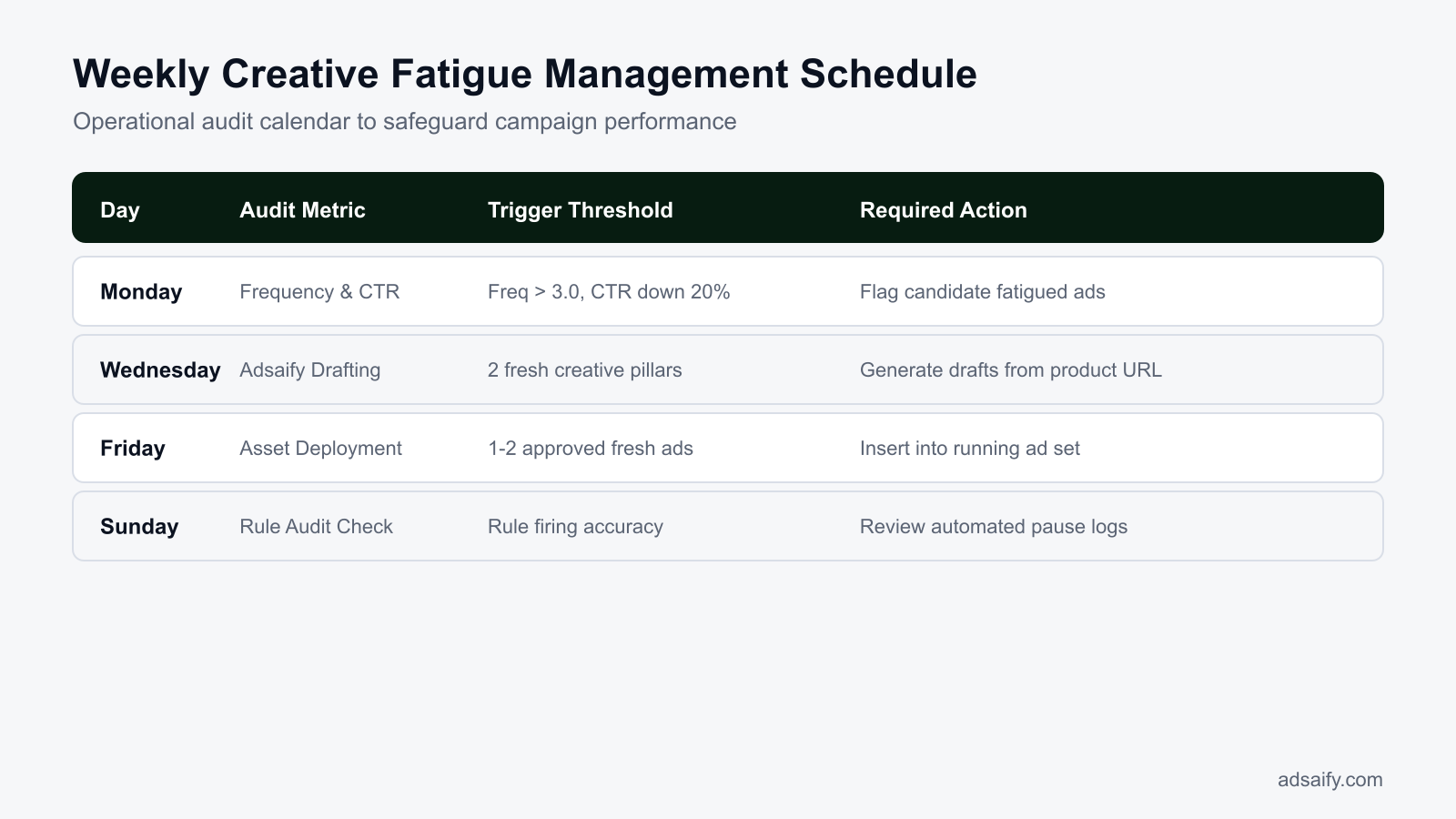
- Monday (Performance Audit): Review ad-level metrics in Meta Ads Manager. Frequency measures the average number of times an individual sees an ad, CTR (click-through rate) is the percentage of impressions resulting in clicks, and Quality Ranking is Meta's diagnostic metric comparing an ad's perceived quality against competing ads. Marketers flag ads showing rising frequency alongside declining CTR and dropping quality rankings as fatigued candidates.
- Wednesday (Asset Generation and Approval): Rather than designing from scratch during emergencies, marketers log in to Adsaify to generate three to five new image or video concepts based on their website URL, exploring new hooks, angles, and messaging to address flagged ad fatigue.
- Friday (Staged Deployment): Deploy verified backup ads into active campaigns to replace assets that triggered automated pause rules during the week.
- Creative Health Scorecard: Maintain a spreadsheet recording asset run-time, lifetime spend, and fatigue status to track inventory depth across active campaigns.
- Daily: Review account-level CPA (cost per acquisition, the cost required to generate one conversion) to ensure automated rules have paused severely underperforming assets.
- Weekly (Monday): Inspect Meta Ads Manager reporting tables to flag creative fatigue using Frequency, CTR, and Quality Ranking.
- Weekly (Wednesday): Generate visual concepts and copy angles in Adsaify to replenish depleted creative pipelines.
- Weekly (Thursday): Review generated drafts and approve compliant assets into the staging queue.
- Weekly (Friday): Publish approved creatives into live ad sets to maintain target active ad counts.
- Weekly (Friday): Update the creative health scorecard to ensure at least two weeks of pre-approved reserves remain available.
- Monthly: Conduct a comprehensive angle audit, retiring obsolete messaging themes and analyzing broad audience saturation.
Should I pause and rest a top-performing ad before fatigue actually begins?
No, advertisers should never pause an active, top-performing Meta ad before performance metrics confirm decline. Meta Ads Manager optimizes distribution using historical conversion data accumulated during the ad set learning phase; manually pausing a profitable ad abandons valuable delivery momentum. Instead, keep the winning ad running while introducing fresh backup concepts into the ad set. Only pause the mature ad when cost per acquisition permanently breaches target thresholds or frequency rises alongside steep conversion drops.
Which Mistakes Commonly Sabotage AI Creative Refreshing?
Performance marketers sabotage AI creative refreshing when they publish superficial visual adjustments, configure oversensitive automated pause rules, replace all active assets at once, and expect AI platforms to update live campaigns autonomously. These errors trigger ad set learning phase resets, waste advertising spend, and fail to alleviate audience creative fatigue.
Uploading Superficial Background Color Swaps
Generating the same product angle with minor background color swaps fails because Meta's visual recognition algorithms and human audiences perceive both versions as identical. When users scroll past the familiar silhouette, CTR stagnates while CPC (cost per click) rises. Fix this by varying compositional structures, switching between lifestyle scenes, product close-ups, and user-generated video demonstrations.
Setting Overly Aggressive Automated Rules
Setting automated rules to pause ads after small CPA fluctuations or low spend volumes prematurely disables winning ads experiencing normal day-to-day delivery variance. To fix this, configure automated pause rules in Meta Ads Manager or Adsaify with minimum conversion thresholds, evaluating performance over a rolling three-day window before triggering a pause.
Replacing Every Creative Simultaneously
Deleting or pausing all active ads within an ad set at the same time wipes out accumulated algorithmic signals and forces the ad set back into the learning phase (the calibration period where Meta tests delivery). Fix this mistake by deploying a rolling replacement strategy, introducing one or two new creatives weekly while retaining stable baseline performers.
Assuming AI Tools Manage Live Ad Swaps Autonomously
Marketers sometimes assume that AI software automatically swaps out fatigued ads directly in live campaigns. While platforms like Adsaify generate ad copy, images, and videos from website analysis, the user must review generated outputs and publish them to their Meta account. Fix this by scheduling weekly manual approvals to move generated drafts into production.
Neglecting Copy and Hook Variations
Pairing fresh AI visuals with tired primary text fails to resolve creative fatigue because copy hooks capture distinct user motivations. Fix this by pairing every visual refresh with contrasting headline angles, testing direct benefits, social proof, and pain-point positioning.
Ignoring Audience Saturation Indicators
Refreshing creatives repeatedly within an exhausted, narrow custom audience yields diminishing returns because identical individuals keep seeing the account's promotions. When creative refreshing yields no recovery, broaden demographic targeting or create an account on Adsaify to generate campaigns aimed at broader prospective audiences.
Is changing the camera angle of the product enough to eliminate creative fatigue?
No, changing only the camera angle of a product is rarely enough to eliminate creative fatigue on Meta. Meta's auction algorithms and prospective buyers quickly identify the asset as the same underlying commercial proposition, leading to persistent ad blindness and flatlining click-through rates. To effectively overcome creative fatigue, advertisers must alter the fundamental hook, shift the visual narrative style, or highlight an entirely different consumer benefit rather than making subtle perspective adjustments.
When Does AI Automation Fail to Prevent Creative Fatigue?
AI automation fails to prevent creative fatigue when underlying structural constraints—such as depleted audience sizes, uncompetitive pricing, broken checkout flows, or poor product-market fit—restrict conversions. In these instances, generating fresh visual assets merely accelerates budget burn because the failure stems from business fundamentals rather than creative wear-out.
Audience Saturation in Narrow Retargeting Pools
When an ad set targets an ultra-narrow Custom Audience, such as a 30-day website visitor list containing fewer than 5,000 individuals, creative rotation reaches a mathematical ceiling. Even if an advertiser introduces five new AI-generated variations weekly, Meta delivers those variations to the exact same pool of users. Frequency climbs rapidly, CPM (cost per mille, which is the cost per one thousand ad impressions) inflates, and performance collapses. The solution requires structural scaling rather than creative iteration: transitioning budget into Advantage+ shopping campaigns or testing broad targeting with zero demographic restrictions so Meta can locate fresh prospects.
Post-Click Friction and Macro Offer Deficits
Creative assets only control the click; they cannot execute the purchase. When an ad generates strong outbound CTR (click-through rate, the percentage of impressions that lead to a click off the platform) but conversions plummet, the bottleneck resides entirely post-click. Slow mobile landing page load times, hidden shipping costs revealed late in the funnel, uncompetitive product pricing, or a defective Meta Pixel tracking script will halt sales regardless of creative novelty. AI tools like Adsaify can identify performance drops through automated rules that pause bleeding ads, but automation cannot repair an unappealing core offer.
Pre-Creative Diagnostic Checklist
- Verify your targeted audience contains at least 50,000 active individuals to prevent immediate frequency spikes.
- Test landing page mobile load speed through Google PageSpeed Insights to ensure loading times remain under three seconds.
- Audit Google Analytics 4 checkout events to confirm cart-to-purchase drop-off rates do not exceed industry averages.
- Benchmark competitor pricing and delivery fees weekly to verify your offer remains economically viable.
- Inspect Events Manager inside Meta Ads Manager to confirm purchase events trigger without server deduplication errors.
- Consolidate fragmented ad sets to allow the Meta delivery algorithm sufficient conversion volume to complete the learning phase.
If my audience size is very small, will rotating creatives still fail to stop fatigue?
Yes, rotating creatives in a very small audience will still fail to prevent fatigue because the available impression pool remains mathematically fixed. Even if you introduce completely unique visuals, the same individuals encounter your brand multiple times daily across their feeds. This repeated exposure leads to cognitive habituation, rapid CPM inflation, and rising acquisition costs. To stop fatigue in small audiences, you must expand targeting parameters, lower daily budgets, or transition from narrow retargeting to broad prospective audiences.
What Are the Key Terms in Ad Fatigue and AI Campaign Management?
The key terms in ad fatigue and AI campaign management define how ad performance degrades over time, how machine learning systems optimise creative delivery, and how performance marketers monitor account stability. Mastering these core concepts allows advertisers to identify whether rising acquisition costs stem from user habituation, technical delivery boundaries, or flawed automated rules.
- Creative Fatigue: The performance degradation that occurs when an audience is overexposed to an ad asset, causing click-through rates to decline while frequency and acquisition costs rise.
- Banner Blindness: A cognitive habituation phenomenon where digital media consumers subconsciously ignore page elements that resemble conventional promotional advertisements or generic stock layouts.
- Creative Pillar: A distinct conceptual angle and messaging framework designed to address a specific customer motivation, pain point, or objection within a broader advertising campaign.
- Automated Rule: An algorithmic conditional statement configured inside Meta Ads Manager or tools like Adsaify to execute predefined actions, such as pausing an ad when performance drops below a threshold.
- Frequency: The average number of times each unique individual views a specific ad creative within a designated reporting timeframe.
- CPM (Cost Per Mille): The monetary cost an advertiser pays for every one thousand impressions delivered across Meta advertising inventory.
- CTR (Click-Through Rate): The metric calculated by dividing total ad clicks by total ad impressions, expressed as a percentage to measure initial creative resonance.
- ROAS (Return on Ad Spend): A financial metric calculating total gross revenue generated directly divided by total ad expenditure within a specific campaign.
- Learning Phase: The operational period after publishing where Meta machine learning models require approximately fifty conversion events per ad set to calibrate budget delivery.
- Advantage+ Creative: An algorithmic Meta Ads feature that dynamically adjusts media brightness, applies aspect-ratio templates, or serves automated text combinations to individual users.
- Hook Rate: A video diagnostic metric measuring the percentage of total impressions that watch at least the first three seconds of a video asset.
Can I save custom metric columns for these terms inside Meta Ads Manager?
Yes, you can save custom metric column presets inside Meta Ads Manager to monitor fatigue indicators simultaneously. In the Ads Manager reporting interface, click the Columns dropdown menu, select "Customize Columns," and choose metrics such as Frequency, CTR (Outbound), Hook Rate (via custom formula), and CPM. Once selected, check the "Save as preset" box in the bottom-left corner, enter a label such as "Creative Fatigue Audit," and click "Apply" to retain this diagnostic view across campaigns.
How to Maintain Sustainable Creative Health in Meta Ads?
Managing creative fatigue requires a consistent, structured routine. First, monitor your seven-day ad frequency alongside cost per acquisition and click-through rates to identify early warning signs of audience exhaustion. Next, pause declining ads instead of deleting them to preserve historical delivery data. Then, introduce new creative concepts featuring distinct visual hooks, formats, and angles rather than minor tweaks. Finally, establish automation rules to pause fatigue-stricken ads automatically before they inflate overall acquisition costs.
Audit your Meta Ads Manager account today by filtering for active ads across the last seven days. Identify any asset where rolling frequency exceeds 2.5 alongside a downward trend in click-through rate. Pause that fatigued asset immediately, review your customer feedback or website messaging, and produce two fresh creative variations with completely different visual hooks to re-engage prospective buyers.
Want to see this in your own account? Enter your website address and Adsaify drafts the campaign for you. The first ad is free. Try it now or log in.
Frequently Asked Questions (FAQ)
1. Should I delete or simply pause an ad when creative fatigue sets in?
Pause the ad instead of deleting it. Pausing stops Meta from spending budget on an exhausted creative while preserving historical reporting data, social proof, and performance learnings. Deleting an ad permanently removes it from your standard Ads Manager reporting views and prevents you from reactivating the creative later after an audience cooldown period.
2. Does Adsaify automatically swap new creatives into live campaigns on its own?
No, Adsaify does not automatically swap or refresh creatives in a running campaign by itself. Adsaify generates campaign structures, ad copy, images, and videos based on your business URL, and offers automation rules to pause underperforming ads based on performance triggers. However, advertisers must manually select, review, and publish new creative assets to their campaigns.
3. What frequency benchmark should indicate creative fatigue in Meta campaigns?
Frequency measures the average number of times an individual sees an ad. In broad prospecting campaigns, an ad frequency exceeding 2.0 to 2.5 over a seven-day rolling window typically indicates creative fatigue, particularly if click-through rates decline simultaneously. In smaller retargeting audiences, fatigue usually emerges once weekly frequency crosses 4.0 to 5.0.
4. How many fresh creative assets should be produced weekly to prevent fatigue?
The necessary creative volume depends on weekly ad spend and audience size. For example, an account with a 500 to 1,500 USD weekly budget typically maintains performance stability by introducing two to four distinct creative variations each week. Higher-spend accounts exhaust audiences faster, requiring five to ten new visuals, angles, or video concepts weekly.
5. Does using Dynamic Creative Optimization (DCO) solve creative fatigue by itself?
Dynamic Creative Optimization (DCO) delays fatigue but does not solve it permanently. Meta's delivery algorithm quickly identifies and delivers one preferred combination of image, headline, and text, allocating most of the budget to it. Once that dominant combination saturates the target audience, performance drops, requiring entirely new visual assets to maintain delivery efficiency.
6. Does adding a fresh ad creative reset the ad set learning phase?
Adding a new creative asset can reset the learning phase if Meta interprets the change as a significant edit. Introducing several ads at once or significantly altering daily spend often re-triggers the learning state. To avoid disrupting stable delivery, introduce new creatives gradually into running ad sets or evaluate them in a dedicated testing campaign.
7. Can a previously fatigued winning creative perform well again after a few months?
Yes, a previously successful creative can perform well again after a cooldown period of two to three months. Audience churn brings new prospective customers into your targeting pool, while existing users forget past ad exposures. Reactivating a proven winning creative alongside new headlines or updated copy frequently restores strong conversion rates without new media production.
8. How do you avoid Meta policy violations when generating ad creatives with AI?
To prevent policy violations with AI-generated creatives, review every visual and text element before publishing. Ensure images avoid non-existent features, exaggerated physical transformations, or misleading interactive buttons. Verify that AI-generated copy avoids prohibited claims, personal attributes regarding sensitive traits like financial status or health, and unrealistic guarantees that prompt automated policy rejection by Meta.
How can you try this with Adsaify?
The quickest way to apply the steps in this article to your own account is to try them. Adsaify analyses your business from your website address, drafts the campaign with an audience, ad copy, creative and a budget suggestion, and publishes it to your own Meta ad account once you approve.
- Your first ad is free: there is nothing to lose by trying.
- Your own ad account: the campaign runs in your Meta account and you stay in control.
- Images and video: generate ad creatives with AI or promote an existing Instagram post.
Create a free account and try your first ad · Already have an account? Log in.