Short answer: Choose an AI ad creation tool by testing it on one of your own products, not by its demo. A good one reads your product link, writes copy in several angles, makes images and video in Meta's formats, suggests audience and budget, publishes to your own ad account only after you approve, and watches results with rules you can read. If a tool stops at a picture or a headline, it is a design helper, not an ad creation tool.
If you run an online store, you have seen dozens of products that promise to "make ads with AI." Some produce one nice image and stop there. Some write a headline and leave you alone in Ads Manager. A few handle the whole job from product page to live campaign. From the outside they look alike, and pricing pages rarely say what you actually get.
Choosing badly is expensive in a quiet way. You pay a monthly fee, you still spend evenings rebuilding campaigns by hand, and the ad spend you send to Meta teaches you very little because the setup was weak. Choosing well means one tool takes over most of the repetitive work while you keep control of the money and the account.
This is a buyer's guide. You will find the types of tools, the features a store needs, a scoring checklist for any tool (ours included), questions to ask before paying, a free-trial test plan at $20 a day, real costs, red flags, a weekly routine and the limits of what any tool can do.
Key Takeaways
- An AI ad creation tool should cover the whole path: link, analysis, creatives, copy, audience and budget, approval, publishing and ongoing rules.
- Score every tool on the same ten criteria with your own product; a demo on a landing page proves very little.
- Ads should run in your own Meta ad account, with your page and pixel, and you should pay ad spend directly to Meta.
- Count two costs separately: the tool's subscription and the ad budget you pay to Meta. The second is usually the bigger one.
- Run one real product for about a week on a small daily budget, with a spend-limit rule, before you commit to a paid plan.
- The tool replaces repetitive work, not your judgment: you still approve what goes live and decide the budget.
What is an AI ad creation tool, and what should it do?
An AI ad creation tool is software that turns information about your business into ready-to-run ads. The input is usually a website link, a product page or a short description. The output should be a campaign: creatives, copy, an audience, a budget and a way to publish and manage it on platforms like Facebook and Instagram.
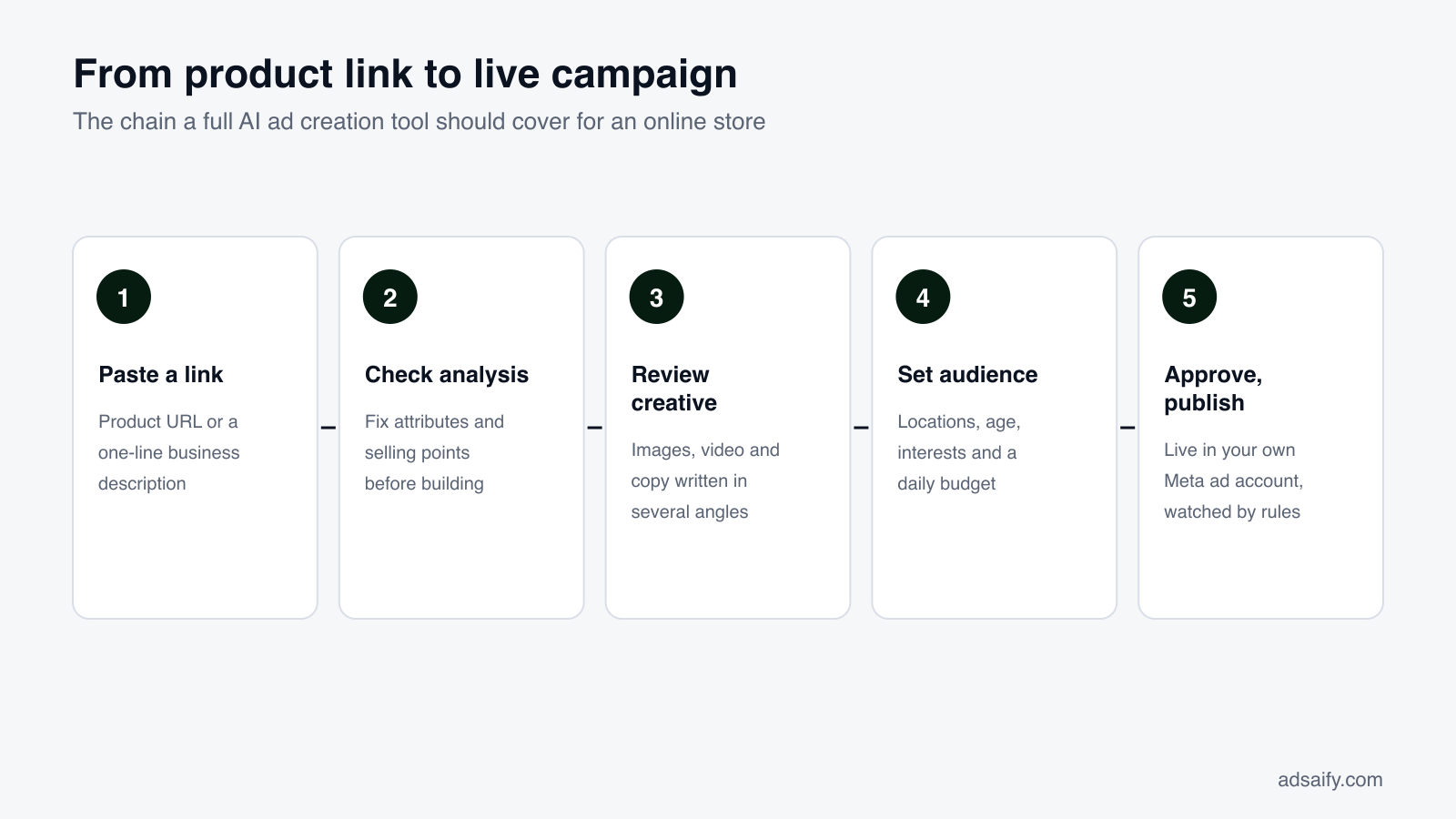
The easiest way to judge any tool is to think of advertising as a chain. Every link the tool skips becomes your job again. For an online store, the chain looks like this:
- Understand the product. Read a product URL or a one-line description and pull out the name, attributes and the selling points a buyer cares about.
- Turn that into a plan. Propose a campaign goal (sales, traffic, engagement, awareness) and a sensible way to scale it.
- Make creatives. Feed images, story formats, carousels and short vertical video for Reels.
- Write copy. Several headlines and primary texts built on different reasons to buy.
- Suggest audience and budget. Locations, age, gender, interests and, for stores with a catalog, people who viewed or added to cart without buying.
- Publish after approval. Send the campaign to your own Meta ad account once you have reviewed it.
- Manage and automate. Show spend, clicks, CTR, CPC and results in one place, and run rules that pause or adjust when numbers move.
A tool that covers steps one to seven replaces a workflow. A tool that covers only step three or four replaces one person in that workflow, and you still do the rest. Neither is wrong, but you should know which one you are buying, because the price difference is often small while the time difference is large.
What types of AI ad tools are there, and which one do you need?
The label "AI ad tool" is used for very different products. Before comparing features, decide which category you are shopping in. There are four common options for a store owner, and only one of them is software that runs the whole chain.
Creative-only generators
These produce images or videos from a prompt or a product photo. They can be very good at visuals. But you still write the copy, build the campaign in Ads Manager, choose the audience and watch the results yourself.
Copy tools
These write headlines, primary texts and descriptions. They help when writing is your bottleneck. Campaign setup, creatives and publishing stay with you.
End-to-end campaign tools
These analyze the product, make creatives and copy, recommend targeting and budget, publish to the ad platform and help you manage results afterwards. This is what most store owners mean when they search for an AI ad creation tool.
Agencies and freelancers
People, not software. A good agency brings experience and judgment; a freelancer can be flexible and affordable. The trade-offs are monthly retainers, slower turnarounds and, sometimes, less visibility into your own account.
| Option | What you get | What stays with you | Best fit |
|---|---|---|---|
| Creative-only generator | Images or video | Copy, campaign setup, targeting, publishing, monitoring | Teams that already run ads and need more visuals |
| Copy tool | Headlines and texts | Creatives, setup, targeting, publishing, monitoring | Marketers who struggle with writing |
| End-to-end campaign tool | Analysis, creatives, copy, targeting, publishing, rules | Approval, budget decisions, product and stock knowledge | Store owners without a marketing team |
| Agency or freelancer | Strategy, production and management by people | Briefing, approvals, paying a retainer | Brands with budget for ongoing service |
If you have no designer, no media buyer and limited time, the end-to-end category is usually the one to evaluate. If you already have a strong in-house team, a creative or copy tool may be enough. And nothing stops you from mixing: some stores use a tool for day-to-day campaigns and a freelancer for a seasonal shoot.
Which features does an online store really need?
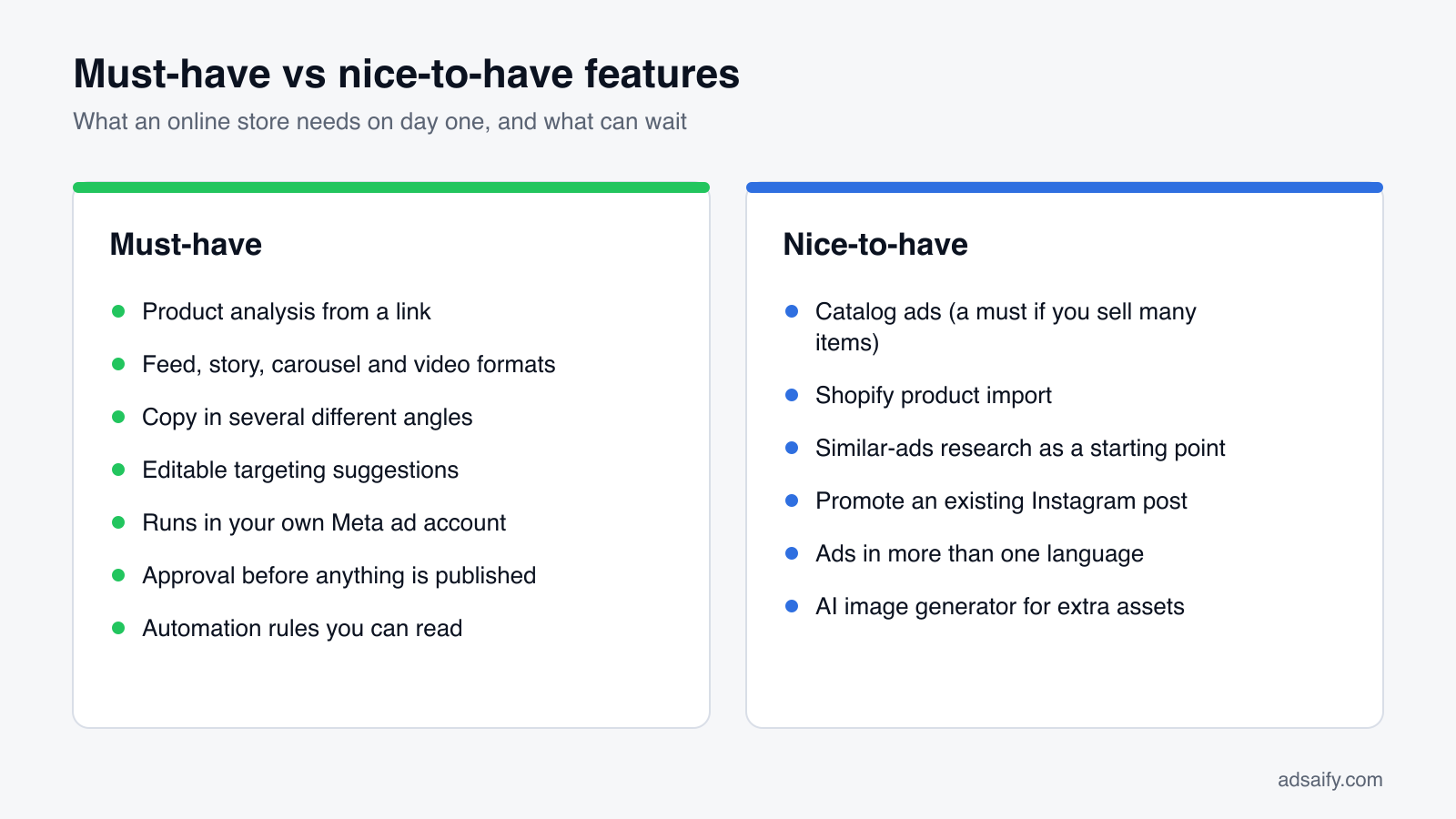
Feature lists on pricing pages are long. For an e-commerce seller, eight features decide whether a tool saves you time or just moves the work around. Check each one with your own product.
1. Product analysis from a link
You should be able to paste a product URL or describe the business in a sentence, and get back the product's attributes and real selling points. If you must type everything by hand, the "AI" is thin.
2. Creative formats Meta actually uses
Feed images, story sizes, carousels and short vertical video. One square image will not cover Feed, Stories and Reels equally well.
3. Copy in different angles
Benefit, social proof, urgency, pain, emotion and ease are different reasons to buy. Ten rewordings of one sentence are not ten angles.
4. Targeting suggestions you can edit
Recommended locations, age range, gender and interests, all visible and changeable before launch.
5. Your own ad account
Campaigns should run in your Meta ad account, with your Facebook page and your pixel, and you should pay ad spend to Meta directly.
6. Approval before publish
You review creatives, copy, audience and budget, then press publish yourself. Nothing should go live on its own.
7. Automation rules you can read
Plain "if this, then that" rules on metrics like spend, purchases, CPC, CTR, ROAS or cost per result, with actions such as pausing or changing budget. Vague "AI optimization" with no explanation is not the same thing.
8. Catalog and Shopify support
If you sell many products, you need catalog ads and audiences such as "viewed or added to cart, no purchase." If you sell on Shopify, product import saves hours. You can read more on store-specific features on our e-commerce page.
How do you score an AI ad creation tool? A ten-point checklist
Comparing tools by memory does not work; by the third trial, everything blurs together. Use one scorecard for every tool and fill it in while you test. Give each criterion 0, 1 or 2 points: 0 if the tool does not do it, 1 if it does it partly or needs a lot of manual work, 2 if it does it well with your product. The maximum is 20.
| Criterion | What to check with your own product | 0 points if… | Score (0–2) |
|---|---|---|---|
| 1. Analysis | Reads your link and extracts real attributes and selling points | You fill in every field manually | __ |
| 2. Strategy | Proposes a goal and a scaling approach you can change | No guidance on objective | __ |
| 3. Creative formats | Images, video, carousel, story and Reels sizes | One image size only | __ |
| 4. Copy angles | Several headlines and texts that say different things | One generic text with your product name | __ |
| 5. Targeting | Editable locations, demographics, interests, catalog audiences | No targeting or a fixed template | __ |
| 6. Own ad account | Runs in your Meta account, your page and pixel | Runs in the vendor's account | __ |
| 7. Approval and publish | Review, then publish directly to Meta | You download files and rebuild by hand | __ |
| 8. Management view | Status, budget, spend, clicks, CTR, CPC, results | No view of results after launch | __ |
| 9. Automation rules | Readable rules on spend, CPC, CTR, ROAS, cost per result | "Optimization" you cannot see or control | __ |
| 10. Pricing and trial | Clear plans, a free first try, no long contract | Annual commitment before any test | __ |
How to read the total
There is no magic cut-off, but the pattern matters more than the sum. A tool that scores 0 on "own ad account" or "approval and publish" deserves a hard look even if everything else is perfect, because those two decide who controls your money. Weight them double if it helps you decide.
What questions should you ask before paying for a tool?
Sales pages answer the questions vendors like. These are the ones that matter to a store owner. Ask them in a chat, in a demo or by email, and keep the answers next to your scorecard.
About the account and the money
- Whose ad account do the ads run in? You want "yours," with your page and pixel.
- Who pays Meta for ad spend? Ideally you pay Meta directly, so there is no hidden markup on the media budget.
- What happens to my campaigns if I cancel? They should stay in your ad account, with their history.
About control
- Can anything be published without my approval? The answer should be no.
- What exactly do automation rules change, and how often are they checked? You want a specific answer, not "the AI handles it."
- Can I edit the copy, audience and budget before launch? Every field should be editable.
About fit and cost
- Which ad formats and languages are supported? Check the ones your customers use.
- Does it work with my catalog or store platform? Important if you sell many products or use Shopify.
- What counts as one unit of usage? Analyses, image tokens, ads or seats; know what you burn through.
- Is there a contract, and can I cancel anytime? Monthly with no lock-in is easiest to test.
If a vendor cannot answer the first four clearly, you have learned what you needed to know. Clear answers do not prove a tool is good, but vague answers on account ownership and approval are a reliable warning sign.
How much does an AI ad creation tool really cost?
When people compare tools, they compare subscription prices. That is only half the bill. Running Meta ads with any tool involves two separate costs, and mixing them up leads to bad decisions.
Cost 1: the tool fee
This is what you pay the software company, usually monthly. Plans are often limited by units such as analyses, AI image tokens, ads or users. Read what one unit means, because a cheap plan with few units can cost more per ad than a bigger one.
Cost 2: the ad spend you pay to Meta
This is the budget Meta charges for showing your ads. At $20 a day, a 30-day month is about $600 of ad spend, which is far more than most tool subscriptions. That is why the quality of the setup matters more than a few dollars of difference in the tool fee: a weak campaign wastes the larger number.
Hidden costs to watch
Your own time is a cost. So are extra seats, add-ons for video, setup fees, minimum contract terms and markups on ad spend when the money passes through a vendor.
| Cost item | Who you pay | Typical form | Question to ask |
|---|---|---|---|
| Tool subscription | Software company | Monthly plan with usage units | What counts as one unit? |
| Ad spend | Meta, ideally directly | Daily or lifetime budget | Does any of it pass through the vendor? |
| Creative add-ons | Software company | Extra tokens or video credits | Is video included in my plan? |
| Contract terms | Software company | Monthly or annual commitment | Can I cancel anytime? |
| Your time | You | Hours per week on setup and checks | Which steps are still manual? |
For reference, Adsaify works like this: your first ad is free (signup includes one ad analysis and two AI image tokens, no credit card), Starter is $25 a month and Pro is $50 a month, with no long-term contract. Ad spend is paid by you directly to Meta and is not part of the subscription. Current details are on the pricing page. Whatever tool you look at, put both numbers, tool fee and planned ad spend, side by side before deciding.
What red flags should make you walk away?
Most weak tools are not dishonest; they are simply narrower than their marketing suggests. A few warning signs, though, point to problems that cost real money. If you see one of these during a trial, stop and ask questions before going further.
Ads run in someone else's account
If campaigns live in the vendor's ad account, you may not see raw data, your pixel does not build history for you, and you lose everything when you leave.
Spend flows through the vendor
When you pay the tool and the tool pays Meta, it is hard to know how much reached the ads. Paying Meta directly is simpler to check.
Publishing without approval
A tool that launches campaigns on its own, especially in your first weeks, can spend before you have looked at anything.
"Optimization" you cannot see
If the tool changes budgets or pauses ads but cannot show the rule behind it, you cannot learn from it or correct it.
Results promised in advance
No tool can promise a specific return on ad spend for your product. Results depend on the product, price, offer, site and market. A guaranteed number is a sales line, not a forecast.
Lock-in before testing
Annual contracts or setup fees before you have run a single ad mean the vendor is carrying no risk and you are carrying all of it.
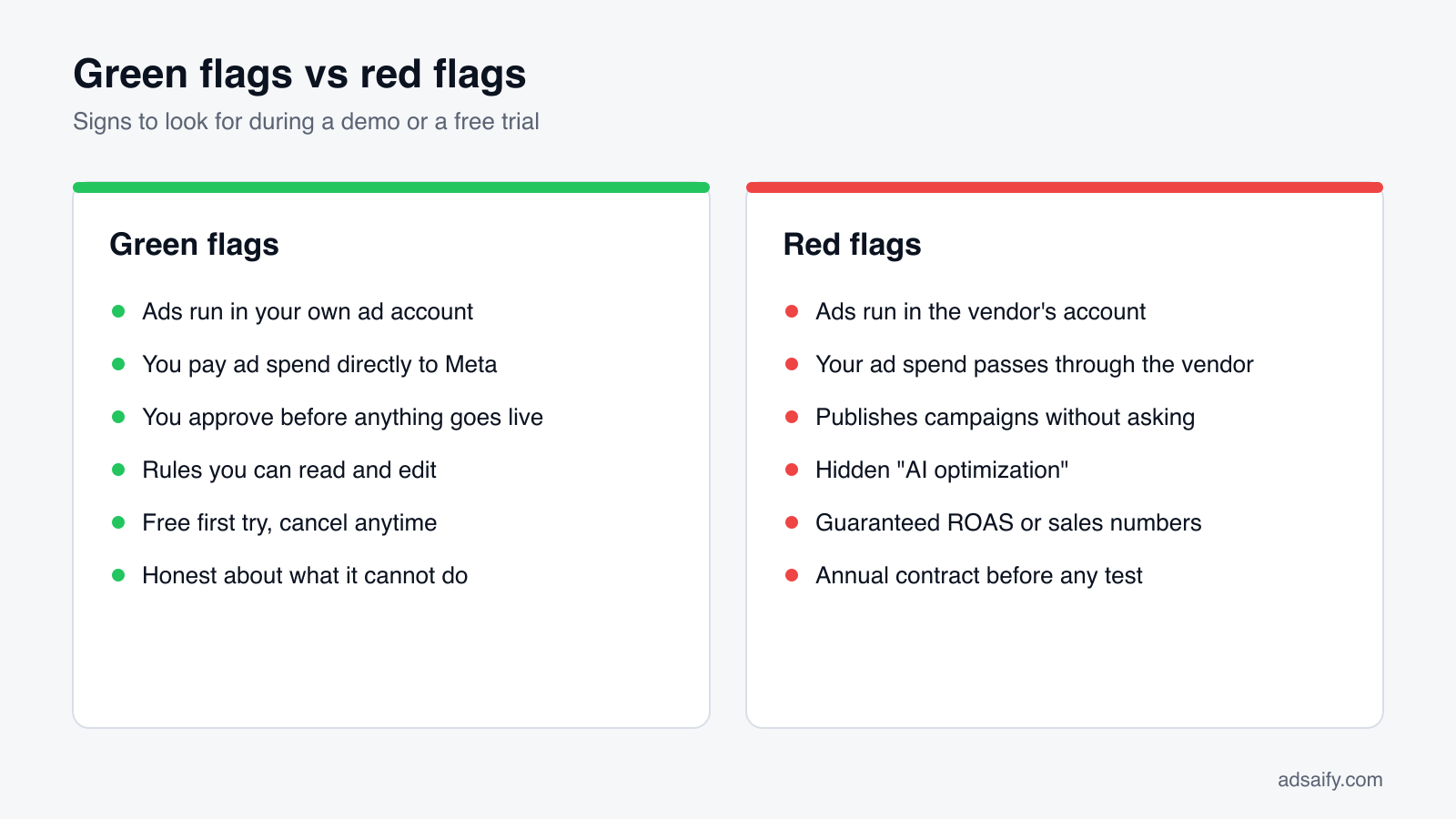
None of these flags is about whether the images look nice. They are all about control: of the account, the money and the decisions. That is where a bad choice hurts most, so it is where your evaluation should be strictest.
Who owns the data and the ad account?
This question deserves its own section because it outlives the tool. Tools come and go; your ad account, your pixel data and your audience history are assets you build over years.
Why your own Meta ad account matters
When ads run in your own ad account, every campaign, every result and every learning stays there. Your Meta pixel collects events from your site for your account. Custom audiences built from site visitors or cart activity belong to you. If you switch tools or bring in an agency later, they start from your history, not from zero.
What you connect, and what you keep
A typical end-to-end tool asks you to connect your business assets: ad accounts, Facebook pages and Meta pixels. That connection lets the tool create and manage campaigns on your behalf. It should not transfer ownership. You can usually remove a tool's access from your Meta business settings at any time.
| Asset | Who should own it | Why it matters |
|---|---|---|
| Meta ad account | You | Holds campaigns, results and billing history |
| Facebook page and Instagram account | You | Ads appear under your brand; comments and followers stay with you |
| Meta pixel and its event data | You | Feeds optimization and retargeting audiences |
| Custom and catalog audiences | You | Reusable for future campaigns with any tool |
| Creatives and copy you approved | You (check the terms) | You may want to reuse them elsewhere |
| Tool login and settings | Tool vendor | Fine, as long as the assets above stay yours |
With Adsaify, campaigns run in your own Meta ad account with your page and pixel, and you pay ad spend directly to Meta. Whatever you choose, confirm this before your first campaign, not after your fiftieth.
How do you test a tool during a free trial?
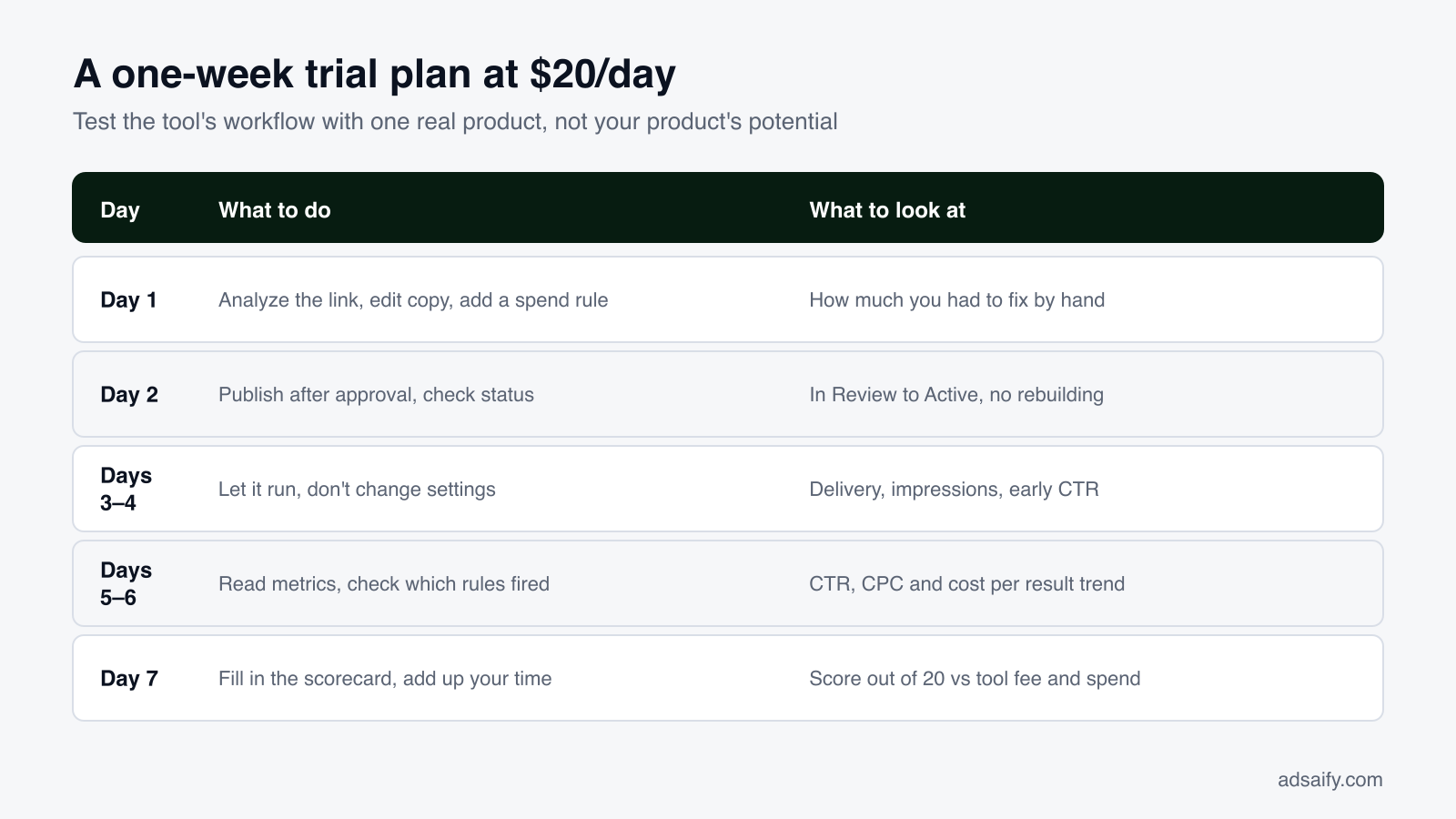
A free trial is only useful if you test the right thing. Many people use it to look at a few generated images and decide. The better test is to run one real ad through the whole chain, with real money but a small budget, and see what you had to do by hand.
Before you start
- Pick one product with steady demand, a clear price and a clear selling point.
- Make sure your Meta ad account, Facebook page and pixel are set up and working.
- Decide the most you are willing to spend on the test, for example $20 a day for about a week.
- Print or copy the ten-point scorecard so you can fill it in as you go.
What to test in the first ad
- Analysis: paste the product link. Did it get the product right? Did you have to correct the selling points?
- Creatives: do you get feed, story and video formats? Would you be happy to show them to customers?
- Copy: do the headlines and texts use different angles? Do any make claims you cannot support?
- Audience and budget: are the suggestions sensible for your market, and can you change them?
- Publish: does it go to your own ad account after your approval, without rebuilding anything?
- Rule: can you set a spend limit rule before the ad starts spending?
What not to judge too early
One week at $20 a day is enough to judge the tool's workflow, not to judge your product's long-term potential. Look at delivery, CTR and CPC trends, and how much time you spent, rather than expecting a final answer on sales.
What does choosing and testing look like with a real product?
Let us walk one product through a trial in Adsaify, to show what to look at at each step. The store is yourstore.com, and the product is a Floral linen midi dress. We will not predict results; the point is the settings and the checks.
Step 1: Paste the link and check the analysis
You paste the product URL into "Site Link or Business Description" and choose English as the ad language. The app shows Parsing URL, Extracting Data, AI Analysis and Finalizing, then the Product DNA (name, linen fabric, midi length, floral print) and Valuable Selling Points: Hand-painted print, Breathable linen, Summer-ready. If anything is wrong, fix it now; every creative builds on it. Score criterion 1.
Step 2: Review the plan
The tool proposes an Ad Campaign Goal and Strategy. For one product with a clear price, Sales is the natural goal. Score criterion 2.
Step 3: Creatives and copy
You check feed images, a story format and a short Reels-style video, then read the copy angles. Keep what sounds like your brand and delete any claim you cannot back up. Score criteria 3 and 4.
Step 4: Audience, budget, publish, rule
You confirm the settings below, select your Meta ad account, page and pixel, and press publish. The campaign shows as In Review, then Active. Score criteria 5 to 9.
| Setting | Value in the example | What to look at |
|---|---|---|
| Ad Goal | Sales | Does it match what you want to measure? |
| Daily Budget | $20, Advantage+ Campaign Budget on | Is it an amount you can run for a week? |
| Locations | Countries or cities you ship to | No regions you cannot deliver to |
| Audience | Women 25–44, fashion and summer clothing interests | Editable, not locked |
| Copy angles | Benefit, Emotion, Ease, Urgency | Each one says something different |
| Safety rule | If spend passes your limit and purchases are 0, pause | Checked every 30 minutes |
After a few days you look at CTR, CPC and cost per result, add up your scorecard and note how many minutes the whole flow took. That total, plus your two cost numbers, is your decision.
How does an AI ad creation tool fit into a small team's workflow?
A tool changes who does what. In a traditional setup, a strategist writes a brief, a designer makes visuals, a copywriter writes texts and a media buyer builds the campaign, with handoffs and revision rounds between them. With an end-to-end tool, most of that production happens in one place, and the people around it move into reviewing and deciding.
If you work alone
You are the approver. The tool does the analysis, creatives, copy and setup; you check facts, adjust the budget and press publish. Block a fixed time each week for review so ads do not run unchecked.
If you have two or three people
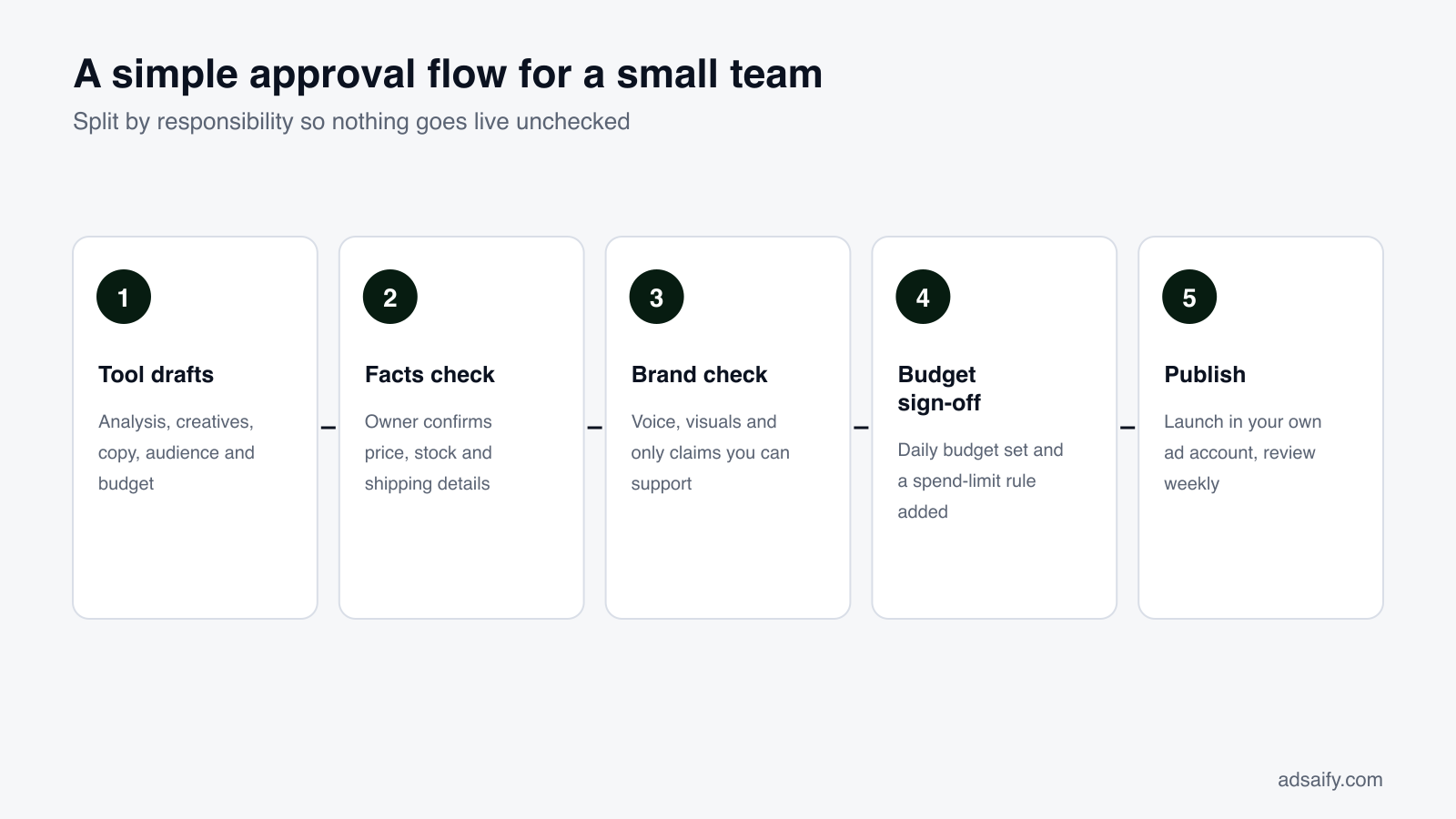
Split by responsibility, not by step. One person owns the product facts and offers (prices, stock, shipping). One person owns the brand voice and approves creatives and copy. One person owns the budget and the rules. In many small stores, the owner holds the budget role no matter who else helps.
If you also work with a freelancer or agency
Because campaigns sit in your own ad account, outside help can see the same data you see. A common split is that the tool handles everyday product campaigns, while a freelancer handles a seasonal photo shoot or a larger launch.
Agree on an approval rule
Write down, in one sentence, what must be checked before anything goes live: for example, "prices, claims and budget are confirmed by the owner." A tool that requires approval before publishing makes this easy to enforce; the rule makes it a habit.
What weekly routine keeps an AI ad tool working for you?
A tool reduces the work, but it does not remove the need to look. A short, fixed routine is what turns automation into control. This one takes about thirty minutes a week for a store running a few campaigns.
- Monday: check status. Open your campaign list. Is anything stuck In Review, paused by a rule or out of budget?
- Read the core numbers. For each active campaign, look at spend, impressions, clicks, CTR, CPC and results for the last seven days. Compare with the week before, not with yesterday.
- Review rule actions. Which rules fired this week, and was each action right? Adjust thresholds that are too strict or too loose.
- Check the product side. Stock, prices and shipping times. Pause ads for anything that sold out or changed price.
- Refresh one thing. If CTR is falling on a campaign, test a new creative or a new copy angle rather than changing everything.
- Decide one budget move. Keep, lower or raise the budget on one campaign based on cost per result, in small steps.
- Write two lines of notes. What you changed and why, so next week's review starts from facts.
Once a month, add one more step: go back to your scorecard and ask whether the tool still covers what you need. Your store changes, and so do your needs. Our page on Meta ad automation explains how rules can carry part of this routine between reviews.
What are the most common mistakes when choosing an AI ad creation tool?
Most buying mistakes come from evaluating the easy part and skipping the expensive part. These are the ones we see most often, each with a simple fix.
- Judging by the demo image. Landing pages show the best output from the best input. Fix: test with an ordinary product photo from your own store.
- Stopping at the creative. A nice image is the cheapest part of advertising. Fix: run the full chain to a published ad during the trial.
- Comparing only subscription prices. Ad spend is usually the bigger number. Fix: write down tool fee and planned ad spend side by side.
- Giving up control of the ad account. Campaigns in a vendor's account leave you without history. Fix: require your own ad account, page and pixel.
- Skipping the approval step. Auto-publishing can spend before you check prices or claims. Fix: choose a tool where you publish yourself, and use it every time.
- Launching without a rule. A campaign can overspend while you sleep. Fix: set a spend limit rule before the first ad goes live.
- Starting with a big budget. More money does not fix a weak setup. Fix: start with one product and a small daily budget, then scale in steps.
- Testing too many tools at once. Your attention, not the tools, becomes the limit. Fix: test two at most, one after the other, with the same product.
Key terms
These terms come up when you compare tools and read your results. You do not need to memorize them, but knowing them makes vendor answers easier to judge.
- AI ad creation tool: software that turns a product link or description into creatives, copy, targeting and a publishable campaign.
- Ad account: the Meta account that holds your campaigns, results and billing; ideally owned by you.
- Meta pixel: a code snippet on your site that sends events such as views, add-to-carts and purchases back to Meta.
- Copy angle: the reason to buy a text is built on, such as benefit, social proof, urgency, pain, emotion or ease.
- Creative: the visual part of an ad, such as an image, a carousel, a story or a video.
- Advantage+ Campaign Budget (CBO): a Meta setting that spreads one campaign budget across ad sets automatically.
- Catalog ads: ads that show products from your product catalog to people Meta thinks are most likely to want them.
- Automation rule: an "if … then …" instruction that pauses or adjusts a campaign when a metric crosses a threshold.
- CTR (click-through rate): the share of people who clicked after seeing your ad.
- CPC (cost per click): how much you paid on average for each click.
- Cost per result: what you paid for each outcome you optimized for, such as a purchase.
- ROAS (return on ad spend): revenue attributed to ads divided by what you spent on them.
What can't an AI ad creation tool do?
Being honest about limits helps you set the right expectations, and helps you spot vendors who promise too much. Even a very good tool has clear boundaries.
It cannot fix the product or the offer
If the price is out of line with the market, the product page is slow or shipping is unclear, better ads mostly bring more people to the same problem. The tool works on the ad, not on the store.
It cannot guarantee results
Meta decides delivery in an auction, and buyers decide whether to buy. A tool can improve the setup and react faster with rules, but no one can promise a specific ROAS for your product.
It does not know your margins, stock or plans
A tool can suggest a budget; only you know what you can afford, what is about to sell out and which product you want to push next month.
It is only as accurate as its input
If your product page is thin or wrong, the analysis will be too. Check the extracted selling points before anything is built on them.
It does not remove the need for judgment
Generated copy can be close but not quite right for your brand, or can hint at claims you cannot support. Reading before publishing stays your job.
It does not replace platform rules
Every ad still goes through Meta's review and must follow its advertising policies. A tool can help you prepare compliant ads, but the final decision on approval is Meta's.
Seen this way, an AI ad creation tool is a fast, tireless assistant for the production and monitoring work. The strategy, the offer and the final yes remain with you, which is exactly where they should be.
Frequently Asked Questions (FAQ)
1. What is the difference between an AI ad generator and an AI ad creation tool?
The terms are often used interchangeably. In practice, many generators only produce images or text. A full AI ad creation tool goes further: it analyzes your product, creates creatives and copy, recommends audience and budget, publishes to your ad account after approval and helps you manage results with rules. When comparing, check which of those steps are actually included.
2. How long should I test a tool before deciding?
About a week with one real product is usually enough to judge the workflow: how good the analysis was, how much you edited, whether publishing worked and whether rules behaved as expected. It is not enough to judge your product's long-term sales potential, so separate those two questions when you decide.
3. Do I need my own Meta ad account?
You should insist on it. With your own ad account, page and pixel, the campaign history and audiences stay with you even if you change tools. With Adsaify, ads run in your own Meta ad account and you pay ad spend directly to Meta, so billing and data stay under your control.
4. Is the tool fee the same as the ad budget?
No. The tool fee is what you pay the software company. The ad budget is what Meta charges to show your ads. At $20 a day, ad spend alone is around $600 for a 30-day month, so plan both numbers. A cheap tool that produces weak campaigns can cost more overall than a better one.
5. Can an AI ad creation tool replace an agency?
It can replace much of the repetitive work: product research, creatives, copy variations, campaign setup and routine monitoring. It does not replace your knowledge of margins, stock and customers, and it does not offer the hands-on strategy some agencies provide. Some stores use a tool instead of an agency; others use both.
6. Is anything published without my approval?
It should not be, and that is worth checking during any trial. In Adsaify you review creatives, copy, audience and budget, then select your Meta account and publish yourself. The Shopify app prepares sales ads for your products but does not publish anything until you approve it.
7. What should my first automation rule be?
A spend limit is the safest start: if spend passes an amount you choose and purchases are still zero, pause the ad set. It caps the cost of a weak test. Once you have a few weeks of data, you can add rules on CPC, CTR or cost per result. Adsaify checks rules every 30 minutes.
8. Does the tool work for stores with many products?
Look for catalog support. Adsaify supports Advantage+ catalog ads, product sets and catalog audiences such as "Broad audience (recommended)" and "Viewed or added to cart, no purchase" over the last 14 days. On Shopify, the app imports products automatically and prepares a sales ad for a product in minutes.
How can you try this with Adsaify?
The best way to choose an AI ad creation tool is to run one of your own products through it. Paste a product link, check the analysis, review the creatives and copy, look at the recommended plan and score it against the checklist above before you decide anything. You can see how the Adsaify AI ad generator works first.
- Your first ad is free: signup includes one ad analysis and two AI image tokens, no credit card needed.
- Your own ad account: campaigns run in your Meta ad account and you pay ad spend directly to Meta.
- Images and video: feed images, carousels, story formats and Reels-style video, with copy in several angles.
Create a free account and try your first ad · Already have an account? Log in.