Short answer: An AI ad generator turns one product link into a ready-to-publish Meta ad. You paste the URL (or write a short description), the tool reads the page, extracts the product details and selling points, proposes a strategy, then prepares images, videos, copy, an audience and a budget. You review and edit every piece, then publish it to your own Facebook and Instagram ad account.
Most articles about AI ad tools stop at a feature list. This one is a hands-on walkthrough. It follows one product through every screen, in order: what to put on the product page before you start, what to paste, how to read the analysis, which format to pick, how to edit the copy, how to set audience and budget, how to publish, and what to do (and not do) in the first 72 hours.
The example product is a Floral linen midi dress sold on yourstore.com. The selling points the tool finds are "Hand-painted print", "Breathable linen" and "Summer-ready". The audience is women aged 25 to 44, and the test budget is $20 per day. If you sell something else, swap the details as you read. The steps are the same for a candle, a supplement or a phone case.
Key Takeaways
- The quality of the product page decides the quality of the analysis. Fix the page first, then paste the link.
- Read the Product DNA and selling points before anything else. Every headline, image and video is built on them.
- One product becomes several formats at once: feed image, UGC/Reels video, carousel and story. Start with two or three, not all of them.
- The six copy angles (Benefit, Social Proof, Urgency, Pain, Emotion, Ease) let you test reasons to buy, not just pictures.
- Nothing goes live without your approval. The ad runs in your own Meta ad account and you pay Meta directly.
- In the first 72 hours, watch more than you change. Let simple automation rules catch the obvious problems.
What does an AI ad generator actually do?
An AI ad generator takes what already exists about your product and turns it into the pieces a Meta campaign needs. Instead of moving between a design tool, a copy document, a spreadsheet and Meta Ads Manager, you go through one guided flow.
In practice it does five jobs:
- Understanding the product: reading the page and summarising what the product is, who it is for and why someone would buy it.
- Planning: suggesting an ad goal (such as Sales or Traffic) and a starting strategy, plus a way to scale if the ad works.
- Creating: producing images, videos, carousels and story versions, and several headlines and primary texts in different angles.
- Setting up: recommending audiences, locations and a daily budget.
- Launching and managing: publishing to Meta, showing results in a campaign list and running automation rules.
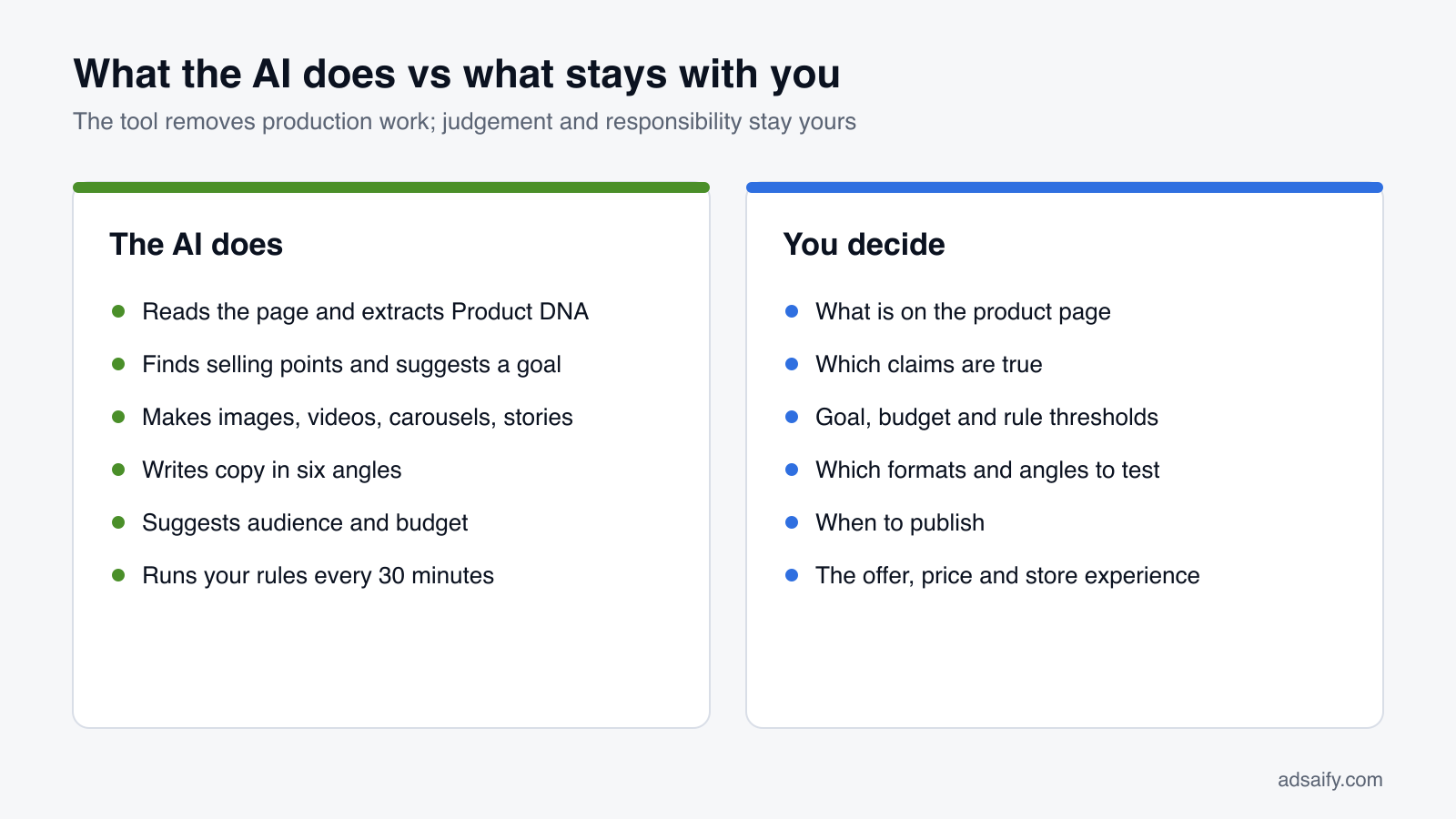
What it does not do is decide for you. You still choose the goal, approve the claims in the copy, set the budget and press publish. A good way to think about it: the AI removes the production work, and you keep the judgement.
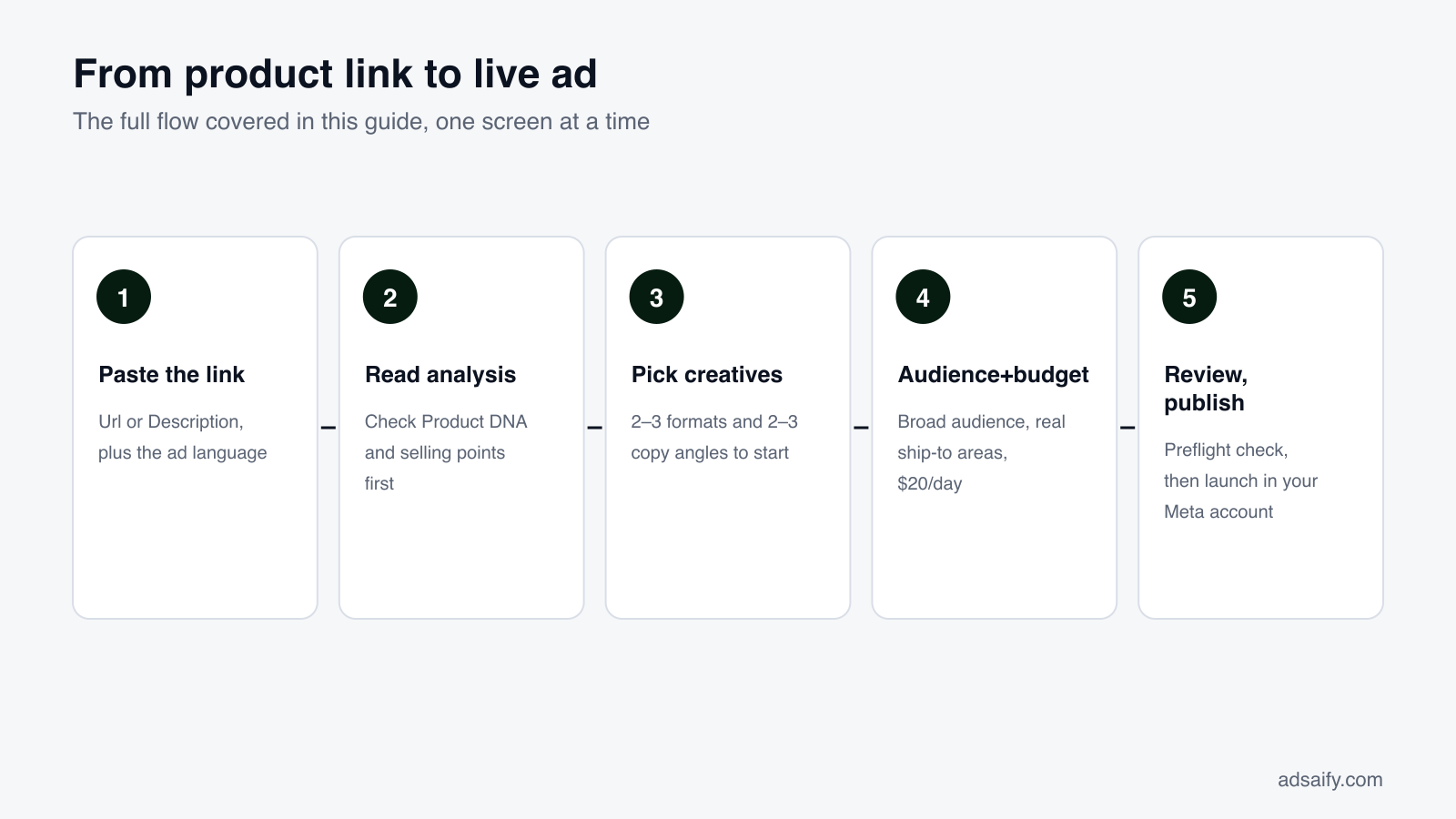
This guide uses the Adsaify flow as the example. For a short product overview, see the Adsaify AI ad generator page. The diagram below shows the full path from link to live ad; each step has its own section in this article.
How do you prepare your product page so the AI reads it well?
The analysis can only work with what is on the page. If the page says "Beautiful dress, buy now" and shows one dark photo, the tool has very little to build selling points from. Ten minutes spent on the page before you paste the link saves a lot of editing later.
For the dress, that means the page should say plainly what it is (a midi dress), what it is made of (linen), what makes it different (a hand-painted floral print) and when to wear it (summer, holidays, weddings, weekends). If those facts live only in your head, the AI cannot find them.
| Page element | What to put there | Why the AI needs it |
|---|---|---|
| Product title | A clear, descriptive name: "Floral linen midi dress", not "Model 2041" | Becomes the product name in Product DNA and appears in headlines |
| Price and currency | Visible price, sale price if any, currency | Lets the copy mention value correctly and avoids wrong price claims |
| Description | 3–6 lines: material, fit, length, care, occasions | The main source for attributes and selling points |
| Bullet features | Short facts: "100% linen", "Hand-painted print", "Midi length" | Easy to extract; often become the selling points directly |
| Photos | Several bright images: full look, close-up of print, fabric texture | Used as the base for creatives; close-ups make better carousel cards |
| Shipping and returns | What you really offer, stated simply | Prevents the copy from promising delivery times you cannot keep |
Quick checks before you paste the link
- Open the page on your phone. If it loads slowly or the main photo is cropped, fix that first; your ad will send people to the same page.
- Make sure the page is public, not password-protected or still in draft.
- Remove old information, such as a discontinued colour or last season's discount.
- Use the specific product page when you want to sell one product. The homepage works for brand-level ads, but it gives the AI a mix of everything.
Link or description: which input option should you choose?
The first screen in the flow has one main field: Site Link or Business Description. Above it are four options: Description · Url · Similar Ads · Language. Choosing the right one is the first real decision.
Url
Use this when you have a product or website page. For the dress you paste yourstore.com/products/floral-linen-midi-dress. This is the fastest route and the right default for most online stores.
Description
Use this when you have no page yet, sell a service, or your page is thin. You write a few sentences instead. A good description answers four questions: what is it, who is it for, why do people choose it, and where do you sell. For the dress:
"A floral linen midi dress with a hand-painted print. Breathable linen, relaxed fit, made for summer days, holidays and weddings. For women aged 25–44 who want something comfortable that still looks special. Sold online at yourstore.com."
That short text gives the analysis the same raw material a good product page would.
Similar Ads
Use this when you already have a style of ad in mind and want to start from that direction rather than from a blank page. It is useful when you know the look you want but not how to describe it.
Language
This sets the language the ads are written in, separately from your website language. A Turkish store selling to Germany can analyse a Turkish page and get German ads; an English page can produce Turkish ads. Choose the language of the people who will see the ad, not the language of your site.
Which one to pick
- You have a complete product page: Url.
- Your page is a marketplace listing or very short: Description, with the details written out.
- You sell a service or have no website: Description.
- You sell in a market with another language: either option, plus Language set to that market.
Then submit. The analysis starts right away, and you will see it move through its stages on screen.
How do you read the analysis: Product DNA, selling points and strategy?
After you submit, the app shows four stages: Parsing URL → Extracting Data → AI Analysis → Finalizing. Parsing reads the page, extracting pulls out the text and images, the AI analysis interprets what the product is and why people would buy it, and finalizing assembles the result. It takes a short moment. The output is the most important screen in the whole flow, because every later step is built on it.
Product DNA
The Product DNA is the product name and its key attributes. For the dress it might read: product name "Floral linen midi dress", category women's clothing, material linen, length midi, print floral, season summer. Check each attribute against reality. If the tool says "cotton" because a related product on the page was cotton, correct it now.
Valuable Selling Points
The Valuable Selling Points are the reasons a shopper would choose this item. For the dress:
- Hand-painted print: it looks unique, not mass-produced.
- Breathable linen: comfortable in heat.
- Summer-ready: fits holidays, weddings and weekends.
Ask two questions about each point. Is it true? And would a customer care? "Comes in a box" may be true but is rarely a reason to buy. A wrong or weak selling point repeats in every headline, image caption and video script, so this is where a small correction has the biggest effect.
Ad Campaign Goal and Strategy
Below the selling points you will see Ad Campaign Goal and Strategy and a Recommended Scaling Strategy. For the dress a typical recommendation is a Sales goal, a broad audience of women 25–44 in the chosen countries, a modest daily budget to start, and a note to raise spend gradually once the ad shows results.
When to change the goal:
- Sales: your Meta pixel is installed and your store takes orders online.
- Traffic: the pixel is new or missing and you want visitors first.
- Awareness or Engagement: a new brand that needs recognition before people buy.
- App promotion: you are selling an app, not a product page.
Which format should you choose: image, UGC video, carousel or story?
From the same product the tool prepares several creative types: feed images, UGC/Reels-style videos, carousels and story formats. You can also make extra images with the AI Image Generator in the Asset Library, upload your own photos, or promote an existing Instagram post that is already doing well. The question is not "which is best" but "which two or three should I test first".
| Format | Shape | Best for | What to check |
|---|---|---|---|
| Feed image | 4:5 vertical | One clear message; products that sell on looks | Product fills the frame; on-image text is short |
| UGC/Reels video | 9:16 vertical | Showing the product in use; Instagram Reels | First seconds show the product; captions readable without sound |
| Carousel | Several cards | Details, features, or a sequence (look, print, fabric) | First card works alone; last card has the call to action |
| Story | 9:16 vertical | Stories placements; quick, full-screen impact | Text stays inside the safe area, away from top and bottom |
A sensible first mix for the dress
- One feed image with the line "Hand-painted. Breathable. Summer-ready."
- One UGC-style video: a try-on style sequence with captions about the linen fabric. Phone-style video often fits Instagram better than a polished studio look.
- One carousel: full look, close-up of the hand-painted print, fabric texture, final card with the call to action.
The story version can run alongside, since it is the same creative in a vertical shape. On a $20 daily budget, three creatives is plenty. Each one needs enough spend to tell you something; ten creatives on the same budget would each get too little.
What do the six copy angles look like for one product?
Alongside the visuals the generator prepares several headlines and primary texts. Each set is written from a different copy angle, so you test different reasons to buy instead of five versions of the same sentence. Because the ad language is a separate setting, the same angle can be written in English or Turkish.
The lines below are illustrative examples for the dress, written to show how the angles differ:
| Angle | English example | Turkish example |
|---|---|---|
| Benefit | Stay cool all summer in breathable linen. | Nefes alan keten ile bütün yaz serin kalın. |
| Social Proof | The dress people stop you to ask about. | Herkesin "Nereden aldın?" diye sorduğu elbise. |
| Urgency | Summer is here. Get yours before your next trip. | Yaz geldi. Tatilden önce elinizde olsun. |
| Pain | Tired of sticky fabrics on hot days? | Sıcakta yapışan kumaşlardan sıkıldınız mı? |
| Emotion | A dress that makes any day feel like a holiday. | Her günü tatil gibi hissettiren bir elbise. |
| Ease | One dress, zero styling stress. | Tek elbise, kombin derdi yok. |
How the angles behave
- Benefit is the safest start: it states what the buyer gets.
- Social Proof only works if it is true. Without reviews or real demand, soften it or skip it.
- Urgency must point to a real reason (season, a trip, a real deadline), not invented scarcity.
- Pain names a problem the product solves; keep it light, not alarming.
- Emotion sells a feeling and pairs well with lifestyle images and video.
- Ease removes a worry, such as "what do I wear it with?"
For a first test, pick two or three angles that fit the product. For the dress, Benefit, Emotion and Ease are natural matches with the selling points. Pair each angle with a creative so you can see which message, not just which picture, brings clicks.
How do you edit AI output: what should you change and what should you keep?
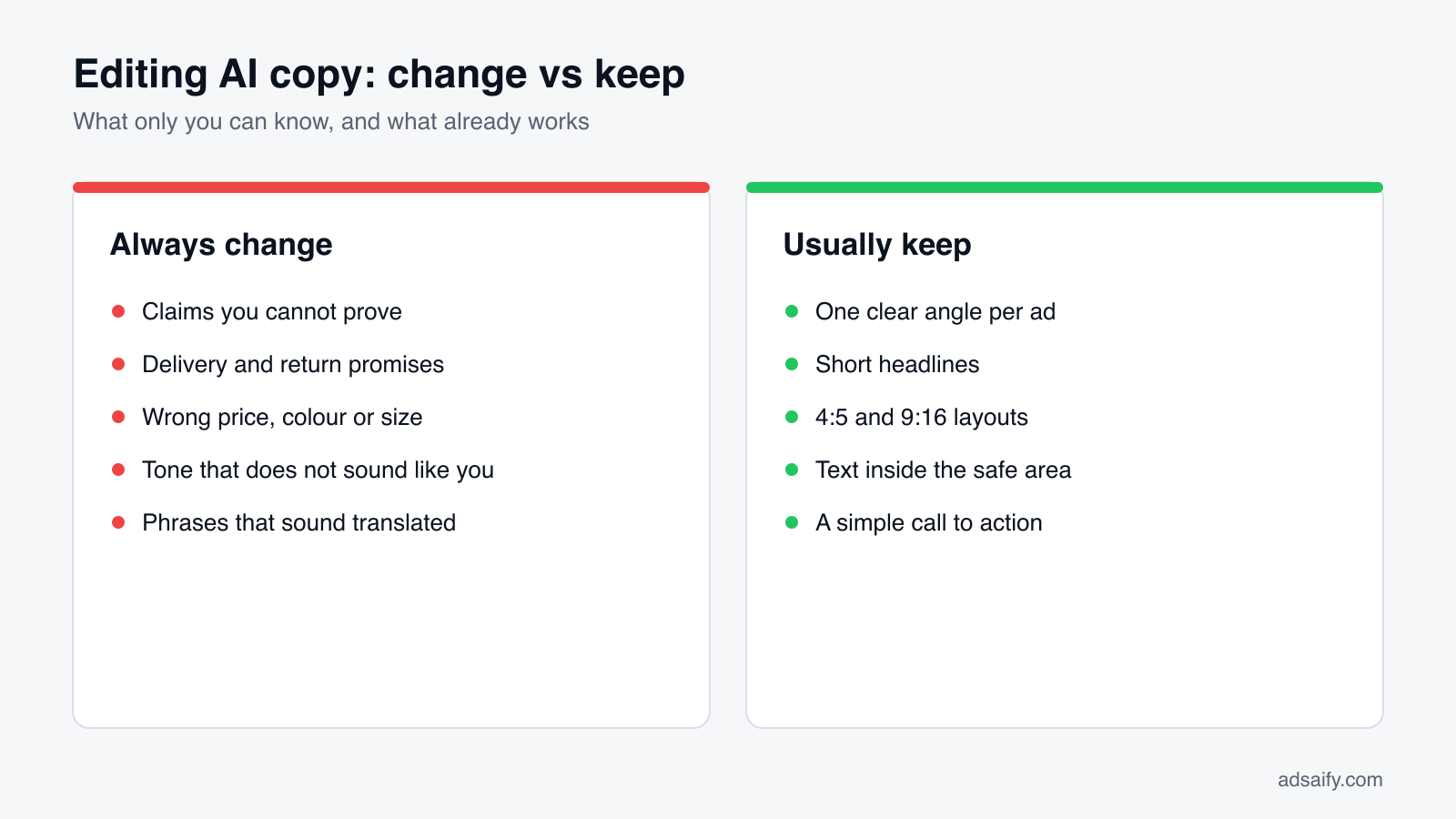
The AI gives you a strong first draft, not a final version. Editing is where your knowledge of the product and your customers matters most. The aim is not to rewrite everything; it is to fix what only you can know and leave the structure that already works.
Always change
- Unsupported claims: "best-selling", "loved by thousands" or "award-winning" stay only if they are true and you can show it.
- Delivery and return promises: match them exactly to your store policy.
- Wrong details: price, colours, sizes, materials. One wrong fact can bring comments and refund requests.
- Tone that does not sound like you: if your brand is calm and simple, cut exclamation marks and hype.
- Local phrasing: read the copy as a native speaker of the ad language would. Fix idioms that sound translated.
Usually keep
- The angle structure: a clear Benefit line and a clear Ease line test two different ideas. Merging them into one blurs the test.
- Short headlines: they are short because they get cut off on small screens.
- Format sizes and safe areas: the 4:5 and 9:16 layouts are already set for placements.
- The call to action: a simple "Shop now" usually does its job.
A worked edit for the dress
Suppose the Social Proof headline reads "Our best-selling summer dress". If the dress is new, that is not true. Change it to "The dress people ask about" or swap to the Benefit angle entirely. Suppose the Urgency line says "Order today, delivered tomorrow" but you ship in three to five days. Change it to "Order now and have it in time for your next trip". Two small edits, and the ad now says only what you can deliver.
How should you set the audience and budget for the first test?
The campaign setup screen brings the remaining decisions together: Ad Goal, Daily Budget, target cities or countries, the destination URL, and the Advantage+ Campaign Budget (CBO) option, which lets Meta move budget between ad sets automatically.
Audience
Under AI Recommended Targetings the tool suggests demographics and interests based on the analysis. For the dress: women, ages 25–44, with interests around summer fashion, linen clothing and holiday wear. You can change age, gender, interests and locations by hand.
- Keep it reasonably broad. Meta's delivery system finds buyers better when it has room. Stacking many narrow interests on a small budget often limits delivery.
- Set locations to where you actually ship. An ad shown in a country you do not deliver to is wasted spend.
- Match language and location. If the ad copy is in Turkish, target places where Turkish speakers will see it.
Budget
For the demo we use $20 per day. It is a test budget: enough to collect early signals on one product without large risk. To choose your own number, think about two things: how much you are willing to spend to learn whether this product sells through ads, and how many days you want the test to run. A smaller daily budget over more days is usually easier to read than a large budget for one day.
Destination URL and Advantage+ Campaign Budget
The destination URL should be the exact product page, not the homepage. Turn on Advantage+ Campaign Budget if you run more than one ad set and want Meta to shift money toward the one performing better. With a single ad set it makes little difference.
For stores with many products
If you sell many items, the Product Catalog option runs Advantage+ catalog ads, where Meta shows the best products from your catalog to the right people. Catalog audiences include "Broad audience (recommended)" and "Viewed or added to cart, no purchase" in the last 14 days, and you can group items into product sets. Shopify stores can import products automatically through the Adsaify app. See the e-commerce page for details.
Quick Setup or the full flow: which should you use, and how do you publish?
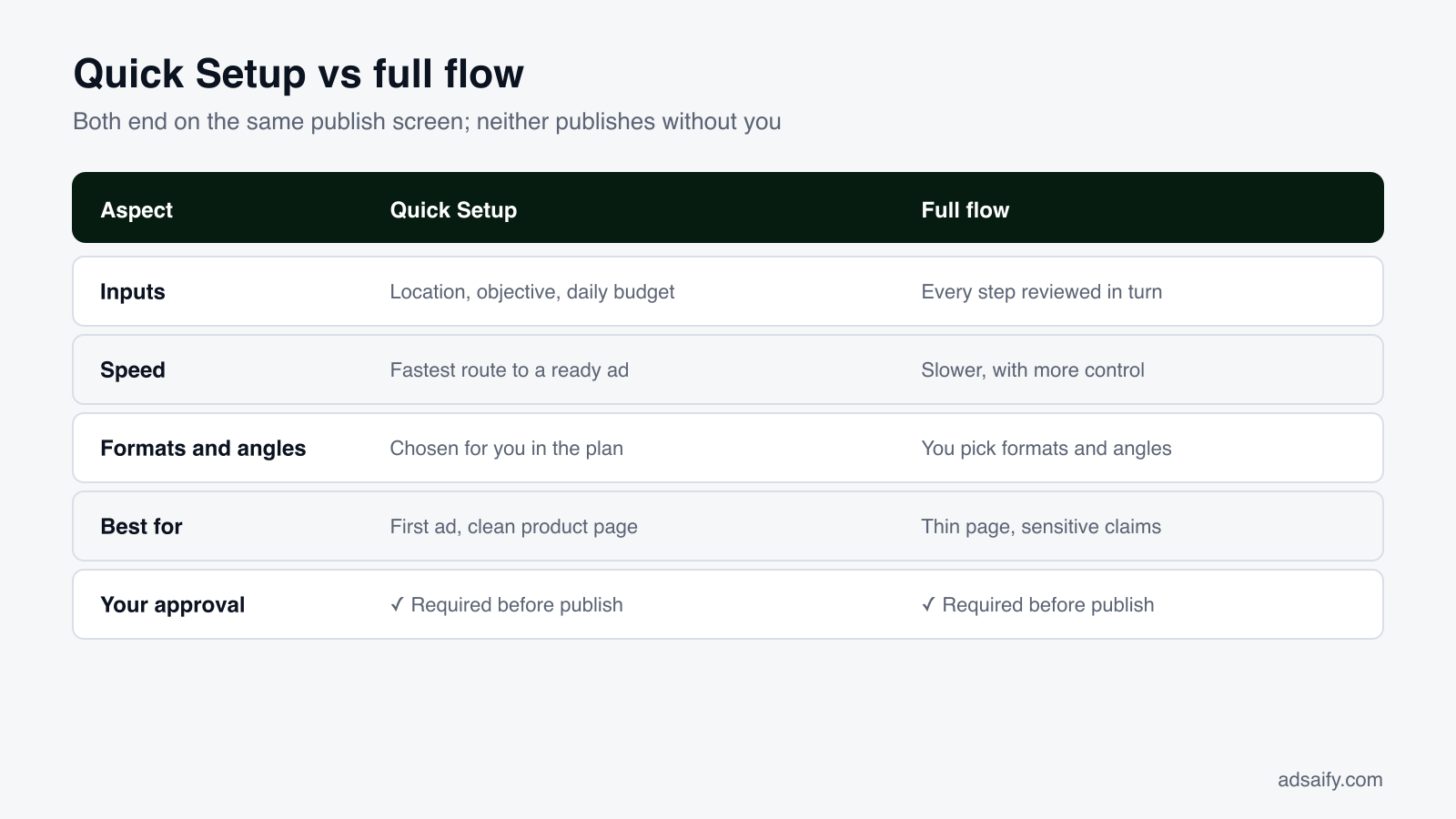
There are two ways to reach the publish screen. The full flow is what this guide has walked through: analysis, creatives, copy, audience and budget, each reviewed in turn. Quick Setup condenses it: Quick Preferences (target location, objective, average daily budget) → Preparing Your Ad → "Your Adsaify Ad is Ready" → "Here is your recommended plan" → publish.
Quick Setup suits a first ad, or a product you know well with a clean page. The full flow suits a product where the page is thin, the claims need care, or you want to choose formats and angles yourself. Both end on the same publish screen, and in both nothing goes live until you confirm.
The preflight check
Before you launch, run through this list on the review screen:
| Check | What to look for | If it is wrong |
|---|---|---|
| Destination URL | Exact product page, loads fast on mobile | Paste the correct link; fix the page speed |
| Product facts | Price, colour and sizes match the store | Edit copy or swap the creative |
| Claims | No reviews, rankings or delivery times you cannot prove | Rewrite the line or change the angle |
| Story safe area | Text away from top and bottom edges | Choose another version or shorten the text |
| Business assets | Right ad account, Facebook page and Meta pixel | Reselect before publishing |
| Daily budget | The amount you intended, in the right currency | Correct the number; a typo here is expensive |
Publishing
The final screen is Publish Campaign — Select your Meta account and launch your ad. You connect your business assets (ad accounts, Facebook pages, Meta pixels), choose which to use, and launch. The campaign runs in your own Meta ad account, which you can open in Meta Ads Manager at any time, and you pay ad spend directly to Meta. After publishing, Meta reviews the ad: the status shows In Review, then Active once approved. Your Meta ad goes live in minutes once that review is done.
What should you watch in the first 72 hours, and when should you not touch anything?
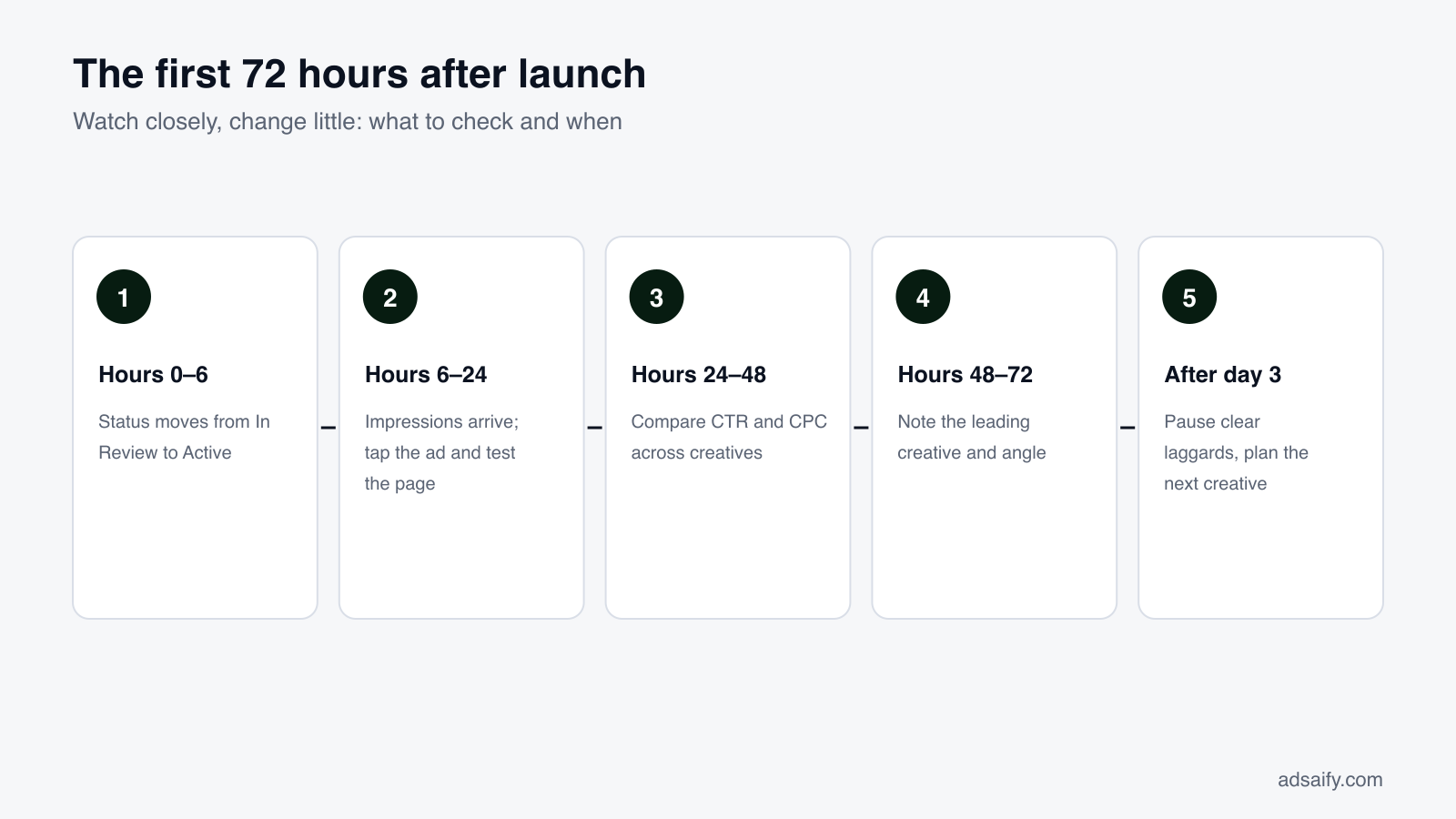
The first three days are when Meta's delivery system learns who responds to your ad. This period is often called the learning phase. Big or frequent edits during it, such as changing the audience, the budget by a lot, or the creative, can restart that learning. So the rule for the first 72 hours is simple: watch closely, change little.
Hours 0–24: confirm it is running
- Open the campaign list and check the status moved from In Review to Active.
- Confirm impressions are coming in and spend is moving toward the daily budget.
- Click the ad yourself on a phone and make sure the product page loads and the right variant is shown.
Hours 24–48: read early signals
In the campaign detail you can see ad sets and ads with spend, impressions, clicks, CTR, CPC and results. At this stage, look at CTR and CPC to see which creative and angle people react to. Do not judge purchases yet; there is too little data.
Hours 48–72: note patterns, still change little
By now you may see one creative getting most of the spend and clicks. That is Meta shifting delivery toward what works, and it is normal. Write down which creative and angle lead, so you know what to build on next week.
When you should step in
- The link is broken, or the page shows the wrong product.
- The ad was rejected in review; read the reason, fix the creative or copy, and resubmit.
- Spend is running with no impressions or clicks at all, which points to a setup problem.
- A factual mistake slipped through (wrong price, wrong shipping promise).
Everything else, such as one creative having a slower day, can wait until after day three.
Which automation rules should you add first?
Automation rules work in an "If (all conditions) … Then …" format. You choose metrics such as Spend, Purchases, CPC, CTR, ROAS or Cost per result, set conditions, and pick an action such as pausing or adjusting the budget. Rules are checked every 30 minutes, so they react faster than a person checking once a day.
The point of early rules is protection, not clever optimisation. They catch obvious problems while you follow the "change little" rule yourself. Here are example rules for the dress test at $20 per day. The thresholds are illustrations; set yours from your own margin and price.
| Purpose | If (all conditions) | Then |
|---|---|---|
| Stop a non-converting ad | Spend is above $25 and Purchases equals 0 | Pause the ad |
| Catch expensive clicks | Spend is above $10 and CPC is above your limit | Pause the ad |
| Catch a weak creative | Spend is above $10 and CTR is below your floor | Pause the ad |
| Protect margin | Cost per result is above your break-even cost | Lower the budget |
| Reward a winner | ROAS is above your target and Purchases are at least 2 | Increase the budget a little |
How to set thresholds without guessing
- Spend limit with zero purchases: start around the product price or your target cost per purchase. If you have spent that much and sold nothing, the ad deserves a pause.
- Break-even cost: what you can spend on ads per order and still not lose money, after product cost and shipping.
- Budget increases: keep them small and gradual. Large jumps can unsettle delivery, the same way big edits do.
Combine conditions with "all" so a rule only fires when the picture is clear. For more on rules, see the Meta ad automation page.
How do you iterate with new creatives, and what does a weekly routine look like?
Even a good ad gets tired. The same people see it again and again, and response slows down. The fix is not to rebuild the campaign; it is to feed it new creatives and new angles on a steady rhythm, starting from what the data already told you.
How to build the next round
- Keep the winner running. Do not replace a working ad; add new ones next to it.
- Change one thing at a time. If the Benefit image led, try the Benefit angle as a UGC video. If the carousel led, try a new first card.
- Test a new angle on the winning format. If Ease worked as an image, try Emotion in the same format.
- Use the Asset Library. The AI Image Generator can make fresh variations of the product without a new photo shoot.
- Revisit the selling points. Customer questions and comments often reveal a selling point the page did not mention. Add it to the page, then analyse again.
A weekly routine for one product
- Monday, 10 minutes: open the campaign list. Check status, spend against budget, and whether any automation rule fired over the weekend.
- Monday: in the campaign detail, rank ads by results, then by CTR. Note the leading creative and angle.
- Tuesday: pause ads that clearly lag after a fair amount of spend (if a rule has not already done it).
- Wednesday: generate one or two new creatives based on the leader: same angle in a new format, or a new angle in the winning format.
- Wednesday: review and publish them in the same campaign, after the same preflight check.
- Friday, 5 minutes: check that the new ads are Active and getting impressions; confirm rules are still set to sensible thresholds.
- End of week: if the results are steady and above your target, consider a small budget increase. If not, keep the budget and keep testing.
What are the most common mistakes with an AI ad generator?
Most problems with AI-made ads do not come from the AI. They come from skipped checks and rushed decisions around it. Here are the ones to watch for, each with its fix.
- Pasting a thin page. A page with one line and one photo gives a vague analysis. Fix: improve the page first, or switch to Description and write the details out.
- Skipping the analysis review. A wrong attribute or weak selling point spreads into every asset. Fix: read Product DNA and selling points before generating anything.
- Publishing every variation on a small budget. Ten creatives on $20 a day each get too little spend to judge. Fix: start with two or three creatives and two or three angles.
- Keeping claims you cannot prove. "Best-selling" or "next-day delivery" in the copy can lead to complaints and ad rejections. Fix: edit every claim against reality before publishing.
- Running Sales without a working pixel. Meta has nothing to optimise toward. Fix: install and check the Meta pixel, or start with Traffic.
- Editing daily in the first 72 hours. Frequent changes can restart learning and make results harder to read. Fix: fix only clear problems; let rules handle the rest.
- Ignoring the landing page. A good ad cannot fix a slow page or a broken checkout. Fix: test the full path on a phone, from ad to payment.
- Raising the budget too fast. A large jump after one good day can unsettle delivery. Fix: increase gradually, and only after results hold for several days.
Key terms
These are the terms you will see in the flow and in this guide, in plain language.
- AI ad generator: a tool that turns a product link or description into ready ad creatives, copy, targeting and a campaign setup.
- Product DNA: the product name and key attributes the analysis extracts from your page.
- Valuable Selling Points: the reasons a shopper would choose your product, used as the base for all copy and visuals.
- Copy angle: the reason to buy a piece of copy leads with, such as Benefit, Social Proof, Urgency, Pain, Emotion or Ease.
- UGC-style video: a short, phone-style video that looks like content people post themselves rather than a studio ad.
- Carousel: one ad with several swipeable cards, each with its own image or video.
- Advantage+ Campaign Budget (CBO): a Meta setting that moves your budget between ad sets toward the better performer.
- Meta pixel: a piece of code on your site that tells Meta when visitors view products, add to cart or buy.
- Learning phase: the early period when Meta's delivery system figures out who responds to an ad.
- CTR (click-through rate): the share of people who clicked after seeing the ad.
- ROAS (return on ad spend): revenue from the ad divided by what the ad cost.
- Automation rule: an "If … Then …" instruction, checked every 30 minutes, that pauses ads or changes budgets for you.
What can't an AI ad generator do?
An AI ad generator saves a lot of production work, but it has clear limits. Knowing them up front keeps expectations realistic and tells you where your own effort still matters.
- It cannot see what is not on the page. If the best thing about your product is missing from the page or description, the analysis will miss it too.
- It cannot verify claims. It does not know whether you really have reviews, fast shipping or a sale. You do.
- It cannot fix the offer. If the price is far above similar products or shipping is costly, better ads will not change that.
- It cannot fix the store. A slow page, unclear sizing or a difficult checkout lose sales after the click.
- It cannot promise results. Whether an ad sells is decided by real people in a real market. Testing tells you; the tool cannot know in advance.
- It does not replace Meta's own rules. Ads still go through Meta's review, and its advertising policies apply as usual.
- It does not know your margins. Budgets and rule thresholds must come from your numbers.
Put simply, the AI is strong at turning information into ads quickly and in many versions. You are still responsible for the truth of what the ad says, the quality of what it sells, and the money it spends. The diagram below splits the work.
If you want to go deeper into individual steps, the guides section covers topics like campaign goals, targeting and creative testing on their own.
Frequently Asked Questions (FAQ)
1. What is an AI ad generator?
An AI ad generator is a tool that creates ads from information you already have, such as a product link or a short business description. It analyses the product, suggests a goal and strategy, generates images, videos and copy, recommends an audience and budget, and lets you publish to Facebook and Instagram after you review everything.
2. What should my product page include before I paste the link?
A clear title, a visible price, a description of three to six lines covering material, fit and use, a few short bullet facts, several bright photos including close-ups, and your real shipping and return terms. The analysis can only use what is on the page, so missing facts mean missing selling points.
3. What if I do not have a product page?
Choose the Description option and write a few sentences: what it is, who it is for, why people choose it and where you sell. The analysis works from that text instead of a URL. Services, local businesses, marketplace sellers and new brands without a website often start this way.
4. Which creative format should I test first?
For most products, start with one feed image, one UGC-style video and one carousel. The story version can run alongside as a vertical copy. That mix covers a single message, a product in use and a detailed look, without spreading a small budget too thin across many creatives.
5. Will the ad be published without my approval?
No. You can review and edit every step, and the campaign only launches when you select your Meta account and confirm on the Publish Campaign screen. This also applies to products imported through the Shopify app: a sales ad can be prepared automatically, but nothing goes live until you approve it.
6. Whose ad account does the campaign run in?
It runs in your own Meta ad account, with your Facebook page and Meta pixel. You pay ad spend directly to Meta and can open the campaign in Meta Ads Manager at any time. The tool's subscription is separate from your ad budget, and plans can be cancelled at any time.
7. How much budget should I start with?
There is no single right number. This guide uses $20 per day as a test budget for one product. Base your own figure on your margin and how many days you want to test. Fewer creatives on a small budget let each one get enough spend to judge fairly.
8. Should I change the ad in the first three days?
Only to fix clear problems: a broken link, a rejected ad, a wrong price or a setup error that blocks delivery. Otherwise, wait. Meta's delivery system is still learning in that period, and frequent edits make results harder to read. Simple automation rules can cover obvious overspending while you wait.
How can you try this with Adsaify?
Paste one product link and follow the same steps as the dress example: analysis, formats, copy angles, audience, review and publish. You will see the full flow on your own product before you decide anything.
- Your first ad is free: signup includes 1 ad analysis and 2 AI image tokens, with no credit card. Paid plans start at $25 a month; see the pricing page.
- Your own ad account: campaigns run in your Meta ad account and you pay Meta directly.
- Images and video: feed images, stories, carousels and UGC-style videos from a single product link.
Create a free account and try your first ad · Already have an account? Log in.