Short answer: Audience mismatches can negatively impact campaign performance for Meta ad managers. This article will cover how to identify this issue, its causes, costs, and solutions.
As a Meta ad manager, you may have experienced the frustration of running campaigns that fail to deliver expected results. Your ads could be reaching a vast audience, yet the engagement and conversions remain disappointingly low. This situation often stems from audience mismatch, where the target audience does not align with the product or service being advertised. Recognizing this issue is crucial for optimizing your ad performance and maximizing return on investment. Audience mismatch can occur for several reasons, including incorrect audience targeting settings, ineffective ad copy, or a disconnect between the product and the audience’s interests. If left unaddressed, this problem can lead to wasted ad spend, low click-through rates, and ultimately, a diminished return on ad spend (ROAS). Over time, these inefficiencies can significantly impact your overall marketing budget and hinder business growth. In this article, you will learn how to effectively diagnose and resolve audience mismatch issues. We will explore the signs of audience mismatch, its underlying causes, and the costs associated with it. Additionally, we will provide a step-by-step guide to fixing the problem and measuring the effectiveness of your solutions. By following these insights, you will be equipped to enhance your ad campaigns and achieve better results in your marketing efforts.Key Takeaways
- Audience mismatch leads to low conversion rates.
- Target audience analysis is crucial for ad success.
- Incorrect targeting can result in budget loss.
- Regular checks prevent audience issues.
What is audience mismatch and how to recognize it?
Audience mismatch occurs when the users targeted by your Meta ads show little to no engagement with the ad content. This issue typically manifests as low click-through rates (CTR) and high cost-per-click (CPC). If your campaigns fail to meet their goals, such as conversions or leads, it may indicate a disconnect between your audience and the ad content.
Example of Audience Mismatch
Consider a local bakery with a daily ad budget of 500 TL. The bakery targets a broad audience based on interests in cooking and baking without specifying location or demographics. After one week, the campaign shows a CTR of 0.5% and a CPC of 10 TL. This indicates poor engagement, and the bakery fails to reach its goal of 20 new customers. To address this, the bakery refines its targeting to local users aged 18-45 who have shown interest in food delivery services. Post-adjustment, the bakery should monitor the CTR and CPC to evaluate the effectiveness of the new targeting strategy.
How can I identify this issue?
To identify audience mismatch, review your Meta Ads Manager reports. Look for low CTR (typically below 1%) and high CPC compared to industry benchmarks. Additionally, analyze the engagement metrics, such as comments and shares, and compare them against your campaign goals. If the results consistently fall short, it may signal an audience mismatch.
What causes audience mismatch?
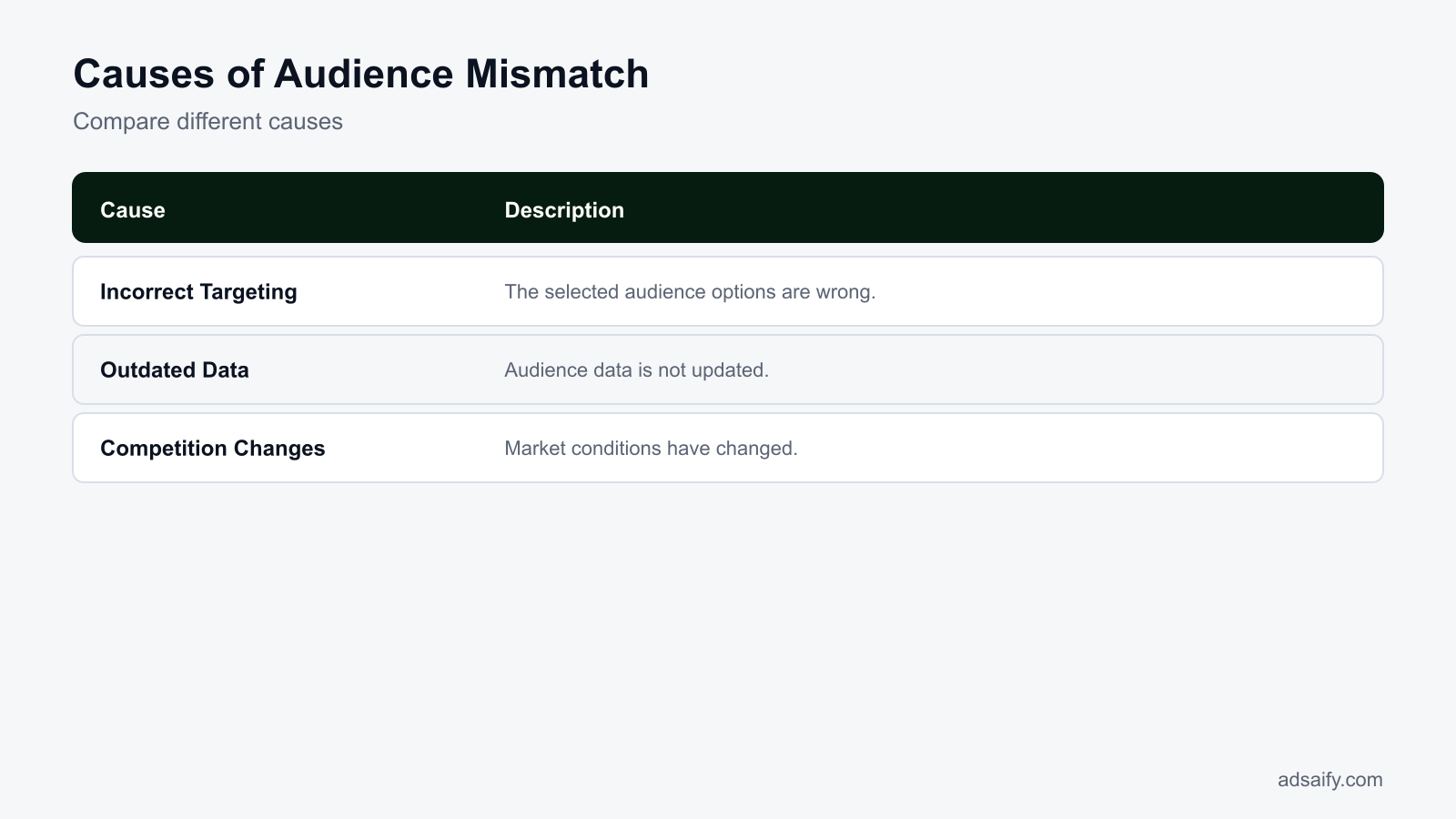
Audience mismatch can arise from several factors, including selecting incorrect targeting options, relying on outdated audience data, and experiencing increased competition or market changes. Each of these causes can significantly impact how effectively your ads reach and resonate with the intended audience.
Comparison of Common Causes
| Cause | Symptoms | Impact | Solution |
|---|---|---|---|
| Incorrect targeting options | Low CTR, high CPC | Wasted ad spend | Refine targeting criteria |
| Outdated audience data | Decreased engagement | Poor ad performance | Refresh audience insights |
| Increased competition | Higher CPC | Ad fatigue | Adjust bidding strategy |
| Market changes | Declining conversions | Loss of relevance | Conduct market research |
How can I update my targeting options?
To update your targeting options in Meta Ads Manager, navigate to the "Ad Set" level of your campaign. Here, you can refine your audience by demographics, interests, and behaviors. Utilize the Audience Insights tool to gather data about your existing audience and adjust your targeting based on the latest trends and insights. Regularly reviewing this data will help ensure your ads reach the right users.
What are the costs of audience mismatch?
Audience mismatch incurs significant costs, resulting in high advertising expenses and low return on investment (ROI). When the intended audience does not align with the ad content, businesses often experience wasted ad spend, diminished brand relevance, and lost opportunities for engagement. Additionally, audience mismatch can lead to a loss of competitive advantage, as resources are diverted toward ineffective campaigns instead of targeting the right consumers.High Costs and Low ROI
When audiences are mismatched, the financial implications can be severe. High costs arise from inefficient ad spend, primarily when targeting the wrong demographics or interests. For example, if a campaign is aimed at a broad audience without specificity, the likelihood of conversion diminishes, leading to a low ROI. Advertisers may find themselves spending significantly on impressions and clicks without generating sales or leads, ultimately eroding profit margins.Loss of Competitive Advantage
In a crowded market, maintaining a competitive edge is crucial. Audience mismatch can dilute a brand's positioning, making it harder to differentiate from competitors. If ads are not reaching the right people, businesses may miss out on valuable insights into consumer preferences and behaviors. This lack of targeted engagement can result in competitors capturing market share, as they effectively reach the audiences that resonate with their offerings.Waste of Time and Resources
Mismatched audiences can lead to inefficient use of time and resources for marketers. Resources spent on developing ad creatives, analyzing data, and managing campaigns may yield little to no results when the target audience isn't properly defined. This inefficiency can detract from strategic planning and the ability to pivot quickly in response to market demands.- Analyze your current audience targeting settings.
- Review performance metrics in your Meta Ads Manager.
- Identify underperforming ads and campaigns.
- Test new audience segments to find better fits.
- Monitor engagement rates for different demographics.
- Adjust your budget allocation based on audience performance.
- Conduct competitor analysis to benchmark audience targeting.
- Seek feedback from your existing customer base.
How can I calculate my costs?
To calculate costs associated with audience mismatch, review your ad spend versus the generated revenue. Use the formula: Cost of Ads ÷ Revenue from Ads = ROI. Analyze the performance metrics in Meta Ads Manager, focusing on cost per conversion and overall campaign spending. This assessment will help identify inefficiencies and provide clarity on the financial impact of audience targeting errors.How can I diagnose the cause of audience mismatch?
Diagnosing audience mismatch involves a thorough analysis of campaign performance and targeting options. Marketers should utilize campaign analysis tools to assess how well their ads are resonating with the intended audience. Reviewing targeting settings, including demographics and interests, is critical. Additionally, conducting A/B testing with different audience segments can provide insights into which groups respond best to specific ad creatives.Use Campaign Analysis Tools
Utilizing Meta Ads Manager is essential for diagnosing audience mismatch. Within the platform, you can access performance metrics such as reach, impressions, clicks, and conversions. By examining these metrics, you can identify discrepancies between your target audience and actual engagement levels. Tools like Facebook Analytics and the Audience Insights feature can further refine your understanding of audience behavior and preferences.Review Your Targeting Options
Reviewing targeting options in Meta Ads Manager is crucial for understanding audience mismatch. Navigate to the "Ad Set" section, where you can evaluate settings such as age, gender, location, interests, and behaviors. Ensure that these options align with your intended audience profile. If the targeting is too broad or misaligned with your product offerings, consider adjusting these settings to better reflect the characteristics of your ideal customer.Test Different Audiences with A/B Testing
A/B testing is a valuable strategy for diagnosing audience mismatch. By creating variations of your ads targeting different segments, you can gather data on which audience performs best. In Meta Ads Manager, set up A/B tests by duplicating your ad sets with slight modifications in targeting criteria. Monitor metrics such as click-through rates (CTR), conversion rates, and engagement levels to determine the most effective audience profile.| Testing Method | Targeting Type | Performance Metric | Expected Outcome |
|---|---|---|---|
| A/B Testing | Demographic Segments | CTR | Higher engagement from specific age groups |
| Audience Insights | Interest-Based | Conversion Rate | Identify interests that lead to sales |
| Performance Analysis | Location | Cost per Conversion | Optimize ad spend for profitable regions |
| Retargeting Ads | Behavioral | Engagement Rate | Increased interaction with previous visitors |
Which analysis tools should I use?
To effectively diagnose audience mismatch, consider using Meta Ads Manager for campaign performance insights. Additionally, leverage Facebook Analytics to understand user behavior across your ads. Audience Insights can help you dive deeper into demographic data, while A/B testing features allow for experimentation with various audience segments. These tools collectively provide a comprehensive view of how your audience interacts with your advertising efforts.If you would rather not set up each of these steps by hand, try it in Adsaify: your first ad is free, so there is nothing to lose. Create a free account.
What should I prepare before applying the fix?
To effectively address audience mismatch issues, marketers must prepare by clearly defining campaign objectives, updating audience data, and conducting competitive analysis. This preparation ensures that the fixes applied are relevant and tailored to the current market conditions, thereby improving the overall performance of the ad campaigns.Clearly define your campaign objectives
Before implementing any fixes, it is crucial to have a clear understanding of what you want to achieve with your campaign. Campaign objectives should be specific, measurable, achievable, relevant, and time-bound (SMART). For example, your objective might be to increase website traffic by 30% over the next quarter or to boost sales of a particular product line by 15% during a promotional period. By establishing these goals, you can align your audience targeting and messaging accordingly.Update your audience data
Audience data must be current and relevant to ensure effective targeting. This involves reviewing your existing audience segments in Meta Ads Manager. Check for changes in demographics, interests, and behaviors. Additionally, consider integrating first-party data, such as customer email lists or website visitors, to create custom audiences. This approach allows for more precise targeting and can significantly enhance campaign performance.Conduct competitive analysis
Understanding what competitors are doing can provide valuable insights into audience preferences and trends. Analyze competitors’ ad campaigns, messaging, and audience engagement. Tools like Facebook Ad Library can help you see what ads are currently running in your industry. This analysis can inform your own strategy, helping you to identify gaps in your targeting or opportunities for differentiation.- Define your campaign objectives using the SMART criteria.
- Review existing audience segments in Meta Ads Manager.
- Integrate first-party data for custom audience creation.
- Analyze competitors’ ad strategies using Facebook Ad Library.
- Update demographic and interest targeting based on current trends.
- Document findings and insights from your competitive analysis.
- Align your messaging with your defined objectives and audience insights.
- Establish a timeline for implementing changes based on your analysis.
Where can I update my audience data?
You can update your audience data in Meta Ads Manager by navigating to the "Audiences" section. From here, you can create new audiences or edit existing ones. Use the "Create Audience" button to access options for custom audiences, lookalike audiences, and saved audiences. Make sure to incorporate relevant data sources to enhance targeting accuracy.What are the steps to solve audience mismatch?
To effectively solve audience mismatch issues, marketers should review and update their targeting options, create new audience segments, and regularly monitor campaign performance. These steps ensure that the audience being targeted aligns closely with the campaign objectives, improving overall ad effectiveness.Review and update your targeting options
Start by evaluating your current targeting options in Meta Ads Manager. Check the demographics, interests, and behaviors you are currently targeting. Make adjustments based on any new insights gained during your preparation phase. This might include narrowing or expanding your audience or adding new interest categories that align with your campaign objectives.Create new audience segments
Creating new audience segments can help address mismatches by allowing for more tailored messaging. Use the insights from your competitive analysis and audience data updates to create segments based on specific characteristics. For example, segmenting audiences by purchase behavior or engagement levels can lead to more effective targeting and improved ad performance.Regularly monitor your campaigns
Once updates are made, it is essential to monitor your campaigns regularly. Use Meta Ads Manager to track key performance indicators (KPIs) such as click-through rates (CTR), conversion rates, and return on ad spend (ROAS). Regular monitoring allows you to quickly identify any further audience mismatch issues and make necessary adjustments.- Review Targeting Options — Evaluate current targeting settings to identify areas for improvement.
- Create New Audience Segments — Develop audience segments based on updated insights and data.
- Implement Changes — Apply the updated targeting options and new segments to your campaigns.
- Launch Campaigns — Activate the campaigns with the new audience settings.
- Monitor Performance — Track key metrics in Meta Ads Manager to assess effectiveness.
- Adjust as Necessary — Make ongoing adjustments based on performance data.
How can I review my targeting options?
To review your targeting options, access Meta Ads Manager and navigate to the "Ad Set" level of your campaign. Here, you will find the "Audience" section where you can view and edit your targeting settings. Analyze the selected demographics, interests, and behaviors, and adjust them based on your campaign objectives and audience insights.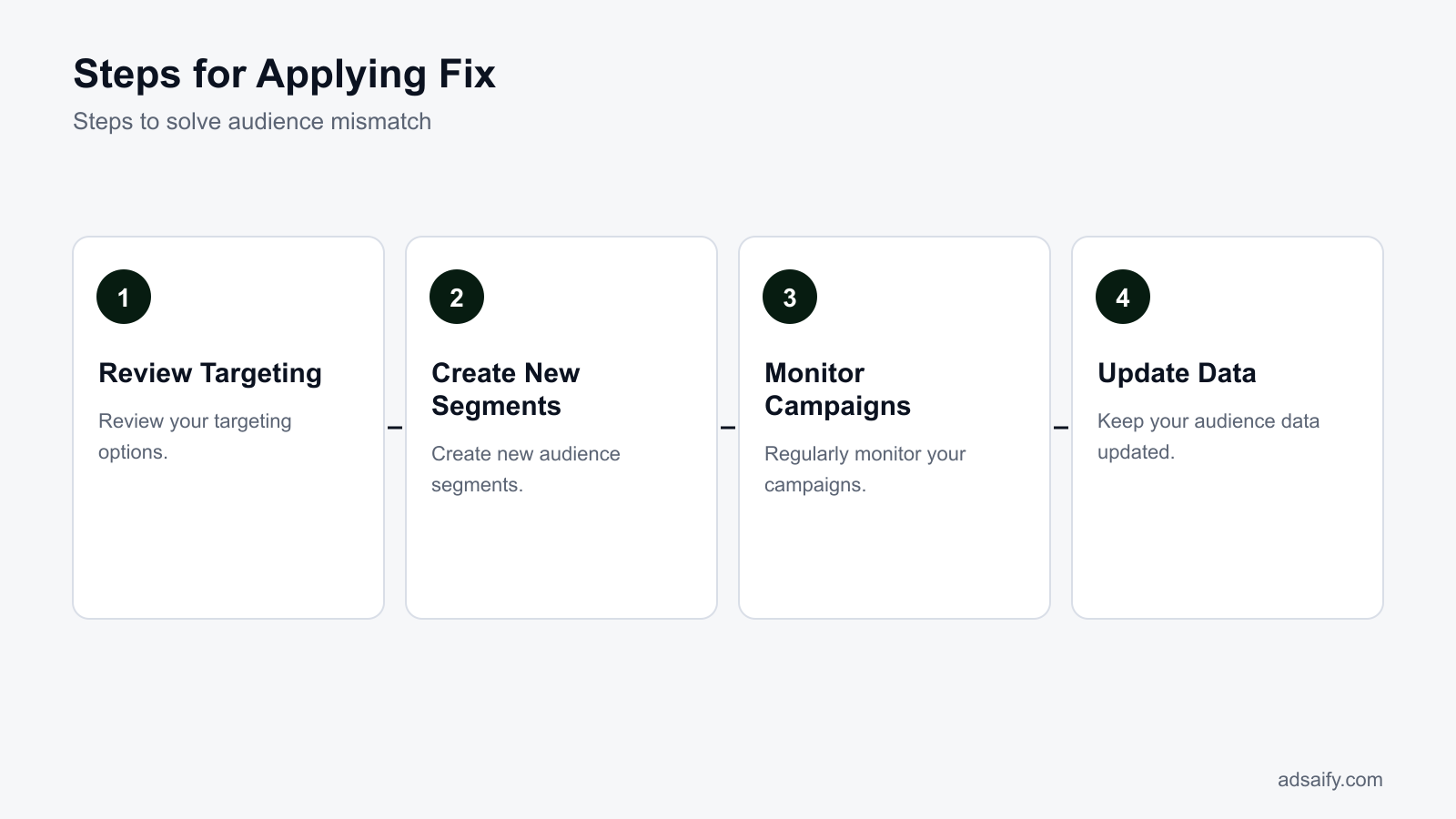
Can you provide a detailed example?
To illustrate audience mismatch issues, consider an e-commerce store specializing in eco-friendly home goods. The store initially targeted a broad audience, resulting in poor engagement and low conversion rates. Conducting audience analysis revealed a more specific target demographic, leading to a refined campaign strategy that significantly improved performance.
Conduct audience analysis for an e-commerce store.
Start by accessing the Meta Ads Manager and navigating to the "Audiences" section. Use the Audience Insights tool to gather data on your current audience, including demographics, interests, and behaviors. For the eco-friendly home goods store, insights showed a strong interest among women aged 25-45 who value sustainability. This data will guide you in refining your targeting strategy.
Develop targeting strategies for a successful campaign.
Based on the audience analysis, create a custom audience in Ads Manager. For the eco-friendly store, set the location to urban areas known for eco-conscious living, such as San Francisco and New York. In the targeting settings, select interests like "sustainable living," "eco-friendly products," and "green home." Allocate a budget of 1,000 TL for a two-week campaign, focusing on conversion objectives. This targeted approach is likely to yield better results.
Evaluate results with sample data.
After running the campaign, monitor the performance metrics. For example, the campaign generated 200 clicks with a conversion rate of 5%, resulting in 10 sales. If the average order value was 150 TL, the total revenue would be 1,500 TL. With a budget of 1,000 TL, the return on ad spend (ROAS) would be 1.5, indicating a successful campaign. Adjustments can be made based on these results to optimize further.
How is audience analysis conducted?
Audience analysis is conducted by utilizing tools within Meta Ads Manager, such as Audience Insights and the "Audiences" section. This involves examining demographic data, interests, and behaviors of current audiences to identify potential target segments that align with business goals, leading to more effective ad targeting.
How can I measure whether the fix worked?
To determine if the adjustments made to address audience mismatch were successful, closely monitor campaign performance metrics over time. Key metrics include return on investment (ROI), conversion rates, and audience engagement levels, which will provide insights into the effectiveness of the new targeting strategy.
Monitor campaign performance.
Regularly check the performance of your ads in the Ads Manager. Look for metrics such as click-through rates (CTR) and cost per acquisition (CPA). A successful fix should show an increase in CTR, indicating that the audience is more aligned with your product offerings. For example, if your CTR increased from 1% to 3%, this indicates improved audience targeting.
Evaluate ROI and conversion rates.
Calculate ROI by comparing the revenue generated from the campaign to the total ad spend. A positive ROI indicates that the campaign is profitable. If the conversion rate improves from 2% to 5%, this suggests that the adjusted audience targeting has effectively engaged more potential customers, leading to increased sales.
Analyze audience engagement.
Engagement metrics such as comments, shares, and likes are crucial indicators of how well the audience resonates with your ads. A higher engagement rate can reflect improved relevance. For example, if engagement increased from 50 to 200 interactions per ad, this signals a successful alignment with audience interests.
| Metric | Before Fix | After Fix | Change |
|---|---|---|---|
| CTR | 1% | 3% | +2% |
| Conversion Rate | 2% | 5% | +3% |
| ROI | -100 TL | 500 TL | +600 TL |
| Engagement Rate | 50 | 200 | +150 |
Which metrics should I track?
To measure the effectiveness of your campaign adjustments, track key metrics such as click-through rate (CTR), conversion rate, return on investment (ROI), and audience engagement levels. Monitoring these metrics will help you assess whether the audience targeting changes have led to improved performance and sales outcomes.
Want to see this in your own account? Enter your website address and Adsaify drafts the campaign for you. The first ad is free. Try it now or log in.
What should I do to prevent this issue from recurring?
To prevent audience mismatch issues from recurring in Meta ad campaigns, marketers should conduct regular audience analyses, keep campaign settings updated, and engage in continuous learning through training and resources. Implementing a structured routine ensures that marketers stay aligned with their target audience and adapt to changing market conditions.- Daily: Check ad performance metrics in Meta Ads Manager, including CTR (click-through rate) and conversion rates, to identify any sudden drops that may indicate audience mismatch.
- Weekly: Review audience insights to understand demographic shifts and interests, ensuring that the target audience remains relevant.
- Weekly: Analyze competitor campaigns to gather insights on audience targeting strategies and identify potential gaps in your own approach.
- Monthly: Update audience segments based on recent customer data, focusing on behaviors and preferences that have changed over time.
- Monthly: Reassess campaign objectives and ensure they align with current business goals, adjusting audience targeting as necessary.
- Quarterly: Conduct a comprehensive review of ad creatives and messaging to ensure they resonate with the current audience, making necessary adjustments based on feedback and performance data.
- Quarterly: Attend webinars or workshops on Meta advertising to stay informed about new features and best practices that can enhance audience targeting.
How often should I check audience analysis?
Audience analysis should be checked at least weekly to stay updated on demographic shifts, interests, and behaviors. Regular assessment helps ensure that the audience segments remain aligned with your campaign objectives and overall business goals, allowing for timely adjustments when necessary.What are the most common mistakes in audience mismatch?
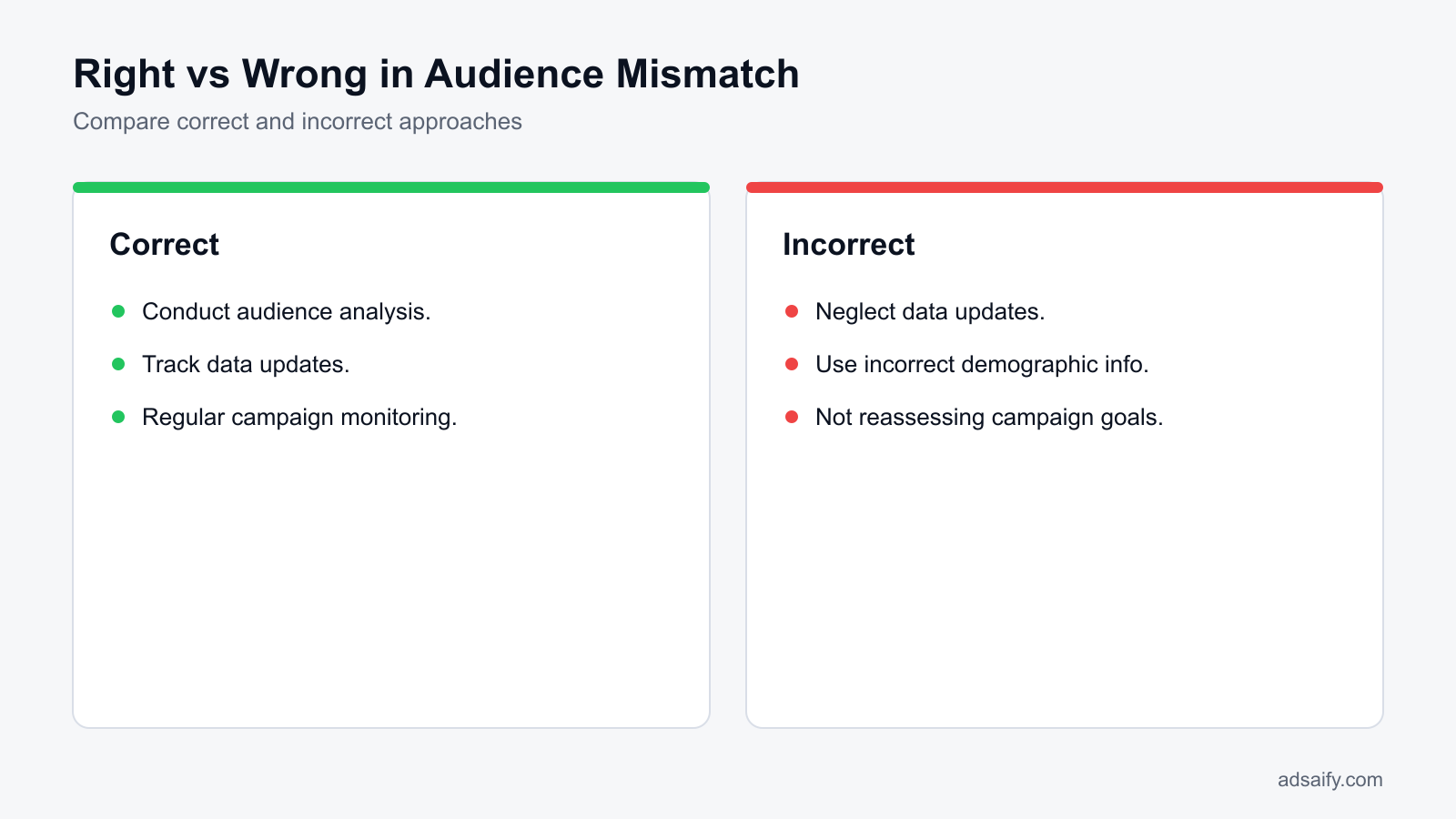
Common mistakes that lead to audience mismatch in Meta ad campaigns include using incorrect demographic information, failing to narrow down the audience, and neglecting data updates. Recognizing these errors is crucial for improving campaign performance and achieving better results.Using incorrect demographic information
Using outdated or inaccurate demographic data can lead to targeting the wrong audience. This mistake can severely affect ad performance and waste budget. To fix this, regularly update demographic data based on the latest insights from Meta Ads Manager and ensure that your audience settings reflect current market conditions.Not narrowing down the audience
Broad targeting can dilute the effectiveness of campaigns, making it harder to reach potential customers who are genuinely interested in your products or services. To remedy this, create more defined audience segments based on specific interests, behaviors, and demographics, allowing for more tailored messaging.Neglecting data updates
Failing to update audience data can lead to stale targeting strategies that no longer resonate with potential customers. Regularly revisiting and refreshing audience data is essential. Set a routine for checking and updating audience insights to reflect recent consumer behaviors and preferences.Ignoring lookalike audiences
Not utilizing lookalike audiences can limit your reach to potential customers similar to your existing clientele. To fix this, leverage lookalike audiences in Meta Ads Manager, which allows you to reach users with similar characteristics to your best customers, enhancing targeting effectiveness.Overlooking custom audience retargeting
Neglecting to retarget users who have previously engaged with your brand can result in missed opportunities. Set up custom audiences in Meta Ads Manager to retarget these users, reminding them of your products and encouraging conversions.Failing to analyze competitors
Not analyzing competitor campaigns can lead to missed insights about effective audience targeting strategies. Regularly review competitor ads and their audience engagement to identify trends and strategies that can inform your own campaigns.How can I fix these mistakes?
To fix these common mistakes, start by conducting thorough audience research and regularly updating demographic information. Implement a structured routine for audience analysis, create defined audience segments, and leverage tools like lookalike and custom audiences. Finally, analyze competitors to gain insights that can refine your targeting strategy.What should I do if the fix does not help?
If the fix for audience mismatch does not yield the desired results, consider trying a different audience strategy. This may involve testing new audience segments, adjusting targeting parameters, or exploring broader or narrower demographics. Reassessing your campaign goals is also crucial, as misaligned objectives can lead to ineffective targeting. In some cases, seeking expert advice may provide insights and strategies that can help optimize your campaign.Try a Different Audience Strategy
Experimenting with varied audience strategies can help identify more effective targeting. Start by utilizing the "Audience Insights" tool in Meta Ads Manager to analyze potential audiences based on interests, behaviors, and demographics. Create a new audience segment by selecting different parameters. For instance, if your initial audience was limited to 18-34-year-olds interested in fitness, try broadening it to include those interested in health and wellness or even expanding the age range to 18-44 years. Test these new segments for a period of time and monitor performance metrics to see if engagement improves.Reassess Your Campaign Goals
Misaligned campaign goals can contribute to audience mismatch. Review your objectives in the "Campaign Settings" section of Meta Ads Manager. Are you aiming for brand awareness, website traffic, or conversions? Ensure your audience aligns with these goals. For instance, if your goal is to drive conversions but your audience is primarily composed of users interested in general lifestyle content, consider narrowing your focus to users who have shown intent to purchase within your niche. Adjust your ad copy and creatives accordingly to resonate with this targeted audience.Seek Expert Advice
If adjustments do not lead to improvement, consider seeking expert advice. A performance marketing consultant can offer insights based on industry trends and data analysis. They might suggest advanced strategies, such as A/B testing different ad formats or utilizing lookalike audiences based on your best customers. Networking within industry forums or utilizing platforms like LinkedIn to connect with experienced marketers can also provide valuable perspectives.- Test a new audience segment.
- Analyze audience insights for better targeting.
- Adjust campaign objectives to align with audience.
- Consult with a performance marketing expert.
- Explore advanced targeting options in Meta Ads Manager.
- Implement A/B testing for different ad sets.
- Review ad creatives for relevance to the audience.
- Monitor performance metrics regularly for insights.
What are the key terms?
Understanding key terms in performance marketing is crucial for effective communication and strategy execution. Here are some essential terms to familiarize yourself with, particularly in the context of Meta advertising.- Target audience: The group of users a specific ad aims to reach.
- ROI: Return on investment; a measure of the profitability of an investment.
- CPC: Cost per click; the amount paid for each click on an advertisement.
- Ad Set: A collection of ads within a campaign that share the same audience and budget.
- Impressions: The total number of times your ad is displayed to users.
- Click-Through Rate (CTR): The percentage of people who click on your ad after seeing it.
- Conversion Rate: The percentage of users who take a desired action after clicking your ad.
- Lookalike Audience: A target audience created based on the characteristics of existing customers.
- Ad Creative: The visual and textual content of the advertisement.
- Retargeting: The practice of serving ads to users who have previously interacted with your brand.
- Automation Rules: Pre-set conditions in Meta Ads Manager to manage ad performance automatically.
- Budget Allocation: The distribution of your total budget across different campaigns or ad sets.
What do these terms mean?
The terms outlined are fundamental concepts in performance marketing, particularly for Meta advertising. Understanding these definitions will help you navigate ad campaigns effectively, measure performance, and optimize strategies for better results. Familiarity with these terms is essential for collaborating with team members and making informed decisions.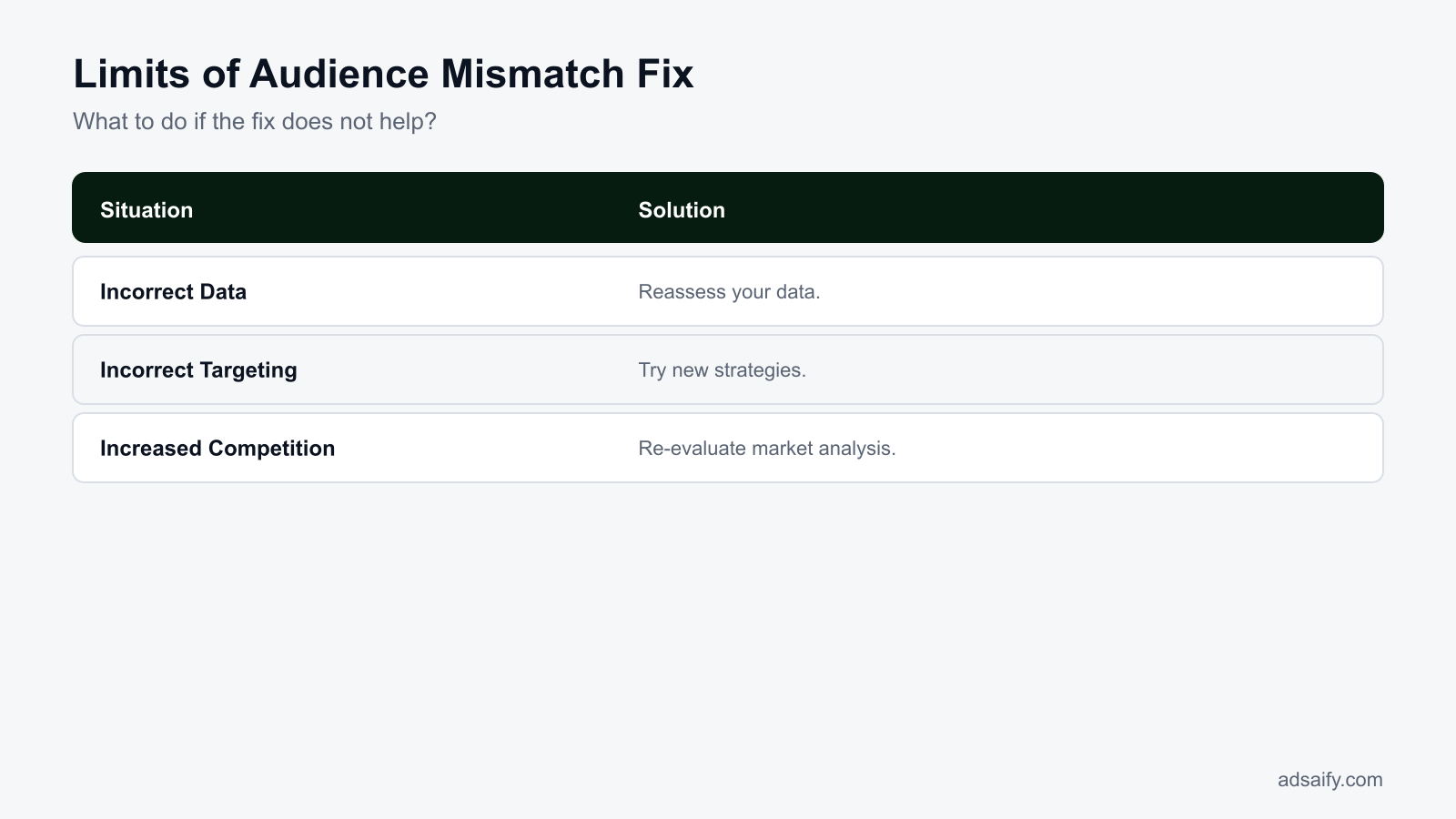
Conclusion
To address audience mismatch issues, first analyze your target audience using tools like Adsaify for accurate insights. Then, adjust your ad settings based on audience size and engagement. For immediate action, register for Adsaify today to optimize your Meta ad campaigns and ensure your audience targeting aligns with your business goals.
Want to see this in your own account? Enter your website address and Adsaify drafts the campaign for you. The first ad is free. Try it now or log in.
Frequently Asked Questions (FAQ)
1. How long does it take to fix audience mismatch?
Fixing audience mismatch can vary in time but typically requires a few hours to a few days. After identifying the mismatch, adjust targeting options in your ad settings, monitor performance, and make necessary changes. Continuous testing and optimization will help in refining your audience targeting over time.
2. What if my audience is too small?
If your audience is too small, consider broadening your targeting criteria. This may involve expanding demographics, interests, or behaviors. Additionally, using lookalike audiences based on existing customers can help reach potential customers who are similar to your current audience.
3. How can audience mismatches be prevented?
To prevent audience mismatches, start by conducting thorough audience research before launching campaigns. Utilize tools like Adsaify to analyze your target audience and align your ad settings. Regularly monitoring campaign performance and adjusting targeting based on data can also help prevent mismatches.
4. What should I do if my audience changes?
If your audience changes, reassess your audience data and adjust your targeting strategies accordingly. Analyze new audience insights and adapt your ad creatives to resonate with the updated audience. Using Adsaify can streamline this process by providing tailored campaign suggestions based on your new audience.
5. What tools are available for audience analysis?
Several tools are available for audience analysis, including Meta's Audience Insights and Adsaify. These tools help you understand audience demographics, interests, and behaviors, allowing you to refine your targeting strategies effectively and optimize campaign performance.
6. How does incorrect targeting affect my budget?
Incorrect targeting can lead to wasted ad spend, as your ads may reach users who are not interested in your products or services. This inefficiency can lower the return on ad spend (ROAS) and diminish overall campaign effectiveness, resulting in higher costs without achieving desired results.
7. How can I track changes in my audience?
To track changes in your audience, regularly review analytics provided by Meta and any audience analysis tools like Adsaify. Monitor metrics such as engagement rates, demographic shifts, and conversion rates to identify trends and adjust your targeting strategies accordingly.
8. What is the best strategy for my audience?
The best strategy for your audience involves understanding their preferences and behaviors. Use tools like Adsaify for audience analysis and create targeted ad campaigns that align with their interests. Continuously test and optimize your ads based on performance data to ensure maximum engagement and effectiveness.
How can you try this with Adsaify?
The quickest way to apply the steps in this article to your own account is to try them. Adsaify analyses your business from your website address, drafts the campaign with an audience, ad copy, creative and a budget suggestion, and publishes it to your own Meta ad account once you approve.
- Your first ad is free: there is nothing to lose by trying.
- Your own ad account: the campaign runs in your Meta account and you stay in control.
- Images and video: generate ad creatives with AI or promote an existing Instagram post.
Create a free account and try your first ad · Already have an account? Log in.