Short answer: The fragmented AI tools issue in Meta ads arises from multiple platforms not working together and data inconsistencies. To overcome this problem, it's essential to develop solutions that integrate AI tools and use a centralized management system.
Many performance marketers face challenges with fragmented AI workflows in Meta ads. This issue often manifests as disparate tools that fail to communicate effectively, leading to inconsistent targeting and ad performance. As a result, marketers might find themselves overwhelmed by the complexity of managing campaigns across various platforms, ultimately hindering their ability to optimize ad spend and achieve desired results. The fragmentation occurs due to the reliance on multiple AI tools that do not integrate seamlessly, creating data silos and complicating the decision-making process. Ignoring this problem can be costly; it can lead to wasted advertising budgets, missed opportunities for audience engagement, and a decline in return on ad spend (ROAS). Without a cohesive strategy, marketers risk falling behind competitors who leverage integrated solutions to streamline their workflows. This article will guide you through the steps to diagnose and resolve the fragmented AI workflow in Meta ads. You will learn how to identify the underlying causes of the issue, prepare your campaigns for effective fixes, and implement a structured approach to unify your tools. By the end, you will have a clear understanding of how to optimize your ad management processes and prevent future fragmentation.Key Takeaways
- Fragmented AI tools lead to budget waste.
- Data inconsistencies affect campaign success.
- Centralized management systems enhance efficiency.
- Integrated solutions optimize ad performance.
What is the fragmented AI tools issue and how to recognize it?
The fragmented AI tools issue in Meta Ads refers to the use of multiple disparate AI platforms that do not communicate effectively with one another, leading to decreased efficiency, time loss, and data inconsistencies. Advertisers often find themselves juggling various tools for campaign management, audience targeting, ad creation, and performance analysis, which complicates the workflow and hampers overall effectiveness.Use of multiple AI tools
Many advertisers rely on various AI tools for different aspects of their Meta ad campaigns, such as audience segmentation, ad copy generation, and performance tracking. For example, a small e-commerce business selling handmade jewelry may use one AI tool for generating ad creatives, another for audience targeting, and yet another for performance analytics. This separation can lead to disjointed workflows, as each tool may not align with the others, resulting in wasted time and effort.Decreased efficiency and time loss
Using multiple AI tools can significantly decrease operational efficiency. When a business has to switch between various platforms, it can lead to redundant tasks and the potential for errors. For instance, if the jewelry business mentioned earlier allocates a daily budget of 1,000 TL across three different tools, it may spend 30% of its time just managing these platforms instead of focusing on strategy or optimization. After running campaigns for a month, they might find that only 70% of their budget was effectively utilized due to the fragmented approach.Data inconsistencies and analysis challenges
Data inconsistencies arise when multiple tools track different metrics or use varying definitions for key performance indicators (KPIs). This can lead to confusion and inaccurate reporting. For the jewelry business, if one tool reports a return on ad spend (ROAS) of 3.0 while another reports 2.5, the discrepancies can lead to misguided decisions regarding budget allocation and campaign adjustments. Advertisers need to carefully analyze data from each tool to discern the true performance of their campaigns.How can I identify this issue?
To identify the fragmented AI tools issue, audit the tools currently being used for ad management. Look for signs such as time spent switching between platforms, inconsistencies in performance metrics, and challenges in generating cohesive reports. If the workflow feels cumbersome and data does not align, fragmentation is likely a problem.Why does this issue occur?
The fragmented AI tools issue occurs due to a lack of integration between different tools, disruptions in data flow, and chaos in campaign management. These factors compound one another, leading to inefficiencies and challenges for advertisers managing their Meta ad campaigns.Lack of integration between different tools
Many AI tools in the market do not offer seamless integration, which results in fragmented workflows. For instance, if an ad creative tool does not sync with Meta Ads Manager, the user must manually upload assets, increasing the risk of errors and delays. This disjointed approach means that advertisers cannot leverage the full potential of their data and insights.Disruptions in data flow
Disruptions in data flow occur when information cannot be easily transferred between tools. For example, if a performance analytics tool captures data on clicks and conversions but cannot share this data with the ad creative tool, advertisers miss critical insights that could inform future campaigns. This can lead to missed opportunities for optimization.Chaos in campaign management
The lack of a unified system creates chaos in campaign management, where advertisers struggle to keep track of various campaigns, audiences, and budgets. This confusion can lead to overspending, underspending, or misallocating resources.| Issue | Symptom | Example Tool | Impact on Campaign |
|---|---|---|---|
| Lack of Integration | Redundant Tasks | Tool A | Increased time spent on management |
| Data Disruption | Inconsistent Metrics | Tool B | Confusing performance analysis |
| Campaign Chaos | Overspending | Tool C | Misallocation of budget |
| Data Silos | Missed Insights | Tool D | Inability to optimize |
How does this issue affect my ad budget?
The fragmented AI tools issue can severely impact your ad budget by leading to inefficiencies and wasted spend. When data is not synchronized or when tools do not communicate effectively, advertisers may find themselves overspending on underperforming campaigns or missing opportunities to optimize high-performing ones. This mismanagement can result in a lower return on ad spend (ROAS) and ultimately hinder overall profitability.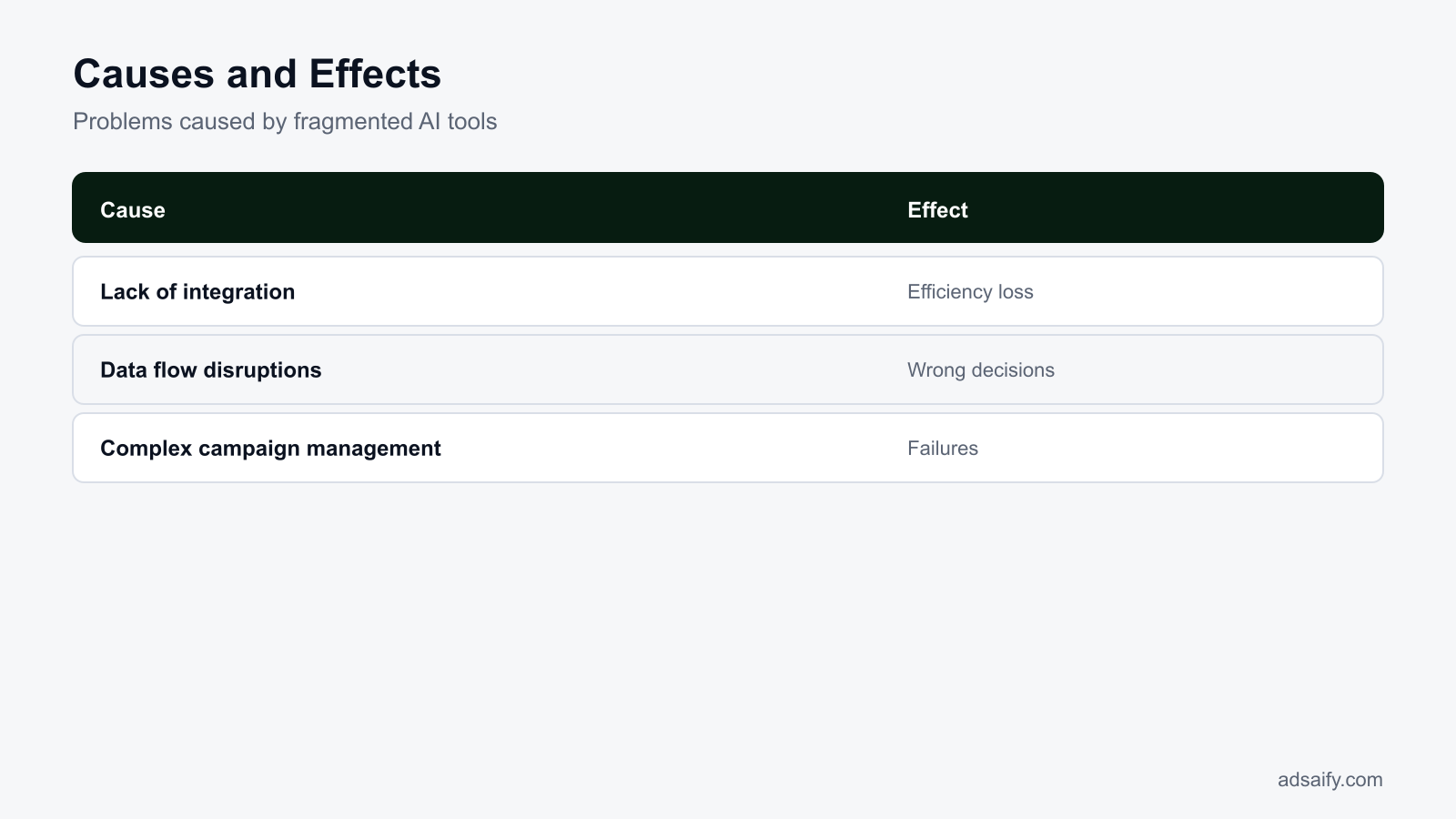
What costs arise if this issue is ignored?
Ignoring the fragmented AI workflow in Meta Ads can lead to several costs, including budget waste, time loss, and potential campaign failures. These issues contribute to low return on investment (ROI) and hinder overall marketing effectiveness. Recognizing these costs is essential for maintaining efficient ad strategies and ensuring the best use of resources.Budget waste and low ROI
Budget waste occurs when ads are not optimized due to a fragmented AI workflow. For instance, if targeting settings are misaligned, your budget may be spent on audiences that are unlikely to convert. This inefficiency can lead to a low ROAS (return on ad spend), which is the revenue generated for every dollar spent on advertising. To assess your budget allocation, check the following: - **Targeting settings:** Ensure they align with your audience insights. - **Ad performance metrics:** Review metrics like CTR (click-through rate) and conversion rates regularly. - **Campaign objectives:** Confirm that your objectives match your business goals.Time loss and labor inefficiency
Time loss arises when marketers spend excessive hours managing fragmented tools instead of focusing on strategy. This inefficiency can lead to missed opportunities and a slower response to market changes. For example, if data from different sources is not integrated, analysts may spend hours compiling reports instead of interpreting data for actionable insights. To minimize time loss, consider the following steps: - **Automate reporting:** Use tools like Adsaify to generate performance reports automatically. - **Set up alerts:** Create alerts for significant performance changes in Meta Ads Manager. - **Streamline communication:** Ensure your team uses a unified platform for updates and feedback.Campaign failures and losses
Campaign failures can occur when fragmented workflows lead to poor ad performance. For instance, if creatives are outdated or misaligned with audience interests, campaigns can underperform. This not only results in financial losses but can also damage brand reputation. To prevent campaign failures, follow this checklist:- Review past campaign performance data.
- Update audience targeting based on recent insights.
- Conduct A/B tests for ad creatives regularly.
- Align ad copy with current promotions or events.
- Ensure that tracking pixels are functioning correctly.
- Monitor competitors' ad strategies for insights.
- Schedule regular team meetings to discuss campaign updates.
- Evaluate and adjust budgets based on performance trends.
How significant is time loss for me?
Time loss can be highly significant, especially in fast-paced marketing environments where prompt actions are crucial. If your team is spending excessive hours troubleshooting fragmented workflows, it detracts from strategic planning and creative development. Even minor inefficiencies can add up, leading to substantial time loss that impacts overall campaign success and ROI.How can I diagnose which causes apply?
Diagnosing the causes of a fragmented AI workflow in Meta Ads requires a systematic approach. By checking data flow, analyzing campaign performance, and observing the interactions of various tools, marketers can identify specific issues that need to be addressed.Check data flow and integration status
The first step in diagnosis is to ensure that all data sources are properly integrated and flowing smoothly. This includes checking the connections between your ad account, analytics tools, and CRM systems. If there are discrepancies in data reporting, it can indicate integration issues. Key actions to take include: - **Review integration settings:** Ensure that all tools are linked correctly in Meta Business Suite. - **Verify data accuracy:** Cross-check data from different sources for consistency. - **Monitor data latency:** Look for delays in data updates that could affect decision-making.Analyze campaign performance
To diagnose performance issues, closely analyze the metrics of your ongoing campaigns. Look for patterns in your KPIs (key performance indicators), such as CTR, conversion rates, and CPA (cost per acquisition). Identifying trends can help pinpoint specific areas of concern. Here are some metrics to focus on: - **Ad relevance score:** A low score may indicate that your ads are not resonating with the target audience. - **Cost per click (CPC):** A rising CPC may suggest inefficiencies in targeting or ad quality. - **Audience engagement:** Low engagement rates can signal misalignment in ad creative or messaging.Observe interactions of tools
Understanding how your tools interact is crucial for diagnosing workflow fragmentation. For example, if your ad performance is suffering despite strong audience targeting, there may be issues with the creative assets or reporting tools. The following table summarizes common interactions and symptoms:| Tool Interaction | Symptoms | Potential Causes | Recommended Actions |
|---|---|---|---|
| Ad Manager and Analytics | Inconsistent performance data | Integration issues | Re-check integration settings |
| CRM and Meta Ads | Low conversion tracking | Tracking pixel misconfiguration | Test and update tracking pixels |
| A/B Testing Tools and Ad Creatives | Poor ad performance | Outdated creatives | Refresh ad creatives regularly |
| Budget Management Tools | Overspending or underspending | Poor budget allocation | Re-evaluate budget distribution |
Which tools should I check?
You should check tools that are integral to your ad campaigns, including Meta Ads Manager, analytics platforms, CRM software, and any A/B testing tools you are using. Ensure that these tools are properly integrated and that the data flow is seamless. Regularly monitor their performance to quickly identify any discrepancies or inefficiencies that could affect your campaigns.If you would rather not set up each of these steps by hand, try it in Adsaify: your first ad is free, so there is nothing to lose. Create a free account.
What should I prepare and check before applying the fix?
To effectively address the fragmented AI workflow in Meta Ads, preparation is crucial. First, take inventory of all existing tools used for ad management, analytics, and reporting. Next, review how data flows between these tools to identify any gaps. Finally, clearly define your advertising goals to ensure that the solution aligns with your objectives.Take inventory of existing tools
Begin by listing all the tools currently in use for managing your Meta Ads campaigns. This includes Meta Ads Manager, third-party analytics tools, creative generation software, and any automation systems. Understanding what tools are available allows you to identify redundancies and gaps. For instance, if you're using multiple platforms for audience segmentation, consider consolidating to streamline your workflow.Review data flow
Assess how data is transferred between the tools you’ve identified. Check for any disconnects that may be causing inefficiencies. For example, ensure that your analytics platform receives real-time data from Meta Ads Manager to provide accurate performance insights. If your data flow is fragmented, consider using APIs (Application Programming Interfaces) to facilitate seamless communication between tools.Define your goals
Clearly articulating your advertising goals is essential for measuring success. Determine if your primary objective is brand awareness, lead generation, or sales conversion. For instance, if your goal is to increase sales, define specific metrics, such as a targeted ROAS (return on ad spend) or a certain number of conversions. This will guide your strategy and help you assess the effectiveness of your fix.- List all tools currently in use for ad management.
- Identify any redundancies in your current tools.
- Map out how data flows between these tools.
- Check for real-time data updates in your analytics tools.
- Define specific advertising goals to guide your strategy.
- Establish key performance indicators (KPIs) for each goal.
- Determine the audience segments you want to target.
- Review past campaign performance to identify trends.
How to apply the solution step by step?
Applying a structured solution to fix the fragmented AI workflow involves a series of organized steps. Start by choosing a system that integrates all your tools effectively. Next, facilitate a smooth data flow among these tools. Finally, create KPIs (Key Performance Indicators) to monitor and evaluate campaign performance continuously.Choose a system that integrates tools
Select an integrated platform that can connect your various tools seamlessly. For example, using Adsaify can simplify the campaign creation process by connecting your website data with Meta Ads Manager. This integration allows for automated audience targeting and ad copy generation, reducing the need for manual input.Organize data flow
Ensure that your chosen system facilitates an efficient data flow. Set up automated reports that pull data from Meta Ads Manager and consolidate it into a single dashboard. This allows for real-time performance tracking and reduces the time spent on manual data entry.Create KPIs to monitor performance
Define specific KPIs relevant to your advertising goals. For instance, if your goal is to increase website traffic, track metrics like CTR (click-through rate) and conversion rates. Establish thresholds for these KPIs to trigger alerts, allowing you to respond promptly to underperforming campaigns.- Choose Integrated System — Select a platform that connects all your tools and streamlines workflow.
- Set Up Data Flow — Organize how data will be shared between tools for real-time updates.
- Define KPIs — Establish clear metrics to measure the success of your campaigns.
- Create Automated Reports — Set up reports that provide insights into campaign performance.
- Monitor Performance — Regularly check KPIs to identify areas for improvement.
- Adjust Campaigns — Make necessary changes based on performance data.
- Review and Optimize — Continuously assess and refine your strategies for better results.
Which systems should I use?
To address fragmented workflows, consider using systems like Adsaify for ad management and analytics tools like Google Analytics for performance tracking. Both platforms facilitate integration, allowing for efficient data flow and centralized reporting. This combination can help streamline your Meta Ads campaigns and improve overall effectiveness.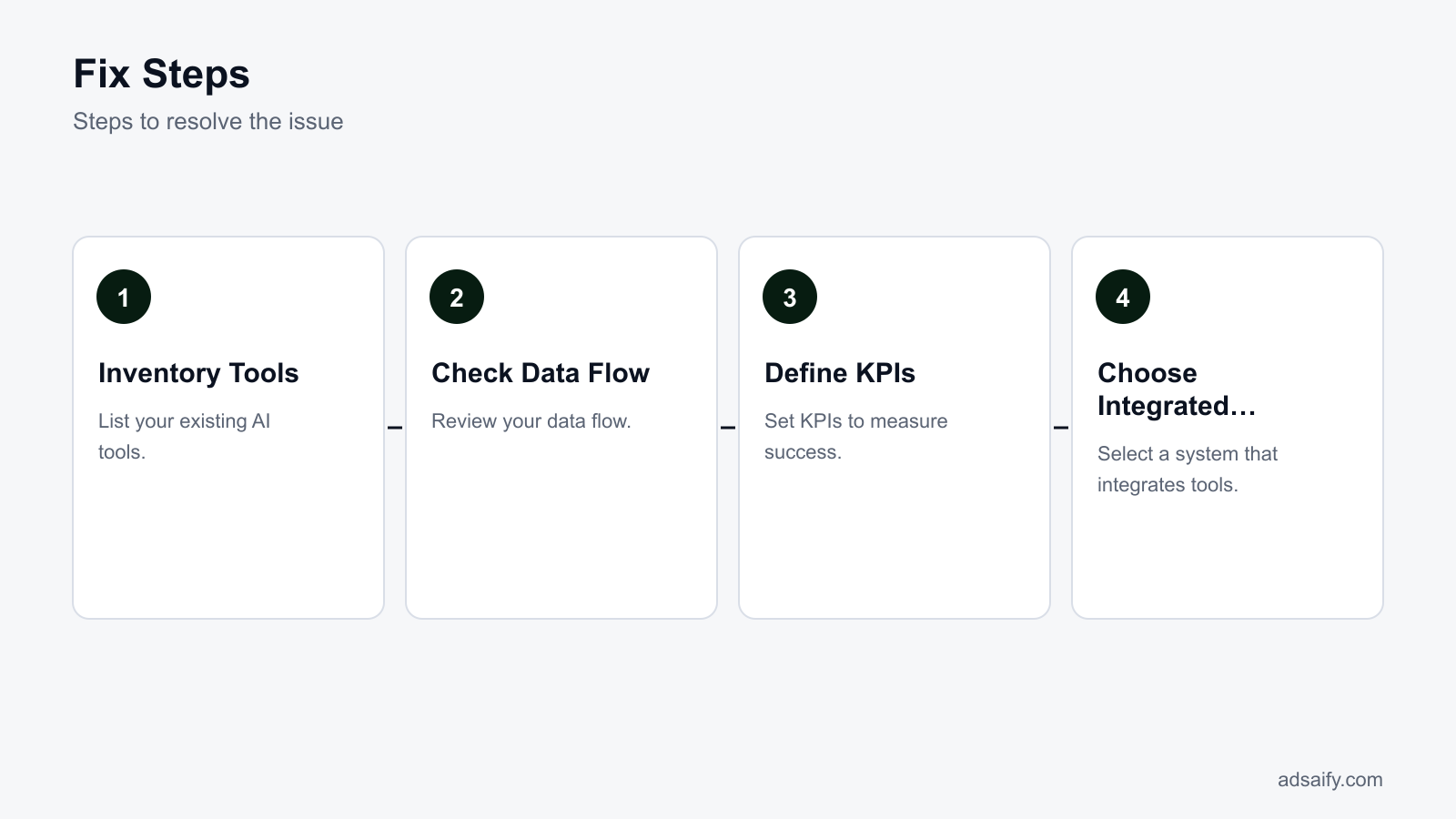
Can you provide a detailed worked example?
To illustrate how to address the fragmented AI workflow in Meta ads, let's create a sample campaign scenario for a fictional online clothing store called "Trendy Threads." The store has a daily budget of 500 TL and wants to promote its new collection of summer dresses. This example will demonstrate how an integrated system can optimize the ad campaign and analyze results effectively.
Create a Sample Campaign Scenario
Trendy Threads decides to run a campaign targeting women aged 18-35 interested in fashion. The primary goal is to increase website traffic and conversions. Using Meta Ads Manager, the team sets the campaign objective to "Traffic" to drive users to their e-commerce site. The ad set is configured with the following parameters:
- Audience: Women, ages 18-35, located in Turkey, interested in fashion and online shopping.
- Budget: 500 TL daily.
- Ad Format: Carousel ads featuring multiple summer dress styles.
After launching the campaign, Trendy Threads uses Adsaify to analyze the performance and receive suggestions for optimization, such as adjusting the audience or ad copy based on real-time data.
Show How the Integrated System Works
With the campaign live, Trendy Threads monitors key performance indicators (KPIs) such as click-through rate (CTR), conversion rate, and cost per click (CPC). The integrated system in Meta Ads Manager provides real-time analytics, allowing for quick adjustments. For example, if the CTR is below 1%, the team can quickly change the ad copy or images through Adsaify's suggestions to enhance engagement.
After three days, the campaign shows the following metrics:
- Impressions: 20,000
- Clicks: 150
- Conversions: 10
- CTR: 0.75%
- CPC: 3.33 TL
Based on this data, Trendy Threads decides to tweak the audience to include women aged 35-45 and adjust the ad copy to emphasize discounts on summer dresses, using Adsaify’s capabilities to create new variations rapidly.
Analyze the Results
After implementing the changes, the campaign runs for another week, leading to improved results:
- Impressions: 25,000
- Clicks: 300
- Conversions: 25
- CTR: 1.2%
- CPC: 2 TL
By analyzing these results, Trendy Threads identifies that the adjustments significantly improved performance, reducing the CPC while increasing conversions. This example highlights how a cohesive AI-driven approach can streamline campaign management and enhance results.
Which metrics should I use in my sample scenario?
In this sample scenario, focus on key metrics such as click-through rate (CTR), conversion rate, cost per click (CPC), and return on ad spend (ROAS). These metrics will provide insights into the effectiveness of your campaign and help you make informed decisions for future optimizations.
How to measure whether the fix worked?
To evaluate whether the fix for the fragmented AI workflow in Meta ads was successful, set measurable key performance indicators (KPIs) and compare performance data before and after implementing the changes. Analyzing these results will help determine the effectiveness of the adjustments made.
Set Measurable KPIs
Establish specific KPIs aligned with the campaign objectives. For Trendy Threads, relevant KPIs include:
- Click-through rate (CTR)
- Conversion rate
- Cost per click (CPC)
- Return on ad spend (ROAS)
These KPIs will help quantify the impact of the modifications made to the campaign.
Compare Performance Data
After implementing the fixes, compare the performance data from before and after the changes. Use Meta Ads Manager to extract metrics for the two periods. The data will show whether the adjustments led to improved performance.
Analyze the Results
| Metric | Before Fix | After Fix |
|---|---|---|
| Impressions | 20,000 | 25,000 |
| Clicks | 150 | 300 |
| Conversions | 10 | 25 |
| CTR | 0.75% | 1.2% |
| CPC | 3.33 TL | 2 TL |
This comparison clearly illustrates the improvement in performance metrics, confirming the effectiveness of the applied fixes.
Which KPIs are important for me?
In your campaigns, prioritize KPIs such as click-through rate (CTR) for engagement, conversion rate for sales effectiveness, cost per click (CPC) for budget management, and return on ad spend (ROAS) to evaluate overall profitability. These metrics will guide your optimization efforts effectively.
Want to see this in your own account? Enter your website address and Adsaify drafts the campaign for you. The first ad is free. Try it now or log in.
How can I prevent this issue from reoccurring?
Preventing the fragmented AI workflow in Meta Ads requires a proactive approach that includes regular system checks, increased training and awareness, and continuous monitoring of data flow. By establishing a routine and fostering a culture of data-driven decision-making, marketers can mitigate the risks associated with fragmented workflows.Conduct Regular System Checks
Regular system checks help identify issues before they escalate. Ensure that your Meta Ads tools are integrated properly and functioning as intended. This includes checking for software updates, verifying that automation rules are active, and ensuring that your tracking pixels are correctly set up.Increase Training and Awareness
Training your team on the proper use of AI tools and Meta Ads features is essential. Conduct workshops and training sessions to familiarize your team with the latest updates in Meta Ads Manager and Adsaify. This ensures that everyone understands how to utilize the tools effectively, reducing the likelihood of errors.Continuously Monitor Data Flow
Monitoring data flow is critical for identifying bottlenecks and inefficiencies. Regularly review your campaign performance metrics in Meta Ads Manager, including CTR (click-through rate), CPC (cost per click), and ROAS (return on ad spend). Establish alerts for significant drops in performance metrics to act quickly before issues worsen.- Daily: Check campaign performance metrics in Meta Ads Manager to identify any immediate issues.
- Daily: Monitor the integration status of AI tools to ensure they are functioning correctly.
- Weekly: Review automation rules to confirm they are still aligned with campaign goals.
- Weekly: Conduct a sync meeting with your team to discuss any challenges faced with the tools.
- Monthly: Audit the audience targeting settings to ensure they are still relevant.
- Monthly: Update training materials based on new features or changes in Meta Ads.
- Quarterly: Evaluate the overall strategy and adjust based on performance data.
How often should I conduct checks?
Checks should be conducted daily for immediate performance metrics and system integrations, weekly for automation rules and team discussions, monthly for audience audits and training updates, and quarterly for strategic evaluations. This structured approach ensures ongoing optimization and minimizes the risk of fragmentation.What are the most common mistakes and how to fix them?
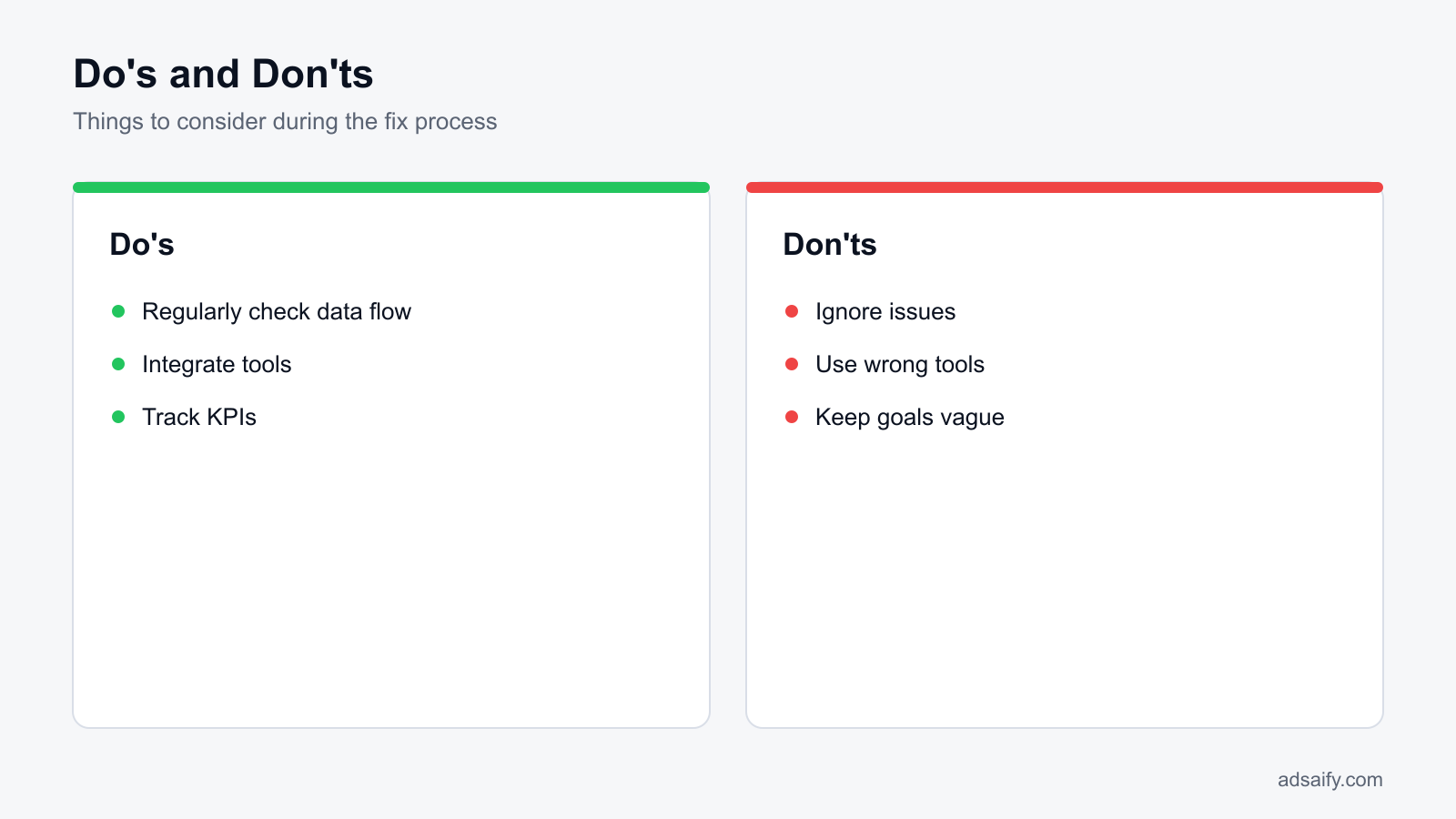
Identifying and correcting common mistakes in Meta Ads management is crucial for maintaining a streamlined workflow. Mistakes such as incorrectly integrating tools, ignoring data flow, and leaving campaign goals vague can lead to wasted resources and missed opportunities.Incorrectly Integrating Tools
Failing to properly integrate tools can lead to data silos, where information is not shared across platforms. This lack of integration can result in inconsistent metrics and poor decision-making. To fix this, ensure all tools are connected properly, and conduct tests to verify data flow between them.Ignoring Data Flow
Disregarding the importance of data flow can hinder performance tracking and optimization. If data is not flowing correctly, you may miss critical insights. Regularly check the data pipeline between Meta Ads Manager and your analytics tools to ensure data integrity. Set up alerts for any discrepancies.Leaving Campaign Goals Vague
Vague campaign goals can lead to misaligned strategies and ineffective ads. Clearly define measurable objectives such as increasing website traffic by a certain percentage or achieving a specific ROAS. Document these goals and ensure they are communicated to everyone involved in the campaign.Neglecting Audience Segmentation
Failing to segment your audience can result in irrelevant ad delivery. Without tailored messaging, ad performance suffers. Use the audience insights feature in Meta Ads Manager to create detailed segments based on demographics, interests, and behaviors, ensuring your ads reach the right people.Inconsistent Creative Testing
Not testing different creatives can lead to missed opportunities for improvement. If you are using the same ad creative for too long, performance can decline. Regularly A/B test different variations of ad copy and images to identify what resonates best with your audience.Overlooking Budget Adjustments
Ignoring budget performance can lead to overspending on underperforming ads. Regularly review your budget allocations based on performance metrics. Use automation rules to pause poorly performing ads and reallocate budget to higher-performing campaigns.How can I prevent these mistakes?
To prevent these mistakes, establish a clear workflow that includes regular audits, defined goals, and ongoing training. Maintain open communication within the team to address issues promptly and encourage a culture of data-driven decision-making. Regularly revisit and refine processes to adapt to changing conditions.When will the fix not help and what are its limits?
The fix for a fragmented AI workflow in Meta Ads may not be effective in several scenarios, including unresolved fundamental issues, insufficient budget and resources, and the application of incorrect strategies. Recognizing these limitations is crucial for effective ad management and optimization.Unresolved fundamental issues
Fundamental issues such as poor product-market fit, unclear branding, or a lack of compelling value propositions cannot be resolved by simply fixing the AI workflow. If these core problems exist, no amount of optimization will lead to improved performance. For instance, if a product does not resonate with the target audience, even the most sophisticated AI tools will struggle to generate positive results. Therefore, ensure that your offerings align with customer needs and preferences before relying on AI solutions.Insufficient budget and resources
If your budget is too low or your resources are inadequate, the fix may not yield significant improvements. Meta Ads Manager requires sufficient funding to generate meaningful data that the AI can analyze. For example, if you set a daily budget of 100 TL, the limited spend may not allow for enough data collection to inform effective optimizations. Be prepared to allocate an appropriate budget based on your campaign goals and expected audience size to ensure that your AI-driven efforts can function optimally.Applying incorrect strategies
Implementing strategies that do not align with your campaign objectives can also limit the effectiveness of any fixes. For instance, if you focus solely on engagement metrics while ignoring conversions, the AI may optimize for the wrong outcomes. Review your campaign objectives in Meta Ads Manager, ensuring they are set to meet your desired results, such as lead generation or sales. Misaligned strategies can lead to wasted budget and subpar performance.- Evaluate unresolved fundamental issues in your business.
- Assess whether your budget is sufficient for your campaign goals.
- Review your current strategies for alignment with objectives.
- Check if your target audience is well-defined and reachable.
- Analyze historical performance data for insights.
- Ensure that your creative assets are high-quality and relevant.
- Consult with team members or experts for external perspectives.
- Reassess your timeline to allow for adequate testing and adjustments.
What should I do in this situation?
If you find yourself in a situation where the fix may not help, focus on addressing fundamental issues first. This may involve refining your product offering, clarifying your messaging, or increasing your advertising budget. Additionally, ensure your strategies align with your overall goals, and consider consulting industry experts for guidance tailored to your specific challenges.What are the key terms used in this article?
Key terms in this article refer to specific concepts and metrics essential for understanding the fragmented AI workflow in Meta Ads. Familiarity with these terms will enhance your ability to navigate the complexities of ad management.- AI tools: AI-powered ad management systems that automate and optimize advertising processes.
- KPI: Key performance indicators, metrics used to measure the success of an advertising campaign.
- ROI: Return on investment, a measure of the profitability of an investment relative to its cost.
- Meta Ads Manager: The platform used to create, manage, and analyze advertising campaigns on Meta platforms.
- Audience targeting: The process of defining and reaching specific groups of consumers based on demographics, interests, and behaviors.
- Ad creative: The visual and textual elements used in an advertisement, including images, videos, and copy.
- Campaign objectives: The specific goals set for an ad campaign, such as brand awareness or conversions.
- Budget allocation: The distribution of financial resources across different aspects of an advertising campaign.
- Performance metrics: Data points used to evaluate the effectiveness of ads, such as click-through rate and conversion rate.
- Automation rules: Predefined actions set up in ad management tools to optimize campaign performance automatically.
- Creative refresh: The process of updating ad creatives to maintain audience engagement and performance.
- Segmentation: The practice of dividing a target audience into smaller groups based on shared characteristics.
What do these terms mean?
Understanding these key terms is essential for effectively navigating the complexities of Meta Ads. They provide a framework for defining strategies, measuring success, and optimizing campaigns. Familiarity with these concepts will empower you to make informed decisions in your advertising efforts.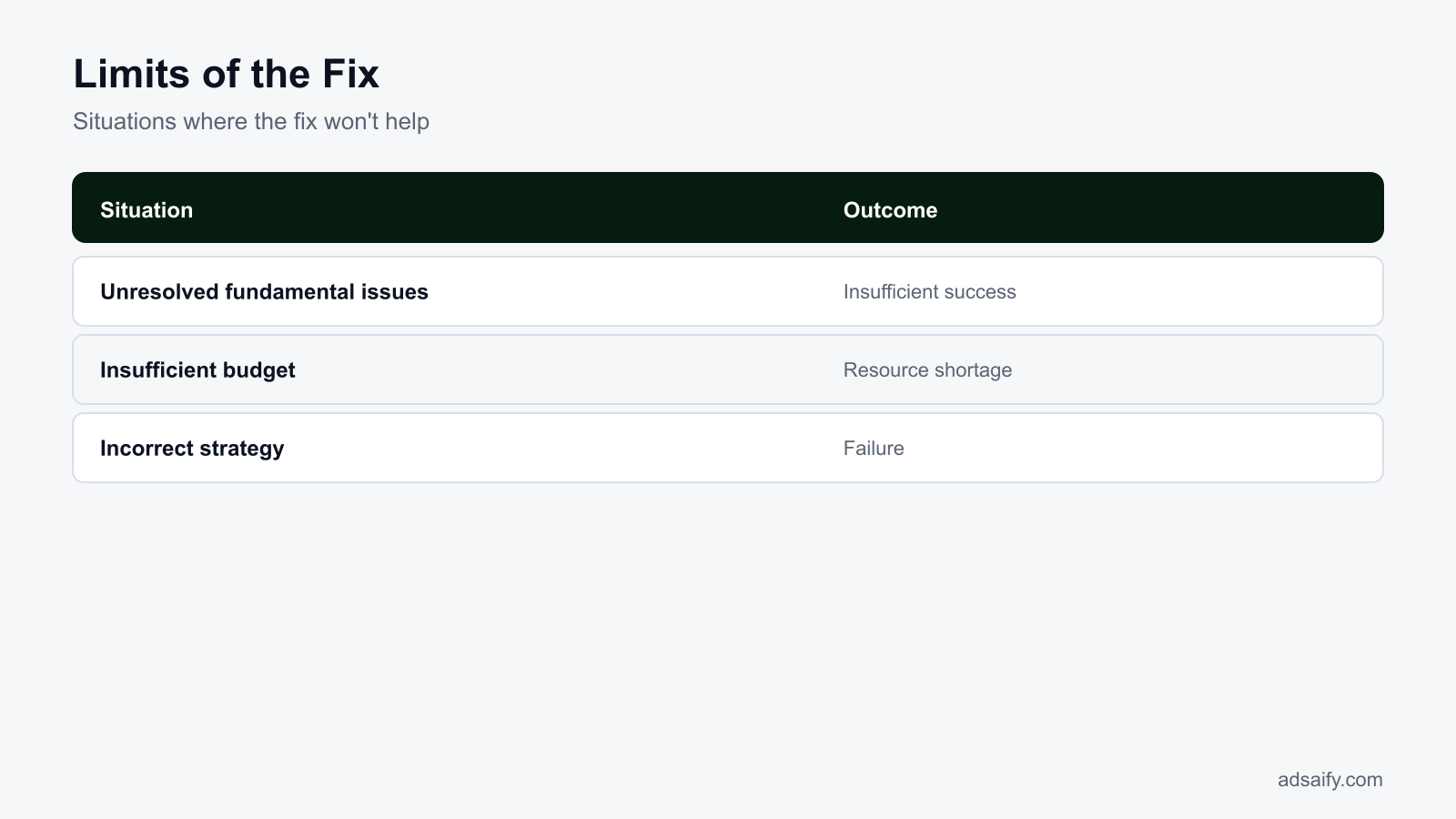
Conclusion
To fix the fragmented AI workflow in Meta Ads, start by analyzing your current ad campaigns for inefficiencies. Next, leverage tools like Adsaify to streamline campaign creation and management. Finally, set up automation rules to optimize performance. As a concrete next step, consider registering for a free trial on Adsaify to explore its features today.
Want to see this in your own account? Enter your website address and Adsaify drafts the campaign for you. The first ad is free. Try it now or log in.
Frequently Asked Questions (FAQ)
1. How long does the fix take?
The time required to fix the fragmented AI workflow in Meta Ads varies based on the complexity of your campaigns. Typically, you can expect to spend a few hours analyzing your current setup and implementing tools like Adsaify. Once you begin using automation rules, expect ongoing adjustments as needed.
2. What if my budget is small?
If your budget is small, prioritize targeting a specific audience segment to maximize your return on ad spend (ROAS). Focus on creating high-quality content and set a daily budget that allows for testing. Adsaify can help you identify the best strategies for your budget constraints.
3. Which tools should I use to solve this issue?
To address a fragmented AI workflow in Meta Ads, consider using Adsaify for campaign creation and management. Additionally, utilize analytics tools like Facebook Ads Manager to track performance, and automation tools to manage ad spend and optimize campaigns efficiently.
4. What should I do if the issue persists?
If the fragmented workflow issue persists, revisit your campaign settings and audience targeting. Analyze performance metrics to identify problem areas. Consider consulting with an expert or utilizing additional tools for deeper insights. Regularly updating your strategies based on data can also help.
5. Which metrics should I track?
Key metrics to track include click-through rate (CTR), conversion rate, and return on ad spend (ROAS). Additionally, monitor engagement metrics such as likes, shares, and comments on ads. These metrics provide insights into ad effectiveness and audience interaction.
6. How costly is the solution for this issue?
The costs associated with fixing the fragmented AI workflow in Meta Ads can vary. Using Adsaify for campaign management is free for the first ad. Additional costs may arise from advertising spend and any premium features you choose to implement. Budget accordingly based on your goals.
7. Is using just one tool sufficient?
Using just one tool may not be sufficient to fully resolve a fragmented AI workflow in Meta Ads. While Adsaify can streamline campaign creation and management, combining it with analytics tools and performance tracking will provide a more comprehensive solution for optimizing your advertising efforts.
8. How can I use time more efficiently?
To use time more efficiently, automate repetitive tasks like ad performance monitoring and budget adjustments with tools like Adsaify. Create templates for ad campaigns to speed up the setup process. Regularly review performance data to make informed decisions quickly, minimizing delays.
How can you try this with Adsaify?
The quickest way to apply the steps in this article to your own account is to try them. Adsaify analyses your business from your website address, drafts the campaign with an audience, ad copy, creative and a budget suggestion, and publishes it to your own Meta ad account once you approve.
- Your first ad is free: there is nothing to lose by trying.
- Your own ad account: the campaign runs in your Meta account and you stay in control.
- Images and video: generate ad creatives with AI or promote an existing Instagram post.
Create a free account and try your first ad · Already have an account? Log in.