Short answer: To avoid over-engineering when choosing Meta ad tools, base your decision on weekly ad volume rather than technical complexity. Instead of building hundreds of nested if-then rules, select autonomous AI platforms that streamline creative generation and protective pausing to eliminate operational overhead and algorithm conflicts.
Many performance marketers and business owners spend more time maintaining complex stacks of third-party automation software, custom reporting connectors, and nested bid-adjustment rules than actually refining their creative strategy. Your day quickly devolves into troubleshooting broken API syncs, resolving conflicting automated triggers that pause and unpause ad sets overnight, and paying high subscription fees for features that deliver zero measurable incremental value to your Facebook and Instagram campaigns.
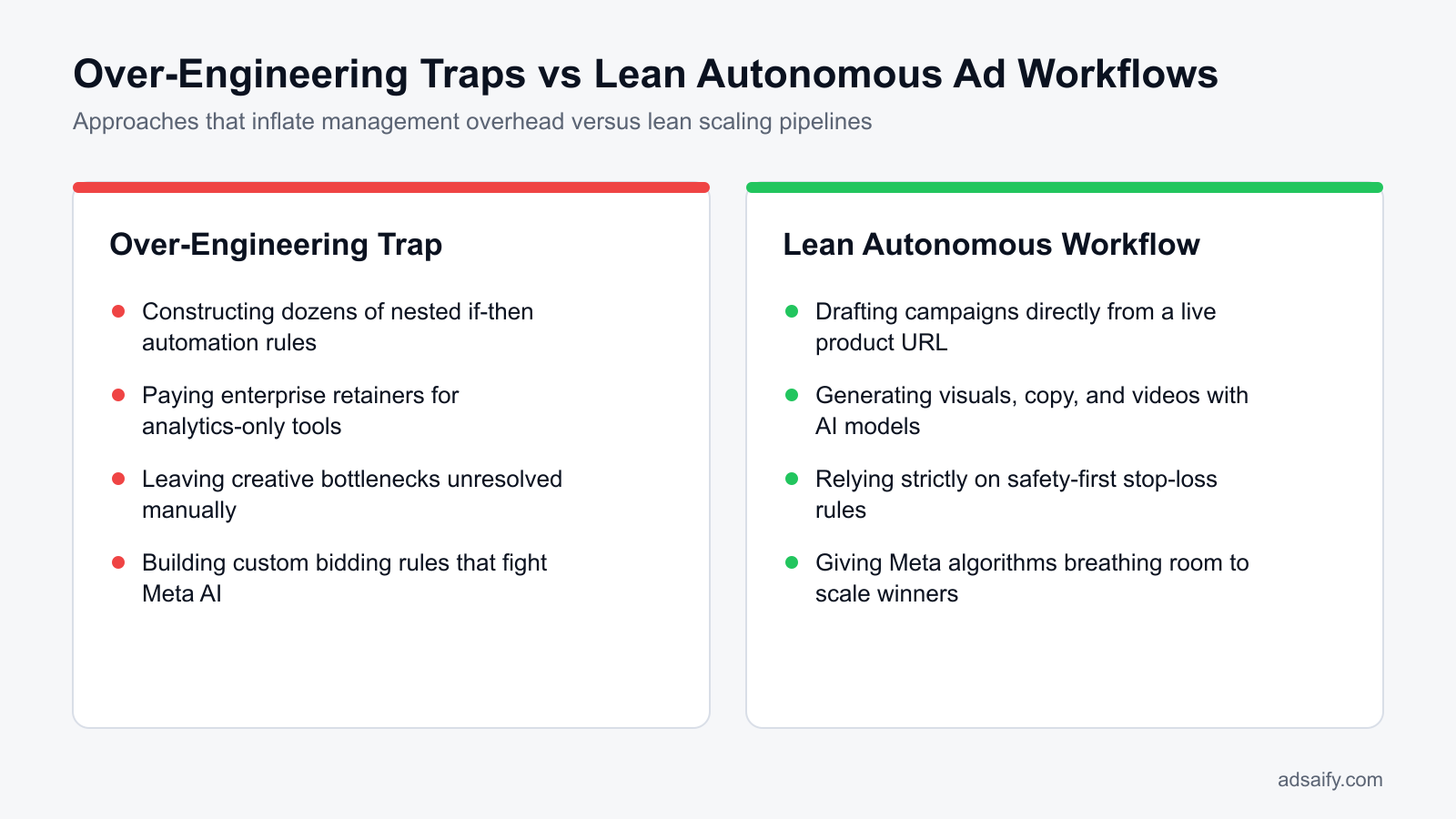
This over-engineering happens because media buyers assume that higher technical complexity automatically drives superior returns. Leaving this bloated setup unchecked leads to heavy operational drag: rigid external rules constantly fight against Meta's native machine-learning delivery system, repeatedly throwing ad sets back into the learning phase, spiking cost per acquisition, and consuming hours of manual oversight that should be spent developing high-converting offers.
This article provides a practical blueprint to strip away software clutter and choose the right Meta ad tool for your current scale. You will discover how to audit your account data before switching platforms, evaluate different tool architectures against real-world advertising scenarios, eliminate automation conflicts, and implement routine operational checks that protect your advertising budget without adding unnecessary friction.
Key Takeaways
- Autonomous models (Adsaify) cut operational management time compared to complex rule builders (Revealbot).
- Enterprise catalog tools like Smartly create unjustified fixed overhead for small and mid-sized ad spends.
- Dashboard-heavy tools like Madgicx leave manual bottlenecks unresolved if they do not generate creatives.
- The right platform prevents external automation logic from conflicting with Meta's native machine learning.
What Is the Over-Engineering Problem in Meta Ad Management?
The over-engineering problem in Meta ad management occurs when advertisers deploy excessively intricate software stacks, hyper-segmented campaign structures, and brittle automation rule chains that exceed their actual operational requirements. This practice creates severe management overhead, slows down creative testing cycles, and burns media spend on redundant software subscriptions rather than direct advertising inventory.
Operational Drag and Misaligned Buyer Priorities
When media buyers focus primarily on building complex logic trees, ad account performance deteriorates. Modern performance marketing relies heavily on testing creative formats, angles, and messaging hooks. ROAS (return on ad spend) is the total revenue generated divided by advertising spend. Media teams that spend their working hours calibrating twenty-step conditional rules neglect visual production and customer research. This friction introduces technical misconfigurations inside Meta Ads Manager, such as overlapping audience exclusions or budget cannibalization across ad sets.
Software Overhead Relative to Media Spend
Over-engineering also creates unsustainable cost structures. Purchasing high-tier enterprise software when ad spend does not justify the fixed monthly cost imposes an unnecessary fee on every campaign. For businesses managing lean budgets, selecting focused software such as Adsaify to generate ad copy, visual assets, and essential pause rules prevents software costs from eroding profit margins.
For example, consider an apparel store operating with a $6,000 monthly media budget. The business previously paid $600 per month for an enterprise automation platform while splitting the account into 18 ad sets across 5 legacy campaigns. To resolve operational bloat, the team eliminated the external platform, consolidated delivery into one Advantage+ shopping campaign, and reallocated the $600 software fee directly into creative testing. After implementing this change, the team evaluated CPA (cost per acquisition), which is total ad spend divided by the number of purchases, alongside blended ROAS over a thirty-day window to confirm lower conversion costs.
Doesn't setting up advanced automation rules always improve performance?
No, advanced automation rules do not always improve performance because complex rule chains often restrict the native machine learning inside Meta Ads Manager. When multiple external rules fire simultaneously—such as automated bid cuts triggered alongside micro-budget adjustments—they interrupt the learning phase of Meta delivery algorithms. Instead of stabilizing delivery, over-automated rules frequently force ad sets back into learning resets, increasing ad volatility and driving up purchase costs.
Which Tool Selection Mistakes Drain Meta Advertising Budgets?
Tool selection mistakes drain Meta advertising budgets when third-party software counteracts Meta native optimization engines, charges steep fixed fees without aiding production, or introduces delayed reporting data. These missteps force campaigns to bid against internal rules, divert capital away from media spend into idle dashboards, and shut down profitable ads prematurely due to inaccurate telemetry.
Algorithmic Conflicts and Production Gaps
The most expensive mistake is deploying third-party bid management tools that directly conflict with Meta Advantage+ delivery settings. Meta uses auction signals gathered in real time across billions of user interactions to determine bid prices. When an external tool forces programmatic bid adjustments every twenty minutes, it degrades auction efficiency and inflates CPM (cost per mille), which is the cost an advertiser pays for every one thousand ad impressions. Furthermore, brands often spend substantial funds on analytics-only dashboards that identify weak performance but offer no built-in creative generation tools. Advertisers can instead run direct creative experiments with Adsaify, which crafts copy, images, and videos directly from a store URL.
Attribution Delays and Software Evaluation
An API (application programming interface) is a connection interface that enables software systems to send and receive data automatically. Delayed data synchronisation across third-party APIs frequently tricks automation rules into pausing campaigns that are actively generating profitable sales. The table below outlines how common tool selection mistakes degrade Meta campaign budgets:
| Selection Mistake | Underlying Cause | Account Symptom | Corrective Action |
|---|---|---|---|
| Conflicting Bidding Rules | Third-party bid caps overriding Advantage+ automated budget delivery | Unspent daily budget and persistent learning phase resets | Disable external bidding scripts and rely on native Meta bid strategies |
| Analytics-Only SaaS | Paying high monthly fees for reporting dashboards without creative creation tools | Stagnant ad copy and creative fatigue across primary audiences | Adopt tools that assist with asset generation and basic safeguard rules |
| Unused Dynamic Engines | Enterprise catalog overlay software requiring custom developer maintenance | High developer retainers without measurable lifts in conversion rate | Use native Meta catalog ads with standard on-platform creative enhancements |
| Delayed Webhook Automation | External automation rules evaluating ROAS before attribution data finalizes | Premature pausing of winning ads during peak purchasing hours | Extend rule evaluation windows to minimum 48-hour attribution lookbacks |
How does third-party API latency hurt ad auction performance inside Meta?
Third-party API latency hurts auction performance because external platforms receive conversion events with hours of delay, whereas Meta optimizes auctions in real time. If an external rule checks ROAS before conversion webhooks finalize attribution, the rule sees artificial underperformance and pauses high-converting ads. By the time conversions populate, the paused ad set has lost its auction momentum, requiring a costly re-learning phase that raises effective customer acquisition costs.
What Is the Operational Cost of Choosing the Wrong Tool Architecture?
The operational cost of choosing the wrong Meta ad tool architecture includes wasted labor hours, compressed profit margins, unmaintained automation rules, and recurring creative production bottlenecks. When third-party software adds technical complexity instead of streamlining execution, teams spend valuable working hours managing software mechanics rather than refining creative strategy, testing messaging, and improving campaign profitability.
Wasted Labor Hours and Margin Compression
Marketing teams often allocate up to half of their weekly working hours to configuring custom automation rules, reconciling webhook errors, and troubleshooting API synchronization delays. ROAS (return on ad spend) is a performance metric that calculates gross revenue generated for every monetary unit spent on advertising. When a business pays fixed enterprise software retainers alongside ad spend without seeing measurable ROAS improvements, operating margins shrink rapidly. High subscription fees require higher incremental revenue just to break even, placing unnecessary strain on performance targets.
Staff Turnover and Creative Bottlenecks
Over-engineered platforms suffer severely when personnel changes occur. When senior media buyers leave an organization, incoming managers frequently inherit dozens of undocumented custom rules inside Meta Ads Manager. Because nobody understands the overlapping logic conditions, teams either disable the rules entirely or risk automated bidding conflicts that throttle delivery. Furthermore, systems that focus strictly on rule-based bid adjustments fail to address asset generation. Ad fatigue is a performance decline that occurs when target audiences see the same advertisement too many times, causing frequency to climb and click-through rates to collapse. Without a streamlined way to produce new creative variations, teams face persistent asset deficits.
Operational Architecture Audit Checklist
- Calculate total hours spent weekly writing, testing, and debugging third-party tool logic.
- Compare the monthly platform subscription cost against attributed incremental revenue gains.
- Audit existing automated rules inside Meta Ads Manager to identify inactive or undocumented conditions.
- Track average creative lifespan to verify whether current tooling resolves ad fatigue.
- Document how many separate dashboard logins your team requires to publish a single campaign.
- Assess whether campaign creators can launch end-to-end ads without technical engineering assistance via Adsaify.
How can I tell whether an ad management tool is genuinely saving my team time?
An ad management tool is genuinely saving your team time if the total hours spent launching campaigns, reviewing analytics, and refreshing creative assets decrease week over week. If media buyers spend less time diagnosing platform errors and more time interpreting consumer insights, the software works. Conversely, if your team logs into both the external tool and Meta Ads Manager daily just to verify automated actions or correct failed syncs, the tool creates operational overhead rather than operational leverage.
How to Diagnose If Your Current Meta Ad Tool Fits Your Needs?
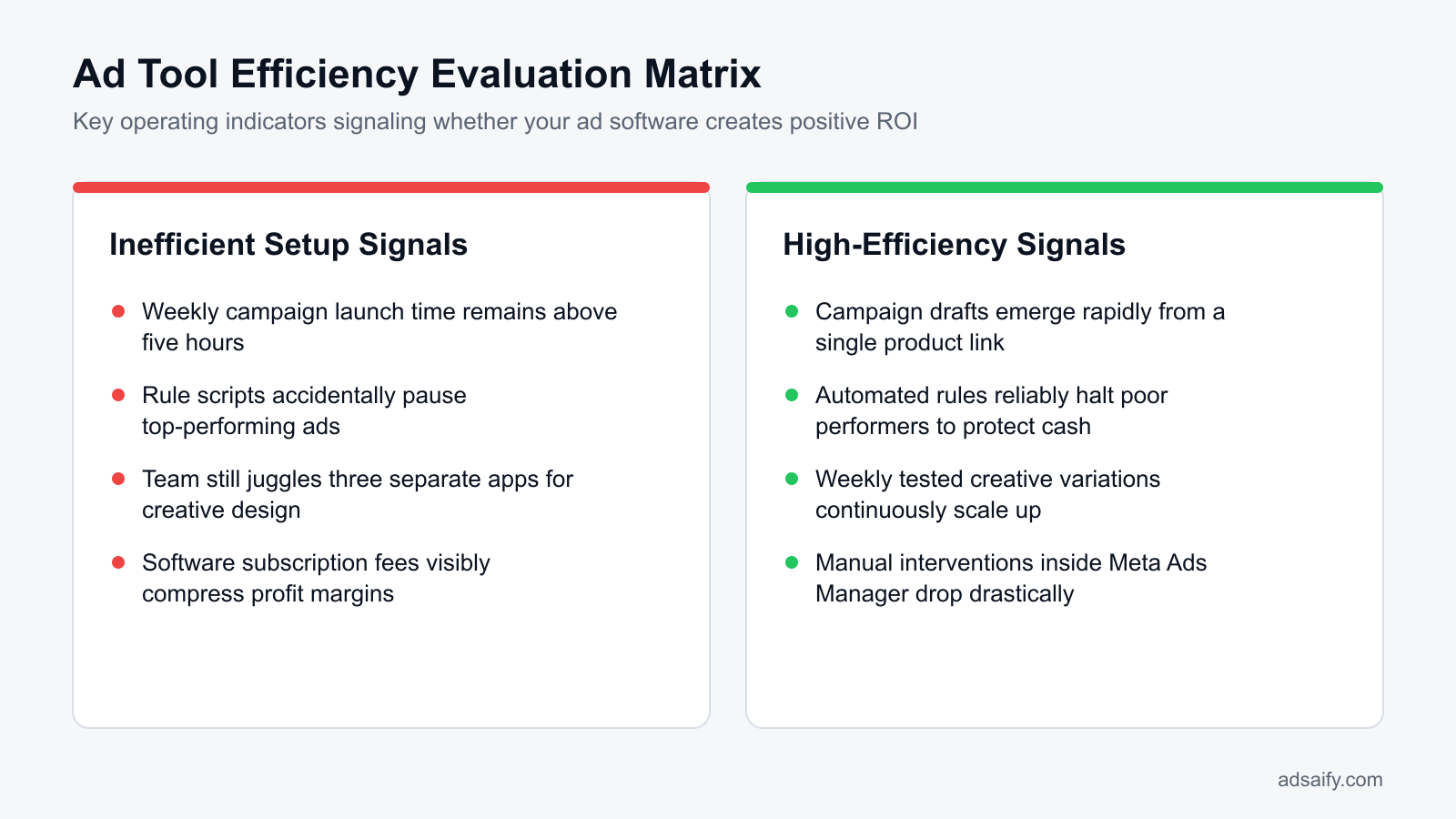
Diagnosing whether a Meta ad tool fits operational needs requires evaluating software expenses against advertising spend, measuring creative output volume, tracking native interface intervention frequency, and calculating feature usage rates. If a management platform demands high overhead while forcing media buyers back into Meta Ads Manager for routine tasks, the tool is poorly aligned with business requirements.
Auditing Software Spend, Asset Output, and Native UI Dependency
A reliable standard for marketing technology efficiency is keeping software expenses below five percent of total monthly Meta advertising spend. For example, with a 10,000 USD monthly ad spend, allocating more than 500 USD to management tooling creates an unnecessary hurdle for net profitability. In addition to cost, teams must audit creative throughput over rolling 30-day windows. If your software manages budgets but produces zero usable copy, image, or video variations, creative production remains a manual bottleneck. Teams must also track how frequently media buyers access native Meta Ads Manager menus to correct campaign errors. Needing daily native interventions to adjust Advantage campaign budget settings or fix broken audience exports indicates that the third-party layer is redundant.
Feature Utilization Analysis
Most enterprise platforms offer deep sub-menus, predictive bidding algorithms, and multi-touch attribution models that smaller operations never use. Calculating active feature utilization—dividing the tools your team touches weekly by total platform capabilities—reveals whether you are subsidizing unused functionality. High-friction platforms require continuous training, whereas streamlined tools like Adsaify simplify campaign creation from initial business inputs through automated execution without surplus architectural layers.
| Diagnostic Area | Healthy Tool Indicator | Over-Engineered Tool Indicator |
|---|---|---|
| Software Spend Ratio | Platform costs remain under five percent of monthly Meta spend. | Subscription fees exceed five percent of monthly ad spend. |
| Creative Generation | Tool directly generates usable ad copy, images, or video assets. | Tool manages bids only; all creative production remains external. |
| Meta Ads Manager Logins | Managers log into native Meta tools once weekly for high-level review. | Staff log into native Meta menus daily to fix publishing errors. |
| Feature Utilization | Team uses over seventy percent of available features every week. | Team uses under thirty percent of features while paying full tier costs. |
| Campaign Publishing | Full campaigns launch directly through the tool without friction. | Campaign drafts require extensive manual re-configuration in native UI. |
What percentage of my ad budget should software subscriptions ideally represent?
Software subscriptions for Meta ad management should ideally represent between two and five percent of your total monthly advertising budget. For example, a business spending 5,000 USD per month on Meta ads should not allocate more than 100 to 250 USD to campaign management tools. Crossing the five percent threshold diverts working capital away from audience reach and testing, which directly diminishes campaign performance unless the tool measurably lowers creative production costs.
If you would rather not set up each of these steps by hand, try it in Adsaify: your first ad is free, so there is nothing to lose. Create a free account.
What Account Data Must Be Audited Before Switching Management Tools?
Auditing account data before switching Meta ad management tools requires cataloging active campaign structures, existing automation rules, tracking integrity, and creative output volume. Advertisers must inspect whether campaigns rely on Advantage Campaign Budget or ad set budgets, verify Conversions API event match quality, record active automated rules, and quantify current creative production rates across the funnel.
Campaign Architecture, Automation Rules, and Tracking Integrity
Begin by auditing structural configurations inside Meta Ads Manager. Advantage Campaign Budget (CBO) is an automated budgeting setting that allocates spend across ad sets dynamically, whereas Ad Set Budget Optimization (ABO) assigns rigid spend caps to individual ad sets. Document your ratio of CBO to ABO campaigns, because tools handle programmatic budget redistribution differently depending on whether budgets sit at the campaign level or the ad set level.
Next, audit active automated processes under Ads Manager > Automated Rules and inspect third-party webhook integrations. Conversions API (CAPI) is a server-side data pipeline that transmits consumer actions directly from a website server to Meta without relying on browser cookies. Check Events Manager to review your Event Match Quality (EMQ) score, which grades parameters such as hashed emails and IP addresses on a scale from 1 to 10. Low match scores degrade algorithmic optimization, meaning that switching management platforms cannot fix underlying performance issues caused by faulty server payloads.
Creative Refresh Velocity and Migration Checklist
Audit your creative velocity, which is the total volume of new visual assets and copy variations introduced to the ad account every week. Catalog-heavy brands must verify their product feed health inside Commerce Manager, ensuring that catalog feeds match active inventory counts and contain error-free metadata before connecting automation software.
- Export active campaign configurations, separating CBO architectures from ABO architectures.
- Document all native automated rules inside the Meta Ads Manager rules panel.
- Inspect Event Match Quality scores for Purchase and Lead events inside Meta Events Manager.
- Verify catalog feed health and resolve unmapped parameter warnings in Commerce Manager.
- Calculate your required weekly volume of net-new visual creatives and ad copy variations.
- Revoke obsolete third-party tokens in Meta Business Settings under Connected Apps.
Can I leave my old automated rules active in Meta while onboarding a new tool?
Leaving legacy automated rules active inside Meta Ads Manager during new tool onboarding causes catastrophic execution conflicts. When two distinct systems monitor the same metrics simultaneously, both may apply automated actions like budget cuts or ad pauses, resulting in duplicate changes. Advertisers must turn off all native Meta automated rules and disconnect legacy external software before activating rules in a new platform, or strictly isolate the rules by applying them to mutually exclusive campaign sets.
How to Select the Right Meta Ad Tool for Your Business Scale Step by Step?
Selecting the right Meta ad management tool requires matching your operational bottleneck to software capability across team size, catalog complexity, and creative cadence. Advertisers must evaluate whether they suffer from repetitive optimization tasks or creative fatigue, assess technical feed requirements against autonomous campaign generation, and test direct integration workflows before committing to enterprise subscriptions.
Identifying Operational Bottlenecks: Optimization Rules versus Creative Production
The first decision point is isolating where manual labor drains your media buying team. If performance drops because media buyers fail to pause unprofitable ads on weekends, rule execution engines provide immediate stability. However, if performance stalls because audiences fatigue from seeing the same static banners, rule software will only pause spend without providing replacement revenue. Teams spending most of their time writing copy and assembling visual formats need creative generation software rather than complex rule-builders.
Matching Tool Complexity to Catalog Scope and AI Workflows
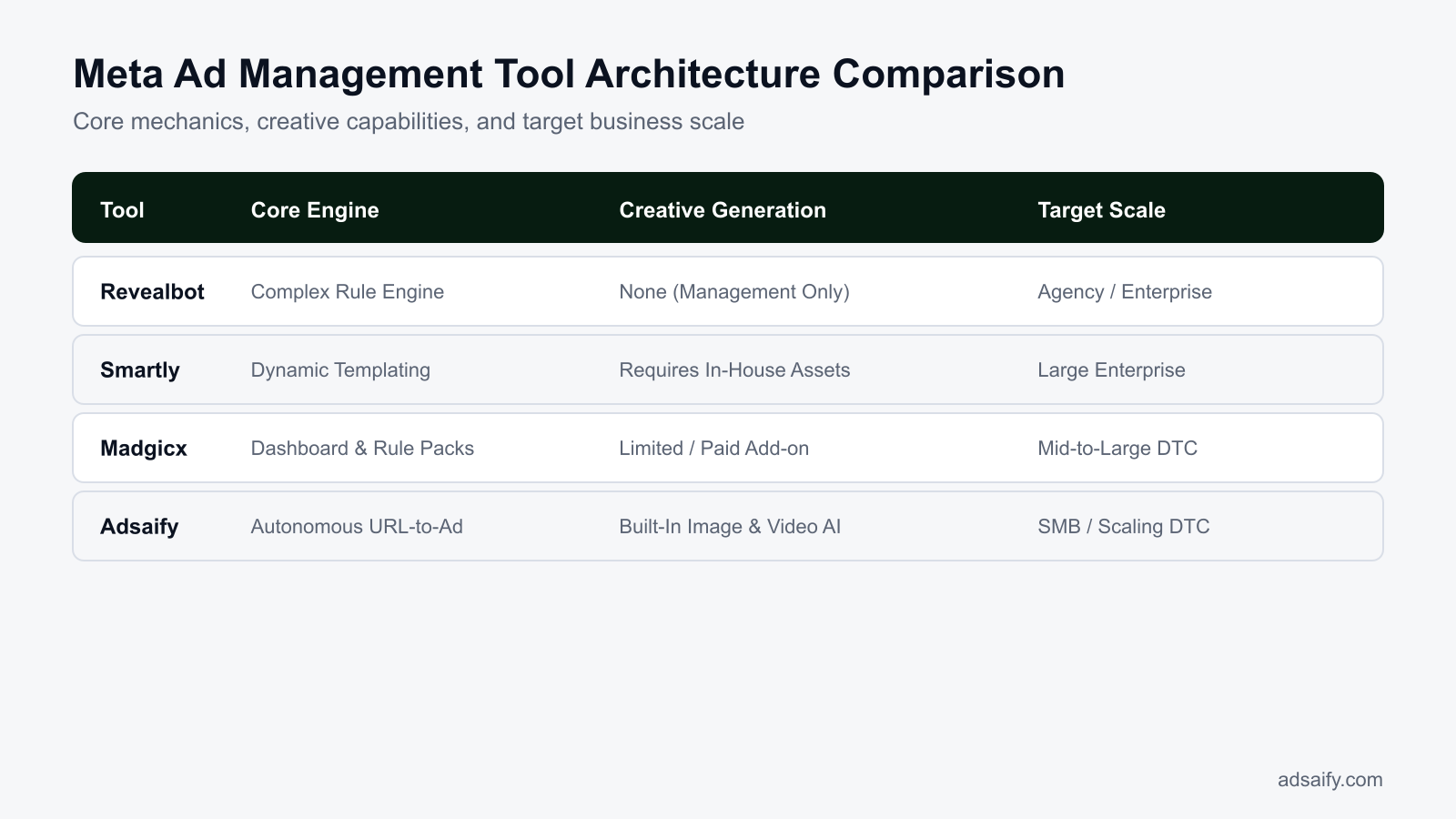
Enterprise platforms like Smartly specialize in dynamic creative templates mapped to dynamic product catalogs containing tens of thousands of stock-keeping units, which requires technical onboarding. Scripting tools like Revealbot offer deep manual rule-building engines for media buyers who prefer writing custom boolean logic to trigger budget shifts. For small-to-medium teams that lack dedicated designers and data engineers, autonomous AI platforms like Adsaify simplify campaign creation by scanning a landing page URL to draft audiences, ad copy, and creatives, publishing them directly to the user's Meta ad account with basic automated pause rules for poor performers.
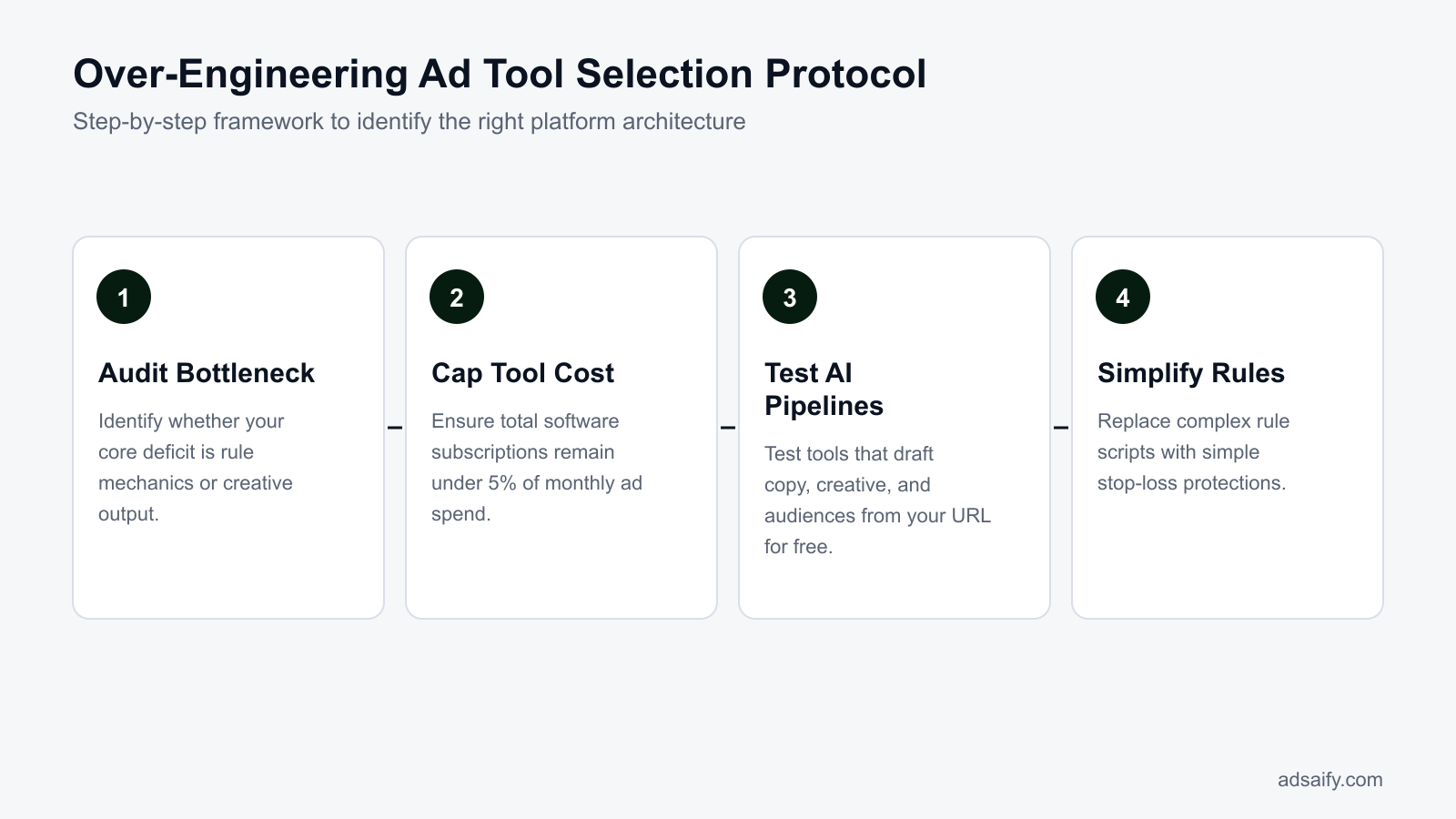
- Audit operational bottleneck — Determine whether the team loses hours to ad creation or bid management to choose between creative tooling and rule engines.
- Assess catalog scope — Evaluate dynamic SKU counts to decide if enterprise template management is mandatory.
- Evaluate technical scripting capacity — Check if media buyers can maintain custom boolean formulas to determine if manual rule platforms fit the workflow.
- Test autonomous URL generation — Run a campaign draft from a web address to verify creative asset relevance and targeting accuracy.
- Verify direct account publishing — Confirm that candidate software successfully pushes ad sets and ads into Meta Ads Manager without disrupting custom tracking parameters.
- Apply protective automation — Set foundational performance rules to pause underperforming ads automatically once campaigns exit the learning phase.
How do URL-to-campaign AI tools handle technical audience targeting?
URL-to-campaign AI tools analyze landing page content, extract core product value propositions, and map customer intent to Meta's native targeting taxonomy. These systems evaluate on-page semantic cues and business descriptions to select relevant interest clusters, demographic constraints, and broad targeting settings. Instead of requiring manual query building inside Meta Ads Manager, the software constructs structured ad sets with pre-configured audience parameters, allowing media buyers to review and refine targeting suggestions directly before pushing campaigns to the ad account.
How Does a Real-World Scenario Compare Across Different Ad Tool Types?
A real-world comparison across different Meta ad tool types demonstrates that complex rule engines and deep analytical suites often stall execution for mid-sized advertisers. Tools designed for enterprise workflows introduce configuration overhead, whereas focused campaign creation tools reduce production bottlenecks and protect margins by automating essential launching and pausing functions directly.
Workflow Friction Across Complex Automation and Enterprise Platforms
For example, consider an online leather goods store operating with a 50,000 TL monthly advertising budget in Meta Ads Manager. Using an advanced automation platform like Revealbot requires the media buyer to write nested conditional syntax (such as checking if Spend is greater than twice the target CPA while Purchases are zero over a three-day window). A single syntax error can pause active ad sets or allow runaway budgets.
Switching the same store to an analytics-heavy suite like Madgicx often results in analysis paralysis. The brand spends operational hours reviewing dozens of audience performance tiles and predictive metrics inside the dashboard instead of addressing ad fatigue in Meta Ads Manager. Meanwhile, enterprise suites like Smartly mandate significant onboarding fees and catalog template workflows that consume a disproportionate share of a 50,000 TL budget before any media spend takes place.
Streamlining Campaign Execution and Guardrails
In contrast, using a focused platform such as Adsaify removes asset production and campaign launch bottlenecks. By scanning the leather goods store website URL, the software generates campaign drafts, suggested audiences, ad copy variations, and AI-generated image or video creatives ready for review. Once the campaign publishes directly to the user's Meta ad account, basic automated rules protect the budget by pausing underperforming ads when Cost Per Result exceeds a defined cap. Marketers can register on Adsaify to draft their first ad campaign without upfront onboarding friction. Afterwards, the advertiser monitors Cost Per Result (cost per purchase) and ROAS (return on ad spend, calculated as revenue divided by ad spend) inside Meta Ads Manager over a 14-day evaluation period.
Why is testing enterprise-grade ad software harmful on a limited advertising budget?
Testing enterprise-grade ad software on a limited advertising budget is harmful because the fixed operational overhead and complex setup requirements outweigh potential performance gains. Enterprise platforms demand substantial time to configure API connections, build custom reporting dashboards, and maintain rigid automation rules. When a business allocates a modest spend, recurring platform fees reduce the net capital deployed to Meta ad auctions. Diverting operational hours away from creative production into software configuration degrades media efficiency.
Which Metrics Measure Whether Your Selected Ad Tool Is Effective?
Measuring the effectiveness of a Meta ad tool requires tracking workflow speed, creative output, budget preservation, and bottom-line profit. The core metrics include campaign setup duration, weekly creative volume, automated pause response time on underperforming ads, and net profit on ad spend after subtracting all external software costs.
Core Production and Financial Efficiency Metrics
ROAS (return on ad spend) is gross revenue divided by advertising cost, but it does not account for software expenses. POAS (profit on ad spend) is the ratio of gross profit generated by advertising divided by total ad spend. Net POAS adjusts this formula by subtracting third-party software subscriptions from gross profit before dividing by ad spend. If an external tool costs 10,000 TL monthly but only increases campaign profit by 5,000 TL, the tool creates an operational loss regardless of reported platform ROAS.
Operational speed must also be quantified. Measure campaign deployment time from concept to published status inside Meta Ads Manager. Transitioning from manual copywriting, graphic exporting, and ad set assembly to an AI drafting tool should compress setup time from several hours down to minutes. Furthermore, track creative throughput: effective tools increase the weekly volume of tested hooks and visual variations, allowing advertisers to replace fatigued ads before the Ad Set Frequency metric rises above acceptable thresholds.
| Evaluation Metric | Inefficient Tool Setup | Optimized Tool Setup | Impact on Meta Ads |
|---|---|---|---|
| Campaign Deployment Time | 3 to 4 hours per campaign | Under 15 minutes per draft | Faster reaction to inventory and seasonal offers |
| Weekly Creative Output | 1 to 2 static banners | 6 to 10 AI image and video variations | Lower ad fatigue and stabilized Cost Per Result |
| Waste Mitigation Speed | 24 to 48 hours manual review lag | Automated pause within specified rule checks | Preserves ad budget for top-performing assets |
| Net Software Drag on POAS | Tool subscription exceeds 10% of spend | Tool overhead remains under 3% of spend | Protects net operating margins on paid traffic |
How can I track the operational efficiency gain of an ad tool directly on the balance sheet?
To track operational efficiency gains on the balance sheet, record the software subscription as an operating expense while calculating the billable hours saved in media planning and asset production. Compare the net profit margin across consecutive billing cycles before and after tool integration. When reduced manual hours eliminate contractor fees or free internal staff for commercial activities, and ad spend waste drops through automated pause rules, the resulting margin expansion reflects the tool's true financial contribution.
Want to see this in your own account? Enter your website address and Adsaify drafts the campaign for you. The first ad is free. Try it now or log in.
Which Routine Checks Prevent Tool Clutter and Automation Conflicts?
Routine checks prevent tool clutter and automation conflicts by systematically auditing rule triggers, activity logs, and permission layers across software integrations. Marketers maintain operational hygiene by matching Meta Ads Manager change history against external software actions, pruning obsolete automated conditions, evaluating platform licensing expenses against attributed gains, and ensuring single-source authority over campaign budgets.
When multiple applications access the Meta Marketing API, overlapping automations can issue conflicting commands to identical ad sets. For example, a third-party scaling tool might increase an ad set daily budget by 15% while Meta native automated rules decrease that same budget due to temporary cost-per-acquisition spikes. Teams can maintain clean system architecture by adopting a recurring inspection cadence.
- Daily: Inspect the Change History panel in Meta Ads Manager to identify unexpected budget shifts or ad status modifications executed by external API connections.
- Weekly: Cross-reference external tool automation execution logs against Meta ad set change logs to verify that pause triggers and budget modifications do not fire simultaneously on identical assets.
- Bi-weekly: Monitor ad frequency alongside performance metrics to detect audience saturation early. Ad frequency is the average number of times each unique person views an advertisement over a defined timeframe.
- Monthly: Archive obsolete custom automation triggers, inactive rule conditions, and disconnected campaign tags inside third-party tools to prevent accidental executions on active campaigns.
- Quarterly: Review ad fatigue indicators against your team's creative generation velocity to verify that third-party creative tools produce sufficient asset volume to support ongoing rotation demands. Marketers using Adsaify to draft campaigns can generate fresh visual assets and copy variations whenever ad fatigue appears.
- Bi-annually: Audit system user permissions in Meta Business Settings and revoke API write access for any legacy platforms or inactive software vendors.
- Annually: Conduct an operational return on investment audit to verify whether revenue attributed to software capabilities justifies ongoing licensing fees. ROAS (return on ad spend) is total attributable advertising revenue divided by total ad spend.
Do external rule engines require manual updates when Meta rolls out new platform features?
Yes, external rule engines frequently require manual updates and recalibration when Meta introduces new API endpoints, bidding strategies, or campaign objective structures. When Meta modifies algorithmic delivery parameters or deprecates specific metrics, third-party software rules referencing legacy fields can silently fail or trigger unintended bid adjustments. Performance marketers must verify platform changelogs quarterly and manually revise external logic conditions to maintain synchronization with Meta Ads Manager core functionality.
What Are the Most Common Tool Migration Mistakes and How to Fix Them?
The most common Meta ad tool migration mistakes occur when advertisers abruptly shift operations without staged validation, creating permission collisions, tracking gaps, and algorithmic instability. Teams frequently run simultaneous budget scripts, break conversion tracking setups, pause high-performing ad sets in bulk, and neglect attribution discrepancies, which severely damages ad auction competitiveness and spikes acquisition costs.
Granting Concurrent Budget Management Permissions to Multiple Tools
Connecting two external platforms with active budget optimization privileges causes aggressive bidding conflicts in the Meta ad auction. Both tools read performance data at different intervals and issue contradictory budget modifications. Fix this mistake by revoking campaign write permissions for the outgoing software in Meta Business Settings before activating optimization features in the new tool.
Hard-Pausing Legacy Campaigns in a Single Day
Pausing all running campaigns instantaneously disrupts account history and forces new campaigns directly into volatile delivery. The learning phase is the period after an ad or campaign is created or edited when Meta's algorithm gathers performance data to optimize delivery. Fix this problem by shifting ad spend gradually, moving 20% to 25% of the total daily budget to campaigns drafted in the new platform every few days.
Misconfiguring Conversions API Tokens and Server-Side Events
Third-party tools that manage event forwarding can overwrite or duplicate purchase signals if access tokens and pixel identifiers are entered incorrectly. Corrupted server-side data compromises Meta's delivery algorithms and conversion reporting. Fix this by testing event payloads using the Test Events tool inside Meta Events Manager and verifying event deduplication parameters before decommissioning older tracking scripts.
Duplicating Automated Rules Across Meta Native Tools and External Engines
Configuring automated pause conditions inside both native Meta Ads Manager rules and an external platform creates racing execution logic. For example, if both engines attempt to throttle underperforming creatives at different thresholds, ad delivery stops unpredictably. Fix this conflict by designating a single engine as the master controller; tools like Adsaify can handle automated pausing for low-performing ads while native Meta rules remain turned off.
Overlooking Reporting and Attribution Window Discrepancies
External management software often applies different default reporting logic than Meta's native attribution windows. An attribution window is the defined time period during which Meta credits an ad interaction with a subsequent conversion event. Fix this mismatch by aligning the external software's reporting settings to Meta's standard 7-day click and 1-day view attribution model before assessing migration performance.
Migrating Entire Account Creatives Without Phased Parallel Testing
Transferring all creative assets simultaneously without running controlled parallel tests prevents performance isolation. Advertisers cannot determine whether performance shifts stem from new tool algorithms or creative variation. Fix this issue by selecting one low-risk campaign to build and launch through the new platform first, using a guided workflow demonstration to validate stability before expanding account-wide.
How can I prevent campaign clashes while testing two ad management tools simultaneously?
To prevent campaign clashes while evaluating two ad management tools simultaneously, assign each software strict campaign-level isolation rather than granting account-wide access. Dedicate one distinct campaign to the first tool and a completely separate campaign to the second tool, ensuring neither software shares audience pools or automated budget controls. Disable automated bidding rules across both platforms during testing, and evaluate each software exclusively on workflow efficiency, asset generation quality, and reporting clarity.
When Do Ad Management Tools Fail to Solve Issues and What Are Their Limits?
Meta ad management tools fail when fundamental commercial, technical, or creative foundations are broken. Automation software and artificial intelligence cannot compensate for lack of product-market fit, broken website checkout funnels, misconfigured tracking scripts, or uncompetitive offer pricing. Ad tools optimize media distribution and budget pacing, but tools cannot generate consumer demand for unwanted inventory.
Why Do Commercial Viability and Website Experience Outweigh Software Capabilities?
Ad management software controls the bid and the placement, but the off-platform experience dictates profitability. If a product is priced significantly higher than competing market alternatives without differentiated value, external automation will not lower acquisition costs. Similarly, if a landing page takes more than three seconds to load on a mobile device, CPC (cost per click is the fee charged each time a user clicks an ad) increases while CVR (conversion rate is the percentage of visitors who complete a desired action) drops to near zero. Setting automated bid caps or switching tools cannot repair high shipping friction, confusing navigation, or an untrusted checkout interface.
How Do Misconfigured Tracking Pixels Starve Algorithmic Media Buying?
Third-party tools operate strictly on data ingested from Meta Events Manager. If the Meta Pixel or the Conversions API (CAPI is a server-side interface that transmits web events directly to Meta) is improperly installed, Meta Ads Manager cannot attribute events accurately. When an ad set fails to generate at least 50 conversion events per week, the delivery engine remains trapped in the learning phase, causing volatile delivery and elevated costs. No third-party management platform can calculate optimal bids when upstream event signals are missing or duplicated.
What Creative Constraints Exist Beyond Automated Tool Control?
Ad automation software optimizes delivery rules, but software cannot replace the creative concept that resonates with human psychology. Platforms such as Adsaify draft ad copy, generate images, and enforce rules that pause underperforming ads based on live performance metrics. However, Adsaify does not automatically refresh or substitute creatives in an active ad set on its own. Media buyers must still evaluate performance data, conceptualize new messaging angles, and manually supply fresh creatives to counteract creative decay.
Before changing software or increasing your ad budget, use this operational checklist to evaluate your account foundation:
- Audit the checkout sequence on mobile devices to confirm zero functional errors exist.
- Verify that the Meta Pixel and Conversions API fire correct Purchase events in Events Manager.
- Benchmark product retail prices and domestic delivery fees against three active competitors.
- Confirm that the target ad set achieves a minimum of 50 optimization events every seven days.
- Inspect ad creative fatigue metrics in Meta Ads Manager when ad set Frequency surpasses 3.5.
- Measure mobile page speed to ensure product landing pages render in under three seconds.
If my product is not selling, will switching ad automation software fix sales?
No, switching ad automation software will not fix sales if a product lacks market demand or presents an uncompetitive offer. Automation platforms and third-party tools merely execute delivery rules and streamline workflow efficiency across Meta Ads Manager. When consumers reject your product pricing, website experience, or core value proposition, changing software does not alter consumer desire. You must first resolve product-market fit, optimize conversion funnels, and test compelling creative hooks before investing in external management platforms.
Meta Ad Management Tool Terminology: What Are the Key Concepts?
Meta ad management terminology defines the technical architectures, delivery mechanics, and software frameworks used to control Facebook and Instagram marketing campaigns. Understanding these core concepts prevents over-engineering by clarifying what native Meta Ads Manager settings handle directly versus what specialized third-party automation tools, artificial intelligence systems, and external application programming interfaces execute.
- Rule-Based Automation: An ad management setup operating strictly under deterministic if-then programmatic thresholds that execute actions like pausing ad sets when predefined metric limits are breached.
- Autonomous Ad Creation: An artificial intelligence workflow, utilized by platforms like Adsaify, that drafts marketing copy, visual creatives, and campaign targeting structures directly from a business website URL.
- Ad Fatigue: A performance decay occurring when ad frequency rises, causing audiences to ignore repetitive creatives, which depresses click-through rates and inflates cost per acquisition.
- API Latency: The synchronization time gap between native Meta advertising servers and third-party software endpoints communicating through the Meta Marketing API.
- CPA (Cost Per Acquisition): An efficiency metric calculated by dividing total advertising expenditure by the total number of completed conversion actions attributed to a campaign.
- ROAS (Return on Ad Spend): A revenue metric that measures gross revenue generated for every monetary unit spent on advertising campaigns.
- Meta Pixel: A snippet of tracking code placed on a website that monitors visitor actions and passes behavioral conversion signals into Meta Ads Manager.
- Conversions API (CAPI): A direct server-to-server data connection that transmits web and offline events to Meta servers to protect tracking accuracy against browser-level data loss.
- Learning Phase: The initial delivery stage during which the Meta algorithm calibrates ad distribution until an ad set achieves roughly 50 optimization events within seven days.
- Cost Cap: A manual bidding control in Meta Ads Manager that directs the ad delivery system to maintain an average acquisition cost below a specified threshold.
- Attribution Window: The specific time period during which Meta credits an ad impression or ad click with producing a downstream consumer conversion.
What is the primary technical distinction between autonomous AI tools and rule-based systems?
The primary technical distinction lies in operational initiation and logic execution. Rule-based systems rely entirely on static, conditional parameters predefined by a human operator, executing reactive actions such as pausing an ad set only when specific metric thresholds are crossed. Conversely, autonomous AI systems generate original campaign infrastructure, interpreting brand assets and predictive audience data to synthesize ad copy, imagery, and structural configurations before campaign launch without requiring step-by-step conditional configuration.
Selecting the Most Effective Meta Ad Management Architecture for Your Brand
To avoid over-engineering your Meta advertising stack, begin by identifying your single biggest workflow bottleneck: whether it is creative generation, manual campaign drafting, or campaign monitoring. Next, eliminate enterprise-grade rule suites that require complex onboarding, and select a lightweight tool aligned with your team size and budget. Connect the software directly to your existing Meta ad account, set basic safety rules such as automated ad pausing, and let Meta's native optimization algorithms handle audience delivery alongside targeted AI drafts.
Take a concrete step today by auditing the active ad sets in your Meta Ads Manager to see where manual tasks consume your hours. You can test a streamlined workflow immediately by registering on Adsaify and entering your store URL to draft your first campaign for free, allowing you to assess AI creative generation and direct campaign publishing without introducing operational friction.
Want to see this in your own account? Enter your website address and Adsaify drafts the campaign for you. The first ad is free. Try it now or log in.
Frequently Asked Questions (FAQ)
1. Are enterprise tools like Revealbot or Smartly necessary for a small e-commerce brand?
Enterprise ad platforms like Revealbot or Smartly are not necessary for a small e-commerce brand. These enterprise suites cater to teams managing hundreds of complex campaigns with custom conditional logic and multi-channel asset scaling. Small businesses risk over-engineering their workflow, paying high platform fees, and wasting hours on setup when native Meta tools or streamlined AI campaign builders accomplish their goals faster.
2. Do autonomous AI tools like Adsaify disrupt existing Meta pixel conversion data?
Autonomous AI tools like Adsaify do not disrupt existing Meta pixel conversion data. Because Adsaify connects directly to your native Meta ad account via the official API, all conversion tracking continues through your established Meta pixel and Conversions API setups. Campaign drafts publish directly into your account structure, preserving historical pixel event data, attribution models, and existing custom audience records.
3. Can I test an ad management tool by drafting my first campaign for free?
Yes, you can test ad management platforms without upfront financial commitments by using services that provide free campaign drafting. For instance, Adsaify allows users to draft and publish their first ad campaign for free. This trial lets you evaluate AI-generated audiences, ad copy suggestions, creative quality, and Meta account publishing functionality before committing any software subscription budget.
4. Do AI ad tools automatically replace visual creatives in live, running campaigns?
Most AI ad tools, including Adsaify, do not automatically replace visual creatives inside live campaigns without user intervention. Instead, automation rules monitor performance thresholds and pause fatigued ads. The user must generate new image or video creatives within the platform and actively deploy them into the campaign, ensuring human oversight over brand visual assets and creative alignment.
5. What is the most distinct operational difference between Madgicx and Revealbot?
The most distinct operational difference between Madgicx and Revealbot lies in their primary focus: automated creative analysis versus complex automation logic. Madgicx emphasizes full-funnel audience targeting, creative insights, and design workflows. Revealbot operates primarily as a customizable rule engine that lets advertisers build complex algorithmic automation scripts, cross-account rules, and notification triggers across multiple ad networks.
6. Do budget protection rules disrupt Meta's learning phase when pausing underperforming ads?
Budget protection rules do not disrupt Meta's learning phase when pausing underperforming individual ads within an ad set, provided the ad set itself remains active. Pausing a poor creative merely reallocates ad set spend toward better-performing creatives. However, frequent rule-based budget edits exceeding twenty percent on the ad set or campaign level will reset the learning phase.
7. What data points do URL-analyzing ad tools use to draft campaigns?
URL-analyzing ad tools inspect on-page metadata, product titles, descriptions, pricing, and visual imagery directly from a website address. By parsing these page elements, the AI extracts the core value proposition and category niche. It then uses this context to generate relevant target audience recommendations, draft marketing copy, suggest baseline budgets, and compose promotional creatives.
8. What should be the first testing step when selecting a tool without over-engineering?
The first testing step when selecting a tool is auditing your actual operational bottleneck before comparing software features. Determine whether your business struggles primarily with creative generation, campaign setup time, or post-launch performance monitoring. Once identified, test a single lightweight tool on one active campaign for two weeks to measure whether it directly reduces labor without adding administrative complexity.
How can you try this with Adsaify?
The quickest way to apply the steps in this article to your own account is to try them. Adsaify analyses your business from your website address, drafts the campaign with an audience, ad copy, creative and a budget suggestion, and publishes it to your own Meta ad account once you approve.
- Your first ad is free: there is nothing to lose by trying.
- Your own ad account: the campaign runs in your Meta account and you stay in control.
- Images and video: generate ad creatives with AI or promote an existing Instagram post.
Create a free account and try your first ad · Already have an account? Log in.