

Short answer: Weekend budget bleed in Meta ads happens when media buyers leave Ads Manager unmonitored from Friday evening to Monday morning while underperforming ads continue spending. Preventing this loss requires setting up autonomous guardrail rules that evaluate spend thresholds and automatically pause unprofitable ads outside working hours without waiting for human intervention.
Every performance marketer knows the frustration of opening Meta Ads Manager on Monday morning to find a sudden spike in wasted spend. An ad set that delivered profitable results through Friday afternoon suddenly derails on Saturday morning, spending full daily allocations with zero conversions. Because nobody is actively monitoring ad accounts over the weekend, that single underperforming asset continues burning cash for over forty-eight hours straight, dragging down blended account performance before anyone can intervene.
This off-hours bleed happens because Meta auction dynamics and consumer shopping behaviors shift noticeably over weekends, yet manual campaign management introduces a severe operational delay. While the delivery system continues spending allocated budgets regardless of real-time conversion rates, human oversight remains paused until the start of the workweek. Left unmanaged, these regular weekend performance dips quietly wipe out weekday profit margins, waste creative testing funds, and distort account data used for scaling decisions.
In this guide, you will learn how to protect your ad spend against weekend manual delays through structured automation. We cover how to distinguish operational latency from creative fatigue, calculate exact metric thresholds for pausing rules, configure automated account guardrails step by step, and quantify exactly how much profit your automated protections save every weekend.
Key Takeaways
- Manual oversight is bounded by office hours, whereas Meta's ad auction runs 24/7, leaving campaigns vulnerable to unchecked spending over weekends.
- Configuring autonomous stop rules for ads exceeding target CPA cuts wasted budget immediately without waiting for Monday morning reviews.
- Ignoring Meta's conversion attribution delay causes manual buyers to make emotional decisions and pause winning ads prematurely.
- Autonomous guardrails continuously monitor ad set spend thresholds to defend blended ROAS during off-hours and peak auction swings.
What is weekend ad budget bleed in Meta ads and how do you spot it?
Weekend ad budget bleed in Meta ads occurs when underperforming ads spend daily budgets between Friday evening and Monday morning without human oversight. Media buyers spot weekend ad budget bleed by identifying sudden weekend spikes in cost per acquisition and zero-conversion ad sets that drain allocated capital during unmonitored off-hours.
Identifying CPA spikes and zero-conversion ad sets in Meta Ads Manager
CPA (cost per acquisition) is the total ad spend divided by the number of attributed purchases or leads. To identify weekend budget bleed, open Meta Ads Manager, set the date filter to the preceding seven days, and use the "Breakdown" dropdown menu to select "Time" and then "Day". Compare your Saturday and Sunday CPA against your Tuesday through Thursday baseline. When an ad set maintains a steady 20-dollar CPA during midweek auctions but climbs to 55 dollars on Saturday without generating additional conversions, that ad set is actively bleeding budget.
Auditing zero-conversion ad sets requires reviewing the "Amount Spent" column alongside the "Purchases" column on Monday morning. In an unmonitored account, ad sets often exhaust their entire daily limit across forty-eight hours without recording a single transaction. This forty-eight-hour blind spot directly compresses weekly blended ROAS. ROAS (return on ad spend) is total revenue generated divided by gross advertising spend. When two full days of spend yield zero or negligible revenue, your weekly blended return drops even if weekday campaigns hit their target margins.
Tracking weekend performance drift with a practical account audit
For example, consider an e-commerce apparel store operating with a 600-dollar daily budget across three Meta ad sets inside an Advantage campaign budget structure. During the workweek, the account averages a 3.0 ROAS at a 25-dollar CPA. On Friday at 6:00 PM, an ad set targeting broad interests begins burning budget on a creative variant that drops below break-even efficiency. Because no media buyer monitors the account until Monday at 9:00 AM, the failing ad set consumes 1,200 dollars across Saturday and Sunday while generating only two purchases at a 600-dollar CPA. Automating safeguard rules through Meta or connecting automated rules through Adsaify to pause bleeding ad sets prevents these prolonged losses. Media buyers auditing this account afterwards must inspect the "Frequency", "Outbound CTR", and hourly conversion timestamps to confirm how fast margin erosion occurred.
Is the high CPA I see on Monday morning an actual performance drop or just an attribution delay?
A Monday morning CPA spike can stem from attribution delay, but checking specific metrics confirms whether performance genuinely collapsed. Meta uses a default seven-day click attribution window, and conversions occurring over the weekend sometimes take up to twenty-four hours to process through the Conversions API. If Meta Ads Manager reports normal outbound click-through rates and stable cart-addition volumes alongside high weekend CPA, delayed attribution is likely. However, if cost per click rose while outbound click-through rate and on-site checkout events dropped simultaneously, the weekend CPA spike represents an actual performance failure.
Why do off-hours CPA spikes happen in Meta ads?
Off-hours CPA spikes happen in Meta ads because consumer conversion intent drops over weekends while mobile browsing volume rises. This behavioral shift alters auction dynamics, increases competitive ad delivery, accelerates ad frequency saturation, and causes automated budget algorithms to allocate spend toward inefficient ad variations while media buyers are offline.
Auction dynamics, manual latency, and algorithm allocation
During weekends, consumer screen time increases across Instagram and Facebook feeds, which lowers impression costs but dilutes direct buying intent. CPC (cost per click) is the total advertising spend divided by the number of clicks generated. When users browse casually without completing checkouts, CPC fluctuations occur alongside sharp declines in conversion rates. This dynamic is exacerbated by manual latency, which is the time gap between an ad experiencing a severe performance drop and a media buyer manually logging in to modify or pause that campaign.
Budget misallocation intensifies these losses in automated campaign structures. CBO (Campaign Budget Optimization) is an automated Meta setting that distributes a single campaign budget across ad sets in real time based on perceived opportunity. When higher-performing weekday ad sets experience momentary audience exhaustion on Saturday morning, CBO and Advantage+ setups frequently push aggressive spend into cold, unproven ad sets. Because weekend auctions feature high impression volume, these cold ad sets burn their daily allocations before the delivery algorithm detects the absence of purchase signals.
Comparing off-hours performance drivers
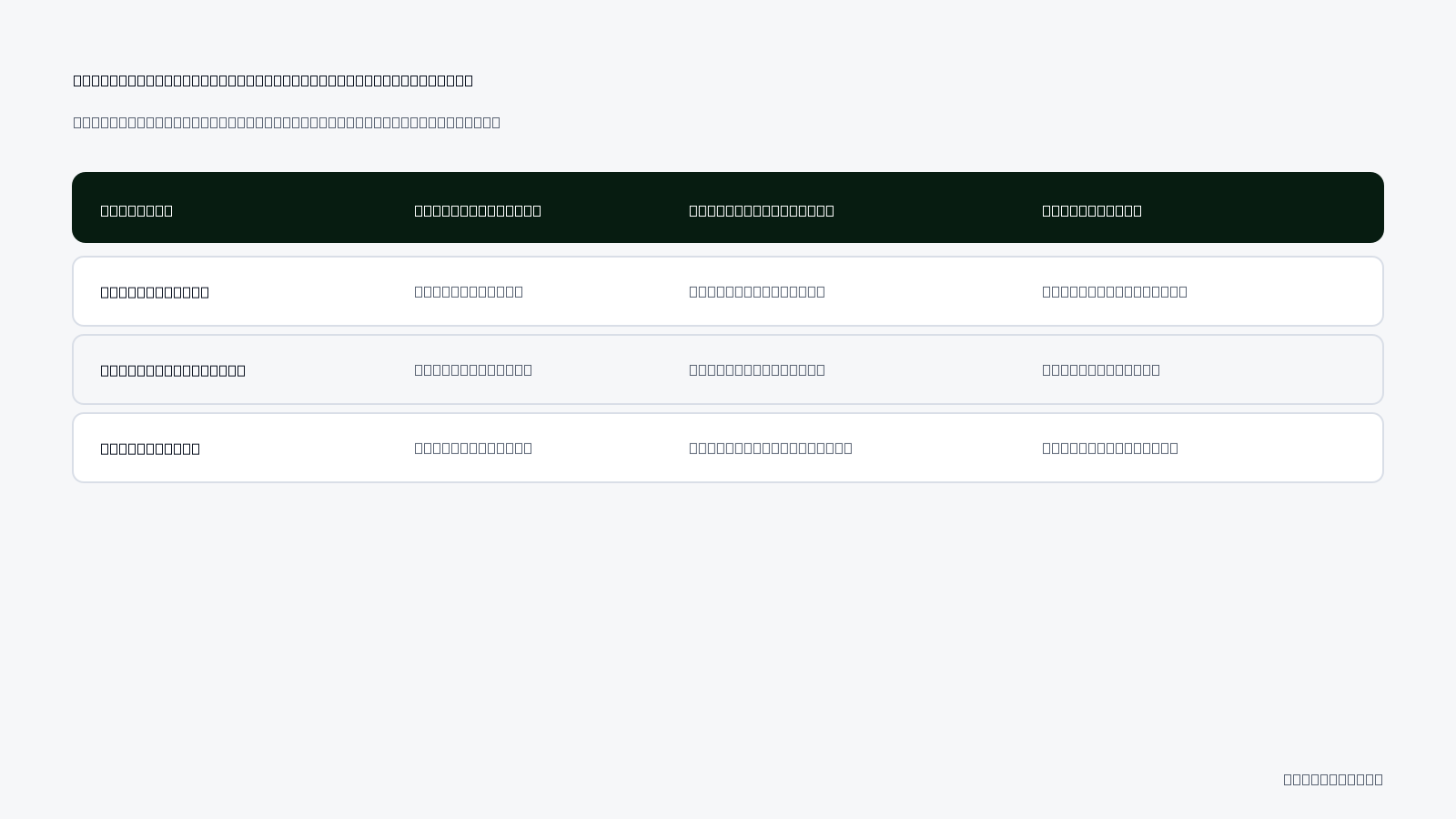
Diagnosing why performance collapses over the weekend requires evaluating distinct platform mechanisms side by side:
| Spike Factor | Primary Mechanism | Ads Manager Metric to Check | Direct Account Impact |
|---|---|---|---|
| Auction Shift | Passive browsing reduces checkout conversion rates | Cost Per Unique Outbound Click | High click volume with zero downstream purchase events |
| Manual Latency | Absence of manual adjustments over 48 hours | Amount Spent vs. Purchases | Unchecked budget drain on unprofitable ad variants |
| CBO Misallocation | Algorithm diverts funds to secondary ad sets | Ad Set Spend Distribution | Sudden budget inflation in untested audience segments |
| Creative Fatigue | Weekend volume causes rapid ad overexposure | Frequency (by Day breakdown) | Steep drop in click-through rate within 24 hours |
Ad fatigue accelerates rapidly in high-spending campaigns during weekends. Frequency is the average number of times an individual user views an ad. When campaigns run unmonitored over forty-eight hours of elevated feed activity, audience pools experience swift saturation, causing creative engagement to plummet.
Why would an ad that performed great on Friday suddenly flatline on Saturday?
An ad that converted effectively on Friday can flatline on Saturday because user intent changes dramatically between working hours and leisure time. Midweek buyers frequently complete transactional purchases on desktop or stable mobile connections, whereas weekend audiences browse social media passively in recreational settings. Furthermore, Meta's auction resets delivery pacing at midnight, and if Friday's high conversion rate caused the algorithm to enter aggressive weekend delivery auctions, the creative can exhaust its reach among high-intent prospects and immediately cycle into lower-converting audience pockets.
What does unmanaged weekend budget bleed cost an e-commerce brand?
Unmanaged weekend budget bleed costs an e-commerce brand net profit, algorithmic efficiency, and working capital. Because Saturday and Sunday represent roughly two-sevenths or nearly 28 percent of weekly advertising spend, unmonitored performance drops over these 48 hours can completely erase five days of profitable weekday sales and misdirect automated delivery bidding systems.
Weekly ROAS compression and lost operating margins
ROAS (return on ad spend) is the revenue generated for every monetary unit spent on advertising. When a store spends 28 percent of its weekly capital across Saturday and Sunday without supervision, even a moderate CPA (cost per acquisition) surge can push overall net operating margins below zero. For example, with an ad spend of 10,000 TL per week, allocating 2,800 TL to weekend delivery that generates a 1.2x ROAS will drag down a healthy 3.5x weekday ROAS to an aggregate weekly ROAS of barely 2.8x, eroding inventory margins.
Capital reallocation loss and algorithmic misdirection
Meta Ads Manager relies on machine learning to match ads with users most likely to take a desired conversion action. When ad sets spend significant budget on weekends without registering conversions, the Meta delivery system receives poor optimization signals. Instead of learning which user profiles generate revenue, the algorithm begins pursuing cheaper, low-intent traffic to exhaust daily pacing requirements. Furthermore, unmonitored weekend bleed wastes capital that should have been preserved for Monday through Thursday scaling windows.
Audit your account vulnerabilities using this operational checklist:
- Calculate weekend versus weekday historical ROAS in Meta Ads Manager reporting.
- Determine your store break-even ROAS including product costs, processing fees, and shipping.
- Examine weekend Cost Per Add to Cart trends under the Delivery breakdown tab.
- Audit the pacing of lifetime and daily budgets across peak and off-peak hours.
- Establish maximum spend limits on top-of-funnel campaigns before Friday evening.
- Implement autonomous safeguard rules using a platform like Adsaify to protect margins without manual oversight.
Would it make more sense to pause all ads over the weekend and reactivate them on Monday?
Pausing all Meta ads every weekend is generally counterproductive because hard pauses reset the campaign algorithmic learning phase. When campaigns restart on Monday morning, the ad delivery system often enters the Learning phase again, causing volatile CPMs (cost per thousand impressions) and unstable acquisition costs for several days. Instead of stopping delivery entirely, brands should implement dynamic budget reductions or threshold-based safeguards that preserve delivery history while capping spend on unprofitable ad sets.
How do you diagnose whether spend waste stems from latency or fatigue?
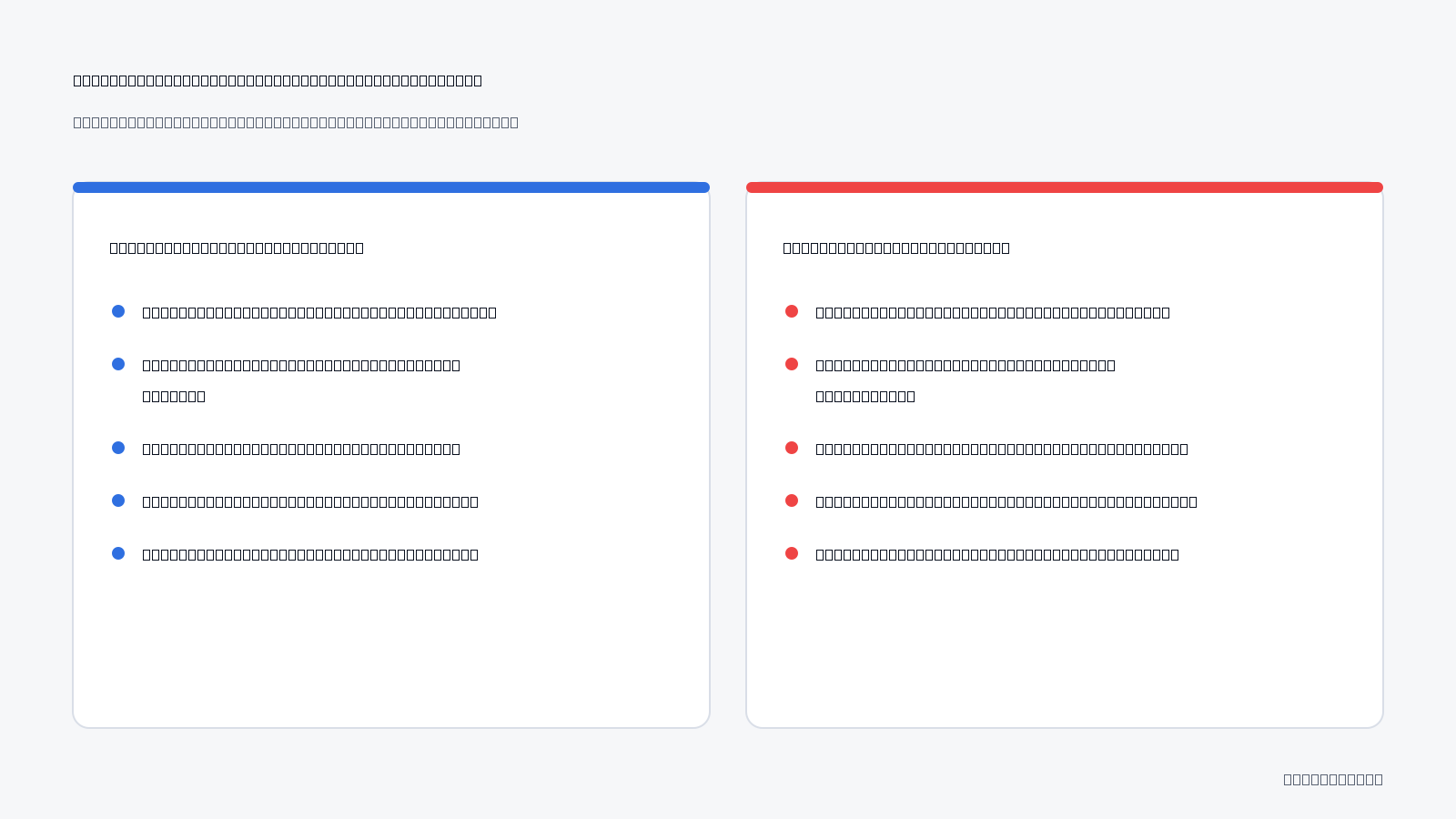
Diagnosing whether spend waste stems from conversion latency or ad fatigue requires analyzing click engagement alongside attribution timing. If click-through rates remain steady while reported conversions drop, attribution delay is usually the cause; if frequency climbs while click-through rates collapse, the creative asset is fatigued and needs to be refreshed.
Attribution windows versus casual weekend mobile browsing
An attribution window is the timeframe during which Meta credits an ad interaction with driving a subsequent purchase or action. Under the standard 7-day click and 1-day view attribution setting, data from iOS devices and the Meta Conversions API can take 24 to 48 hours to fully populate in Meta Ads Manager. When weekend shoppers browse casually on mobile devices from home, they often initiate browsing sessions or add items to cart but delay finalizing checkout until working hours on desktop. Mistaking this conversion lag for campaign failure causes marketers to prematurely shut down profitable campaigns.
Creative exhaustion metrics
CTR (click-through rate) is the percentage of ad impressions that result in a click. Frequency is the average number of times each unique user sees an ad. When an ad set experiences creative exhaustion, frequency rises while CTR drops consistently over 72 hours, driving CPC (cost per click) up. By contrast, conversion latency exhibits healthy click metrics, stable CPCs, and normal Add to Cart volumes, but temporarily lacks final Purchase events.
| Diagnostic Indicator | Attribution Latency Symptom | Creative Fatigue Symptom |
|---|---|---|
| Click-Through Rate (CTR) | Remains stable or increases | Drops sharply below campaign average |
| Ad Frequency | Grows at a normal, predictable rate | Spikes rapidly alongside declining reach |
| Cost Per Click (CPC) | Remains flat within target bounds | Increases continuously as audience ignores ad |
| Add to Cart Volume | Consistent with typical weekend browsing | Declines proportionally with outbound clicks |
| 48-Hour Lookback Data | Conversions backfill and ROAS stabilizes | ROAS and conversions remain permanently depressed |
Will an autonomous rule accidentally pause a profitable ad if the conversion data is simply delayed?
Yes, an autonomous rule can pause a profitable ad prematurely if it relies solely on real-time purchase metrics without accounting for delayed attribution. Standard Meta Ads Manager reporting can take 24 to 48 hours to attribute conversions fully, especially from iOS devices. To prevent false pauses, autonomous safeguards should incorporate secondary leading indicators—such as Cost Per Add to Cart or outbound click thresholds—or apply lookback windows that ignore the most recent data lag.
If you would rather not set up each of these steps by hand, try it in Adsaify: your first ad is free, so there is nothing to lose. Create a free account.
Which metric thresholds should you calculate before automating ad rules?
To automate Meta ad rules effectively, advertisers must calculate break-even CPA (cost per acquisition), maximum spend limits without conversions, rolling evaluation timeframes, and minimum impression floors. Establishing these quantitative benchmarks prevents premature ad pausing while establishing strict financial guardrails that eliminate unprofitable spend when performance marketing teams are away from Meta Ads Manager.
Calculating target CPA and spend caps from unit economics
CPA (cost per acquisition) is the total ad spend required to generate a single conversion. Before configuring automated rules, determine your maximum acceptable CPA by subtracting product costs, packaging, shipping, and payment processing fees from your gross sales price. For example, on a product selling for 1,000 TL with 600 TL in total fulfillment costs, your break-even CPA is 400 TL. Any acquisition cost above 400 TL produces a net loss. Once your target CPA is established, set your automated spend threshold at 1.5 times that figure (600 TL in this example). This multiplier grants Meta's delivery algorithm enough financial leeway to find buyers without permitting unconstrained weekend losses.
Configuring evaluation windows and minimum impression floors
Automated rules must inspect adequate historical data before triggering actions. In Meta Ads Manager, under the Automated Rules creation window, avoid setting the time range to "Today." Single-day windows suffer from conversion attribution delays and natural intraday purchasing fluctuations. Instead, configure rules using a rolling window such as "Last 3 days" (excluding today) to smooth out reporting latency. In addition, establish an impression floor of at least 1,000 impressions. A high spend metric on an ad with fewer than 1,000 impressions often reflects temporary CPM (cost per mille, the cost per thousand impressions) inflation rather than definitive creative failure.
Pre-automation metric checklist
- Calculate net product margins across all catalog items to identify absolute break-even points.
- Establish your target CPA benchmark based on desired operating profit margins.
- Define your maximum spend cap without purchase events at 1.5 times target CPA.
- Select a rolling 3-day data attribution window inside your rule parameters.
- Set an impression threshold of at least 1,000 impressions to ensure statistical significance.
- Verify that the Meta Pixel Purchase standard event passes accurate currency data.
How should I factor Average Order Value (AOV) into my automated stop thresholds?
AOV (average order value) is the average currency amount customers spend during a single transaction. When catalog items have varying prices, a static CPA stop threshold causes premature shutoffs on high-ticket bundles. Instead of a fixed spend amount, set automated stop rules using minimum ROAS (return on ad spend), calculated as gross revenue divided by ad spend. If higher-priced orders yield larger profit margins, allow higher spend thresholds before triggering pauses.
How do you set up automated weekend budget protection step by step?
Setting up automated weekend budget protection requires connecting your Meta ad account to an automation tool, establishing condition-based pause triggers for zero-converting ad sets, scheduling checks for off-hours windows, and enabling email notifications. This setup continuously monitors ad performance while media buyers are offline, terminating wasted spend without manual intervention.
Connecting accounts and configuring condition logic
Begin by granting administrative access to an autonomous platform. Connecting your Meta ad account to an autonomous management platform such as Adsaify enables system-level monitoring across your active campaigns. Inside Meta Ads Manager or your connected automation workspace, create a rule targeting "All active ad sets." Define the trigger logic using two core conditions: set "Spend is greater than" your calculated threshold (for example, 600 TL) and combine it with "Purchases (Meta Pixel) is less than 1." This logic isolates ad sets actively burning budget without producing sales.
Scheduling off-hours execution and audit alerts
In the rule scheduling settings, select custom execution intervals rather than the default "Continuously" option. Specify active evaluation windows starting Friday at 18:00 and concluding Monday at 09:00. Set the execution frequency to run hourly. This frequency prevents runaway spend during low-conversion nighttime hours while avoiding erratic adjustments during peak daylight traffic. Finally, enable automated email and platform notifications under the rule notification menu. Instant audit trails provide a transparent record of paused assets, detailing the exact spend, impressions, and timestamp when the safeguard engaged.
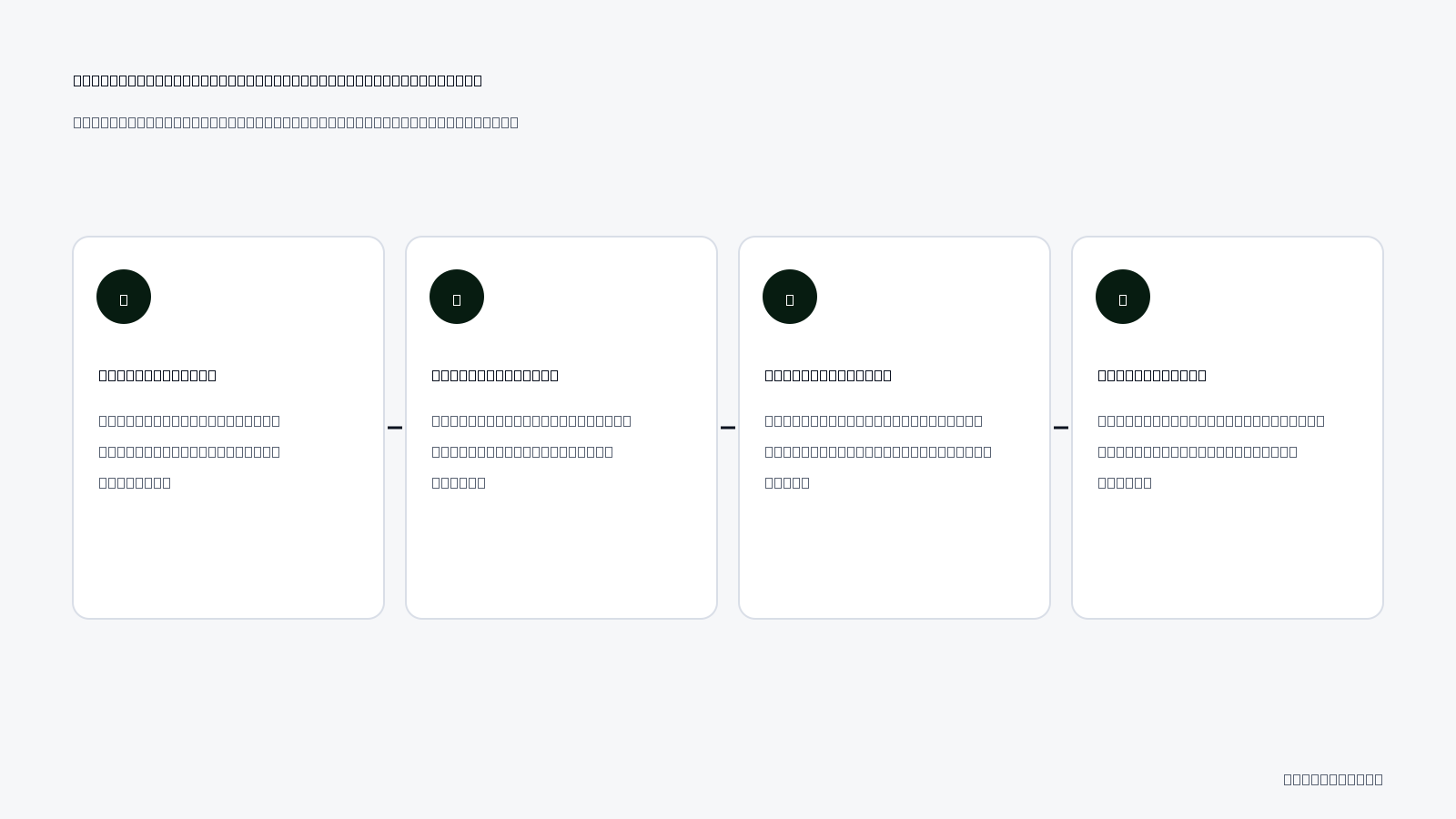
Automated budget protection execution flow
- Schedule activation — The automation engine initiates performance checks starting Friday at 18:00 to monitor off-hours activity.
- Metric evaluation — The system scans active ad sets against the configured 3-day rolling spend threshold and impression floor.
- Conversion verification — The rule checks if the Meta Pixel recorded one or more purchases for each candidate ad set.
- Execution trigger — The platform pauses any ad set exceeding the spend limit with zero attributed conversions.
- Notification dispatch — An automated alert logs the paused ad set ID, total spend, and timestamp for Monday morning review.
Once an ad is paused by an automation rule, do I need to manually reactivate it on Monday?
Yes, performance marketers should manually review paused ads on Monday morning before reactivating them. Do not configure rules to turn failing ad sets back on automatically. Delayed attribution from weekend shoppers may credit purchases retroactively in Meta Ads Manager. If delayed conversion data brings the CPA back into a profitable range, unpause the ad set manually; otherwise, keep the asset paused to protect your ongoing account budget.
How does a weekend protection rule work in a real e-commerce scenario?
A weekend protection rule works by continuously evaluating live campaign metrics against predefined safety thresholds and executing automated actions, such as pausing an ad set, the moment an ad breaches efficiency limits. This execution prevents unmonitored spend from draining company capital when media buyers are offline between Friday evening and Monday morning.
Anatomy of a weekend budget trigger in Meta Ads Manager
Consider an example of an online leather goods store operating with a 1,500 TL daily budget across three ad sets, targeting a 150 TL target CPA. CPA (cost per acquisition) is the total ad spend divided by the total number of recorded purchases. On Friday at 18:00, the marketing team leaves the Meta Ads Manager account active without scheduled manual supervision.
By Saturday at 14:00, one testing ad set encounters delivery anomalies and spends 250 TL while generating zero purchases. In an unmonitored account, this ad set would continue spending through Sunday evening, exhausting roughly 750 TL across the weekend without generating a return. Instead, an automated rule configured inside Meta Ads Manager or deployed through Adsaify evaluates the account at 14:15.
Autonomous execution and budget recovery
The safeguard rule checks the following condition: if ad set spend exceeds 1.5 times the target CPA (225 TL) today and website purchases are less than one, update the ad set status to paused. Because the ad set reached 250 TL with zero purchases, the rule fires instantly at 14:15 and stops delivery. Over the remaining 34 hours of the weekend, this single automated trigger rescues approximately 500 TL of spend that would have been wasted before Monday morning review. On Monday, the media buyer reviews the paused ad set, inspects creative metrics such as CTR (click-through rate), and reallocates the preserved capital to winning audiences.
What happens if that ad was about to convert just a couple of hours later?
If an ad was nearing conversion, pausing it trades speculative late attribution for guaranteed loss prevention. Meta ad auctions prioritize predictable signals; an ad spending 1.5 times the target CPA with zero purchases already demonstrates poor engagement. Letting an inefficient ad run on the chance of a delayed conversion drains liquidity, whereas pausing it allows you to reallocate spend to proven creatives during Monday working hours without destabilizing account performance.
How do you measure if autonomous budget protection actually saved profit?
You measure whether autonomous budget protection saved profit by comparing blended return on ad spend against historical unmonitored weekends, calculating capital preserved in rule execution logs, and tracking store-wide marketing efficiency ratio improvements. These figures demonstrate whether pausing declining ad sets protected cash flow without suppressing overall order volume.
Quantifying preserved spend and portfolio efficiency
To calculate preserved profit, navigate to the Automated Rules section in Meta Ads Manager and filter the rule execution history for Saturday and Sunday. Sum the daily budgets of all ad sets paused by the rule, minus the actual spend incurred before the pause triggered. For instance, if an ad set with a 300 TL daily budget is paused after spending 150 TL on Saturday morning, the rule preserved 150 TL on Saturday and 300 TL on Sunday. Media buyers can manage these safeguard thresholds directly through their Adsaify login to monitor execution trends.
Next, evaluate MER across the entire e-commerce store. MER (marketing efficiency ratio) is total gross revenue across all sales channels divided by total advertising spend. ROAS (return on ad spend) is total revenue attributed directly to advertising divided by total ad spend. Comparing weekend MER against previous unmonitored weekends reveals whether pausing runaway ads improved net profitability or artificially throttled revenue.
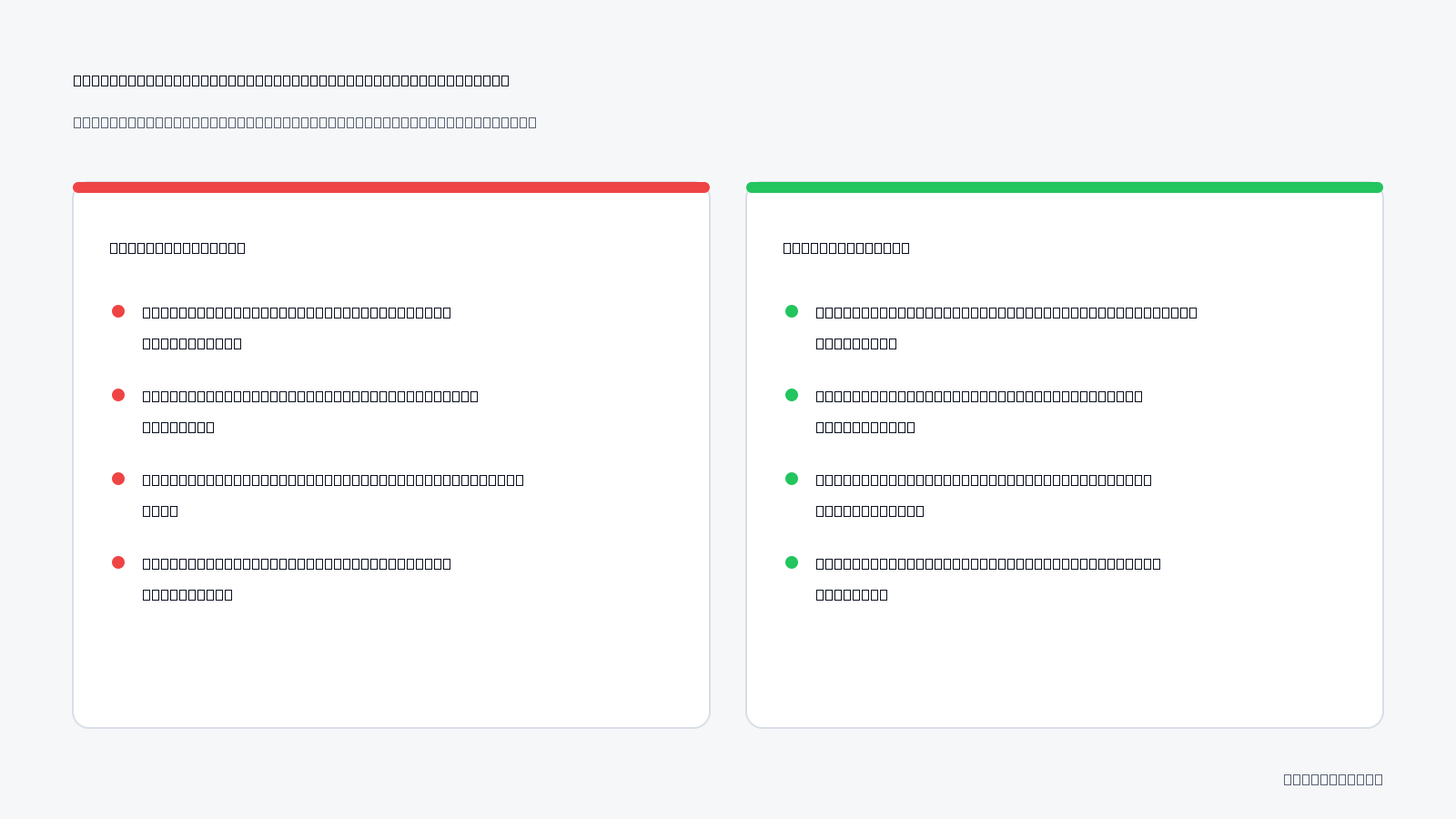
| Performance Dimension | Unmonitored Manual Management | Automated Budget Safeguard |
|---|---|---|
| Weekend Spend Waste | Full daily budgets drain on zero-conversion ads | Spend capped immediately at predefined loss limits |
| Blended ROAS | Suppressed by runaway ad sets burning budget | Protected by reallocating capital to working sets |
| Learning Phase Stability | Diluted across fatigued or non-converting ads | Consolidated into stable, high-converting ad sets |
| Monday Morning Routine | Reactive damage control and budget auditing | Strategic creative analysis and scaling decisions |
Should I measure the success of weekend protection on individual ads or account-wide profitability?
You should measure weekend protection at the account-wide profitability level using blended return on ad spend and marketing efficiency ratio. Evaluating paused ads in isolation creates false negatives, as individual ad-level metrics ignore the capital saved from non-performing delivery. A successful safeguard preserves liquidity across the entire account, ensuring that aggregate weekend ad spend generates acceptable gross margins rather than burning budget across runaway creative tests.
Want to see this in your own account? Enter your website address and Adsaify drafts the campaign for you. The first ad is free. Try it now or log in.
What routine prevents weekend ad spend bleed permanently?
A structured operational cadence combining automated rules with proactive human reviews permanently prevents weekend ad spend bleed. Advertisers protect capital by conducting a pre-weekend audit on Friday afternoon, reviewing paused ad sets objectively on Monday morning, replenishing creative assets mid-week, and calibrating automation thresholds ahead of high-volume seasonal sale periods.
The Weekly Cadence for Weekend Spend Protection
Preventing ad budget waste requires establishing a repeatable operational schedule inside Meta Ads Manager. Rather than reacting to weekend losses on Monday, performance marketers enforce discipline through scheduled audits, asset preparation, and threshold recalibration.
A comprehensive account maintenance schedule consists of seven sequential procedures:
- Weekly (Friday 16:00): Conduct a pre-flight audit of running campaigns in Meta Ads Manager. Filter ad sets by active delivery and inspect frequency metrics alongside CPA (cost per acquisition, the total ad spend divided by the number of tracked conversions) to catch fatigued creative before weekend traffic arrives.
- Weekly (Friday 16:30): Confirm that automated safeguard rules are active and tied to verified conversion events. Advertisers managing multiple accounts on platforms like Adsaify verify rule status to guarantee automated pauses trigger without technical delays.
- Weekly (Monday 09:00): Conduct an objective execution review of all ad sets paused by automation over the weekend. Inspect actual spend, conversion values, and tracking attribution logs without immediately reactivating paused assets out of habit.
- Weekly (Tuesday): Analyze the specific creative angles and formats that triggered pause rules over the weekend to identify structural patterns in user drop-off or audience saturation.
- Weekly (Wednesday): Replenish the creative pipeline by preparing new ad variations, headlines, and visual hooks to replace ad sets that automated rules halted during previous off-hours periods.
- Weekly (Thursday): Launch new creative iterations during regular business hours, allowing the Meta auction algorithm to gather initial impression data while team members remain available to monitor stability.
- Monthly: Calibrate automated threshold metrics. Before major shopping holidays, dynamic sales events, or sudden product launches, raise allowable spend ceilings on rules so legitimate conversion spikes do not trigger premature shutdowns.
Why is it risky to publish a brand-new ad set on a Friday afternoon?
Publishing a brand-new ad set on a Friday afternoon exposes ad spend to high auction volatility without manual supervision. The Meta delivery algorithm requires initial impression volume to exit the learning phase, during which cost per acquisition fluctuates unpredictably. If a brand-new campaign experiences erratic bidding or incorrect conversion tracking late on Friday, unmonitored budgets can exhaust over forty-eight hours before media buyers return on Monday morning to diagnose the underlying tracking error or auction failure.
What are the most common mistakes when automating ad safeguards?
The most common mistakes when automating ad safeguards involve setting premature spending limits, misinterpreting attribution latency, and completely neglecting account oversight. Marketers often choke profitable delivery by reacting to partial data, configuring contradictory automation logic, or assuming software eliminates the need to analyze underlying creative quality and conversion tracking accuracy.
Setting Overly Strict CPA Thresholds
Pausing an ad set when spend reaches only 0.5x target CPA cuts off delivery before Meta gathers enough impressions to identify buyers. For example, with a 500 TL target CPA, pausing at 250 TL spend prevents normal auction learning. Fix: Configure pause triggers only after an ad set spends 1.5x to 2x target CPA with zero conversions.
Disregarding Delayed Attribution and View-Through Data
Judging weekend conversion data exclusively on immediate clicks causes automated rules to kill campaigns that generate conversions later via delayed attribution. High-consideration purchases often take twenty-four hours to record. Fix: Include a 1-day view attribution window or set rule conditions to evaluate trailing data rather than current-day metrics.
Creating Overlapping Rule Conflicts
Running conflicting rules—such as a rule increasing budgets during early-morning performance spikes alongside a rule pausing ads during temporary dips—creates auction instability. Fix: Ensure scaling and pause conditions do not run on identical evaluation windows, giving ad sets distinct operational boundaries.
Complete Abandonment of Account Operations
Assuming automation replaces active campaign management leads to creative exhaustion. While automated rules inside tools like Adsaify pause failing ads to protect cash flow, automation does not create new campaigns independently. Fix: Review rule execution logs weekly and continuously upload fresh creative variations to replace paused assets.
Evaluating Narrow Midday Time Windows
Triggering budget decisions using the "Today" time attribution window causes false alarms during standard afternoon lulls in user purchasing activity. Fix: Set the rule evaluation schedule to review "Yesterday" or rolling 3-day performance windows to smooth out intra-day variance.
Ignoring Website and Pixel Disconnects
Automated rules interpret broken checkout pages or disconnected tracking tags as poor ad performance, shutting down campaigns without alerting the team to technical infrastructure failures. Fix: Pair ad spend rules with external website uptime monitors and rapid zero-conversion email notifications.
Is it safe to never check Ads Manager once automated rules are active?
It is never safe to abandon Meta Ads Manager completely because automated rules react only to mathematical thresholds, not business context. Safeguards prevent catastrophic financial losses by turning off declining ad sets, but they cannot fix pixel outages, replenish fatigued creative assets, or adapt to macroeconomic shifts. Media buyers must regularly audit rule execution logs, resolve underlying tracking errors, and introduce fresh campaign angles to ensure automated systems protect an active, healthy advertising pipeline.
When will automated ad budget rules fail to solve the problem?
Automated ad budget rules fail when underlying account conditions break data reliability or prevent ad delivery entirely. Rules cannot fix accounts with fewer than ten weekly conversions, unmonitored website checkout outages, fatigued ad catalogs without replacement creatives, or overly restrictive bid caps that completely suppress auction impressions in Meta Ads Manager.
Why do low conversion volumes and checkout failures break automated rules?
In low-volume e-commerce stores that generate fewer than ten purchases per week, Meta ad sets lack the statistical density required for automated evaluation. When an ad set records sporadic conversions, measuring performance against a 24-hour return on ad spend or cost-per-acquisition threshold produces false alarms. The rule interprets normal purchase variance as an ad failure and halts campaigns prematurely. Similarly, automated rules cannot detect website technical failures such as broken payment gateways, database crashes, or checkout page 500 server errors. When a checkout flow breaks over a weekend, Meta Ads Manager continues serving impressions while the landing page conversion rate falls to zero percent. Automated rules will eventually pause the ads due to rising spend without conversions, but the rule misdiagnoses the symptom: it treats a store infrastructure outage as a creative failure without alerting technical teams to the broken checkout.
How do creative fatigue and aggressive cost caps disrupt automated guardrails?
Ad fatigue occurs when target audiences see the same advertisement multiple times, leading to rising ad costs and declining response rates. If an ad account lacks a continuous pipeline of fresh ad creative, automated rules will progressively pause fatigued ads until the entire campaign shuts down. Platforms like Adsaify provide autonomous guardrails to pause losing ads based on performance triggers, but automated rules do not generate and insert new visual assets into running ad sets on their own. Advertisers must still design new creative variations and upload them to the account. Additionally, setting an aggressive Cost Cap—a Meta Ads Manager bid strategy that caps the average cost per purchase—can prevent ads from entering auctions entirely. If Meta cannot win impressions under an unrealistically low cap, daily spend stays at zero TL, meaning automated budget protection rules never trigger because spend thresholds are never reached.
- Verify website checkout functionality on mobile devices before leaving the ad account unmonitored for the weekend.
- Audit weekly purchase volume to confirm ad sets generate at least fifteen conversions before applying hourly automation rules.
- Publish two backup creative variations into your campaign ad sets to avoid total ad delivery halts when rules pause fatigued creatives.
- Inspect Cost Cap settings in Meta Ads Manager to ensure bid targets remain at least ten percent above historical target CPA levels.
- Check Meta Pixel and Conversions API event diagnostic logs in Events Manager to confirm purchase signals report without server drops.
- Confirm inventory levels across all promoted product catalog items to prevent spend waste on out-of-stock product pages.
If automated rules pause all my active ads, will my weekend sales halt entirely?
Yes, automated rules can completely halt weekend sales if every active ad breaches your performance thresholds and no fallback ad remains active. When automated guardrails shut down all underperforming ad sets, Meta stops delivery completely across that campaign. To prevent zero-revenue weekends, maintain a separate evergreen fallback campaign with conservative daily budgets, or set automated rules to notify your team via email rather than pausing the final surviving ad in an ad set.
What key terms define autonomous Meta ad budget management?
Autonomous Meta ad budget management relies on core concepts that govern automated rule logic, ad auction delivery, and real-time revenue protection. These terms define how automated systems monitor spend velocity, interpret delayed conversion tracking, set defensive profitability guardrails, and control campaign pacing in Meta Ads Manager without manual weekend human intervention.
- Target CPA: The maximum target cost a business is willing to pay to acquire a single purchase.
- Autonomous Guardrail: An automated rule that halts ad delivery when performance falls below defined thresholds without human intervention.
- Attribution Lag: The delay between a user clicking an ad and the purchase event reporting inside Meta Ads Manager.
- Spend Threshold: The specific monetary cap an ad is permitted to spend without results before triggering a pause action.
- ROAS (Return on Ad Spend): A gross revenue efficiency metric calculated by dividing tracked conversion value by total ad spend.
- Cost Cap: A Meta bidding control that instructs the auction algorithm to keep the average cost per result below an advertiser-specified ceiling.
- Ad Fatigue: A decline in ad performance that occurs when Meta's audience sees the same creative repeatedly over time.
- Frequency: The average number of times each unique person has seen an ad within a specified reporting timeframe.
- Learning Phase: The initial delivery period where Meta's machine learning algorithm requires approximately 50 conversion events per ad set to calibrate performance.
- Conversions API: A direct server-to-server data connection that transmits purchase events directly from website servers to Meta.
- Lookback Window: The designated historical timeframe, such as the past three days, that automated rules evaluate to determine performance actions.
How does understanding these concepts help me operate autonomous ad software effectively?
Understanding these operational terms prevents advertisers from configuring overly aggressive rules that cause unintended campaign shutdowns or false-positive pauses. Knowing how attribution lag distorts real-time reporting ensures you set appropriate lookback windows, while recognizing spend thresholds protects your margins during weekend off-hours. A thorough grasp of these mechanics enables performance marketers to set precise parameters inside platforms like Adsaify, ensuring automated account guardrails act defensively without choking off profitable conversion volume.
Why modern e-commerce brands must transition to autonomous weekend budget protection
Fixing weekend Meta ad budget bleed requires systematic controls rather than constant manual monitoring. First, review your historical conversion lag to distinguish true underperformance from delayed reporting. Next, establish clear loss thresholds, such as spending two to three times your target cost per acquisition without a sale. Finally, configure automated rules in your ad account to pause underperforming ads or ad sets before losses compound over Saturday and Sunday.
To protect your ad budget this coming weekend, set up a simple pause rule today. Open your ad management dashboard, define your maximum tolerable spend without a conversion, and activate an automated guardrail. If you prefer automated campaign creation with built-in safeguard rules, you can create your first ad on Adsaify for free and connect your Meta account before the weekend starts.
Want to see this in your own account? Enter your website address and Adsaify drafts the campaign for you. The first ad is free. Try it now or log in.
Frequently Asked Questions (FAQ)
1. Is it mandatory to use Adsaify to stop weekend ad budget bleed?
No, using Adsaify is not mandatory. Advertisers can manually configure native automated rules inside Meta Ads Manager to pause ads when spend exceeds thresholds without conversions. Adsaify streamlines this workflow by generating campaigns and applying automated performance rules directly to the user's connected Meta ad account, but the underlying mechanism relies on rule-based automation that Meta natively supports.
2. Can't Meta's native Automated Rules solve this weekend issue alone?
Meta's native Automated Rules can solve weekend budget bleed if they are configured correctly. However, advertisers often fail to set them up, choose incorrect evaluation timeframes, or set rigid thresholds that ignore conversion attribution delays. While native rules handle execution, third-party platforms like Adsaify help by integrating setup, performance tracking, and rule creation into a unified campaign creation workflow.
3. Does pausing an ad via automated rules reset Meta's algorithm learning phase?
Pausing an individual ad does not automatically reset the learning phase of an ad set, provided other active ads remain running. However, pausing an entire ad set or pausing an ad for longer than seven days will reset Meta's learning phase upon reactivation. Frequent automated toggling can destabilize ad delivery, so automated rules should trigger only on clear underperformance.
4. What multiplier of target CPA should be used for automated pause rules?
CPA (cost per acquisition) is the average cost an advertiser pays for a single conversion. A common standard is setting automated pause rules at two to three times your target CPA without a conversion. For example, if your target CPA is 50 dollars, allow the ad to spend 100 to 150 dollars before automatically pausing it to account for normal variance.
5. Is pausing all campaigns over the weekend a safe way to preserve profit?
Pausing all campaigns over the weekend is generally not recommended because it resets algorithmic momentum and sacrifices weekend purchasing volume. Consumer buying habits vary by industry, and completely turning campaigns off repeatedly forces Meta's delivery system back into the learning phase every Monday. A safer alternative is using automated rules to pause only specific ads that exceed loss thresholds.
6. Do autonomous software tools automatically create replacement ads when one is paused?
No, automated tools do not automatically generate and launch new replacement ads inside an active campaign when an underperforming ad is paused. For example, Adsaify offers AI tools to generate ad copy, images, and videos during campaign drafting, but adding new creatives to an active campaign requires manual user review and approval. Automation handles pausing based on performance rules.
7. How do view-through conversions impact automated rule thresholds?
View-through conversions occur when a user sees an ad, does not click, but later converts. Meta attribution can take 24 to 48 hours to report these events. If automated rules evaluate performance over too short a window, such as the past few hours, ads might be paused prematurely before delayed view-through conversions register in the reporting dashboard.
8. Does testing autonomous guardrails on your first ad campaign require an extra upfront cost?
Testing automated guardrails does not require an upfront cost. Meta's built-in Automated Rules tool is completely free within Ads Manager. Additionally, Adsaify allows users to draft their initial campaign and publish their first ad for free to their own Meta ad account, enabling advertisers to test automated campaign generation and performance guardrails without paying upfront software fees.
How can you try this with Adsaify?
The quickest way to apply the steps in this article to your own account is to try them. Adsaify analyses your business from your website address, drafts the campaign with an audience, ad copy, creative and a budget suggestion, and publishes it to your own Meta ad account once you approve.
- Your first ad is free: there is nothing to lose by trying.
- Your own ad account: the campaign runs in your Meta account and you stay in control.
- Images and video: generate ad creatives with AI or promote an existing Instagram post.
Create a free account and try your first ad · Already have an account? Log in.