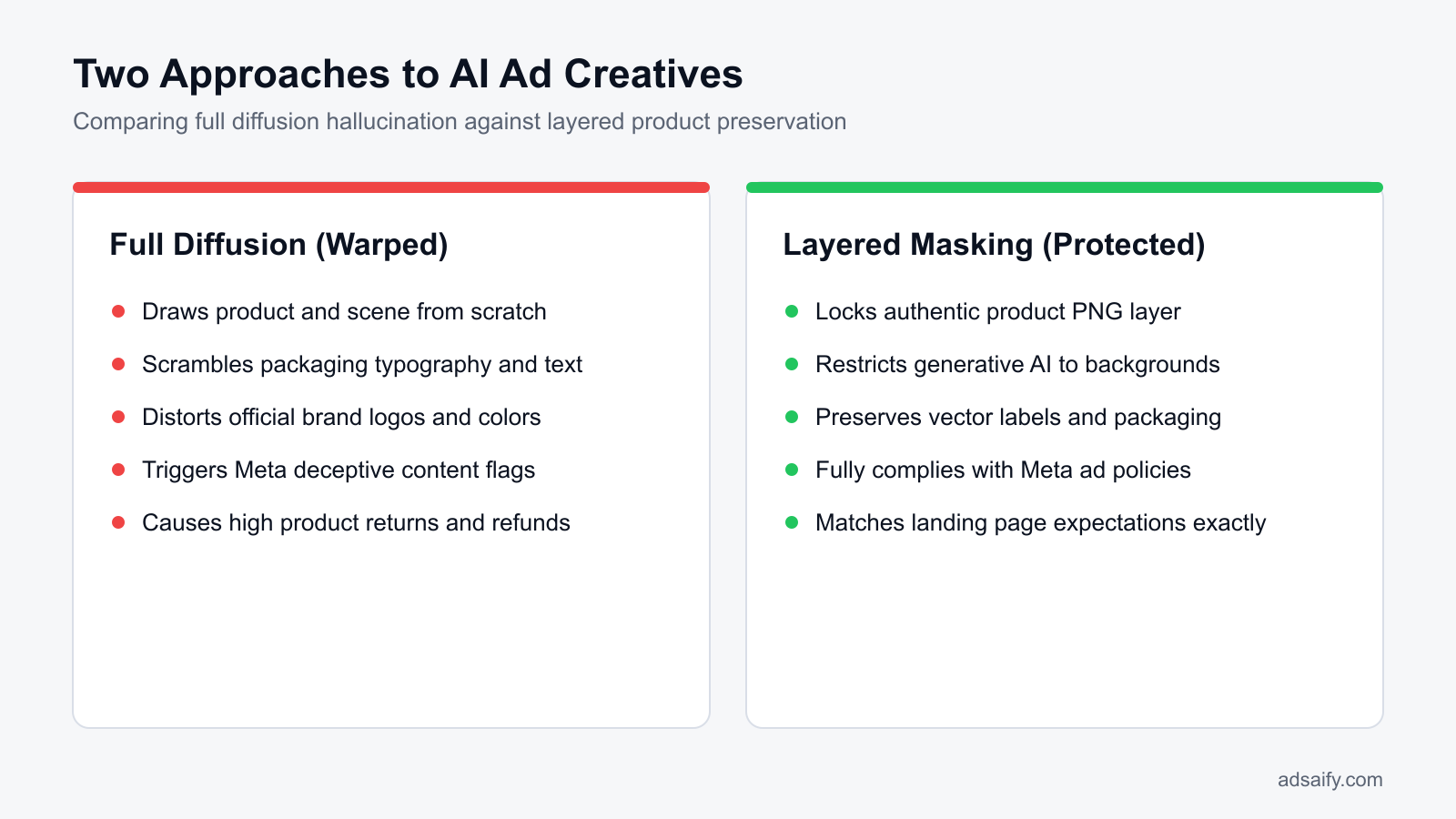
Short answer: To stop product distortion in AI ad creatives, avoid end-to-end diffusion that redraws your item. Instead, isolate the real product as a transparent PNG and use AI strictly for background staging and shadows. Platforms like Adsaify preserve original product geometry from website URLs, combining intact packaging with generative scenes and negative prompts to eliminate visual warping.
Every performance marketer testing generative creative eventually hits the same frustrating roadblock: the AI-generated scene looks stunning, but the product itself is warped. You prompt an image generation tool to place your skincare serum on a bathroom counter, but the bottle's label features nonsensical squiggles, the dropper curves unnaturally, and the brand logo looks like a smudge. When scaling creative volume on Meta, these micro-hallucinations turn high-potential ad concepts into unusable visual errors that damage your brand's credibility before a prospect even reads the primary text.
Standard diffusion models do not distinguish between background aesthetic elements and protected commercial packaging. Generative algorithms treat every pixel as malleable noise, actively redrawing bottle caps, edges, and typography to blend with surrounding lighting. Letting distorted assets slip into your Meta campaigns degrades user trust, inflates acquisition costs through depressed click-through rates, and risks customer returns when the delivered physical item fails to match the AI-rendered visual.
This guide provides a systematic framework to eliminate product warping entirely while retaining creative production speed. You will learn how to isolate real packaging geometry, stage realistic lighting without redrawing core assets, deploy negative prompts effectively, and establish a weekly quality audit. Workflows like Adsaify streamline this process by extracting authentic product assets directly from your store URL, helping you launch photorealistic Meta creatives that preserve exact physical fidelity across every placement.
Key Takeaways
- Never regenerate the core physical product; restrict AI generation strictly to background scenes.
- Use pixel masking and transparent product PNG layers to protect logos, labels, and exact dimensions.
- Eliminate Meta ad account rejection risks stemming from deceptive or distorted product presentations.
- Deploy URL-based AI workflows to sync high-converting copy with unwarped, authentic visual assets.
What is Product Distortion in AI Meta Ads and How Do You Spot It?
Product distortion in AI Meta ads occurs when artificial intelligence models alter the authentic geometry, typography, color balance, or structural features of a physical item. Marketers spot product distortion by auditing creative previews for nonsensical text labels, unnatural packaging seams, warped silhouettes, and unexpected drop-offs between ad link clicks and landing page views.
Visual Indicators of Hallucinated Product Features
When prospective customers scroll through Facebook Feed or Instagram Reels, synthetic imperfections immediately catch attention for the wrong reasons. Generative algorithms struggle to replicate rigid manufactured objects with precision. Common visual indicators of distortion include garbled brand typography where recognizable characters dissolve into illegible script, asymmetrical bottle caps or spray nozzles, warped cylindrical edges, and fabricated seams or buttons that do not exist on the genuine product. These visual hallucinations instantly signal inauthenticity to social media shoppers, undermining brand credibility before the user even reads the primary text.
Auditing Funnel Discrepancies in Meta Ads Manager
Product distortion manifests clearly in performance metrics within Meta Ads Manager. When an ad creative misrepresents an item, curious or confused users may click the creative but immediately leave once they encounter the actual merchandise on the destination URL. Performance marketers identify this friction by evaluating Outbound CTR (click-through rate, the percentage of ad impressions resulting in clicks that lead off Meta platforms) alongside landing page engagement.
For example, a direct-to-consumer ceramic cookware brand runs a Sales campaign with a daily budget of 1,200 TL. The creative team tests an AI-generated image where the frying pan features an elongated, polished brass handle that deviates from the black silicone handle on the physical product. In Meta Ads Manager, the ad produces a strong Outbound CTR of 2.60%, but the Landing Page View to Link Click ratio drops to 40%, and the Shopify bounce rate spikes above 85% with zero purchases. Replacing the warped creative with an unwarped composite restores the landing page view ratio to 78% and stabilizes conversion volume. Advertisers managing multiple campaigns with tools like Adsaify can implement automated rules to pause underperforming creatives when conversion rates fall below target thresholds.
Does Meta's automated ad review system actively detect and penalize slight visual warping or fake text?
Meta does not reject ad creatives solely for minor AI warping or nonsensical packaging text, as the automated review system primarily inspects creatives for explicit policy infractions such as restricted items or predatory claims. However, Meta's auction algorithms penalize distorted creatives indirectly. When users encounter warped products, they bounce quickly, dismiss the ad, or submit negative feedback. These actions suppress the ad's Quality Ranking in Meta Ads Manager, increasing CPM (cost per mille, the cost per thousand impressions) and diminishing ad delivery.
Why Do AI Ad Generators Distort Physical Products?
AI ad generators distort physical products because diffusion algorithms construct images by iteratively predicting probabilistic pixel clusters rather than assembling mathematically rigid 3D geometries. When single prompts instruct models to invent both environmental backgrounds and exact merchandise simultaneously, general training data overrides proprietary dimensions, resulting in warped shapes, mismatched colors, and synthetic text.
Probabilistic Pixel Denoising Versus Vector Geometry
Modern visual generative models utilize latent diffusion, a mathematical framework that removes noise from a random distribution of pixels across successive steps to construct an image based on contextual probability. Unlike CAD (computer-aided design) software or vector graphics rendering engines, diffusion systems do not calculate structural mechanics, exact dimensions, or persistent focal planes. When an engine generates a branded bottle or packaged supplement, it estimates pixel values based on patterns observed in vast image libraries. Because the software lacks an internal model of the real object's spatial integrity, straight packaging lines curve unpredictably, cylindrical containers lose symmetry, and reflective highlights melt into adjacent surfaces.
The Limits of Single-Step Prompts and Generalized Datasets
Single-step text-to-image workflows force the neural network to synthesize both the product and its ambient setting simultaneously. Because the algorithm prioritizes broad aesthetic cohesion over strict factual preservation, the dominant patterns within its generalized training set override distinct physical characteristics, custom label fonts, and exact Pantone brand shades. Furthermore, when marketers upload low-resolution product source files, generative upscaling algorithms attempt to interpolate missing boundary details, producing synthetic artifacts, blurry typography, and unnatural surface textures.
| Workflow Approach | Generation Mechanism | Product Fidelity Result | Meta Ads Impact |
|---|---|---|---|
| Single-Step Text-to-Image | Synthesizes product and environment simultaneously from a text prompt | Warped edges, hallucinated packaging typography, altered shapes | Low Quality Ranking, elevated bounce rate, weak conversion rate |
| Low-Resolution Source Upload | Interpolates missing edge pixels with generative diffusion algorithms | Muddied packaging textures, synthetic blur, distorted logos | Higher CPC (cost per click), low engagement, negative user comments |
| Asset-Isolated Compositing | Preserves original raster product layer and renders only surrounding backdrop | 100% authentic product geometry, intact labels, true brand colors | Stable conversion funnel, aligned expectations, optimal ROAS (return on ad spend) |
| Canvas Inpainting with Masks | Protects isolated product pixels while inpainting background negative space | Flawless physical proportions with fresh seasonal or contextual staging | High Relevance Diagnostics, strong engagement, reduced creative fatigue |
Can prompt engineering with exact hex codes and brand names completely prevent AI image hallucinations?
No, prompt engineering with exact hex codes and brand names cannot eliminate AI image hallucinations. Language models translate descriptive prompts into probabilistic semantic embeddings rather than programmatic computer instructions. Diffusion engines interpret color codes like #FF5733 as approximate conceptual suggestions rather than exact digital swatches. Furthermore, AI models do not possess vectorized blueprints of registered trademarks. Preserving structural fidelity requires technical bounding constraints, such as pixel masks or depth maps, rather than relying solely on descriptive text prompts.
What Are the True Costs of Running Distorted AI Creatives on Meta?
Running distorted AI creatives on Meta leads to policy enforcement penalties, elevated acquisition costs, and customer churn. Meta flags warped product imagery under Unacceptable Business Practices, resulting in account restrictions. Furthermore, misleading visuals spark disputes and return requests, while user hide actions diminish Quality Ranking in Meta Ads Manager, artificially inflating advertising CPMs.
Account Enforcement and Customer Friction
Meta enforces strict integrity guidelines regarding misleading promotional content. When generative artificial intelligence warps critical merchandise details, automated review systems categorize the advertisement under Unacceptable Business Practices. This triggers immediate creative rejection and, in recurring instances, permanent restrictions on the Meta ad account. Outside the platform, visual discrepancies between generated imagery and delivered items drive operational costs. A chargeback is a transaction reversal initiated by a customer's bank due to disputed product claims. When buyers receive merchandise that fails to resemble the rendered asset, return rates accelerate, dispute ratios climb, and merchant processing fees accumulate.
Auction Penalties and Brand Erosion
Meta optimizes ad delivery through auction feedback signals. Quality Ranking is a Meta Ads Manager metric that measures how an ad's perceived quality compares to competing ads targeting the same audience. When prospective customers see deformed product hands, unreadable logos, or mangled packaging, they choose "Hide ad" or report the creative. These negative signals crush the ad's Quality Ranking, compelling the Meta auction engine to demand higher CPM (cost per mille, which is the cost per one thousand impressions) to deliver impressions. Simultaneously, uncanny visuals degrade consumer trust. Customer lifetime value (LTV) is the total net revenue a business anticipates generating from a single customer relationship. Synthetic distortion impairs perceived craftsmanship, lowering LTV and forcing reliance on costly one-off acquisitions. Advertisers using Adsaify often deploy automated rules to pause ads displaying poor performance metrics before auction penalties compromise account health.
- Audit generated image details against physical inventory before publishing campaigns to Meta Ads Manager.
- Monitor customer feedback scores within Commerce Manager to catch visual expectation mismatches early.
- Track the Quality Ranking diagnostic column weekly to identify ads accumulating negative user signals.
- Cross-reference return reason codes with specific ad creative IDs to detect artifact-driven returns.
- Pause deteriorating ad variations immediately using automated account rules to preserve auction standing.
- Inspect typography, product seams, and branding elements under full-resolution zoom prior to scaling ad spend.
How difficult is it to recover an ad account disabled due to misleading or hallucinated product representations?
Recovering an ad account restricted for misleading product representations under Meta's Unacceptable Business Practices policy is exceptionally difficult and frequently irreversible. Meta's automated integrity systems treat visual hallucinations as deliberate consumer deception. An advertiser must submit an official review through Meta Business Support Home, providing unedited product photography, manufacturer invoices, and proof of inventory to prove authentic operations. If human reviewers determine the creative systematically misrepresented core physical specifications, appeals are typically rejected outright.
How Do You Diagnose the Exact Cause of AI Product Distortion?
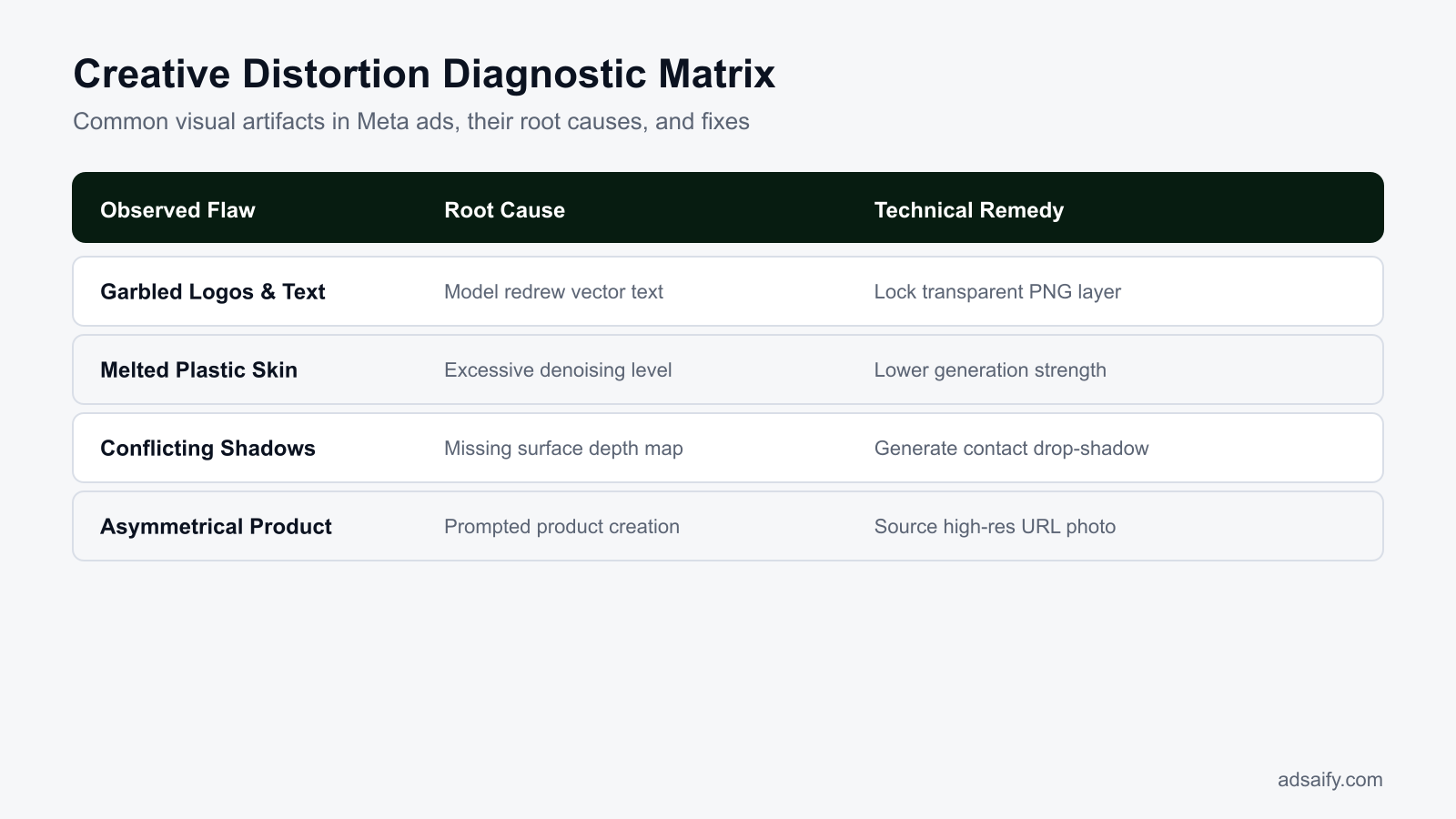
Diagnosing AI product distortion requires isolating asset pipeline stages through controlled test runs, inspecting visual artifacts, and auditing generation parameters. Performance marketers isolate product typography, perspective geometry, and surface textures to determine whether flaws stem from low-resolution source files, unconstrained diffusion prompts, missing depth maps, or excessive model denoising strength.
Diagnostic Tests and Visual Failure Modes
Pinpointing creative failures begins with a layer-isolation test, which involves rendering the product against a neutral background without background prompting to isolate baseline flaws from contextual hallucinations. If artifacts persist, inspect specific visual failure modes. Typography warping reveals a failure in vector boundary protection. Vector boundary protection is an editing technique that locks product text masks to prevent latent diffusion models from treating lettering as decorative pixels. When diffusion models encounter unprotected labels, they attempt to invent letterforms, producing illegible script.
Perspective collapse occurs when an asset lacks spatial alignment data. A depth map is a greyscale image representing three-dimensional spatial distance from the camera viewpoint. Without depth data, the diffusion engine miscalculates horizon lines, yielding impossible contact angles and conflicting shadow trajectories. Meanwhile, plastic skinning and melting surfaces stem from parameter misconfigurations. Denoising strength is a generative parameter that controls how aggressively the AI modifies pixels during latent diffusion passes. When background generation workflows apply extreme denoising values across unprotected product pixels, the model overwrites authentic material textures with smoothed synthetic approximations.
| Visual Symptom | Root Technical Cause | Pipeline Failure Point | Corrective Setting Adjustment |
|---|---|---|---|
| Warped typography and logos | Missing vector boundary protection | Text regeneration in diffusion step | Apply hard pixel alpha mask over branding |
| Conflicting contact shadows | Absence of z-axis depth maps | Spatial horizon alignment | Import ControlNet depth maps prior to synthesis |
| Plastic, melted product texture | Excessive latent denoising strength | Background blending pass | Cap denoising strength between 0.25 and 0.40 |
| Jagged boundary haloing | Unfeathered alpha channel edges | Source asset isolation cutout | Feather cutout boundary by 1 to 2 pixels |
| Unnatural light reflections | Mismatched ambient illumination | Prompt environmental conditioning | Add directional lighting vectors to generative prompt |
If I lower the denoising strength, will the generated background fail to blend naturally with the product?
Lowering denoising strength preserves product fidelity but can create a visible seam where the original product edges meet the synthetic background. When denoising drops below 0.30, diffusion models cannot redraw edge pixels to integrate contact lighting and ambient bounce. To resolve this without distorting the product, maintain low denoising on the isolated product mask while applying a separate higher-denoising pass exclusively to the ambient background and contact shadow regions.
If you would rather not set up each of these steps by hand, try it in Adsaify: your first ad is free, so there is nothing to lose. Create a free account.
What Assets Must You Prepare Before Generating Safe AI Creatives?
To generate safe AI creatives without product distortion, you must prepare high-resolution transparent PNG cutouts, a brand asset kit, clean landing page URLs, and pre-formatted canvas templates. These source files provide rigid boundaries for AI models, preventing diffusion networks from hallucinating altered labels, unnatural textures, or warped package geometry during image generation.
High-Resolution Product Cutouts and Brand Style Guides
The foundation of an artifact-free generation workflow is an isolated product render exported as a transparent PNG (Portable Network Graphics, a lossless raster format that supports visual transparency). The cutout should be at least 2000x2000 pixels and captured under neutral, balanced commercial studio lighting. Diffuse lighting prevents baked-in highlights and extreme shadows from conflicting with the virtual lighting environments that AI generators render around the product.
In addition to product cutouts, compile a digital brand kit containing vector logos in SVG format, verified typography font families, and strict packaging color hex codes. An AI model that is provided with exact visual references maintains branding uniformity across placements, avoiding pseudo-letters, blurred logos, and mutated brand colors.
Landing Page Data and Canvas Ratio Specifications
Extract direct, uncluttered product landing page URLs that modern creative platforms can scan to parse physical specifications, benefits, and value propositions. Clean input data ensures that the ad copy, background theme, and visual props generated by AI match the actual claims made on your storefront.
Finally, establish fixed canvas aspect ratios before beginning generation. In Meta Ads Manager, different placements demand distinct dimensions: prepare 1:1 square canvases (1080x1080 pixels) for Facebook Feed and Instagram Feed, alongside 9:16 vertical canvases (1080x1920 pixels) for Instagram Stories and Reels. Pre-defining these ratios prevents Meta from applying automated center-cropping or pillar-boxing that warps visual proportions.
- Export isolated product images as 24-bit transparent PNG files at a minimum resolution of 2000x2000 pixels.
- Capture original product photography under neutral, shadow-free studio lighting to allow realistic relighting.
- Compile vector brand logos and primary color hex codes to enforce brand identity standards.
- Select approved font files to prevent AI generators from rendering illegible text approximations on the product.
- Clean product landing page URLs by removing tracking parameters so AI tools can parse product attributes accurately.
- Set up dedicated creative artboards for 1:1 feed placements and 9:16 vertical video placements.
Can a clear smartphone photo taken against a plain wall work if I lack professional studio catalog assets?
Yes, a modern smartphone photo taken against a plain, well-lit wall can work if the lighting is diffuse and the product remains sharp. Ensure that you turn off portrait-mode background blurring, clean the camera lens, and capture the shot in bright, indirect daylight. After capturing the photo, use a background removal tool to cut out the product cleanly and verify that all label typography remains perfectly legible at full zoom before using it in your ad workflow.
How Do You Generate Distortion-Free AI Creatives Step by Step?
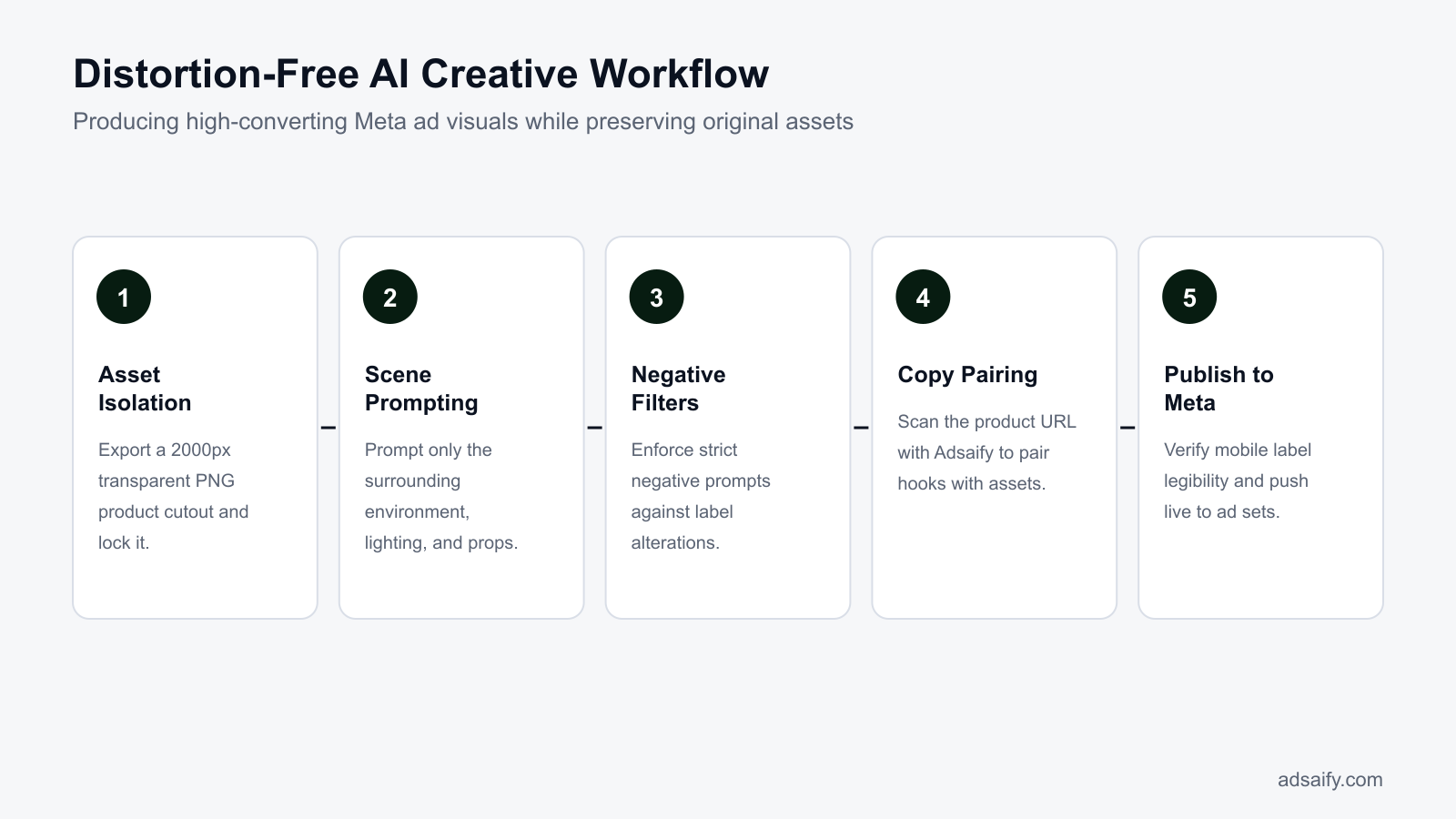
You generate distortion-free AI creatives by isolating your real product on an immutable mask layer, prompting only for background scenes, applying negative prompts against visual artifacts, and validating render realism before export. This layer-locked method ensures that machine learning diffusion models manipulate only peripheral pixels, leaving product packaging, logos, and critical marketing copy completely untouched.
Layer Masking and Environmental Prompt Engineering
Begin by locking your product cutout onto a dedicated foreground layer mask. An image mask is a digital template that shields specific pixel coordinates from being altered by an image generation algorithm. When the mask is active, the generative AI cannot redraw or hallucinate details across your product surface.
Next, restrict all positive text prompts to peripheral variables: the contextual environment, surface materials (such as marble, oak, or brushed metal), atmospheric backlighting, and seasonal props. Pair this with a robust negative prompt: a command sequence that instructs the AI generator to exclude specific visual elements. Include terms such as "distorted text, warped edges, mutated logos, extra packaging seams, low resolution, blurry foreground" to instruct the model to keep surrounding elements crisp.
Campaign Ingestion, Shadow Inspection, and Meta Publishing
Once your masked asset template is ready, connect your product landing page URL to Adsaify to automatically extract core product attributes and draft a complete campaign structure, pairing your verified visual creative with audience targeting and sharp ad copy. Before publishing the draft to your live Meta ad account, conduct a rigorous visual inspection in Meta Ads Manager preview.
Check the product contact shadow—the localized dark shadow cast where the physical item meets a surface—to verify that the product does not look like it is floating unnaturally. Ensure that edge reflections match the background light direction and confirm that every word of printed packaging text remains razor-sharp.
- Mask isolation — The real product cutout is placed onto an immutable foreground mask, locking all original packaging pixels before generation proceeds.
- Contextual prompting — The user enters positive prompts for background scenery and lighting while applying negative prompts against text distortion, moving to generation once parameters are set.
- Background rendering — The generative AI synthesizes the scene around the locked mask, prompting an immediate visual check of edge blend and contact shadows.
- Campaign drafting — The marketer feeds the approved visual and product URL into Adsaify to auto-generate matching ad copy and campaign structures, advancing to final review.
- Placement validation — The final creative is previewed across 1:1 and 9:16 placements in Meta Ads Manager, triggering publication to the live account if zero distortion is detected.
Can I publish verified, distortion-free AI creatives directly to my Meta ad account without manual re-uploading?
Yes, platforms like Adsaify connect directly to your Meta ad account to publish verified campaigns without manual downloading and re-uploading. Once you approve the drafted creative, ad copy, targeting structure, and daily budget, the tool pushes the complete campaign straight into your Meta Ads Manager. This automated deployment keeps creative assets uncompressed, eliminates duplicate file management errors, and allows your chosen automation rules to monitor live delivery immediately after launch.
From Warped Artifacts to High-Converting Ad: How Does a Worked Case Look?
A successful transition from warped artificial intelligence visuals to high-converting Meta ads requires isolating the true physical product image and generating only the contextual background environment around it. This process replaces illegible labels and deformed packaging with pixel-accurate assets, instantly improving creative credibility, viewer retention, and downstream conversion rates in Meta Ads Manager.
The Skincare Ad Breakdown: From Label Hallucination to Asset Lockdown
Consider an example of an e-commerce skincare brand allocating a 1,000 TL daily budget to an ad set targeting beauty enthusiasts on Instagram. The initial creative relied on an end-to-end artificial intelligence prompt that warped the text on the moisturizer bottle label into nonsensical gibberish. Although the lighting was aesthetically pleasing, the ad generated a weak 1.1% CTR (click-through rate, which is the percentage of impressions that result in a click), accompanied by user comments questioning product authenticity.
To resolve the issue, the media buyer paused the distorted creative in Meta Ads Manager and executed a controlled replacement workflow:
- Asset Isolation: The team isolated an authentic studio photograph of the physical moisturizer bottle as a transparent background PNG file to lock the typography and packaging geometry.
- Contextual Environment Generation: Using the isolated jar as a static foreground mask, the background generator produced a photorealistic setting: "a marble bathroom vanity bathed in morning sunlight with botanical eucalyptus accents."
- Copy Alignment: The primary ad copy and the initial three-second video hook highlighted "non-comedogenic hydration," matching the visible, legible text on the physical bottle label. Marketers can also test variations by generating fresh campaign angles using Adsaify to draft contextual ad concepts from an existing product URL.
Measurable Campaign Improvements After Creative Correction
After launching the corrected asset within the same ad set, the link CTR rose from 1.1% to 2.8%. Misleading-product customer service inquiries dropped to zero because prospective buyers saw the identical jar design upon navigating to the Shopify product page. Landing page bounce rates decreased markedly as prospective buyers encountered visual consistency between the Instagram feed placement and the checkout funnel.
How many contextual AI background variations should I test against the same preserved product asset?
Testing three to five distinct background variations against one preserved product asset provides the optimal balance between creative diversity and algorithmic learning in Meta Ads Manager. Deploying more than five variations simultaneously fragments the ad set budget, preventing Meta's delivery system from accumulating enough conversion data per ad. Testing fewer than three variations limits discovery of the most resonant visual context for your target audience.
Which Metrics Prove That Your Creative Distortion Fix Succeeded?
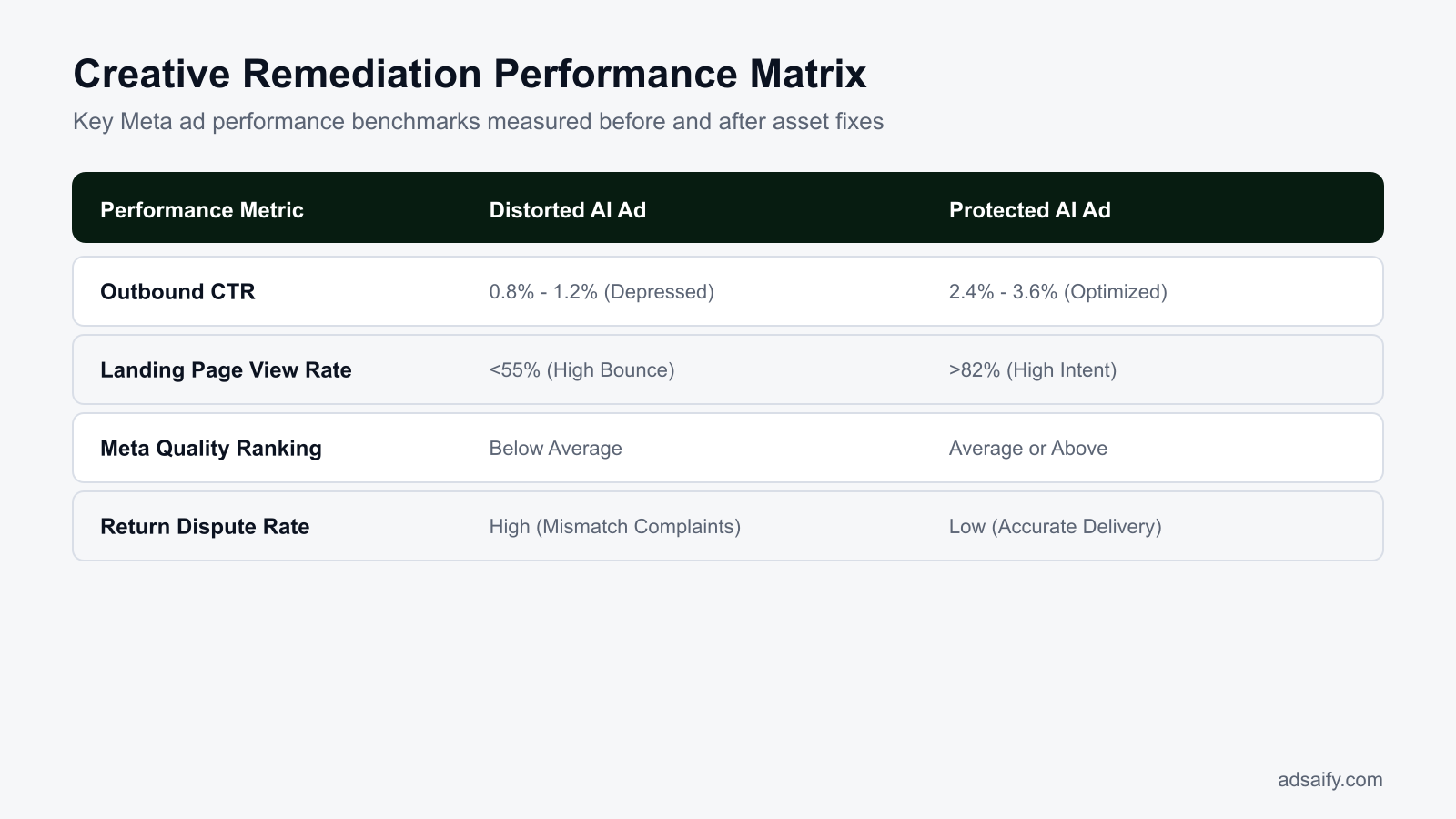
You prove that a creative distortion fix succeeded by tracking Outbound Click-Through Rate, the Landing Page View to Link Click ratio, Meta Ad Quality Ranking, and Cost Per Acquisition. When ad imagery accurately reflects physical inventory, user engagement shifts from passive curiosity to verified intent, raising engagement scores and lowering acquisition costs across ad sets.
Core Diagnostic Metrics in Meta Ads Manager
Evaluating creative integrity requires looking past surface-level engagement metrics. Outbound CTR (the percentage of impressions that led to an outbound click leaving Meta properties) reflects authentic buyer curiosity rather than accidental clicks on visually jarring artifacts. A Landing Page View to Link Click ratio reaching 80% or higher confirms that users who clicked the creative did not immediately abandon the site upon realizing the ad portrayed an unrealistic representation of the inventory.
Furthermore, CPA (cost per acquisition, which measures the advertising cost required to secure a single sale) stabilizes as confused traffic is replaced by high-intent shoppers. Advertisers can implement automated performance rules in tools like Adsaify to pause underperforming ads automatically if CPA spikes during testing.
Distorted Creative vs. Corrected Asset Comparison
| Metric or Setting | Distorted AI Creative | Fixed Layered Asset | Performance Benchmark Target |
|---|---|---|---|
| Outbound CTR | Suppressed below 1.0% | Reaches 1.8% to 3.2% | Sustained above 1.5% |
| LPV to Link Click Ratio | Below 60% due to visual mismatch | Maintains 80% to 92% | Minimum 80% completion |
| Meta Quality Ranking | Ranked 'Below Average' (bottom 20%) | Upgrades to 'Average' or 'Above Average' | 'Average' or higher |
| Customer Comment Sentiment | Questions about scams or fake packaging | Product inquiries and ingredient questions | Zero scam or distortion complaints |
| Cost Per Acquisition (CPA) | Inflated by low post-click conversions | Decreases as conversion intent stabilizes | At or below target product CPA |
Monitoring Meta's Ad Quality Ranking (a diagnostic metric comparing your ad's perceived quality against ads competing for the same target audience) provides immediate feedback on distortion fixes. Corrected creatives eliminate user-initiated "Hide ad" actions and misleading-content feedback flags, restoring delivery efficiency across competitive auctions.
Does a 'Below Average' quality score on distorted ads degrade the delivery performance of my entire ad account?
A 'Below Average' quality ranking on individual ads penalizes auction efficiency at the ad set level rather than permanently damaging the entire ad account. Meta charges a higher effective CPM (cost per thousand impressions) to deliver low-quality creatives, forcing you to bid more for identical placements. Consistently running distorted ads signals negative user experience through hides and reports, which suppresses distribution and inflates costs across the campaign.
Want to see this in your own account? Enter your website address and Adsaify drafts the campaign for you. The first ad is free. Try it now or log in.
What Weekly Routine Keeps AI Creatives Free of Distortion and Policy Risks?
A weekly creative maintenance routine keeps artificial intelligence (AI) ads compliant by systematically auditing Meta Ad Quality Rankings, user comments, visual integrity, and landing page bounce rates. This operational cadence identifies subtle visual hallucinations, prevents account-level policy penalties for misleading business practices, and ensures that marketing budgets fund only accurate, high-performing product assets.
- Daily: Monitor user comments beneath active Meta ads in Ads Manager. Shoppers immediately flag AI hallucinations, such as incorrect bottle caps or distorted text, which protects your account against deceptive advertising flags.
- Weekly (Monday): Inspect Meta Ad Quality Rankings in the Ads Manager column setup. Meta Ad Quality Rankings measure perceived ad quality based on feedback and policy signals compared to ads competing for the same audience. A ranking below average indicates visual distortion or deceptive claims.
- Weekly (Wednesday): Refresh contextual scene backgrounds by using Adsaify to analyze product URLs and draft compliant, high-resolution lifestyle environments while keeping native packaging geometry intact.
- Weekly (Thursday): Verify multi-placement rendering across Meta Feeds, Stories, and Reels on physical smartphone screens to detect downsampled, blurry labels or awkward aspect-ratio cropping.
- Weekly (Friday): Review performance metrics and pause ads showing visual decay or rising bounce rates. Shift daily spend toward proven creatives using Adsaify automated rules to halt ads that fail performance targets.
- Monthly: Reconcile active creative assets against e-commerce return reports and support tickets. If customers cite discrepancies between delivered goods and promotional images, immediately remove the offending AI creative.
Does editing the creative asset inside an existing live ad reset the ad set back into the Meta learning phase?
Yes, replacing the creative asset inside an active Meta ad resets the ad set into the learning phase. Meta defines the learning phase as the calibration window where the delivery system gathers roughly 50 optimization events to stabilize ad performance. Modifying media files, primary text, or campaign objectives triggers this reset. To preserve conversion stability, duplicate the live ad, insert the corrected creative into the new ad container, and pause the distorted ad once review completes.
What Are the Most Common Mistakes When Creating AI Ad Assets?
The most common mistakes when creating AI ad assets stem from relying on fully autonomous generation without structural constraints, yielding warped packaging, illegible label text, and disjointed marketing messages. Advertisers resolve these errors by anchoring real product photographs with masking layers, enforcing brand guidelines across visual scenes, and testing creatives on native mobile feeds.
Relying on Single-Prompt End-to-End Image Generation
Requesting an entire product and scene from a text prompt forces the diffusion engine to imagine physical geometry. A diffusion engine is a generative AI model that creates images by iteratively removing noise from random visual patterns. This causes asymmetrical packaging, inaccurate logos, and distorted closures. The fix is compositing real product cutouts over AI-generated scenes rather than rendering products from text.
Allowing Diffusion Models to Render Label Typography
Diffusion models treat typography as pixel clusters rather than structured glyphs, producing unreadable pseudo-text on labels. Running ads with illegible text harms consumer trust and breaches Meta standards on deceptive design. The solution is applying hard vector masks over text regions to keep original typography untouched.
Mismatching Background Scene Context with Ad Copy Hooks
Generating scenes without aligning them to the ad copy confuses prospects. An AI generator might depict an outdoor running trail for an indoor desk supplement. Ensure message-creative congruence by using Adsaify to generate ad copy and matching visual scenes directly derived from business website data.
Skipping Mobile Viewport Audits Before Publishing
Small artifact errors on desktop screens turn into blurred, unrecognizable shapes on mobile devices. Because over 90 percent of Meta impressions serve on handheld screens, unverified compression ruins product legibility. Always preview creatives within the Meta Ads Manager mobile preview tool before allocating budget.
Distorting Native Product Dimensions and Aspect Ratios
Generative outpainting often shrinks, elongates, or misrepresents product scale relative to background objects like cups or furniture. Skewed proportions mislead consumers regarding actual volume. Fix this by standardizing product scale relative to reference objects in the compositing stage.
Overlooking Inconsistent Lighting and Cast Shadows
Placing a product with flat studio lighting into an AI background featuring harsh directional sunlight yields an amateur floating visual. These visual disconnects hurt click-through rates. Set explicit shadow diffusion and ambient reflection values during rendering to match the foreground product.
How do I prevent AI copywriting tools from inventing exaggerated claims that contradict actual product packaging?
Prevent AI copywriting tools from exaggerating claims by feeding them exact product specifications, ingredient lists, and approved regulatory statements inside the system prompt. Never allow open-ended creative freedom for benefit claims. Require the model to reference source copy directly, and compare generated hooks against legal guidelines to ensure compliance with Meta misleading claims policies.
When Does Asset Masking Fail and What Are the Inherent Limits of AI Ads?
Asset masking fails when generative tools encounter complex optical properties like refraction, translucent liquids, or dynamic fabric drape across human forms. While generative artificial intelligence (AI) handles static backdrops reliably, it cannot resolve physical light transport across transparent objects or substitute for downstream business fundamentals like checkout functionality and inventory availability.
Optical Refraction and Fabric Physics Expose Generative Boundaries
Asset masking is a graphic processing technique that isolates original product pixels using a cutout layer so that an artificial intelligence background generator only alters surrounding pixels. This method breaks down rapidly when dealing with transparent or reflective glassware, such as perfume flacons, spirits bottles, and optical lenses. Generative algorithms synthesize lighting that rarely matches the physical refraction of the original glass. For instance, placing a studio-shot whiskey bottle onto an AI-generated beach creates discordant shadows, impossible internal reflections, and haloed silhouettes that instantly signal artificial manipulation to prospective buyers.
Apparel presents an even steeper barrier. Garments require complex three-dimensional fabric mechanics to sit naturally against moving human bodies. A flat cutout of a cotton shirt or structured coat cannot account for natural stretching, seam tension, and body contouring when placed onto an AI-generated model. The synthetic model ends up looking detached from the clothing, producing distorted collars, melted buttons, and floating hems that erode buyer trust and inflate product return rates.
Downstream Performance Barriers Beyond Pixel Quality
Performance marketers often blame visual assets when campaigns underperform, but pristine image fidelity cannot solve broken marketing foundations. Automation rules in platforms like Adsaify can continuously evaluate performance and automatically pause ads when key metrics—such as cost per acquisition (CPA), which measures the total ad spend required to achieve one purchase—exceed acceptable limits. However, automation rules cannot modify or fix graphic artifacts in running ads. Furthermore, flawless creatives cannot overcome uncompetitive retail pricing, friction in the mobile shopping cart, or items that show as out of stock once the consumer clicks through to the website.
- Inspect transparent liquid borders against high-contrast backgrounds to detect synthetic halos.
- Audit garment shoulder lines and seams for unnatural warping across generated human models.
- Establish automated pause rules inside your ad account to halt creatives when acquisition costs spike.
- Verify inventory counts in your ecommerce platform prior to launching new creative variations.
- Review mobile checkout loading speeds to ensure post-click traffic completes purchases smoothly.
- Cross-check product dimensions and color saturation against physical samples before publishing ads.
Is traditional model photography still required for apparel brands to prevent fabric fit and drape distortions?
Yes, traditional model photography remains necessary for apparel brands requiring exact fit, drape, and structural texture representation. While generative background tools can place existing studio cutouts into new contextual scenes, artificial intelligence cannot accurately simulate how specific textile weights stretch, fold, and hang over varied human bodies. Capturing foundational assets on physical human models in a studio ensures visual authenticity, eliminates return rates triggered by fit discrepancies, and provides the clean base layers required for safe generative background composition.
What Are the Key Terms for AI-Powered Meta Ad Creative Generation?
The key terms for artificial intelligence (AI) Meta ad creative generation describe the computational methods, visual anomalies, performance metrics, and policy standards that govern automated advertising. Mastering this specialized vocabulary enables performance marketing practitioners to diagnose visual rendering flaws, construct safe generation workflows, and maintain strict compliance with Meta advertising guidelines across campaigns.
- Product Distortion: The unintended visual deformation of physical product packaging, geometry, labels, or branding caused by generative computer vision algorithms.
- Product Masking: The digital isolation of authentic product pixels via an alpha channel cutout so generative tools only replace the contextual background.
- AI Hallucination: The generation of non-existent visual artifacts, garbled typography, or physically impossible structures produced by machine learning models without real-world training reference.
- Hook Rate: The percentage of total ad impressions that result in a video view of at least three seconds, calculated by dividing three-second video plays by total impressions.
- Deceptive Content Policy: The advertising standards enforced by Meta that penalize accounts publishing misleading imagery, distorted product representations, or unsubstantiated functional claims.
- Inpainting: An image editing process where an artificial intelligence model replaces or restores designated pixel areas inside an isolated boundary mask.
- Outpainting: An algorithmic expansion technique that generates complementary contextual background elements beyond the original borders of an image frame.
- Return on Ad Spend (ROAS): A core advertising metric calculated by dividing the gross revenue generated from an ad campaign by the total ad spend.
- Cost Per Acquisition (CPA): An efficiency metric calculated by dividing total advertising expenditure by the number of completed customer conversions.
- Meta Ads Manager: The official backend advertising interface where marketers construct campaigns, define targeting parameters, monitor spend, and analyze asset metrics across Meta apps.
- Creative Fatigue: The measurable decline in an ad unit's conversion rate and click volume caused by excessive exposure frequency to the target audience.
Do I need to build a custom metric inside Meta Ads Manager to track creative hook rates accurately?
Yes, you must configure a custom metric inside Meta Ads Manager because hook rate is not available as a default reporting column. To create it, navigate to Columns, select Customize Columns, click Create Custom Metric, and define the formula as three-second video plays divided by impressions, formatted as a percentage. Tracking this custom metric allows media buyers to immediately evaluate how effectively the opening frames of an ad capture user attention in mobile feeds.
How Can You Harness AI in Meta Ads Without Risking Creative Distortion?
To eliminate product distortion in AI-generated Meta ads, begin by isolating authentic product photography from background elements using clean cutouts. Next, restrict generative prompts specifically to contextual staging, ensuring the core packaging, typography, and brand logos remain pixel-perfect and unedited. Pair these visuals with ad copy verified strictly against your real label claims, and set up performance automation rules to monitor audience delivery.
Today, choose one key product page and extract high-resolution source images with transparent backgrounds before testing new generative concepts. You can submit your website link through Adsaify to generate aligned ad copy, audiences, and draft creatives published directly into your Meta ad account, taking advantage of a free first ad to validate your setup.
Want to see this in your own account? Enter your website address and Adsaify drafts the campaign for you. The first ad is free. Try it now or log in.
Frequently Asked Questions (FAQ)
1. Does Meta require an explicit AI disclaimer tag on product advertising creatives generated with AI?
Meta requires disclosure for photorealistic ads created or altered with AI that depict realistic-looking people, events, or places that did not happen. Meta generally does not require the "Altered or synthetic content" label for standard commercial product edits, such as background enhancements, color correction, or image resizing, provided the visual does not deceive viewers regarding fundamental product features.
2. Does altering a product's background with generative AI trigger copyright or trademark infringement risks?
Altering a product's background with generative AI creates trademark or copyright risks if the tool generates third-party intellectual property into the backdrop. If an AI generator mistakenly introduces recognizable brand logos, copyrighted architectural landmarks, or protected art into the environment, the advertiser remains legally responsible. Advertisers should inspect backdrops thoroughly to ensure every generated scene is free from recognizable intellectual property.
3. How does Adsaify maintain logo and packaging integrity when scanning a product link to build ads?
Adsaify inspects the business website URL provided by the advertiser to extract accurate brand information, product details, and structured context. By extracting genuine details directly from the source page rather than synthesizing arbitrary brand assets, the platform drafts targeted ad copy and campaign structures that reflect the actual product offering, helping advertisers publish verified ad drafts straight into their Meta ad account.
4. How can I prevent generative AI copywriting from inventing claims not present on my physical product label?
To stop AI copywriting models from hallucinating unverified claims, feed the model explicit source text consisting solely of your approved product specifications and packaging copy. Constrain the prompt instructions with negative boundaries, explicitly forbidding benefits not listed in the input. Finally, conduct a mandatory human review step comparing the generated ad text against the physical package before launching the campaign on Meta.
5. How quickly does an ad rejected for deceptive product imagery damage the ad account's overall delivery ranking?
An ad rejected for deceptive imagery can impact an account's delivery ranking immediately upon review completion. Meta evaluates account quality based on historical compliance. Repeated policy rejections signal low quality to Meta's automated auction systems, leading to higher CPMs (cost per thousand impressions), slower review times for future ads, or unexpected account spending limits across all running campaigns.
6. Must media buyers possess advanced Photoshop masking skills to prevent AI product distortion?
Media buyers do not need advanced Photoshop masking skills to prevent AI product distortion. Modern background-removal tools and automated composition software automatically isolate physical packaging without manual pen-tool clipping. By using dedicated creative workflows and automated platform prompts that protect the central foreground layer, media buyers can safely generate authentic commercial environments without specialized graphic design software training.
7. Why is product distortion more prevalent in AI-generated video ads compared to static image creatives?
Product distortion occurs more frequently in AI-generated video ads due to temporal consistency challenges. Generative video diffusion models render content frame by frame, often struggling to preserve fine packaging details, straight lines, and typography across continuous motion. Without strict frame-to-frame tracking constraints, subtle micro-shifts across thirty frames per second cause bottles, boxes, and logos to warp, jitter, or melt visibly.
8. Is there any cost to test and publish a distortion-free AI ad creative and copy on your first campaign?
There is no software cost to create and publish your first ad campaign using Adsaify, as the first ad is completely free to try. Advertisers simply register an account, input their website URL to receive campaign suggestions, generate visual creative assets, and publish directly to their own connected Meta ad account, paying only Meta's standard ad delivery costs.
How can you try this with Adsaify?
The quickest way to apply the steps in this article to your own account is to try them. Adsaify analyses your business from your website address, drafts the campaign with an audience, ad copy, creative and a budget suggestion, and publishes it to your own Meta ad account once you approve.
- Your first ad is free: there is nothing to lose by trying.
- Your own ad account: the campaign runs in your Meta account and you stay in control.
- Images and video: generate ad creatives with AI or promote an existing Instagram post.
Create a free account and try your first ad · Already have an account? Log in.