Short answer: Architecture mismatch occurs when a business's core operational bottleneck fails to match the software's functional archetype. For instance, teams lacking creative volume waste budget when deploying rule engines like Revealbot or enterprise feed pipelines like Smartly. Solving this requires auditing actual labor friction and selecting tools that complement Meta's auction algorithms rather than conflicting with them.
Every morning begins with notification triage across multiple dashboards that never align: an external automated rule engine paused an ad set that Meta's delivery algorithm was actively stabilizing, third-party analytics show conflicting attribution counts, and creative production remains painfully manual. Media buyers adopt specialized platforms expecting operational leverage, but managing brittle API integrations, overlapping automation scripts, and fragmented interfaces often creates more administrative work than running campaigns directly within Meta Ads Manager.
This friction happens because of an architecture mismatch, where the functional design of the chosen software directly conflicts with Meta's modern auction algorithms and the actual operational constraints of your business. When an account lacking creative volume deploys complex bid-management engines, or when a lean catalog adopts enterprise feed tools, performance suffers. Left unaddressed, conflicting automation triggers continually reset ad set learning phases, inflate CPA (cost per acquisition, the total advertising cost required to acquire a single paying customer), and consume significant operating budget on redundant software licenses that fail to resolve the core bottleneck.
After reading this guide, you will be able to audit and systematically realign your Meta advertising software stack to eliminate operational drag. We examine how to diagnose your business model's specific architectural archetype, complete essential pre-migration technical tracking audits, transition campaign workflows without destabilizing historical ad set optimization, and establish a monthly maintenance routine that permanently prevents rule overlap and tool bloat.
Key Takeaways
- Rule engines (Revealbot), intelligence dashboards (Madgicx), enterprise feeds (Smartly), and autonomous launchers (Adsaify) serve distinct operational needs.
- Mismatching architectures triggers algorithmic friction when rigid external rules override Meta's native Advantage+ auction systems.
- Purchasing automated bidding tools when your actual bottleneck is creative production inflates SaaS overhead without lifting ROAS.
- A lean ad architecture minimizes external rule logic, prioritizing rapid creative diversification and clean campaign publishing.
What Is Meta Ad Tool Architecture Mismatch and How Do You Spot It?
Meta ad tool architecture mismatch occurs when the functional design of third-party advertising software fails to address the primary operational bottleneck of a business. Marketers spot this misalignment when software subscription overhead increases while manual labor hours remain flat, or when automated software rules disrupt Meta's machine learning delivery instead of improving return on ad spend.
Identifying Software Friction and Learning Phase Disruption
The clearest symptom of architectural mismatch is financial bloat coupled with stagnant operational speed. Teams pay steep multi-seat software fees for enterprise platforms while internal media buyers still spend hours manually building ad sets, uploading creative assets, and typing ad copy directly inside Meta Ads Manager. The tool promises automation, but the human workflow remains entirely manual because the platform solves an issue the business does not actually have.
Another major technical indicator involves delivery instability inside Meta Ads Manager. The learning phase is the period after an ad set is published or significantly edited during which Meta's delivery system explores the best audience segments to generate 50 conversion events. External rule triggers that evaluate performance on short timeframes frequently pause and unpause ad sets or adjust budgets aggressively. These external overrides continuously reset the learning phase, trapping campaigns in the "Learning Limited" status and driving up cost per acquisition through delivery volatility.
Categorizing the Four Primary Ad Tool Architectures
To avoid operational mismatch, media buyers must classify external software into distinct architectural categories:
- Rule engines: Platforms that execute strict if-then scripts based on static metrics like cost per acquisition, useful for manual bid caps but prone to fighting Meta's automated algorithms.
- Creative generation engines: Software dedicated to producing graphic templates, AI product mockups, and script variations without publishing campaigns directly.
- Autonomous campaign builders: Platforms like Adsaify that analyze a brand's website URL, generate creative variations, draft target audiences, and deploy campaigns directly to Meta Ads Manager alongside performance-monitoring pause rules.
- Enterprise feed tools: Systems engineered for large catalog management, designed to map dynamic product ads across hundreds of thousands of inventory SKUs.
For example, an apparel boutique spending a 1,500 USD monthly budget on Meta ads deployed an automated bid-adjustment tool. The software adjusted ad set budgets hourly based on instant purchase events. Because Meta requires steady pacing, these frequent edits repeatedly triggered the "Learning Limited" status in Meta Ads Manager. The boutique removed the external rule tool and transitioned to using native Advantage+ campaign budget pacing, while shifting software assistance to creative generation. Afterwards, the team monitored the delivery column in Ads Manager; the campaigns remained stable in "Active" status, and cost per purchase decreased by avoiding continual learning resets.
What is the earliest signal that our ad management software is too complex for our team setup?
The earliest signal that ad management software is too complex is when media buyers bypass the external platform to execute routine adjustments directly inside native Meta Ads Manager. If team members must consult engineering documentation, file recurring support tickets to adjust basic parameters, or maintain manual spreadsheets to verify third-party data accuracy, the tool introduces workflow friction rather than efficiency. When software maintenance demands exceed execution time, the tool architecture fails the team.
Why Do Marketers Choose the Wrong Ad Management Tool Architecture?
Marketers choose the wrong ad management tool architecture by evaluating comprehensive feature checklists rather than identifying their primary execution bottleneck. Teams frequently purchase complex rule platforms or enterprise suites based on industry prestige, mistakenly assuming that advanced reporting dashboards and automated bid manipulators will resolve fundamental deficits in creative production, budget sizing, or landing page conversion rates.
Checklist Procurement Versus Operational Bottlenecks
Software procurement often falters because decision-makers prioritize the quantity of available buttons over actual workflow requirements. A small business with five active ad sets does not suffer from budget pacing inefficiency; it suffers from a creative asset deficit. When that team purchases software designed to control thousands of daily bid shifts, the team acquires maintenance overhead without solving the requirement for fresh video concepts and ad copy variants.
Brands also fall into the trap of adopting enterprise-grade suites like Smartly that require dedicated engineers to maintain custom application programming interface connections and dynamic image templates. If an organization lacks dedicated technical personnel, these systems languish half-configured while the brand pays enterprise retainers. Similarly, legacy rule engines like Revealbot were engineered in an era when manual micro-targeting, manual ad set duplication, and hourly budget trimming were industry standard practices. Deploying rigid rule scripts today directly undermines Meta's autonomous machine learning and Advantage+ delivery systems, which require consolidated budgets and broad audience parameters to optimize performance.
Finally, media buyers frequently purchase diagnostic dashboards like Madgicx hoping to reverse dropping conversion rates. Deep analytical visualizers chart historical performance anomalies and demographic breakdowns, but they do not produce new advertising hooks, generate ad copy, or draft campaigns. Diagnosing creative fatigue visually without possessing the tools to produce replacement creative leaves the underlying bottleneck unresolved.
Comparing Ad Management Tool Architectures
| Tool Architecture Category | Primary Functional Focus | Ideal Operational Fit | Primary Mismatch Risk |
|---|---|---|---|
| Enterprise Feed Automation | Multi-SKU catalog synchronization | E-commerce brands with over 10,000 active inventory items | Requires dedicated technical developers to maintain feed connections |
| Legacy Rule Engines | Automated pausing, scaling, and bid scripts | Accounts running manual bid caps across segmented funnels | Causes learning phase resets by fighting Meta Advantage+ delivery |
| Analytical Dashboards | Historical metric visualization and audience audits | Data analysts auditing established multi-brand accounts | Provides diagnostic data without generating new ad creative assets |
| Autonomous Builders | Asset generation and direct campaign drafting | Small-to-mid brands needing rapid campaign deployment | Less suited for complex custom API enterprise data warehousing |
For brands seeking streamlined execution without enterprise feed complexity, choosing autonomous campaign builders aligns platform utility directly with the daily demand for fresh ad concepts.
Why does picking the most expensive or renowned ad tool fail to guarantee a higher ROAS?
ROAS (return on ad spend) is the revenue generated for every dollar spent on advertising. Expensive enterprise ad tools fail to guarantee higher ROAS because software cannot compensate for poor creative resonance, uncompetitive pricing, or flawed landing pages. Modern Meta algorithms reward creative diversification and automated broad delivery. When brands pay premium software rates for complex rule engines that disrupt Meta's machine learning, overhead costs increase while ad performance remains constrained by underlying creative quality.
What Budget and Performance Losses Occur from the Wrong Ad Software?
Budget and performance losses from mismatched ad software occur when recurring subscription fees, API auction interference, and rigid automation rules compound to reduce overall profitability. Disconnected third-party tools trigger auction friction, artificially increase CPM (cost per mille), prematurely terminate high-converting ad sets due to data reporting delays, and drain internal labor on technical troubleshooting.
Financial and Algorithmic Friction in Delivery
When software charges a fixed monthly fee or a percentage of gross ad spend, it directly reduces POAS (profit on ad spend), which is the net profit generated divided by total advertising costs. For example, with a 500,000 TL monthly budget, a small percentage surcharge or high software tier erodes margins on lower-margin catalog items. Beyond financial overhead, external algorithmic tools frequently throttle Meta's native delivery system. When third-party scripts execute micro-adjustments to campaign budgets or bid caps multiple times per hour, they repeatedly reset the learning phase in Meta Ads Manager. This constant disruption causes delivery volatility, increases auction entry friction, and forces ad sets into sub-optimal bidding pools, resulting in elevated CPM (the cost per one thousand ad impressions).
Operational Drag and API Latency Traps
Marketing teams often allocate critical work hours to debugging complex nested rules, tracking down conflicting triggers, and correcting execution errors instead of launching diversified creatives. Creative diversification remains the single largest operational lever for scaling accounts in Meta Ads Manager, making this technical diversion costly. Furthermore, third-party Graph API latency creates significant delivery problems. Conversions tracked through the Meta Pixel or Conversions API often encounter normal reporting delays. When an external rule evaluates ROAS (return on ad spend, calculated as revenue divided by ad spend) over short rolling windows, it makes decisions on incomplete attribution data. Consequently, the tool prematurely pauses winning ad sets before actual purchase events synchronize with the ad account.
Audit Checklist for Detecting Ad Software Waste
- Calculate the direct reduction in net POAS caused by software subscription tiers and ad spend surcharges.
- Inspect the change history in Meta Ads Manager to identify rules that repeatedly reset ad set learning phases.
- Verify whether your external automation rules evaluate conversion windows shorter than 24 hours.
- Track total monthly hours spent managing third-party software rules versus producing new ad creatives.
- Audit paused ad sets to identify campaigns turned off during standard intra-day conversion attribution delays.
- Test whether native Meta Ads Manager automated rules can replace external rule engines without loss of control.
How do redundant software features directly drag down my ad account's bottom-line profitability?
Redundant software features reduce bottom-line profitability by adding recurring operating expenses while degrading Meta's algorithmic efficiency. When media buyers manage multi-tiered rule builders or predictive dashboards that duplicate native Meta Ads Manager capabilities, they pay for unused computing overhead. Furthermore, conflicting automation triggers continually edit active ad sets, destabilizing predictive bidding algorithms. The combined impact of subscription overhead, auction resets, and false-positive pausing directly contracts net operating margins, turning an otherwise profitable Meta ad operation into an unsustainable media buying setup.
How Do You Diagnose Which Ad Tool Architecture Fits Your Business Model?
You diagnose the right ad tool architecture by matching your operational team size, product catalog complexity, and creative production volume to the software's functional specialty. Brands with large catalogs require dynamic creative automation, scaling agencies need granular stop-loss rule engines, while lean teams achieve higher efficiency using autonomous artificial intelligence systems.
Categorizing Meta Ad Software Architectures
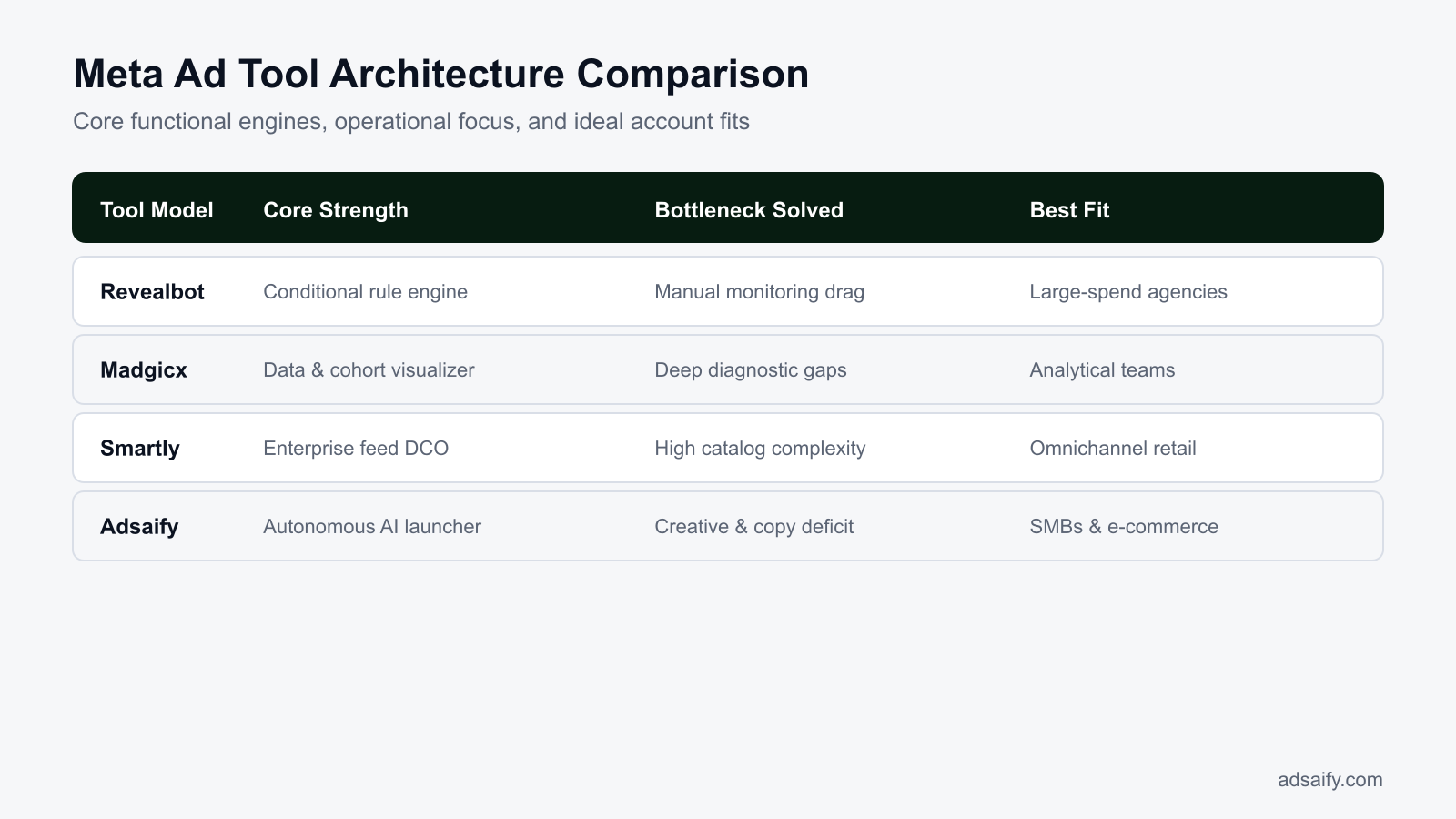
Selecting the wrong software architecture creates operational bottlenecks. Enterprise agencies managing dozens of client accounts with high cumulative ad spend benefit most from rule-engine architectures like Revealbot. These engines specialize in rigid stop-loss parameters, automated budget reallocations across complex account structures, and cross-channel safeguards. Conversely, media buyers executing high creative volume at scale require analytics suites like Madgicx, which emphasize cohort analysis, demographic breakdown visualizations, and creative fatigue indicators across custom timeframes.
Enterprise retail brands with thousands of SKUs (stock keeping units) require creative automation platforms like Smartly to sync dynamic catalog feeds directly into customized image templates across omnichannel inventories. However, small-to-medium businesses and lean e-commerce stores often struggle under these complex frameworks. Lean operations lack the engineering capacity to configure nested logic or feed pipelines. Instead, they require autonomous platforms like Adsaify, which analyzes a business from its website URL to draft complete campaigns—including audiences, ad copy, creative generation, and budget recommendations—published directly to the user's Meta ad account with performance rules. The first ad campaign on Adsaify is free to try.
Architecture Comparison Matrix
| Tool Architecture | Target Business Model | Primary Functional Value | Key Operational Trade-Off |
|---|---|---|---|
| Rule Engines | Enterprise agencies managing multi-account spend | Granular nested stop-loss and budget-pacing automations | Requires heavy manual setup and continuous logic maintenance |
| Analytics Suites | High-spend brands with dedicated media buyers | Demographic cohort visualization and creative fatigue tracking | Provides analytical depth but lacks campaign drafting workflows |
| Catalog Creative Automation | Enterprise retail with vast dynamic inventories | Real-time template syncing with multi-channel product feeds | High implementation complexity and technical feed management |
| Autonomous AI Platforms | SMBs and lean e-commerce stores | Generates ad copy, assets, and live campaigns from a URL | Creative iterations must be added manually by the user |
At what functional stage do rule engines like Revealbot diverge from autonomous platforms like Adsaify?
Rule engines diverge from autonomous platforms at the campaign initiation and execution stage. A rule engine operates reactively: it requires the marketer to create all campaign structures, audiences, and ad variations manually before applying external algorithmic triggers to manage bids or pause underperforming assets. In contrast, an autonomous platform handles campaign creation proactively by analyzing a product URL to generate target audiences, copy, and visual creative assets, publishing the finalized campaign directly to Meta Ads Manager alongside built-in performance guards.
If you would rather not set up each of these steps by hand, try it in Adsaify: your first ad is free, so there is nothing to lose. Create a free account.
What Technical Audits Should Be Completed Before Changing Ad Tools?
Before changing Meta ad tools, marketing teams must audit active third-party app permissions in Meta Business Settings, review automated rules inside Meta Ads Manager, catalog tracking parameters, analyze the thirty-day activity history log, and measure weekly operational labor. These technical audits prevent tracking breaks, eliminate competing bidding scripts, and reveal whether existing software helps or harms delivery.
Auditing automated rules, app permissions, and tracking logs
Ad tool migrations frequently fail when unseen background scripts continue overwriting campaign settings. Marketers must inspect the "System Users" and "Connected Apps" tabs inside Meta Business Settings to identify external tools holding active API (application programming interface) write access. In Meta Ads Manager, open the "Automated Rules" screen to review rules adjusting daily budgets, bid caps, or pausing ad sets. UTM (Urchin Tracking Module) parameters are tags added to URLs that allow analytics software to track traffic sources. Audit legacy tracking templates under the URL parameters field across all active ads to avoid corrupting analytics attribution data upon disconnection.
Review the Meta Ads Manager "Activity History" log covering the previous thirty days. Document every automated action executed by third-party tools, specifically noting instances where budget adjustments pushed ad sets back into the learning phase. For example, if an external rule raised the daily budget of an ad set from 500 TL to 700 TL three times in one week, each shift over twenty percent restarted auction optimization. Finally, quantify the marketing team's time expenditure: tally hours dedicated to troubleshooting mechanical rule conflicts versus producing new creative angles.
Technical pre-migration audit checklist
- Inspect connected applications and system user permissions within Meta Business Settings.
- Document active automated rules, conditions, and frequency triggers in Meta Ads Manager.
- Export custom URL parameter strings to maintain Google Analytics attribution continuity.
- Examine the thirty-day activity log for external budget updates exceeding twenty percent.
- Verify custom conversion endpoints in Meta Events Manager for external webhook dependencies.
- Calculate weekly hours spent by media buyers on rule management versus creative production.
How can we disconnect third-party ad software without disrupting active Meta campaigns?
To disconnect third-party ad software safely, navigate to Business Settings in Meta Business Manager, select "Integrations", and locate "Connected Apps". Before revoking system user tokens or deleting the application connection, manually pause all active external rules within the software dashboard. Meta campaigns will immediately default to standard native delivery settings, preserving active ad sets, historical conversion data, and budget allocations without resetting the learning phase or causing downtime across running ads.
How Do You Realign Your Meta Ad Tool Architecture Step by Step?
Marketers realign Meta ad tool architecture by systematically turning off conflicting micro-rules, merging fragmented ad sets into consolidated structures, adopting automated creative generation workflows, testing streamlined campaign publishing, and setting minimal stop-loss safeguards. This step-by-step process restores algorithm efficiency in Meta Ads Manager while freeing creative resources from redundant manual campaign maintenance.
Consolidating campaign structures and modernizing creative workflows
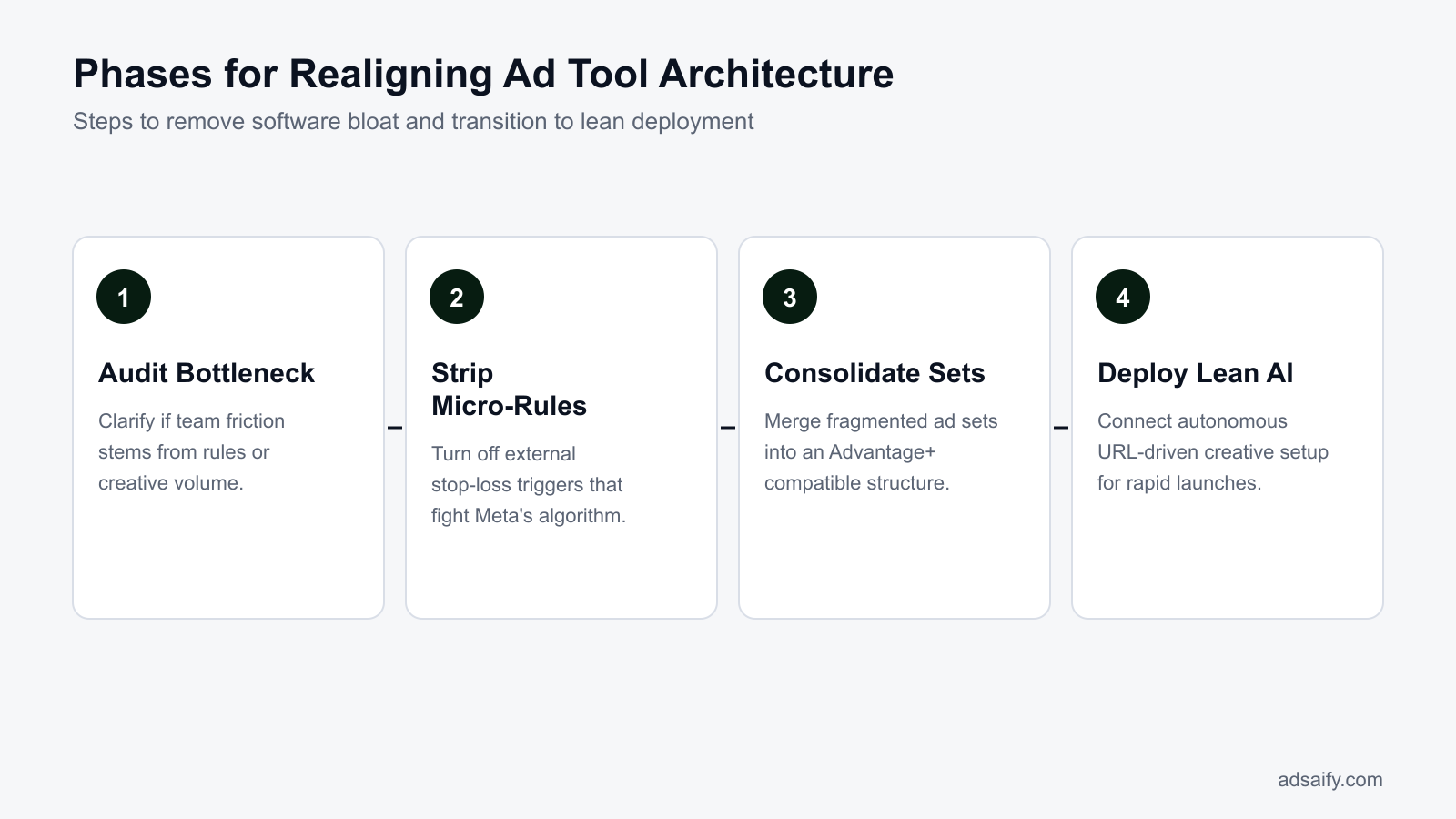
Step 1 begins by disabling high-frequency rules that execute hourly bid or budget changes. Meta Advantage+ auction pacing is an automated system that dynamically distributes ad spend across the most cost-effective placements and audiences. Granular third-party rules interfere with this system by choking spend before the auction algorithm evaluates multi-day conversion patterns. Step 2 requires consolidating fractured accounts: merge audience test splits into broader ad sets so each ad set reliably generates the fifty weekly conversions needed to exit the learning phase.
Step 3 addresses production bottlenecks by replacing manual campaign-building software with generative tools. If copy and creative generation delay testing, transition to an AI platform capable of extracting brand identity directly from your digital storefront. Step 4 involves launching a streamlined campaign draft using Adsaify by entering your store link after signing up at Adsaify to evaluate creative and audience cohesion. Adsaify drafts the campaign structure, ad copy, and visuals, then publishes directly to your Meta ad account. In Step 5, establish simple stop-loss rules instead of intra-day scaling scripts. A stop-loss rule is an automated condition that pauses an ad or ad set once spend exceeds a set threshold without achieving a conversion, such as pausing an ad when spend exceeds two times your target cost per acquisition without a sale.
- Audit and deactivate micro-rules — Deactivate external automated rules that alter budgets by small increments, allowing native Advantage+ pacing to stabilize delivery.
- Consolidate ad set architecture — Merge fragmented single-interest ad sets into broad targeting structures if weekly conversions per ad set remain below fifty.
- Connect URL-based creative tooling — Ingest store links into generative software to prepare fresh angle variations whenever creative fatigue inflates acquisition costs.
- Draft and publish foundational campaigns — Deploy drafted ad copy, target audiences, and creatives directly to Meta Ads Manager to evaluate baseline delivery.
- Apply defensive stop-loss guardrails — Activate single-condition rules that pause non-converting ads only when spend surpasses acceptable loss thresholds.
How frequently should manual audits be conducted after moving to an autonomous ad creator?
Conduct manual account audits every seven to fourteen days once an autonomous ad creator is deployed. Because Meta's native machine learning requires multiple days to normalize conversion reporting and optimize auction delivery, checking daily metrics often leads to premature manual edits. Bi-weekly reviews provide sufficient statistical significance to assess blended return on ad spend, evaluate creative fatigue, identify top-performing visual hooks, and determine which new creative variations need to be generated and introduced next.
How Does a Mid-Sized Brand Successfully Migrate Between Ad Tool Architectures?
A mid-sized brand successfully migrates between ad tool architectures by auditing conflicting rule logic, disabling aggressive intra-day triggers, and shifting operational focus from automated micromanagement to rapid creative production. This transition stabilizes delivery by allowing the Meta auction algorithm to evaluate conversions across full attribution windows rather than prematurely throttling ad sets.
Diagnosing Rule Clutter and Attribution Lag in High-Volume Accounts
Mid-sized accounts frequently accumulate legacy automation rules that harm delivery. Conversion lag is the time delay between a user clicking an ad and completing a purchase transaction. LTV (customer lifetime value) is the projected net revenue attributed to the entire future relationship with a customer. When third-party software evaluates ad performance every hour, it often interprets normal conversion lag as underperformance.
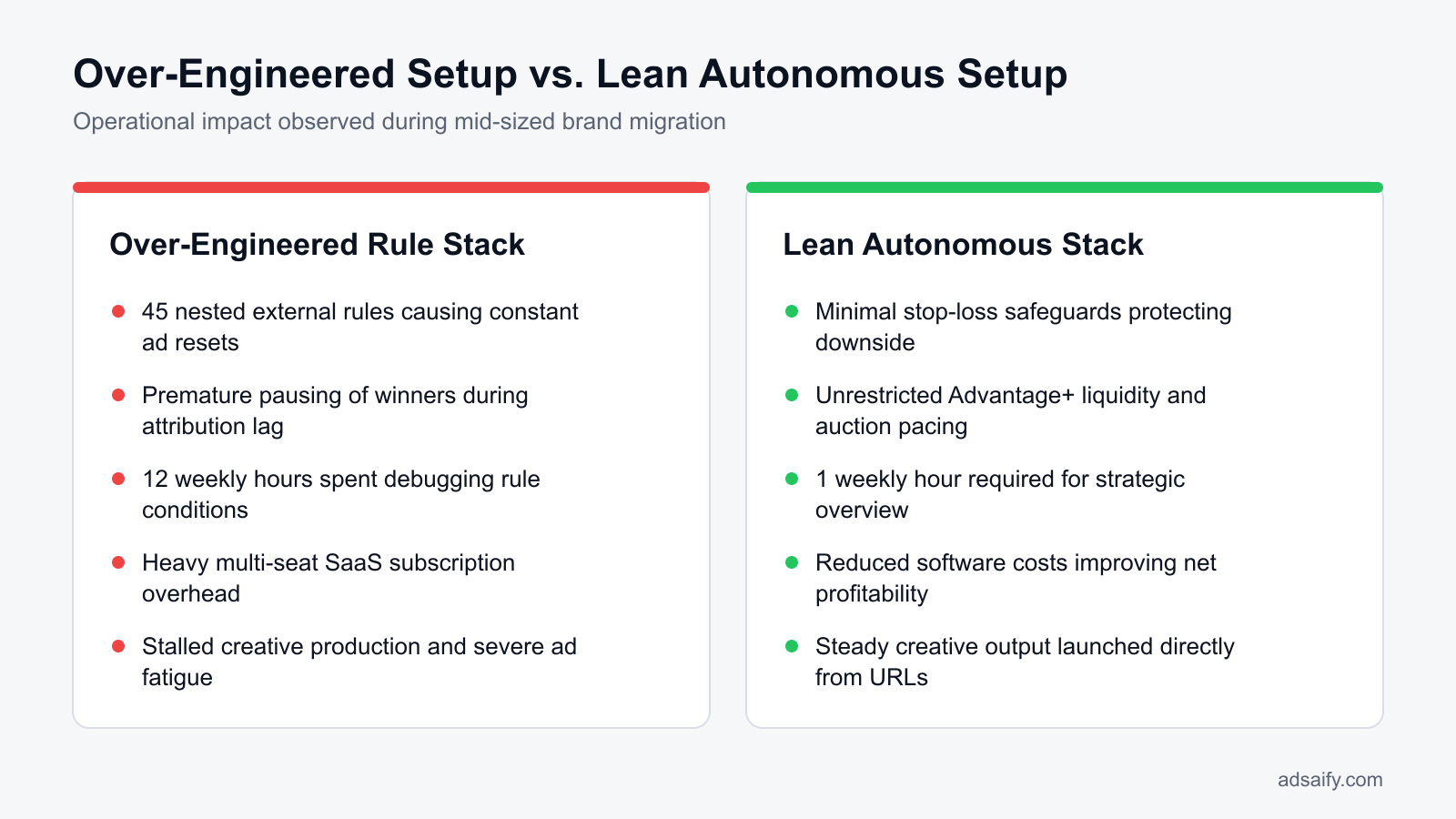
For example, an apparel retailer spending 200,000 TL monthly across Meta campaigns ran 45 nested automation rules inside a legacy management dashboard. Over 70% of those automated triggers checked return on ad spend between 12:00 PM and 3:00 PM. Because target customers browsed during lunch but completed checkouts on desktop devices between 8:00 PM and 10:00 PM, the legacy tool routinely paused high-LTV ads during midday dips. When the software unpaused those ads the next morning, the ad sets re-entered the learning phase, causing severe CPM (cost per thousand impressions) fluctuations and wasted budget.
Executing the Realignment Plan
To eliminate this friction, the brand initiated a structural migration across three distinct operational phases:
- Rule Auditing and Deletion: The team accessed the automated rules interface in the legacy dashboard and deleted all micro-management triggers based on intra-day ROAS, hourly spend velocity, and midday click-through rates.
- Downside Protection Setup: The account retained only one basic safety rule inside Meta Ads Manager to pause ads if spend reached two times the target cost per purchase with zero conversions over a trailing three-day window.
- Transition to Creative-Led Tooling: The brand adopted Adsaify to streamline campaign generation. Instead of configuring multi-condition logic, the media buyer supplied live product URLs. The tool analyzed each product page, drafted audience targets, generated fresh visual and copy concepts, and published the structured campaigns directly to the brand's Meta ad account.
Following this migration, auction resets dropped to zero because ad sets remained active continuously. The team introduced five fresh creative angles weekly into running ad sets, allowing Meta's delivery system to allocate budget naturally. Blended ROAS stabilized within two attribution cycles.
What immediate delivery shifts occur during the first week after pruning rule clutter?
During the first week after removing legacy rules, Meta Ads Manager displays a sharp decline in hourly CPM volatility. Ad sets exit the "Learning Limited" status as the delivery system gathers the required 50 conversion events over an uninterrupted 7-day period. Because the algorithm no longer experiences mid-afternoon bid throttles or premature automated pauses, distribution shifts toward higher-intent audiences who convert during evening hours, producing stable daily spend pacing and predictable CPA trends across core campaigns.
Which Metrics Measure the Success of a Tool Architecture Realignment?
Marketers measure the success of a tool architecture realignment by evaluating blended net ROAS, creative velocity, learning phase stability, and operational time savings. A successful restructuring reduces software overhead, eliminates algorithmic disruption caused by excessive third-party rules, and increases the weekly volume of tested creative variations without inflating manual labor hours.
Core Performance and Operational Benchmarks
ROAS (return on ad spend) is total ad-driven revenue divided by gross advertising spend. POAS (profit on ad spend) is total gross profit divided by ad spend after accounting for product costs and software overhead. When realigning software architecture, evaluating platform-reported ROAS in isolation is insufficient; media buyers must track Blended Net ROAS and POAS by subtracting third-party software seat licenses and spend-tier surcharges from net revenue.
Creative velocity represents the absolute count of distinct visual formats, copy angles, and hook variations deployed per week across core ad sets. A realigned stack shifts media buyers away from debugging rule conflicts and toward creative output. Concurrently, Learning Phase stability tracks the percentage of active account spend flowing through ad sets that maintain "Active" status rather than "Learning Limited" in Meta Ads Manager. Finally, team operational hours quantify the time media buyers dedicate weekly to campaign assembly, troubleshooting third-party webhooks, and manual budget reallocation.
Evaluating Account Architecture Transitions
Comparing account metrics before and after an architectural audit reveals whether current software helps or hinders Meta's optimization engine.
| Diagnostic Metric | Bloated Legacy Tool Architecture | Realigned Lean Architecture |
|---|---|---|
| Learning Phase Status | Over 40% of ad spend trapped in "Learning Limited" | Less than 10% of ad spend in "Learning Limited" |
| Weekly Creative Velocity | 1 to 2 new ad variations deployed weekly | 5 to 10 net-new creative angles deployed weekly |
| Rule Conflict Frequency | Multiple overlapping intra-day pause/resume triggers | Zero conflicting rules; single trailing-day stop-loss |
| Operational Time Allocation | 10 to 15 hours weekly spent debugging software rules | Under 2 hours weekly focused on creative analysis |
| Net Margin Impact | High monthly SaaS seats and spend-based platform fees | Lower software overhead yielding improved blended POAS |
Brands that streamline their tech stack often rely on Adsaify to analyze product URLs and draft new creative assets, redirecting team resources toward creative strategy rather than technical rule maintenance.
How many weeks does it take for software savings to reflect in true net profit on ad spend?
Software savings typically reflect in true net profit on ad spend within two to four weeks following migration. In the first two weeks, eliminating SaaS subscription tiers and percentage-of-spend fees immediately widens gross operating margins. By the third and fourth weeks, the stabilization of Meta's 7-day learning cycles and the consistent influx of tested ad angles lower blended customer acquisition costs, compounding the initial software savings into noticeable bottom-line net profit gains across the entire ad account.
Want to see this in your own account? Enter your website address and Adsaify drafts the campaign for you. The first ad is free. Try it now or log in.
Which Monthly Routine Prevents Recurring Tool Bloat and Rule Overlap?
A structured maintenance routine prevents tool bloat and rule overlap by systematically revoking dormant Meta API permissions, auditing user seats, aligning stop-loss rules with seasonal margins, and verifying product feed parameters. Executing scheduled checks ensures automation tools support marketing performance without generating conflicting API commands or unnecessary software subscription expenses.
Marketing teams often accumulate redundant software when solving short-term operational bottlenecks. Over time, multiple platforms retain read-and-write permissions to the same Meta ad account, leading to hidden API sync errors, uncoordinated automated adjustments, and bloated monthly operating costs. Consolidating automated tasks into unified platforms—such as managing campaign creation and performance-based pause rules through Adsaify—eliminates the need for multiple single-feature subscriptions.
- Weekly: Review Meta Ads Manager automated rule logs to confirm that active stop-loss conditions are executing without throwing delivery errors or conflicting with external schedulers.
- Weekly: Verify URL tracking parameters on catalog feeds to ensure automated dynamic ads correctly point to active landing pages without broken redirect strings.
- Monthly: Audit Meta Business Manager Connected Apps to revoke API tokens for deprecated software, trials, and former agency partners.
- Monthly: Review active software user seats across third-party tools and cancel subscriptions for standalone reporting dashboards that internal media buyers no longer open.
- Monthly: Recalibrate automated pause and scale thresholds against shifting seasonal profit margins, updating target acquisition costs for promotional and non-promotional cycles.
- Monthly: Test autonomous product-to-ad workflows by cross-referencing published catalog ads against live e-commerce inventory to detect out-of-stock delivery waste.
How can dormant third-party API connections be safely identified during routine reviews?
To identify dormant third-party API connections safely, navigate to Meta Business Settings under Integrations and inspect Connected Apps and System Users. Check the last activity timestamp in the Meta Events Manager or the system user token generation history. If an application has logged zero API calls over the previous thirty days, cross-check with team leads to verify abandonment before revoking system user access tokens or removing the app completely from Business Manager.
What Are the Most Common Mistakes When Deploying Meta Ad Tools?
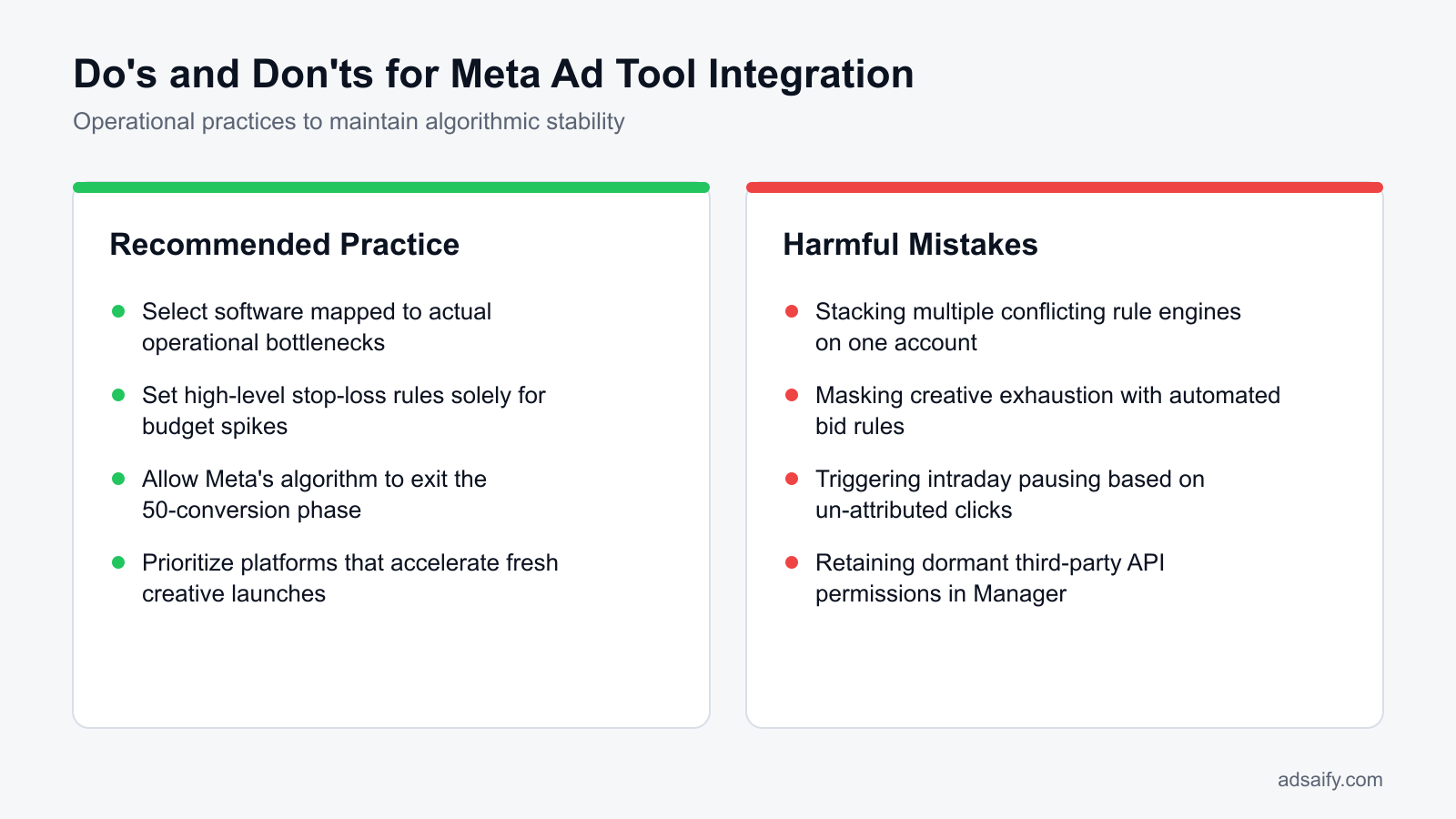
The most common mistakes when deploying Meta ad tools stem from layering competing automation platforms, overriding native machine learning, and using bid software to address creative fatigue. Marketers create account instability when external software disrupts Meta auction liquidity, issues conflicting budget adjustments, or applies untested automation rules account-wide without controlled campaign validation.
Connecting Multiple Automation Platforms Simultaneously
Connecting two or more automation tools with write access causes conflicting commands, such as one platform raising an ad set budget while another pauses it. This race condition triggers rapid status changes and destabilizes ad delivery. Media buyers should designate a single primary automation system, such as using Adsaify to publish campaigns and pause underperforming ads, rather than stacking overlapping rule suites.
Treating Creative Exhaustion as a Bidding Problem
Creative fatigue occurs when an ad audience sees the same visual asset repeatedly, causing click-through rates to decline and acquisition costs to rise. Attempting to solve creative exhaustion by purchasing algorithmic bidding tools fails because bid adjustments cannot improve unengaging content; the account simply needs new visual assets.
Applying Hourly Budget Changes to Advantage+ Campaigns
Advantage+ campaigns rely on predictive machine learning to allocate spend across broad audiences. When external rules adjust campaign budgets every hour, they continually reset the campaign learning phase—the initial delivery period where Meta gathers 50 conversion events to optimize performance—which leads to elevated costs and volatile distribution.
Deploying Untested Automation Rules Account-Wide
Applying an untested rule across all campaigns can inadvertently shut down profitable operations due to minor metric anomalies. For example, if a rule pauses ads with a low ROAS—where ROAS (return on ad spend) is total revenue divided by advertising cost—a temporary attribution delay could trigger mass campaign pausing. Marketers should validate new rules on a single campaign before global deployment.
Relying on External Dashboards with Attribution Latency
Third-party analytics dashboards often refresh data on a multi-hour delay. Setting automation tools to execute budget cuts based on delayed external metrics causes systems to penalize newly launched ads that have generated conversions not yet synced via the reporting API.
Over-Segmenting Audiences While Using Automated Rules
Splitting budgets across dozens of granular custom audiences starves automated tools of conversion volume. Automation platforms require stable conversion density to calculate reliable statistical trends; over-segmentation fragments account liquidity and produces erratic rule triggers.
Why is running both a rule-based engine and an AI optimizer on the same account dangerous?
Running a static rule-based engine alongside an AI optimizer creates contradictory execution loops. Rule-based engines execute rigid programmatic commands based on historical thresholds, such as pausing an ad set when CPA exceeds 200 TL—where CPA (cost per acquisition) is total spend divided by conversions. Meanwhile, predictive AI optimizers adjust bids dynamically to capture expected future conversions during peak hours. When both operate simultaneously, the rule engine frequently terminates ad sets right as the AI model attempts to scale them.
When Will Switching Ad Software Fail to Solve Poor Performance?
Switching ad software will fail to solve poor performance when the underlying failure stems from broken tracking, an uncompetitive commercial offer, weak landing page conversion rates, or a lack of product-market fit. Software optimizes media delivery mechanics, but software cannot generate buyer demand for products that consumers do not want or cannot successfully purchase.
Tracking Infrastructure Failures and Commercial Friction
Meta Ads Manager relies entirely on accurate feedback loops to identify purchasing audiences. The Meta Pixel is a snippet of JavaScript code placed on a website that tracks visitor actions to measure ad effectiveness. The Conversions API (CAPI) is a Meta tool that creates a direct connection between marketing data from an advertiser's server and Meta's delivery systems. If an e-commerce store suffers from misconfigured data transmission, such as missing deduplication IDs or dropped purchase triggers, attribution data becomes corrupted. No external management software can train Meta's auction algorithms effectively when the platform cannot verify which user clicks resulted in actual revenue.
Commercial friction presents an equally fatal barrier. If an online store exhibits slow page load speeds, forces intrusive registration steps, or lacks recognizable payment options, prospective buyers abandon their carts. Similarly, uncompetitive product pricing, unexpected shipping charges calculated late in the checkout flow, or rigid return guarantees prevent conversions regardless of campaign structure. An advertiser might deploy automated rules to reallocate budgets, yet the cost per acquisition remains unsustainable because the post-click shopping environment repels consumers.
The Boundary Between Workflow Efficiency and Product Demand
Performance marketing tools exist to streamline logistics, eliminate repetitive campaign creation tasks, and safeguard budgets through conditional rules. An autonomous ad launcher such as Adsaify can analyze a store URL to draft campaigns from product URLs, suggest audience targeting, and automatically pause failing ads based on real-time data. However, campaign software operates strictly as a delivery and management pipeline. It cannot adjust manufacturing costs, improve product aesthetics, or validate consumer demand for an obsolete catalogue.
Before investing resources into migrating your tool architecture, verify that commercial and technical fundamentals are sound by completing this audit checklist:
- Verify your Meta Pixel and Conversions API event match quality score inside Events Manager.
- Audit your mobile checkout funnel to eliminate unexpected shipping costs or forced account registrations.
- Compare your retail pricing and return policies directly against top-ranking marketplace alternatives.
- Test your landing page load time using Google PageSpeed Insights to resolve render-blocking assets.
- Confirm that your historical purchase conversion rate exceeds one percent on steady organic traffic.
- Review ad creative messaging to ensure post-click landing page copy matches user expectations precisely.
Can an advanced ad tool compensate for an uncompetitive product offer or broken landing page?
No, an advanced ad management tool cannot compensate for an uncompetitive commercial offer or a defective landing page. Ad software solely manipulates delivery settings, budget pacing, and campaign construction within Meta Ads Manager. If prospective customers dislike the retail price, face exorbitant shipping fees, or encounter technical errors during checkout, automated campaign actions cannot force transactions. Traffic acquisition software amplifies your existing conversion funnel; it cannot repair structural commercial deficiencies.
What Are the Key Technical Terms in Meta Ad Tool Architecture?
The key technical terms in Meta ad tool architecture describe how external platforms interact with Meta's marketing interface to generate assets, manage budgets, and execute automated actions. Understanding these architectural classifications enables performance marketers to select compatible software stacks, avoid redundant API requests, and eliminate destructive rule conflicts inside Meta Ads Manager.
- Rule Engine: Software that executes automated account management actions based on programmed conditional logic, such as IF/THEN statements evaluating metrics in platforms like Revealbot.
- Autonomous Ad Launcher: An artificial intelligence software architecture, such as Adsaify via the Adsaify account interface, that scans website URLs to automatically generate campaign copy, targeting configurations, and creative drafts.
- Creative Automation Engine: An enterprise software framework, exemplified by tools like Smartly, that generates dynamic ad variations at scale by merging product catalog feeds with modular design templates.
- Algorithmic Conflict: System friction that occurs when overlapping automated rules or external API commands disrupt Meta's native machine-learning auction pacing and budget optimization.
- Conversions API (CAPI): A server-side data pipeline that transmits web and offline conversion events directly from an advertiser's server to Meta's delivery systems.
- Learning Phase: The initial calibration period during which Meta Ads Manager delivers an ad set to approximately fifty optimization events to stabilize cost per action.
- Advantage Campaign Budget: A campaign setting where Meta dynamically allocates a unified daily budget across active ad sets to maximize total results.
- Dynamic Creative Optimization (DCO): A Meta delivery feature that automatically tests permutations of uploaded images, videos, titles, and text copy to match specific user preferences.
- Event Match Quality (EMQ): A scoring metric inside Meta Events Manager indicating how effectively customer parameters sent with server events match Meta user profiles.
- API Rate Limiting: A protective restriction imposed by Meta that caps the volume of programmatic calls an external tool can execute against the Marketing API within a rolling window.
- Bid Cap: A manual bidding strategy that sets a hard ceiling on the maximum bid Meta can enter into the ad auction on behalf of an ad set.
What is the primary operational distinction between rule automation and autonomous campaign creation?
The primary operational distinction between rule automation and autonomous campaign creation lies in reactive control versus generative initiation. Rule automation operates as an oversight layer that adjusts bids, monitors performance metrics, and pauses underperforming ads based on strict conditional thresholds. Autonomous campaign creation functions as a generative front-end architecture that scans destination URLs, drafts marketing angles, produces visual assets, and publishes fully structured campaigns directly into Meta Ads Manager.
Protect Your Ad Spend by Choosing the Tool Architecture Tailored to Your Real Bottleneck
To prevent software architecture mismatch across Meta advertising tools, start by cataloging your current technology stack to eliminate overlapping subscriptions. Align your chosen platforms directly with your team size and monthly ad spend rather than purchasing enterprise platforms designed for complex enterprise catalogs. Rely on Meta's native machine learning for dynamic ad delivery and auction bidding, while deploying external tools strictly for high-leverage workflows such as creative generation, campaign drafting, and rule-based performance safeguards.
For your immediate next step today, review your Meta ad account to identify any conflicting third-party automation rules running alongside native Meta settings. Disconnect tools that create attribution friction or trigger redundant edits. If you want a leaner workflow, try drafting a campaign on Adsaify by providing your store URL, allowing the platform to structure targeting, copy, and AI visuals in your own connected ad account.
Want to see this in your own account? Enter your website address and Adsaify drafts the campaign for you. The first ad is free. Try it now or log in.
Frequently Asked Questions (FAQ)
1. Why are enterprise tools like Smartly or Revealbot often excessive for smaller e-commerce brands?
Enterprise tools like Smartly or Revealbot are designed for massive campaign catalogs and complex multinational budgets that require custom API logic. Smaller e-commerce brands rarely have the daily conversion volume needed to feed hundreds of automated rules. Paying high monthly subscription minimums for enterprise features creates fixed overhead that drains advertising capital without improving return on ad spend (ROAS).
2. Does Adsaify autonomously swap or replace ad creatives inside an active running campaign?
No, Adsaify does not autonomously swap or replace ad creatives inside an active, running Meta ad campaign. Instead, Adsaify provides AI tools for users to generate new ad copy, images, or videos independently. Automation rules can pause low-performing ads based on predefined performance metrics, but the advertiser must manually review and publish new creative assets to the campaign.
3. Can third-party ad tools completely replace Meta's native Advantage+ machine learning?
No, third-party ad tools cannot replace Meta's native Advantage+ machine learning. Meta's algorithms operate at the ad auction and impression delivery level, processing billions of behavioral signals directly on Facebook and Instagram. External software can only set structural parameters, suggest budgets, generate creative assets, or trigger rule-based changes such as pausing ads via the official Meta Graph API.
4. Do external ad management platforms increase the risk of ad account policy restrictions?
External ad management platforms that connect through official Meta Marketing APIs do not inherently increase account restriction risks. Restrictions occur when ad creative, copy, or landing pages violate Meta's advertising standards, or when tools trigger sudden, erratic budget changes that trigger automated fraud detection. Using legitimate software to publish campaigns or automate pauses does not breach Meta platform policies.
5. Do I need to decrease my Meta ad budget while transitioning to a leaner tool architecture?
No, you do not need to decrease your Meta ad budget when switching software tools, because the underlying ad campaigns remain hosted directly in your Meta ad account. However, you should audit and disable overlapping automation rules or third-party automated bidding scripts before the transition. This prevents conflicting automated commands from destabilizing active ad sets during daily learning phases.
6. Do I need to enter credit card details to build my first test campaign on Adsaify?
No, Adsaify allows advertisers to try their first ad campaign without entering payment details up front. You can register an account, input your website URL to generate campaign assets such as ad copy, targeting suggestions, and AI creatives, and review the drafted campaign structure before committing financial resources to external subscription billing.
7. What is the most frequent attribution timing mistake made when configuring rule-based tools?
The most frequent mistake is setting automation rules that pause or reallocate spend without accounting for conversion attribution lag. Delayed data reporting—such as purchases recorded one to three days after an ad click—can cause software to misinterpret an ad as unprofitable. Evaluating ad performance over too narrow a window leads to prematurely killing winning ad creatives.
8. How long does it take to determine whether an ad software subscription is net-profitable?
Evaluating whether ad management software is net-profitable typically takes two to four full business cycles, usually 30 to 60 days. This duration provides enough time to observe whether the software saves significant operational hours, eliminates unprofitable ad spend via automated pauses, and maintains stable return on ad spend without introducing disruptive system conflicts.
How can you try this with Adsaify?
The quickest way to apply the steps in this article to your own account is to try them. Adsaify analyses your business from your website address, drafts the campaign with an audience, ad copy, creative and a budget suggestion, and publishes it to your own Meta ad account once you approve.
- Your first ad is free: there is nothing to lose by trying.
- Your own ad account: the campaign runs in your Meta account and you stay in control.
- Images and video: generate ad creatives with AI or promote an existing Instagram post.
Create a free account and try your first ad · Already have an account? Log in.