Short answer: An ads library (or ad library) is a public, searchable archive where an advertising platform shows the ads running on it. The best known is the Meta Ad Library for Facebook and Instagram, but Google, TikTok, LinkedIn and most other large platforms have one too. They are free, need no account in most cases, and let you see any advertiser's creatives and dates, though never their results.
Key Takeaways
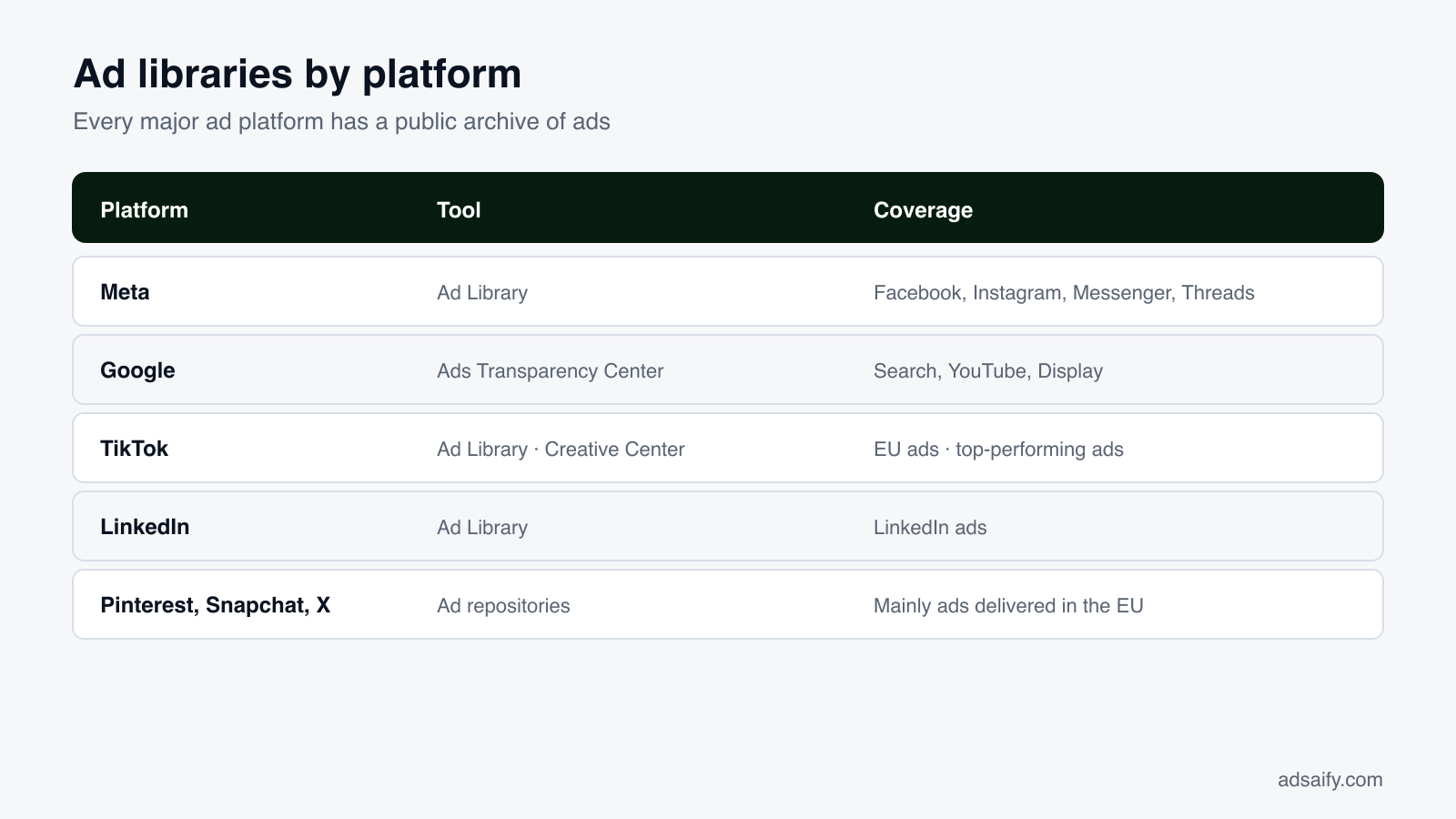
- Every major platform has one: Meta Ad Library, Google Ads Transparency Center, TikTok's Ad Library and Creative Center, LinkedIn Ad Library, and EU repositories for Pinterest, Snapchat, X and others.
- They exist because of transparency rules, first for political ads and then, in the EU, for all ads.
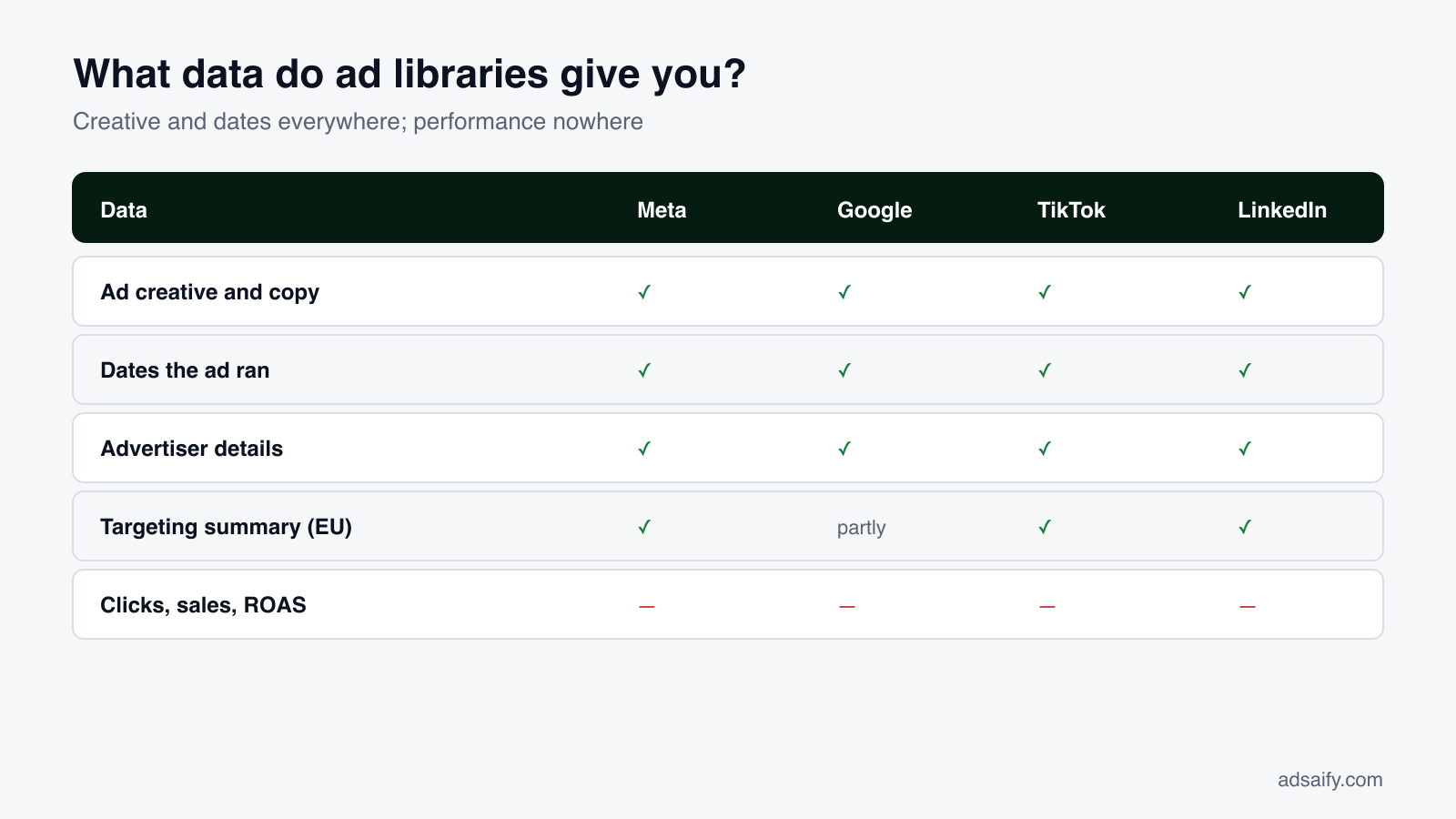
- They show the ad, not the outcome: creative, copy, dates and advertiser, with extra reach and targeting detail for ads shown in the EU.
- Meta's is the most useful for most businesses because it is global, complete and covers both Facebook and Instagram.
- The value is in the pattern: what several advertisers keep running for months is worth testing yourself.
Ten years ago, the only way to see a competitor's advertising was to be shown it by chance. Today almost every large advertising platform publishes its ads in a public archive that anyone can search. This guide explains what ad libraries are, which ones exist and where to find them, what each one shows, and how to use them together to plan your own advertising.
What is an ads library?
An ads library is a database, published by an advertising platform, of ads that run or have run on that platform. You search by advertiser or keyword and see the ad as users see it, together with basic facts such as when it started and where it is shown. The term is used both for Meta's tool in particular, since "Ad Library" is its official name, and for the whole category.
Why do platforms publish their advertisers' ads?
Two waves of regulation and public pressure. The first, from about 2018, concerned political advertising: platforms began archiving election and issue ads with information on who paid. The second is the European Union's Digital Services Act, which requires very large platforms to maintain a searchable repository of all ads shown in the EU, with details on targeting and reach, for a year after the ad last ran. Many platforms then made the same tool available worldwide.
Which ad libraries exist, and where are they?
| Platform | Name of the tool | What it covers | Account needed? |
|---|---|---|---|
| Meta | Meta Ad Library | All active ads on Facebook, Instagram, Messenger, Threads and Audience Network, worldwide | No |
| Ads Transparency Center | Ads from verified advertisers on Search, YouTube, Display and other Google surfaces | No | |
| TikTok | Ad Library (Commercial Content Library) | Ads shown in Europe, with targeting and reach details | No |
| TikTok | Creative Center: Top Ads | A curated selection of high-performing ads by region and industry | Free TikTok for Business login for full access |
| LinkedIn Ad Library | Ads run on LinkedIn, with extra detail for ads shown in the EU | No | |
| Pinterest, Snapchat, X, Microsoft, Amazon and others | Ads repositories | Mainly ads delivered in the EU, as the Digital Services Act requires | Usually no |
Names, addresses and coverage change, and platforms differ in how complete their archives are outside Europe. Treat this table as a map at the time of writing and check each tool for its current scope.
What does each ad library show?
Meta Ad Library
The broadest. Every active ad from every advertiser in every country, searchable by Page name or keyword, with filters for country, language, platform and media type. Each ad shows its start date, platforms and versions. Ads delivered in the EU add reach and a summary of age, gender and location targeting; ads about social issues, elections or politics add spend and impression ranges and stay for seven years. Read the complete guide to the Meta Ads Library for details.
Google Ads Transparency Center
Search by advertiser name or website. You see the advertiser's ads by format (text, image, video), the regions where they were shown and the dates they last ran. It covers Search and YouTube, which makes it the place to see a competitor's search ad copy and video ads. The same information is reachable from any Google ad through the "About this advertiser" option.
TikTok Ad Library and Creative Center
TikTok has two separate tools. The Ad Library is the transparency archive for ads shown in Europe: you search by advertiser or keyword and see the ad, its dates, and its targeting and reach summary. The Creative Center is a marketing resource: its Top Ads section shows a selection of well-performing ads, filterable by region, industry, objective and format, with engagement indicators. The Creative Center is the more useful of the two for ideas, the Ad Library for looking up a specific advertiser.
LinkedIn Ad Library
Search by company name or keyword and filter by country and date. You see the ad creative and format. For ads shown in the EU, LinkedIn adds impressions and targeting parameters. A company's ads are also reachable from its LinkedIn Page under the Posts tab, in the Ads section.
The EU repositories
Pinterest, Snapchat, X, Microsoft Advertising, Amazon and several others publish repositories to meet the Digital Services Act. They are usually limited to ads shown in EU countries, vary a great deal in usability, and are most useful when a competitor advertises in Europe.
How do the libraries compare?
| Feature | Meta | TikTok | ||
|---|---|---|---|---|
| Global coverage of commercial ads | Yes | Yes, verified advertisers | Ad Library: Europe; Creative Center: selected ads worldwide | Yes |
| Search by keyword in ad text | Yes | By advertiser or domain | Yes | Yes |
| Start date of each ad | Yes | Date range shown | Yes | Yes |
| Versions of an ad | Yes | Lists each creative | Limited | Limited |
| Targeting summary | EU ads only | Limited | EU ads | EU ads |
| History after the ad stops | EU and political ads only | Yes, for a period | EU ads for a year | For a period |
| Spend or results | No (ranges for political ads) | No (political ads only) | No | No |
The pattern is the same everywhere. The creative and the dates are public. Budgets, clicks and sales are not.
If you would rather not build each ad by hand after your research, try it in Adsaify: your first ad is free, so there is nothing to lose. Create a free account.
Which ad library should you start with?
| If you sell… | Start with | Because |
|---|---|---|
| Consumer products online | Meta Ad Library | Most direct-to-consumer brands spend heavily on Facebook and Instagram |
| Something people search for when they need it (repairs, software, insurance) | Google Ads Transparency Center | Search ad copy shows how competitors answer intent |
| To a young audience, or with video-first products | TikTok Creative Center | Shows which video styles are working now |
| To businesses | LinkedIn Ad Library | B2B advertisers concentrate there |
| In Europe | Any of them, with the country set to an EU member state | Targeting and reach details appear |
How do you use several ad libraries together?
- List competitors — five brands: two large, two similar to you, one new entrant.
- Check each one in Meta and Google — note how many ads they run on each and which formats dominate.
- Compare the message across platforms — the same promise worded differently for search, feed and video tells you what the brand believes matters most.
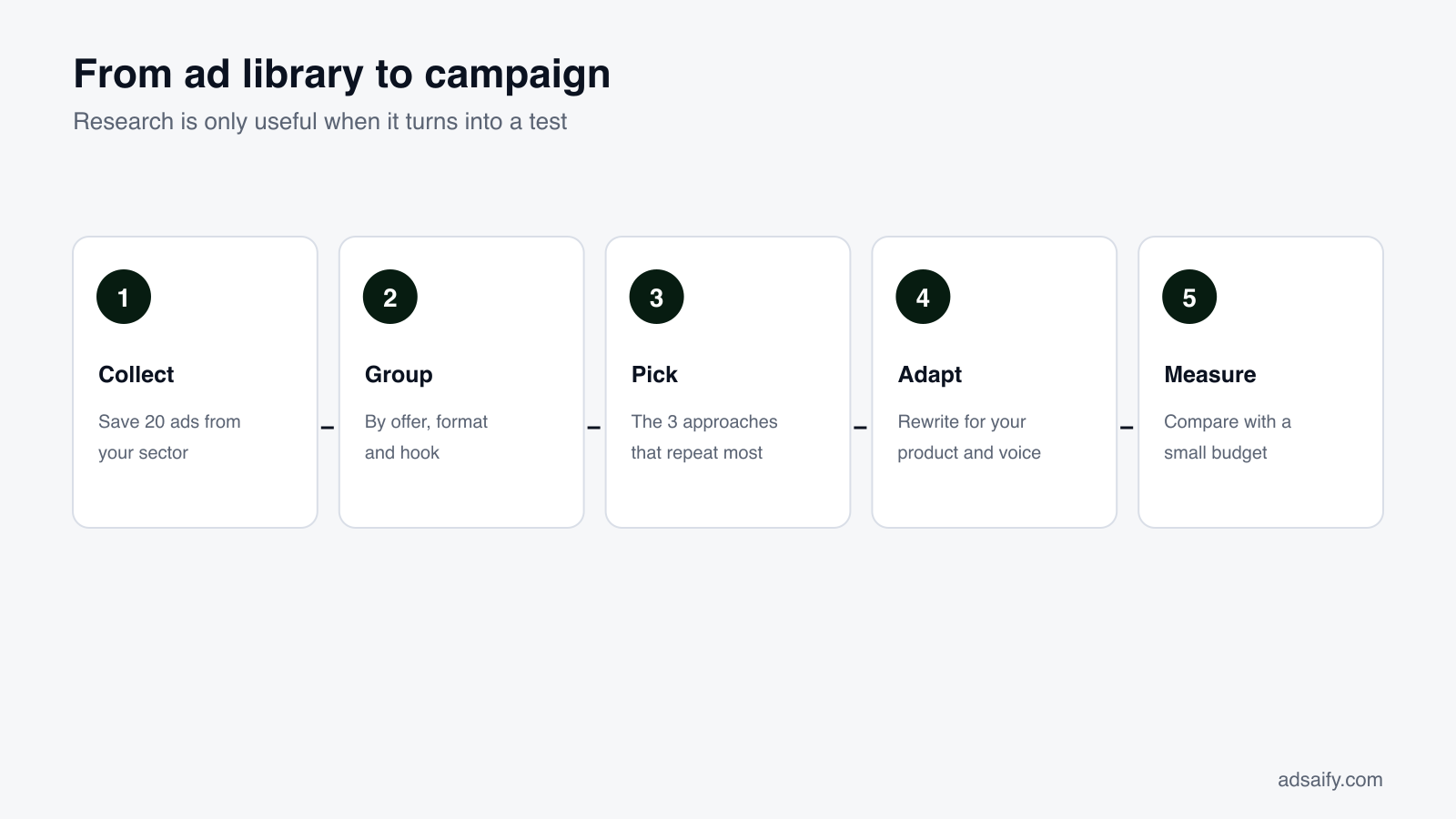
- Collect twenty ads — save links or screenshots with start dates.
- Group them — by offer (discount, bundle, trial), by format (image, video, carousel) and by hook (problem, result, testimonial).
- Choose what recurs — the approaches used by several advertisers for months.
- Write your own — for your product, in your voice, and test the versions against each other.
A worked example
Consider an online language-learning service. In the Meta Ad Library, four competitors all run short vertical videos opening with a learner speaking after "30 days", and three of the four offer a free trial. In Google's Transparency Center, the same competitors' search ads lead with price and "start free". On TikTok's Creative Center, top ads in education are informal clips filmed on a phone. The conclusion is not that any one ad is a winner; it is that across platforms the category sells with a time-bound result, a free start and unpolished video. That is a testable brief. The example is illustrative.
How do you search each library, step by step?
Meta Ad Library
- Open facebook.com/ads/library.
- Set the country to "All" and the category to "All ads".
- Type the brand and select its Page, or type a keyword and press Enter.
- Filter by platform and media type; open "See ad details" on the oldest ads.
Google Ads Transparency Center
- Open adstransparency.google.com.
- Type the advertiser's name or its website address.
- Choose the region and the time period.
- Filter by format: text for search ads, video for YouTube, image for display.
- Open an ad to see when it was last shown and in which regions.
TikTok Creative Center
- Open the Creative Center and go to Inspiration > Top Ads.
- Choose the region, industry and campaign objective.
- Sort by the engagement indicator you care about and set the period.
- Open an ad to see its details and where viewers' attention holds.
LinkedIn Ad Library
- Open linkedin.com/ad-library.
- Type the company name or a keyword.
- Filter by country and date range.
- Open an ad for its format and, for EU ads, its impressions and targeting.
What does a monthly routine across platforms look like?
| Step | Tool | Time | Output |
|---|---|---|---|
| Count each competitor's active ads | Meta Ad Library | 10 min | A number per brand, compared with last month |
| Note the oldest and newest ads | Meta Ad Library | 15 min | What survived, what is being tested |
| Read competitors' search ad copy | Google Ads Transparency Center | 10 min | The promises and prices used against intent |
| Scan top ads in your industry | TikTok Creative Center | 10 min | Two video styles worth trying |
| Write test ideas | Your own sheet | 10 min | Three one-sentence tests for next month |
Under an hour a month. The times are a guide to proportion, not a measurement.
What are the common mistakes when using ad libraries?
- Treating presence as proof. An ad being live says it was launched, not that it works.
- Comparing across platforms without adjusting. A search ad answers a question; a feed ad interrupts. The same message needs different wording.
- Forgetting the country filter. Most "empty" results are a filter set to the wrong place.
- Expecting history. Outside the EU, most commercial ads vanish when paused.
- Trusting "top ads" lists blindly. They are curated selections, often from large advertisers with large budgets.
- Collecting without deciding. A folder of two hundred screenshots is not a plan.
Key terms
| Term | Meaning |
|---|---|
| Ad library / ads library | A platform's public archive of ads |
| Ad repository | The term used in EU law for the same thing |
| Digital Services Act (DSA) | The EU regulation requiring large platforms to publish ads with targeting and reach details |
| Advertiser verification | A platform's identity check; some libraries list only verified advertisers |
| Creative | The image, video or text of an ad |
| Hook | The opening line or first seconds meant to stop the scroll |
| Reach | How many accounts saw an ad at least once |
| Swipe file | A personal collection of ads saved for reference |
What can ad libraries not tell you?
- Whether an ad is profitable. No library publishes conversions or revenue for commercial ads.
- How much is spent. Only political advertising has spend ranges.
- Who exactly is targeted. At most you get age, gender and location for EU ads; interests, customer lists and retargeting are never shown.
- The strategy behind it. You cannot tell a test from a main campaign, or prospecting from retargeting.
- Everything, everywhere. Several repositories cover only Europe, and some platforms list only verified advertisers.
Duration is the one reliable proxy. Advertisers stop paying for ads that do not work, so an ad that has run for months has earned its place.
Are third-party "ad spy" tools better than the official libraries?
| Official ad libraries | Third-party tools | |
|---|---|---|
| Price | Free | Monthly subscription |
| Source of data | The platform itself | Collected from the libraries and other sources |
| History | Limited for commercial ads | Often keeps ads after they stop |
| Organisation | No folders or boards | Saving, tagging, team boards |
| Performance estimates | None | Estimates only; no tool has the advertiser's real results |
The official libraries are enough for most businesses. Paid tools add convenience, mainly history and organisation, not hidden data. Be sceptical of any tool that claims to show a competitor's actual sales or return.
What are the rules for using what you find?
- Viewing is allowed and anonymous: these archives are public by design.
- Copying is not: images, videos and text belong to the advertiser. Reusing them infringes copyright and breaks platform advertising policies.
- Automated collection is governed by each platform's terms; use the official APIs where they exist.
- Learn the structure, not the surface: the offer logic, the format and the order of the message are ideas you can apply in your own words.
From research to your own ads
An hour in the libraries gives you a brief: the offer to test, the formats to produce and the hooks to try. The remaining work is building the campaign.
Adsaify handles that part for Meta: paste your website address and it drafts the campaign with ad copy, creatives and an audience, shows you the ad as a Feed post, a Story and a Reel, and publishes it to your own Meta ad account. The app also includes its own library of ready-made ad examples by sector that you can open as a draft and adapt, which is separate from the platform libraries described here.
Related reading: Meta Ads Library: the complete guide and how to find any brand's ads in the Facebook Ads Library.
Frequently Asked Questions (FAQ)
1. What is an ads library?
A public archive in which an advertising platform shows the ads that run on it, searchable by advertiser or keyword.
2. Is "ads library" the same as the Meta Ad Library?
Often, yes: most people who search for it mean Meta's tool for Facebook and Instagram. The term also describes the similar archives of Google, TikTok, LinkedIn and others.
3. Are ad libraries free?
Yes. The official libraries are free. Some, such as TikTok's Creative Center, ask for a free login to see everything.
4. Where is Google's ad library?
It is called the Ads Transparency Center. Search for an advertiser or a website to see its ads on Search, YouTube and Display.
5. Does TikTok have an ad library?
Yes, two tools: the Ad Library for ads shown in Europe, and the Creative Center's Top Ads for well-performing ads by region and industry.
6. Is there an Instagram ads library?
Instagram ads are in the Meta Ad Library. Filter by platform and choose Instagram.
7. Can I see competitors' ad spend in any library?
No, not for commercial ads. Spend ranges are published only for political and social-issue advertising.
8. Which ad library is best?
For most businesses, Meta's, because it is complete and global. Use Google's for search ads and LinkedIn's for B2B.
9. Why do ads in Europe show more information?
The EU's Digital Services Act requires large platforms to publish targeting and reach details for ads shown there and to keep them for a year.
10. Do advertisers know when I view their ads in a library?
No. Views are not reported to advertisers.
How can you try this with Adsaify?
Adsaify analyses your business from your website address, drafts the campaign with an audience, ad copy, creative and a budget suggestion, and publishes it to your own Meta ad account once you approve.
- Your first ad is free: there is nothing to lose by trying.
- Your own ad account: the campaign runs in your Meta account and you stay in control.
- Ready-made examples: open an ad example from your sector as a draft and adapt it.
Create a free account and try your first ad · Already have an account? Log in.