Short answer: To find any brand's ads in the Facebook Ads Library (FB Ads Library), open facebook.com/ads/library, set the country to "All", choose "All ads", type the brand name and select its Page from the dropdown. You will see every ad that Page is running right now on Facebook and Instagram. No account is needed and the brand is not notified.
Key Takeaways
- Three ways in: the library's search box, the "Page transparency" section of any Facebook Page, and the "About this account" menu of any Instagram profile.
- Most "no results" problems come from the country filter, the category filter, or picking a keyword instead of the Page.
- Start date is the signal: ads that have been running longest are the ones worth studying.
- Old commercial ads are gone: the library shows what is active, so save what you want to keep.
- Use it to learn, not to copy: take the structure and write your own.
You saw an ad on Instagram, scrolled past, and now cannot find it. Or you want to know what a competitor is advertising this month. Both problems have the same answer: the Facebook Ads Library. This guide is the practical, click-by-click version: how to reach a brand's ads from a computer or a phone, how to read what you find, how to keep it, and what to do when the library shows nothing.
How do you find a specific brand's ads?
- Open the library — facebook.com/ads/library, in any browser.
- Set the country to "All" — otherwise you only see ads delivered in the country shown, which is your own by default.
- Choose "All ads" — in the ad category menu.
- Type the brand name — and wait for the list of Pages to appear under the search box.
- Select the Page — click the brand's Page in the list instead of pressing Enter. Enter runs a keyword search across all advertisers.
- Read the header — it shows how many results there are; the ads are listed below, newest first.
What if the brand has several Pages?
Large brands often run ads from country Pages, product-line Pages or a separate Page for each store. Check the handle and the follower count in the dropdown to pick the right one, and repeat the search for the others. Ads published by a creator or partner on the brand's behalf appear under the partner's Page, with the brand named in the ad.
How do you get there from a Facebook Page or Instagram profile?
If you are already looking at the brand's profile, you do not need to search.
| Starting from | Path |
|---|---|
| A Facebook Page (computer) | Open the Page → About → Page transparency → See all → Ads from this Page → Go to Ad Library |
| A Facebook Page (app) | Open the Page → the "…" menu or About → Page transparency → Go to Ad Library |
| An Instagram profile (app) | Open the profile → the "…" menu at the top right → About this account → Active ads |
| An ad in your feed | The "…" menu on the ad → Why am I seeing this ad? → then open the advertiser's Page as above |
Menu names move around between app versions. If a label is not where the table says, look for "Page transparency" on Facebook and "About this account" on Instagram; both end in the library.
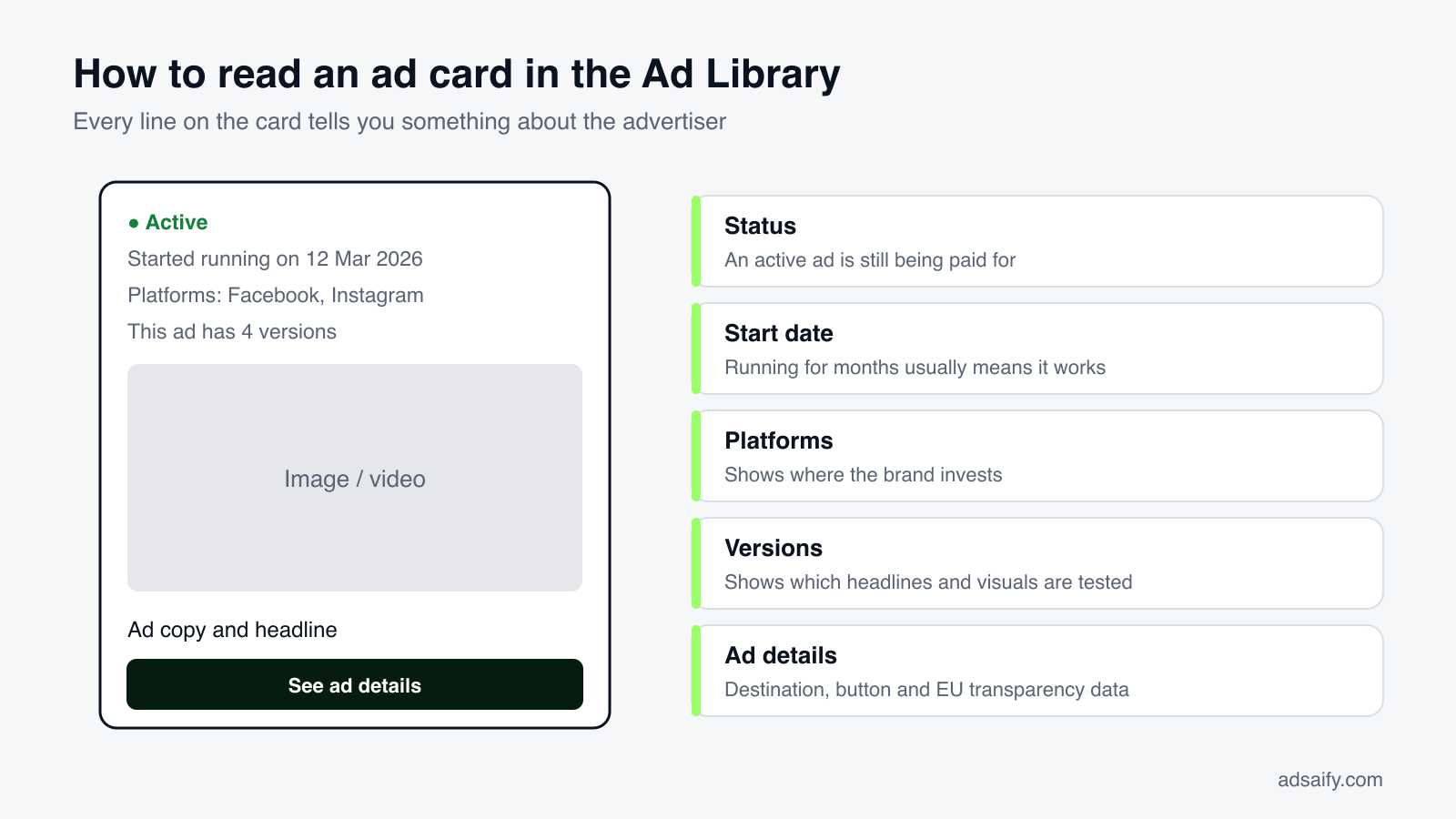
How do you read an ad once you have found it?
| On the card | What it tells you | What to note |
|---|---|---|
| Active | The ad is being delivered and paid for now | Whether the brand is still investing in this message |
| Started running on | How long this version has survived | Anything older than about three months |
| Platform icons | Where it is placed | Instagram-only ads are usually vertical video |
| Multiple versions | The brand is testing texts or visuals | What differs between versions: hook, image, offer |
| "N ads use this creative" | The same ad runs in several ad sets | High numbers suggest a scaled winner |
| Button | The action the brand wants | Shop now, Learn more, Sign up, Send message |
| See ad details | Destination, versions and transparency data | The landing page address and its offer |
How do you see only Instagram ads, only videos, or ads in one language?
Open Filters at the top of the results.
- Platform → Instagram: hides ads that do not run on Instagram.
- Media type → Videos: useful when you are collecting references for Reels or Stories.
- Language: separates a brand's English ads from its Spanish or Hindi ones.
- Impressions by date: limits results to ads shown within a period, for example last November.
- Active status: inactive ads appear only where the library keeps them, such as ads delivered in the EU and political ads.
How do you search without knowing the brand?
Type a keyword and press Enter. The library returns ads from any advertiser whose ad text contains it.
- Product words: "standing desk", "protein powder", "wedding photographer".
- Offer words: "free shipping", "50% off", "free trial", "buy one get one".
- Exact phrases: put the phrase in quotation marks to match it exactly.
- Then filter by advertiser to keep only the brands that interest you.
Keyword search is the fastest way to discover competitors you did not know you had, including small ones that never appear in a Google search.
If you would rather not build each ad by hand after your research, try it in Adsaify: your first ad is free, so there is nothing to lose. Create a free account.
How do you save ads and follow a competitor over time?
The library has no folders and no export. These methods work.
| Method | How | Good for |
|---|---|---|
| Copy the link | The "…" menu on the ad → Copy ad link | Sharing one ad with a colleague |
| Library ID | Note the ID shown on the card; paste it into the search box later | A lightweight list in a spreadsheet |
| Saved searches | When logged in, save a search to reopen it with one click | Checking the same competitors every week |
| Screenshot or screen recording | Capture the ad as it appears | Keeping a record after the ad is paused |
| A tracking sheet | Columns: brand, link, start date, format, hook, offer, landing page | Spotting patterns across many ads |
A link to a commercial ad stops working once the ad is no longer active, so capture anything you want to keep.
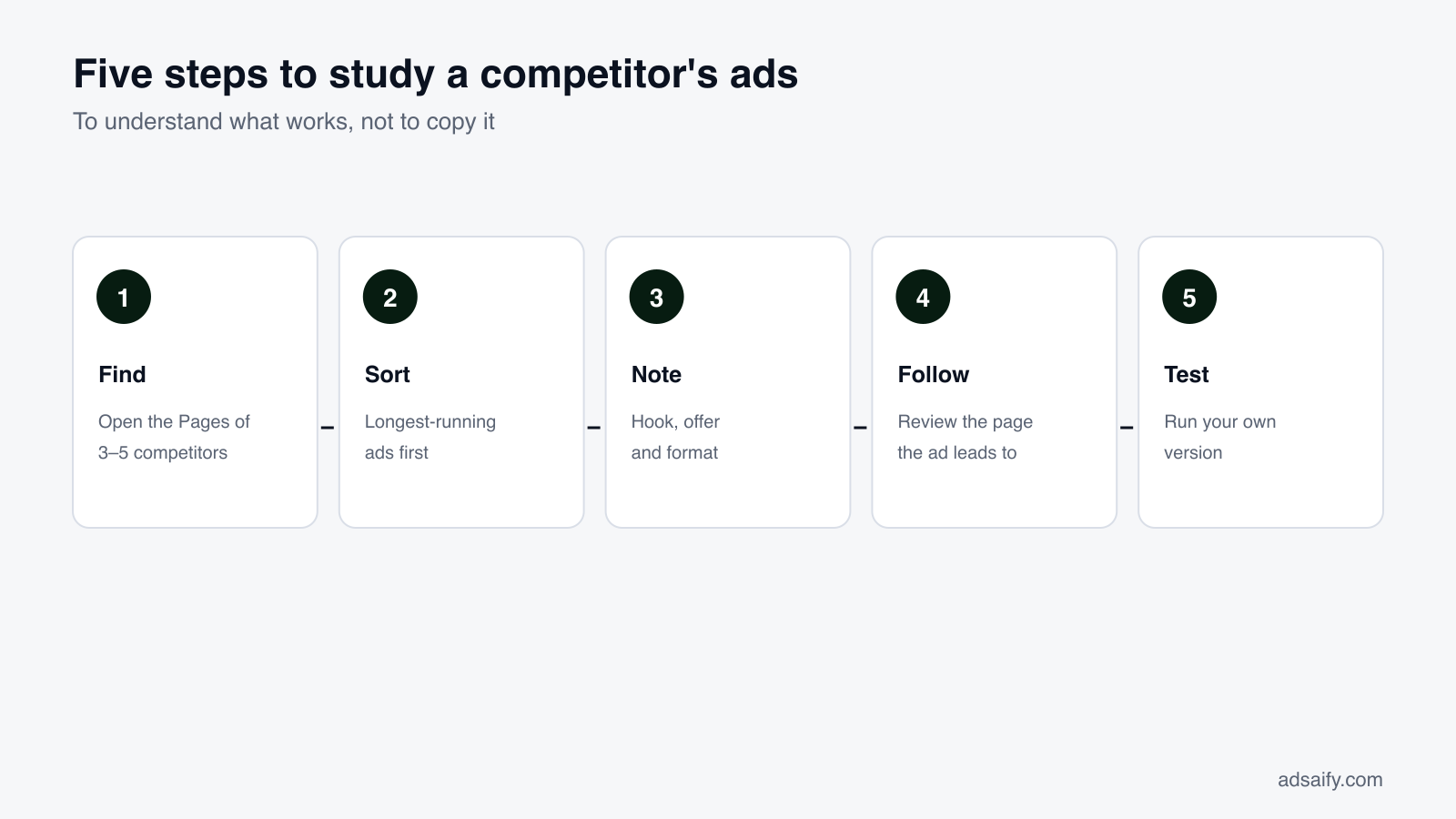
What is a good routine for competitor research?
- Choose three to five competitors, including one that is clearly bigger than you and one of your own size.
- Open each Page in the library and count the active ads. The number alone tells you how seriously they advertise.
- Find the oldest active ads. Write down the first line, the format and the offer of each.
- Look at the newest ads. These are current tests: new products, new angles, seasonal messages.
- Click through to the landing pages. Note price, guarantee, delivery promise and what the page asks the visitor to do.
- Repeat monthly. Ads that are still there next month have passed another round of selection.
What to write down for each ad
| Element | Question to answer |
|---|---|
| Hook | What do the first line and the first two seconds say? |
| Format | Image, video, carousel? Vertical or square? |
| Proof | Reviews, numbers, before-and-after, a recognisable customer? |
| Offer | Discount, bundle, free trial, free delivery, deadline? |
| Call to action | Which button, and where does it lead? |
| Age | How long has it been running? |
How do you analyse a video ad you found?
Video is where most of the spend is, and it rewards slow viewing. Watch the ad three times.
| Viewing | Focus | Write down |
|---|---|---|
| First, with sound off | The first two seconds and the on-screen text | What is shown first; whether it is understandable silently |
| Second, with sound on | The script | The opening sentence, the claim, the proof, the offer, the closing line |
| Third, pausing | The structure | How many cuts, when the product appears, when the call to action appears, total length |
Most effective direct-response videos follow a short sequence: a hook that names a problem or shows a result, a demonstration, a piece of proof, an offer and a call to action. Mapping a competitor's video onto those five steps shows you immediately which step your own ad is missing.
What do long-running ads tend to have in common?
- The product or the result is visible in the first frame.
- One idea per ad, not a list of every feature.
- A specific claim: a number, a time, a comparison.
- Proof from someone else: a customer, a review, a count of buyers.
- A reason to act now: a deadline, limited stock, a trial.
- A plain call to action that matches the button.
- Native-looking production: filmed on a phone, shaped for the placement.
These are observations about what advertisers keep paying for, not guarantees. Treat each as a hypothesis for your own tests.
What does a filled-in research sheet look like?
An illustrative example for a fictional coffee subscription studying three competitors:
| Brand | Running since | Format | Hook | Offer | Button |
|---|---|---|---|---|---|
| Competitor A | 5 months | Vertical video, 18 s | "Your supermarket coffee was roasted a year ago" | First bag half price | Shop now |
| Competitor A | 3 weeks | Single image | Product on plain background | Free delivery | Shop now |
| Competitor B | 7 months | Carousel, 5 cards | "Take the 30-second taste quiz" | Personalised first box | Take quiz |
| Competitor C | 4 months | Vertical video, 25 s | Customer unboxing | Cancel any time | Subscribe |
Reading across: the three oldest ads all lower the risk of the first order (half price, personalised, cancel any time), and two of three are vertical video. The image ad is new and unproven. The test that follows writes itself: a vertical video with a risk-reducing first-order offer.
What are the most common mistakes?
- Assuming every ad you see is working. New ads are experiments; many will be gone next week.
- Studying only the biggest brand. Its budget and awareness let it run ads that would fail for a small brand.
- Copying the surface. Colours and wording matter less than offer and structure.
- Ignoring the landing page. The ad is half of the message.
- Looking once. The value is in what is still there a month later.
- Researching instead of testing. An hour of research should produce an ad, not a longer document.
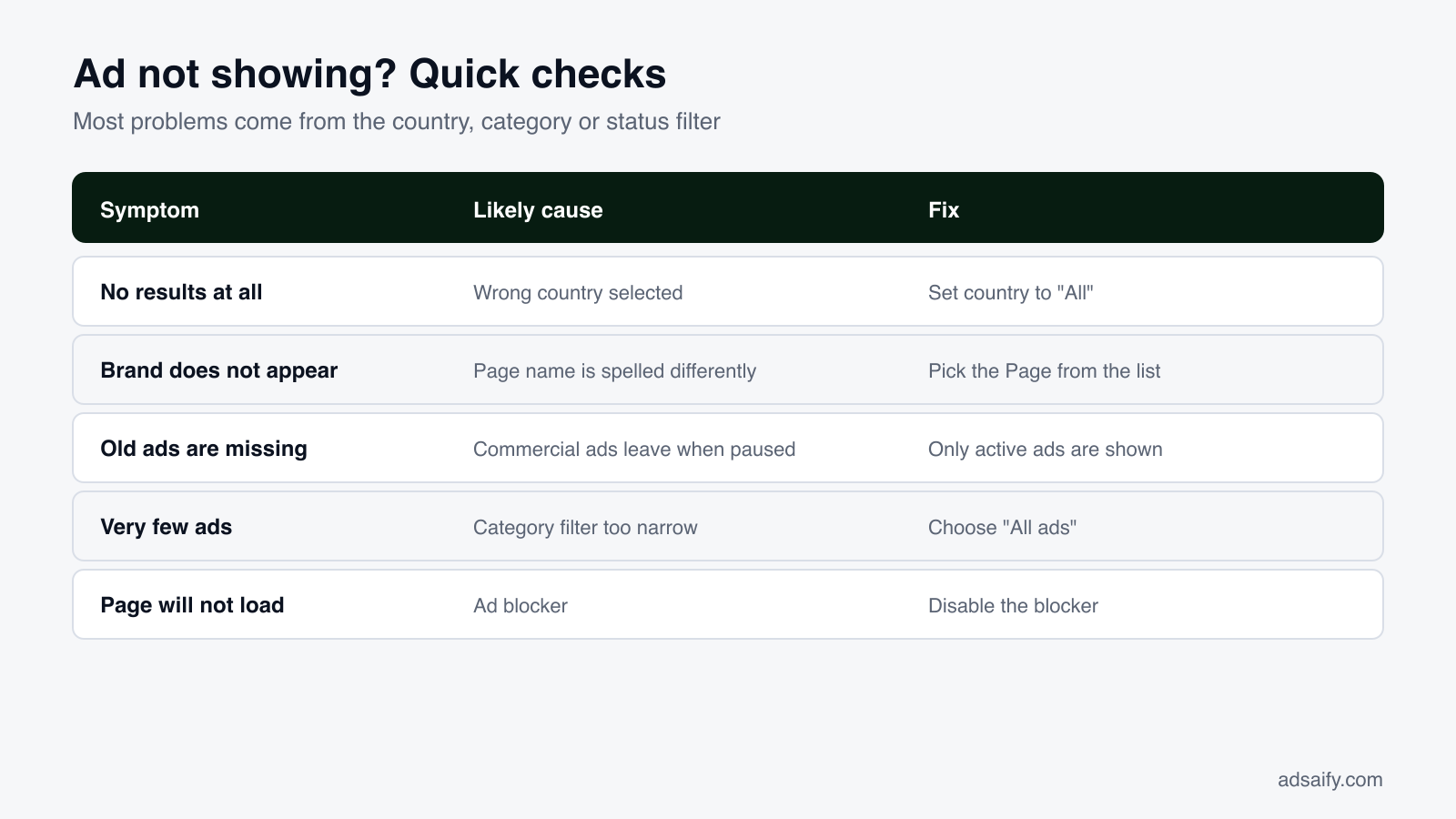
Why is the Facebook Ads Library not showing ads?
| Symptom | Likely cause | Fix |
|---|---|---|
| "No ads match your search" | The country filter excludes where the ad runs | Set the country to "All" |
| The brand is not in the dropdown | The Page uses a different name or spelling | Try the handle, or go in through the Page's transparency section |
| Results are unrelated brands | You pressed Enter and ran a keyword search | Select the Page from the dropdown |
| Only political ads appear | The category is set to issues, elections or politics | Switch to "All ads" |
| An ad you saw is missing | It was paused, or it runs from a partner's Page | Check the partner or creator named in the ad |
| Last month's ads are gone | Commercial ads leave the library when they stop | Nothing; save ads when you see them |
| A brand shows zero ads | It is not advertising on Meta right now | Check again later; many brands advertise seasonally |
| The page is blank or will not load | An ad blocker or privacy extension is blocking it | Disable the extension for facebook.com, or use a private window |
| Videos do not play | Browser autoplay or data-saver settings | Click the video, or try another browser |
One more case causes confusion: a newly published ad can take a short while to appear, and an ad still in review is not listed until it starts delivering.
Does it work on a phone?
Yes. There is no separate app, but the library works in a mobile browser, and the shortcuts from a Facebook Page or an Instagram profile open it directly. Filters are behind a single button on small screens. For serious research a computer is more comfortable, because you can keep several brands open in tabs.
Is it legal and private to look at competitors' ads?
Yes. The library is public by design and Meta provides it for exactly this purpose. Advertisers are not told who viewed their ads. What you may not do is reuse their images, videos or text: those belong to the advertiser, and copying them breaks both copyright law and Meta's advertising policies.
What do you do with what you found?
Turn the notes into a test. Take the two approaches that appeared most often among long-running ads, write your own versions for your product, and run them against each other.
Adsaify shortens the building step: paste your website address and it drafts the campaign with ad copy, creatives and an audience, lets you preview the ad as a Feed post, a Story and a Reel, and publishes it to your own Meta ad account. Inside the app there is also a library of ready-made ad examples by sector that you can open as a draft and adapt.
Related reading: the complete guide to the Meta Ads Library and ad libraries on every platform.
Frequently Asked Questions (FAQ)
1. What is the FB Ads Library?
It is Meta's free public database of active ads on Facebook and Instagram, officially called the Meta Ad Library.
2. How do I see all the ads a Page is running?
Search the Page in the library with the country set to "All" and the category set to "All ads", and select the Page from the dropdown.
3. Can I see a competitor's Instagram ads?
Yes. Use the platform filter in the library, or open "About this account" on the Instagram profile and tap "Active ads".
4. Will the brand know I looked at its ads?
No. Views in the library are not reported to advertisers.
5. Can I see ads that are no longer running?
Only for ads delivered in the EU, which stay for about a year, and for political or social-issue ads, which stay for seven years. Other ads disappear when they stop.
6. Why does a brand have hundreds of ads?
Large advertisers test many versions and run catalogue ads for many products. Filter by media type and sort your attention by start date.
7. Can I find an ad from a screenshot?
Not by image. Search a distinctive phrase from the ad text in quotation marks, or open the advertiser's Page in the library.
8. How often does the library update?
Ads appear shortly after they start delivering and leave when they stop, so it reflects what is running now.
9. Can I use the library to check whether a shop is trustworthy?
It helps. Check how long the Page has existed, whether its name changed, where its managers are located and how long its ads have been running.
How can you try this with Adsaify?
Adsaify analyses your business from your website address, drafts the campaign with an audience, ad copy, creative and a budget suggestion, and publishes it to your own Meta ad account once you approve.
- Your first ad is free: there is nothing to lose by trying.
- Your own ad account: the campaign runs in your Meta account and you stay in control.
- Ready-made examples: open an ad example from your sector as a draft and adapt it.
Create a free account and try your first ad · Already have an account? Log in.