Short answer: To fix conversion lag when scaling Meta ad spend, evaluate performance using cohort-based attribution windows and MER (marketing efficiency ratio) rather than same-day ROAS. Avoid cutting budgets within the first 48 to 72 hours of an increase, allowing delayed purchases to register before adjusting campaign spend, bid levels, or audience targeting.
You scale your Meta ad budget from $300 to $1,000 per day, expecting revenue to jump, but by mid-afternoon Meta Ads Manager shows terrible numbers. Your reported ROAS (return on ad spend, calculated as revenue divided by ad spend) drops from 3.5 to 1.2, cost per purchase spikes, and panic sets in. Believing the increase broke your delivery, you cut the budget back down. By the next morning, delayed conversions register, revealing that the day was actually profitable.
This reaction happens because of conversion lag, which is the time delay between an ad click and the final purchase. Prospective buyers often research competitors, reconsider pricing, or complete checkout days later on another device. When media buyers judge performance solely on same-day data, they kill working ads prematurely. Continually cutting and raising budgets resets Meta's learning phase, destabilizes auctions, and prevents the ad account from ever scaling past its revenue ceiling.
After reading this guide, you will know how to scale ad spend without second-guessing performance during reporting delays. We break down how to identify your latency window, distinguish conversion lag from creative fatigue, and audit attribution before raising spend. You will also learn step-by-step scaling protocols, a ten-fold budget expansion framework, essential metrics like MER (marketing efficiency ratio, which is total revenue divided by total ad spend), and the routine required to maintain profitability.
Key Takeaways
- Same-day ROAS drops after budget increases usually reflect buyer consideration time, not failing ads.
- Allow at least 72 hours for 7-day click cohort conversions to mature before altering ad set budgets.
- Track blended MER (Marketing Efficiency Ratio) alongside platform ROAS to measure true store profitability.
- Scale ad spend gradually in 48-hour increments with disciplined automated pausing rules.
What is conversion lag in Meta ads and how do you spot it?
Conversion lag in Meta ads is the elapsed time between a prospective customer clicking an ad and completing a purchase. Media buyers spot conversion lag by observing that same-day ROAS (return on ad spend, calculated as revenue divided by ad spend) appears unprofitable in Meta Ads Manager, while reported conversions for that exact date steadily revise upward days later.
How does the attribution window distort same-day reporting in Meta Ads Manager?
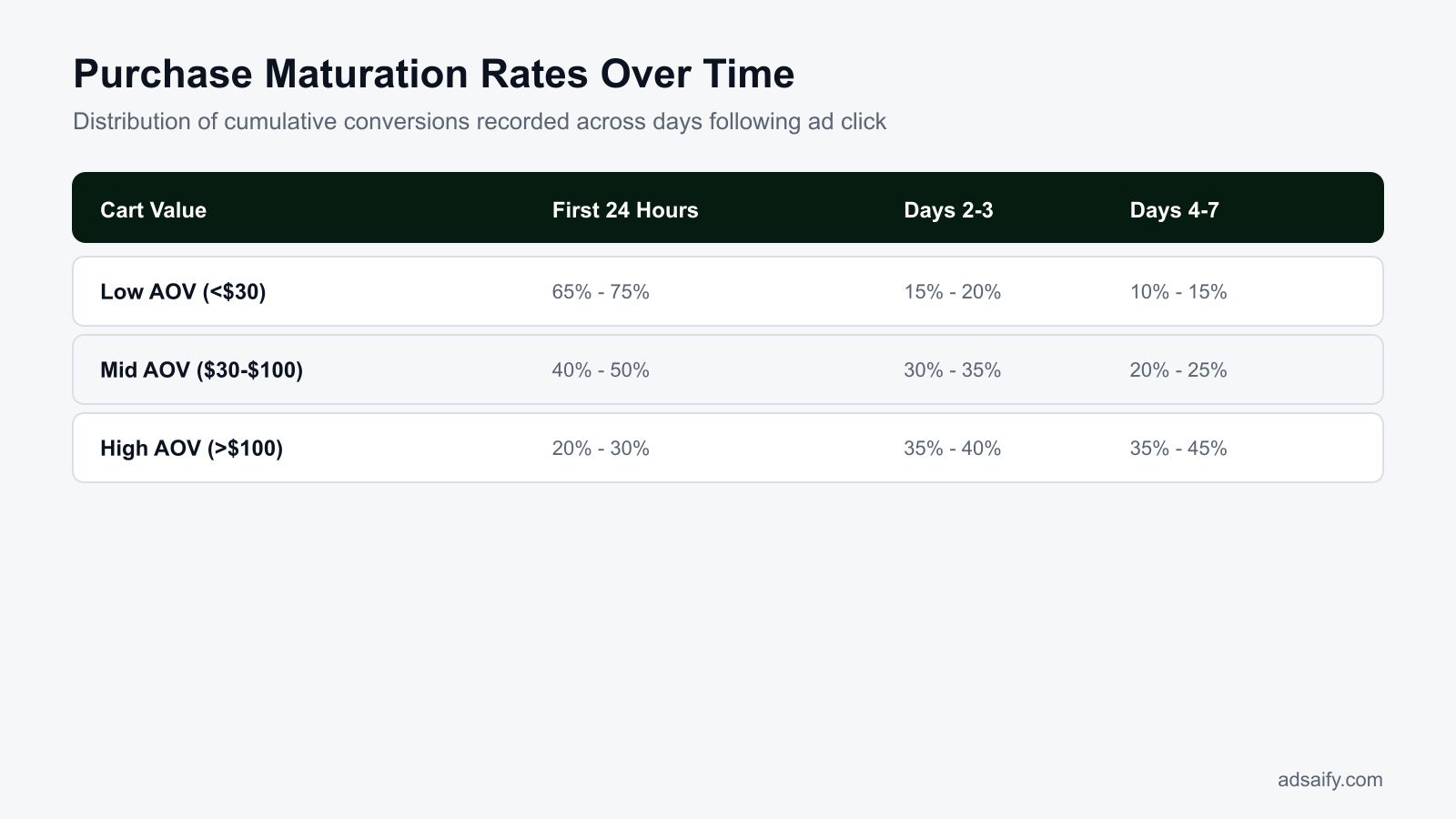
When an ad account spends money, Meta registers that advertising expenditure instantly in the reporting dashboard. However, Meta's attribution system credits conversion revenue back to the date of the interaction rather than the date of the checkout. Under the default 7-day click and 1-day view attribution setting, a customer who clicks an ad on Monday but completes checkout on Thursday will have their purchase attributed to Monday's data column. Consequently, looking at Monday's performance on Monday evening reveals 100% of the cost but only a fraction of the purchases, producing an artificially depressed same-day ROAS. Media buyers can verify this by checking historical date ranges in Meta Ads Manager over three, five, and seven days to observe past daily revenue figures revising upward.
What is the risk of misdiagnosing conversion lag as ad fatigue?
When media buyers observe an immediate drop in ROAS after altering campaigns, they frequently assume the creative has suffered ad fatigue (a condition where audience overexposure causes ad engagement and conversion rates to decay). Reacting to incomplete same-day data often leads advertisers to turn off top-performing creatives prematurely.
For example, an online leather footwear store running an Advantage+ shopping campaign spends $400 daily at a steady 2.5 ROAS. The media buyer scales the daily budget to $800. On day one of the increase, Meta Ads Manager reports $600 in revenue, displaying a 0.75 ROAS. Assuming the creative fatigued under increased spend, the buyer pauses the ad. However, checking that exact date four days later reveals delayed purchases lifted total revenue to $2,200, representing an actual 2.75 ROAS. Pausing the ad prematurely ruined a profitable scaling phase because footwear buyers required seventy-two hours to verify sizing and review shipping options. Whether building campaigns manually or using Adsaify to draft campaign structures, advertisers must allow sufficient reporting latency before turning off active ads.
Does conversion lag last the same amount of time across all e-commerce niches?
No, conversion lag varies significantly based on product price point, purchase urgency, and AOV (average order value, the average dollar amount spent each time a customer places an order). Low-ticket impulse items under $30 typically experience a conversion lag of less than twenty-four hours because buyers deliberate very little. In contrast, luxury goods, high-ticket electronics, and customized furniture with order values exceeding $200 regularly exhibit conversion lag windows extending from five to twelve days while customers evaluate alternatives and check household budgets.
Why does conversion lag become more pronounced when scaling ad spend?
Conversion lag becomes more pronounced when scaling Meta ad spend because higher daily budgets force the ad delivery algorithm to reach broader, less purchase-ready audiences outside the core pool of immediate buyers. These prospective customers require extended research, product comparisons, and multiple brand touchpoints before buying, stretching the purchase path well beyond the initial click.
How does audience expansion change customer consideration time at scale?
At a low budget of $1,000 per month, Meta's auction algorithm easily finds hyper-ready prospects—individuals whose recent browsing history signals an immediate readiness to buy. When a brand scales ad spend toward $50,000 per month, the delivery system must serve impressions to colder prospects across broader audience definitions. Cold prospects rarely buy during their first website visit. They read third-party reviews, compare pricing against competing brands, discuss purchases with family members, and wait for upcoming paydays. This natural consumer friction elongates the consideration window from a few hours to several days, concentrating ad spend on day one while scattering sales across the following week.
Why does attribution processing delay increase psychological pressure on media buyers?
Meta relies on an attribution window (the period after an ad click or view during which a resulting purchase is credited to the ad) that extends across multiple days. Processing delays from the Conversions API, browser cookie restrictions, and data modeling mean purchases take time to register in Meta Ads Manager. At $50 per day, a delayed purchase of $40 is easy to stomach. At $3,000 per day, unrecorded conversions create massive temporary paper losses on the dashboard. This financial mismatch strains the emotional tolerance of media buyers, tempting them to slash budgets during normal attribution delays. Automated workflows and ad creation tools like Adsaify assist teams in managing campaigns, but media buyers must still account for reporting latency when evaluating scaled budgets.
| Daily Spend Tier | Target Audience Temperature | Average Consideration Window | Primary Attribution Symptom |
|---|---|---|---|
| $30 to $100 per day | Warm high-intent prospects | Under 12 hours | Same-day ROAS closely mirrors final performance |
| $200 to $500 per day | Blended warm and targeted lookalike groups | 24 to 48 hours | Modest upward revision of purchases after 48 hours |
| $1,000 to $3,000 per day | Broad cold audiences | 3 to 7 days | Initial same-day ROAS appears below break-even threshold |
| $5,000 or more per day | Mass-market broad audiences | 7 to 14 days | Severe intraday reporting gaps and prolonged Conversions API reconciliation |
If I increase budgets in smaller increments, does conversion lag disappear?
No, increasing budgets in smaller increments does not eliminate conversion lag; it merely obscures its financial impact. Conversion lag is determined by human shopping behavior and product deliberation time, not the speed of budget increases. Raising daily ad spend by 10% instead of 50% reduces daily spend variance, preventing dramatic intraday ROAS drops on your dashboard. However, as new cold prospects enter the marketing funnel, those buyers will still require several days before finalizing their orders.
What does ignoring conversion lag cost an e-commerce store?
Ignoring conversion lag costs an e-commerce store significant revenue by causing media buyers to turn off profitable campaigns prematurely, reset Meta's machine learning phase, and artificially cap account scale. Premature campaign pauses destabilize CPM (cost per thousand impressions) bidding efficiency, inflate blended acquisition costs, and waste valuable creative resources replacing ads that merely required extra time to convert.
The Financial Penalty of False-Negative Campaign Management
When an ad buyer evaluates campaign performance inside a narrow 24-hour window, attribution models have not yet registered delayed checkouts. Pausing an ad set because its immediate ROAS (return on ad spend) appears unprofitable is known as false-negative campaign management. Turning off the ad set halts Meta's delivery system entirely. When the media buyer notices days later that delayed sales arrived and restarts the campaign, this status change resets the learning phase in Meta Ads Manager. Restarting the learning phase drives up CPM and spikes CPA (cost per acquisition), because the delivery algorithm must rebuild audience delivery predictions from scratch.
The Artificial Spending Plateau and Creative Exhaustion
Repeatedly halting active campaigns traps online stores under an artificial spending plateau. Brands fail to scale daily budgets from $500 to $5,000 because each budget increase creates an apparent short-term drop in ROAS that triggers panic cuts. Additionally, design teams exhaust their resources producing unnecessary replacement videos and images. Creative teams discard winning concepts under the false assumption that audiences are fatigued, when prospective buyers were simply completing multi-day consideration cycles. Setting up measured automated rules through platforms like Adsaify protects active ad sets from reactive manual pauses while maintaining spending discipline across the account.
Use this evaluation checklist before pausing or editing any scaling campaign in Meta Ads Manager:
- Audit the 7-day click attribution window to identify delayed conversion lift before reducing ad budgets.
- Verify whether mid-funnel actions like Initiate Checkout meet cost-per-event targets despite lower immediate purchases.
- Review historical time-to-purchase distributions in Meta Events Manager to determine the store's typical conversion latency.
- Maintain ad set budgets for at least 72 hours following any budget increase above twenty percent.
- Track cohort-based revenue in store analytics to calculate the realized value of lagged customer orders.
- Document active creative concepts to avoid prematurely retiring ads that continue generating delayed conversions.
When I pause an ad early, where does Meta attribute subsequent purchases?
When an advertiser pauses an ad early, Meta still attributes subsequent purchases to that specific paused ad, provided the customer clicked the ad while it was active and completes checkout within the chosen attribution window (such as 7-day click). In Meta Ads Manager, historical reporting columns update retroactively, displaying increased purchases and higher ROAS on the paused ad days after deactivation, confirming that the initial pause decision was premature.
How do you diagnose whether low ROAS is real fatigue or conversion lag?
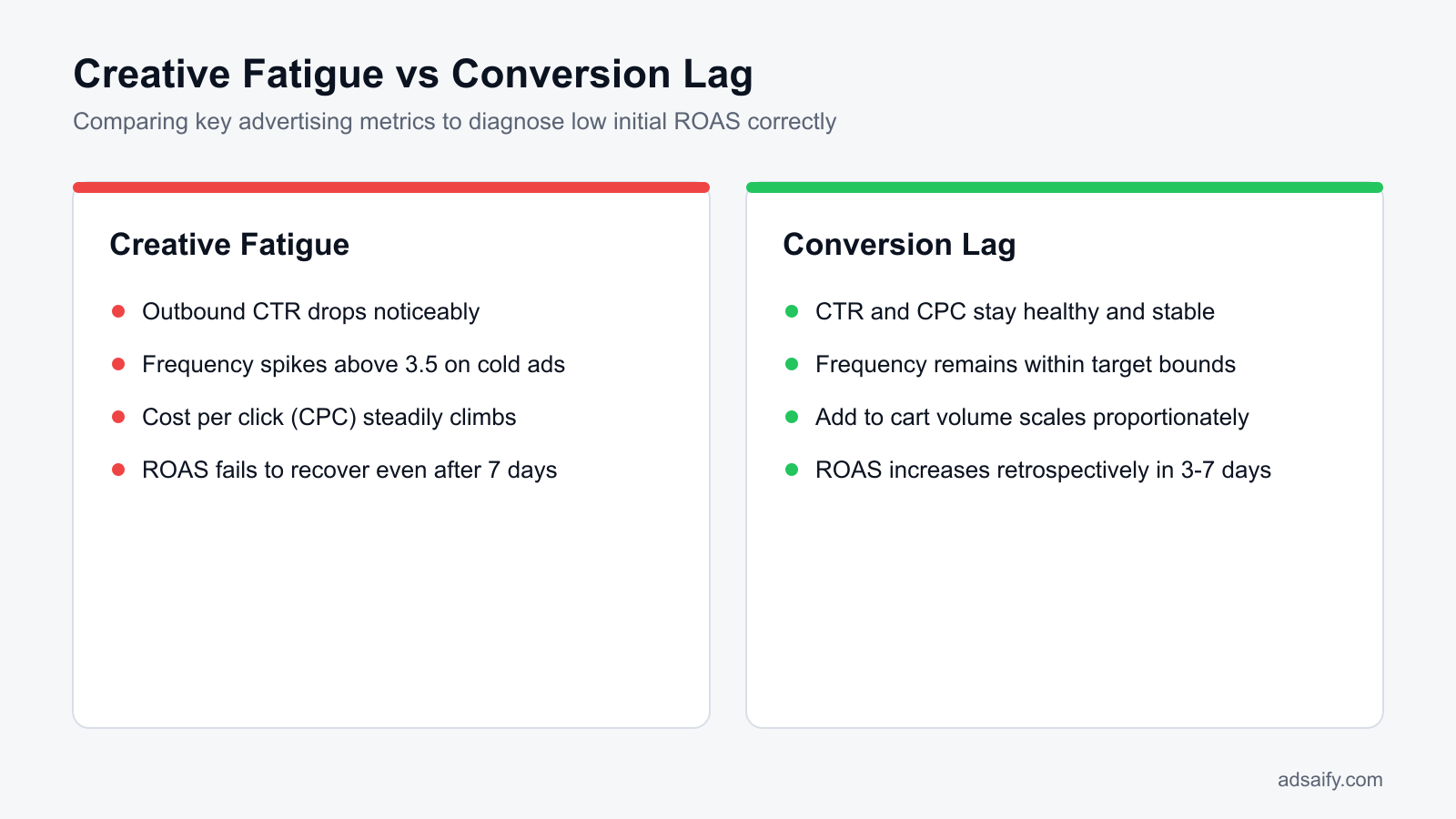
To diagnose whether low ROAS (return on ad spend) stems from creative fatigue or conversion lag, media buyers inspect leading engagement metrics and mid-funnel conversion signals. If CTR (click-through rate) remains stable, CPC (cost per click) stays flat, and checkout initiations scale with ad spend while same-day purchases drop, delayed buyer decisions cause the dip rather than creative exhaustion.
Evaluating Pre-Click and Mid-Funnel Pacing Signals
Creative fatigue creates unmistakable patterns in Meta Ads Manager top-of-funnel metrics before revenue drops. When an ad suffers from fatigue, CTR (click-through rate) decreases and CPC (cost per click) climbs because audiences no longer respond to the creative hook. During conversion lag, pre-click metrics remain strong. Link click volume expands in proportion to increased budget, and traffic costs remain affordable. In addition, media buyers must track the Adds to Cart and Checkouts Initiated columns. If shoppers click the ad and initiate checkout at a steady cost per event, the campaign targeting and creative message are operating successfully, and conversion volume is simply awaiting payment finalization.
Frequency and Cohort Latency Benchmarking
Media buyers must evaluate the Frequency metric alongside audience size. A sudden spike in frequency paired with rising CPC signals audience saturation and authentic ad fatigue. Conversely, if frequency climbs modestly (for example, moving from 1.15 to 1.30 across a scaling cycle) while budget increases, the delivery system is serving consideration impressions to undecided prospective buyers. In Meta Events Manager, compare current pacing against the store's historical 30-day time-to-purchase distribution. If sixty percent of store orders historically take longer than 48 hours to complete, a short-term ROAS decline is the expected mathematical outcome of increasing ad spend.
| Metric or Symptom | Real Creative Fatigue | Conversion Lag |
|---|---|---|
| CTR (Link Click-Through Rate) | Decreases steadily over consecutive reporting days | Remains stable or matches account baseline averages |
| CPC (Cost Per Link Click) | Increases as ad engagement drops across the audience | Remains flat and within the targeted acquisition range |
| Cost Per Initiate Checkout | Spikes due to poorly qualified traffic entering the site | Remains steady as daily ad spend scales upward |
| Frequency Trajectory | Surges rapidly within small or exhausted target audiences | Rises gradually as consideration cycles develop |
| Same-Day ROAS | Declines permanently without delayed metric recovery | Drops temporarily, then recovers within seven days |
What should I do if add-to-carts increase but no purchases occur within 48 hours?
If add-to-carts increase without purchases within 48 hours, audit your checkout funnel immediately for technical bugs, unexpected shipping costs, or failing payment gateways. Once technical friction is eliminated, maintain campaign spend for another 24 to 48 hours to accommodate the store's normal conversion latency window. Simultaneously inspect automated abandoned cart email and SMS workflows to ensure high-intent prospective buyers receive prompt reminders before you make any reactive budget cuts in Meta Ads Manager.
If you would rather not set up each of these steps by hand, try it in Adsaify: your first ad is free, so there is nothing to lose. Create a free account.
What store and attribution data must you check before scaling ad spend?
Before scaling ad spend, you must verify your store's average time-to-convert, standardize your Meta Ads Manager attribution setting to 7-day click and 1-day view, calculate your break-even return on ad spend and marketing efficiency ratio, and establish controlled campaign budget parameters. These baseline figures prevent premature budget cuts caused by unrecorded delayed conversions.
Attribution settings and baseline efficiency metrics
An attribution window is the timeframe during which an ad platform credits an ad view or click with a subsequent customer purchase. In Meta Ads Manager, navigate to the ad set level, scroll down to the "Attribution setting" section under Optimization & Delivery, and select "7-day click and 1-day view" to capture conversions that occur days after the initial engagement.
ROAS (return on ad spend) is the revenue generated directly by an advertising campaign divided by the total advertising spend of that campaign. Break-even ROAS is calculated by dividing 1 by your gross profit margin; for example, with a 50% gross profit margin, your break-even ROAS threshold is 2.0. MER (marketing efficiency ratio) is total e-commerce store revenue divided by total marketing ad spend across all channels. When you draft campaigns via Adsaify, the tool analyses your website URL to suggest budget structures aligned with your operational targets so you do not scale beyond your margins.
Pre-scaling attribution and tracking checklist
- Export conversion latency data from your web analytics platform to determine your median delay between ad click and checkout.
- Standardize your Meta Ads Manager ad set attribution setting to 7-day click and 1-day view to accommodate delayed purchases.
- Calculate your exact break-even ROAS by factoring in product costs, merchant processing fees, and fulfillment expenses.
- Define a minimum acceptable blended MER threshold to evaluate top-line store profitability independently of daily pixel fluctuations.
- Audit Meta Events Manager to verify that the Purchase event fires accurately without missing or duplicated deduplication parameters.
- Set conservative campaign spending limits within your campaign settings to prevent rapid budget overconsumption while the algorithm calibrates.
Which specific report displays my store's average customer conversion delay?
In Google Analytics 4, navigate to the Advertising workspace, expand the "Attribution" menu, and select the "Conversion paths" report. Examine the "Days to conversion" column alongside touchpoint paths to view the exact latency between first interaction and transaction. In Shopify, navigate to Analytics, select Reports, and review the "Customer journey summary" report. These reports pinpoint the precise number of days shoppers take before completing purchases, establishing your true conversion lag baseline.
How do you scale ad spend step by step while managing conversion lag?
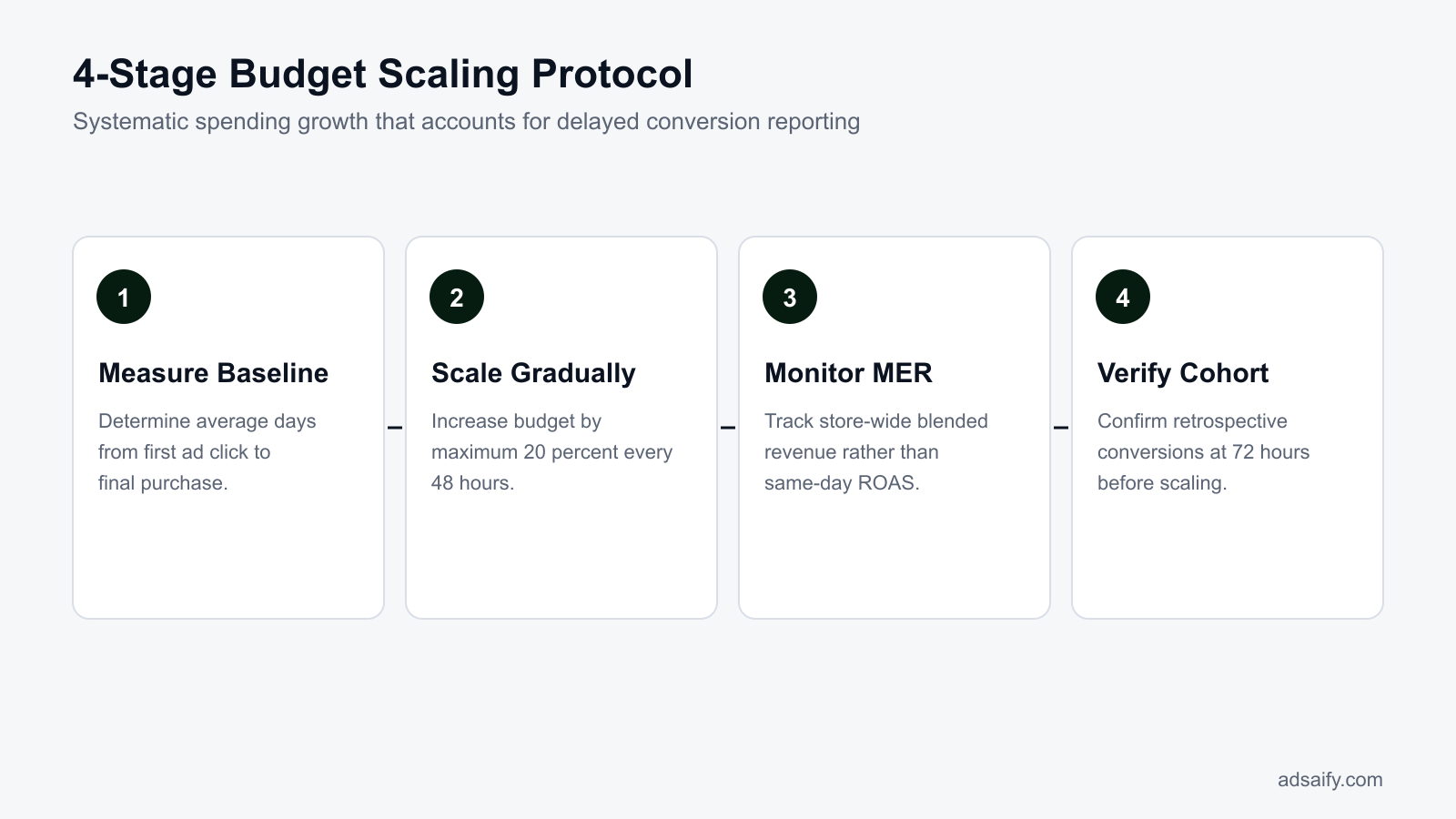
You scale ad spend while managing conversion lag by increasing daily budgets in 15% to 20% increments, maintaining a mandatory 48-to-72-hour observation window after each adjustment, tracking store-wide marketing efficiency ratio instead of real-time ad set metrics, and using safeguard automation rules to pause failing creative assets only during severe drops.
Budget pacing, observation windows, and safeguard rules
The learning phase is the period after an ad set launch or major edit during which Meta's delivery system calibrates ad delivery to reach stable performance, usually requiring roughly 50 optimization events. Increasing ad set or campaign budgets by only 15% to 20% at a time keeps delivery stable and avoids re-entering the learning phase. For example, with a 500 TL daily budget, an increase to 575 TL or 600 TL protects optimization momentum.
After increasing a budget, enforce a strict 48-to-72-hour "no-touch window" where media buyers make no changes to audiences, bids, or creatives. Intra-day ROAS inside Meta Ads Manager often looks artificially low during this window because conversions require time to mature. Instead of pausing ad sets prematurely based on temporary in-platform dips, monitor blended MER in your main store dashboard. To prevent runaway losses, media buyers configure automation rules in Adsaify to pause individual ad creatives only when spending exceeds three times your target cost per acquisition with zero purchases over a multi-day rolling window.
Step-by-step budget scaling sequence
- Baseline audit — Evaluate the rolling 7-day blended MER in your store dashboard, proceeding to scale only if current returns exceed your target break-even threshold.
- Budget expansion — Increase the daily budget by 15% to 20% in Meta Ads Manager to prevent delivery instability and avoid triggering the learning phase.
- Observation lock — Lock the ad account for 48 to 72 hours without making manual adjustments to allow delayed conversions to register.
- Blended return check — Assess store-wide sales and overall MER after the observation window closes, approving another budget increase if metrics remain above target.
- Automated protection — Use Adsaify automation rules to pause specific ad creatives only when spend reaches three times target acquisition cost without sales.
- Compounded scaling — Apply the next 15% to 20% budget increment or maintain spend if conversion lag is still resolving from the prior increase.
Is a 20% bump every 48 hours too slow to scale spend toward $50k monthly?
No, increasing ad spend by 20% every 48 to 72 hours compounds rapidly into substantial budget growth. For example, raising a 1,000 USD daily spend by 20% every three days roughly triples the daily budget to over 3,000 USD in about three weeks. This pacing accommodates your store's natural conversion lag, prevents the optimization algorithm from destabilizing, and ensures you scale toward a 50,000 USD monthly spend without incurring massive cash-flow losses.
How does the scaling process look when increasing daily spend ten-fold?
Scaling daily Meta ad spend ten-fold involves stepping up daily budgets in measured phases while accounting for conversion lag through retrospective cohort analysis. Conversion lag is the delay between a user clicking an ad and completing a purchase. As spend escalates, immediate daily reporting dips before delayed multi-day conversions retroactively populate the attribution window.
The day-by-day progression from 500 TL to 5,000 TL daily spend
For example, an apparel brand selling seasonal jackets with an average order value of 1,200 TL currently spends 500 TL per day in Meta Ads Manager. At 500 TL daily spend, the account generates 2,000 TL in tracked revenue, reflecting an immediate 4.0x ROAS (return on ad spend is the ratio of gross revenue generated directly by advertising spend).
On Day 1, the media buyer increases the campaign budget to 1,000 TL. By midnight, Ads Manager reports 1,000 TL spent but only 1,800 TL in same-day revenue, showing an apparent drop to 1.8x ROAS. Account managers must not panic at this stage. Increasing delivery pushes ads into larger auctions where high-intent buyers add items to carts or compare styles across multiple devices, postponing their actual checkout.
By Day 3, the delayed attribution updates begin revising Day 1 numbers. Looking back at the Day 1 cohort through the Meta 7-day click attribution setting, reported revenue rises from 1,800 TL to 3,400 TL, bringing mature Day 1 ROAS to 3.4x. Shoppers who deliberated or waited for payday completed purchases through direct sessions, email reminders, and view-through touchpoints.
Systematic progression toward the 5,000 TL daily spend target
Rather than jumping directly from 1,000 TL to 5,000 TL, the media buyer increments daily spend in stepped stages: first to 2,000 TL, then 3,500 TL, and ultimately 5,000 TL. At each stage, the buyer waits for a 72-hour window to review trailing cohort performance instead of reacting to day-one fluctuations. When spend reaches the 5,000 TL daily target, mature 7-day cohort ROAS settles between 2.8x and 3.1x. Although nominal ROAS is lower than at 500 TL, daily gross revenue expands from 2,000 TL to roughly 15,000 TL. Setting automated safety thresholds via Adsaify helps protect budgets against severe drops without prematurely shutting down ad sets in the middle of their conversion window.
If ROAS does not recover by day 3, should I immediately revert the budget?
Do not revert the budget immediately on day 3 if your secondary metrics remain healthy. First, check your Add to Cart volume, Cost Per Click, and blended store revenue in your e-commerce platform. If high-intent actions surged while final checkout lagged, allow the full 7-day click window to mature before intervening. However, if cost per click doubled and click-to-cart conversion rates plummeted alongside flat gross store sales across 72 hours, reduce the daily budget by 25 to 50 percent to prevent cash burn.
Which metrics prove that your scaling strategy overcame conversion lag?
Confirming that a scaling strategy overcame conversion lag requires evaluating cohort ROAS, blended marketing efficiency ratio, delayed conversion percentage, and net profit volume. These metrics reveal whether platform performance drops represent genuine buyer acquisition failure or simply unrecorded purchasing delays that mature profitably across your standard multi-day customer consideration window.
Core validation metrics across the delayed attribution window
Evaluating scaling success requires shifting focus away from immediate 1-day Ads Manager dashboards toward four core metrics:
- Cohort ROAS: Cohort ROAS is the ratio of total revenue generated over 7 days attributed back to the ad spend of the initial click date. Tracking cohort maturity reveals whether day-one drops consistently climb back to target thresholds.
- Blended MER: Blended MER (Marketing Efficiency Ratio is total e-commerce revenue divided by total paid advertising spend across all campaigns) verifies storewide revenue expansion independent of platform tracking loss.
- Delayed conversion percentage: This calculation tracks the proportion of orders finalizing beyond the initial 24-hour mark. If delayed conversions rise from 20 percent to 40 percent as spend scales, longer customer deliberation is taking place normally.
- Net profit volume: Net profit volume represents total absolute monetary profit after subtracting ad spend, product costs, and merchant fees. A successful campaign optimizes for total bank balance rather than isolated efficiency ratios.
| Metric or Signal | Healthy Conversion Lag | True Creative Fatigue | Recommended Action |
|---|---|---|---|
| Cohort ROAS (Day 1 vs. Day 7) | Starts low (1.5x) and matures upward (3.0x+) | Starts low (1.2x) and remains flat by Day 7 | Maintain budget during lag; pause or replace fatigued creative |
| Blended MER | Stable or expanding across total store sales | Declines steadily alongside platform metrics | Verify backend store orders before altering Meta ad budgets |
| Delayed Conversion Ratio | Increases as ad spend scales higher | Remains low while total purchases decline | Extend reporting lookback windows to 7-day click settings |
| First-Day Cost Per Click (CPC) | Remains stable within historical averages | Increases sharply as frequency rises | Keep ad running if CPC is steady; refresh ad creative if CPC spikes |
| Net Profit Volume | Absolute net profit grows despite lower ROAS | Absolute profit drops as ad spend burns margin | Scale spend on high profit volume; scale back on negative margins |
How can my total profit be higher if platform ROAS drops from 3.0 to 2.2?
Total profit expands because a lower ROAS on a much larger expenditure base produces greater absolute dollar margin than a higher ROAS on a small budget. For example, spending $1,000 at a 3.0 ROAS generates $3,000 in revenue, leaving $2,000 above ad spend. Scaling spend to $5,000 at a 2.2 ROAS generates $11,000 in revenue, leaving $6,000 above ad spend. Provided your product margins cover fulfillment and cost of goods, the larger cash volume delivers superior business profit.
Want to see this in your own account? Enter your website address and Adsaify drafts the campaign for you. The first ad is free. Try it now or log in.
What weekly routine prevents conversion lag panic when scaling to $50k?
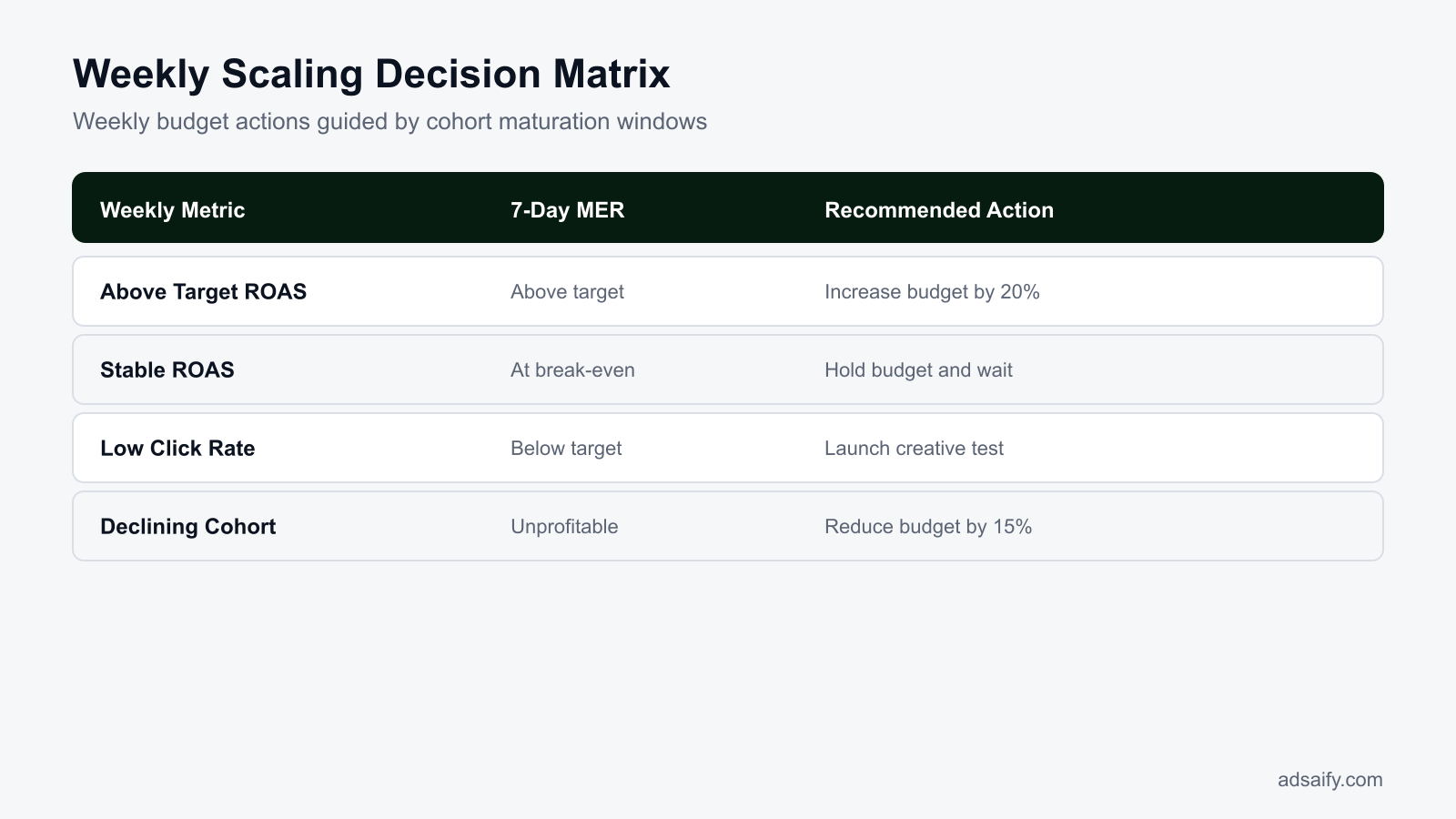
A structured weekly operating cadence prevents conversion lag panic by anchoring scaling decisions to matured data rather than incomplete real-time metrics. Media buyers maintain emotional control by reviewing finalized conversion cohorts on Mondays, testing fresh creative variations midweek, and executing systematic budget increases on Fridays before weekend shopping traffic peaks.
Account Governance and Weekly Operational Cadence
Conversion lag is the delay between when a user clicks an ad and when they complete a purchase. When scaling an account toward a $50,000 monthly spend, intraday metrics in Meta Ads Manager always appear artificially depressed. Establishing an ad account governance checklist prohibits spontaneous budget cuts during active buying cycles and enforces structured decision milestones.
- Daily: Check blended MER (marketing efficiency ratio, defined as total store revenue divided by total ad spend) across your e-commerce platform and Meta to verify overall cash flow without altering active ad sets.
- Daily: Inspect cost per click (CPC) and outbound click-through rate (CTR, the percentage of ad impressions that resulted in a link click) to confirm cold traffic quality remains stable while purchases populate.
- Weekly (Monday): Review matured 7-day click attribution cohorts from the prior week to calculate realized ROAS (return on ad spend, defined as tracked ad revenue divided by ad spend) and confirm true baseline profitability.
- Weekly (Wednesday): Generate and draft new image and video creative angles using Adsaify to keep your asset pipeline stocked against ad fatigue before scaling budgets.
- Weekly (Friday morning): Apply calibrated budget increases of 15% to 20% on top-performing campaigns to capture heightened weekend buying volume without destabilizing ad delivery.
- Weekly (Sunday night): Audit early conversion signals, checking Add to Cart and Initiate Checkout volume against historical conversion rates to forecast lag completion.
- Monthly: Re-evaluate your store's average customer journey duration using attribution lag reports to update your account evaluation timeframes.
Does conversion lag decrease over weekends when e-commerce traffic surges?
Conversion lag often appears shorter during weekends because consumer buying intent and leisure browsing time increase simultaneously, compressing the discovery-to-checkout window. Shoppers who clicked an ad on Tuesday or Wednesday frequently return to complete their purchase on Saturday or Sunday. However, the initial cold touchpoints generated on the weekend still experience their own delayed reporting cycle, meaning media buyers must still allow standard attribution windows to mature before judging new creative tests launched during peak weekend hours.
What are the most common mistakes when scaling through conversion lag?
The most common mistakes when scaling through conversion lag stem from reacting to incomplete attribution data, interrupting Meta’s algorithmic optimization, and misdiagnosing creative performance. Media buyers who panic over delayed purchase reporting prematurely pause profitable campaigns, destabilize ad delivery, and mistake long customer consideration cycles for genuine campaign failure.
Relying Exclusively on 1-Day Attribution Windows
Evaluating campaigns solely on a 1-day click setting blinds media buyers to high-consideration purchases that take several days to close. This hurts performance by starving mid-funnel scaling campaigns of recognized value. Fix: Configure reporting columns in Meta Ads Manager to display both 1-day click and 7-day click attribution settings to monitor the maturation gap.
Slashing Budgets Mid-Afternoon Due to Low Daytime ROAS
Cutting daily spend at 2:00 PM because morning ROAS looks unviable penalizes campaigns before evening conversion spikes and delayed attribution sync. This depresses overall volume and resets bid pacing. Fix: Enforce a strict governance rule banning intraday spend reductions, evaluating performance only on multi-day rolling windows.
Excusing Genuinely Dead Creatives Under the Guise of Lag
Assuming an ad set with declining engagement will eventually recover because of conversion lag wastes budget on exhausted creative assets. Fix: Track leading indicators like outbound CTR; if engagement metrics collapse alongside purchase volume for seven consecutive days, pause the creative rather than waiting indefinitely for delayed sales.
Fracturing Campaign Architecture and Resetting Learning
Spreading spend across dozens of segmented ad sets dilutes conversion volume, making lag effects exponentially worse because ad sets struggle to exit the learning phase. Fix: Consolidate ad sets into broad campaign budget optimization structures so pooled conversion data accelerates algorithmic optimization.
Triggering Aggressive Automation Rules Without Data Lookback Delays
Setting automated rules that pause ads based on same-day performance kills high-performing ads before delayed purchases register. Fix: In Adsaify, configure automated pausing rules with multi-day lookback windows, such as evaluating the last 3 to 7 days of delivery, to ensure sales have fully attributed before triggering actions.
Treating High-Ticket and Impulse Products with the Same Expectations
Expecting a high-ticket product to convert on the same day as a low-cost impulse item leads to premature budget starvation on high-margin inventory. Fix: Measure your average time-to-purchase by product price point, and adjust your reporting evaluation window to match the specific product consideration cycle.
Why does making mid-day budget changes disrupt Meta's bidding algorithm?
Mid-day budget changes disrupt Meta’s bidding algorithm by resetting the pacing model that distributes impressions across the 24-hour delivery window. Meta calibrates bids based on expected user liquidity and historical conversion propensity throughout the day. When spend limits are altered mid-day, the algorithm must instantaneously recalibrate its auction entry thresholds, often causing over-delivery in low-quality inventory or a temporary pause in ad serving, which inflates your CPM (cost per thousand impressions, defined as ad spend divided by impressions, multiplied by 1,000).
When will conversion lag adjustments fail to save ad profitability?
Conversion lag adjustments fail to save ad profitability when underlying operational, pricing, or website friction prevents users from completing their purchase journey. If high shipping fees, broken checkout gateways, uncompetitive product offers, or poor site credibility stop buyers entirely, delayed conversions will never materialize regardless of attribution modeling or waiting periods.
Why technical checkout issues and surprise fees invalidate lag patience
When prospective customers reach the final checkout screen only to discover unexpected shipping costs or broken payment processors, they abandon carts permanently. Conversion lag assumes that interested shoppers are merely taking time to deliberate, consult family members, or wait for payday. In Meta Ads Manager, high Click-to-Purchase drop-offs paired with a surging Initiate Checkout count indicate structural barriers rather than extended deliberation. Waiting several days for these shoppers to return will only drain budget, because no amount of attribution patience can resolve a technical error or unexpected surcharge at the payment gateway.
How uncompetitive pricing, weak credibility, and rigid rules trigger losses
Lag models also fail when buyers use their deliberation window to compare offers across competitors. If your product price is substantially higher without distinct value differentiation, or if your landing page lacks genuine customer reviews and trust badges, shoppers purchase elsewhere during their evaluation period. Furthermore, account setup mistakes can ruin profitable scaling. For example, when media buyers configure automation rules in tools like Adsaify to pause ad sets after only 24 hours of low ROAS (return on ad spend, calculated as revenue divided by ad spend), they prematurely kill campaigns before the platform can process delayed conversion signals.
- Verify checkout payment gateways by completing end-to-end test purchases weekly.
- Eliminate unexpected shipping charges by displaying delivery rates upfront on product pages.
- Benchmark product prices against top competitors to ensure market competitiveness during user deliberation.
- Audit automation rule thresholds to ensure ad sets are not paused before the full attribution window closes.
- Inspect customer reviews and trust seals on product landing pages to reinforce buyer confidence.
- Analyze ecommerce platform abandoned checkouts for recurring payment error codes.
Is dedicated retargeting necessary to recover shoppers in the conversion lag window?
Dedicated retargeting campaigns are generally not necessary to recover shoppers during the conversion lag window if your broad prospecting campaigns already maintain adequate frequency. Meta's delivery algorithm automatically re-exposes engaged users who visited your website back to your prospecting ads within their natural decision cycle. Creating separate custom audience retargeting ad sets often fragments ad spend, drives up CPMs (cost per thousand impressions), and forces ad sets back into the learning phase without generating incremental store revenue.
What key terms must media buyers understand when scaling Meta ad budgets?
Media buyers must understand core advertising metrics, attribution models, and algorithmic phases to scale Meta ad budgets without misinterpreting early performance dips. Mastering these technical definitions allows marketers to separate temporary attribution latency from genuine campaign failure, ensuring data-backed financial decisions instead of emotional budget cuts during the conversion window.
- ROAS (Return on Ad Spend): Revenue generated directly from advertising divided by total ad spend over a designated period.
- Conversion Lag (Attribution Latency): The delay between when a user clicks on an ad and when that user ultimately completes a purchase.
- Cohort Reporting: An analytical method that attributes transactions back to the specific date or ad impression that initially engaged the customer.
- MER (Marketing Efficiency Ratio): Total store revenue across all sales channels divided by total advertising spend across all platforms.
- Learning Phase: The algorithmic calibration period where Meta requires approximately 50 conversion events per ad set within a 7-day window to stabilize delivery.
- Attribution Window: The predefined timeframe, such as 7-day click or 1-day view, during which Meta assigns credit for a conversion to an ad.
- CPA (Cost Per Acquisition): Total advertising cost divided by the total number of completed conversions or purchases generated.
- 7-Day Click Attribution: A reporting setting in Meta Ads Manager that records conversions occurring within seven days of an ad click.
- First-Party Tracking: Server-side data collection managed directly on your store domain to measure customer actions independent of browser privacy restrictions.
- Conversion Rate: The percentage of website sessions or unique ad clicks that result in a finalized order.
- Ad Frequency: The average number of times a single unique user sees an advertisement over a selected timeframe.
If my store MER is strong, can I safely ignore lower ROAS inside Meta Ads Manager?
You can safely tolerate lower in-platform ROAS if your blended MER (marketing efficiency ratio) remains above your target break-even threshold and net profit continues to grow. Attribution latency, cross-device browsing, and browser privacy settings cause Meta Ads Manager to underreport purchases by a notable margin during scale. Relying on MER as your guiding north star metric prevents you from mistakenly scaling down profitable ad sets that drive high offline or delayed sales.
Scaling Your Meta Spend to $50k Safely While Protecting Profitability
To fix conversion lag when scaling Meta ad spend, first measure your baseline attribution delay by comparing one-day click numbers with seven-day click results in Meta Ads Manager. Next, configure automated rules with appropriate evaluation windows—such as assessing performance over the last three to seven days rather than intraday data—to avoid turning off profitable ads prematurely. Finally, scale ad spend incrementally by fifteen to twenty percent every few days instead of doubling budgets abruptly, which preserves delivery stability and keeps conversion reporting predictable.
Audit your current reporting setup today by reviewing your Meta attribution settings and adjusting any strict daily automated rules to look back at least seventy-two hours. If you want structured campaign planning with performance-based automation rules from the start, you can test Adsaify by creating your first campaign for free.
Want to see this in your own account? Enter your website address and Adsaify drafts the campaign for you. The first ad is free. Try it now or log in.
Frequently Asked Questions (FAQ)
1. How can I see conversion lag data in Meta Ads Manager?
In Meta Ads Manager, select your campaign and click the Columns dropdown to customize reporting. Compare your default attribution setting, such as 7-day click, against 1-day click reporting to view delayed purchases. You can also inspect conversion date versus impression date in Meta Events Manager, which reveals the average number of days users take between clicking an ad and completing an order.
2. What happens to conversion lag if I double my budget instead of scaling 20%?
Doubling your budget suddenly resets the ad set learning phase and rapidly expands your audience pool into colder prospects. Because new prospects often require several touchpoints and consideration time before buying, reported ROAS (return on ad spend) will plunge sharply during the first few days. Scaling by 20% maintains auction stability, giving conversion lag time to catch up without masking genuine ad performance.
3. Does conversion lag still affect low ticket e-commerce stores?
Yes, conversion lag affects low ticket e-commerce stores, though usually to a lesser degree than high ticket stores. Even for products under 50 dollars, shoppers frequently browse on mobile, abandon carts, compare alternatives, or wait for payday before finishing a transaction. This behavioral delay means a meaningful portion of same-day Meta ad conversions will only register 24 to 72 hours later.
4. Can automated rules pause winning ads by mistake due to conversion lag?
Yes, automated rules pause winning ads prematurely if they evaluate short attribution windows like the current day or past 24 hours. Because purchases often take multiple days to register in Meta Ads Manager, an ad may appear unprofitable immediately after spending budget. Setting automated rules to evaluate metrics over a 3-day or 7-day window prevents pausing ads that are actually generating sales.
5. Does Campaign Budget Optimization automatically account for conversion lag?
CBO (Campaign Budget Optimization) allocates budget to ad sets based on real-time auction opportunities, but it does not fully solve conversion lag. CBO relies on recent attribution data; therefore, if one ad set has a longer customer journey, Meta may temporarily shift budget toward ad sets showing faster, low-intent conversions. Marketers should monitor long-term blended performance rather than relying solely on immediate CBO distribution.
6. Do third-party tracking tools eliminate conversion lag completely?
No, third-party tracking tools do not eliminate conversion lag because conversion lag is driven by human decision-making, not just technical tracking gaps. While server-side tracking and attribution software provide clearer customer journey paths and click-to-purchase timelines, they cannot force shoppers to purchase immediately. Buyers still take days to research and decide, so attribution delays remain regardless of the measurement platform used.
7. How does Adsaify account for conversion lag when drafting campaigns?
Adsaify analyzes your website URL or business description to draft campaign audiences, copy, creatives, and suggested budgets tailored to your offer type. When configuring automated rules to pause underperforming ads, Adsaify applies performance evaluation logic so rules act on sustained data rather than immediate intraday fluctuations. Users retain control over budgets and can review performance before making manual scaling adjustments.
8. How should e-commerce stores manage cash flow during conversion lag windows?
E-commerce stores should calculate their cash conversion cycle and maintain a working capital buffer that covers at least two to four weeks of ad spend. When scaling Meta campaigns, evaluate performance using trailing blended metrics rather than same-day revenue. By planning for a multi-day delay between ad outlay and cash collection, businesses avoid prematurely cutting profitable ad spend due to temporary cash deficits.
How can you try this with Adsaify?
The quickest way to apply the steps in this article to your own account is to try them. Adsaify analyses your business from your website address, drafts the campaign with an audience, ad copy, creative and a budget suggestion, and publishes it to your own Meta ad account once you approve.
- Your first ad is free: there is nothing to lose by trying.
- Your own ad account: the campaign runs in your Meta account and you stay in control.
- Images and video: generate ad creatives with AI or promote an existing Instagram post.
Create a free account and try your first ad · Already have an account? Log in.