Short answer: To stop URL ad setup errors when launching Meta ads from product links, verify canonical links, real-time stock status, and UTM parameters before publishing. Always ensure the specific product variant featured in the AI creative directly matches the destination variant ID, and validate the final HTTP status code before publishing to Meta.
Every performance marketer knows the sinking feeling of reviewing an active Meta campaign only to find high link clicks accompanied by near-zero landing page views. You inspect the live ad preview on Instagram and discover the issue immediately: the destination link resolves to a 404 error page, drops your tracking tags, or drops the shopper onto an out-of-stock colorway instead of the specific product featured in the ad creative.
These setup failures typically emerge when automated ad tools ingest unstable product slugs, when store catalog updates alter URL structures, or when multi-hop HTTP redirects strip essential query parameters before the page renders. Leaving broken or misdirected URLs live burns daily ad spend on visitors who instantly bounce, skews Meta Pixel optimization signals, and suppresses conversion rates across your entire ad account.
After reading this guide, you will be able to identify, fix, and systematically prevent URL ad setup errors across all your campaigns. We detail the technical diagnostics for redirect lag, step-by-step checks for variant ID matching, an end-to-end launch workflow for e-commerce products, and routine maintenance protocols to keep your destination links functional and high-converting.
Key Takeaways
- Session-based URL parameters can cause ads to redirect shoppers to default out-of-stock product variants.
- When generating ads from product URLs, supply the direct canonical SKU link rather than a generic collection page.
- Malformed or missing UTM strings sever the attribution bridge between Meta Ads Manager and web analytics.
- Verifying destination URLs in Adsaify before publishing prevents ad spend from flowing to dead or redirected pages.
What are URL ad setup errors in Meta ads and how do you spot them?
URL ad setup errors are configuration mistakes in an ad destination address, including broken 404 links, redirect loops, and missing variant IDs. Performance marketers spot URL ad setup errors in Meta Ads Manager by identifying severe discrepancies between link clicks and landing page views, or traffic misclassified as direct in web analytics platforms.
How broken links, redirect chains, and variant mismatches manifest
Landing Page Views in Meta Ads Manager measure how many times a user successfully loaded the destination webpage after clicking an ad. When an ad has a broken URL that returns a 404 Not Found status, Meta still logs a Link Click when a user taps the ad, but the Landing Page View metric stays near zero. Similarly, a 301 redirect chain occurs when a link points through multiple intermediate URLs before reaching the target page, introducing latency that causes mobile users to abandon the page before the Meta Pixel loads.
Variant mismatches create severe conversion friction. When an ad creative promotes an emerald green leather jacket, but the URL drops the variant ID parameter and loads the default brown variant that is sold out, shoppers bounce immediately. Furthermore, syntax errors in tracking tags corrupt performance data. UTM (Urchin Tracking Module) parameters are tags appended to a URL that allow analytics platforms to track campaign traffic sources. If a marketer places an errant second question mark in the URL string instead of an ampersand, Google Analytics 4 cannot parse the campaign source and dumps the session into untracked direct traffic.
Worked diagnostic example: E-commerce footwear store click loss
For example, an e-commerce footwear store running a Meta campaign with a $120 daily budget targeted athletic sneakers. Meta Ads Manager reported 280 Link Clicks over 48 hours, but registered only 38 Landing Page Views. The marketing team audited the ad setup in the Ad Creative section and discovered an extra slash in the destination link that caused a redirect loop on mobile web browsers. The team updated the URL to the direct product path. Over the following 48 hours, with the same $120 daily budget, Landing Page Views rose to 232, validating that real traffic reached the product page.
What is considered a normal drop-off between Meta Link Clicks and Landing Page Views?
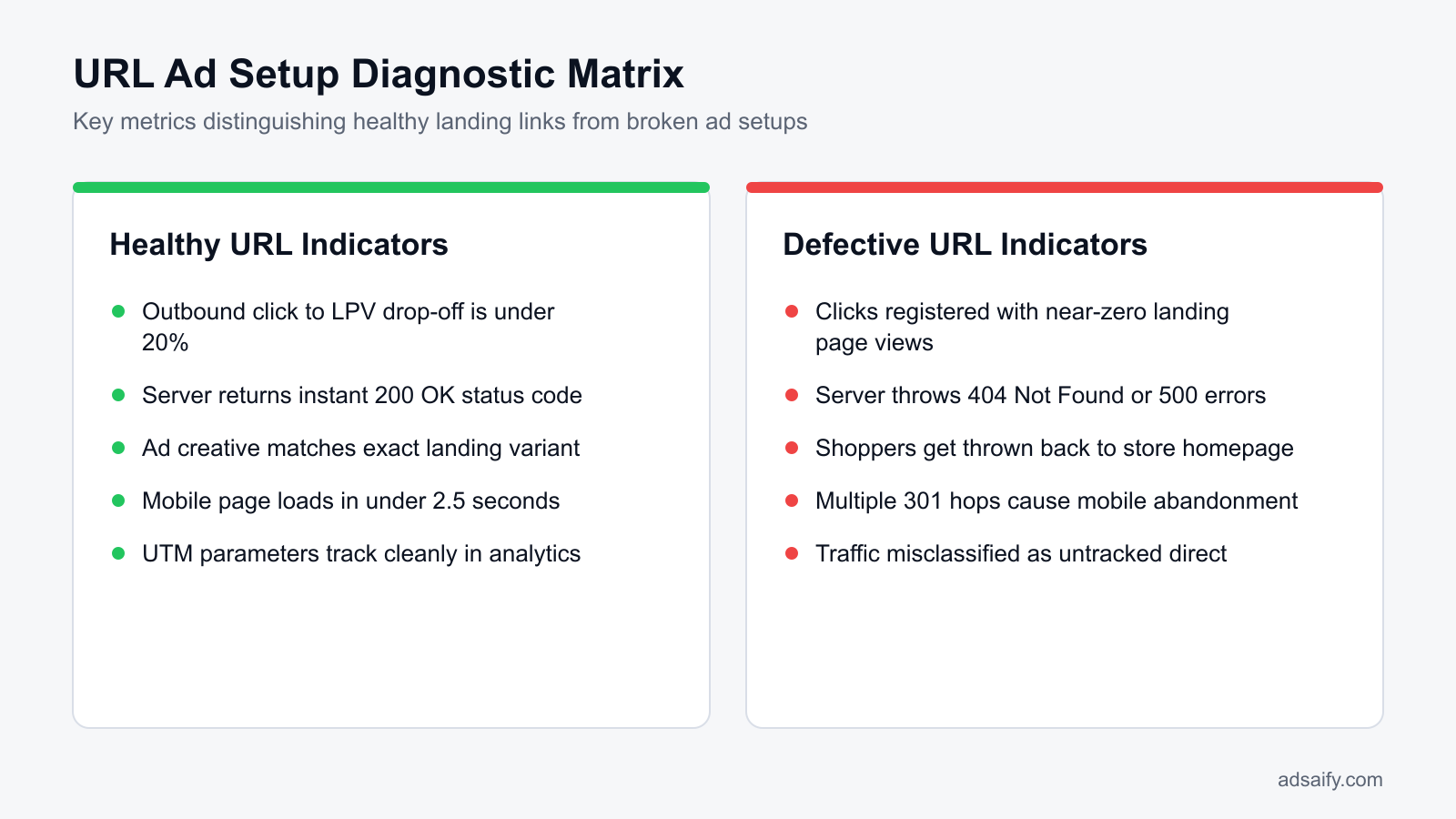
A normal drop-off between Meta Link Clicks and Landing Page Views ranges between 15% and 25%. A marketer calculates drop-off by dividing Landing Page Views by Link Clicks. If an ad registers 1,000 Link Clicks, achieving 750 to 850 Landing Page Views reflects standard mobile network latency, browser pre-fetching, and accidental clicks where users leave before page scripts fire. A drop-off exceeding 30% indicates slow server response times, unoptimized redirect hops, or broken links that require immediate debugging.
Why do URL redirection errors happen when AI generates ads from links?
URL redirection errors happen during AI ad generation when automated scrapers fail to extract dynamic query strings, execute client-side JavaScript, or bypass localized routing scripts. These failures occur because automated scrapers request basic HTML headers, causing platforms to drop product variant parameters, default to incorrect storefront currencies, or trigger redirection loops.
Technical causes of link failures in AI campaign workflows
E-commerce platforms like Shopify and WooCommerce append variant identifiers using query strings such as ?variant=123456. Many AI scrapers strip these parameters to find what they consider the canonical link, inadvertently sending traffic to an unselected or sold-out default option. Additionally, modern web stores built as a SPA (single-page application), which is a website that dynamically rewrites the current web page rather than loading entire new pages from a server, often fail under simple scrapers that do not execute client-side JavaScript.
Automatic geo-location and currency scripts also derail ad performance by intercepting ad clicks and forcing a 302 temporary redirect to a regional directory, which often strips ad tracking tokens. When setting up campaigns, advertisers using AI tools like Adsaify benefit from clean URLs; Adsaify analyses a business from its website URL to draft the campaign, but pasting URLs cluttered with session IDs or search queries can skew the input. Creating a verified link on the Adsaify registration portal helps prevent upstream scraping errors.
| Issue | Mechanism | Impact on Meta Traffic | Technical Solution |
|---|---|---|---|
| Stripped Variant ID | Scraper strips query parameters from product links | Shopper lands on default or out-of-stock color | Preserve explicit variant query strings in final ad link |
| JavaScript SPA Rendering | Automated scraper cannot process client-side DOM | Tool extracts store homepage rather than product URL | Supply direct server-rendered product endpoint |
| Geo-IP Redirection | Store script forces a redirect to regional store directory | Redirect chain strips UTM tracking and inflates bounce rate | Link directly to localized market path in ad settings |
| Session Parameter Clutter | Pasting URLs containing admin or search tokens | Server cache misses occur and tracking fails | Clean URLs down to canonical path before inputting |
Why isn't copying the URL straight from my Shopify browser bar sufficient?
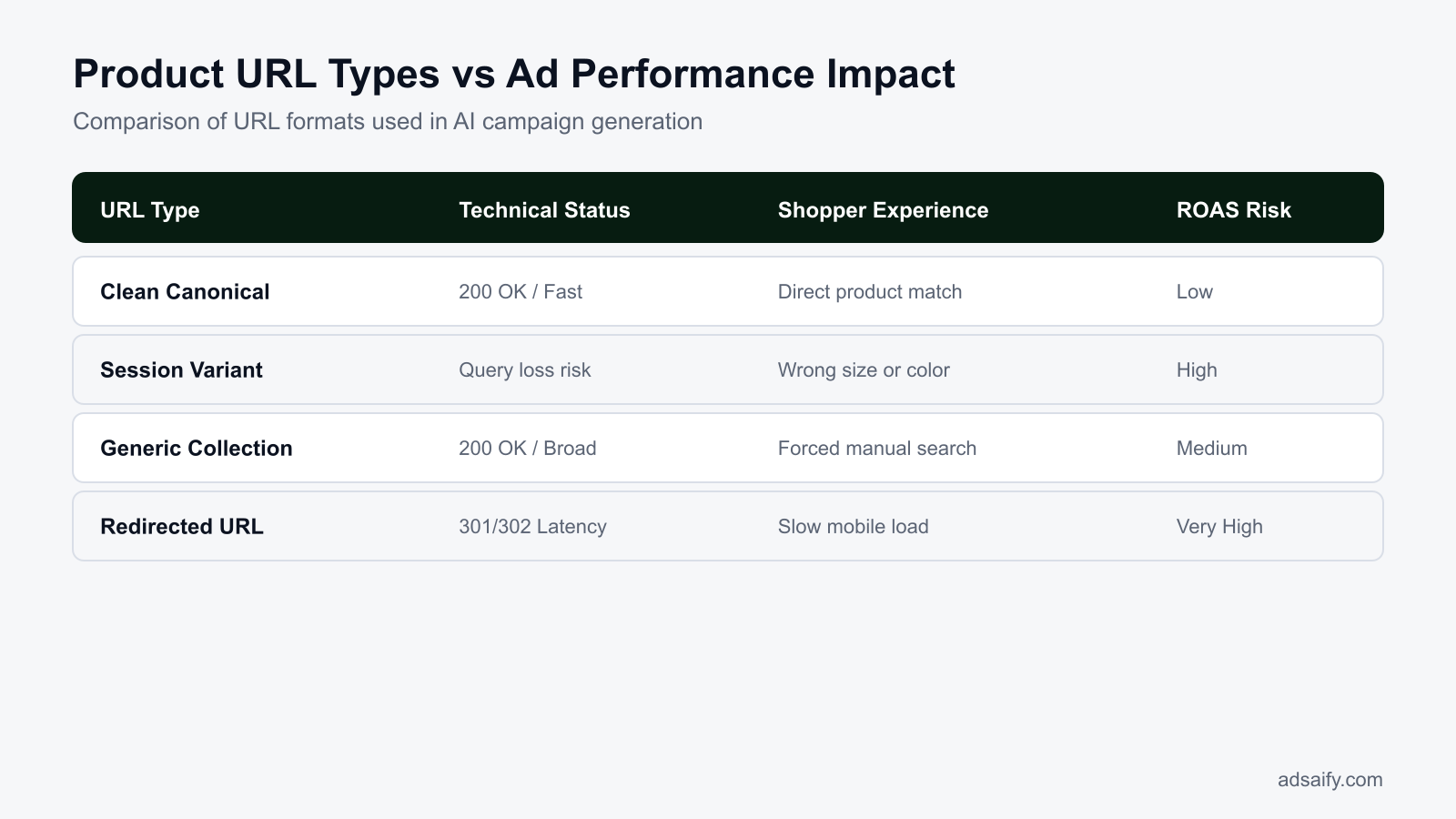
Copying a product URL directly from a Shopify browser address bar often includes dynamic session parameters, collection paths, or temporary search queries rather than the clean canonical link. If an administrator clicks through an internal search or specific tag filter, the resulting URL might look like /collections/sale/products/item?variant=123&_pos=1. Feeding this non-canonical URL into ad platforms causes redirect latency or caching errors when external shoppers load the page, diminishing conversion rates before the shopper even sees the product.
What does a broken product URL cost an e-commerce business?
A broken product URL costs an e-commerce business wasted advertising spend, higher delivery costs, and degraded algorithm performance. Every paid click landing on an error page produces a zero-conversion session, triggers Meta auction penalties that raise cost per mille (CPM), breaks signal tracking for conversion optimization, and permanently lowers overall return on ad spend (ROAS).
Direct Budget Waste and Auction Penalties
CPC (cost per click) is the fee charged by Meta whenever a user interacts with an ad link. When a paid click directs traffic to a 404 HTTP status code, which is an error response indicating a missing server resource, that fee is charged immediately with zero chance of revenue return. Simultaneously, Meta tracks post-click landing page experience. High bounce rates signal low user value, causing Meta's auction algorithm to degrade the ad's Quality Ranking inside Meta Ads Manager. As quality scores collapse, CPM (cost per thousand impressions, measuring the cost to deliver 1,000 ad impressions) climbs steeply, requiring higher ad spend simply to reach the same audience size.
Broken Attribution and Revenue Loss
ROAS (return on ad spend) measures the revenue generated per unit of currency invested in advertising. A non-functioning product URL severs the attribution feedback loop between an online storefront and Meta. Meta Pixel (a client-side tracking snippet) and Conversions API (a server-to-server tracking pipeline that sends web events directly to Meta) fail to trigger standard events such as ViewContent or AddToCart. Without this data intake, an ad set cannot exit the learning phase, trapping campaign budgets in erratic delivery patterns. Furthermore, prospective buyers encountering a dead page rarely search an online catalog manually; they abandon the session, diminishing brand trust and suppressing customer lifetime value.
Before launching ad spend, run this pre-launch link validation checklist:
- Inspect destination URLs for accurate SKU and variant query strings.
- Review HTTP response status codes across staging and production domains.
- Check whether automated inventory stock-outs trigger unannounced page deletions.
- Confirm Meta Pixel and Conversions API track valid events on every product route.
- Monitor the Ads Manager Quality Ranking column for unexpected performance drop-offs.
- Audit server redirect chains to ensure tracking parameter persistence.
Does Meta automatically pause ads that point to broken or error URLs?
Meta does not reliably pause ads that point to broken or dead destination URLs in real time. While automated policy crawlers periodically review destination pages for policy compliance and reachability, campaigns with 404 errors or broken redirect chains often continue running and consuming daily budget indefinitely. The system treats silent HTTP failures as normal ad delivery, leaving advertisers fully responsible for detecting dead endpoints and pausing non-functioning creative assets inside Meta Ads Manager.
How do you diagnose broken links, redirect lag, and variant drop-offs?
Diagnose broken links, redirect lag, and variant drop-offs by checking HTTP status codes, reconciling Meta Ads Manager click metrics against landing page views, testing clean browser sessions, and reviewing web analytics error reports. This process identifies whether traffic loss stems from server misconfigurations, stripped query parameters, or slow page redirects before ad budgets deplete.
Technical Auditing and Ads Manager Metrics
Begin a technical diagnosis by evaluating HTTP response headers using browser developer tools or server inspection utilities. An optimal ad destination URL yields a clean 200 OK status code. If an inspection reveals 301 Moved Permanently or 302 Found redirect chains, query parameters that designate specific product variants—such as color or size—are frequently dropped or malformed during transit, pushing buyers to unselected defaults.
In Meta Ads Manager, compare the "Outbound Clicks" metric against "Landing Page Views". Outbound Clicks measure raw clicks leaving Meta platforms, whereas Landing Page Views register only when a user successfully loads the destination page containing an active Meta Pixel. A widening gap between these two metrics signals severe redirect latency, slow mobile load speeds, or broken endpoints.
Incognito Testing and Analytics Isolation
Verify product URLs in private or incognito browsing sessions to replicate a first-time ad click without cached assets, cookies, or existing shopping cart sessions. Direct-to-consumer stores often mask errors for authenticated store administrators while external mobile shoppers receive broken layouts or missing variant selectors.
In GA4 (Google Analytics 4, a web analytics platform that tracks user interactions), navigate to the "Pages and screens" report. Set the primary dimension to "Page title" and filter for titles containing "Page Not Found" or "404". Add a secondary dimension of "Session source / medium" filtered to facebook / cpc or instagram / cpc. This isolates precisely which Meta campaigns drive paid traffic into dead endpoints.
| Diagnostic Symptom | Metric Indicator | Underlying Technical Cause | Corrective Action |
|---|---|---|---|
| Immediate 404 error | Zero Landing Page Views despite high Outbound Clicks | Expired product handle or deleted URL slug | Update the ad destination URL to the active product page |
| Variant drop-off | Traffic lands on default variant or generic category page | Query string parameters stripped by unconfigured 301 redirect | Configure web server rewrites to preserve trailing query strings |
| Redirect latency drop | Landing Page Views drop below 60% of Outbound Clicks | Multiple chained 301/302 redirects slowing mobile load times | Link ads directly to the final canonical URL endpoint |
| Server timeout | Elevated 504 Gateway Timeout log entries in GA4 | Paid traffic spikes overwhelming unoptimized backend resources | Enable edge server caching or scale hosting capacity |
Below what percentage threshold does click-to-page-view ratio indicate a URL issue?
A click-to-page-view ratio below 70 percent indicates a significant URL, redirect, or landing page issue. To calculate this, divide Landing Page Views by Outbound Clicks inside Meta Ads Manager. Normal mobile drop-off rates due to network fluctuations range between 15 and 25 percent, maintaining a ratio above 75 percent. If the ratio drops below 70 percent, inspect the link immediately for slow redirect hops, HTTP error codes, or unoptimized mobile scripts that disrupt page loading.
If you would rather not set up each of these steps by hand, try it in Adsaify: your first ad is free, so there is nothing to lose. Create a free account.
What checks must you run before launching an ad campaign from a product URL?
Before launching an ad campaign from a product URL, you must verify slug stability, confirm mobile stock availability, test page speed thresholds, and validate Meta tracking events. Running these checks ensures traffic arrives on a functioning destination page without redirect delays, broken checkout scripts, or lost conversion signals in Meta Events Manager.
Auditing URL Slugs, Stock Levels, and Page Speed
A canonical URL is an HTML link element with the attribute rel="canonical" that tells web crawlers and ad bots the authoritative version of a webpage. If an e-commerce platform automatically rewrites a product handle or adds dynamic session IDs, the link can cause redirect chains. You must confirm that the target slug remains permanent and does not redirect to a category archive.
Next, check inventory states across all sizes and colors. A campaign sending paid traffic to an out-of-stock item wastes your media budget instantly. Load the page on simulated mobile viewport widths in Google Chrome Developer Tools to ensure the primary "Add to Cart" button remains sticky, fully visible, and unblocked by promotional cookie banners or chat widgets.
Page loading latency must stay below three seconds on standard mobile connections. When redirects consume two to three seconds before delivering the document object model, prospective buyers abandon the session. Run the product link through Google PageSpeed Insights and address heavy uncompressed product images before turning on ad spend.
Validating Signal Delivery in Meta Events Manager
Meta Pixel is a snippet of JavaScript code placed on an e-commerce website that tracks user interactions for ad measurement and optimization. Conversions API (CAPI) is a Meta server-side tool that shares customer actions directly from a website's web server to Meta Ads Manager to preserve signal reliability.
Navigate to Meta Events Manager and open the Test Events tool. Open your target product URL in a separate browser tab to verify that a ViewContent event fires immediately. Check that the event payload passes the exact product ID, currency, and value that matches your Meta product catalog.
- Inspect the product slug to ensure no temporary promotional paths or trailing redirects exist.
- Verify in-stock inventory thresholds for the specific product variants featured in your ads.
- Tap the Add to Cart button on multiple mobile device viewports to confirm script responsiveness.
- Audit the mobile load time to confirm primary page elements render in under three seconds.
- Open Meta Events Manager Test Events to confirm the ViewContent event fires without errors.
- Cross-reference browser Pixel events with Conversions API server events for accurate deduplication.
Does using a canonical URL structure actually affect paid ad performance?
A canonical URL structure directly affects paid ad performance by preventing tracking fragmentation and redirect latency. When paid traffic hits non-canonical URLs that redirect to the primary address, the redirect strips URL parameters, delays page render times, and can drop Meta Pixel events before firing. Directing ads to clean canonical links preserves UTM data, stabilizes bounce rates, and ensures that Meta Ads Manager accurately attributes conversion events to the correct ad set.
How do you set up error-free, high-ROAS Meta ads from a product link?
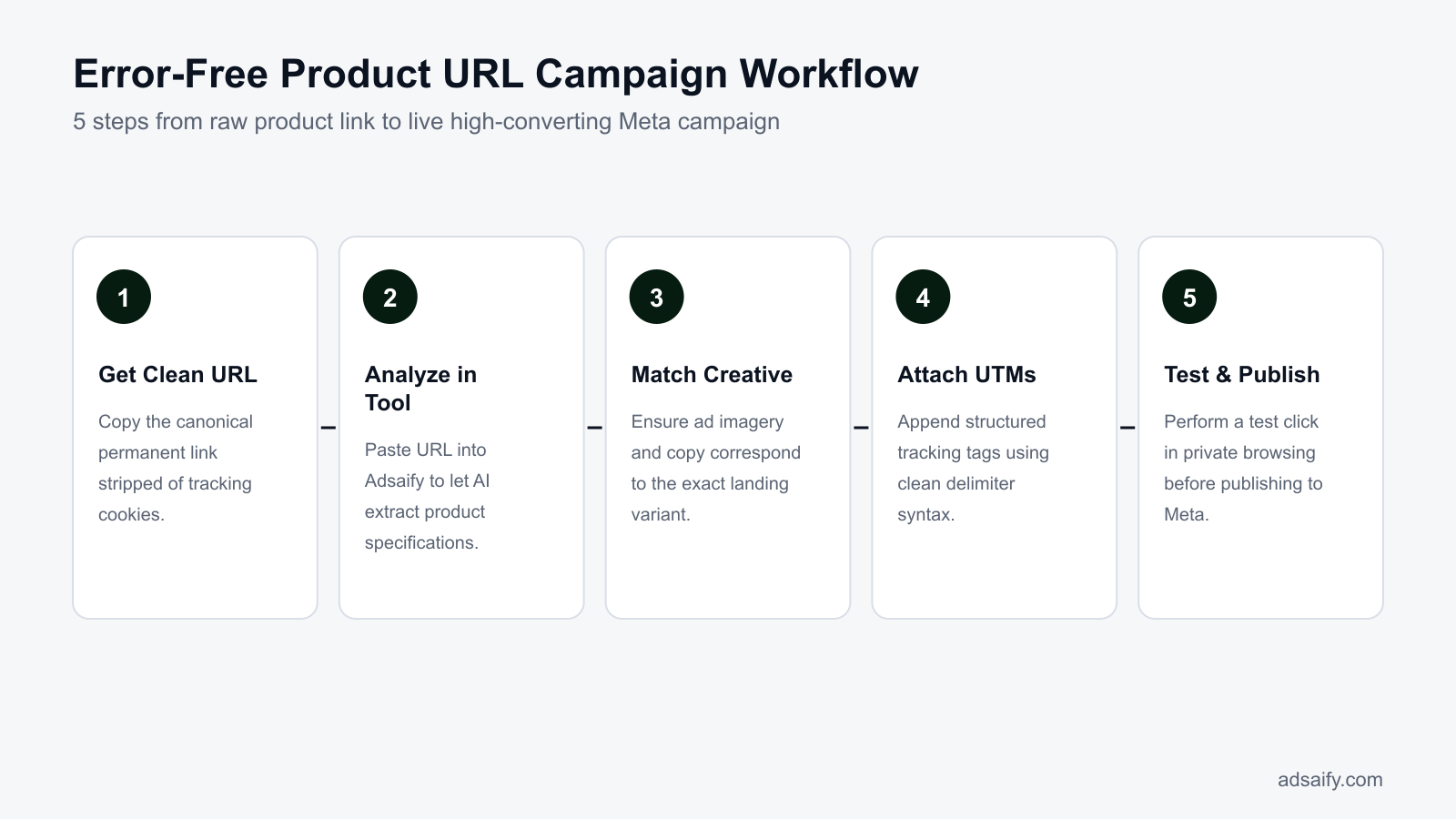
To set up error-free, high-ROAS Meta ads from a product link, submit the clean canonical URL into an automation tool, verify variant congruence, append delimited tracking parameters, and test the link preview. ROAS (return on ad spend) is a marketing metric measuring revenue generated for every dollar spent on advertising.
Extracting Data and Aligning Creative Assets
When you start a campaign using Adsaify, entering a single canonical product link allows the tool to analyse the page and draft campaign assets, targeting suggestions, and ad copy. You can register for an account to run your first ad for free. Ensure the URL you input points strictly to the individual item rather than a generic collection page.
Ad creative congruence is critical for e-commerce conversion rates. If your ad graphic showcases a tan leather bag, the destination link must display that specific colorway above the fold. Forcing a shopper to select their intended color from a dropdown list after clicking your ad introduces drop-off points that lower your conversion rate.
Structuring UTM Strings and Preview Validation
Tracking parameters must follow standard URL encoding rules to prevent broken links. The first parameter attached to a link must start with a question mark delimiter, while every subsequent key-value pair must connect with an ampersand delimiter. If your base URL already contains a question mark, appending another question mark breaks the destination link and causes a 404 error.
Before publishing from Adsaify into your Meta ad account, use the live destination preview button. This launches the fully resolved URL in a clean browser session, allowing you to confirm that tracking parameters populate and the correct page variant renders without errors.
- Input canonical URL — The marketer submits the clean product link into Adsaify to initiate the automated catalog and copy scrape.
- Audit extracted data — The user inspects the extracted product details and pricing to verify that the imported features match current product inventory.
- Select ad creatives — Adsaify generates campaign copy and creative options, prompting the marketer to choose visual assets that match the specific landing page variant.
- Append tracking parameters — The advertiser configures dynamic URL parameters using correct question mark and ampersand delimiters to ensure clean analytics tracking.
- Trigger live link test — The user executes a test click inside the campaign draft preview to ensure the landing page loads without redirects.
- Publish to Meta — Adsaify exports the validated campaign directly into the connected Meta ad account for immediate delivery.
Can Adsaify distinguish different variant prices when scanning the product link?
Adsaify extracts the visible price displayed on the canonical product URL provided during initial setup. If a product page presents a price range or dynamically updates pricing through on-page dropdown selectors, Adsaify captures the base price loaded in the page markup. Marketers targeting a specific high-tier variant must supply the unique variant URL or manually confirm that the generated ad copy reflects the exact price seen when the customer lands on the page.
Step-by-step example: Launching a flawless campaign from a leather bag product URL
Launching a flawless Meta ad campaign from a product URL requires cleaning the destination link of tracking parameters, preserving variant-specific parameters, generating aligned ad creatives, and deploying protective budget automation rules. Following these sequential steps prevents traffic drops, protects your ad spend from broken routing, and guarantees that shoppers land directly on the exact matching item.
Cleaning the destination URL and isolating the specific product variant
Consider an e-commerce leather goods boutique allocating a daily budget of 1,500 TL to promote its bestselling handcrafted brown backpack. Often, links copied directly from browser sessions contain volatile session parameters, user tokens, or site search queries, such as example.com/products/backpack?color=brown&session_id=987abc&source=internal_search. To prevent routing conflicts, you must strip out the volatile tracking tags while retaining the specific variant parameter. The clean destination URL for the ad setup must read precisely as example.com/products/backpack?color=brown. Retaining the ?color=brown query parameter ensures the page dynamically selects the brown variant, matching the visual creative and preventing buyer confusion.
Generating campaign assets with Adsaify and publishing to Meta Ads Manager
After finalizing the clean variant link, enter the destination URL into Adsaify to analyze the product details directly from the webpage. Adsaify reads the backpack's product title, material specifications, and pricing to draft targeted ad copy variations, suggest interest-based audiences (such as everyday carry gear and premium leather accessories), and generate contextual image and video assets. After reviewing and approving the generated assets, publish the campaign directly from the tool into your connected Meta ad account under an ad set optimized for the Purchase standard event.
Configuring automated protection rules to eliminate wasted spend
To shield the 1,500 TL daily budget from technical site outages or silent link failures, set an automated rule directly within Meta Ads Manager or via Adsaify automation rules. Configure the rule condition: if the ad spend reaches 300 TL and the Landing Page Views metric equals 0 over the current day, automatically pause the ad. In this leather boutique example, this protection prevents the system from burning the entire 1,500 TL allocation whenever server hiccups, inventory stockouts, or theme updates break the variant landing page.
Does launching separate campaigns for individual variant links split my budget too thin?
Launching separate campaigns for individual variants will fragment your budget and prolong the learning phase if your daily spend cannot sustain roughly 50 conversion events per ad set each week. Instead, consolidate variants within a single campaign using dynamic product ads or create dedicated ad sets within one campaign only for your top-performing, high-inventory variants. This structure concentrates ad spend, stabilizes delivery, and avoids running underfunded ad sets that underperform.
How do you verify that URL fixes and landing page alignment worked?
You verify that URL fixes and landing page alignment worked by auditing the ratio between Outbound Clicks and Landing Page Views, tracking on-site engagement metrics, and reviewing Meta delivery diagnostics. A successful deployment eliminates redirection bottlenecks, lowers bounce rates, lifts your Ad Quality Ranking in Meta Ads Manager, and attributes downstream purchase events accurately back to the specific creative.
Auditing click loss and verifying on-site engagement
The primary diagnostic metric in Meta Ads Manager is the drop-off between the Link Clicks metric (or Outbound Clicks) and the Landing Page Views (LPV) metric. LPV (Landing Page View) is a Meta reporting metric that counts how many times a person loaded the destination webpage after clicking an ad link. A healthy campaign maintains a drop-off rate below 20%, calculated as ((Outbound Clicks - Landing Page Views) / Outbound Clicks) * 100. If drop-off exceeds 20%, shoppers are abandoning the page during redirection lag or bounce due to link formatting issues. Simultaneously, review your web analytics platform: resolving link and content mismatches directly correlates with a reduction in bounce rate and a sustained increase in average session duration.
| Audit Area | Healthy Metric Threshold | Misaligned / Broken Link Indicator | Corrective Action Required |
|---|---|---|---|
| Click-to-LPV Ratio | Drop-off stays below 20% | Drop-off exceeds 35% | Remove redirect chains and optimize landing page load speed |
| Quality Ranking | Average or Above Average | Below Average (Bottom 20% of ads) | Align ad copy and imagery precisely with the landing page offer |
| On-Site Session Time | Over 45 seconds average duration | Under 10 seconds average duration | Ensure variant parameters preselect the advertised item model |
| Event Attribution | Add to Cart fires per creative ID | Purchases attribute only to account level | Embed clean URL parameters and verify Meta Pixel standard events |
Evaluating delivery diagnostics and attribution consistency
Meta provides diagnostic feedback through the Quality Ranking column inside Meta Ads Manager. When destination links accurately reflect ad messaging, your Quality Ranking rises from 'Below Average' to 'Average' or 'Above Average'. Finally, inspect the Events Manager dashboard to confirm that Add to Cart and Purchase standard events record correctly. Match rates between ad clicks and completed transactions indicate that browser redirects are not stripping Meta Click Identifiers (fbclid) or breaking session cookies across your checkout flow. If technical tracking issues persist, log in at Adsaify to review your campaign setup and streamline your ad parameters.
How long after launching an ad campaign does click-to-LPV data become statistically reliable?
Click-to-Landing Page View data becomes statistically reliable once an individual ad gathers between 100 and 200 unique Outbound Clicks, which typically takes 24 to 48 hours under adequate budgets. Analyzing drop-off rates on fewer than 100 clicks produces misleading conclusions caused by temporary mobile network latency, localized server fluctuations, or transient tracking delays within the Meta reporting interface.
Want to see this in your own account? Enter your website address and Adsaify drafts the campaign for you. The first ad is free. Try it now or log in.
What maintenance routine prevents broken ad links and redirection drift?
A structured maintenance routine prevents broken ad links and redirection drift by scheduling continuous tracking audits, automated alerts, and inventory checks across active campaigns. Regularly monitoring live landing pages ensures that Meta ad spend directs shoppers to in-stock products without encountering slow redirects, broken destination URLs, or untracked analytics sessions.
In Meta Ads Manager, URL failures directly inflate acquisition costs. Landing page view (LPV) is a Meta Ads metric that measures when a person clicks an ad link and successfully loads the destination page. UTM (Urchin Tracking Module) parameters are standardized text tags appended to URLs to monitor campaign traffic inside analytics platforms. To safeguard marketing capital against silent link decay, implement the following recurring maintenance schedule:
- Daily: Check the Delivery column and Account Quality alerts in Meta Ads Manager to catch disapproved ads or broken landing page errors flagged by Meta systems.
- Daily: Monitor Cost per Landing Page View in your reporting dashboards; you can use Adsaify automation rules to automatically pause ad sets when Cost per Landing Page View spikes 3x above your account baseline due to site crashes or redirect errors.
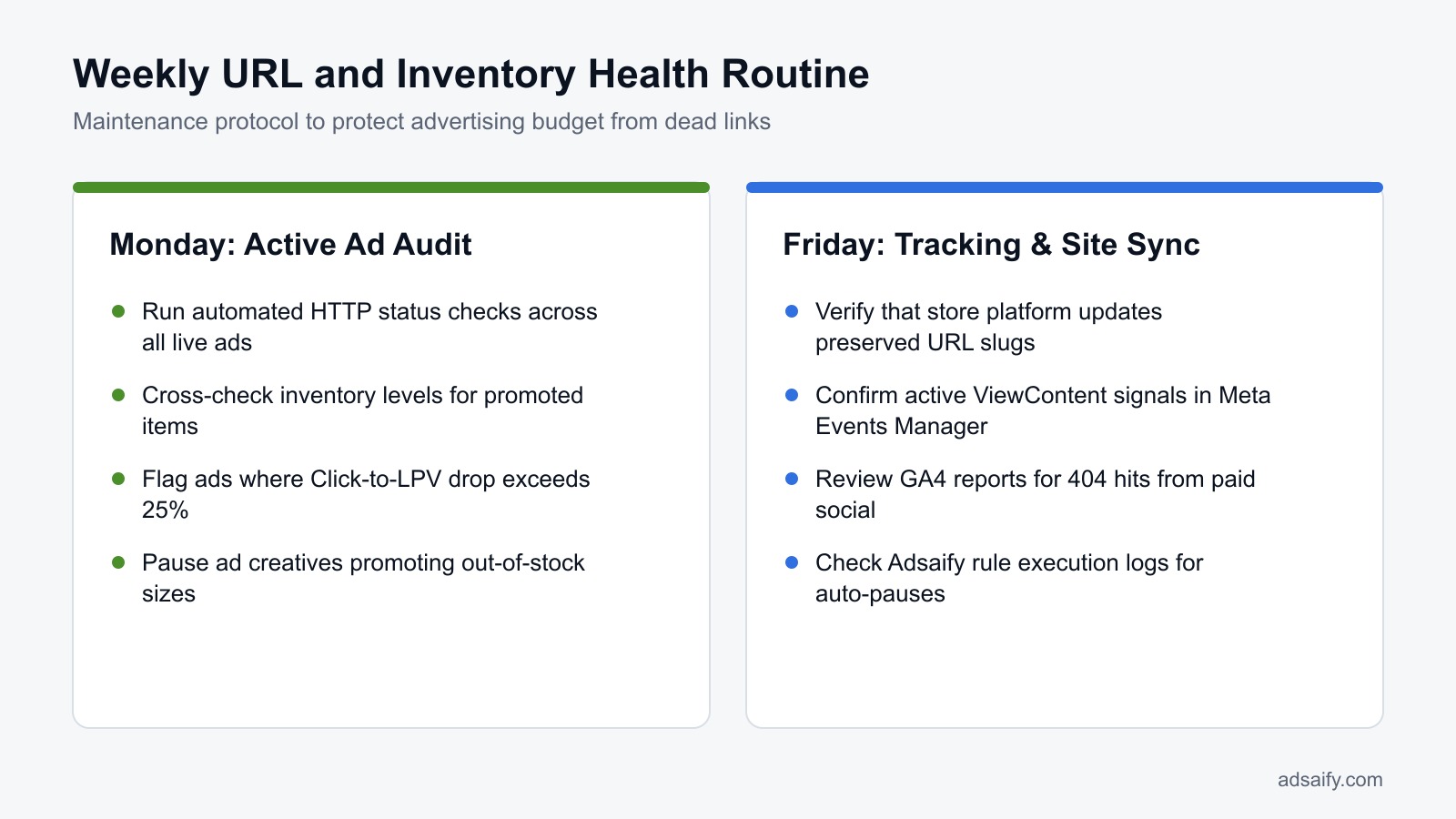
- Weekly: Perform an inventory synchronization between your e-commerce platform and active Meta ads to detect creatives promoting out-of-stock items or discontinued variations.
- Weekly: Run automated URL health checks across active campaign destinations immediately after theme updates, content management system upgrades, or product slug rewrites.
- Bi-weekly: Test live ad links on physical iOS and Android devices to verify that in-app browser sessions load variant selectors and checkout buttons without script friction.
- Monthly: Perform a UTM hygiene review inside web analytics tools to verify that ad traffic correctly attributes revenue without parameter fragmentation or lost referral tags.
Should I 301-redirect out-of-stock product links to a similar item instead of pausing the ad?
No, you should pause the ad or update the creative rather than creating a 301 redirect to an alternative product. A 301 redirect is a permanent server-side status code indicating a permanent page move. When shoppers click an ad featuring a specific item and arrive at a different product, bounce rates spike, customer trust drops, and Meta ad delivery algorithms penalize the account for poor post-click engagement. Pause the ad until stock returns.
What are the most common product link ad setup mistakes and how to fix them?
The most common product link ad setup mistakes stem from broken destination URLs, improper tracking syntax, and misaligned inventory. Marketers resolve these issues by auditing destination links, applying standardized query parameters, testing mobile render times, and ensuring that advertised product variants match the exact landing page availability.
Routing ads to generic homepage or category pages
Sending specific product ad traffic to a generic homepage forces shoppers to search for the item manually, driving bounce rates upward. Always paste the exact product page URL into the Website URL field in Meta Ads Manager so buyers reach the advertised item instantly.
Inserting duplicate question marks in tracking parameters
Adding a second question mark instead of an ampersand when building UTM strings breaks web server parsing and causes 404 errors. Use a single question mark to initiate query parameters, followed by ampersands to separate keys, or build campaigns with Adsaify to eliminate syntax mistakes.
Directing mobile ad traffic to heavy landing pages
Directing mobile shoppers to uncompressed product pages that take longer than five seconds to load causes high abandonment before the Meta pixel fires. Compress product media, remove unnecessary tracking scripts, and verify mobile load times inside Google PageSpeed Insights.
Advertising product variants that are out of stock
Promoting a specific color or size in ad creatives when that selection is sold out frustrates buyers and lowers conversion rates. The conversion rate is the percentage of visitors who complete an intended action. Always confirm that advertised variants are fully stocked on the destination page.
Using desktop links with missing mobile responsiveness
Some legacy online stores utilize separate URLs for mobile and desktop shoppers. Serving non-responsive desktop product URLs to Instagram and Facebook mobile feeds destroys the user experience. Configure responsive design frameworks so that a single canonical URL adapts seamlessly across all devices.
Omitting secure protocol prefixes
Entering raw web addresses without the explicit HTTPS protocol can trigger insecure browser warnings or multi-hop redirect chains that degrade tracking. Ensure that every destination link entered in Meta Ads Manager starts with a secure HTTPS prefix.
Do long UTM strings in the product link scare mobile shoppers away?
No, long UTM strings do not deter mobile shoppers because native mobile browsers and Meta in-app browsers hide URL query parameters inside the interface address bar. Shoppers observe the brand domain name rather than the full parameter string. However, improperly formatted query strings that create browser parsing errors will disrupt user experiences, making technical parameter accuracy essential.
When does product link optimization fail to fix poor Meta ad performance?
Product link optimization fails to fix poor Meta ad performance when the core friction lies within the commercial offer, technical checkout barriers, server latency, or creative mismatch rather than URL routing. Even if a product URL loads instantly without errors, uncompetitive pricing, unexpected shipping fees, broken payment gateways, and weak ad hooks prevent conversions.
Commercial Offer Competitiveness and Creative Hook Alignment
When an ad delivers qualified traffic to a working product page, conversions stall if the value proposition does not resonate. ROAS (return on ad spend) is a marketing metric measuring the revenue earned for each unit of currency spent on advertising. If your pricing sits significantly higher than competitors without clear justification, or if the promotional offer fails to provide perceived value, link integrity cannot salvage ROAS. Furthermore, a weak creative hook in Meta Ads Manager that sets inaccurate expectations causes immediate drop-offs, even when the URL resolves directly to the correct product variant.
Checkout Technical Friction and Server Bottlenecks
URL optimization stops at the product landing page, leaving downstream checkout steps vulnerable to friction. Common barriers include unconfigured payment gateways that reject transactions, forced account creation, and surprise shipping fees introduced at final billing. Moreover, tools like Adsaify or native Meta campaign workflows can publish clean URLs, but they cannot resolve web host outages or slow database response times. When server databases stall under peak ad traffic, link optimization cannot recover abandoned shoppers. For campaigns configured through Adsaify or Meta directly, server-side infrastructure remains the sole responsibility of the store's hosting provider.
- Compare retail pricing and product bundles directly against top market competitors.
- Audit the checkout flow by processing a live test transaction with real payment methods.
- Calculate shipping rates across multiple postal zones to eliminate surprise fees.
- Inspect server response times in your hosting control panel during traffic spikes.
- Align the visual hook and promise of the ad creative with the landing page headline.
- Analyze the drop-off ratio between the Initiate Checkout and Purchase metrics in Meta Ads Manager.
If all my URLs work perfectly but sales don't happen, what should I inspect next?
Inspect your conversion funnel drop-offs inside Meta Ads Manager by comparing Landing Page Views, Adds to Cart, and Purchases. If Landing Page Views are high but Adds to Cart are low, evaluate your pricing, product imagery, and social proof. If Adds to Cart are healthy but Purchases flatline, test your checkout process for hidden shipping costs, restrictive payment methods, or gateway errors.
What key technical terms must you know for product URL ad setup?
Key technical terms for product URL ad setup define the protocols, tracking mechanisms, and routing instructions that connect Meta ads to e-commerce storefronts. Understanding these concepts enables performance marketers to construct reliable ad destinations, prevent tracking discrepancies between Meta Ads Manager and web analytics, eliminate redirect latency, and maintain accurate conversion measurement across multi-variant product catalogs.
- Canonical URL: The master authoritative web address designated by a website to represent the primary version of a duplicate or multi-variant product page.
- Landing Page View (LPV): A Meta Ads Manager performance metric recorded only when the destination webpage code or Meta Pixel successfully finishes loading after an ad click.
- UTM Parameters: Dedicated tracking code tags appended to a destination URL to transmit traffic source, medium, and campaign data to external analytics platforms.
- Redirect Hop: A sequential server-side forwarding step, such as a 301 or 302 redirect, that delays browser rendering before reaching the final product page.
- Query String: The portion of a URL following a question mark that contains data fields and values used for filtering or tracking.
- 301 Redirect: A permanent server-level status code that automatically routes visitors and search engines from an old URL to a new target address.
- Deep Link: A destination URL that sends users directly to a specific product or in-app view rather than a general homepage.
- Meta Pixel: A snippet of JavaScript code placed on a website that tracks user actions and transmits conversion events back to Meta.
- Time to First Byte (TTFB): A web performance metric measuring the duration a browser waits between requesting a URL and receiving the initial data byte from the server.
- Event Match Quality (EMQ): A Meta metric scoring how effectively server and browser customer data matches against Meta user profiles for conversion attribution.
- Slug: The user-friendly, hyphenated ending portion of a URL path that specifically identifies a distinct product or landing page.
Are UTM parameters and Meta Pixel dynamic URL parameters the same thing?
UTM parameters and Meta Pixel dynamic URL parameters are distinct tracking mechanisms that serve different analytical tools. UTM parameters are static or dynamic tags appended to URLs specifically for third-party analytics platforms like Google Analytics to report traffic sources. In contrast, Meta dynamic parameters feed contextual ad data directly into Meta's advertising ecosystem to enrich Conversion API signals and optimize campaign delivery within Meta Ads Manager.
Audit your product URLs and safeguard your Meta ad budget
To prevent costly URL setup errors in Meta ad campaigns, follow a systematic verification workflow before launching. First, test every landing page on both desktop and mobile networks to confirm proper HTTPS status codes and responsive page rendering. Next, append tracking parameters cleanly in the designated URL parameter field rather than hardcoding complex query strings into the destination address. Finally, implement automated performance monitoring rules to monitor unexpected drops in conversions caused by broken links or stock depletion.
Begin by auditing your current active Meta ads today: export your destination links to check for broken paths, redirect loops, or missing product pages. If you want a structured setup that extracts landing page context cleanly while drafting copy, audiences, and creatives, register on Adsaify to test your first ad campaign without manual configuration mistakes.
Want to see this in your own account? Enter your website address and Adsaify drafts the campaign for you. The first ad is free. Try it now or log in.
Frequently Asked Questions (FAQ)
1. Is it mandatory to add UTM parameters when launching AI ads from product URLs?
UTM (Urchin Tracking Module) parameters are not technically mandatory for Meta ads to deliver, but omitting them prevents external analytics platforms from accurately attributing traffic. Meta can track conversions internally using the Meta Pixel and Conversions API without UTM tags. However, adding standardized UTM parameters in the dedicated URL parameters box ensures Google Analytics and internal reporting can verify sales data independently.
2. Can Adsaify automated rules pause ads when performance drops due to stock exhaustion?
Yes, Adsaify automated rules can pause ads when performance declines because an item is out of stock. While Adsaify does not check website inventory levels directly, users can set automated rules based on performance metrics such as cost per acquisition or conversion rate. When stock exhaustion causes conversions to halt and acquisition costs to spike beyond defined thresholds, the rule automatically pauses the ad.
3. Can running ads with broken 404 links lead to Meta ad account restrictions?
Yes, running Meta ads with broken 404 links can trigger ad rejections and eventual account restrictions. Meta policies require destination URLs to function properly and display relevant content matching the ad creative. If Meta automated review crawlers detect dead links, redirect loops, or non-functional landing pages repeatedly across campaigns, the advertising account may face lower trust scores, reduced delivery, or policy enforcement penalties.
4. Should I use different product URLs for desktop and mobile Meta ad placements?
You should not use separate destination URLs for desktop and mobile Meta ad placements if your website uses responsive web design. Modern ecommerce websites automatically adapt layout and elements based on screen width. Using a single responsive URL prevents parameter fragmentation and tracking discrepancies. Only split URLs if your infrastructure maintains separate, distinct subdomains for mobile devices without automatic server-side redirection.
5. What is the difference between dynamic catalog feed errors and single product URL errors?
Dynamic catalog feed errors occur across an automated data file that supplies product information, prices, and URLs to Meta Advantage+ catalog campaigns, often breaking multiple product links simultaneously. In contrast, single product URL errors affect only an individual ad creative where a user manually entered an incorrect, misspelled, or outdated website address. Catalog errors require feed file fixes, while single ad errors require editing ad settings.
6. Can I edit the destination URL slug of an active Meta ad without losing social proof?
Editing the destination URL of an active Meta ad typically resets its social proof, including likes, comments, and shares. Meta treats a destination URL change as a creative update, which creates a new ad variation and restarts the learning phase. To preserve engagement, advertisers often set up a 301 server-side redirect from the old URL to the new destination instead of altering the ad settings directly.
7. After how many seconds of loading time does the landing page view rate collapse?
Landing page view rates drop sharply when load times exceed roughly three seconds on mobile connections. A landing page view occurs only after the Meta Pixel successfully loads following an ad click. If mobile visitors encounter latency beyond a few seconds, users abandon the session before the tracking tag executes, creating a significant discrepancy between reported link clicks and recorded landing page views.
8. How does Adsaify scan the product URL during the first ad campaign setup?
When setting up an ad campaign, Adsaify scans the provided product website URL by reading page text, product details, and visual elements. The AI analyzes this landing page content to understand the business offerings, draft targeted audience suggestions, write relevant ad copy, and propose budget structures. It ensures campaign assets align directly with the destination page before publishing the draft to the user Meta ad account.
How can you try this with Adsaify?
The quickest way to apply the steps in this article to your own account is to try them. Adsaify analyses your business from your website address, drafts the campaign with an audience, ad copy, creative and a budget suggestion, and publishes it to your own Meta ad account once you approve.
- Your first ad is free: there is nothing to lose by trying.
- Your own ad account: the campaign runs in your Meta account and you stay in control.
- Images and video: generate ad creatives with AI or promote an existing Instagram post.
Create a free account and try your first ad · Already have an account? Log in.