Short answer: To stop ROAS drops when switching from an agency to an AI media buying platform, secure Business Manager pixel ownership, export proven creative assets, and shift budget gradually over two weeks instead of cutting ties abruptly. Launch initial campaigns inside the AI platform using historical winning structures to avoid sudden learning phase shocks.
You ended your agency contract to bring Meta ad management in-house with an AI tool, expecting lower overhead and faster execution, but revenue collapsed within forty-eight hours. Instead of steady sales, your campaigns are trapped in volatile delivery, cost per acquisition has doubled, and your ROAS (return on ad spend, the revenue generated for every unit of currency spent on advertising) has halved. The dashboard shows erratic spending patterns while your team scrambles to decipher inherited ad sets without clear campaign history.
This sudden performance dive occurs because cutting agency access overnight disrupts account continuity. When advertisers launch entirely new campaigns inside an AI system while pausing established agency structures, Meta’s machine-learning algorithm loses its recent conversion baseline and re-enters an expensive learning phase. Leaving this instability unchecked drains daily ad budgets on exploratory bidding, starves your pixel of consistent purchase signals, and forces your business to repurchase the exact audience data you already paid an agency to gather.
After reading this guide, you will be able to execute a seamless migration without risking your store's cash flow. You will discover how to audit agency asset ownership, extract historical creative winners, and implement a phased budget migration that protects operational efficiency. The following sections walk through diagnosing legacy campaign architectures, configuring an AI media buying workflow with tools like Adsaify, and applying weekly operational routines that keep in-house ad performance predictable.
Key Takeaways
- Secure primary ownership of Meta Business Manager, Pixel, and Catalog before ending agency contracts.
- Shift ad budget to the AI platform in 20 percent increments over two weeks rather than cutting campaigns overnight.
- Archive top-performing creative formats and copy structures to eliminate cold-start volatility in the AI platform.
- Track blended ROAS and net margins across total daily spend during the handover to spot performance slips early.
Why Does ROAS Plummet When Moving from an Agency to AI?
ROAS (return on ad spend) is the revenue generated for every currency unit spent on advertising. ROAS plummets during an agency-to-AI migration when advertisers abruptly disconnect tracking pixels, reset Meta machine learning, abandon calibrated bidding limits, and launch unproven creative assets simultaneously. These actions strip Meta of optimization data, causing delivery costs to spike.
Data Disconnection and Cold Learning Phases
The most immediate trigger for declining performance is the sudden loss of proprietary data assets. Agencies frequently build custom audiences, lookalike seed lists, and conversion tracking inside their own Meta Business Manager. When an advertiser terminates the agency contract, access to these assets often vanishes overnight. Losing access to a Meta Pixel—the piece of code placed on a website that tracks visitor actions—forces the new setup to run without historical conversion context.
Simultaneously shutting down high-performing agency campaigns throws ad delivery into chaos. In Meta Ads Manager, every ad set requires approximately 50 optimization events per week to exit the learning phase. Pausing mature campaigns cold and launching fresh ad sets inside an AI platform forces the delivery algorithm back into an uncalibrated exploration state, resulting in wild CPM (cost per thousand impressions) swings and erratic conversion rates.
Bidding Friction and Creative Deficits
Agency media buyers often rely on manual bidding safeguards, such as Cost Cap or Bid Cap thresholds, to prevent expensive auction entries. In contrast, modern AI platforms typically operate using lowest-cost auction mechanics or automated delivery rules designed to maximize volume. When an account shifts instantly between these paradigms without gradual budget allocation, the algorithm may aggressively enter high-cost auctions.
This structural friction is aggravated when the business lacks raw creative assets. If the departing agency withholds source files, the advertiser cannot feed top-performing visual hooks into the AI tool. Marketers utilizing Adsaify to draft campaigns and generate creative options must still provide high-quality source context or historical creative themes to establish stable baseline conversion rates.
For example, an e-commerce apparel brand spending 1,500 TL per day severed agency ties on a Friday. The owner immediately paused three agency Advantage+ sales campaigns maintaining a 3.8 ROAS and shifted the entire 1,500 TL daily budget to a new automated campaign. Because the pixel was unlinked from past purchase exclusions, CPM doubled from 45 TL to 90 TL within 48 hours. Marketers diagnosing this performance drop must inspect Meta Ads Manager for the Learning Limited status and compare cost per purchase trends against the agency baseline.
Where do I start if my agency created and owns the ad account and Pixel?
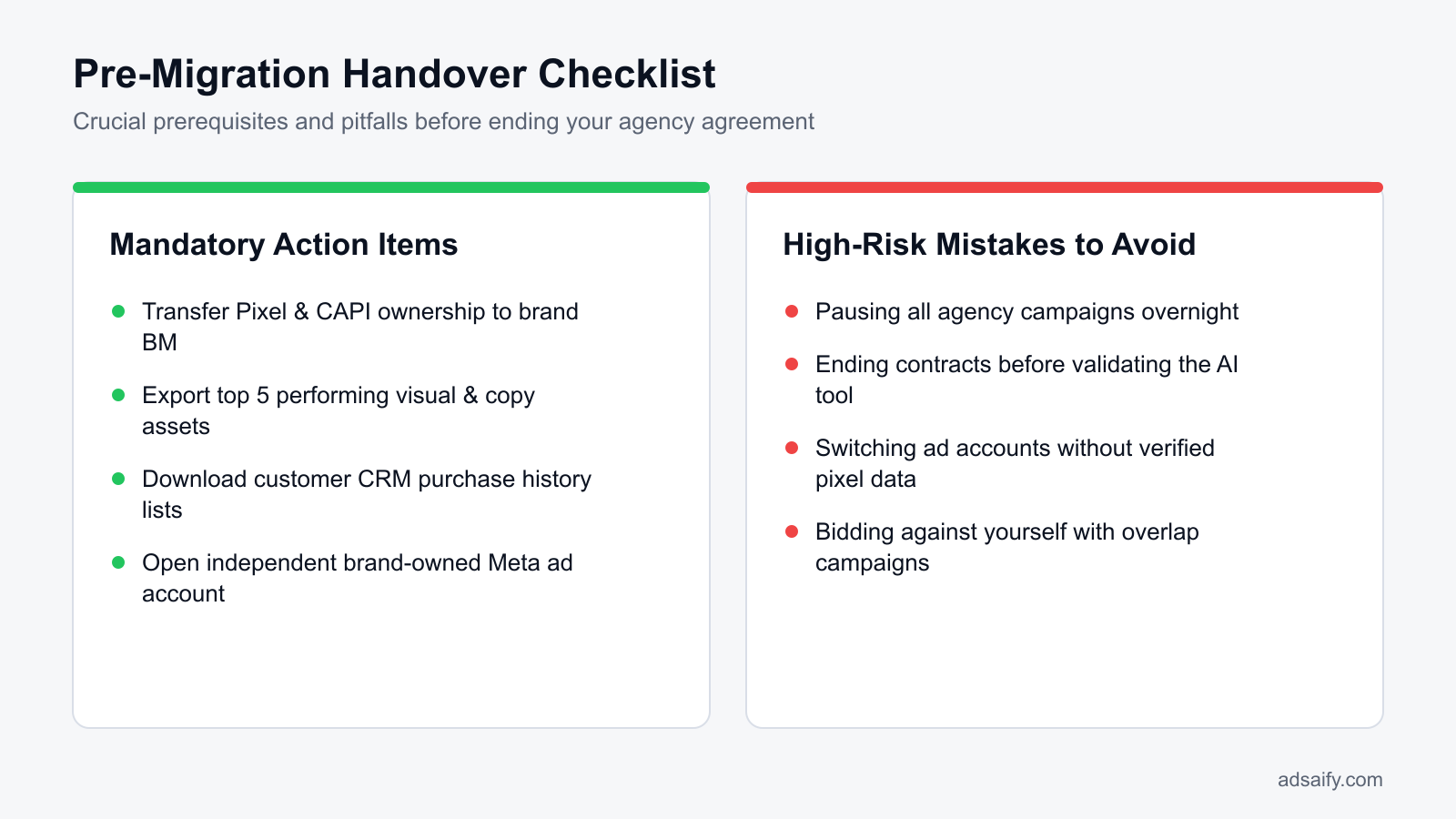
Begin by requesting an asset transfer inside Meta Business Settings rather than deleting the existing setup. Request your agency partner to assign full admin control of the Meta Pixel, custom audiences, and catalog directly to your own Meta Business Manager. If the agency refuses or cannot transfer ownership, generate a brand-new Meta Pixel immediately, install it alongside the existing tag via Google Tag Manager, and collect conversion signals for at least two to four weeks before launching AI-managed campaigns.
What Are the Root Causes Behind Ad Migration Failures?
Ad migration failures occur when advertisers launch automated campaigns without resolving tracking infrastructure, data retention, and auction mechanics. The primary root causes include locked historical performance data, aggressive budget pacing in cold ad sets, broken Conversions API connections, and auction overlap between overlapping ad accounts. These oversights cause erratic budget spending and inflated acquisition costs.
Data Silos and Budget Pacing Shock
Departing agencies often treat campaign logs, negative audience exclusions (such as past 180-day purchasers), and winning copy angles as proprietary property. When advertisers lose these assets, the AI media buying tool must rediscover audience preferences from scratch. This knowledge gap causes the algorithm to waste impressions on non-converting audience segments.
This challenge is intensified by budget pacing shock. Injecting a 100% daily budget into a newly published ad set prevents the Meta pacing system from distributing spend efficiently throughout the day. When Meta encounters an unseasoned ad set with high daily spend, it rapidly bids across accessible inventory to fulfill budget requirements, substantially lowering ROAS.
Tracking Disruption and Auction Competition
CAPI (Conversions API) is a Meta tool that shares customer actions directly from a website's server to Meta Ads Manager to improve measurement accuracy. When CAPI endpoints are hosted on agency cloud servers, terminating the agency relationship immediately breaks server-side signal ingestion. This degradation drops the Event Match Quality score in Meta Events Manager, blinding optimization algorithms to real conversion values.
Additionally, advertisers frequently trigger self-competition by running campaigns across both setups simultaneously. Running identical targeting across existing agency campaigns and new AI-generated campaigns causes auction overlap, forcing the advertiser to bid against themselves.
| Migration Failure Point | Primary Technical Symptom | Impact on Performance | Corrective Setting or Action |
|---|---|---|---|
| Withheld Audience Exclusions | High impression frequency on existing customers | Artificially high CPA on prospect campaigns | Rebuild 180-day purchaser Custom Audience and exclude it |
| Budget Pacing Shock | Rapid budget exhaustion within morning hours | Inflated CPM and unstable conversion volume | Scale budget upward in 15% to 20% increments every 48 hours |
| Broken Conversions API (CAPI) | Event Match Quality drops below 6.0 in Events Manager | Attribution gaps and delayed conversion reporting | Configure direct server-side gateway inside Meta Events Manager |
| Auction Overlap | Ad set flagged with high auction overlap percentage | Delivery stalls on one or both competing ad sets | Consolidate ad sets or apply strict audience exclusions |
What happens if I run ads via the AI platform without turning off agency ads first?
Running concurrent campaigns in both setups targeting the same audience triggers auction self-competition, known as auction overlap. Meta prevents duplicate ads from the same brand from competing directly against each other by entering only the highest-ranking ad into the auction. This suppresses impression volume for the secondary campaign, causes CPM inflation across both ad sets, and skews reporting data. You should use audience exclusions or transition daily spend incrementally rather than bidding simultaneously.
What Is the True Financial Cost of an Unplanned Migration?
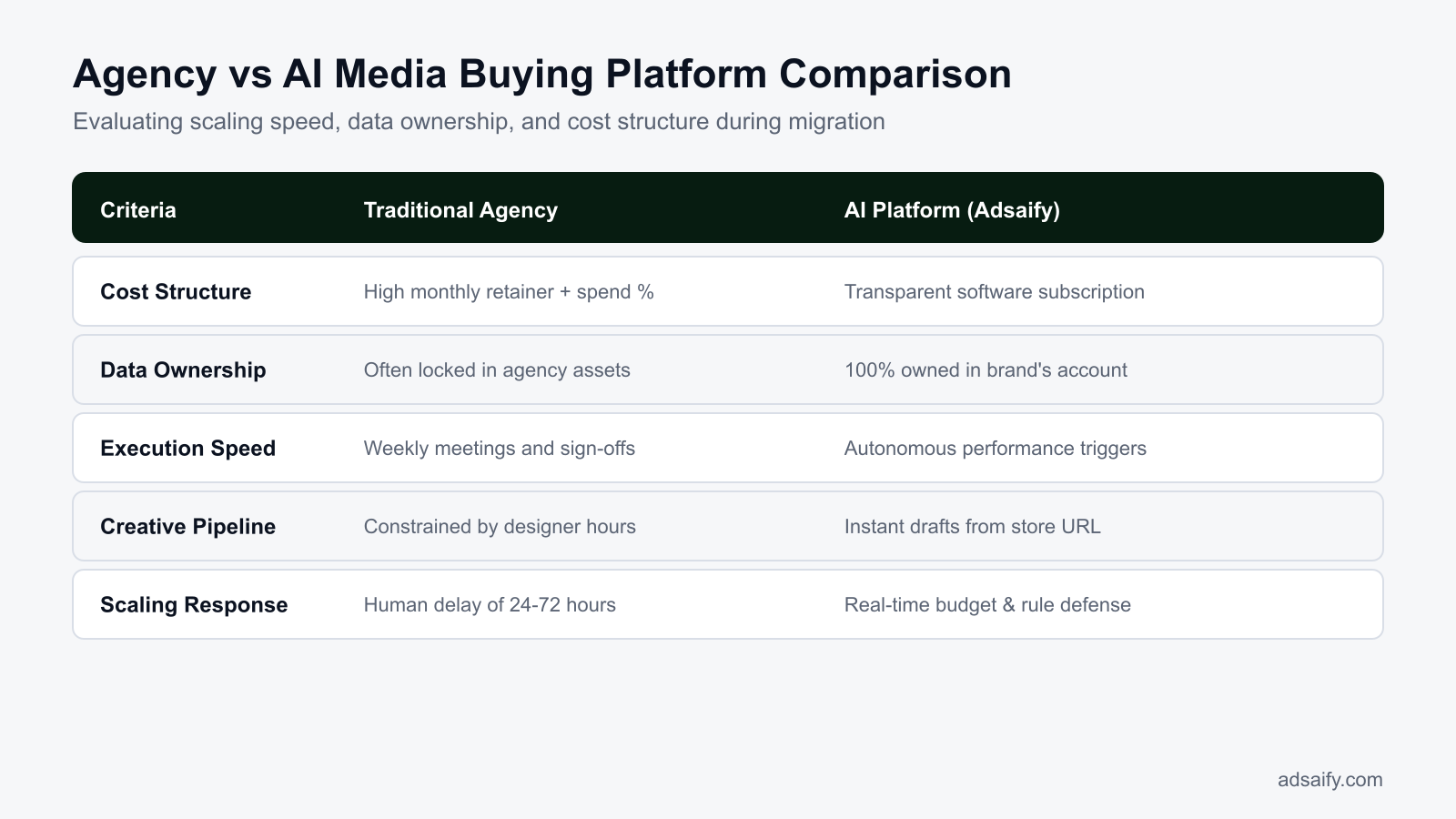
The true financial cost of an unplanned migration combines direct operational losses, diminished campaign efficiency, and compounding overhead expenses. Brands routinely experience steep CPA (cost per acquisition) spikes during algorithmic recalibration, duplicate overhead expenses from idle agency retainers, and severe cash flow suppression caused by delayed retail inventory turnover and interrupted remarketing pipelines.
The Compounding Mechanisms of Migration Revenue Loss
When an advertiser abruptly migrates campaigns without a structured buffer, performance destabilization hits several operational fronts simultaneously:
- Learning phase volatility: CPA (cost per acquisition) is the total advertising spend divided by the total number of attributed conversion events. Terminating agency campaigns abruptly resets the Meta auction algorithm, forcing new ad sets into an uncalibrated learning phase that frequently elevates CPA for 7 to 14 days while machine learning models search for conversion signals.
- Dead retainer burn: Terminating an agency relationship usually requires a 30-day or 60-day notice window. Paying a full agency retainer during an uncooperative or demotivated transition period creates double overhead if the in-house team deploys new software simultaneously.
- Inventory stagnation: Reduced daily conversion volume suppresses product sales velocity. Slower inventory turnover ties up working capital in unsold warehouse stock, decreasing liquidity needed for future operational expenses.
- Lost retargeting momentum: Failing to preserve high-intent custom audiences and pixel tracking data starves conversion campaigns. Abandoned cart recovery rates collapse when dynamic product ads lack continuous event history.
Checklist: Pre-Migration Financial Risk Audit
- Calculate baseline customer acquisition costs over the prior 60 days to define a clear cost-tolerance ceiling.
- Review contractual termination notice windows to avoid overlapping agency retainer fees and software expenses.
- Export historical customer purchase lists from your store back-end to rebuild warm audience segments.
- Adjust inventory reorder cycles to reflect a temporary 10-day slowdown in acquisition velocity.
- Verify that payment methods in Meta Ads Manager have sufficient credit lines to handle simultaneous campaign testing.
- Establish automated stop-loss account rules to automatically halt ad sets exceeding maximum acceptable cost thresholds.
How long does it typically take to recover net profit margins after a botched handover?
Recovering net profit margins after a disrupted ad account migration generally takes three to six weeks. The first two weeks involve rebuilding audience signal data and clearing the initial Meta learning phase across new ad sets. The subsequent two to four weeks require stabilizing cost per acquisition through continuous creative testing and conversion rate optimization on key landing pages. Margin recovery accelerates once retargeting pools repopulate and automated rules prevent unconstrained spend on underperforming creative assets.
How Do You Diagnose Your Current Agency Account Architecture?
Diagnosing your agency ad account architecture requires systematically auditing asset ownership in Meta Business Manager, cataloging creative files, analyzing 90-day campaign performance metrics, and reviewing contractual rights. This diagnostic ensures that your business maintains legal ownership of data assets and isolates historical performance benchmarks before transitioning media buying responsibilities to software.
Structural Ownership and Asset Integrity Audits
Begin inside Meta Business Settings under the "Accounts" and "Data Sources" menus. Verify whether your business owns the primary Meta Business Manager or if the agency merely granted you partner access. True ownership requires that the Meta Pixel (now listed under Data Sets), product catalogs, and primary Facebook and Instagram pages are listed directly within your organization's Business Manager.
Next, audit creative asset storage. Confirm that original high-resolution video files, design templates, and vector graphics are housed in company-controlled drives rather than agency-hosted repositories. In Meta Ads Manager, set the reporting window to the last 90 days. Identify the top 5 ad creatives by conversion volume and calculate target ROAS. ROAS (return on ad spend) is the monetary revenue generated divided by the gross advertising spend. Note the winning creative hooks, primary visual formats, and winning audience angles. When you register on Adsaify, the AI analyzes your website URL to generate campaign angles, creative copy, and suggested structures, but aligning your launch parameters with these 90-day historical benchmarks establishes realistic performance targets.
Finally, inspect the active Master Services Agreement. Locate termination clauses, intellectual property stipulations, and data handover requirements to ensure your brand legally retains all ad account optimizations, pixel event data, and published creative rights.
| Audit Checkpoint | Brand-Owned Healthy State | Agency-Dependent Risk State |
|---|---|---|
| Business Manager Ownership | Brand owns the parent Business Manager; agency is added as a Partner. | Agency owns the Business Manager; brand has only standard user access. |
| Pixel & Tracking Data Sets | Pixel resides in brand Business Manager with direct domain verification. | Pixel is owned by agency Business Manager; access terminates at contract end. |
| Creative Asset Repositories | High-resolution files and source templates reside in brand cloud drives. | Editable assets exist exclusively on agency-hosted local drives or tools. |
| Historical Benchmark Access | Full admin rights to export historical campaign data in Meta Ads Manager. | Restricted dashboard views or aggregated monthly reports without raw logs. |
| Contractual IP Provisions | Contract specifies all created campaign assets and audience data belong to brand. | Contract designates ad copy, campaign structures, and strategies as agency IP. |
How can I extract historical ad performance data if the agency refuses full transparency?
If an agency restricts your Business Manager access, navigate to Meta Ads Manager using any active analyst or advertiser seat to export raw campaign reporting. Select the maximum available date range, configure columns to include Spend, Purchases, Purchase ROAS, and Cost Per Purchase, and export the dataset as an XLSX or CSV file. Additionally, capture full-resolution exports of top-performing ad creatives and copy variations directly from the ad preview tool within Ads Manager before contract termination.
If you would rather not set up each of these steps by hand, try it in Adsaify: your first ad is free, so there is nothing to lose. Create a free account.
What Must You Prepare Before Connecting an AI Media Buying Tool?
To prepare before connecting an AI media buying tool, you must secure independent ownership of your Meta advertising assets, audit data tracking integrity, and organize historical creative assets. Completing these technical prerequisites prevents attribution loss, avoids campaign delivery delays, and equips the artificial intelligence with accurate store data for generating high-performing campaign structures.
Securing Asset Ownership and Technical Tracking
Open Meta Business Settings and ensure your internal organization owns the primary Meta Business Manager account. In the Ad Accounts panel, create a dedicated, brand-owned ad account rather than operating inside an agency-owned shell, granting your internal profile full administrative control. Navigate to Events Manager to audit your Meta Pixel and Conversions API (CAPI), which is a server-side data pipeline that transmits web events directly to Meta. Verify that the Purchase, Add to Cart, and View Content standard events maintain an Event Match Quality score above good thresholds, and confirm your catalog product feed synchronizes daily without missing product attributes.
Assembling Creative Assets and Brand Inputs
Before launching automated generation, build a centralized creative bank containing your top-performing marketing angles. Document your core product URLs, primary value propositions, verified customer pain points, and historically proven hook angles from past agency campaigns. Having these brand assets organized allows AI media buying software to generate accurate marketing copy and tailored visual assets that align with proven customer purchase motivations. Next, authorize Adsaify to access your clean, brand-owned ad account. The platform evaluates your e-commerce store URL, extracts product attributes, and drafts audiences, copy, creative variations, and budget proposals based on your catalog structure.
Pre-Connection Technical Checklist
- Create a fresh, brand-owned ad account inside Meta Business Settings with full administrative access.
- Verify server-side event delivery in Events Manager using the Conversions API test payload tool.
- Audit your commerce catalog to confirm all product feeds synchronize stock levels and prices accurately.
- Compile top-performing value propositions, customer objections, and visual hooks into a creative sheet.
- Connect your Meta ad account to the AI tool using standard administrative permissions.
- Input your primary e-commerce store URL into the setup interface to prepare baseline campaign drafts.
Will connecting my ad account to Adsaify immediately interrupt running agency campaigns?
Connecting your Meta ad account to Adsaify does not modify, pause, or interrupt any active campaigns run by an agency. Adsaify connects via Meta's secure API as an authorized media buying tool. It only reviews your business data and creates drafts in your ad account. Existing agency ad sets, budget allocations, and automation rules continue operating unchanged until you intentionally publish an AI campaign or manually adjust existing campaign delivery settings inside Meta Ads Manager.
How Do You Execute a Phased Budget Migration Step by Step?
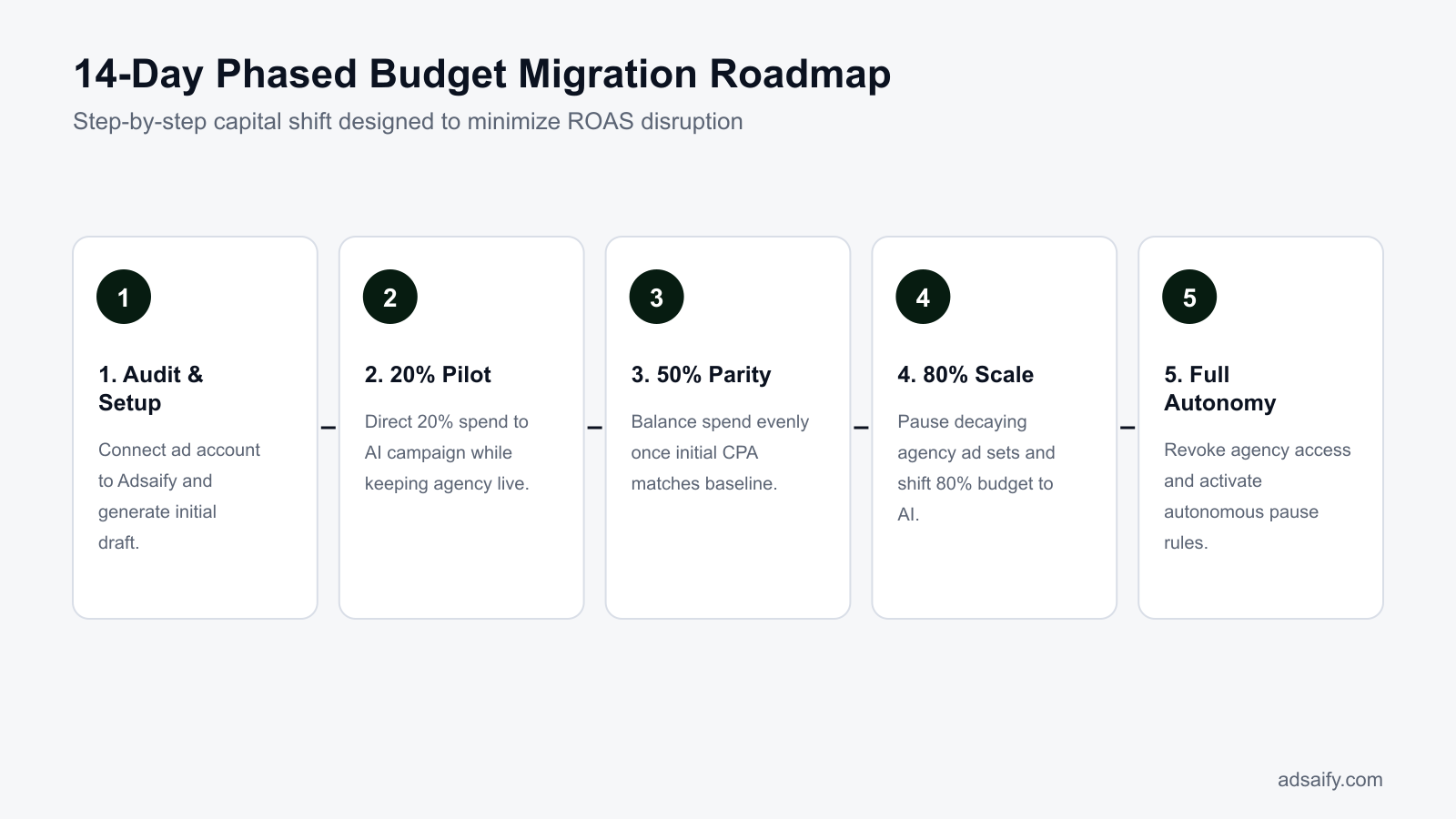
To execute a phased budget migration, gradually reallocate ad spend from agency campaigns to your AI media buying setup over a two-week transition window. Moving your budget in measured increments protects algorithmic learning, maintains delivery stability, and allows you to validate return on ad spend (ROAS) benchmarks before permanently removing agency management.
Executing the Staged Reallocation Schedule
Begin by creating an account at the Adsaify registration page, where the software scans your website URL to generate your baseline campaign draft with custom copy, audience targeting, and creative concepts. For days two through four, keep 80 percent of your daily ad budget in existing agency campaigns while directing the remaining 20 percent to the new AI-generated campaign. This allows the Meta delivery algorithm to exit the learning phase on the new campaign without disrupting overall revenue volume.
On days five through eight, compare the AI campaign's CTR (click-through rate), which is the ratio of link clicks to ad impressions, and CPA (cost per acquisition), which is the total ad spend divided by purchases, against agency baselines. If metrics align, increase the AI spend share to 50 percent. Between days nine and twelve, turn off underperforming agency ad sets and shift 80 percent of your capital to the AI platform architecture. By day fourteen, revoke agency user permissions in Meta Business Manager and run 100 percent of your advertising spend under AI automated performance rules, such as automatically pausing ads that exceed target CPA limits.
Step-by-Step Budget Migration Workflow
- Baseline draft creation — Scan your store URL through the software platform and review targeting recommendations before scheduling campaign publication.
- Initial spend split — Direct 20 percent of your budget to the AI campaign draft while leaving 80 percent under agency management to preserve conversion volume.
- Metric validation check — Evaluate click-through rates and acquisition costs after three days of delivery to verify that performance meets historical agency benchmarks.
- Parity budget expansion — Increase the AI campaign share to 50 percent of total spend if acquisition costs remain stable across both setups.
- Legacy ad deprecation — Turn off decaying agency ad sets inside Ads Manager and allocate 80 percent of spend to the new setup.
- Full governance transfer — Reassign the remaining 20 percent of budget to the AI campaigns and remove agency administrative roles in Business Settings.
What should I do if the AI platform campaign lags behind agency ROAS during the first 3 days?
Do not panic or shut the campaign down prematurely during the initial 72 hours. Meta requires roughly 50 conversion events per ad set to exit the algorithmic learning phase, during which acquisition costs fluctuate naturally. Check Events Manager to verify that the Purchase event fires correctly without duplicate counts. If delivery underperforms after reaching statistical relevance, use Adsaify to generate fresh visual creatives or test an alternative hook angle, while keeping the spend split at 20 percent until performance aligns with your agency baseline.
Worked Example: How to Shift a 1,000 TL Daily Ad Spend?
To shift a 1,000 TL daily Meta ad spend from an agency to an AI media buying tool safely, you allocate budget gradually across three distinct phases. Rather than cutting external management abruptly, you reallocate capital incrementally while tracking combined return on ad spend to safeguard overall business revenue during the platform transition.
Step-by-Step Budget Allocation across Three Phases
Consider an example involving a boutique leather goods retailer operating in Istanbul with an established 1,000 TL daily budget. ROAS (return on ad spend) is gross revenue generated divided by ad spend. Prior to the migration, the external marketing agency delivered a 3.0 ROAS inside Meta Ads Manager, generating 3,000 TL in daily revenue, excluding their fixed monthly retainer fee.
- Phase 1 (Controlled Testing): Reduce the agency campaign budget to 800 TL per day, which produces 2,400 TL in revenue at 3.0 ROAS. Concurrently, register at Adsaify to launch a new campaign using automated website analysis with a 200 TL daily budget. During initial learning, the AI campaign produces 500 TL in revenue at 2.5 ROAS. Combined daily revenue is 2,900 TL on 1,000 TL spend, yielding a blended 2.9 ROAS.
- Phase 2 (Post-Learning Calibration): Once the Meta Pixel logs roughly 50 purchase events on the AI campaign, rebalance both setups equally. Reduce agency spend to 500 TL per day (generating 1,500 TL) and raise the AI campaign budget to 500 TL per day. With matured audience signals, the AI campaign delivers 1,750 TL at 3.5 ROAS. Combined daily revenue reaches 3,250 TL, increasing blended ROAS to 3.25.
- Phase 3 (Full AI Deployment): Allocate the complete 1,000 TL daily budget to the AI campaigns and pause agency ad sets. The AI structure produces 3,500 TL at 3.5 ROAS.
Key Settings to Monitor in Meta Ads Manager
After adjusting budgets between the agency and the AI campaign, monitor the "Learning Phase" status in the Ad Sets tab. Verify that the combined daily frequency across both setups does not exceed 2.2 within a seven-day window to prevent ad fatigue. In addition, review the "Attribution Setting" to ensure both campaigns use the 7-day click or 1-day view standard, ensuring fair performance comparisons.
Does cutting the agency retainer immediately offset transient learning phase costs?
Yes, cutting a fixed agency retainer immediately offsets small transient revenue dips during the initial learning phase. If a brand pays an agency a monthly management fee of 15,000 TL, that represents a 500 TL daily operational overhead. A temporary drop from a 3.0 ROAS to a 2.9 ROAS on a 1,000 TL daily budget reduces daily gross revenue by only 100 TL. Eliminating the 500 TL daily overhead yields an immediate positive net cash balance from day one.
Which Metrics Confirm a Successful Platform Migration?
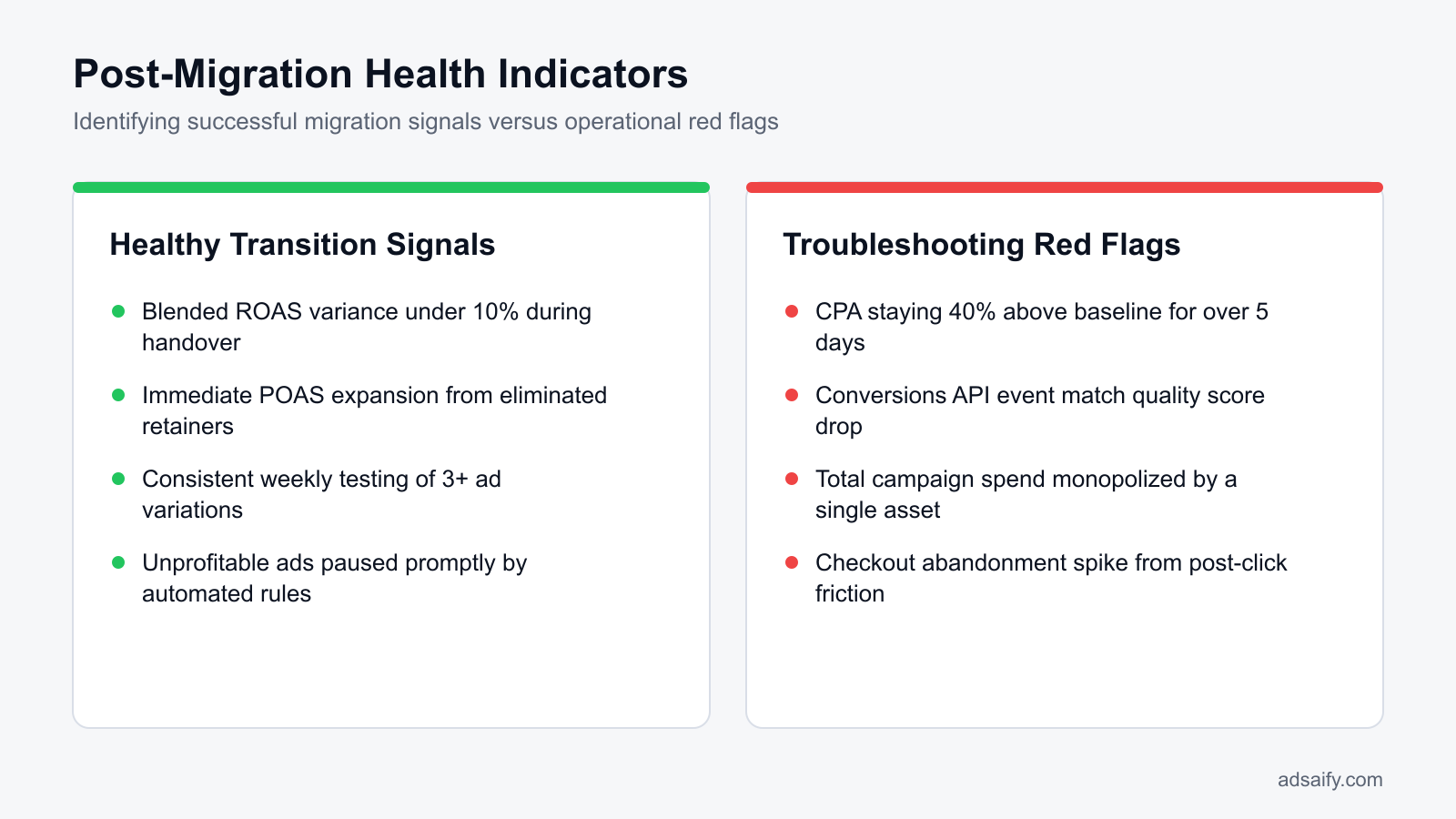
A successful platform migration is confirmed by tracking four core performance indicators: profit on ad spend, blended return on ad spend, creative testing velocity, and top-of-funnel engagement stability. These metrics ensure that bottom-line profitability and conversion volume remain stable or improve as campaign management moves from human agencies to automated AI systems.
Core Migration Metrics and Tracking Baselines
Evaluating an account transition requires looking beyond isolated campaign reports. POAS (profit on ad spend) is gross profit divided by ad advertising spend, measuring net operational return after accounting for product costs and eliminated management fees. Blended ROAS is total e-commerce revenue divided by total advertising spend across all active Meta campaigns. Creative velocity is the rate at which an advertiser introduces fresh ad creatives and copy variations into active ad sets over a given time period. CPC (cost per click) is the price paid for each link click, and CTR (click-through rate) is the percentage of ad impressions that generate a click.
You can test campaign generation workflows and review these tracking requirements when you start with an interactive demo to verify baseline compatibility before migrating active spend.
| Evaluation Metric | Agency Historical Baseline | Healthy AI Migration Target | Diagnostic Signal |
|---|---|---|---|
| POAS (Profit on Ad Spend) | 1.40 (Net of 15,000 TL fee) | 1.75 or higher | Net cash margin expands despite learning variance. |
| Blended ROAS | 3.00 gross account return | 3.00 to 3.40 combined return | Revenue stabilizes across legacy and automated campaigns. |
| Creative Velocity | 2 ad variations per month | 4 to 8 new ad assets per week | Ad fatigue diminishes and audience delivery broadens. |
| CTR (Link Click-Through) | 1.10% on static agency ads | 1.25% or higher | AI visual generation matches target audience intent. |
| CPC (Cost Per Link Click) | 4.50 TL average click cost | 4.20 TL or lower | Targeting relevance lowers auction clearing prices. |
Which numbers should I trust when Meta reporting conflicts with my e-commerce backend?
Always trust your e-commerce backend and bank receipts over Meta Ads Manager reporting when platform numbers diverge. Meta uses statistical modeling and delayed attribution windows that frequently double-count conversions or credit view-through interactions that did not drive incremental purchases. Your store backend records verified transactions, settled cash, and actual order IDs. Tracking real revenue against total ad spend confirms whether your migration is genuinely profitable regardless of attribution discrepancies in ad dashboards.
Want to see this in your own account? Enter your website address and Adsaify drafts the campaign for you. The first ad is free. Try it now or log in.
What Weekly Routine Keeps In-House AI Ad Performance Stable?
A structured weekly routine keeps in-house AI ad performance stable by pairing machine automation with human oversight over inventory, budgets, and creative freshness. While automated rules halt unprofitable ads instantly, media buyers must review rule logs, inject fresh visual assets, and audit stock levels before high-volume weekend traffic spikes occur.
- Daily: Monitor Meta Ads Manager delivery alerts and out-of-stock product notifications to prevent wasted spend on landing pages with missing inventory.
- Weekly (Monday): Audit automated rule logs in Adsaify to confirm that unprofitable ad variants were paused automatically without draining daily testing budgets.
- Weekly (Wednesday): Generate fresh creative angles from top product URLs using Adsaify login or promote high-engagement organic Instagram posts to prevent audience ad fatigue.
- Weekly (Friday): Adjust campaign budget allocations in Meta Ads Manager and confirm warehouse inventory counts for best-selling items before weekend consumer purchasing surges begin.
- Weekly (Sunday): Calculate weekly blended ROAS (return on ad spend, defined as total revenue divided by total ad spend) and net POAS (profit on ad spend, defined as gross profit divided by ad spend) to establish budget caps for the coming week.
- Monthly: Clean and rebuild Meta custom audiences by uploading updated customer lifetime value spreadsheets and auditing event tracking integrity in Meta Events Manager.
Why do I need a weekly maintenance routine if the AI platform automates media buying?
AI media buying platforms automate algorithmic bid management, audience targeting, and real-time loss prevention rules, but machine learning lacks visibility into physical supply chains, profit margins, and changing brand strategy. Human oversight ensures ad creative assets stay relevant, high-margin products receive sufficient daily budget, and inventory stockouts do not waste ad spend. Routine weekly audits preserve data hygiene across Meta Events Manager and keep automated optimization parameters aligned with genuine business cash flow.
How Do You Fix the Most Common Agency Offboarding Blunders?
Fixing agency offboarding blunders requires preserving algorithmic conversion history, securing proprietary customer data, and phasing operational transitions gradually. Rushing campaign cancellations resets machine learning, while forgetting to export custom audience records creates data blind spots. Systematic handovers protect ad account stability and prevent revenue collapse when moving to automated media buying tools.
Pausing all agency campaigns instantly on contract termination
Shutting off existing agency campaigns immediately deletes account momentum and forces Meta's bidding algorithms back into the initial learning phase. Wind down agency budgets progressively by 15% to 20% every two to three days over a 14-day transition period while ramping up your internal AI campaigns.
Leaving custom audience lists and purchaser CRM data locked in agency accounts
Agencies frequently build customer match lists inside agency-owned Business Managers, leaving brands without historical first-party conversion data upon departure. Export all lifetime customer email addresses, phone numbers, and purchase values from your store platform, then re-upload them into Meta Ads Manager under Audiences as fresh customer list custom audiences.
Setting unrealistic daily budget caps inside the AI platform on day one
Constraining newly launched AI campaigns with micro-budgets prevents the delivery system from gathering the 50 conversions required per week to exit the learning phase. Set starting daily budgets equal to at least five times your target CPA (cost per acquisition, meaning the ad spend required to achieve one purchase), or test safely via Adsaify registration to build initial delivery volume.
Relying entirely on legacy creatives without fresh inputs
Re-running exhausted agency image assets results in severe creative fatigue, driving up ad frequency, CPM (cost per thousand impressions), and user drop-off. Continuously introduce new visual concepts by analyzing product URLs with AI generation tools to produce fresh video assets and alternative hook angles.
Revoking agency administrative access before transferring asset ownership
Severing agency permissions prematurely can orphan Meta Pixels, product catalog feeds, and domain verifications if primary admin roles were not reassigned. Navigate to Meta Business Settings, assign Full Control permissions for all digital assets to your internal Business Manager, and only then remove agency partner access.
Failing to audit existing automated rules and custom conversions
Forgotten agency optimization rules can silently pause active ads or optimize toward broken URL tracking parameters. Open the Automated Rules dashboard inside Meta Ads Manager, delete obsolete agency automation rules, and verify active custom conversions inside Events Manager.
Can an agency legally demand that I stop using ad creatives they designed for my brand?
Whether an agency can demand you stop running previously designed creatives depends entirely on the master services agreement signed between both parties. If the contract designates deliverables as work made for hire upon full payment, the brand retains exclusive intellectual property rights to all ad assets. However, if the agency retained design ownership or licensed proprietary production templates, the agency can legally demand removal. Always review contract intellectual property clauses before termination and replace contested creative assets promptly.
When Will an AI Media Buying Tool Alone Fall Short?
An AI media buying tool falls short when underlying business fundamentals, such as low website conversion rates, sub-20 percent profit margins, or uncompetitive offer positioning, fail to convert qualified traffic. Automation manages delivery and bidding inside Meta Ads Manager, but software cannot repair broken checkout funnels, supply chain deficits, or absent brand equity.
Conversion Rate Bottlenecks and Fragile Operating Margins
Paid traffic automation operates on the assumption that a store can convert qualified visitors once they land on a page. When an e-commerce website suffers from technical checkout errors, slow page loads, or unclear product descriptions, automated campaign adjustments inside Meta Ads Manager cannot compensate for the friction. If the purchase conversion rate in Meta Events Manager drops because customers abandon clunky multi-step checkouts, bidding algorithms receive negative feedback signals regardless of creative quality.
Similarly, businesses operating on gross profit margins below 20 percent face severe cash flow vulnerability. Cost of Goods Sold (COGS) represents the direct costs incurred to manufacture or purchase the products a business sells. When COGS and shipping consume more than 80 percent of retail revenue, even minor fluctuations in advertising auction costs wipe out operating profit. Automation tools can optimize budget allocation between ad sets, but software cannot manufacture bottom-line profitability out of thin unit margins.
Creative Refresh Limits and Strategic Brand Management
Automation platforms provide operational discipline rather than autonomous creative direction. While Adsaify provides automated rules that monitor performance metrics and pause underperforming ads, the software does not automatically generate and swap new creative assets into active ad sets without direct user intervention. Performance marketers must regularly produce and publish fresh visuals to resolve creative fatigue.
Furthermore, nuanced enterprise marketing initiatives require human relationship management. Securing creator permissions in Meta Business Manager for influencer whitelisting, negotiating partnership contracts, coordinating public relations campaigns, and executing bespoke brand positioning remain qualitative tasks that an automated tool cannot negotiate or direct.
- Audit the mobile checkout flow to remove unexpected fees and payment processing errors.
- Calculate your net product margins to ensure profitability after factoring in direct product fulfillment costs.
- Verify server-side tracking health by checking the Event Match Quality score inside Meta Events Manager.
- Generate replacement visual concepts before pausing fatigued ads inside Adsaify.
- Configure advertiser partnership access manually within Meta Business Settings for all whitelisted creator handles.
- Benchmark landing page loading speed on mobile devices against the three-second industry standard.
Is it worth adopting an AI ad tool if my store conversion rate is currently below one percent?
Adopting an AI ad tool is not worthwhile if your store conversion rate is under one percent, because sending paid traffic to a leaking funnel accelerates cash burn without delivering statistically viable conversion signals to Meta Ads Manager. Before automating ad spend, improve product landing pages, optimize site speed, clarify shipping policies, and streamline checkout. Once on-site conversion improves to sustainable baseline levels, AI tools can profitably scale distribution and maintain bidding efficiency.
What Key Media Buying Terms Apply to Agency and AI Transitions?
Transitions between agencies and AI media buying platforms involve key terminology covering unit economics, algorithmic learning, and technical tracking infrastructure. Understanding these terms ensures clear evaluation of marketing efficiency, preventing deceptive vanity reporting and allowing advertisers to align Meta Ads Manager automation rules directly with true bottom-line profitability.
- ROAS (Return on Ad Spend): Gross e-commerce revenue divided by total advertising spend during a specified timeframe.
- POAS (Profit on Ad Spend): Net profit earned per advertising dollar spent, factoring in product cost of goods sold and platform management costs.
- Learning Phase: The auction recalibration window where Meta requires approximately 50 conversion events per ad set within a seven-day period to optimize ad delivery.
- Conversions API (CAPI): A server-side data pipeline that sends customer purchase events directly from your store server to Meta's algorithm to bypass browser tracking limitations.
- CPA (Cost Per Acquisition): The total advertising expenditure required to generate a single attributed purchase or conversion event.
- Event Match Quality (EMQ): A scoring metric inside Meta Events Manager indicating how accurately your server-side customer data parameters match active Meta user profiles.
- Attribution Window: The defined time frame, such as seven-day click and one-day view, during which Meta credits conversions to an exposed ad.
- Advantage+ Shopping Campaign (ASC): An automated Meta campaign format that combines broad targeting, machine-learning budget distribution, and creative delivery into a single ad set.
- Creative Fatigue: The performance decline occurring when target audiences see an ad repeatedly, resulting in rising advertising costs and declining click-through rates.
- Break-Even ROAS: The minimum return on ad spend required to cover advertising expenses and unit fulfillment costs without sustaining a financial loss.
- Cost of Goods Sold (COGS): The direct costs incurred to manufacture, package, and procure the products sold by a commercial business.
How does the difference between ROAS and POAS dictate whether I should hire an agency or use AI?
High ROAS (return on ad spend) can obscure operational losses if steep agency retainer fees erode low gross margins, whereas tracking POAS (profit on ad spend) reveals whether your enterprise generates actual profit after all marketing overhead. If agency fees suppress your POAS below break-even thresholds, migrating execution to an automated AI tool like Adsaify removes fixed monthly service overhead, instantly expanding real operating margins while preserving granular algorithmic campaign management.
Turn Your Migration from Agency to AI into a Margin-Expanding Growth Engine
To prevent a drop in ROAS (return on ad spend, the revenue earned for every dollar spent on advertising) during an agency transition, secure primary ownership of your Meta Business Manager, Meta Pixel, and ad account first. Next, export historical campaign benchmarks and audience data before access permissions change. Run your new AI-managed campaigns parallel to existing agency ads using a modest budget split to let the Meta delivery algorithm learn without revenue disruption. Once conversion performance stabilizes, safely conclude agency contracts and activate performance-based automation rules.
Review your Meta Business Manager administrative access today to verify that your business directly owns its advertising accounts, data assets, and conversion tracking pixels. Once confirmed, you can visit Adsaify to test an initial AI-drafted campaign using your website URL without interfering with your live agency setups.
Want to see this in your own account? Enter your website address and Adsaify drafts the campaign for you. The first ad is free. Try it now or log in.
Frequently Asked Questions (FAQ)
1. Can I launch ads on an AI platform while my agency contract is still active?
Yes, you can launch ads on an AI platform while an agency contract is active. To prevent internal competition, run the AI campaigns with distinct objectives, separate product lines, or segregated target audiences. Inform your agency about the test budgets to avoid skewed reporting and duplicate bid auctions in your Meta ad account.
2. How many days does performance volatility typically last during a platform migration?
Performance volatility typically lasts between seven and fourteen days during an ad platform migration. Meta ad sets require roughly 50 conversion events per week to exit the learning phase, during which cost per acquisition fluctuates. Maintaining stable daily budgets and avoiding frequent audience modifications during this two-week window helps algorithms stabilize delivery and return on ad spend faster.
3. How do I claim primary ownership of a Meta Pixel configured by an external agency?
To claim primary ownership, log into Meta Business Settings and navigate to Data Sources, then Pixels or Datasets. If the agency created the pixel under their Business Manager, request that they assign partner access to your Business Manager ID or transfer asset ownership. Ensure your Business Manager holds administrative control over the pixel before terminating contracts.
4. Do I still need to produce weekly marketing reports when using an AI media platform?
Yes, tracking weekly marketing reports remains necessary to evaluate overall business metrics like blended customer acquisition cost and net revenue. While an AI media platform handles operational tasks like budget allocation and ad set creation, regular weekly reviews allow your team to assess creative fatigue, cash flow limits, and high-level strategy against company goals.
5. Can Adsaify take over management of campaigns previously built by an agency?
Adsaify creates and publishes new campaigns directly to your Meta ad account using AI-generated drafts based on your website or business description. It does not import or reconfigure legacy campaigns built by an agency. However, you can use Adsaify to publish replacement campaigns, run them parallel to agency setups, and manage newly published ads using automated performance rules.
6. Does it make sense for small brands to start with an AI platform instead of hiring an agency?
Starting with an AI platform makes financial sense for small brands with limited advertising capital. Traditional agencies often require minimum monthly retainer fees that exceed the small brand's entire media budget. Using an AI tool allows emerging businesses to direct their capital straight into ad spend while generating targeted creative drafts and audience structures automatically.
7. Is there a risk of my Meta ad account getting disabled during the agency offboarding process?
There is a risk of disruption if offboarding is handled incorrectly. Account locks or review flags typically occur if billing credit cards are abruptly swapped, agency business managers remove shared payment methods, or sudden administrative permission revocations trigger Meta fraud detection systems. Update billing profiles and admin roles carefully before revoking agency partner privileges.
8. Can I rely completely on AI-generated images and copy for all my campaign creatives?
While AI-generated images and ad copy provide strong campaign foundations and speed up draft production, total reliance is not recommended. Complementing synthetic visuals with authentic user-generated content, customer testimonials, and direct product photography delivers better audience trust. AI works best when combined with real brand assets and strategic human review of ad resonance.
How can you try this with Adsaify?
The quickest way to apply the steps in this article to your own account is to try them. Adsaify analyses your business from your website address, drafts the campaign with an audience, ad copy, creative and a budget suggestion, and publishes it to your own Meta ad account once you approve.
- Your first ad is free: there is nothing to lose by trying.
- Your own ad account: the campaign runs in your Meta account and you stay in control.
- Images and video: generate ad creatives with AI or promote an existing Instagram post.
Create a free account and try your first ad · Already have an account? Log in.