

Short answer: When using Dynamic Product Ads (DPA), displaying out-of-stock items can lead to losing potential customers. Appropriate adjustments and automation solutions should be implemented to prevent this issue.
As a performance marketer, you may have experienced the frustration of running Dynamic Product Ads (DPA) on Meta, only to discover that your ads are promoting items that are out of stock. This situation not only confuses potential customers but can also lead to wasted ad spend, reduced trust in your brand, and ultimately lost sales. When users click on ads for products that they cannot purchase, it creates a negative experience that can deter them from returning to your store. The display of out-of-stock items in DPA ads typically occurs due to a misalignment between your inventory management and the ad feed that Meta uses to generate ads. If your product catalog isn't updated in real-time or accurately reflects your stock levels, your ads may continue to show items that are no longer available. Left unaddressed, this issue can significantly impact your return on ad spend (ROAS) and overall campaign performance, leading to lower conversion rates and wasted resources. In this article, you will learn how to systematically address the issue of out-of-stock items in your DPA campaigns. We will explore the underlying causes, the costs associated with displaying unavailable products, and provide a step-by-step guide to effectively diagnose and implement solutions. By following these steps, you will be equipped to enhance your ad performance and ensure that your customers only see products that are readily available for purchase.Key Takeaways
- Displaying out-of-stock items leads to customer loss.
- Automation tools can manage stock updates.
- Proper targeting is vital for competitive advantage.
- Optimizing DPA ads can increase conversion rates.
What are the Issues with Displaying Out-of-Stock Items in DPA Ads?
Displaying out-of-stock items in Dynamic Product Ads (DPA) negatively impacts customer satisfaction, leading to frustration when potential buyers find products unavailable. This situation not only decreases conversion rates but also poses a risk to brand image, as customers may perceive the brand as unreliable or out of touch with inventory levels.Customer Satisfaction and Frustration
When customers see out-of-stock items, their immediate reaction is often disappointment. For instance, if an online clothing retailer allocates a daily budget of 500 TL for its DPA campaign but fails to update its product catalog, it may continue to advertise a popular dress that is no longer in stock. Customers clicking on the ad expecting to purchase will instead be met with a "sold out" message, leading to a negative experience. Over time, this can erode trust and loyalty, as customers may seek alternatives that consistently have available products.Impact on Conversion Rates
Out-of-stock items can severely hinder conversion rates. For example, if the clothing retailer mentioned above had a conversion rate of 5% on ads featuring in-stock items, that translates to 25 sales per day at an average order value of 100 TL, yielding 2,500 TL in revenue. However, if 20% of their ads display out-of-stock items, they may lose 5 potential sales daily, resulting in a revenue loss of 500 TL. This not only affects immediate sales but also diminishes the effectiveness of the advertising spend.Brand Image and Reliability
Continuously displaying out-of-stock items can damage a brand's image. Brands are often evaluated based on their operational efficiency, and repeated failures in inventory management can lead to negative perceptions. Customers may share their experiences on social media, further amplifying the issue. A brand perceived as unreliable can face long-term consequences, including decreased customer retention and a tarnished reputation.How can I recognize these issues?
Recognizing issues with out-of-stock item displays can be done by monitoring customer feedback, analyzing conversion rates, and reviewing ad performance metrics in Meta Ads Manager. Look for patterns in customer complaints, declines in sales, and higher bounce rates from DPA ads as indicators of dissatisfaction stemming from out-of-stock displays.Why Does Out-of-Stock Item Display Happen?
Out-of-stock item displays occur due to several key reasons, including failure to update product catalogs promptly, integration challenges with inventory management systems, and misconfigurations in dynamic product ads. Each of these factors can contribute to a disconnect between actual inventory and what is advertised.Failure to Update Catalogs on Time
Catalogs must be updated regularly to reflect real-time inventory. If an e-commerce store does not sync its product catalog frequently, it may continue to promote items that are no longer available. In Meta Ads Manager, ensure that your catalog is set to automatically refresh, ideally on a daily basis, to minimize the chances of displaying out-of-stock products.Integration Issues with Inventory Management Systems
Integration problems can arise when the inventory management system does not communicate effectively with the Meta catalog. For example, if the inventory system is set to update every hour but the catalog refresh is set to daily, discrepancies will occur. To avoid these issues, verify that both systems are configured to align in their update frequency.Misconfiguration of Dynamic Product Ads
Misconfigurations in DPA settings can also lead to the promotion of out-of-stock items. Ensure that your DPA setup in Meta Ads Manager includes proper filters that exclude out-of-stock items from being shown. Review the settings in the "Product Sets" section to ensure that only available items are included.| Issue | Symptoms | Settings to Check | Recommended Action |
|---|---|---|---|
| Catalog Not Updated | Ads show unavailable items | Catalog refresh settings | Set to daily updates |
| Integration Issues | Inconsistent inventory levels | Sync frequency | Align update schedules |
| Misconfigured DPA | Out-of-stock items in ads | Product Sets filters | Exclude out-of-stock products |
| Manual Catalog Management | Ad performance drops | Upload schedule | Automate uploads |
What are the underlying causes of this issue?
Underlying causes of out-of-stock item displays include outdated product catalogs due to infrequent updates, poor integration between inventory management systems and Meta, and incorrect configurations in DPA settings. Each of these factors can lead to a misrepresentation of available inventory, negatively impacting ad performance and customer experience.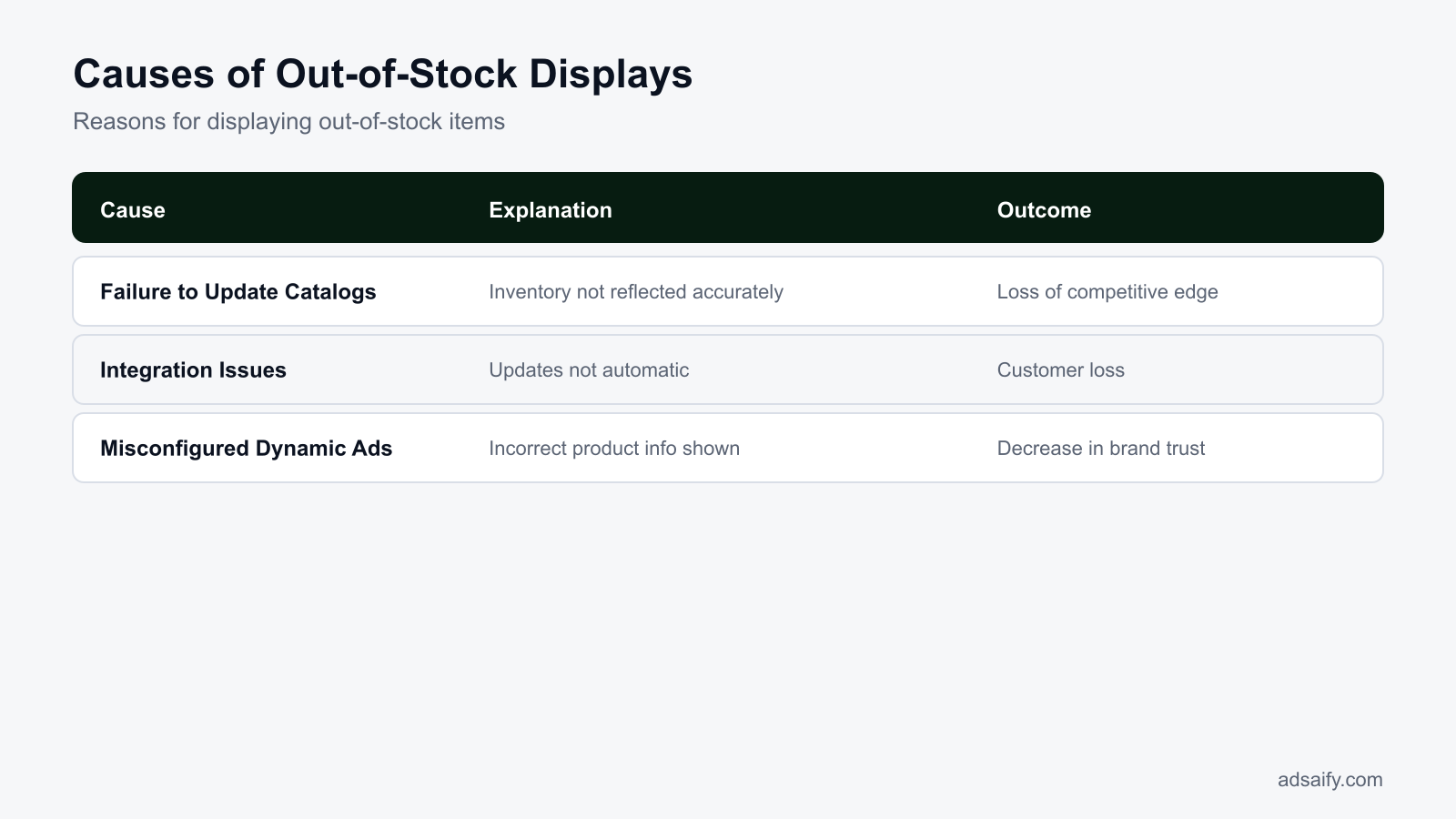
What Are the Costs of Displaying Out-of-Stock Items in Ads?
Displaying out-of-stock items in Dynamic Product Ads (DPA) can lead to significant costs for advertisers. The primary issues include lost potential revenue, decreased customer trust, and high ad spend with low conversion rates. As competitors fill the gap with available products, the inability to sell can directly impact the bottom line and brand reputation.Lost Potential Revenue in a Competitive Market
When out-of-stock items are advertised, businesses miss out on potential sales. In a competitive market, customers often have multiple options. If they encounter a product that is unavailable, they may quickly turn to competitors who offer similar items. For example, if you have a product advertised but it's out of stock, a customer may purchase from a rival who has the same item readily available. This not only leads to a direct loss of revenue but also diminishes market share over time.Decreased Customer Trust
Advertising out-of-stock items can significantly harm customer trust. When customers see an item they want but find it unavailable, their perception of your brand can suffer. They may feel frustrated or misled, leading to a negative experience. Over time, this can result in lower customer retention rates and a dwindling loyal customer base. Brands that consistently show unavailable products risk being seen as unreliable, which can have long-lasting effects on sales.High Ad Spend with Low Conversion
Running ads for out-of-stock items often results in high advertising costs with minimal conversions. Ad spend becomes inefficient when the products being promoted cannot be purchased. For instance, if you allocate a budget of 1,000 TL for a campaign featuring out-of-stock products, your return on ad spend (ROAS) may plummet, resulting in wasted resources. This inefficiency can lead to budget constraints in future campaigns, ultimately affecting overall marketing performance.- Audit your product catalog regularly.
- Pause ads for out-of-stock items immediately.
- Update inventory management systems frequently.
- Communicate stock status clearly on your website.
- Monitor competitor inventory levels.
- Analyze ad performance metrics consistently.
- Implement automation rules for ad management.
- Train your team on inventory and advertising alignment.
What happens if I ignore this situation?
Ignoring the issue of displaying out-of-stock items can lead to a downward spiral of high ad costs without returns, decreased customer loyalty, and a tarnished brand reputation. Over time, this neglect can result in significant revenue losses and reduced market competitiveness, making it essential to address the problem proactively.How Can I Diagnose the Causes of Out-of-Stock Displays?
Diagnosing the causes of displaying out-of-stock items in Dynamic Product Ads involves a systematic approach. Key steps include checking catalog updates, reviewing the status of your inventory management system, and conducting competitive analysis to identify gaps in availability.Check Catalog Updates
Verify that your product catalog in Meta Ads Manager is current. Navigate to the “Commerce Manager” and check the “Data Sources” section to ensure your catalog is updated with real-time inventory levels. If updates are missing, it could lead to the display of out-of-stock items. Make sure to set up scheduled updates to keep your catalog synchronized with your inventory management system.Review the Status of Your Inventory Management System
Inspect your inventory management system for any discrepancies. This can be done by accessing your inventory software or platform and checking the stock levels of products listed in your catalog. Look for any delays in syncing stock levels or inaccuracies that might cause out-of-stock items to be displayed in your ads.Conduct Competitive Analysis to Identify Gaps
Perform a competitive analysis to understand how your inventory levels compare to competitors. Use tools like SEMrush or Ahrefs to analyze competitor product availability. This can help identify if your competitors are offering similar products in stock, which may lead to lost sales opportunities for your business.| Action | Details | Expected Outcome |
|---|---|---|
| Check Catalog Updates | Verify product availability in Commerce Manager | Ensure accurate stock display in ads |
| Review Inventory System | Inspect stock levels in inventory software | Identify discrepancies and fix them |
| Conduct Competitive Analysis | Analyze competitors’ stock levels | Find gaps in your inventory strategy |
| Set Up Alerts | Create notifications for stock changes | Stay informed on inventory status |
What steps should I take?
To effectively diagnose causes of out-of-stock displays, first, check your product catalog for updates and ensure it reflects accurate inventory levels. Next, review your inventory management system for any syncing issues. Finally, conduct a competitive analysis to identify if competitors have stock available, which may highlight gaps in your own inventory strategy.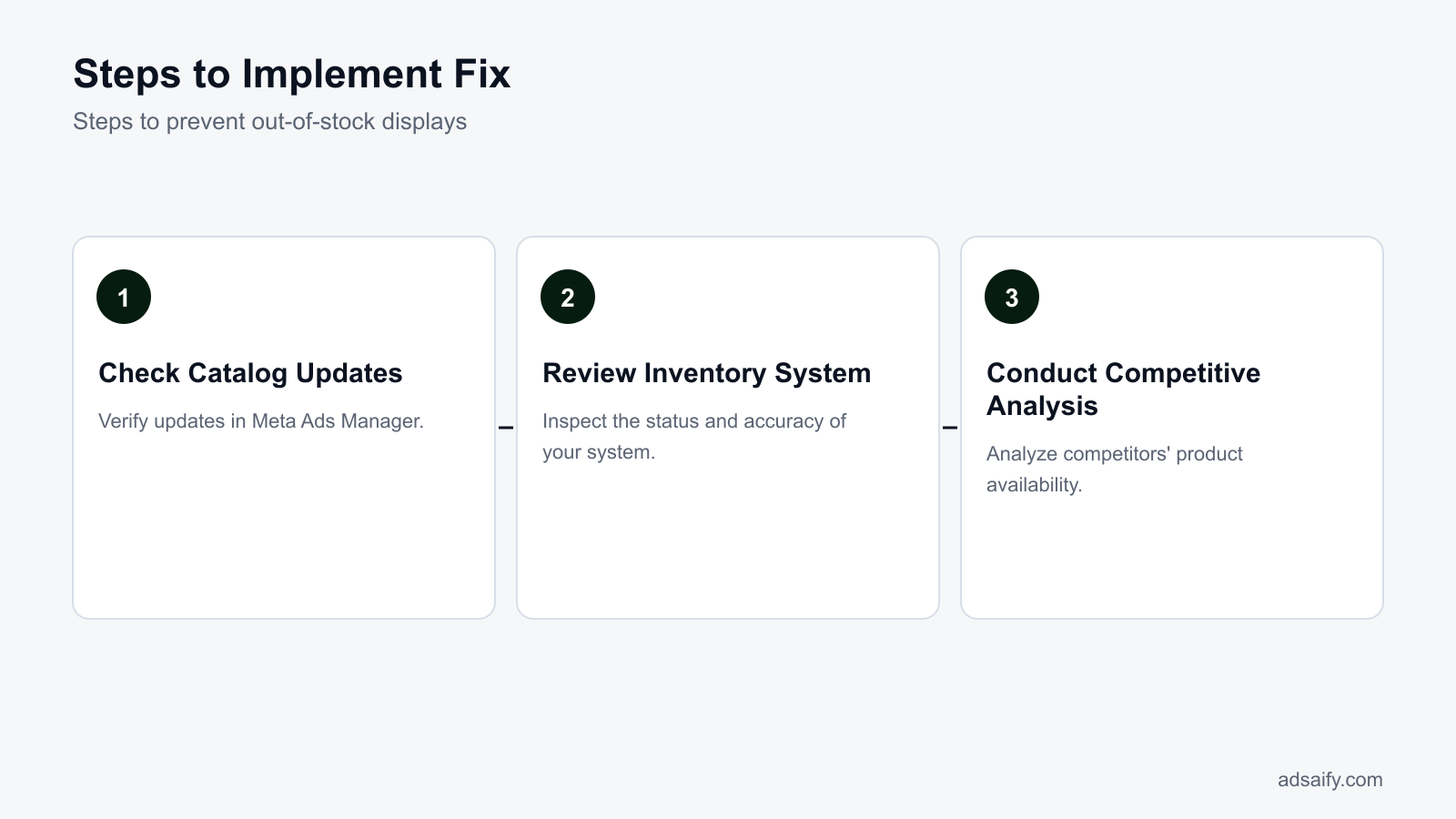
If you would rather not set up each of these steps by hand, try it in Adsaify: your first ad is free, so there is nothing to lose. Create a free account.
What Should I Prepare Before Applying the Fix?
To effectively prevent out-of-stock items from being advertised in Dynamic Product Ads (DPA) on Meta, proper preparation is essential. This involves gathering updated stock data, checking catalog settings, and conducting competitive product analyses. Ensuring that your ad campaigns are based on accurate and current information will help maintain their effectiveness and prevent wasted ad spend.Gather updated stock data
Start by collecting the most recent inventory data from your inventory management system. This data should include product availability, stock levels, and any replenishment schedules. Use this information to create a CSV file or integrate it directly with your product catalog in Meta. Regular updates ensure that any out-of-stock items are promptly removed from your DPA campaigns.Check catalog settings
Next, review your product catalog settings in the Meta Business Manager. Navigate to the "Commerce Manager" and select "Product Catalogs." Ensure that your catalog is connected correctly to your inventory data source. Check that all products have accurate availability status, and confirm that the “Availability” field is set correctly for each item. This ensures that only in-stock items are shown in your ads.Conduct competitive product analyses
Perform a competitive analysis to understand how your competitors manage their inventory and advertising. Use tools like Facebook’s Ad Library to view competitors' DPA strategies. Identify which products they promote, how often they update their ads, and their pricing strategies. This insight can help you adjust your own catalog and advertising approach to stay competitive.- Gather updated stock data from your inventory management system.
- Review catalog settings in Meta Business Manager.
- Confirm the accuracy of product availability statuses.
- Analyze competitors’ advertising strategies using Facebook’s Ad Library.
- Identify seasonal trends that may affect stock levels.
- Set up alerts for low stock levels in your inventory system.
- Establish a regular schedule for inventory updates.
- Coordinate with suppliers for timely stock replenishment.
What resources do I need at this stage?
At this stage, you will need access to your inventory management system for stock data, your Meta Business Manager for catalog settings, and tools for competitive analysis, such as Facebook’s Ad Library. Additionally, having a team member familiar with data management and catalog setup will streamline the process.What Are the Step-by-Step Solutions to Prevent Out-of-Stock Displays?
Preventing out-of-stock items in your DPA campaigns involves a series of systematic steps. Automating stock updates, reviewing DPA settings, and adding automation rules are essential practices to ensure your ads reflect current inventory levels.Automate stock updates
To automate stock updates, integrate your inventory management system with your product catalog on Meta. This can usually be done through a feed that updates regularly (daily or hourly). Check the "Data Sources" section in Commerce Manager to set up this integration. Automated stock updates will help maintain accurate availability, reducing the likelihood of promoting out-of-stock items.Review DPA settings
After automating stock updates, review your DPA settings in Ads Manager. Navigate to “Ads” under the “Commerce” section. Confirm that your product sets are correctly configured and only include items that are in stock. Adjust your targeting to focus on users who have shown interest in your available products, ensuring your ads are relevant and timely.Add automation rules
In Ads Manager, set up automation rules to manage your ads effectively. Go to the “Automated Rules” section and create rules that will pause ads for products that go out of stock. For example, you can set a rule to pause ads when the stock level drops below a specific threshold. This proactive measure will help prevent displaying out-of-stock items to users.- Integrate inventory feed — Connect your inventory management system to your Meta product catalog for real-time stock updates.
- Set update frequency — Choose how often the feed updates (daily or hourly) based on your stock turnover rate.
- Review DPA settings — Check that only in-stock items are included in your DPA campaigns.
- Adjust targeting — Focus on users interested in available products to improve ad relevance.
- Create automation rules — Implement rules to pause ads for items that go out of stock.
- Monitor performance — Regularly review ad performance to ensure the rules are effective.
How can I implement these solutions?
To implement these solutions, begin by integrating your inventory management system with your Meta product catalog. Next, set the desired frequency for stock updates. Afterward, review your DPA settings and adjust your targeting options. Finally, create automation rules in Ads Manager to manage ads for out-of-stock items effectively. Regular monitoring will ensure that your approach remains effective.Can You Explain the Situation with a Detailed Example?
Consider an e-commerce store that sells fitness apparel. This store notices that Meta Dynamic Product Ads (DPA) are showing out-of-stock items, leading to customer frustration and lost sales. The store has implemented an automated stock update system that integrates with its inventory management software, ensuring that stock levels are reflected accurately in real-time. However, competitive analysis reveals that similar stores are not facing this issue, prompting a need for actionable steps.
Explanation through an E-commerce Store Example
Let’s say the e-commerce store, "FitWear", has a daily ad budget of 1,000 TL. Previously, their DPA campaigns included items that were out of stock, resulting in a 10% drop in click-through rates (CTR). After identifying the issue, FitWear decided to automate their stock updates using an integration with their e-commerce platform. They set up their inventory feed in Meta Ads Manager under the “Product Catalog” section, ensuring that only available items are advertised.
Automation of Stock Updates
FitWear implemented an automated stock feed that updates every hour. In Meta Ads Manager, they navigated to “Commerce Manager” and selected “Data Sources.” There, they configured their product catalog to pull data directly from their inventory management system. This ensures that any product marked as out of stock is automatically removed from the DPA feed. After making these changes, FitWear saw a significant increase in both engagement rates and customer satisfaction.
Competitive Analysis Results and Actionable Steps
Conducting a competitive analysis revealed that other stores with similar offerings were effectively managing their stock levels in ads, which contributed to higher conversion rates. FitWear analyzed their competitors' ad strategies using tools like Facebook Ad Library. They discovered that these competitors frequently updated their catalogs and used dynamic ads that only displayed in-stock items. Taking actionable steps, FitWear scheduled weekly reviews of their ad performance metrics in Meta Ads Manager, focusing on CTR and conversion rates to ensure they remained competitive.
Can I learn through a real example?
Yes, learning through a real example illustrates the practical steps needed to prevent out-of-stock items from appearing in ads. By automating stock updates and analyzing competitors, businesses can enhance their advertising effectiveness and improve customer experiences.
How Can I Measure Whether the Fix Worked?
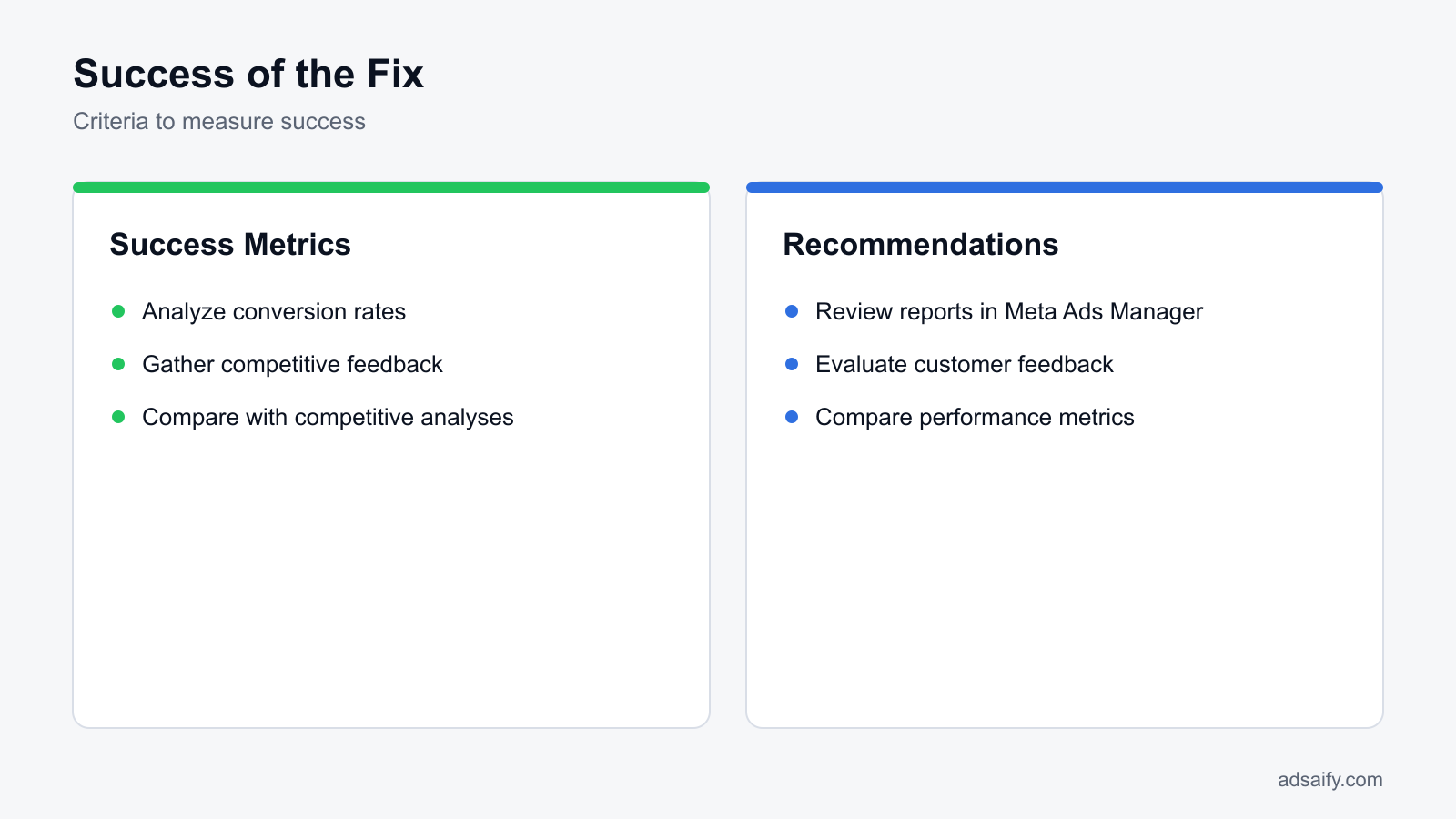
To determine if the implemented fixes were successful, the e-commerce store needs to analyze conversion rates, gather competitive feedback, and compare their performance against industry benchmarks. Tracking these metrics will provide insights into the effectiveness of the changes made to the DPA campaigns.
Analyze Conversion Rates
FitWear should monitor their conversion rates using Meta Ads Manager. They can set up custom reports to track the performance of their ads over time. A notable increase in conversion rates after implementing the stock update automation indicates that the fix is effective. They should focus on metrics like Return on Ad Spend (ROAS), which measures the revenue generated per unit of currency spent on advertising.
Gather Competitive Feedback
FitWear can also gather feedback from their customer base through surveys or reviews. Understanding customer experiences regarding product availability can highlight improvements. If customers report fewer frustrations related to out-of-stock items, this feedback serves as positive reinforcement that the changes have been beneficial.
Compare with Competitive Analyses
After implementing fixes, FitWear should conduct a new competitive analysis to compare performance metrics with similar businesses. This includes tracking CTR, conversion rates, and customer feedback. The following table summarizes key metrics before and after implementing the solution:
| Metric | Before Fix | After Fix | Competitor Average |
|---|---|---|---|
| CTR | 1.5% | 3.2% | 2.8% |
| Conversion Rate | 2.0% | 4.5% | 3.5% |
| ROAS | 3.0 | 6.0 | 4.5 |
| Customer Feedback Score | 3.2/5 | 4.5/5 | 4.0/5 |
How can I evaluate success?
Evaluating success involves analyzing post-fix conversion rates, gathering customer feedback, and comparing performance metrics against competitors. A marked improvement in these areas indicates that the implemented solutions were effective in resolving the issue of displaying out-of-stock items.
Want to see this in your own account? Enter your website address and Adsaify drafts the campaign for you. The first ad is free. Try it now or log in.
What Routines Should I Establish to Prevent Recurrence?
Establishing routines is crucial to prevent the reoccurrence of displaying out-of-stock items in Dynamic Product Ads (DPA). Regular stock updates, automation reviews, and competitive analyses help maintain a healthy ad environment. By instituting a systematic approach, marketers can ensure that ads reflect current inventory levels and market positioning.- Daily: Check stock levels in your inventory management system. This ensures that any changes in stock are immediately reflected in your ad campaigns.
- Daily: Review product feeds in Meta Ads Manager for any discrepancies. This allows you to catch any out-of-stock items before they appear in ads.
- Weekly: Update your product catalog in Meta Business Manager. Regular updates help align your ads with real-time inventory.
- Weekly: Monitor ad performance metrics such as click-through rates (CTR) and return on ad spend (ROAS). This helps identify if ads are still driving traffic effectively.
- Monthly: Conduct a competitive analysis to understand what products competitors are promoting. This helps adjust your strategy to maintain market relevance.
- Monthly: Review and adjust automation rules in your Meta Ads account. Ensure these rules accurately reflect your inventory practices and ad performance goals.
How can I establish these routines?
To establish these routines, create a calendar with specific tasks assigned to each day of the week. Utilize tools like reminders or project management software to keep track of these tasks. Engage your team in these processes to ensure everyone is accountable for maintaining updated inventory and ad performance standards.What Common Mistakes Occur If This Fix Is Not Implemented?
Failing to implement fixes for displaying out-of-stock items can lead to several detrimental outcomes. Continuous display of these items can frustrate customers, lower conversion rates, and impact overall business performance. Understanding these common mistakes is crucial for marketers.Continuous Display of Out-of-Stock Items
Displaying out-of-stock items leads to customer frustration and a poor shopping experience. This mistake results in wasted ad spend and can damage your brand's reputation. Regular stock checks and updates to your product catalog are essential fixes.Customer Loss and Low Conversion
When customers encounter out-of-stock items, they are likely to abandon their shopping carts and seek alternatives. This behavior leads to lost sales and low conversion rates. Implementing automation rules to pause ads for out-of-stock items can help mitigate this issue.Falling Behind Competitors
If your ads continue to show out-of-stock products, you risk losing customers to competitors who are more agile with their inventory management. Regular competitive analyses can help you stay informed about market trends and adjust your strategies accordingly.Inadequate Communication with Inventory Teams
Poor communication with inventory management can lead to discrepancies between actual stock and what is advertised. Establishing a clear line of communication ensures that marketing efforts align with real-time inventory levels.Ignoring Performance Metrics
Not monitoring key performance metrics can result in prolonged display of out-of-stock items. Metrics like CTR and ROAS should be regularly reviewed to ensure ads reflect current inventory status.Failure to Update Product Feeds
Neglecting to update product feeds in Meta Ads Manager can lead to outdated inventory being promoted. Regular updates to your product catalog are necessary to ensure that only available items are advertised.Not Utilizing Automation Tools Effectively
Automation tools can streamline ad management, but failing to configure them properly can lead to displaying out-of-stock items. Regularly review automation settings to ensure they align with your inventory practices.How can I fix these mistakes?
To fix these mistakes, implement a structured routine for stock updates, performance monitoring, and communication with inventory teams. Establish automation rules in Meta Ads Manager to ensure that ads for out-of-stock items are paused immediately. Regularly review competitor strategies to stay ahead in the market.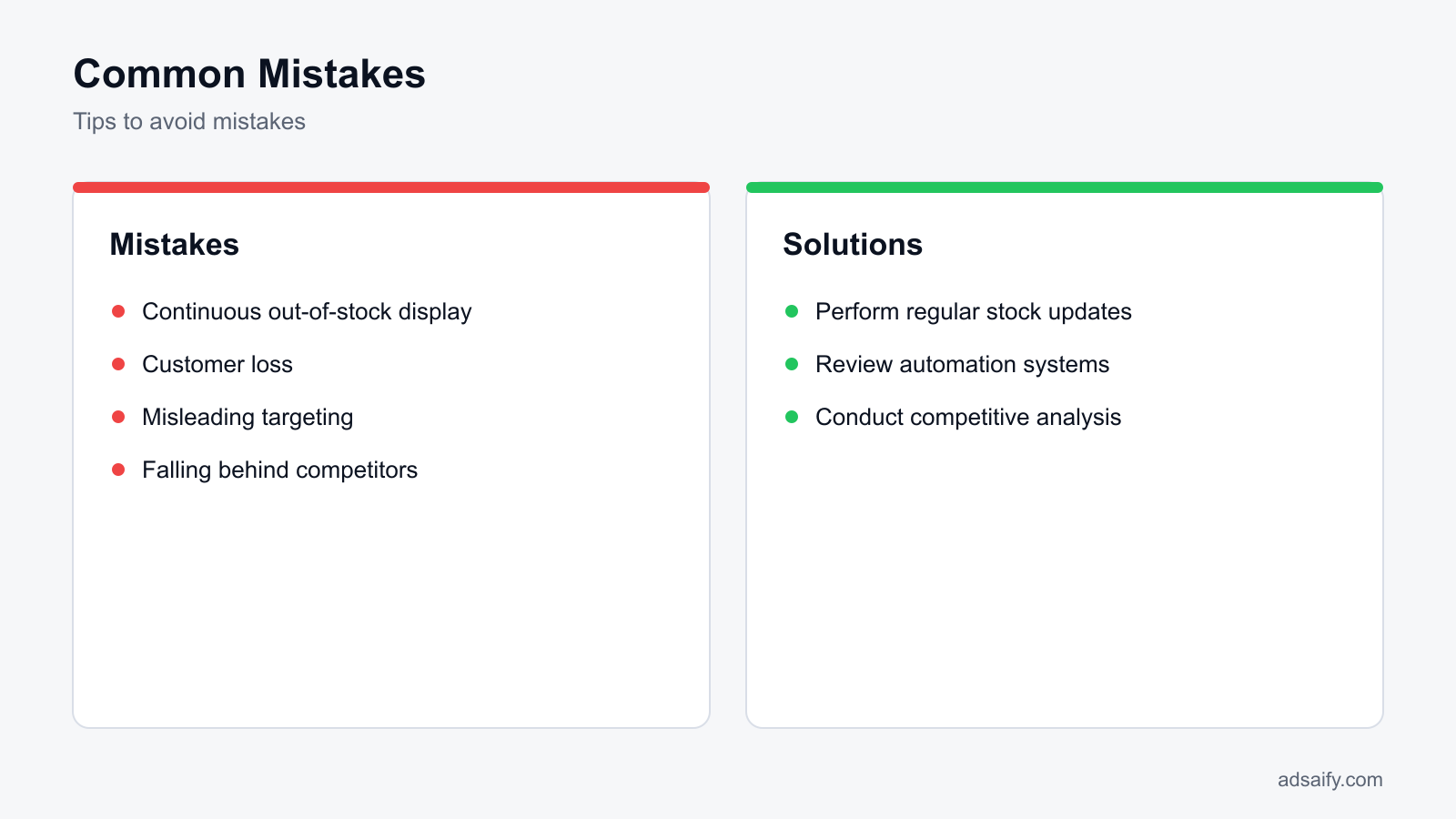
When Will This Fix Not Help and What Are Its Limits?
Displaying out-of-stock items in Dynamic Product Ads (DPA) can often be addressed with catalog updates and inventory management. However, there are situations where the fix may not be effective. Issues beyond catalog updates, system integration errors, and incorrect targeting strategies can still result in out-of-stock products being advertised, despite attempts to rectify the situation.Issues Beyond Catalog Updates
Even after ensuring that your product catalog is up-to-date, other factors may contribute to the display of out-of-stock items. For instance, if there are issues with the data feed from your e-commerce platform to Meta, such as missing attributes or incorrect product IDs, these can lead to discrepancies. Regularly check your data feed settings in the Commerce Manager and ensure that all products are correctly represented.System Integration Errors
Integration problems between your e-commerce platform and Meta can lead to out-of-stock items being shown. If your inventory management system is not properly synced with your Meta catalog, it may not reflect real-time stock levels. To diagnose integration issues, review the API settings and ensure that inventory levels are being accurately reported. Consider using tools that monitor API responses for errors or delays.Incorrect Targeting Strategies
Even if your catalog is accurate, incorrect targeting can lead to unwanted ads for out-of-stock items. If your audience settings are not aligned with your inventory, you might inadvertently target users who are shown products that are no longer available. Regularly review your audience settings in Ads Manager and consider adjusting your targeting parameters based on current inventory levels.- Verify product catalog updates regularly.
- Check for system integration errors.
- Review your audience targeting settings.
- Audit your data feed for missing attributes.
- Monitor API responses for errors.
- Adjust advertising strategy based on current inventory.
- Ensure real-time stock levels are reported accurately.
- Test the ad display with different audience segments.
What are the limitations of this solution?
The limitations of the fix for displaying out-of-stock items in DPA ads include the inability to address system integration issues or incorrect targeting strategies. If these underlying problems are not resolved, catalog updates alone may not prevent out-of-stock items from being advertised.What Key Terms Were Used in This Article?
Understanding key terms is essential for effectively managing Dynamic Product Ads. This section provides definitions for important concepts related to advertising on Meta platforms.- DPA: Dynamic Product Ads are automated ads that display products from a catalog based on user behavior.
- Automation: Making processes automatic to enhance efficiency and reduce manual intervention.
- Inventory Management: Control of product inventory to ensure accurate stock levels are reflected in advertisements.
- Catalog Updates: The process of refreshing product information in a catalog to reflect current inventory.
- API: Application Programming Interface, a set of rules that allows different software systems to communicate with each other.
- Commerce Manager: A Meta tool for managing commerce-related activities, including product catalogs and inventory.
- Data Feed: A structured file that contains product information for advertising purposes.
- Targeting Strategies: The methods used to define and reach specific audiences in advertising campaigns.
- Ad Settings: Configurations that control how ads are displayed and targeted to audiences.
- Real-Time Stock Levels: The current availability of products, updated instantly to reflect changes.
- Audience Segments: Groups of users defined by specific characteristics for targeted advertising.
- Performance Metrics: Measurements used to evaluate the effectiveness of advertising campaigns.
What do these terms mean?
These terms represent essential concepts for understanding and managing advertising on Meta platforms. Familiarity with these definitions helps marketers to effectively troubleshoot issues and optimize their ad strategies for better performance.Conclusion
To stop Meta Dynamic Product Ads (DPA) from advertising out-of-stock items, first, regularly update your product feed to reflect real-time stock levels. Next, implement automation rules to pause ads for out-of-stock products. Finally, consider using Adsaify to help manage and optimize your ad campaigns effectively. A concrete next step is to sign up for an Adsaify account and start optimizing your ads today.
Want to see this in your own account? Enter your website address and Adsaify drafts the campaign for you. The first ad is free. Try it now or log in.
Frequently Asked Questions (FAQ)
1. What is the cost of displaying out-of-stock items?
Displaying out-of-stock items can lead to wasted ad spend and decreased return on ad spend (ROAS). When users click on ads for unavailable products, it can result in lost sales opportunities and a negative customer experience, ultimately harming your brand's reputation.
2. What automation tools can be used?
Automation tools like Adsaify can help manage Meta ad campaigns by implementing rules to pause ads for out-of-stock items. Additionally, many advertising platforms offer automation features to adjust bids or budgets based on product availability and performance metrics.
3. How can I optimize my DPA ads?
To optimize Dynamic Product Ads (DPA), ensure your product feed is accurate and regularly updated, target specific audience segments, and analyze ad performance metrics. Utilize A/B testing for ad creatives and copy to identify what resonates best with your audience.
4. What software is available to prevent this situation?
Adsaify is a software solution that helps prevent advertising out-of-stock items by managing product feeds and automating ad campaign settings. By using Adsaify, businesses can ensure their ads reflect current stock levels and improve overall campaign performance.
5. What strategies should I use for high conversion rates?
To achieve high conversion rates, focus on targeted audience segmentation, compelling ad copy, and high-quality visuals. Implement retargeting strategies to reach customers who have previously engaged with your products, and ensure a seamless user experience on your landing pages.
6. How is competitive analysis conducted?
Competitive analysis involves researching competitors' advertising strategies, product offerings, and market positioning. This can include analyzing their ad creatives, target audiences, and performance metrics to identify gaps and opportunities in your own advertising tactics.
7. How can I automate stock updates?
To automate stock updates, integrate your e-commerce platform with your ad management software. Many platforms offer APIs that allow real-time inventory updates, which can automatically adjust your product feed and pause ads for out-of-stock items.
8. How long do these fixes take to be effective?
The effectiveness of fixes such as updating product feeds and implementing automation rules can vary. Generally, changes may take a few days to reflect in ad performance. Continuous monitoring and adjustments are recommended to ensure optimal results.
How can you try this with Adsaify?
The quickest way to apply the steps in this article to your own account is to try them. Adsaify analyses your business from your website address, drafts the campaign with an audience, ad copy, creative and a budget suggestion, and publishes it to your own Meta ad account once you approve.
- Your first ad is free: there is nothing to lose by trying.
- Your own ad account: the campaign runs in your Meta account and you stay in control.
- Images and video: generate ad creatives with AI or promote an existing Instagram post.
Create a free account and try your first ad · Already have an account? Log in.