Short answer: Adding new creatives directly to an active Meta Advantage+ Shopping Campaign (ASC) causes ROAS drops because the algorithm allocates disproportionate spend to unproven assets, disrupting stabilized delivery. To solve this, validate new assets inside a separate sandbox testing campaign first, migrate only proven winners with stable CPA into live ASC, and cap weekly creative changes.
Every media buyer running Meta Advantage+ Shopping Campaigns (ASC) knows the frustration that follows a creative refresh. You upload three new video angles into a campaign that was delivering steady returns, and within forty-eight hours, your account performance collapses. Instead of generating incremental volume, the new ads siphon the daily budget away from your established top performers without closing sales, leaving you to scramble between cutting budgets and panic-pausing ads.
This volatility occurs because Meta's automated delivery system prioritizes aggressive exploration whenever fresh creative assets enter a campaign. The delivery algorithm misinterprets early engagement metrics as genuine purchase intent, starving your proven conversion engines of spend. When left unmanaged, this unpredictable distribution inflates your customer acquisition cost (CAC), damages cash flow, and keeps the machine learning system in a perpetual cycle of performance resets.
This guide provides a structured framework to protect your ROAS (return on ad spend) while consistently scaling creative volume. You will discover how to isolate creative testing inside a pre-ASC sandbox, define rigorous data thresholds for graduating winning ads, and execute a controlled weekly transfer protocol. By separating creative discovery from campaign scaling, your store can test dozens of visual variations without jeopardizing delivery stability.
Key Takeaways
- Uploading new creative assets directly into an active ASC forces algorithmic exploratory spend, causing acute 48-72 hour ROAS drops.
- Always validate new creative angles in a dedicated manual sandbox testing campaign before moving them into your live ASC.
- Import winning creative assets into ASC using Existing Post IDs to preserve engagement, comments, and social proof.
- Cap creative turnover to a maximum of 20 percent of active ASC assets per week to maintain delivery and bidding stability.
How to tell if adding new creatives is hurting Meta ASC performance?
You can tell adding new creatives is hurting Meta ASC (Advantage+ shopping campaign) performance when return on ad spend drops steeply within forty-eight hours, over half the budget redirects to unproven ads, blended cost per acquisition spikes, and ad-level reporting reveals low conversion rates alongside elevated costs per thousand impressions on the new assets.
Recognizing the immediate symptoms of creative cannibalization
A primary signal of creative destabilization is an immediate drop in ROAS (return on ad spend) of 30 percent or more within 24 to 48 hours of publishing new ads into an active ASC campaign. When you navigate to Meta Ads Manager and inspect the Ads tab, look at the distribution of spend. In a compromised campaign, the algorithm suddenly funnels 50 to 70 percent of your daily budget into the newly introduced creative assets, effectively starving the proven winners that generated consistent purchase volume.
This rapid shift causes the account-level blended CPA (cost per acquisition, which is total spend divided by total purchases) to spike sharply. Because the delivery engine is forcing impressions onto unvalidated creative hooks, intraday budget pacing becomes erratic, frequently exhausting a substantial portion of the budget during early morning hours with minimal conversion output.
Confirming asset failure through Ads Manager breakdowns
To confirm that newly introduced creatives are the root cause, review your delivery data directly:
- Open Meta Ads Manager, select your ASC campaign, and open the Columns dropdown to set the view to Performance and Clicks.
- Click Breakdown, choose By Dynamic Creative Element (or view individual ads if running static units), and examine CPM (cost per mille, which is the cost per thousand impressions).
- Identify whether the new creative assets exhibit a high CPM paired with a click-to-purchase conversion rate significantly lower than campaign historical averages.
For example, consider an online footwear store spending 5,000 USD daily across three winning video creatives at a 3.20 ROAS and a 35 USD CPA. The brand publishes four new lifestyle images directly into the active ASC. Within 36 hours, Meta allocates 3,100 USD of the 5,000 USD daily budget to the four unverified images. Campaign ROAS drops to 1.85, the CPA escalates to 68 USD, and the original video winners receive under 400 USD combined. The Breakdown menu confirms the new images suffer from high CPMs and an acquisition rate under 0.8 percent, demonstrating direct creative cannibalization. Brands managing volatile testing pipelines can monitor asset decay and set up automated pause rules using Adsaify to protect baseline revenue.
Isn't the budget shifting to new ads just Meta's algorithm naturally learning?
No, this spend shift is not productive machine learning; it is automated budget exhaustion. When you insert new creatives into an active ASC, Meta prioritizes exploratory delivery to calibrate audience responses. If the creative resonance fails, the algorithm does not immediately pull back. Instead, it continues spending aggressively across marginal audiences to find a converting segment, driving down campaign-level blended margins before you can manually intervene.
Why does adding creative assets to an active ASC destabilize Meta's algorithm?
Adding creative assets to an active Meta ASC (Advantage+ shopping campaign) destabilizes the algorithm because the system forcefully allocates exploratory impression share to unproven visuals. This shift strips conversion signals from established winning ads, depresses auction-level estimated conversion rates, and drives bids into uncalibrated audience pockets with lower purchasing intent.
Exploratory spend bias and auction metric dilution
Meta ASC operates on machine-learning models programmed to maximize total conversion liquidity, which creates a structural bias toward new visual assets. The delivery system assigns aggressive exploratory spend to any newly uploaded creative to gather behavioral feedback. Consequently, established winning ads lose auction delivery priority and their tightly calibrated historical bid efficiency.
In Meta’s ad auction, total bid value is determined by the bid multiplied by eCVR (estimated conversion rate, which is the algorithm's prediction of user conversion likelihood) plus user value. Unproven creative assets have zero historical conversion data, which introduces high variance. When these new assets produce initial clicks without downstream purchases, the algorithm broadens bid distribution into cheaper, uncalibrated demographic and interest pockets rather than staying inside profitable, high-intent segments.
Comparing auction states before and after adding unproven creatives
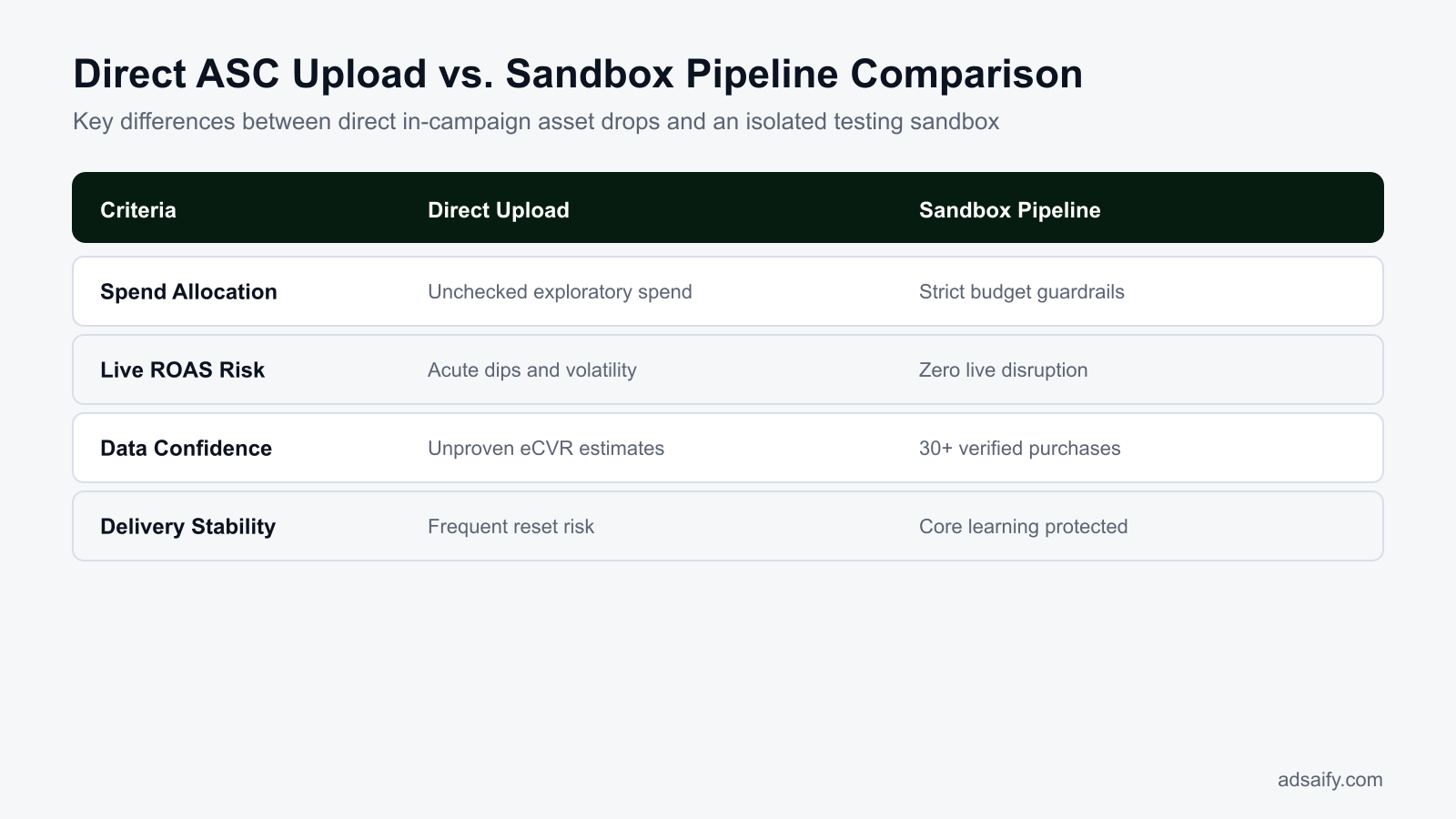
The operational differences between a calibrated ASC asset pool and an uncalibrated asset injection illustrate why performance degrades across the entire campaign structure:
| Auction Metric | Stable ASC (Pre-Addition) | Destabilized ASC (Post-Addition) |
|---|---|---|
| Spend Distribution | Concentrated on verified winning ads with steady conversion data | Over 50 percent redirected to unverified exploratory assets |
| Estimated Conversion Rate (eCVR) | Predictable and backed by real-time purchase feedback | Volatile and depressed due to low initial transaction rates |
| Audience Targeting Pockets | Tightly aligned with high-intent recurring buyers | Broadened into low-intent segments seeking cheaper clicks |
| Intraday Pacing Stability | Even delivery matched to peak historical buying hours | Aggressive morning delivery attempting rapid exploratory learning |
When unproven assets depress campaign-level conversion metrics, the delivery engine cannot recalibrate on its own without sacrificing margin. Creative teams must avoid injecting raw prototypes directly into scaled campaigns, opting instead to validate asset quality in isolated testing workflows before deployment.
Does this destabilization still happen even if we leave old winners running?
Yes, keeping old winners active does not prevent destabilization. ASC does not treat ads as isolated entities; it evaluates the entire campaign asset pool simultaneously. Because Meta's delivery mechanism prioritizes data gathering on newly added visuals, the system artificially diverts auction bids away from proven ads regardless of their historical profitability, suppressing their delivery volume until the campaign is forced into prolonged instability.
What does unchecked creative volatility in Meta ASC cost an online store?
Unchecked creative volatility in Meta ASC costs an online store immediate net profit, working capital reserves, and algorithmic stability. When untested creative assets suddenly siphon delivery away from proven ads, return on ad spend drops, customer acquisition costs spike, and automated bid systems enter perpetual learning states that permanently degrade audience targeting.
Margin Compression and Cash Flow Disruptions
Meta ASC (Advantage+ shopping campaign) is an automated campaign type that relies on machine learning to dynamically distribute ad spend across audiences, placements, and creative assets. When an advertiser uploads unvalidated creatives directly into an active campaign, the delivery system tests these new assets aggressively. For example, in an ad account spending 5,000 USD daily with a baseline 3.0 ROAS (return on ad spend, the revenue earned per currency unit spent), an untested video might consume 40 percent of that budget while producing a 0.8 ROAS. This sudden reallocation instantly eliminates net e-commerce profit margins for the week. Elevated CAC (customer acquisition cost, the total marketing expense required to gain one paying customer) creates immediate cash flow pressure, preventing the store from reinvesting in inventory or fulfilling baseline operating expenses.
Algorithmic Drift and Learning Phase Trap
When high-spend, low-converting assets fail to generate purchase events, the Meta delivery system attempts to find cheaper conversion signals elsewhere. The algorithm begins distributing impressions to low-intent user segments who click frequently but do not buy. This feedback loop degrades the quality of data fed into the campaign optimization model. When performance plummets, advertisers often panic, drastically cutting the daily budget or pausing multiple ads simultaneously. Adjusting ad sets by more than twenty percent resets the campaign learning phase, trapping the entire Meta ad account in perpetual learning resets that prolong poor conversion rates for weeks.
- Calculate daily net profit break-even thresholds before introducing any asset.
- Audit ad-level spend distribution every morning inside Meta Ads Manager.
- Cap total daily spend allocation permitted for unproven creative variations.
- Verify inventory levels for every SKU featured in uploaded creatives.
- Establish automated pausing thresholds to stop assets burning spend without conversions.
- Maintain account-level baseline conversion rates without resetting campaign budgets abruptly.
Won't performance naturally recover on its own if we just wait a few days?
Performance will not naturally recover if the underperforming creative continues to drain significant budget. While Meta's delivery system continuously optimizes, leaving a negative-margin asset active forces the algorithm to gather conversion signals from low-intent cohorts to satisfy delivery targets. Allowing an untested creative to exhaust twenty to forty percent of daily spend over several days deepens cash losses and warps campaign audience modeling, requiring weeks of corrective spend to re-establish previous baseline performance.
How do you diagnose whether an ASC performance drop is caused by creative changes?
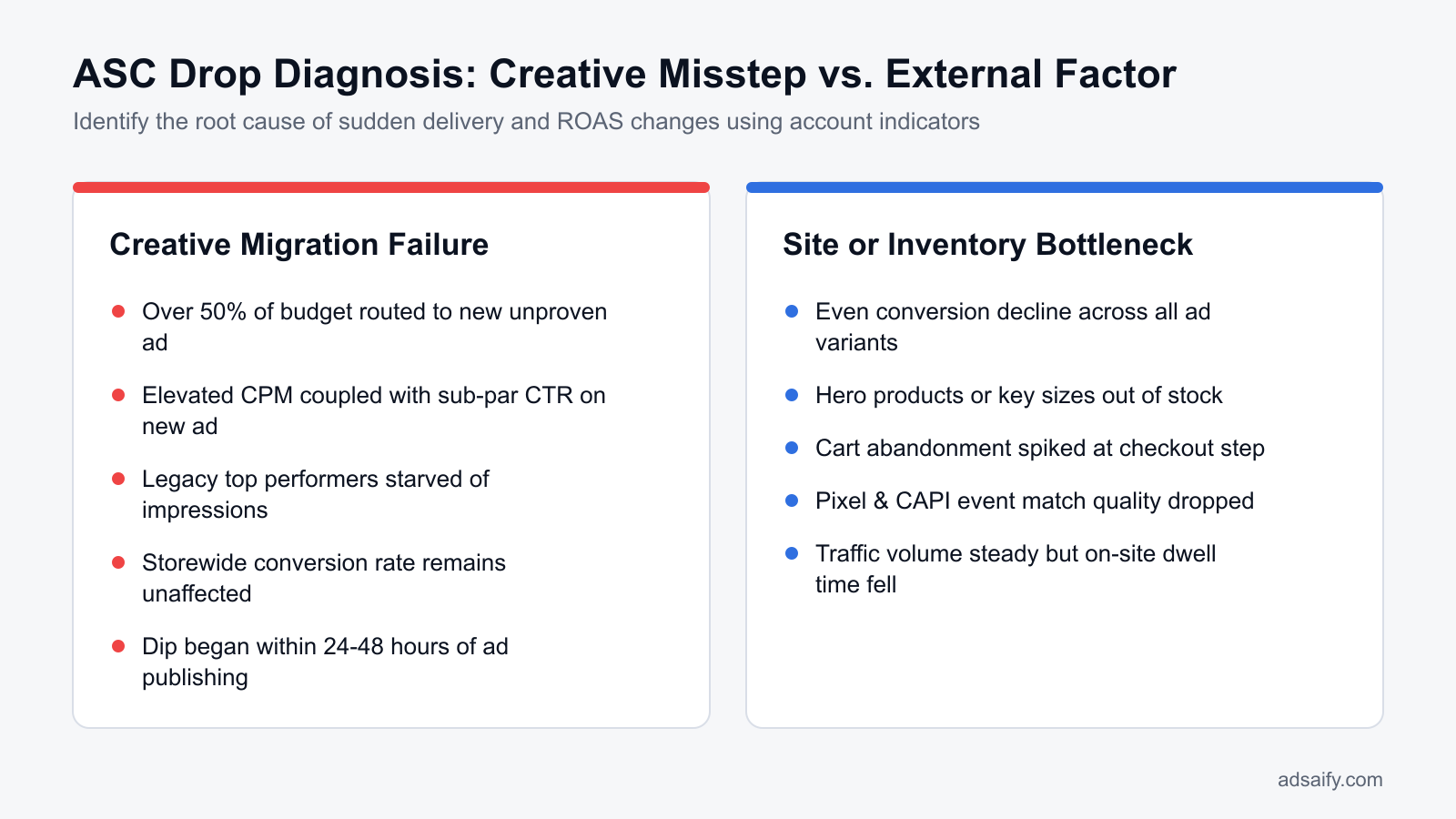
Diagnosing whether a Meta ASC performance drop stems from creative changes requires auditing asset-level spend distribution in Meta Ads Manager. If newly uploaded assets capture more than twenty percent of daily budget while delivering below-target return on ad spend, creative destabilization is confirmed, provided checkout tracking, inventory levels, and site speeds remain fully functional.
Auditing Spend Share and Asset-Level Efficiency
Open Meta Ads Manager, select the specific Advantage+ shopping campaign, and navigate to the Ads tab. Change the reporting window to compare the last seven days against the preceding seven days. Sort the creative assets by the Amount Spent column. If an asset added within the past 48 to 72 hours has absorbed a significant share of total campaign expenditure while generating a ROAS well below the account break-even mark, creative cannibalization is taking place. This spend diversion starves your proven winning ads of impressions, dragging down overall campaign blended ROAS.
Rule Out External Technical and Store Bottlenecks
Before blaming creative performance, verify that store infrastructure is operating correctly. Review your e-commerce platform analytics for checkout payment gateway errors, unexpected product stockouts on advertised items, or sudden drops in server response time. Next, analyze Meta advertising diagnostics: CPM (cost per mille, the cost per one thousand ad impressions), outbound CTR (click-through rate, the percentage of impressions that result in clicks off Meta platforms), and ad frequency (the average number of times a user sees an ad). A creative-induced drop displays stable CPMs and steady impressions, but suffers from dropping conversion rates and lower outbound CTR on the newly introduced assets.
| Diagnostic Signal | Creative Destabilization Indicator | External Technical Issue Indicator |
|---|---|---|
| Budget Distribution | New assets absorb over 20% of spend rapidly | Spend remains evenly distributed across old winners |
| Outbound CTR | Declines sharply on new assets compared to controls | Remains normal across all active ad variants |
| Store Conversion Rate | Drops specifically on traffic routed from new ads | Drops uniformly across all paid and organic traffic |
| Delivery CPM | Remains stable or drops due to low-intent delivery | Remains normal while site purchase events cease entirely |
Stores using automated management tools, such as the performance monitoring rules available in Adsaify, can configure automated safeguards to pause creative assets that fail to hit ROAS targets before spend leakage compromises the campaign.
Once confirmed as a creative issue, what is the immediate emergency action?
The immediate emergency action is to pause only the newly introduced underperforming ad assets inside Meta Ads Manager without modifying campaign-level budgets or targeting parameters. Do not edit or touch the existing winning assets. Pausing the failing individual creative stops immediate financial losses and automatically routes the campaign budget back to established, high-converting creative assets within several hours, preventing a full learning phase reset.
If you would rather not set up each of these steps by hand, try it in Adsaify: your first ad is free, so there is nothing to lose. Create a free account.
What should you prepare before structuring an ASC creative testing pipeline?
To prepare an ASC creative testing pipeline, advertisers must define account profitability benchmarks, audit active asset distribution, and group incoming creatives by hypothesis. Establishing a firm target CPA, cataloging current spend across running ads, and drafting structured variations prevents destabilizing live machine learning when introducing new creative assets into Meta Ads Manager.
Establish performance thresholds and audit live assets
Before launching an isolated creative workflow, establish your account's non-negotiable performance boundaries. CPA (cost per acquisition) is the total ad spend divided by the number of purchases, and ROAS (return on ad spend) is the gross revenue generated divided by ad spend. If an account requires a minimum ROAS of 2.50 and a target CPA of 40 dollars to remain profitable, record these metrics as hard screening criteria.
Next, audit the live ASC (Advantage+ shopping campaign). Open Meta Ads Manager, select your active ASC, set the date range to the last 30 days, and examine the Ad level. Document how many ads currently receive impressions. In most accounts, Meta allocates 80 percent or more of the budget to just two or three dominant ads. Knowing your baseline spend allocation prevents you from misinterpreting normal distribution biases during future creative launches.
Categorize hypotheses and generate structured variations
Organize incoming creative assets into structured testing buckets rather than uploading disorganized files. Categorize assets by visual hook (the opening three seconds of video), visual format (such as static user-generated content, lifestyle photography, or motion graphic carousels), and primary copy angle (such as emotional benefit versus functional feature). Testing distinct angles uncovers what truly resonates with your audience.
You can streamline this preparation phase with Adsaify, which analyzes a business from its website URL to draft campaign structures, generate initial ad copy, suggest ad images or videos, and suggest appropriate test budgets for your Meta ad account.
ASC testing preparation checklist
- Calculate your maximum viable CPA and minimum acceptable ROAS using your store profit margins.
- Audit the live Advantage+ shopping campaign to record active creative counts and primary spend winners.
- Tag every incoming creative asset by its primary hook, asset ratio, and creative concept.
- Verify that the Meta Pixel and Conversions API pass purchase events with deduplicated transaction values.
- Prepare clean ad copy angles with matching landing page destinations for each concept.
Will running a separate test campaign fragment my total advertising budget too much?
A separate test campaign does not dangerously fragment your budget if you size it properly according to your conversion volume. Dedicating 15 to 20 percent of your overall Meta ad spend to a manual sandbox campaign leaves 80 to 85 percent of your capital consolidating signals inside the primary Advantage+ shopping campaign. As long as your testing budget generates enough conversions to complete the learning phase on each test ad set, liquidity across the ad account remains healthy.
How do you safely introduce new creatives into Meta ASC using a sandbox pipeline?
To safely introduce new creatives into Meta ASC, isolate unproven ads in an external manual sandbox campaign using broad targeting before promoting them to the live environment. Only transfer assets that meet volume and efficiency thresholds, migrate them via Existing Post ID to preserve social proof, and cap introductions to two ads weekly.
Build the manual testing sandbox environment
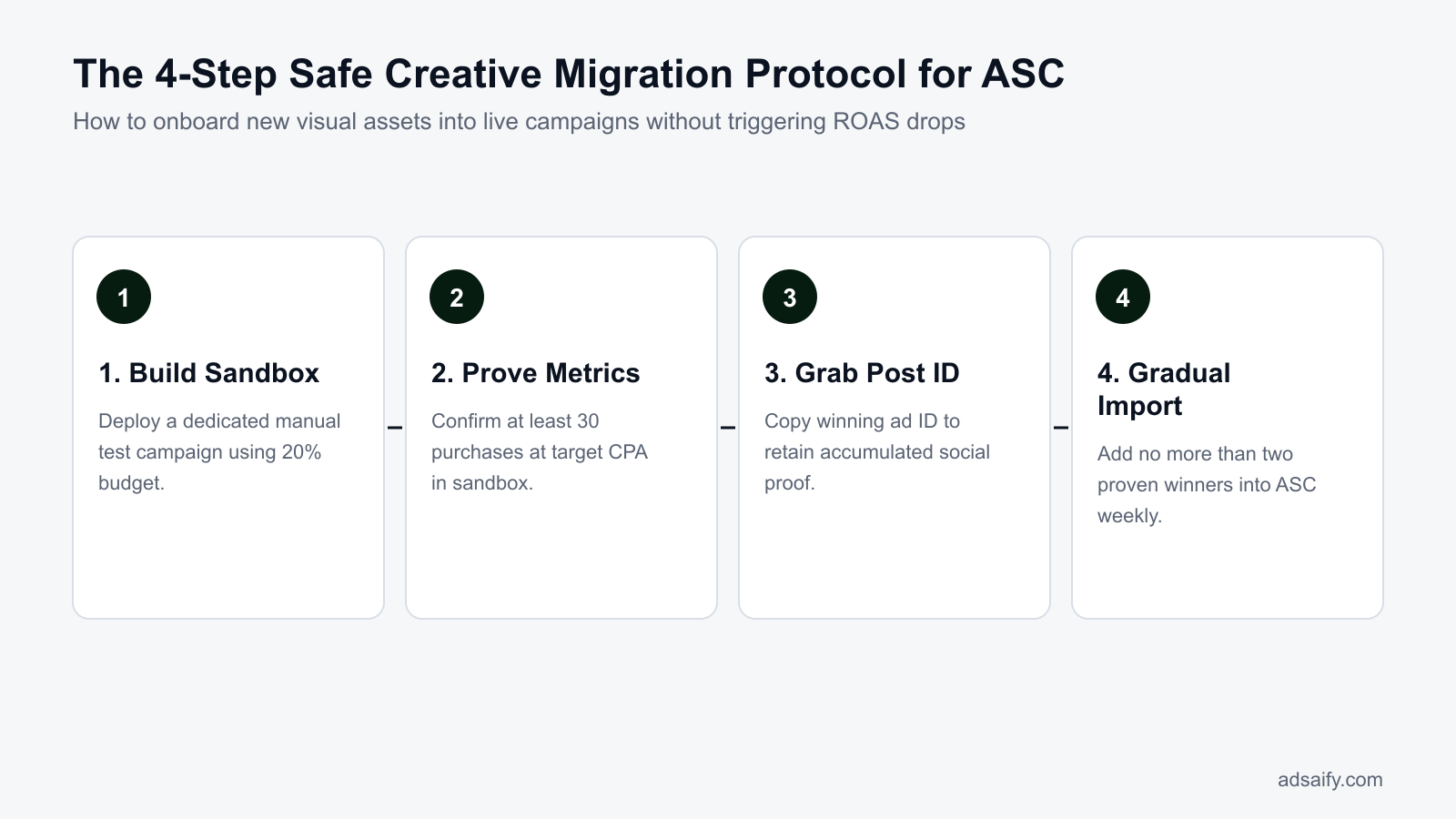
Create a dedicated manual sales campaign named "Creative Sandbox" alongside your primary Advantage+ shopping campaign. Allocate exactly 20 percent of your total account budget to this campaign. Depending on your preference for spend control, set the sandbox as an ABO (ad set budget optimization) campaign where you dictate budget per ad set, or a CBO (campaign budget optimization) campaign where Meta distributes spend dynamically across ad sets.
Inside the sandbox, configure ad sets targeting completely broad audiences with no detailed targeting or lookalikes, matching the broad environment Meta ASC operates in natively. Place two to four creative variations into each ad set. Allow each test cohort to run uninterrupted for three to five days without editing ad copy or budgets mid-flight.
Validate winners and execute the Post ID transfer
A creative must prove itself through statistical significance before touching your live scaling campaign. Designate an asset as a validated winner only after it achieves at least 30 to 50 purchases at or below your target CPA threshold. Assets failing to hit this conversion volume often experience performance collapse once exposed to higher spending velocity.
When an asset passes validation, never recreate it manually inside the ASC. Doing so generates a duplicate asset that starts with zero engagement data. Instead, navigate to Page Posts within Meta Business Suite, copy the alphanumeric Post ID of the winning ad, and import that existing post directly into the live ASC. Limit imports to a maximum of two new assets per week, allowing the campaign to absorb the new data for seven days before making any subsequent changes.
- Sandbox allocation — Allocate 20 percent of the total account budget into a dedicated manual broad-targeting campaign to protect the main campaign from volatile learning cycles.
- Run testing cohort — Run new creative concepts inside the sandbox environment for three to five days without altering ad set parameters.
- Evaluate conversion volume — Check whether an ad achieved at least 30 to 50 purchases at or below the target CPA threshold before approving it for migration.
- Extract Post ID — Locate the validated ad inside Meta Page Posts and copy its unique Post ID to retain all accumulated social proof and comment history.
- Import into ASC — Paste the Post ID into the live Advantage+ shopping campaign, adding no more than two new assets per weekly optimization cycle.
- Observation window — Monitor delivery distribution across all ads for seven days to verify that the imported creative integrates without degrading total account ROAS.
What is the difference between using Post ID versus creating the ad from scratch inside ASC?
Importing an ad using its Existing Post ID transfers the exact Facebook and Instagram post, retaining every comment, like, share, and algorithmic engagement signal earned during sandbox testing. Recreating an ad from scratch by re-uploading the media file generates a brand-new post with zero social proof. Starting from zero forces Meta's delivery system to re-learn audience relevance, resulting in higher initial CPMs and an increased risk of performance volatility inside the live campaign.
How does an e-commerce brand launching 10 weekly creatives run this framework?
An e-commerce brand runs this framework by splitting daily ad spend between an active Advantage+ shopping campaign (ASC) and a manual sandbox campaign. The sandbox isolates new creative testing without destabilizing live delivery. Only validated assets that meet predefined cost-per-acquisition targets migrate into the main Advantage+ shopping campaign using their existing Post IDs.
Allocating budget and setting up sandbox ad sets
For example, an online apparel brand operating with a 5,000 TL total daily budget allocates 4,000 TL (80 percent) to the primary Advantage+ shopping campaign and 1,000 TL (20 percent) to a manual sales testing sandbox. An Advantage+ shopping campaign (ASC) is an automated campaign type in Meta Ads Manager that uses machine learning to optimize creative and audience delivery across all Meta placements. The sandbox campaign uses manual Sales campaign settings with original audience options, broad demographic targeting, and cost control settings.
The brand divides the 10 weekly creatives—consisting of five short-form videos and five static catalog images—equally across two sandbox ad sets, allocating 500 TL daily budget to each ad set. Media buyers who manage rapid testing pipelines often use Adsaify to draft campaign variations, generate complementary ad copy, and structure test batches directly in Meta Ads Manager without disrupting live account architecture.
Evaluating performance thresholds and transferring Post IDs
The testing sandbox runs uninterrupted for 72 hours so Meta Ads Manager collects reliable conversion telemetry. CPA (cost per acquisition) is the average advertising cost incurred to generate a single purchase. If the brand sets a maximum allowable CPA threshold of 200 TL, any creative that generates sales at or below 200 TL qualifies for graduation.
In this worked example, two video assets achieve CPAs of 175 TL and 190 TL after 72 hours, while the remaining eight creative assets produce CPAs above 310 TL or spend budget without generating sales. The brand immediately pauses the eight unprofitable ads inside the sandbox ad sets. The media buyer opens Meta Page Posts, copies the distinct Post ID for each of the two winning ads, and inputs those Post IDs into the active Advantage+ shopping campaign using the "Use Existing Post" option. A Post ID is the unique alphanumeric identifier that stores an ad's accumulated comments, shares, and engagement history. Importing the Post ID preserves that historical engagement, preventing algorithmic shock inside the main campaign.
What should we do if none of the 10 sandbox creatives hit our target CPA?
If no sandbox creative meets the target CPA after 72 hours, pause all 10 sandbox ads immediately and leave the live Advantage+ shopping campaign untouched. Do not force underperforming assets into the live campaign, as that triggers delivery volatility and depresses return on ad spend. Analyze the sandbox drop-off points using click-through rate, cost per outbound click, and video retention metrics to diagnose whether the creative hook, product offer, or messaging failed before testing the next creative batch.
Which metrics confirm that the ASC creative transfer protocol is working?
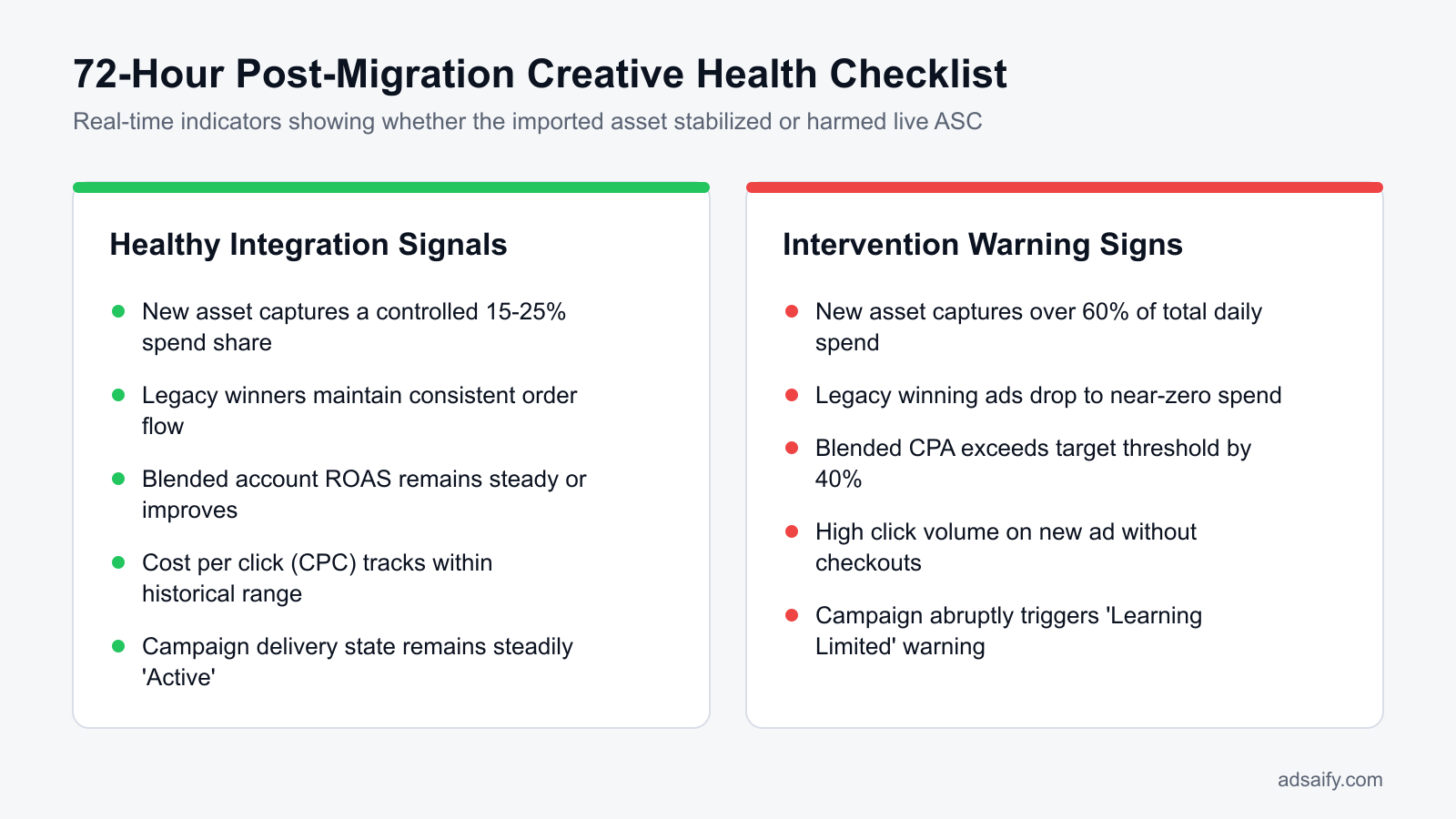
Media buyers confirm the Advantage+ shopping campaign creative transfer protocol is working when blended return on ad spend remains stable, cost per acquisition stays within target, and the newly introduced Post ID smoothly captures 15 to 25 percent of campaign spend without starving existing top-performing ad assets of delivery.
Monitoring spend distribution and account-level stability
ROAS (return on ad spend) is total attributed revenue divided by total advertising spend. MER (Marketing Efficiency Ratio) is total store revenue across all sales channels divided by total marketing expenditure across all platforms. When introducing a graduated creative into an Advantage+ shopping campaign, Meta Ads Manager should distribute 15 to 25 percent of the daily budget toward the new Post ID within three to five days.
Legacy winning ads must retain the remaining 75 to 85 percent of delivery. If the algorithm abruptly allocates over 60 percent of the campaign budget to the new creative within 24 hours, delivery instability will follow. CPC (cost per click) is the average price an advertiser pays each time an ad receives a click. CPC and site-wide conversion rates should show steady trendlines with minimal day-to-day variance. Teams can set automated guardrails, such as configuring Adsaify automation rules to pause imported ads if their individual CPA exceeds acceptable limits, preventing unexpected spend spikes.
Evaluating health indicators during creative transfer
| Metric or Signal | Healthy Transfer Indicator | Unstable Transfer Indicator |
|---|---|---|
| Budget Share of New Post ID | Gradually scales to 15-25% over 3 to 5 days | Consumes >60% in 24 hours or stays flat at 0% |
| Legacy Creative Performance | Retains steady impression volume and CPA | Experiences sudden impression drop ("spend starvation") |
| Cost Per Outbound Click (CPC) | Fluctuates within a narrow 10% tolerance band | Spikes unpredictably by more than 30% day-over-day |
| Blended Account ROAS | Remains flat or trends upward over a 7-day period | Drops sharply below the account breakeven threshold |
| Store-Level MER | Correlates positively with reported Meta revenue | Declines while platform reports artificially high ROAS |
If there is a discrepancy between MER and in-platform ROAS, which metric takes priority?
When Marketing Efficiency Ratio (MER) and in-platform return on ad spend (ROAS) diverge, MER always takes priority. In-platform Meta ROAS relies on modeled attribution windows and conversion tracking pixels that can over-report duplicate conversions or under-report cross-device purchases. MER measures actual bank-deposited revenue against actual marketing expenditure across the entire store. If Meta reports a rising ROAS but overall MER declines, the transferred creatives are likely cannibalizing organic sales or claiming false attribution rather than generating net-new customer revenue.
Want to see this in your own account? Enter your website address and Adsaify drafts the campaign for you. The first ad is free. Try it now or log in.
What weekly routine keeps the ASC creative pipeline stable without ROAS dips?
A structured weekly routine stabilizes Meta ASC (Advantage+ Shopping Campaigns) by decoupling creative testing from scaling and staggering asset introductions. Advertisers review sandbox tests on Monday, introduce one or two validated creatives via existing Post IDs on Wednesday, audit spend distribution on Friday, and retire fatigued ads on Sunday to avoid auction shocks.
Executing Meta advertising operations on a strict calendar prevents automated bidding systems from entering volatile re-learning phases. For example, in an account spending 5,000 USD weekly, uncoordinated ad launches scatter impression delivery unpredictably. Following a synchronized operating rhythm ensures that creative graduation, asset pruning, and budget safeguarding occur without destabilizing the core ASC machine learning model.
- Daily: Monitor account-level blended CPA (cost per acquisition, the total ad spend divided by total purchases) in Meta Ads Manager to catch sudden algorithmic volatility before daily budgets drain.
- Weekly (Monday): Review sandbox testing ad sets over the trailing 72-hour weekend window, pausing creative variants that fail to achieve target ROAS (return on ad spend, which measures gross revenue earned per dollar spent).
- Weekly (Wednesday): Graduate a maximum of one to two verified sandbox winners into the active ASC by selecting "Use Existing Post" in Meta Ads Manager Ad Setup to retain established social engagement.
- Weekly (Friday): Audit ASC spend allocation across all active ads, using automated rules in Adsaify to automatically pause any new asset whose CPA drifts 30 percent above account targets.
- Weekly (Sunday): Gracefully turn off legacy winning creatives whose 14-day rolling CPA has exceeded acceptable profitability thresholds, allowing delivery algorithms to transition volume naturally into newer assets overnight.
- Bi-weekly: Refresh the sandbox creative backlog with iterative variations of top-performing visual hooks, direct response angles, and headline variations identified during testing.
- Monthly: Conduct a comprehensive creative audit inside Meta Ads Manager Breakdown reports to evaluate conversion rates, click-through rates, and customer acquisition costs across historical asset formats.
Should we immediately replace a paused legacy creative with a new one on the exact same day?
No, media buyers should never pause a legacy creative and launch a replacement simultaneously inside Meta ASC. Abruptly swapping high-volume ads forces Meta's delivery algorithm into an immediate state of shock, redistributing daily spend unpredictably across active assets. Instead, introduce the validated replacement creative first, allow the algorithm two to three days to naturally allocate impressions toward it, and only pause the decaying legacy ad once the new asset reliably sustains target CPA.
What are the most common mistakes when managing creative assets in Meta ASC?
The most common mistakes when managing Meta ASC creatives include uploading untested assets directly into active campaigns, abruptly pausing legacy top performers, terminating ads prematurely, and re-uploading media files without Post IDs. These actions trigger algorithmic resets, inflate CPA (cost per acquisition), strip away accumulated social proof, and disrupt automated spend allocation.
Batch uploading more than five untested creative assets into live ASC
Flooding an active ASC with unproven assets forces Meta's predictive model to scatter budget across exploratory micro-segments, diluting delivery away from proven winners. For example, adding six new ads at once frequently degrades daily account efficiency. The fix is to validate concepts in an isolated sandbox ad set first, introducing only one or two winners weekly into ASC.
Manually pausing legacy winning ads when a new ad starts spending
Marketers often panic when a new ad captures spend and prematurely pause the existing top performer. This eliminates the campaign's historical conversion anchor, spiking CPA. The fix is to let the legacy winner run until its 14-day rolling CPA exceeds acceptable limits, allowing Meta to balance spend shifts organically.
Prematurely pausing new ads after less than 24 hours
Turning off a newly added creative within 24 hours denies the algorithm statistical confidence. Meta requires adequate impressions to match creative signals to buyer intent across placements. The fix is allowing new assets to spend at least two to three times target CPA before evaluating performance, avoiding knee-jerk manual interventions.
Re-uploading raw creative files instead of reusing Post IDs
Uploading fresh media files into ASC instead of importing the original Post ID (the unique identifier assigned to a published ad that retains likes, comments, and shares) erases social proof. This forces the ad to enter auctions with zero engagement signals, inflating CPM (cost per thousand impressions). The fix is selecting "Use Existing Post" in Meta Ads Manager.
Running duplicate visual hooks across multiple active ASC ads
Launching ads with identical opening video hooks creates creative overlap within ASC. The algorithm struggles to identify distinct audience pockets, causing CPMs to rise without reaching new buyers. The fix is ensuring that every new asset features a distinctly different hook, format, or messaging angle before introducing it to the campaign.
Failing to establish automated CPA safety limits
Leaving newly introduced creatives unmonitored over weekends can trigger runaway spend on poorly converting assets. ASC algorithms occasionally over-index on high click-through rates that fail to convert into purchases. The fix is setting automated safety rules in Meta Ads Manager to pause any asset whose spend exceeds target CPA without a conversion.
If I operate on a very small budget, can't I just test directly inside ASC?
Testing directly inside Meta ASC on a limited daily budget guarantees erratic performance and wasted spend. When total campaign budget cannot support simultaneous exploration and conversion, ASC funnel-biases spend into existing winning ads, starving new creatives or randomly diverting critical impressions to unproven assets. Small-budget advertisers should instead test single creative concepts inside a low-cost standard manual campaign, graduating only verified, revenue-positive assets into ASC once profitability is definitively proven.
When does the creative isolation strategy fail to fix Meta ASC ROAS drops?
The creative isolation strategy fails to fix Meta ASC (Advantage+ Shopping Campaign) ROAS (return on ad spend) drops when external operational, technical, or seasonal factors disrupt conversion efficiency outside the ad auction. Isolating ad creative cannot compensate for broken checkout funnels, out-of-stock merchandise, broken Meta Pixel tracking signals, or macro consumer demand slowdowns.
Technical website errors and inventory depletion
Meta ASC relies on post-click conversion velocity to determine which audience cohorts receive delivery. When a website suffers from technical regressions, the algorithm continues spending budget on ads that cannot convert. A sudden increase in page load time from two seconds to six seconds on mobile devices can reduce purchase conversion rates significantly, causing ROAS to drop even when ad engagement metrics remain healthy. Similarly, unexpected payment gateway errors inside Shopify or WooCommerce silently reject transactions while Meta continues to record outbound clicks. Inventory stockouts represent another critical breaking point. If your top three product variants or core apparel sizes sell out on the product detail page, traffic directed by an isolated ad will bounce without completing a purchase, starving the ad set of conversion signals.
Tracking signal degradation and seasonal shopping lulls
Performance drops frequently originate within data pipelines rather than ad creative execution. Meta Conversions API (CAPI is a server-side event tracking tool) disconnects or misconfigured cookie consent banners prevent purchase events from reporting back to Meta Events Manager. When Event Match Quality scores deteriorate, Meta loses the ability to attribute sales to specific ads and cannot optimize auction bidding. In addition, macro seasonal downtrends periodically depress consumer purchasing intent across entire industries. During post-holiday shopping lulls in January, consumer demand contracts naturally. In these periods, testing new creative variations or isolating existing winners will not offset broader market contractions, as lower buyer intent inflates CPM (cost per mille) rates and suppresses conversion rates across all campaigns.
- Audit mobile site speed using Google PageSpeed Insights to verify product pages load in under three seconds.
- Execute a live checkout transaction from an incognito mobile browser to confirm payment gateways process orders normally.
- Inspect store inventory levels to verify all sizes and colorways featured in active ad creatives remain in stock.
- Check the Meta Events Manager Diagnostics tab for dropped Event Match Quality scores or missing server purchase events.
- Compare store-wide conversion rates against historical averages to determine if drop-offs occur across all marketing channels.
- Review external search demand trends to rule out industry-wide seasonal retail contractions.
How can I distinguish a technical pixel failure from algorithmic creative volatility?
To distinguish a technical pixel failure from algorithmic creative volatility, review the Meta Events Manager Diagnostics tab and compare website backend orders against Meta reported purchases. A technical failure manifests as an immediate, vertical drop in reported events, missing server-side deduplication, or zero Purchase events in the Test Events tool while actual store revenue remains stable. In contrast, algorithmic creative volatility causes gradual ROAS declines, fluctuating CPM rates, and declining outbound click-through rates across both Meta Ads Manager and website analytics simultaneously.
What are the essential terms used in ASC creative pipeline management?
Essential terms in Meta ASC creative pipeline management define the algorithmic mechanics, testing structures, and tracking parameters required to scale automated campaigns safely. Mastering this vocabulary enables media buyers to diagnose auction behavior, preserve machine learning stability, and transfer validated ad assets between environments without triggering disruptive performance fluctuations or wasted ad spend.
- ASC (Advantage+ Shopping Campaign): Meta's automated e-commerce campaign type running machine-learning-driven delivery, targeting, and budget optimization across all platform placements.
- Creative Sandbox: An isolated testing campaign where new ad angles are validated without risking primary campaign ROAS.
- Existing Post ID: A unique identifier that retains all user engagement, comments, and social proof on a specific ad.
- eCVR (Estimated Conversion Rate): Meta's algorithmic probability score predicting whether a given user will complete a purchase.
- ROAS (Return on Ad Spend): A metric calculated by dividing total attributed revenue by total advertising expenditure to measure marketing efficiency.
- Creative Fatigue: The performance decline occurring when audience members repeatedly view identical ad assets, leading to rising acquisition costs.
- Learning Phase: The initial algorithmic optimization period where Meta requires approximately 50 conversion events per ad set within seven days to stabilize ad delivery.
- CPM (Cost Per Mille): The cost an advertiser pays for every one thousand ad impressions served within Meta's ad auction.
- First-Time Impression Ratio: A diagnostic metric that measures the percentage of daily ad impressions delivered to individuals who have never seen the ad asset before.
- CAPI (Conversions API): A Meta server-side event tracking tool that routes web conversion data directly from a store backend to bypass browser tracking restrictions.
- Graduation Protocol: The structured operating procedure of copying top-performing creative assets from an isolated testing sandbox into a live production campaign.
Do I need advanced technical or software expertise to manage this campaign setup?
You do not need software engineering skills or custom coding to manage an ASC creative pipeline, as the framework relies entirely on native Ads Manager duplication workflows and Post ID reuse. However, manually tracking creative fatigue across multiple ad sets demands consistent daily oversight. Performance marketers who want to streamline this operational overhead can register for Adsaify to draft campaigns from a website URL, generate creatives, and enforce automated rules to pause underperforming ads without manual hourly audits.
Safeguarding ASC ROAS: Test in Sandbox, Validate with Data, and Scale Gradually
To prevent ROAS drops in Meta Advantage+ Shopping Campaigns (ASC), run a structured workflow in strict order. First, never upload untested creatives directly into your primary ASC. Instead, validate new concepts inside an isolated creative testing campaign using a standard manual sales structure. Second, allow each new creative to collect sufficient conversion volume before evaluating performance. Third, once a creative proves profitable, import it into the live ASC campaign using its existing Post ID to preserve social proof. Finally, protect total campaign efficiency by using automated rules to pause underperforming or fatigued ads before they drain significant budget.
For an immediate next step today, audit your active Meta ad account to identify how spend is currently distributed across your live ASC ads. If you notice a recently added asset pulling disproportionate budget with below-target returns, pause it and rebuild your workflow around a separate testing environment. You can register on Adsaify to draft structured creative variations and establish automated rules that keep your scaling campaigns protected.
Want to see this in your own account? Enter your website address and Adsaify drafts the campaign for you. The first ad is free. Try it now or log in.
Frequently Asked Questions (FAQ)
1. What is the optimal number of active creative assets in a live ASC?
A live Meta Advantage+ Shopping Campaign (ASC) generally operates best with 10 to 20 active creative assets. Maintaining this range provides Meta's machine learning algorithm with sufficient variety to target different audience segments without diluting daily budget across too many competing ads. Too few assets risk early creative fatigue, while too many cause fragmented delivery and erratic optimization.
2. What percentage of the overall ad budget should be dedicated to the creative sandbox?
Allocate approximately 10 to 20 percent of your total Meta advertising budget to your creative sandbox testing campaign. The remaining 80 to 90 percent stays dedicated to your scaling Advantage+ Shopping Campaign. For example, with an overall daily budget of 1,000 dollars, reserve 100 to 200 dollars for testing new hooks, angles, and visual concepts without destabilizing primary revenue.
3. What should you do if Meta ASC assigns zero spend to a newly added creative?
If an Advantage+ Shopping Campaign assigns zero spend to a new creative, leave the live campaign alone and move that asset into an isolated testing ad set. Meta prioritizes proven historical winners, frequently starving new ads of impressions. Testing the creative in a standard campaign with forced budget allows the asset to gather conversion data before you reintroduce it via Post ID.
4. Can you edit the copy or image of an ad after importing it via Post ID?
No, you cannot edit the primary text, headline, or media file of an ad once it is published and imported using its Post ID. A Post ID represents a specific, immutable publication on Meta platforms. Modifying the underlying creative requires creating a new ad post, which generates a distinct Post ID and resets any accumulated social proof, comments, and engagement.
5. How do you know when an existing ASC winning ad is fatigued and ready to be paused?
An existing ASC winning ad is fatigued when its frequency rises steadily over seven to fourteen days while click-through rate declines and cost per acquisition increases. If the ad's return on ad spend consistently drops below your target threshold over a meaningful sample size, it should be paused manually or automatically to allow alternative proven assets to receive budget.
6. Does adding a dynamic catalog ad instead of standalone videos prevent this ASC ROAS crash?
Adding a dynamic catalog ad does not guarantee protection against an ASC ROAS crash. While catalog ads allow Meta to personalize product displays automatically, the underlying delivery algorithm still reallocates budget rapidly toward newly added assets. If the catalog ad underperforms, it can siphon spend from steady video winners, leading to the same sudden drop in overall campaign efficiency.
7. How many conversions are required in the sandbox phase before declaring a winning creative?
A creative in the sandbox phase should achieve at least 20 to 50 purchases or primary target conversions before being declared a winner. While Meta requires roughly 50 optimization events per week for an ad set to exit the learning phase, observing 20 to 30 consistent sales at or below your target cost per acquisition provides statistically meaningful validation.
8. How can I speed up creative variation drafting and testing workflows with Adsaify?
Adsaify speeds up your workflow by analyzing your website URL or business description to generate draft ad copy, audience suggestions, and AI-generated image or video assets. You can publish these test concepts directly to your Meta ad account and configure automated rules, such as pausing underperforming ads, allowing you to validate new creative angles before graduating them into scaling campaigns.
How can you try this with Adsaify?
The quickest way to apply the steps in this article to your own account is to try them. Adsaify analyses your business from your website address, drafts the campaign with an audience, ad copy, creative and a budget suggestion, and publishes it to your own Meta ad account once you approve.
- Your first ad is free: there is nothing to lose by trying.
- Your own ad account: the campaign runs in your Meta account and you stay in control.
- Images and video: generate ad creatives with AI or promote an existing Instagram post.
Create a free account and try your first ad · Already have an account? Log in.