Short answer: Placement creep occurs when automated AI media buying tools push scaled budgets into cheap, low-intent inventory like Audience Network or right-column placements just to fulfill daily spend. To fix it, inspect placement-level breakdowns, exclude non-converting partner networks, and enforce automated pacing rules tied to cost per acquisition rather than raw impression volume.
You scale an Advantage+ shopping campaign or broad-targeting Meta ad set after strong initial returns, but by evening your blended conversion rate collapses. Your Ads Manager reports thousands of cheap impressions and rapid link clicks, yet your store analytics show near-instant bounce rates with session durations under two seconds. Your core conversion surfaces—such as Instagram Feed and Facebook Reels—are suddenly starved of budget while low-intent secondary inventory quietly burns through your daily allocation.
This shift occurs because Meta's automated delivery algorithm prioritizes pacing and aggregate volume when core feed auctions experience heavy competitive bid pressure. Left unchecked, the system diverts capital toward cheaper publisher inventory that generates accidental taps instead of qualified buyer visits. The consequences extend beyond direct revenue loss; unmonitored spend skew pollutes pixel data, distorts attribution models, and feeds misleading optimization signals back into your bidding engine.
This guide provides an operational framework to diagnose, isolate, and prevent unwanted distribution shifts inside automated campaigns. You will learn how to extract granular placement breakdown reports, evaluate conversion velocity across delivery surfaces, establish placement guardrails without impairing algorithmic learning, and deploy automated management rules that safeguard store profitability as you scale your ad spend.
Key Takeaways
- When scaling budgets, Meta algorithms may shift spend into low-quality placements to hit pacing targets.
- Audience Network and in-app game inventory lower CPC but drastically inflate landing page bounce rates.
- Breakdown reports in Meta Ads Manager must be audited weekly to verify purchase CPA across placements.
- Automated rules in Adsaify help protect budget by pausing non-performing ad variants before margins collapse.
What Is Placement Creep in AI Ads and How Do You Spot It?
Placement creep in AI ads is the automated migration of ad spend away from high-converting feed placements into cheaper, low-intent surfaces like Audience Network or Messenger. Media buyers spot placement creep when outbound click volume surges while verified store sessions, add-to-cart actions, and backend e-commerce orders remain completely flat.
The Divergence Between Ad Metrics and Store Reality
In Meta Ads Manager, programmatic budget scaling relies on machine-learning algorithms to distribute spend across all available ad inventory. When an ad set experiences placement creep, the account-level CPM (cost per mille, the cost per thousand impressions) drops dramatically. Simultaneously, Link Clicks and CTR (click-through rate, the percentage of impressions that lead to a click) appear to improve.
However, this apparent efficiency masks a severe drop-off further down the purchase funnel. The gap between Link Clicks recorded inside Meta Ads Manager and Landing Page Views (LPV) recorded by the Meta pixel widens. While top-of-funnel clicks climb, downstream events such as Add to Cart, Initiate Checkout, and Purchases remain stagnant because the traffic generated from peripheral placements lacks commercial intent.
Diagnosing Placement Creep in Scaling: A Worked Example
Consider an online footwear brand that scales its daily ad budget from 500 USD to 2,500 USD using Advantage+ placement settings. During the initial phase at 500 USD per day, the campaign generates 250 landing page views and 10 purchases, with 85 percent of the budget allocated to Instagram Feed and Facebook Feed.
After increasing the budget to 2,500 USD, the advertiser examines the campaign metrics inside Meta Ads Manager:
- The blended CPM drops from 22.00 USD down to 11.50 USD.
- Reported Link Clicks jump from 300 to 2,200 per day.
- Landing Page Views only rise from 250 to 410, showing an 81 percent drop-off from link clicks.
- Daily purchases remain flat at 11 orders, cutting ROAS (return on ad spend, calculated as revenue divided by ad spend) by nearly 80 percent.
To confirm the diagnosis, the advertiser navigates to Meta Ads Manager, selects the Breakdown dropdown menu, chooses By Delivery, and selects Placement. The report reveals that 1,600 USD of the 2,500 USD daily spend shifted into Audience Network Rewarded Video and Messenger Stories. When using automation software like Adsaify to publish and control campaigns, performance marketers monitor these delivery breakdowns closely to avoid subsidizing unproductive impressions.
What is the single earliest indicator that placement creep is happening?
The single earliest indicator that placement creep is occurring is an immediate divergence between Link Clicks and Landing Page Views in Meta Ads Manager. When an ad set experiences a sudden 40 percent or greater drop-off between link clicks registered by the ad platform and landing page views recorded by the Meta pixel, the algorithm has shifted delivery to peripheral inventory where accidental taps, misclicks, and bot traffic artificially inflate engagement numbers without delivering real prospective shoppers to your site.
Why Does Automated Media Buying Shift Spend to Low-Quality Placements?
Automated media buying shifts spend to low-quality placements because Meta’s pacing algorithm must spend your entire daily budget within 24 hours while minimizing cost per impression. When competitive auctions make premium Feeds and Reels expensive, machine-learning delivery engines fulfill budget targets by buying cheap, surplus inventory across Audience Network, Messenger, and peripheral apps.
Auction Scarcity and the 24-Hour Pacing Directive
Meta operates on a strict budget pacing system designed to consume 100 percent of an ad set’s daily budget across a rolling 24-hour cycle. Prime ad inventory, particularly Instagram Feed, Facebook Feed, and Instagram Reels, has finite ad load and intense advertiser competition. As an advertiser increases daily spend, the marginal cost to win auctions on these premium surfaces rises sharply.
When unconstrained by manual guardrails, Meta’s bidding logic prioritizes clearing auctions at the lowest available clearing price rather than maintaining conversion quality. Surfaces within Meta Audience Network—such as third-party mobile games, utility applications, and banner networks—have virtually unlimited inventory and minimal advertiser demand. Consequently, their auction prices are a fraction of feed inventory. The automated system routes excess budget into these cheap slots to satisfy the 24-hour pacing mandate without triggering overspend alerts.
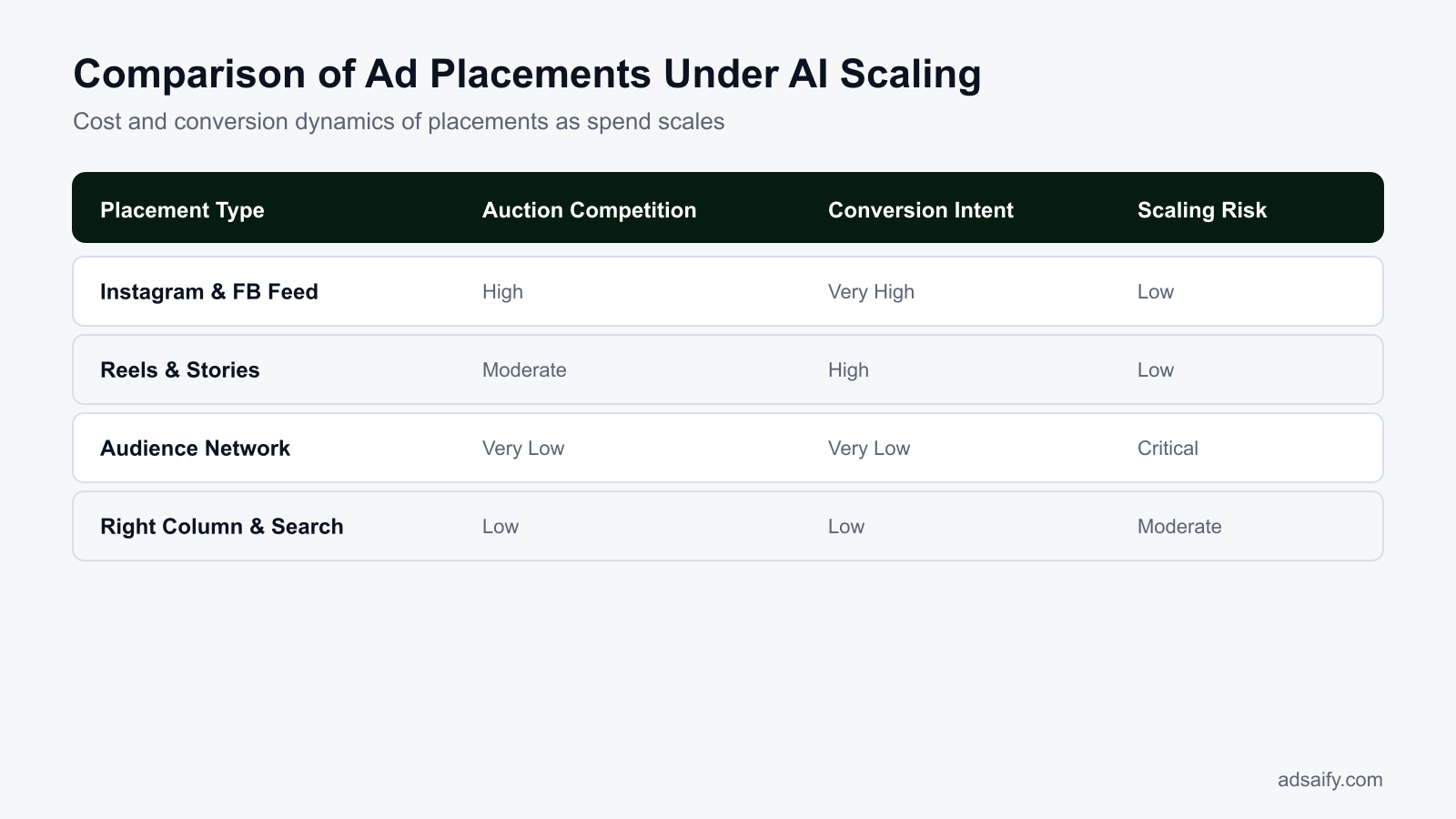
Comparing Placement Dynamics Across Meta Inventory
Understanding how inventory attributes differ explains why automated systems default to peripheral placements during budget scale:
| Placement Group | Auction Clearing Price (CPM) | Primary User Interaction | Conversion Intent Level | Susceptibility to Placement Creep |
|---|---|---|---|---|
| Instagram & Facebook Feeds | High | Deliberate vertical scrolling and intentional taps | High commercial intent | Low (algorithm flees here when budgets scale aggressively) |
| Instagram & Facebook Reels | Moderate to High | Fast vertical swiping, sound-on immersive viewing | Moderate to High commercial intent | Low to Moderate |
| Audience Network (Rewarded Video) | Extremely Low | Forced viewing in exchange for in-app currency | Near zero commercial intent | Extremely High (algorithm dumps excess budget here) |
| Audience Network (Native & Banner) | Extremely Low | Accidental peripheral thumb clicks in utility apps | Near zero commercial intent | Extremely High (inflates click metrics cheaply) |
| Messenger Inbox & Stories | Low | Interrupted personal messaging navigation | Low commercial intent | Moderate to High |
Accidental clicks in third-party mobile applications exacerbate this misallocation. A user attempting to close an ad inside a casual mobile game often taps the ad unit accidentally. Meta’s algorithm logs this event as a valid Link Click with a rapid CTR. Because machine-learning models optimize towards intermediate signals when final purchase data is delayed, the system misinterprets these accidental clicks as high user engagement and allocates even more budget to that low-value inventory. Advertisers exploring tools like Adsaify to draft and launch campaigns should keep these underlying auction pressures in mind when setting performance rules.
Why does Meta's algorithm allocate budget to inventory that does not produce purchases?
Meta's algorithm allocates budget to non-purchasing inventory because its primary machine-learning directive during high-spend periods is pacing completion at the lowest available auction clearing price. If your attribution window or target event does not receive immediate conversion signals, the automated bidding system treats early surrogate signals—such as rapid, cheap clicks generated by accidental touches in games or external apps—as positive feedback, routing capital into low-value impressions to fulfill daily spend mandates.
How Much Does Unchecked Placement Creep Cost Your E-Commerce Store?
Unchecked placement creep costs an e-commerce store significant wasted advertising capital, collapses blended return on ad spend, and corrupts core algorithmic feedback loops. When automated delivery systems allocate capital toward low-intent placements, ad spend burns rapidly without yielding direct purchases, depressing net store profitability while degrading analytical clarity across paid acquisition channels.
Direct Margin Erosion and Server Overhead
In an active scaling phase, automated delivery systems often divert between 30 percent and 50 percent of total ad spend toward secondary inventory such as Audience Network rewarded video or mobile banner slots. For example, in an account spending 5,000 USD per day, 1,500 to 2,500 USD daily can shift into placements that deliver thousands of accidental clicks but zero direct sales. ROAS (return on ad spend) is the revenue earned for every currency unit spent on advertising; this metric collapses rapidly when non-converting placements consume ad budgets. Furthermore, high volumes of accidental clicks create heavy server traffic loads. Unintended mobile taps cause near-instantaneous page exits, forcing e-commerce hosting infrastructures to process resource-heavy page requests that slow site speeds for legitimate purchasing customers.
Algorithmic Machine Learning Pollution
Placement creep pollutes data collection across the Meta Pixel, which is the snippet of tracking code deployed on an e-commerce website to log visitor actions and conversion events. When thousands of low-intent users arrive from mobile gaming banners or third-party apps, the Meta Pixel records incoming traffic with high bounce rates and near-zero checkout intent. The machine learning delivery engine interprets these rapid visits as successful traffic events, subsequently optimizing future delivery toward similar low-intent profiles. E-commerce brands using automation platforms like Adsaify configure custom performance rules to pause declining ad variations before poor conversion delivery distorts account-level optimization data.
E-Commerce Placement Risk Audit Checklist
- Calculate total spend allocated to non-core placements over the preceding 30 days.
- Compare placement-level conversion rates against core Facebook and Instagram feeds.
- Identify bounce rates exceeding 85 percent inside store web analytics per placement.
- Evaluate server response times during high-volume ad delivery spikes.
- Audit retargeting custom audiences for inflated visitor sizes with low purchasing velocity.
- Determine the net profit margin deficit caused by zero-conversion placement spend.
Does low-quality placement traffic permanently degrade my Meta Pixel audience targeting?
Low-quality placement traffic does not permanently ruin the Meta Pixel, but it temporarily corrupts optimization windows and Custom Audience datasets. The Meta Pixel prioritizes recent standard events—particularly page views, content views, and add-to-cart triggers—over the preceding 7 to 28 days to build predictive delivery profiles. Once advertisers eliminate non-converting placements and retargeting pools flush out accidental mobile clicks, the Meta delivery algorithm recalibrates its probabilistic modeling back toward genuine purchasing behavior within approximately two conversion cycles.
Which Breakdown Reports Reveal the Root Cause of Placement Creep?
The Delivery by Placement breakdown report inside Meta Ads Manager isolates the exact root cause of placement creep across ad sets. By segmenting reporting rows by placement and platform, advertisers immediately pinpoint where automated algorithms allocate ad budget versus where verified landing page views and conversion purchases actually materialize.
Isolating Discrepancies in Meta Ads Manager
To inspect delivery distribution, open Meta Ads Manager, select the active campaign, and navigate to the Breakdown drop-down menu located at the top right of the reporting table. Select Delivery, then choose Placement. This action breaks down each ad set into individual rows corresponding to Facebook Reels, Instagram Stories, Audience Network, Messenger, and remaining surfaces. Marketers must evaluate CPC (cost per click, the amount billed for each user click) alongside CPA (cost per acquisition, the total ad spend required to secure one purchase). A severe negative correlation often emerges: low-quality placements present an ultra-low CPC alongside an astronomical CPA, consuming significant spend while producing zero sales.
| Placement Name | Observed CPC Trend | Landing Page View Ratio | Observed CPA Trend | Diagnostic Status |
|---|---|---|---|---|
| Instagram Feed | Moderate to High | High (80% to 90%) | Target Baseline | Efficient Delivery |
| Facebook Mobile Feed | Moderate | High (75% to 85%) | Target Baseline | Efficient Delivery |
| Audience Network Rewarded Video | Extremely Low | Low (Under 30%) | Extremely High or Zero Sales | Placement Creep Symptom |
| Messenger Inbox | Low to Moderate | Moderate (40% to 50%) | High Above Baseline | Inefficient Inventory |
| Facebook Right Column | Low | Low (30% to 40%) | High Above Baseline | Inefficient Inventory |
Correlating Meta Data with Third-Party Web Analytics
Meta Ads Manager reporting must be cross-referenced with independent web analytics platforms such as Google Analytics. Marketers append dynamic UTM parameters (Urchin Tracking Module tags added to URLs to track traffic sources) to ad creatives, passing the placement name directly to site analytics. When examining session duration and bounce rates by placement, low-quality inventory reveals average session durations under two seconds. If Meta Ads Manager reports hundreds of Link Clicks from third-party placements but site analytics shows zero corresponding session sessions, accidental clicks or bot triggers are actively wasting media budgets. Marketers review these analytics dashboards before accessing Adsaify to adjust campaign delivery parameters across their active ad sets.
Which exact column ratio inside the breakdown report reveals placement inefficiency?
The ratio between Landing Page Views and Link Clicks, combined with the ratio between Cost Per Link Click and Cost Per Purchase, reveals immediate placement inefficiency. If the Landing Page View to Link Click drop-off exceeds 50 percent, users are bouncing before site assets load, typically from accidental mobile taps. When an ad placement generates a Cost Per Link Click under 0.10 currency units alongside a Cost Per Purchase exceeding five times your target acquisition threshold, that placement is inefficient.
If you would rather not set up each of these steps by hand, try it in Adsaify: your first ad is free, so there is nothing to lose. Create a free account.
What Should You Verify Before Restricting Automated Placements in Meta?
Before restricting automated placements in Meta, an advertiser should verify placement-level conversion data, creative format alignment, campaign learning status, and expected cost-per-mille changes. Prematurely eliminating secondary placements can severely constrict auction liquidity, spike acquisition costs, and reset campaign optimization before an ad set gathers sufficient conversion volume to establish clear statistical significance.
Auditing Attribution Windows, Creative Assets, and Learning Milestones
In Meta Ads Manager, navigate to the Breakdown menu, select "By Placement," and evaluate your metrics across 7-day click and 1-day view attribution windows. Compare the average order value (AOV, the average monetary amount spent by a customer per transaction) and raw purchase volume between core placements like Instagram Feed and peripheral placements like Audience Network. Often, apparent placement creep occurs simply because an ad set lacks tailored assets, forcing Meta to adapt a 1:1 square image into 9:16 Reels inventory with low-converting letterboxing.
Next, confirm whether the campaign has exited the learning phase, which requires roughly 50 conversion events per ad set within a 7-day rolling window. If an ad set is restricted before hitting this milestone, removing placements will shrink target audience availability and disrupt the algorithm's predictive modeling.
Pre-Restriction Placement Audit Checklist
- Extract placement-level purchase reports across both 7-day click and 1-day view attribution windows to identify genuine revenue disparities.
- Calculate placement-specific AOV to ensure lower-cost placements are not quietly driving viable, low-ticket transactions.
- Inspect creative assets to verify that 1:1 square and 9:16 vertical ratios are already assigned to their matching feeds and fullscreen surfaces.
- Confirm that the ad set has generated at least 50 conversion events in the preceding seven days to avoid resetting algorithmic exploration.
- Record baseline CPM (cost per mille, the cost an advertiser pays for one thousand impressions) across all placements to anticipate auction price increases after exclusion.
- Check product catalog feeds for formatting errors that might prevent dynamic ads from rendering cleanly on mobile placements.
Will switching off Advantage+ Placements cause my overall CPMs to instantly surge?
Yes, disabling Advantage+ Placements to focus solely on high-demand inventory like the Instagram Feed will almost immediately increase your overall CPM. Peripheral placements provide cheap impression liquidity that balances out blended campaign delivery costs. When you restrict Meta to premium real estate, you enter a much more competitive bidding pool for finite user attention, which raises impression costs even if post-click conversion rates improve.
How Do You Stop Placement Creep in AI Campaigns Step by Step?
To stop placement creep in AI campaigns, advertisers must switch from fully automatic distribution to calibrated manual placements, eliminate non-converting peripheral inventory, assign dedicated creative ratios to primary feeds and Reels, and enforce automated rules with conservative budget pacing. This structured containment stops Meta's delivery algorithm from allocating conversion budgets into cheap, low-intent remnant impressions.
Step-by-Step Placement Containment Workflow
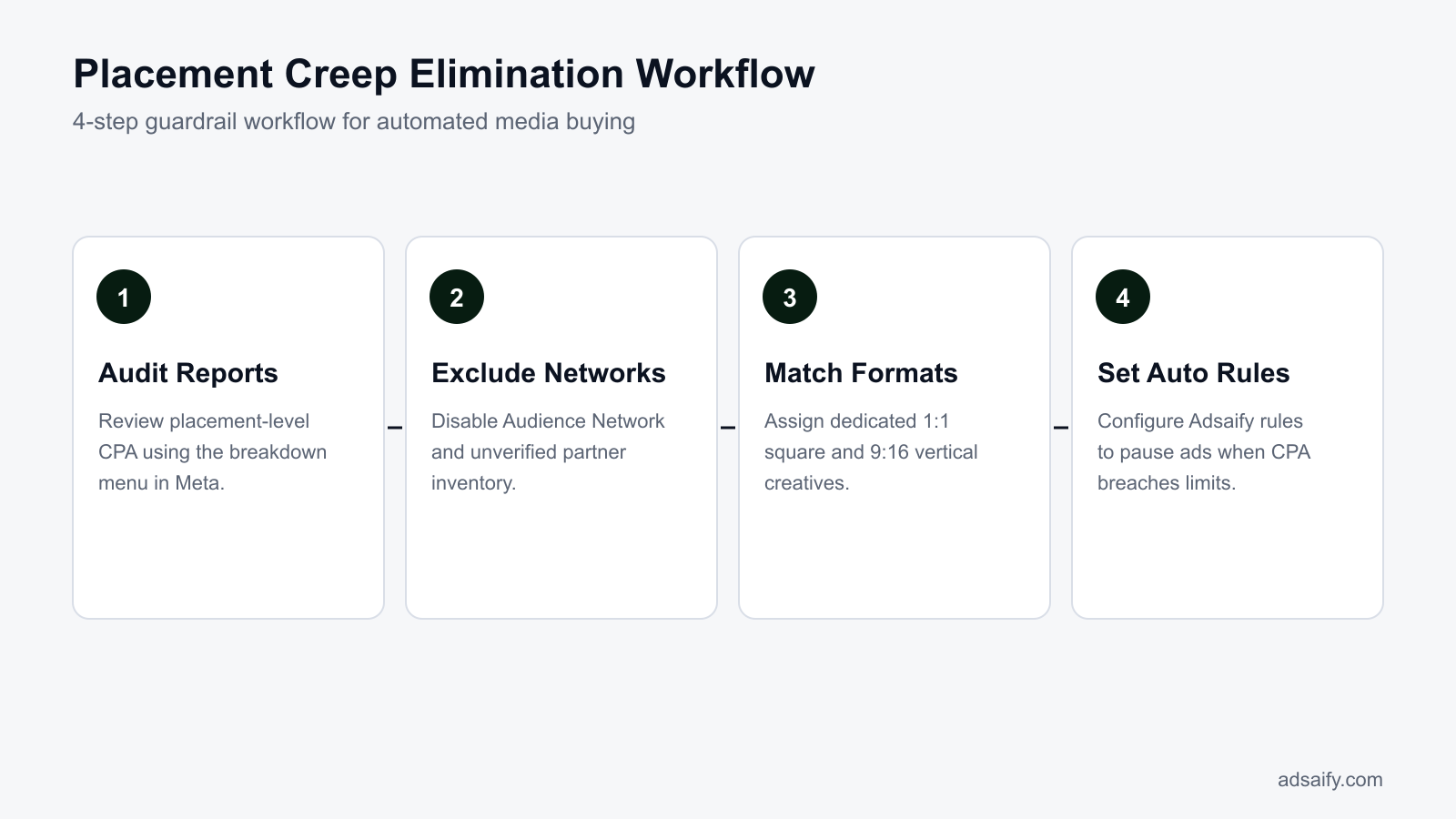
To stop placement creep systematically, apply the following operational sequence inside your ad account and automation software:
- Select manual placements — Open the ad set settings in Meta Ads Manager, select "Manual Placements," and advance to inventory selection.
- Exclude non-performing networks — Deselect Audience Network, Messenger inbox, and desktop right-hand column, keeping delivery focused on high-intent environments.
- Assign tailored creative assets — Upload dedicated 1:1 square media for feeds and 9:16 vertical media for Stories and Reels using the "Asset Customization by Placement" tool.
- Establish automated performance rules — Connect your campaign to Adsaify to set automation rules that continuously monitor cost per acquisition (CPA, the total ad spend divided by total conversions) and automatically pause ad variants that cross acceptable cost thresholds.
- Scale budget conservatively — Increase daily budgets by no more than 20% once every 48 hours to maintain delivery pacing within your narrowed placement inventory.
Enforcing Creative Allocation and Scaling Safeguards
Under the ad set "Placements" section, toggle off "Advantage+ placements" and uncheck Audience Network, Messenger, and unproven search or article placements. Then, proceed to the ad level and use Meta's asset customization feature to guarantee that Instagram Feed, Facebook Feed, Instagram Stories, and Facebook Reels each receive high-resolution creatives built natively for their aspect ratios.
Finally, protect your ad set from algorithmic overspending by implementing automated safeguards. With Adsaify, media buyers can define automated rules that evaluate ad-level performance and pause creative variants that generate high spend without delivering conversions. Pair these rules with gradual budget scaling increments of 15% to 20% every two to three days, which prevents Meta's pacing engine from experiencing volatility and seeking cheap impressions outside your primary targets.
Can I prevent placement creep without completely abandoning Advantage+ delivery?
You can mitigate placement creep within Advantage+ campaigns by deploying strict placement asset customization and category exclusion lists at the account level. Uploading native 9:16 video formats alongside 1:1 square images ensures that high-intent placements receive visually optimized creative assets. While this approach encourages algorithmic distribution toward premium feeds and Reels, fully stopping budget migration to remnant networks ultimately requires switching your conversion ad sets to manual placement controls.
How Is Placement Creep Fixed in a Real Scaled E-Commerce Campaign?
Fixing placement creep during scaling requires diagnosing low-intent distribution, supplying native aspect ratios, and switching to controlled manual placement delivery. When automated budgets push delivery into low-converting inventory, isolating Meta Feeds and Reels while refreshing 1:1 and 9:16 creative assets immediately redirects ad spend toward qualified buyers with purchasing intent.
Diagnosing Spend Leakage in a Scaling Apparel Store
Consider an example of an online women's apparel store scaling its daily budget from 1,000 TL to 3,000 TL inside Meta Ads Manager. The media buyer observes that while daily spend tripled, daily purchase volume remained completely flat, causing ROAS (return on ad spend, calculated as revenue divided by ad spend) to drop sharply from 3.5 to 1.2. Opening Meta Ads Manager and applying the breakdown filter via Breakdown > By Delivery > Placement exposes the root problem: out of the 3,000 TL daily budget, 1,200 TL shifted into Meta Audience Network rewarded video and third-party mobile banner slots, generating thousands of accidental clicks but zero completed purchases.
Producing Native Creative Assets to Support Controlled Placements
Meta's algorithm often routes budget to Audience Network when an ad set lacks suitable vertical creatives for Reels or high-resolution square assets for Feeds. To resolve this asset deficit, the apparel brand can use Adsaify to analyze its product page URL and automatically generate fresh 1:1 square image creatives for Feeds alongside 9:16 vertical video assets tailored for Instagram Reels and Stories. Providing platform-native formats removes the inventory constraint that initially triggered the delivery algorithm to seek cheap, out-of-app placements.
Restricting Placements and Staging Budget Increases
Once dedicated assets are ready, the buyer edits the scaling ad set to manual placements by navigating to Ad Set > Placements > Manual Placements. The buyer unchecks Audience Network and Messenger completely, keeping spend confined to Facebook Feed, Instagram Feed, Instagram Reels, and Facebook Reels. Because abruptly shifting placements resets ad set delivery learning, the buyer temporarily resets the daily budget back to 1,500 TL to stabilize the learning phase. Once the campaign demonstrates stable purchases at a 3.0 ROAS, the buyer raises the budget by 15% to 20% every few days, verifying via delivery breakdowns that every additional lira remains inside core Feeds and Reels.
How many days should I wait between each incremental budget increase?
You should wait two to three full days between each incremental budget increase of 15% to 20%. This window provides the Meta auction algorithm adequate time to stabilize bidding within the chosen manual placements without re-entering the learning phase or experiencing erratic cost per acquisition swings. If your store has a longer attribution lag where shoppers take several days to purchase after clicking an ad, extend this observation window to four or five days before applying the next budget increase.
How Do You Measure If the Placement Creep Fix Actually Worked?
You measure if the placement creep fix worked by monitoring click connection quality, placement distribution percentages, blended acquisition costs, and on-site session depth. A successful correction demonstrates an immediate rebound in the ratio of landing page views to link clicks, stable spend allocation on premium placements, and a marked reduction in unengaged web traffic.
Validating Click Quality and Spend Consolidation
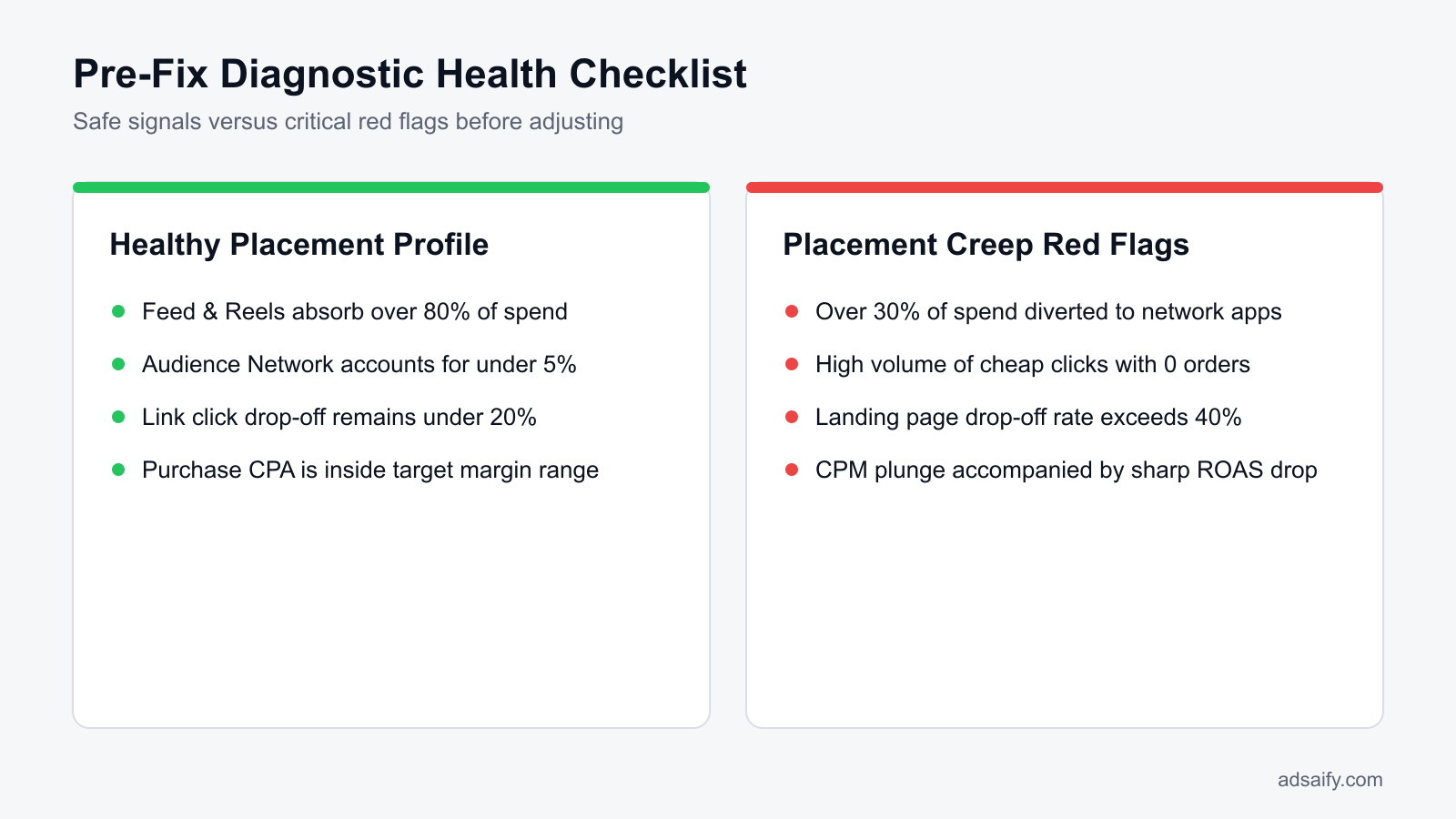
The primary diagnostic metric inside Meta Ads Manager is the landing page view rate, which represents landing page views divided by outbound link clicks. In campaigns compromised by placement creep, this rate frequently plunges below 50% due to accidental taps in third-party mobile apps. Once placements are restricted to Feeds and Reels, the landing page view rate should recover to a healthy benchmark of 75% or higher. Concurrently, checking the placement breakdown must confirm that at least 85% of scaled daily spend consolidates squarely within Facebook and Instagram Feeds and Reels, rather than leaking into peripheral utility placements.
Tracking Acquisition Costs and On-Site Engagement Metrics
Direct advertising results must align with downstream web analytics. As spend returns to high-intent surfaces, cost per acquisition (CPA, the total ad spend required to generate a single conversion) decreases back toward target store thresholds. In Google Analytics or your preferred tracking tool, Meta campaign traffic should exhibit lower bounce rates, increased average session durations, and higher pages per session. Media buyers scaling campaigns through Adsaify can establish automated rules to pause any ad if CPA exceeds acceptable targets, preventing new budget creep cycles from going unnoticed.
| Performance Metric | Placement Creep Symptom | Healthy Corrected Value | Primary Meta Ads Menu Location |
|---|---|---|---|
| Landing Page View Rate | Below 50% of link clicks | 75% to 85% or higher | Columns > Customize Columns |
| Core Inventory Spend Share | Under 60% in Feeds/Reels | At least 85% in Feeds/Reels | Breakdown > By Delivery > Placement |
| Cost Per Acquisition (CPA) | 2x to 3x target threshold | At or below target store CPA | Columns > Performance |
| Audience Network Allocation | Exceeds 25% of daily budget | 0% (excluded via settings) | Ad Set > Placements |
What threshold of landing page view rate indicates an active placement leak?
A landing page view rate below 65% of total outbound link clicks indicates an active placement leak. When fewer than 65 out of every 100 users who click your ad wait for your landing page to load, Meta is almost certainly routing ad impressions to low-quality placements like Audience Network or interstitial game banners where users tap unintentionally and bounce before the browser renders your website.
Want to see this in your own account? Enter your website address and Adsaify drafts the campaign for you. The first ad is free. Try it now or log in.
What Weekly Routine Prevents Placement Creep from Returning During Scale?
A structured weekly review routine prevents placement creep by catching unwanted budget shifts before low-intent networks consume advertising spend. Performance marketers systematically inspect breakdown reports, track drop-off rate anomalies, confirm automated safeguarding rules, and assess blended revenue margins. This disciplined operational cadence maintains target return on ad spend without destabilizing campaign delivery algorithms.
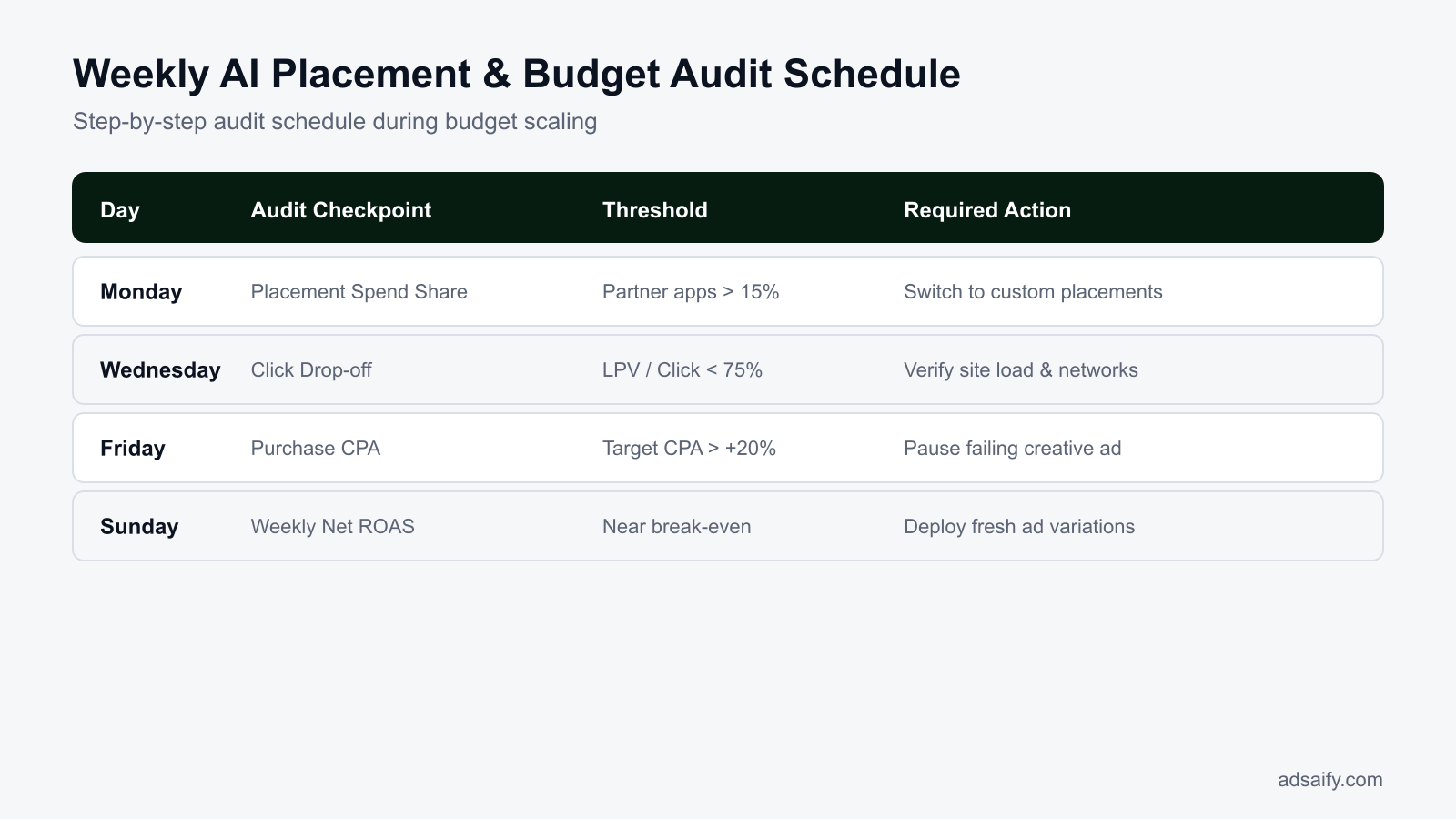
Placement creep describes the process where Meta's delivery algorithm diverts ad set budget toward cheaper, lower-converting placements such as Audience Network. To protect profitability while scaling budgets, media buyers should follow an organized maintenance schedule across Meta Ads Manager and connected automation tools:
- Weekly on Monday: Audit placement breakdown reports from the preceding seven days in Meta Ads Manager to verify that core placements like Facebook Feed and Instagram Feed received at least seventy percent of total budget allocation.
- Weekly on Wednesday: Compare outbound clicks to landing page views to detect sudden spikes in bounce rates, which flag traffic degradation from casual gaming or non-social app placements.
- Weekly on Friday: Access the Adsaify dashboard to review automation rule logs, verifying that automated conditions paused poor-performing creative variants before budget shifted to remnant placements.
- Weekly on Friday: Queue fresh creative assets within campaign drafts so that refreshed visual iterations are available when active variants experience auction fatigue.
- Weekly on Sunday: Calculate your blended MER (marketing efficiency ratio is total gross sales divided by total ad spend) across your e-commerce storefront to verify net profitability retention against total media expenditure.
- Monthly on the first: Perform a comprehensive cost-per-acquisition analysis by placement group to determine whether specific non-feed placements now justify manual exclusions or dedicated asset customizations.
Does performing these audits daily disrupt Meta's machine learning stability?
Performing read-only audits daily does not disrupt Meta's machine learning stability because checking metrics does not edit ad set configurations. Reviewing placement distributions, click quality, and conversion velocity involves observing data inside Ads Manager without modifying budgets or targeting. Machine learning resets occur only when advertisers publish significant edits, such as altering manual placement selections, updating bidding strategies, or adjusting budgets by more than twenty percent within a single day.
Which Common Mistakes Occur When Trying to Control Automated Placements?
Controlling automated placements often backfires when media buyers over-restrict targeting inventory, starve delivery algorithms, or introduce operational turbulence into live campaigns. Common errors include isolating single placements, misconfiguring vertical aspect ratios, resetting learning phases prematurely, and disabling lucrative delivery channels. Avoiding these mistakes preserves machine learning efficiency while shielding budgets from low-quality impressions.
Restricting Delivery to a Single Placement
Limiting an ad set exclusively to Facebook Feed restricts delivery liquidity, forcing the auction algorithm into intense bidding competition. This error inflates CPM (cost per mille is the cost per one thousand ad impressions) and drives up conversion costs. The remedy is grouping high-intent feeds and vertical video channels together rather than isolating a single screen.
Accidentally Excluding Instagram Reels and Stories
Marketers attempting to avoid remnant banners often disable vertical placements, inadvertently cutting off mobile video inventory. Instagram Reels and Stories generate high conversion intent for visual products. Media buyers must explicitly retain these full-screen placements while toggling off unwanted third-party app networks in manual controls.
Failing to Tailor Creative Aspect Ratios for Approved Placements
Publishing a square 1:1 asset across all placements causes awkward letterboxing on 9:16 vertical displays like Reels. Low visual quality decreases CTR (click-through rate is the percentage of impressions that result in a click), prompting algorithms to push spend toward cheaper native placements. Marketers should upload dedicated vertical creative files for 9:16 environments.
Editing Placement Controls Too Frequently
Changing placement toggles whenever daily fluctuations occur keeps ad sets trapped in the learning phase. Continuous resets prevent bidding models from stabilizing. Advertisers must let placement adjustments accumulate at least fifty conversion events over seven days before making subsequent structural changes.
Blaming Placements for Unappealing Creative Hooks
When creative messaging fails to capture audience attention within the first three seconds, delivery systems route impressions to cheaper placements to satisfy budget delivery goals. Restricting placements without fixing weak creative assets merely increases costs. E-commerce brands can use Adsaify to generate fresh creative variations that sustain engagement on primary feeds.
Imposing Uniform Manual Placements Across All Account Funnels
Applying the exact same manual placement exclusions to broad prospecting and warm retargeting damages performance. Warm website custom audiences convert effectively on non-feed surfaces that fail during cold prospecting. Media buyers should maintain tighter placement boundaries on cold discovery campaigns while allowing broader placement access on retargeting sets.
Is it wise to isolate only Instagram Feed and completely turn off Facebook placements?
Isolating Instagram Feed while completely disabling Facebook placements is rarely optimal because it drastically reduces auction volume and spikes your cost per thousand impressions. Although Instagram Feed exhibits strong engagement, Facebook Feed and Video Feeds capture valuable purchasing demographics. Excluding Facebook entirely limits Meta's delivery system from capturing cost-effective conversions across multi-device user journeys, which ultimately diminishes overall campaign scale and return on ad spend.
When Does Restricting Placements Fail and What Are Its Technical Limits?
Restricting placements fails when foundational marketing variables like uncompetitive pricing, weak offers, or unengaging ad creative suppress conversion rates regardless of ad distribution. Technically, placement restrictions fail when narrow audience-placement combinations exhaust auction liquidity, driving up CPMs, or when tracking breakdowns and slow landing pages invalidate traffic delivery across all selected placements.
Why Creative Quality and Offers Overrule Placement Controls
Restricting ad inventory to high-intent surfaces like Instagram Feed or Facebook Feed cannot rescue an uncompelling value proposition. If an ad creative fails to capture attention within the first two seconds, or if product pricing is misaligned with market expectations, narrowing placements only serves to deliver unprofitable clicks at a significantly higher cost per impression. In Meta Ads Manager, creative fatigue and audience mismatch manifest as declining click-through rates and rising acquisition costs even within pristine feeds.
How Liquidity Loss Spikes Auction Costs in Constrained Ad Sets
Auction liquidity is the algorithmic freedom Meta uses to find the cheapest conversion opportunities across diverse placements, formats, and time windows. When an advertiser isolates a single placement—such as Facebook Reels—on a constrained daily budget of 500 TL, Meta is forced into a hyper-competitive micro-auction. Because the algorithm cannot balance bids across cheaper auxiliary inventory, CPM (cost per mille, the price per one thousand impressions) can surge, negating any conversion rate advantages gained from the premium placement.
The Technical Bottleneck of Mobile Page Speeds
Placement optimization becomes entirely ineffective when mobile destination URLs suffer from sluggish load speeds. Even when impressions are strictly confined to premium feeds, a mobile page that takes longer than three seconds to load causes high bounce rates before the Meta Pixel can execute. Advertisers utilizing third-party tools like Adsaify to publish and manage campaigns must ensure destination infrastructure is optimized, as no placement restriction or automated rule can recover traffic lost to landing page drop-off.
- Audit mobile page load times on standard cellular connections before modifying placement settings.
- Benchmark creative click-through rates against account averages to isolate design flaws from placement issues.
- Evaluate product pricing and promotional offers against direct competitors in your niche.
- Maintain ad set budgets at levels sufficient to generate at least fifty conversion events per week.
- Review mobile checkout flows to confirm payment gateways function seamlessly across all mobile browsers.
- Compare click-to-landing-page view ratios to spot immediate asset delivery failures.
Can you manually restrict placements inside Meta Advantage+ Shopping Campaigns?
Meta Advantage+ Shopping Campaigns do not allow advertisers to select or deselect specific ad placements manually at the ad set level. Meta designs Advantage+ Shopping Campaigns to operate on full algorithmic automation, distributing impressions across Facebook, Instagram, Messenger, and Audience Network based on real-time machine learning predictions. Advertisers wishing to exclude low-intent placements like Audience Network completely must run standard manual sales campaigns rather than Advantage+ Shopping Campaigns, trading native automation for granular inventory placement control.
Which Core Terms Define AI Ad Scaling and Placement Optimization?
The core terms defining AI ad scaling and placement optimization describe how automated auctions price impressions, allocate budgets across network channels, and measure visitor quality. Understanding these metrics and algorithmic systems allows media buyers to distinguish between artificial traffic inflation caused by low-intent network distribution and genuine, profitable e-commerce customer acquisition.
- Placement Creep: The automatic shift of scaled advertising spend into cheap, low-intent ad inventory by delivery algorithms seeking the lowest nominal cost per action.
- Audience Network: Meta's external network displaying ads across third-party mobile applications and external partner websites outside Facebook and Instagram.
- Click Drop-off: The percentage of ad clickers who abandon the session before the landing page successfully loads and fires a tracking pixel event.
- Budget Pacing: The algorithmic auction throttle ensuring an ad set spends its allocated daily or lifetime budget evenly across a twenty-four-hour cycle.
- CPA (Cost per Acquisition): The average advertising spend required to generate a single completed e-commerce purchase or designated conversion event.
- CPM (Cost per Mille): The price an advertiser pays for every one thousand impressions served within Meta's ad auction.
- ROAS (Return on Ad Spend): The metric calculated by dividing total gross revenue generated from advertising by the total advertising expenditure.
- Advantage+ Placements: Meta's default automated delivery setting that distributes budget across all available Facebook, Instagram, Messenger, and Audience Network surfaces.
- Auction Liquidity: The operational flexibility an algorithm retains to seek conversion opportunities across diverse audiences, placements, and time intervals.
- Landing Page View: A metric recorded when a user clicks an ad and the destination URL loads sufficiently to trigger the Meta Pixel.
- Breakdown Reporting: An analytical view inside Meta Ads Manager that segments performance data by delivery criteria, including placement, platform, age, and country.
Which of these terms is the most critical leading metric for e-commerce profitability?
Click drop-off is the most critical leading metric for e-commerce profitability when diagnosing automated placement health. While cost per acquisition and return on ad spend record historical purchase performance, click drop-off immediately signals whether ad spend is being diverted into accidental, bot, or low-intent placements before substantial budget is lost. A sharp increase in click drop-off indicates traffic is failing to load or convert, providing an immediate warning to adjust delivery settings.
How to Secure High-Converting Placements While Scaling Ad Spend with AI
To stop placement creep in Meta AI campaigns, audit delivery breakdowns weekly by placement to identify hollow traffic. Exclude volatile inventory such as Audience Network and low-converting in-stream placements early if they consume spend without producing sales. Constrain broad delivery with asset customization for core placements like Feeds and Reels, and implement automated rules to pause ad sets that breach your target acquisition cost.
Open Meta Ads Manager today, navigate to your active campaigns, and select the Breakdown menu by Placement. Calculate the actual return on ad spend across Audience Network and third-party apps versus Feeds. If secondary placements consume more than fifteen percent of spend without generating completed purchases, switch your ad sets from Advantage+ placements to manual placements or enforce budget protection rules.
Want to see this in your own account? Enter your website address and Adsaify drafts the campaign for you. The first ad is free. Try it now or log in.
Frequently Asked Questions (FAQ)
1. Does disabling placements in Meta Advantage+ hurt algorithm performance?
Disabling low-performing placements does not inherently harm Meta algorithm performance if high-intent surfaces like Feeds and Reels receive sufficient liquidity. While Meta recommends broad Advantage+ placements to maximize reach, unchecking non-converting inventory such as Audience Network concentrates spend on placements with verified purchase intent. This prevents budget dilution and stabilizes cost per acquisition for e-commerce accounts.
2. Is it mandatory to keep all placements enabled when using an AI ad manager?
No, keeping all placements enabled is not mandatory when using an AI ad manager. Quality AI management systems allow advertisers to apply manual placement boundaries alongside automated campaign structures. Restricting delivery to core Meta surfaces ensures the AI optimizes bidding, targeting, and creative delivery exclusively across environments where consumers are genuinely inclined to browse and complete purchases.
3. Why are Audience Network clicks so cheap yet bring zero sales?
Audience Network delivers low cost-per-click metrics because it serves impressions across third-party mobile apps and games. In these environments, clicks frequently stem from accidental taps, bot activity, or users seeking in-game rewards rather than authentic commercial interest. Because click volume does not reflect consumer intent, high traffic counts rarely convert into completed checkout events.
4. Does preventing placement creep cause campaign underspending?
Preventing placement creep can occasionally reduce delivery if audience targeting is excessively narrow or if bidding is constrained. However, with broad targeting on Feeds, Stories, and Reels, sufficient inventory exists to spend budgets completely. If underspending occurs after restricting placements, increasing the target audience size or slightly raising the bid ceiling resolves delivery issues without wasting spend on cheap inventory.
5. Does creating separate ad sets for Reels and Stories reset AI learning?
Yes, creating separate ad sets creates distinct learning phases for each ad set in Meta Ads Manager. The Meta algorithm must gather fifty conversion events per ad set within seven days to exit the learning phase. Splitting placements fragments budget and conversion data, which can prolong optimization unless your store possesses enough conversion volume to sustain both ad sets simultaneously.
6. How do placement controls and budget protection rules work when launching ads with Adsaify?
Adsaify drafts campaign audiences, ad copy, and suggested budgets directly from your website address. Once Adsaify publishes campaigns to your Meta ad account, you can apply automation rules that monitor performance. These rules automatically pause ads or campaigns exceeding defined cost thresholds, preventing placement creep from siphoning budget into ineffective placements while allowing the algorithm to optimize delivery safely.
7. Is placement creep a real risk for low-budget e-commerce stores?
Yes, placement creep poses a significant risk for low-budget stores because every dollar matters. When daily budgets are small, Meta machine learning seeks the cheapest impressions to fulfill spend quotas. Consequently, automated placements can direct a disproportionate share of limited capital into low-value external apps, burning through test budgets before high-intent feed placements receive enough data to convert.
8. How does immature Meta Pixel data trigger AI placement creep in new stores?
A newly installed Meta Pixel lacks historical purchase records to guide algorithmic targeting. Seeking immediate conversion signals, the bidding system may interpret cheap link clicks or landing page views from secondary placements as success. This positive feedback loop causes the algorithm to allocate more spend to low-tier inventory, mistaking high traffic volume for genuine progress toward purchase conversions.
How can you try this with Adsaify?
The quickest way to apply the steps in this article to your own account is to try them. Adsaify analyses your business from your website address, drafts the campaign with an audience, ad copy, creative and a budget suggestion, and publishes it to your own Meta ad account once you approve.
- Your first ad is free: there is nothing to lose by trying.
- Your own ad account: the campaign runs in your Meta account and you stay in control.
- Images and video: generate ad creatives with AI or promote an existing Instagram post.
Create a free account and try your first ad · Already have an account? Log in.